Controleprogramma Hyperflex Health en Pre-upgrade uitvoeren
Inhoud
Inleiding
In dit document wordt beschreven hoe u het gereedschap Hypercheck-status en Pre-upgrade uitvoert.
Voorwaarden
Vereisten
Cisco raadt u aan om kennis te hebben van dit onderwerp:
- Hyperflex
Gebruikte componenten
De informatie in dit document is gebaseerd op de tool Hypercheck Health en Pre-upgrade.
De informatie in dit document is gebaseerd op de apparaten in een specifieke laboratoriumomgeving. Alle apparaten die in dit document worden beschreven, hadden een opgeschoonde (standaard)configuratie. Als uw netwerk live is, moet u zorgen dat u de potentiële impact van elke opdracht begrijpt.
Achtergrondinformatie
Deze tool is een hulpprogramma dat proactieve zelfcontroles uitvoert op Hyperflex-systemen om hun stabiliteit en veerkracht te garanderen. Het helpt bij het automatiseren van een lijst met gezondheids- en pre-upgradecontroles op de Hyperflex-systemen om tijd te besparen tijdens de upgrade- en onderhoudsbewerkingen van Hyperflex.

Opmerking: Download altijd de nieuwste versie van de tool voor gebruik. Omdat het gereedschap vaak wordt verbeterd, kan het gebruik van een eerdere versie ertoe leiden dat belangrijke controles ontbreken.
Ondersteunde HX-systemen
- Hyperflex-versies - 1.8, 2.0, 2.1, 2.5, 2.6, 3.0, 3.5, 4.0, 4.5, 5.0, 5.5
- Standaardcluster van Hyperflex
- Hyperflex uitgerekt cluster
- Hyperflex Edge-cluster (2 nodes, 3 nodes en 4 nodes)
- Alleen ondersteund op Hyperflex-cluster op VMWare ESXi
Opmerking: voor informatie over het uitvoeren van Hypercheck op het Hyperflex HyperV-cluster raadpleegt u Hypercheck: Hyperflex Health & Pre-Upgrade Check Tool - HyperV.
Wanneer te gebruiken
De effectieve tijden voor het gebruik van de controletool Hyperflex Health en Pre-upgrade zijn:
- Voordat u upgrades van Hyperflex uitvoert
- Hyperflex-statuscontrole voor en na onderhoudsvensters
- Om defecte schijven/schijven te identificeren
- Werken met Cisco TAC
- Op elk gewenst moment proactieve gezondheidscontrole
Hoe te gebruiken
HX versie 4.5 en hoger
Stap 1. Start een SSH-verbinding met de Storage Controller VM (SCVM) met behulp van de Cluster Management IP (CMIP), uw HX-IP-verbinding.
Stap 2. Voer de opdracht hypercheck uit.
admin:~$ hypercheck
Stap 3. Voer het SCVM-beheerderswachtwoord in wanneer daarom wordt gevraagd en voer het hoofdwachtwoord in van de ESXi.
admin:~$ hypercheck

                  HX Health Check 4.5.0

Please enter below info of HX-Cluster:
Enter the HX-Cluster Root Password:
Enter the HX-Cluster Admin Password:
Enter the ESX Root Password:
HX versie 4.0 en eerder
Stap 1. DownloadHyperflex-Hypercheck.zipvan het Cisco Github DevNet-account. Ontvang de meest recente kopie met de nieuwste verbeteringen en updates.
Opmerking: alleen geregistreerde Cisco-gebruikers hebben toegang tot interne Cisco-tools, -bestanden en -informatie.
Opmerking: Gebruik alleen het script dat is gedownload van het Cisco GitHub devnet-account.
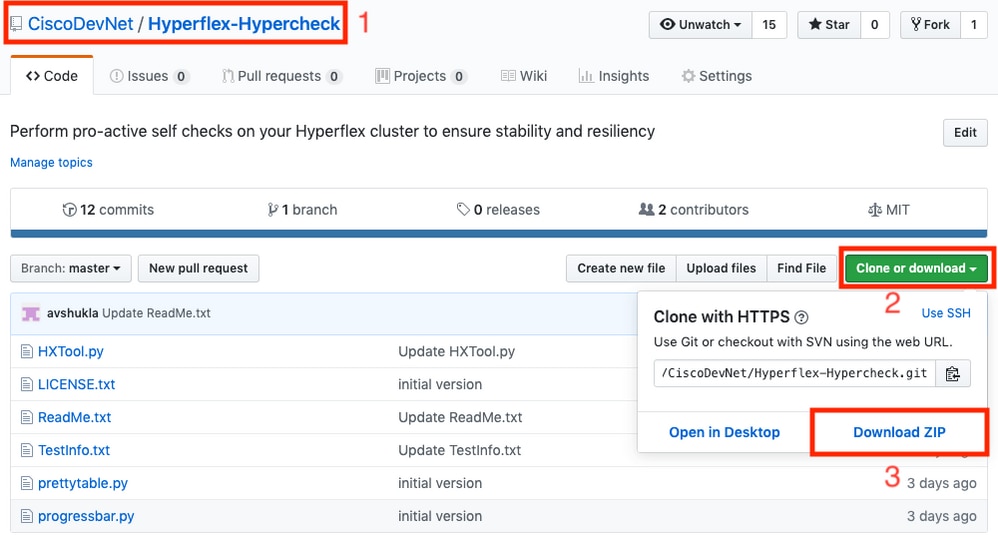
Stap 2. Upload het naar de SCVM met de CMIP.
Gebruik uw voorkeursmethode -scp/sftp/ftp/tftp- om deHyperflex-Hypercheck.zipnaar de/tmp-directory te kopiëren.
Voor MAC:
Voer SCP uit vanuit CLI (bevestig dat deHyperflex-Hypercheck.zipzich in dezelfde map bevindt van waaruit u SCP uitvoert).
# scp Hyperflex-Hypercheck.zip root@
Gebruik deze optie om het IP-adres voor clusterbeheer in uw HX-omgeving te identificeren - Hyperflex-afspeelmap.

Voor Windows:
U kuntWINSCPgebruiken om de bestanden over te dragen zoals hier wordt getoond:
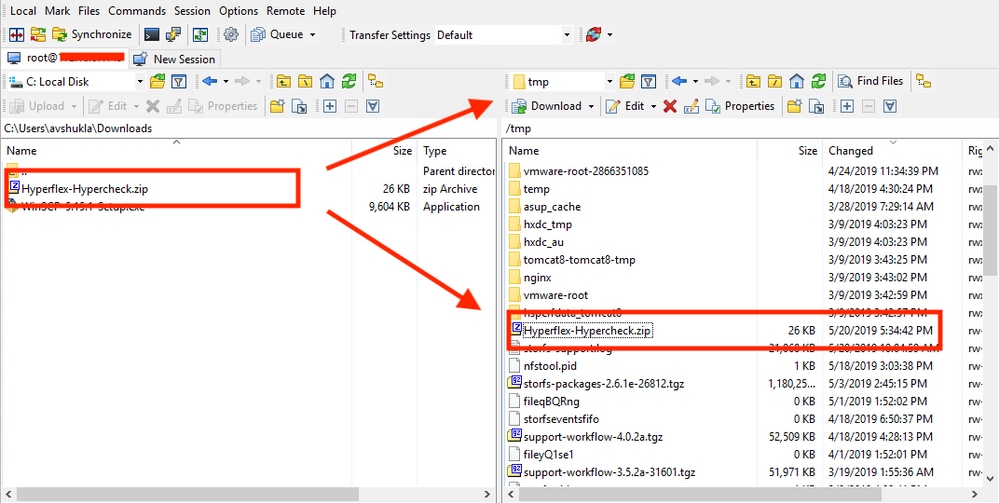
Stap 3. Pak de inhoud van deHyperflex-Hypercheck.zip.
Typcd /tmpom naar de/tmpdirectory te veranderen.
root@SpringpathController7PVQWP6WV1:~# cd /tmp/
Typ unzip Hyperflex-Hypercheck.zip om de bestanden te extraheren.
root@SpringpathController7PVQWP6WV1:/tmp# unzip Hyperflex-Hypercheck.zip
Archive:  Hyperflex-Hypercheck.zip
b61c59f7962b72902692ce70548ba3d760efdf06
   creating: Hyperflex-Hypercheck/
  inflating: Hyperflex-Hypercheck/HXTool.py
  inflating: Hyperflex-Hypercheck/LICENSE.txt
  inflating: Hyperflex-Hypercheck/ReadMe.txt
  inflating: Hyperflex-Hypercheck/TestInfo.txt
  inflating: Hyperflex-Hypercheck/prettytable.py
  inflating: Hyperflex-Hypercheck/progressbar.py
root@SpringpathController7PVQWP6WV1:/tmp#
Stap 4. Voer het HXTool Python-script uit.
Typ cd Hyperflex-Hypercheck om naar deHyperflex-Hypercheckte navigeren.
root@SpringpathControllerABCDE01234:/tmp# cd Hyperflex-Hypercheck
Typ python HXTool.pyom het script uit te voeren.
root@SpringpathControllerABCDE01234:/tmp/Hyperflex-Hypercheck# python HXTool.py
Stap 5. Voer het SCVM-hoofdwachtwoord in wanneer daarom wordt gevraagd.
Enter this information of HX-Cluster:
Enter the HX-Cluster Root Password:
Enter the ESX Root Password:
Opmerking: om de scriptuitvoering te stoppen, gebruikt u de toets (CTRL+Z) en stopt deze onmiddellijk.
Stap 6. Het gereedschap Hyperflex-Hypercheck start de controles. Het duurt ongeveer 3-10 minuten voordat de uitvoering is voltooid, afhankelijk van het aantal geconvergeerde knooppunten in het cluster.
Stap 7. Maak een overzicht van de scriptuitgangen. U kunt het ontvangen zoals getoond:
Het Hypercheck Report tar bestand wordt opgeslagen onder/var/log/springpathen/tmp/Hyperflex-Hypercheck. Je kunt de teerbundel dus downloaden van onder/var/log/springpathof/tmp/Hyperflex-Hypercheck. Als alternatief kunt u gewoon genereren en uploaden van een winkel-support bundel die ook de hypercheck rapport tar bevat.
Rapportteer-bestand voorbeeld -HX_Report_2020_08_30_10_43_50.tarwordt gekopieerd naar pad:/var/log/springpath.
Typls -l | grep HX_Reportom de bestanden te bekijken die zijn gemaakt met het gereedschap Hyperflex-Hypercheck.
Under /var/log/springpath,

root@SpringpathControllerABCDE01234:/var/log/springpath# ls -l | grep HX_Report
-rw-r--r-- 1 root root 380K Sep 23 15:41 HX_Report_2020_08_30_10_43_50.tar
root@SpringpathControllerABCDE01234:/var/log/springpath#

Under /tmp/Hyperflex-Hypercheck,

root@SpringpathControllerABCDE01234:/tmp/Hyperflex-Hypercheck# ls
HX_Report_2020_08_30_10_43_50.tar prettytable.py HX_Report_2020_08_30_10_43_50 TestInfo.txt progressbar.py
HXTool.py prettytable.pyc ReadMe.txt progressbar.pyc LICENSE.txt
root@SpringpathControllerABCDE01234:/tmp/Hyperflex-Hypercheck#
Bestanden en logs in de Hypercheck-logbundel:
root@SpringpathControllerABCDE01234:/tmp/Hyperflex-Hypercheck# ls HX_Report_2020_08_30_10_43_50/
HX_Tool_2020-08-30_10-43-50.log
HX_Tool_Main_Report_2020-08-30_10-54-34.txt
HX_Tool_Summary.json
Stap 8. Exporteer deHX_YYYY_MM_DD_HH_MM_SS.taren deel deze met TAC.
Gebruik uw voorkeursmethode om de Hypercheck-logs te exporteren met behulp vanscp/sftp/ftp/tftpvan de SCVM of u kunt eenvoudig de storfs-supportbundel downloaden die de HX_Report tar-bundel bevat.
Uitvoer/uitgevoerde controles begrijpen
Controles uitgevoerd door Hypercheck
Deze controles worden uitgevoerd met het gereedschap Hyperflex-Hypercheck:
Hyperflex Checks: (Below checks are performed on all the storage controller VMs)
    Cluster services check - Verifies the status of storfs, stMgr and stNodeMgr services
    Enospc state check - Checks if the cluster space usage is above the warning threshold or no
    Zookeeper check - Checks whether the Zookeeper is running or no
    Exhibitor check - Verfies the status of the Exhibitor service which manages the ZK
    System Disks Usage - Checks if /sda1, var/stv and /var/zookeeper is less than 80%
    HDD health check - Reports if you have any blacklisted disk in your cluster
    DNS check - Checks whether DNS is configured and reachable
    vCenter reachability check - Checks whether the vCenter is reachable on the required ports
    Timestamp check - Checks if all the controller VMs have the exact same time
    NTP sync check - Checks whether NTP is reachable from the storage controller VMs and synced
    Check package & versions - Checks for packages and versions on Storage Controller VMs
    Check Iptables count - Checks for Iptables count on and ensure it is same on all Storage Controller VMs.
    Extra pnodes check - Looks for any extra/duplicate pnode entries in the cluster
    Out of memory check - Checks through the log files if the cluster had any oom event
    Supported vSphere versions - Shows all the vSphere Versions supported with your current HXDP version
    Permissions for /tmp  - Checks if the /tmp permissions are set correctly
    Check Cluster Policy  - Checks the Configured Cluster Policy
    Check springpath_keystore.jceks file - Check if All the SCVM have same keystore file
    SED Capable  - Checks if the cluster is SED Capable
    SED Enabled - Checks if Encryption is enabled in the Cluster
    USB-0 Check - If Encryption is enabled, Checks that USB0 interface is present on all the SCVMs
    SED 5100/5200 Drive Check - If we have Micron SED 5100 drives and version is below 3.5.2b, we wont be able to replace or add new 5200 drives
    Disk Lock Check - If Encryption is enabled, Checks for any Locked drives
    Network Checks - Checks the connectivity in Storage network
    Check ZK-Cleanup-Script - Checks to identify ZKTxnCleanUp Script
    Replication Checks - If replication is enabled, we check the local and remote network connectivity (HX 4.5 Only)
    Stretched Cluster Checks - Checks the latency between the sites and the witness VM (HX 4.5 Only)

ESXi Checks: (Below checks are performed on each ESXI node)
    HX User Account check - Verifies if the HXUser is created on all the esxi hosts and has admin rights
    vMotion enabled check - Checks if the vMotion network is confirgued
    Check for ESXI Failback timer - Check for ESXi Failback timer on ESXi host
    Check connectivity between vmk1 and eth1 - Checks the connectivity between the Mgmt and Storage network
    No extra controller vm folders check - Checks for duplicate Controller SCVM Folders
    VMware Tools location check  - Checks for Non default VMware Tools location
    vfat Disk Usage check - Checks for vfat Disk Usage
    Check /tmp usage - Checking for /tmp usage
    Compute Node Checks - All the ESXI checks are also performed on Compute nodes (HX 4.5 Only)
Voorbeeld van hypercheck-uitvoer van een cluster met 4 nodes
Enter this information of HX-Cluster: Enter the HX-Cluster Root Password: Enter the ESX Root Password: Cluster Name: HX-10-Stretched Site-100 Site-97 Cluster Type: STRETCH_CLUSTER SSH connection established to HX Node: 192.168.53.135 SSH connection established to HX Node: 192.168.53.136 SSH connection established to HX Node: 192.168.53.137 SSH connection established to HX Node: 192.168.53.138 HX Cluster Nodes: +-------+--------------+--------------------------------+ | Nodes | IP Address | HostName | +-------+--------------+--------------------------------+ | 1 | 10.39.53.134 | SpringpathControllerOHCWUK9X3N | +-------+--------------+--------------------------------+ | 2 | 10.39.53.135 | SpringpathController37MHMEIBCY | +-------+--------------+--------------------------------+ | 3 | 10.39.53.136 | SpringpathControllerDWRWWIBFLF | +-------+--------------+--------------------------------+ | 4 | 10.39.53.137 | SpringpathControllerWB4UNXDKX3 | +-------+--------------+--------------------------------+ SSH connection established to ESX Host: 10.39.53.133 SSH connection established to ESX Host: 10.39.53.130 SSH connection established to ESX Host: 10.39.53.132 SSH connection established to ESX Host: 10.39.53.131 HX Controller: 192.168.53.135 Cluster services check [########################] COMPLETED ZooKeeper & Exhibitor check [########################] COMPLETED HDD health check [########################] COMPLETED Pre-Upgrade Check [########################] COMPLETED Network check [########################] COMPLETED HX Controller: 192.168.53.136 Cluster services check [########################] COMPLETED ZooKeeper & Exhibitor check [########################] COMPLETED HDD health check [########################] COMPLETED Pre-Upgrade Check [########################] COMPLETED Network check [########################] COMPLETED HX Controller: 192.168.53.137 Cluster services check [########################] COMPLETED ZooKeeper & Exhibitor check [########################] COMPLETED HDD health check [########################] COMPLETED Pre-Upgrade Check [########################] COMPLETED Network check [########################] COMPLETED HX Controller: 192.168.53.138 Cluster services check [########################] COMPLETED ZooKeeper & Exhibitor check [########################] COMPLETED HDD health check [########################] COMPLETED Pre-Upgrade Check [########################] COMPLETED Network check [########################] COMPLETED HX Controller: 192.168.53.135 Test Summary: +--------------------------------------+-----------+----------------------------------------------------------------+ | Name | Result | Comments | +--------------------------------------+-----------+----------------------------------------------------------------+ | Cluster services check | PASS | Checks storfs, stMgr, sstNodeMgr service running on each node. | +--------------------------------------+-----------+----------------------------------------------------------------+ | Enospc state check | PASS | Checks if the cluster storage utilization is above threshold. | +--------------------------------------+-----------+----------------------------------------------------------------+ | Zookeeper check | PASS | Checks if Zookeeper service is running. | +--------------------------------------+-----------+----------------------------------------------------------------+ | Exhibitor check | PASS | Checks if Exhibitor in running. | +--------------------------------------+-----------+----------------------------------------------------------------+ | System Disks Usage | PASS | Checks if /sda1, var/stv and /var/zookeeper is less than 80%. | +--------------------------------------+-----------+----------------------------------------------------------------+ | HDD Health check | PASS | Checks if any drive is in blacklisted state. | +--------------------------------------+-----------+----------------------------------------------------------------+ | DNS check | PASS | Checks if configured DNS is reachable. | +--------------------------------------+-----------+----------------------------------------------------------------+ | vCenter reachability check | PASS | Checks if vCenter is network reachable using PING. | +--------------------------------------+-----------+----------------------------------------------------------------+ | Timestamp check | PASS | Checks if the timestamp is same across all Nodes. | +--------------------------------------+-----------+----------------------------------------------------------------+ | NTP sync check | PASS | Checks if the NTP is synced with NTP server. | +--------------------------------------+-----------+----------------------------------------------------------------+ | Check package & versions | PASS | Checks for count and version of HX packages on each node. | +--------------------------------------+-----------+----------------------------------------------------------------+ | Check Iptables count | PASS | Checks if the IP Table count matches on all nodes. | +--------------------------------------+-----------+----------------------------------------------------------------+ | Extra pnodes check | PASS | Checks for any stale Node entry. | +--------------------------------------+-----------+----------------------------------------------------------------+ | Memory usage check | PASS | Checks for available memory more than 2GB. | +--------------------------------------+-----------+----------------------------------------------------------------+ | Incidence of OOM in the log file | PASS | Checks for any previous incidence of Out Of Memory Condition. | +--------------------------------------+-----------+----------------------------------------------------------------+ | Supported vSphere versions | 6.0.0-U3 | Prints the supported ESXi versions. | | | 6.5.0-U1 | | | | 6.5.0-U2 | | | | 6.5.0-U3 | | | | 6.7.0-UGA | | | | 6.7.0-U1 | | | | 6.7.0-U2 | | | | 6.7.0-U3 | | +--------------------------------------+-----------+----------------------------------------------------------------+ | Check permissions for /tmp | PASS | Checks if the /tmp permissions are set correctly. | +--------------------------------------+-----------+----------------------------------------------------------------+ | Check Cluster Policy | Lenient | Checks the Configured Cluster Policy | +--------------------------------------+-----------+----------------------------------------------------------------+ | Check springpath_keystore.jceks file | PASS | All the SCVM have same keystore file. | +--------------------------------------+-----------+----------------------------------------------------------------+ | SED Capable | NO | Checks if the cluster is SED Capable. | +--------------------------------------+-----------+----------------------------------------------------------------+ | Check Witness Reachability | PASS | Checks Witness VM IP address is reachabile. | +--------------------------------------+-----------+----------------------------------------------------------------+
| Check ZK-Cleanup-Script | PASS | Checks to identify ZKTxnCleanUp Script. |
+--------------------------------------+-----------+----------------------------------------------------------------+ HX Controller: 192.168.53.136 Test Summary: +--------------------------------------+-----------+----------------------------------------------------------------+ | Name | Result | Comments | +--------------------------------------+-----------+----------------------------------------------------------------+ | Cluster services check | PASS | Checks storfs, stMgr, sstNodeMgr service running on each node. | +--------------------------------------+-----------+----------------------------------------------------------------+ | Enospc state check | PASS | Checks if the cluster storage utilization is above threshold. | +--------------------------------------+-----------+----------------------------------------------------------------+ | Zookeeper check | PASS | Checks if Zookeeper service is running. | +--------------------------------------+-----------+----------------------------------------------------------------+ | Exhibitor check | PASS | Checks if Exhibitor in running. | +--------------------------------------+-----------+----------------------------------------------------------------+ | System Disks Usage | PASS | Checks if /sda1, var/stv and /var/zookeeper is less than 80%. | +--------------------------------------+-----------+----------------------------------------------------------------+ | HDD Health check | PASS | Checks if any drive is in blacklisted state. | +--------------------------------------+-----------+----------------------------------------------------------------+ | DNS check | PASS | Checks if configured DNS is reachable. | +--------------------------------------+-----------+----------------------------------------------------------------+ | vCenter reachability check | PASS | Checks if vCenter is network reachable using PING. | +--------------------------------------+-----------+----------------------------------------------------------------+ | Timestamp check | PASS | Checks if the timestamp is same across all Nodes. | +--------------------------------------+-----------+----------------------------------------------------------------+ | NTP sync check | PASS | Checks if the NTP is synced with NTP server. | +--------------------------------------+-----------+----------------------------------------------------------------+ | Check package & versions | PASS | Checks for count and version of HX packages on each node. | +--------------------------------------+-----------+----------------------------------------------------------------+ | Check Iptables count | PASS | Checks if the IP Table count matches on all nodes. | +--------------------------------------+-----------+----------------------------------------------------------------+ | Extra pnodes check | PASS | Checks for any stale Node entry. | +--------------------------------------+-----------+----------------------------------------------------------------+ | Memory usage check | PASS | Checks for available memory more than 2GB. | +--------------------------------------+-----------+----------------------------------------------------------------+ | Incidence of OOM in the log file | PASS | Checks for any previous incidence of Out Of Memory Condition. | +--------------------------------------+-----------+----------------------------------------------------------------+ | Supported vSphere versions | 6.0.0-U3 | Prints the supported ESXi versions. | | | 6.5.0-U1 | | | | 6.5.0-U2 | | | | 6.5.0-U3 | | | | 6.7.0-UGA | | | | 6.7.0-U1 | | | | 6.7.0-U2 | | | | 6.7.0-U3 | | +--------------------------------------+-----------+----------------------------------------------------------------+ | Check permissions for /tmp | PASS | Checks if the /tmp permissions are set correctly. | +--------------------------------------+-----------+----------------------------------------------------------------+ | Check Cluster Policy | Lenient | Checks the Configured Cluster Policy | +--------------------------------------+-----------+----------------------------------------------------------------+ | Check springpath_keystore.jceks file | PASS | All the SCVM have same keystore file. | +--------------------------------------+-----------+----------------------------------------------------------------+ | SED Capable | NO | Checks if the cluster is SED Capable. | +--------------------------------------+-----------+----------------------------------------------------------------+ | Check Witness Reachability | PASS | Checks Witness VM IP address is reachabile. | +--------------------------------------+-----------+----------------------------------------------------------------+
| Check ZK-Cleanup-Script | PASS | Checks to identify ZKTxnCleanUp Script. |
+--------------------------------------+-----------+----------------------------------------------------------------+ HX Controller: 192.168.53.137 Test Summary: +--------------------------------------+-----------+----------------------------------------------------------------+ | Name | Result | Comments | +--------------------------------------+-----------+----------------------------------------------------------------+ | Cluster services check | PASS | Checks storfs, stMgr, sstNodeMgr service running on each node. | +--------------------------------------+-----------+----------------------------------------------------------------+ | Enospc state check | PASS | Checks if the cluster storage utilization is above threshold. | +--------------------------------------+-----------+----------------------------------------------------------------+ | Zookeeper check | PASS | Checks if Zookeeper service is running. | +--------------------------------------+-----------+----------------------------------------------------------------+ | Exhibitor check | PASS | Checks if Exhibitor in running. | +--------------------------------------+-----------+----------------------------------------------------------------+ | System Disks Usage | PASS | Checks if /sda1, var/stv and /var/zookeeper is less than 80%. | +--------------------------------------+-----------+----------------------------------------------------------------+ | HDD Health check | PASS | Checks if any drive is in blacklisted state. | +--------------------------------------+-----------+----------------------------------------------------------------+ | DNS check | PASS | Checks if configured DNS is reachable. | +--------------------------------------+-----------+----------------------------------------------------------------+ | vCenter reachability check | PASS | Checks if vCenter is network reachable using PING. | +--------------------------------------+-----------+----------------------------------------------------------------+ | Timestamp check | PASS | Checks if the timestamp is same across all Nodes. | +--------------------------------------+-----------+----------------------------------------------------------------+ | NTP sync check | PASS | Checks if the NTP is synced with NTP server. | +--------------------------------------+-----------+----------------------------------------------------------------+ | Check package & versions | PASS | Checks for count and version of HX packages on each node. | +--------------------------------------+-----------+----------------------------------------------------------------+ | Check Iptables count | PASS | Checks if the IP Table count matches on all nodes. | +--------------------------------------+-----------+----------------------------------------------------------------+ | Extra pnodes check | PASS | Checks for any stale Node entry. | +--------------------------------------+-----------+----------------------------------------------------------------+ | Memory usage check | PASS | Checks for available memory more than 2GB. | +--------------------------------------+-----------+----------------------------------------------------------------+ | Incidence of OOM in the log file | PASS | Checks for any previous incidence of Out Of Memory Condition. | +--------------------------------------+-----------+----------------------------------------------------------------+ | Supported vSphere versions | 6.0.0-U3 | Prints the supported ESXi versions. | | | 6.5.0-U1 | | | | 6.5.0-U2 | | | | 6.5.0-U3 | | | | 6.7.0-UGA | | | | 6.7.0-U1 | | | | 6.7.0-U2 | | | | 6.7.0-U3 | | +--------------------------------------+-----------+----------------------------------------------------------------+ | Check permissions for /tmp | PASS | Checks if the /tmp permissions are set correctly. | +--------------------------------------+-----------+----------------------------------------------------------------+ | Check Cluster Policy | Lenient | Checks the Configured Cluster Policy | +--------------------------------------+-----------+----------------------------------------------------------------+ | Check springpath_keystore.jceks file | PASS | All the SCVM have same keystore file. | +--------------------------------------+-----------+----------------------------------------------------------------+ | SED Capable | NO | Checks if the cluster is SED Capable. | +--------------------------------------+-----------+----------------------------------------------------------------+ | Check Witness Reachability | PASS | Checks Witness VM IP address is reachabile. | +--------------------------------------+-----------+----------------------------------------------------------------+
| Check ZK-Cleanup-Script | PASS | Checks to identify ZKTxnCleanUp Script. |
+--------------------------------------+-----------+----------------------------------------------------------------+ HX Controller: 192.168.53.138 Test Summary: +--------------------------------------+-----------+----------------------------------------------------------------+ | Name | Result | Comments | +--------------------------------------+-----------+----------------------------------------------------------------+ | Cluster services check | PASS | Checks storfs, stMgr, sstNodeMgr service running on each node. | +--------------------------------------+-----------+----------------------------------------------------------------+ | Enospc state check | PASS | Checks if the cluster storage utilization is above threshold. | +--------------------------------------+-----------+----------------------------------------------------------------+ | Zookeeper check | PASS | Checks if Zookeeper service is running. | +--------------------------------------+-----------+----------------------------------------------------------------+ | Exhibitor check | PASS | Checks if Exhibitor in running. | +--------------------------------------+-----------+----------------------------------------------------------------+ | System Disks Usage | PASS | Checks if /sda1, var/stv and /var/zookeeper is less than 80%. | +--------------------------------------+-----------+----------------------------------------------------------------+ | HDD Health check | PASS | Checks if any drive is in blacklisted state. | +--------------------------------------+-----------+----------------------------------------------------------------+ | DNS check | PASS | Checks if configured DNS is reachable. | +--------------------------------------+-----------+----------------------------------------------------------------+ | vCenter reachability check | PASS | Checks if vCenter is network reachable using PING. | +--------------------------------------+-----------+----------------------------------------------------------------+ | Timestamp check | PASS | Checks if the timestamp is same across all Nodes. | +--------------------------------------+-----------+----------------------------------------------------------------+ | NTP sync check | PASS | Checks if the NTP is synced with NTP server. | +--------------------------------------+-----------+----------------------------------------------------------------+ | Check package & versions | PASS | Checks for count and version of HX packages on each node. | +--------------------------------------+-----------+----------------------------------------------------------------+ | Check Iptables count | PASS | Checks if the IP Table count matches on all nodes. | +--------------------------------------+-----------+----------------------------------------------------------------+ | Extra pnodes check | PASS | Checks for any stale Node entry. | +--------------------------------------+-----------+----------------------------------------------------------------+ | Memory usage check | PASS | Checks for available memory more than 2GB. | +--------------------------------------+-----------+----------------------------------------------------------------+ | Incidence of OOM in the log file | PASS | Checks for any previous incidence of Out Of Memory Condition. | +--------------------------------------+-----------+----------------------------------------------------------------+ | Supported vSphere versions | 6.0.0-U3 | Prints the supported ESXi versions. | | | 6.5.0-U1 | | | | 6.5.0-U2 | | | | 6.5.0-U3 | | | | 6.7.0-UGA | | | | 6.7.0-U1 | | | | 6.7.0-U2 | | | | 6.7.0-U3 | | +--------------------------------------+-----------+----------------------------------------------------------------+ | Check permissions for /tmp | PASS | Checks if the /tmp permissions are set correctly. | +--------------------------------------+-----------+----------------------------------------------------------------+ | Check Cluster Policy | Lenient | Checks the Configured Cluster Policy | +--------------------------------------+-----------+----------------------------------------------------------------+ | Check springpath_keystore.jceks file | PASS | All the SCVM have same keystore file. | +--------------------------------------+-----------+----------------------------------------------------------------+ | SED Capable | NO | Checks if the cluster is SED Capable. | +--------------------------------------+-----------+----------------------------------------------------------------+ | Check Witness Reachability | FAIL | Checks Witness VM IP address is reachabile. | +--------------------------------------+-----------+----------------------------------------------------------------+
| Check ZK-Cleanup-Script | PASS | Checks to identify ZKTxnCleanUp Script. |
+--------------------------------------+-----------+----------------------------------------------------------------+ | Check Disk for SMART Failure. | PASS | Checks disks for SMART Failure. |
+--------------------------------------+-----------+----------------------------------------------------------------+ ################################################################################ Network check: ################################################################################ ESX vmk0: 10.39.53.130, 10.39.53.131, 10.39.53.132, 10.39.53.133 ESX vmk1: 192.168.53.130, 192.168.53.131, 192.168.53.132, 192.168.53.133 SCVM eth0: 10.39.53.134, 10.39.53.135, 10.39.53.136, 10.39.53.137 SCVM eth1: 192.168.53.135, 192.168.53.136, 192.168.53.137, 192.168.53.138 ESX Host: 10.39.53.130 +--------------------------------------+--------+-------------------------------------------------+ | Name | Result | Comments | +--------------------------------------+--------+-------------------------------------------------+ | HX User Account check | PASS | Checks if HXUSER is present. | +--------------------------------------+--------+-------------------------------------------------+ | vMotion enabled check | PASS | Checks if vMotion is enabled on the host. | +--------------------------------------+--------+-------------------------------------------------+ | Check for ESXI Failback timer | PASS | Checks for ESXi FAILBACK timer set to 30000ms. | +--------------------------------------+--------+-------------------------------------------------+ | Check vmk1 ping to eth1 | PASS | Checks Network between ESXi vmk1 and SCVM eth1. | +--------------------------------------+--------+-------------------------------------------------+ | No extra controller vm folders check | PASS | Checks for duplicate Controller SCVM Folders. | +--------------------------------------+--------+-------------------------------------------------+ | VMware Tools location check | PASS | Checks for Non default VMware Tools location. | +--------------------------------------+--------+-------------------------------------------------+ | vfat Disk Usage check | PASS | Checks for vfat Disk Usage. | +--------------------------------------+--------+-------------------------------------------------+ | Check /tmp usage | PASS | Checking for /tmp usage. | +--------------------------------------+--------+-------------------------------------------------+ ESX Host: 10.39.53.131 +--------------------------------------+--------+-------------------------------------------------+ | Name | Result | Comments | +--------------------------------------+--------+-------------------------------------------------+ | HX User Account check | PASS | Checks if HXUSER is present. | +--------------------------------------+--------+-------------------------------------------------+ | vMotion enabled check | PASS | Checks if vMotion is enabled on the host. | +--------------------------------------+--------+-------------------------------------------------+ | Check for ESXI Failback timer | PASS | Checks for ESXi FAILBACK timer set to 30000ms. | +--------------------------------------+--------+-------------------------------------------------+ | Check vmk1 ping to eth1 | PASS | Checks Network between ESXi vmk1 and SCVM eth1. | +--------------------------------------+--------+-------------------------------------------------+ | No extra controller vm folders check | PASS | Checks for duplicate Controller SCVM Folders. | +--------------------------------------+--------+-------------------------------------------------+ | VMware Tools location check | PASS | Checks for Non default VMware Tools location. | +--------------------------------------+--------+-------------------------------------------------+ | vfat Disk Usage check | PASS | Checks for vfat Disk Usage. | +--------------------------------------+--------+-------------------------------------------------+ | Check /tmp usage | PASS | Checking for /tmp usage. | +--------------------------------------+--------+-------------------------------------------------+ ESX Host: 10.39.53.132 +--------------------------------------+--------+-------------------------------------------------+ | Name | Result | Comments | +--------------------------------------+--------+-------------------------------------------------+ | HX User Account check | PASS | Checks if HXUSER is present. | +--------------------------------------+--------+-------------------------------------------------+ | vMotion enabled check | PASS | Checks if vMotion is enabled on the host. | +--------------------------------------+--------+-------------------------------------------------+ | Check for ESXI Failback timer | PASS | Checks for ESXi FAILBACK timer set to 30000ms. | +--------------------------------------+--------+-------------------------------------------------+ | Check vmk1 ping to eth1 | PASS | Checks Network between ESXi vmk1 and SCVM eth1. | +--------------------------------------+--------+-------------------------------------------------+ | No extra controller vm folders check | PASS | Checks for duplicate Controller SCVM Folders. | +--------------------------------------+--------+-------------------------------------------------+ | VMware Tools location check | PASS | Checks for Non default VMware Tools location. | +--------------------------------------+--------+-------------------------------------------------+ | vfat Disk Usage check | PASS | Checks for vfat Disk Usage. | +--------------------------------------+--------+-------------------------------------------------+ | Check /tmp usage | PASS | Checking for /tmp usage. | +--------------------------------------+--------+-------------------------------------------------+ Main Report File: HX_Tool_Main_Report_2020-08-26_09-54-59.txt Report tar file: HX_Report_2020_08_26_09_43_18.tar Report file copied to path: /var/log/springpath Release Notes: https://www.cisco.com/c/en/us/support/hyperconverged-systems/hyperflex-hx-data-platform-software/products-release-notes-list.html Upgrade Guides: https://www.cisco.com/c/en/us/support/hyperconverged-systems/hyperflex-hx-data-platform-software/products-installation-guides-list.html Note: 1) If upgrading to HX 4.0(2a), please review the following link and perform workaround – https://tinyurl.com/wc7j5qp 2) Please check the status of Compute nodes manually, script only verifies the config on the converged nodes. 3) Hypercheck doesnot perform FAILOVER TEST, so please ensure that the upstream is configured for network connectivity for JUMBO or NORMAL MTU size as needed.
4) If you have performed any activity on your vcenter(like upgrade, certificate replacement,etc.), it is recommended to reregister your cluster to the vcenter before performing upgrades. Refer to the Hyperflex CLI guide for relevant commands.
Uitvoer van gereedschap analyseren
Volgende stappen
- De tool automatiseert het proces van het uitvoeren van handmatige opdrachten op Hyperflex-systemen.
- Als het gereedschap OK draait en een PASS geeft op alle tests, is het HX-systeem goed voor alle controles die het script heeft uitgevoerd.
- In situaties waarin het hulpprogramma bij sommige controles FAALT of niet succesvol wordt uitgevoerd, kunt u de CLI-opdrachten (die worden vermeld) gebruiken om dezelfde controles op het Hyperflex-systeem uit te voeren als handmatig door het script.
- De tool controleert niet op oude/nieuwe/open/opgeloste waarschuwingen en daarom wordt het ten zeerste aanbevolen om de Hyperflex Release Notes en Upgrade Guides te bekijken voordat u een upgrade- of onderhoudsactiviteit uitvoert.
Opmerking: open geen TAC-geval omdat het script niet is uitgevoerd. Voer de opdrachten handmatig uit, identificeer het probleem en open een SR voor het geïdentificeerde probleem.
CLI-opdrachten
Over Hyperflex SCVM:
SSH to All Hyperflex SCVMs-

# service_status.sh

# sysmtool --ns cluster --cmd enospcinfo

# echo srvr | nc 0 2181

# pidof exhibitor

# stcli disk list --ip <Corresponding ESXi Mgmt IP Address> |grep -B 2 -A 8 blacklisted

# stcli services dns show (and ping the IPs listed)

# ping <vCenter IP Address>

# date ; compare the time on all SCVMs. They should ideally be identical

# stcli services ntp show

# stcli cleaner info

# ntpq -p -4

# dpkg -l | grep -i springpath | grep -v storfs-support*

# sysmtool --ns disk --cmd list | grep -i blacklisted

# iptables -L -n | wc -l

# stcli cluster info

# df -h ; check that /var/stv should be less than 80%

# zgrep -i “out of memory” /var/log/springpath/debug-storfs.*

# ping -I eth0 <eth0> of all SCVMs

# ping -I eth1 <eth1> of all SCVMs

# "ls -ld /tmp" check for 775 and 777

# stcli cluster info | grep -i 'clusterAccessPolicy:' | head -1

# md5sum /etc/springpath/secure/springpath_keystore.jceks

# cat /etc/springpath/sed_capability.conf

# cat /etc/springpath/sed.conf

# cat /var/log/springpath/diskslotmap-v2.txt

# stcli cluster info | grep dataZkIp (ping dataZkIp for latency)
Over ESXi-systemen:
SSH to all ESXi hosts

# esxcli system account list

# esxcli network firewall ruleset list | grep -i vMotion

# esxcli software vib list| egrep -i 'scvm|stHyper|stfs'

# chkconfig --list | grep -E 'ntpd|hostd|vpxa|stHypervisorSvc|scvmclient|hxctlvm'

# esxcfg-vmknic -l ; confirm that vMotion VMK2 is created

# vmkping -I vmk1 <eth1> of all SCVMs

# cd /vmfs/volumes/Springpath-XXXXXXXXXX ; Ensure that it has only one Folder that has the Storage Controller VM

# df -h | grep vfat  ; Ensure dir has free space
Gerelateerde informatie
Revisiegeschiedenis
| Revisie | Publicatiedatum | Opmerkingen |
|---|---|---|
3.0 |
28-Sep-2026
|
Hercertificering - Toegevoegd AI-inhoudslabel en bijgewerkte opmaak. |
2.0 |
02-May-2024
|
hercertificering |
1.0 |
21-May-2019
|
Eerste vrijgave |

 Feedback
Contact Cisco
- Een ondersteuningscase openen

- (Vereist een Cisco-servicecontract)