EX Hardware: ACI Packet Forwarding Deep Dive.

Downloadopties
Inclusief taalgebruik
De documentatie van dit product is waar mogelijk geschreven met inclusief taalgebruik. Inclusief taalgebruik wordt in deze documentatie gedefinieerd als taal die geen discriminatie op basis van leeftijd, handicap, gender, etniciteit, seksuele oriëntatie, sociaaleconomische status of combinaties hiervan weerspiegelt. In deze documentatie kunnen uitzonderingen voorkomen vanwege bewoordingen die in de gebruikersinterfaces van de productsoftware zijn gecodeerd, die op het taalgebruik in de RFP-documentatie zijn gebaseerd of die worden gebruikt in een product van een externe partij waarnaar wordt verwezen. Lees meer over hoe Cisco gebruikmaakt van inclusief taalgebruik.
Over deze vertaling
Cisco heeft dit document vertaald via een combinatie van machine- en menselijke technologie om onze gebruikers wereldwijd ondersteuningscontent te bieden in hun eigen taal. Houd er rekening mee dat zelfs de beste machinevertaling niet net zo nauwkeurig is als die van een professionele vertaler. Cisco Systems, Inc. is niet aansprakelijk voor de nauwkeurigheid van deze vertalingen en raadt aan altijd het oorspronkelijke Engelstalige document (link) te raadplegen.
Inhoud
Inleiding
In dit document worden verschillende doorstuurscenario's beschreven met behulp van de op "EX" gebaseerde ACI-Switches in Application Centric Infrastructure (ACI). Hierin wordt getoond hoe kan worden gecontroleerd of de hardware correct is geprogrammeerd en worden pakketten doorgestuurd naar de juiste bestemmingseindpunten (EP's) in de juiste eindpuntgroepen (EPG's).
Voorwaarden
Vereisten
Er zijn geen specifieke vereisten van toepassing op dit document.
Gebruikte componenten
De informatie in dit document is gebaseerd op de volgende hardware- en softwareversies:
- Een ACI-stof die bestaat uit twee switches van de wervelkolom en twee switches van het blad met behulp van EX Hardware
- Een ESXi-host met twee uplinks die naar elk van de Leaf-switches gaan
- Nexus 5000 werkt als een router.
- Een Application Policy Infrastructure Controller (APIC) die wordt gebruikt voor de eerste installatie
De informatie in dit document is gebaseerd op de apparaten in een specifieke laboratoriumomgeving. Alle apparaten die in dit document worden beschreven, hadden een opgeschoonde (standaard)configuratie. Als uw netwerk live is, moet u de potentiële impact van elke opdracht begrijpen.
scenario's
2 EP's in hetzelfde EPG/zelfde blad - Switched Frame
Topologie
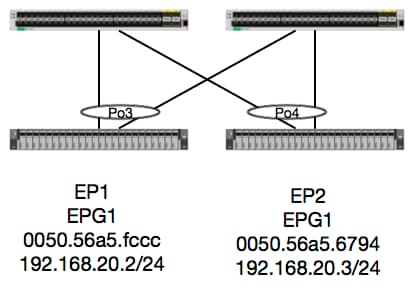
Gezien deze topologie is de stroom van EP1 naar EP2 een L2-stroom en moet lokaal worden geschakeld op welk blad het bronverkeer ook binnenkomt. Het eerste wat u moet controleren met Layer 2 (L2) -stromen is de mac-adrestabel om te bepalen of en waar de switch frames heeft ontvangen:
leaf4# show mac address-table | grep fccc
* 30       0050.56a5.fccc    dynamic      -       F    F    po3
leaf4# show mac address-table | grep 6794
* 30       0050.56a5.6794    dynamic      -       F    F    po4
Om de inkapselingsvlan te bekijken, kunnen we ook de EP-database controleren:
leaf4# show endpoint mac 0050.56a5.fccc
Legend:
 O - peer-attached    H - vtep             a - locally-aged     S - static
 V - vpc-attached     p - peer-aged        L - local            M - span
 s - static-arp       B - bounce
+-----------------------------------+---------------+-----------------+--------------+-------------+
      VLAN/                           Encap           MAC Address       MAC Info/       Interface
      Domain                          VLAN            IP Address        IP Info
+-----------------------------------+---------------+-----------------+--------------+-------------+
30                                        vlan-2268    0050.56a5.fccc LV                        po3
Joey-Tenant:Joey-Internal                 vlan-2268      192.168.20.2 LV                        po3


calo2-leaf4# show endpoint mac 0050.56a5.6794
Legend:
 O - peer-attached    H - vtep             a - locally-aged     S - static
 V - vpc-attached     p - peer-aged        L - local            M - span
 s - static-arp       B - bounce
+-----------------------------------+---------------+-----------------+--------------+-------------+
      VLAN/                           Encap           MAC Address       MAC Info/       Interface
      Domain                          VLAN            IP Address        IP Info
+-----------------------------------+---------------+-----------------+--------------+-------------+
30                                        vlan-2268    0050.56a5.6794 LV                        po4
Joey-Tenant:Joey-Internal                 vlan-2268      192.168.20.3 LV                        po4
We weten dat de FD_VLAN 30 overeenkomt, maar we kunnen de mapping in software altijd valideren:
leaf4# show vlan extended | grep 2268
 30   enet  CE         vlan-2268
En natuurlijk kunnen we de hardware controleren om ervoor te zorgen dat VLAN 30 wordt toegewezen aan VLAN 2268 als de inkapseling van het voorpaneel.
leaf4# vsh_lc
module-1# show system internal eltmc info vlan 30


             vlan_id:             30   :::      hw_vlan_id:             22
           vlan_type:        FD_VLAN   :::         bd_vlan:             28
   access_encap_type:         802.1q   :::    access_encap:           2268
   fabric_encap_type:          VXLAN   :::    fabric_encap:          11960
              sclass:          32778   :::           scope:             11
            untagged:              0
     acess_encap_hex:          0x8dc   :::  fabric_enc_hex:         0x2eb8
     pd_vlan_ft_mask:            0x8
    fd_learn_disable:              0
        qos_class_id:              0   :::      qos_pap_id:              0
          qq_met_ptr:             25   :::      ipmc_index:              0
   ingressBdAclLabel:              0   ::: ingBdAclLblMask:              0
    egressBdAclLabel:              0   ::: egrBdAclLblMask:              0
         qos_map_idx:              0   :::     qos_map_pri:              0
        qos_map_dscp:              0   :::      qos_map_tc:              0
        vlan_ft_mask:          0xe30
           hw_bd_idx:              0   :::      hw_epg_idx:          11267
          intf_count:              2   ::: glbl_scp_if_cnt:              2

<SNIPPED>
Gezien het feit dat de EP's worden geleerd in software, kunnen we ook valideren dat hardware de L2-informatie van deze EP's ook heeft geprogrammeerd. In de nieuwe hardware is er de Hardware Abstraction Layer (HAL) die de softwarestatus van de hardware is. HAL's taak is om een software programmering verzoeken te nemen en duw ze naar hardware.
Om L2 hardware informatie over een eindpunt te bekijken, kunnen we kijken naar de L2 tabel in HAL voor bepaalde mac adressen:
leaf4# vsh_lc
module-1# show platform internal hal ep l2 mac 0050.56a5.fccc
LEGEND:
-------
BDId:              BD Id                                                   BD Name:        BD Name
T:                 EP Type (Pl: Physical Vl: Virtual Xr: Remote            EP Mac:         Mac
L2 IfId:           L2 Interface                                            L2 IfName:      L2 IfName
FDId:              FD Id                                                   FD Name:        FD Name
S Class:           S Class                                                 Age Intvl:      Age Interval
P A:               Packet Action (F: Forward, T: Trap to CPU,
                                  L: Log & Forward, D: Drop, N: None)
S T:               Static Ep                                               S E:            Secure EP
L D:               Learn Disable                                           B N D:          Bind Notify Disable
E N D:             Epg Notify Disable                                      B E:            Bounce Enable
I D L:             IVxlan Dont Learn                                       SPI:            Source Policy Incomplete
DPI:               Dest Policy Incomplete                                  SPA:            Source Policy Applied
DPA:               Dest Policy Applied                                     DSS:            Dest Shared Service
IL:                Is Local                                                VUB:            Vnid Use Bd
SO:                SA Only

 L2 EP Count: 1

======================================================================================================================
                                                                                            B E   I S D S D D   V
     BD           EP                L2       L2               FD        S     Age   P S S L N N B D P P P P S I U S
BdId Name      T  Mac               IfId     Ifname      FDId Name      Class Intvl A T E D D D E L I I A A S L B O
======================================================================================================================
1c   BD-28     Pl 00:50:56:a5:fc:cc 16000002 Po3         1e   FD-30     800a  29f   F 0 0 0 1 0 0 0 0 0 0 0 0 1 0 0


module-1# show platform internal hal ep l2 mac 0050.56a5.6794
======================================================================================================================
                                                                                            B E   I S D S D D   V
     BD           EP                L2       L2               FD        S     Age   P S S L N N B D P P P P S I U S
BdId Name      T  Mac               IfId     Ifname      FDId Name      Class Intvl A T E D D D E L I I A A S L B O
======================================================================================================================
1c   BD-28     Pl 00:50:56:a5:67:94 16000003 Po4         1e   FD-30     800a  29f   F 0 0 0 1 0 0 0 0 0 0 0 0 1 0 0
Nu we de hardware in kaart hebben gebracht, laten we een ELAM doen en kijken waar het pakket naartoe moet.
ELAM
leaf4# vsh_lc
module-1# debug platform internal tah elam asic 0
module-1(DBG-TAH-elam)# trigger reset
module-1(DBG-TAH-elam)# trigger init in-select 6 out-select 0
module-1(DBG-TAH-elam-insel6)# set outer l2 src_mac 0050.56a5.fccc dst_mac 0050.56a5.6794
module-1(DBG-TAH-elam-insel6)# start
module-1(DBG-TAH-elam-insel6)# stat
ELAM STATUS
===========
Asic 0 Slice 0 Status Armed
Asic 0 Slice 1 Status Triggered

module-1(DBG-TAH-elam-insel6)# report | grep ovec
  sug_elam_out_sidebnd_no_spare_vec.ovector_idx: 0x9E
Geweldig, dus Leaf4 kreeg het frame op Asic 0 Slice 1. Met ELAM op de nieuwe hardware is er een nieuw veld dat erg belangrijk is bij het oplossen van problemen: ovector_idx. Deze index is de fysieke poortindex waaruit het frame/pakket moet worden doorgestuurd. Zodra u de ovector_idx hebt, kunnen we deze opdracht gebruiken om te vinden naar welke poort het wordt toegewezen:
module-1(DBG-TAH-elam-insel6)# show platform internal hal l2 port gpd
Legend:
-------
IfId:       Interface Id                                    IfName:      Interface Name
I P:        Is PC Mbr                                       IfId:           Interface Id
Uc PC Cfg:      UcPcCfg Idx                                 Uc PC MbrId:    Uc Pc Mbr Id
As:             Asic                                        AP:             Asic Port
Sl:             Slice                                       Sp:             Slice Port
Ss:             Slice SrcId                                 Ovec:           Ovector (slice | srcid)
L S:            Local Slot                                  Reprogram:
L3:             Is L3
    P:    PifTable                                          Xla Idx:        Xlate Idx
    RP:   Rw PifTable                                       Ovx Idx:        OXlate Idx
    IP:   If Profile Table                                  N L3:           Num. of L3 Ifs
    RS:   Rw SrcId Table                                    NI L3:          Num. of Infra L3 Ifs
    DP:   DPort Table                                       Vif Tid:        Vif Tid
    SP:   SrcPortState Table                                RwV Tid:        RwVif Tid
    RSP:  RwSrcPortstate Table                              Ing Lbl:        Ingress Acl Label
    UC:   UCPcCfg                                           Egr Lbl:        Egress Acl Label
    UM:   UCPcMbr                                           Reprogram:
PROF ID:        Lport Profile Id
    VS:   VifStateTable                                     HI:             LportProfile Hw Install
    RV:   Rw VifTable
Num. of Sandboxes: 1

Sandbox_ID: 0, BMP: 0x0
 Port Count: 8

============================================================================================================================================
                       Uc   Uc                          |       Reprogram       |                                         | Rep |
                     I PC   Pc                        L |   R I R D    R  U U X | L Xla Ovx N  NI Vif    RwV    Ing  Egr  | V R | PROF H
IfId     Ifname      P Cfg  MbrID As AP Sl Sp Ss Ovec S | P P P S P Sp Sp C M L | 3 Idx Idx L3 L3 Tid    Tid    Lbl  Lbl  | S V | ID   I
=============================================================================================================================================
1a004000 Eth1/5      1 0    1d    0  d  0  c  18 18   1   0 0 0 0 0 0  0  0 0 0   0 0   0   0  0  -      -      800  0      0 1   0    0
1a005000 Eth1/6      1 0    b     0  e  0  d  1a 1a   1   0 0 0 0 0 0  0  0 0 0   0 0   0   0  0  -      -      800  0      0 1   0    0
1a006000 Eth1/7      0 26   5     0  f  0  e  1c 1c   1   0 0 0 0 0 0  0  0 0 0   0 0   0   0  0  D-256  -      800  0      0 1   e    0
1a007000 Eth1/8      0 2e   7     0  10 0  f  1e 1e   1   0 0 0 0 0 0  0  0 0 0   0 0   0   0  0  D-84   -      800  0      0 1   30   0
1a01e000 Eth1/31     1 0    2d    0  37 1  e  1c 9c   1   0 0 0 0 0 0  0  0 0 0   0 0   0   0  0  -      -      0    0      0 1   0    0
1a01f000 Eth1/32     1 0    3d    0  38 1  f  1e 9e   1   0 0 0 0 0 0  0  0 0 0   0 0   0   0  0  -      -      0    0      0 1   0    0
1a030000 Eth1/49     0 2    1     0  49 1  20 38 b8   1   0 0 0 0 0 0  0  0 0 0   1 8   6   2  2  D-24d  -      400  0      0 0   1    0
1a031000 Eth1/50     0 3    3     0  29 1  0  0  80   1   0 0 0 0 0 0  0  0 0 0   1 9   7   2  2  D-350  -      400  0      0 0   1    0
De switch denkt dat het pakketje moet worden doorgestuurd vanuit Ethernet 1/32. Is dat PO4 waar we dat mac-adres hebben geleerd?
leaf4# show port-channel summary
Flags:  D - Down        P - Up in port-channel (members)
        I - Individual  H - Hot-standby (LACP only)
        s - Suspended   r - Module-removed
        S - Switched    R - Routed
        U - Up (port-channel)
        M - Not in use. Min-links not met
        F - Configuration failed
-------------------------------------------------------------------------------
Group Port-       Type     Protocol  Member Ports
      Channel
-------------------------------------------------------------------------------
1     Po1(SU)     Eth      LACP      Eth1/5(P)
2     Po2(SU)     Eth      LACP      Eth1/6(P)
3     Po3(SU)     Eth      LACP      Eth1/31(P)
4     Po4(SU)     Eth      LACP      Eth1/32(P)
Ja, dus het pakket wordt vanuit Interface 1/32 doorgestuurd naar de bestemmingshost.
2 EP's in verschillende EPG/Same Leaf - Routed Packet
Topologie
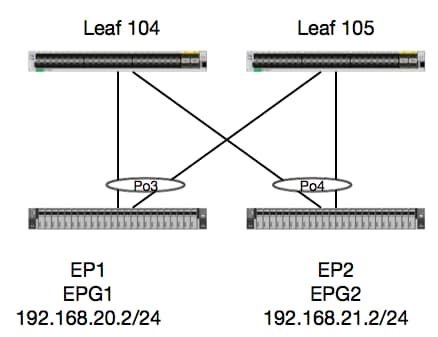
In dit voorbeeld volgen we de pakketstroom van een pakket van EP1 naar EP2 waar ze op hetzelfde vPC-bladpaar bestaan. De twee EP's zijn in verschillende EPG's met verschillende BD's.
Het eerste wat we altijd moeten doen is de EP-databank controleren om te zien of we de EP's hebben geleerd:
leaf4# show endpoint ip 192.168.20.2
Legend:
 O - peer-attached    H - vtep             a - locally-aged     S - static
 V - vpc-attached     p - peer-aged        L - local            M - span
 s - static-arp       B - bounce
+-----------------------------------+---------------+-----------------+--------------+-------------+
      VLAN/                           Encap           MAC Address       MAC Info/       Interface
      Domain                          VLAN            IP Address        IP Info
+-----------------------------------+---------------+-----------------+--------------+-------------+
30                                        vlan-2268    0050.56a5.fccc LV                        po3
Joey-Tenant:Joey-Internal                 vlan-2268      192.168.20.2 LV                        po3


calo2-leaf4# show endpoint ip 192.168.21.2
Legend:
 O - peer-attached    H - vtep             a - locally-aged     S - static
 V - vpc-attached     p - peer-aged        L - local            M - span
 s - static-arp       B - bounce
+-----------------------------------+---------------+-----------------+--------------+-------------+
      VLAN/                           Encap           MAC Address       MAC Info/       Interface
      Domain                          VLAN            IP Address        IP Info
+-----------------------------------+---------------+-----------------+--------------+-------------+
8                                         vlan-2200    0050.56a5.0c11 LV                        po4
Joey-Tenant:Joey-Internal                 vlan-2200      192.168.21.2 LV                        po4
Aangezien we de EP's hebben geleerd en de IP-informatie kennen, moeten we in staat zijn om te kijken naar de EP-leerinformatie in hardware:
leaf4# vsh_lc
module-1# show platform internal hal ep l3 all
LEGEND:
-------
VrfName:           Vrf Name                                                T:              Type (Pl: Physical, Vl: Virtual, Xr: Remote)
EP IP:             Endpoint IP
S Class:           S Class                                                 Age Intvl:      Age Interval
S T:               Static Ep                                               S E:            Secure EP
L D:               Learn Disable                                           B N D:          Bind Notify Disable
E N D:             Epg Notify Disable                                      B E:            Bounce Enable
I D L:             IVxlan Dont Learn                                       SPI:            Source Policy Incomplete
DPI:               Dest Policy Incomplete                                  SPA:            Source Policy Applied
DPA:               Dest Policy Applied                                     DSS:            Dest Shared Service
IL:                Is Local                                                VUB:            Vnid Use Bd
SO:                SA Only                                                 EP NH L3IfName: EP Next Hop L3 If Name
NHT:               Next Hop Type (L2: L2 Entry L3: L3 Next Hop)            BD Name:        L2 NH BD Name
EP Mac:            EP Mac                                                  L3 IfName:      L3 NH If Name
L2 IfName:         L2 If Name                                              FD Name:        L2 Entry FD Name
IP:                L3 NH IP

 L3 EP Count: 12

===========================================================================================================================================================================================
                                                                   B E   I S D S D D   V   EP-NH        N  |
Vrf              EP                              S     Age   S S L N N B D P P P P S I U S L3           H  | BD        EP                L3           L2          FD
Name          T  IP                              Class Intvl T E D D D E L I I A A S L B O IfName       T  | Name      Mac               IfName       Ifname      Name      IP
===========================================================================================================================================================================================
common*rewall Pl 10.6.112.1                      1     0     1 0 0 0 0 0 1 1 0 0 0 0 1 0 0 -            L3   -         00:00:00:00:00:00 -            -           -         0.0.0.0
common*rewall Pl 10.6.114.1                      1     0     1 0 0 0 0 0 1 1 0 0 0 0 1 0 0 -            L3   -         00:00:00:00:00:00 -            -           -         0.0.0.0
common*rewall Pl 10.6.114.129                    1     0     1 0 0 0 0 0 1 1 0 0 0 0 1 0 0 -            L3   -         00:00:00:00:00:00 -            -           -         0.0.0.0
common*efault Pl 100.100.101.1                   1     0     1 0 0 0 0 0 1 1 0 0 0 0 1 0 0 -            L3   -         00:00:00:00:00:00 -            -           -         0.0.0.0
Joey-T*ternal Pl 192.168.1.1                     1     0     1 0 0 0 0 0 1 1 0 0 0 0 1 0 0 -            L3   -         00:00:00:00:00:00 -            -           -         0.0.0.0
Joey-T*ternal Xr 192.168.1.100                   8013  128   0 0 0 1 0 0 0 0 0 0 0 0 0 1 0 -            L3   -         00:0c:0c:0c:0c:0c Tunnel2      Tunnel2     -         0.0.0.0
Joey-T*ernal2 Pl 192.168.3.1                     1     0     1 0 0 0 0 0 1 1 0 0 0 0 1 0 0 -            L3   -         00:00:00:00:00:00 -            -           -         0.0.0.0
Joey-T*ternal Pl 192.168.20.1                    1     0     1 0 0 0 0 0 1 1 0 0 0 0 1 0 0 -            L3   -         00:00:00:00:00:00 -            -           -         0.0.0.0
Joey-T*ternal Pl 192.168.20.2                    800a  0     0 0 0 0 0 0 0 0 0 0 0 0 1 0 0 -            L2   BD-28     00:50:56:a5:fc:cc -            Po3         FD-30     -
Joey-T*ternal Pl 192.168.21.1                    1     0     1 0 0 0 0 0 1 1 0 0 0 0 1 0 0 -            L3   -         00:00:00:00:00:00 -            -           -         0.0.0.0
Joey-T*ternal Pl 192.168.21.2                    800c  0     0 0 0 0 0 0 0 0 0 0 0 0 1 0 0 -            L2   BD-7      00:50:56:a5:0c:11 -            Po4         FD-8      -
Joey-T*ternal Pl 2001:0:0:100::1                 1     0     1 0 0 0 0 0 1 1 0 0 0 0 1 0 0 -            L3   -         00:00:00:00:00:00 -            -           -         0.0.0.0
De HAL Layer3 (l3) tabel is erg handig omdat het ons VLAN / Port informatie geeft voor l3 geleerde EP's. We weten dat de bestemming bestaat uit een Po4, dus het pakket moet worden doorgestuurd vanuit elke poort in Po4.
Laten we een ELAM draaien en zien wat we krijgen!
ELAM
leaf4# vsh_lc
module-1# debug platform internal tah elam asic 0
module-1(DBG-TAH-elam)# trigger init in-select 6 out-select 0
module-1(DBG-TAH-elam-insel6)# set outer ipv4 src_ip 192.168.20.2 dst_ip 192.168.21.2
module-1(DBG-TAH-elam-insel6)# start
module-1(DBG-TAH-elam-insel6)# stat
ELAM STATUS
===========
Asic 0 Slice 0 Status Armed
Asic 0 Slice 1 Status Armed

module-1(DBG-TAH-elam-insel6)# stat
ELAM STATUS
===========
Asic 0 Slice 0 Status Armed
Asic 0 Slice 1 Status Triggered

module-1(DBG-TAH-elam-insel6)# report | grep ovec
  sug_elam_out_sidebnd_no_spare_vec.ovector_idx: 0x9E
Geweldig, dus we hebben het pakket geactiveerd en we ontdekten dat de "ovector_idx" 0x9E is. De vector-index is de uitgaande fysieke interface-index waaruit het pakket moet worden doorgestuurd. Laten we eens kijken welke haven die index heeft:
module-1(DBG-TAH-elam-insel6)# show platform internal hal l2 port gpd
Legend:
-------
IfId:       Interface Id                                    IfName:      Interface Name
I P:        Is PC Mbr                                       IfId:           Interface Id
Uc PC Cfg:      UcPcCfg Idx                                 Uc PC MbrId:    Uc Pc Mbr Id
As:             Asic                                        AP:             Asic Port
Sl:             Slice                                       Sp:             Slice Port
Ss:             Slice SrcId                                 Ovec:           Ovector (slice | srcid)
L S:            Local Slot                                  Reprogram:
L3:             Is L3
    P:    PifTable                                          Xla Idx:        Xlate Idx
    RP:   Rw PifTable                                       Ovx Idx:        OXlate Idx
    IP:   If Profile Table                                  N L3:           Num. of L3 Ifs
    RS:   Rw SrcId Table                                    NI L3:          Num. of Infra L3 Ifs
    DP:   DPort Table                                       Vif Tid:        Vif Tid
    SP:   SrcPortState Table                                RwV Tid:        RwVif Tid
    RSP:  RwSrcPortstate Table                              Ing Lbl:        Ingress Acl Label
    UC:   UCPcCfg                                           Egr Lbl:        Egress Acl Label
    UM:   UCPcMbr                                           Reprogram:
PROF ID:        Lport Profile Id
    VS:   VifStateTable                                     HI:             LportProfile Hw Install
    RV:   Rw VifTable
Num. of Sandboxes: 1

Sandbox_ID: 0, BMP: 0x0
 Port Count: 8

============================================================================================================================================
                       Uc   Uc                          |       Reprogram       |                                         | Rep |
                     I PC   Pc                        L |   R I R D    R  U U X | L Xla Ovx N  NI Vif    RwV    Ing  Egr  | V R | PROF H
IfId     Ifname      P Cfg  MbrID As AP Sl Sp Ss Ovec S | P P P S P Sp Sp C M L | 3 Idx Idx L3 L3 Tid    Tid    Lbl  Lbl  | S V | ID   I
=============================================================================================================================================
1a004000 Eth1/5      1 0    1d    0  d  0  c  18 18   1   0 0 0 0 0 0  0  0 0 0   0 0   0   0  0  -      -      800  0      0 1   0    0
1a005000 Eth1/6      1 0    b     0  e  0  d  1a 1a   1   0 0 0 0 0 0  0  0 0 0   0 0   0   0  0  -      -      800  0      0 1   0    0
1a006000 Eth1/7      0 26   5     0  f  0  e  1c 1c   1   0 0 0 0 0 0  0  0 0 0   0 0   0   0  0  D-256  -      800  0      0 1   c    0
1a007000 Eth1/8      0 2f   7     0  10 0  f  1e 1e   1   0 0 0 0 0 0  0  0 0 0   0 0   0   0  0  D-199  -      800  0      0 1   2e   0
1a01e000 Eth1/31     1 0    2d    0  37 1  e  1c 9c   1   0 0 0 0 0 0  0  0 0 0   0 0   0   0  0  -      -      0    0      0 1   0    0
1a01f000 Eth1/32     1 0    3d    0  38 1  f  1e 9e   1   0 0 0 0 0 0  0  0 0 0   0 0   0   0  0  -      -      0    0      0 1   0    0
1a030000 Eth1/49     0 2    1     0  49 1  20 38 b8   1   0 0 0 0 0 0  0  0 0 0   1 6   4   2  2  D-24d  -      400  0      0 0   1    0
1a031000 Eth1/50     0 3    3     0  29 1  0  0  80   1   0 0 0 0 0 0  0  0 0 0   1 5   3   2  2  D-350  -      400  0      0 0   1    0
Het lijkt erop dat we Port 1/32 moeten sturen, klopt dat?
leaf4# show port-channel summary
Flags:  D - Down        P - Up in port-channel (members)
        I - Individual  H - Hot-standby (LACP only)
        s - Suspended   r - Module-removed
        S - Switched    R - Routed
        U - Up (port-channel)
        M - Not in use. Min-links not met
        F - Configuration failed
-------------------------------------------------------------------------------
Group Port-       Type     Protocol  Member Ports
      Channel
-------------------------------------------------------------------------------
1     Po1(SU)     Eth      LACP      Eth1/5(P)
2     Po2(SU)     Eth      LACP      Eth1/6(P)
3     Po3(SU)     Eth      LACP      Eth1/31(P)
4     Po4(SU)     Eth      LACP      Eth1/32(P)
Ja, dit is juist.
2 EP's in verschillende EPG / verschillende bladeren - Routed Packet
Topologie
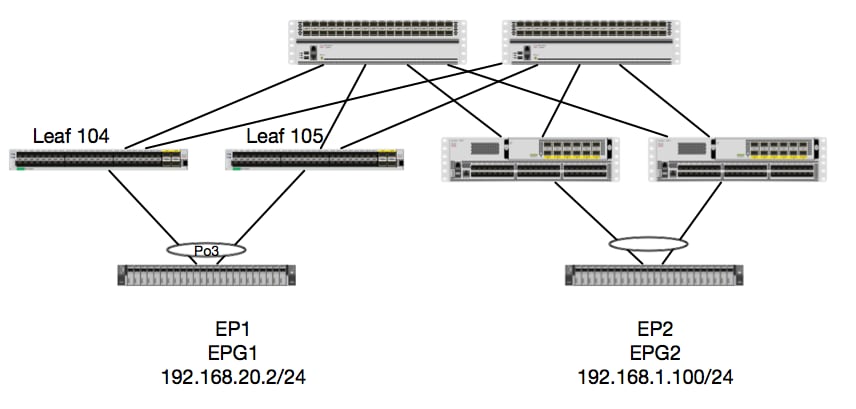
In dit voorbeeld volgen we de pakketstroom van een pakket van EP1 naar EP2, waarbij EP1 bestaat op een EX vPC-paar en EP2 bestaat op een extern Generation 1 vPC Leaf-paar. De twee EP's zijn in verschillende EPG's met verschillende BD's.
Nogmaals, laten we eens kijken waar de EP's worden geleerd:
leaf4# show endpoint ip 192.168.20.2
Legend:
 O - peer-attached    H - vtep             a - locally-aged     S - static
 V - vpc-attached     p - peer-aged        L - local            M - span
 s - static-arp       B - bounce
+-----------------------------------+---------------+-----------------+--------------+-------------+
      VLAN/                           Encap           MAC Address       MAC Info/       Interface
      Domain                          VLAN            IP Address        IP Info
+-----------------------------------+---------------+-----------------+--------------+-------------+
30                                        vlan-2268    0050.56a5.fccc LV                        po3
Joey-Tenant:Joey-Internal                 vlan-2268      192.168.20.2 LV                        po3


calo2-leaf4# show endpoint ip 192.168.1.100
Legend:
 O - peer-attached    H - vtep             a - locally-aged     S - static
 V - vpc-attached     p - peer-aged        L - local            M - span
 s - static-arp       B - bounce
+-----------------------------------+---------------+-----------------+--------------+-------------+
      VLAN/                           Encap           MAC Address       MAC Info/       Interface
      Domain                          VLAN            IP Address        IP Info
+-----------------------------------+---------------+-----------------+--------------+-------------+
Joey-Tenant:Joey-Internal                               192.168.1.100                       tunnel2
Laten we nu eens kijken wat de hardware heeft geprogrammeerd:
leaf4# vsh_lc
module-1# show platform internal hal ep l3 all
LEGEND:
-------
VrfName:           Vrf Name                                                T:              Type (Pl: Physical, Vl: Virtual, Xr: Remote)
EP IP:             Endpoint IP
S Class:           S Class                                                 Age Intvl:      Age Interval
S T:               Static Ep                                               S E:            Secure EP
L D:               Learn Disable                                           B N D:          Bind Notify Disable
E N D:             Epg Notify Disable                                      B E:            Bounce Enable
I D L:             IVxlan Dont Learn                                       SPI:            Source Policy Incomplete
DPI:               Dest Policy Incomplete                                  SPA:            Source Policy Applied
DPA:               Dest Policy Applied                                     DSS:            Dest Shared Service
IL:                Is Local                                                VUB:            Vnid Use Bd
SO:                SA Only                                                 EP NH L3IfName: EP Next Hop L3 If Name
NHT:               Next Hop Type (L2: L2 Entry L3: L3 Next Hop)            BD Name:        L2 NH BD Name
EP Mac:            EP Mac                                                  L3 IfName:      L3 NH If Name
L2 IfName:         L2 If Name                                              FD Name:        L2 Entry FD Name
IP:                L3 NH IP

 L3 EP Count: 12

===========================================================================================================================================================================================
                                                                   B E   I S D S D D   V   EP-NH        N  |
Vrf              EP                              S     Age   S S L N N B D P P P P S I U S L3           H  | BD        EP                L3           L2          FD
Name          T  IP                              Class Intvl T E D D D E L I I A A S L B O IfName       T  | Name      Mac               IfName       Ifname      Name      IP
===========================================================================================================================================================================================
common*rewall Pl 10.6.112.1                      1     0     1 0 0 0 0 0 1 1 0 0 0 0 1 0 0 -            L3   -         00:00:00:00:00:00 -            -           -         0.0.0.0
common*rewall Pl 10.6.114.1                      1     0     1 0 0 0 0 0 1 1 0 0 0 0 1 0 0 -            L3   -         00:00:00:00:00:00 -            -           -         0.0.0.0
common*rewall Pl 10.6.114.129                    1     0     1 0 0 0 0 0 1 1 0 0 0 0 1 0 0 -            L3   -         00:00:00:00:00:00 -            -           -         0.0.0.0
common*efault Pl 100.100.101.1                   1     0     1 0 0 0 0 0 1 1 0 0 0 0 1 0 0 -            L3   -         00:00:00:00:00:00 -            -           -         0.0.0.0
Joey-T*ternal Pl 192.168.1.1                     1     0     1 0 0 0 0 0 1 1 0 0 0 0 1 0 0 -            L3   -         00:00:00:00:00:00 -            -           -         0.0.0.0
Joey-T*ternal Xr 192.168.1.100                   8013  128   0 0 0 1 0 0 0 0 0 0 0 0 0 1 0 -            L3   -         00:0c:0c:0c:0c:0c Tunnel2      Tunnel2     -         0.0.0.0
Joey-T*ernal2 Pl 192.168.3.1                     1     0     1 0 0 0 0 0 1 1 0 0 0 0 1 0 0 -            L3   -         00:00:00:00:00:00 -            -           -         0.0.0.0
Joey-T*ternal Pl 192.168.20.1                    1     0     1 0 0 0 0 0 1 1 0 0 0 0 1 0 0 -            L3   -         00:00:00:00:00:00 -            -           -         0.0.0.0
Joey-T*ternal Pl 192.168.20.2                    800a  0     0 0 0 0 0 0 0 0 0 0 0 0 1 0 0 -            L2   BD-28     00:50:56:a5:fc:cc -            Po3         FD-30     -
Joey-T*ternal Pl 192.168.21.1                    1     0     1 0 0 0 0 0 1 1 0 0 0 0 1 0 0 -            L3   -         00:00:00:00:00:00 -            -           -         0.0.0.0
Joey-T*ternal Pl 192.168.21.2                    800c  0     0 0 0 0 0 0 0 0 0 0 0 0 1 0 0 -            L2   BD-7      00:50:56:a5:0c:11 -            Po4         FD-8      -
Joey-T*ternal Pl 2001:0:0:100::1                 1     0     1 0 0 0 0 0 1 1 0 0 0 0 1 0 0 -            L3   -         00:00:00:00:00:00 -            -           -         0.0.0.0
Hardware denkt dat de EP bestaat op Tunnel 2. Wat is de bestemming voor Tunnel 2?
module-1# show system internal eltmc info interface tunnel2
            IfInfo:
           interface:        Tunnel2   :::         ifindex:      402718722
                 iod:             66   :::           state:             up
                 Mod:              0   :::            Port:              0
        Tunnel Index:              0   :::   Tunnel Dst ip:     0xc0a87843
        Tunnel Encap:         ivxlan   ::: Tunnel VPC Peer:              0
   Tunnel Dst ip str: 192.168.120.67   :::      Tunnel ept:            0x1

          [SDK Info]:
          tunnl_name:
              vrf_id:              2   :::        if_index:     0x18010002
          hwencapidx:              0   :::       encaptype:              1
           mac_proxy:              0   :::        v4_proxy:              0
            v6_proxy:              0   :::    ip_addr_type:              0
        ipv4_address:     0xc0a87843

[SDB INFO]:
                 iod:             66
         pc_if_index:              0
        fab_if_index:              0
               sv_if:              0
             src_idx:              0
            int_vlan:              0
          encap_vlan:              0
     mod_port_status:     0x41620003
           v6_tbl_id:     0x80000002
           v4_tbl_id:            0x2
          router_mac:00.00.00.00.00.00
          unnumbered:              0
            trunk_id:              0
          tunnel_mod:              0
         tunnel_port:              0
              tep_ip:     0xc0a87843
          ip_if_mode:              0
          sdk_vrf_id:              2
                 mtu:           9366   :::        ipmtu_id:              0
       is_fex_fabric:              0
Aangezien de bestemming bestaat uit een vPC, moet dat bestemmings-IP het vPC Virtual IP van de externe bladeren zijn. Laten we eens kijken op een afgelegen blad en zien:
leaf1# show system internal epm vpc


Local TEP IP                  : 192.168.160.95
Peer TEP IP                   : 192.168.160.93
vPC configured                : Yes
vPC VIP                       : 192.168.120.67
MCT link status               : Up
Local vPC version bitmap      : 0x7
Peer vPC version bitmap       : 0x7
Negotiated vPC version        : 3
Peer advertisement received   : Yes
Tunnel to vPC peer            : Up
Perfect, dus het leerde de Destination EP van het externe vPC-paar. Laten we eens kijken wat ELAM ziet en controleren of we het pakket correct doorsturen:
ELAM
module-1# debug platform internal tah elam asic 0
module-1(DBG-TAH-elam)# trigger init in-select 6 out-select 0
module-1(DBG-TAH-elam-insel6)# set outer ipv4 src_ip 192.168.20.2 dst_ip 192.168.1.100
module-1(DBG-TAH-elam-insel6)# start
module-1(DBG-TAH-elam-insel6)# stat
ELAM STATUS
===========
Asic 0 Slice 0 Status Armed
Asic 0 Slice 1 Status Triggered
Nu, met externe bestemmingen op EX Hardware, zijn er 2 ELAM-waarden die erg belangrijk zijn bij het oplossen van pakketstromen. De vector_idx zoals voorheen, en de encap_idx:
module-1(DBG-TAH-elam-insel6)# report | grep ovec
  sug_elam_out_sidebnd_no_spare_vec.ovector_idx: 0xB8
module-1(DBG-TAH-elam-insel6)# report | grep encap
  sug_lurw_vec.encap_l2_idx: 0x0
  sug_lurw_vec.encap_pcid: 0x0
  sug_lurw_vec.encap_idx: 0x6
  sug_lurw_vec.encap_vld: 0x1
Op EX Hardware hebben we de mogelijkheid om de bestemmingspoort te besturen waar het pakket uit moet worden verzonden. Voorheen controleerden we meestal gewoon de encap idx en controleerden we of de bestemming idx de juiste tunnel was. Hier kunnen we controleren welke poort naar 8B toewijst:
module-1(DBG-TAH-elam-insel6)# show platform internal hal l2 port gpd
Legend:
-------
IfId:       Interface Id                                    IfName:      Interface Name
I P:        Is PC Mbr                                       IfId:           Interface Id
Uc PC Cfg:      UcPcCfg Idx                                 Uc PC MbrId:    Uc Pc Mbr Id
As:             Asic                                        AP:             Asic Port
Sl:             Slice                                       Sp:             Slice Port
Ss:             Slice SrcId                                 Ovec:           Ovector (slice | srcid)
L S:            Local Slot                                  Reprogram:
L3:             Is L3
    P:    PifTable                                          Xla Idx:        Xlate Idx
    RP:   Rw PifTable                                       Ovx Idx:        OXlate Idx
    IP:   If Profile Table                                  N L3:           Num. of L3 Ifs
    RS:   Rw SrcId Table                                    NI L3:          Num. of Infra L3 Ifs
    DP:   DPort Table                                       Vif Tid:        Vif Tid
    SP:   SrcPortState Table                                RwV Tid:        RwVif Tid
    RSP:  RwSrcPortstate Table                              Ing Lbl:        Ingress Acl Label
    UC:   UCPcCfg                                           Egr Lbl:        Egress Acl Label
    UM:   UCPcMbr                                           Reprogram:
PROF ID:        Lport Profile Id
    VS:   VifStateTable                                     HI:             LportProfile Hw Install
    RV:   Rw VifTable
Num. of Sandboxes: 1

Sandbox_ID: 0, BMP: 0x0
 Port Count: 8

============================================================================================================================================
                       Uc   Uc                          |       Reprogram       |                                         | Rep |
                     I PC   Pc                        L |   R I R D    R  U U X | L Xla Ovx N  NI Vif    RwV    Ing  Egr  | V R | PROF H
IfId     Ifname      P Cfg  MbrID As AP Sl Sp Ss Ovec S | P P P S P Sp Sp C M L | 3 Idx Idx L3 L3 Tid    Tid    Lbl  Lbl  | S V | ID   I
=============================================================================================================================================
1a004000 Eth1/5      1 0    1d    0  d  0  c  18 18   1   0 0 0 0 0 0  0  0 0 0   0 0   0   0  0  -      -      800  0      0 1   0    0
1a005000 Eth1/6      1 0    b     0  e  0  d  1a 1a   1   0 0 0 0 0 0  0  0 0 0   0 0   0   0  0  -      -      800  0      0 1   0    0
1a006000 Eth1/7      0 26   5     0  f  0  e  1c 1c   1   0 0 0 0 0 0  0  0 0 0   0 0   0   0  0  D-256  -      800  0      0 1   c    0
1a007000 Eth1/8      0 2f   7     0  10 0  f  1e 1e   1   0 0 0 0 0 0  0  0 0 0   0 0   0   0  0  D-199  -      800  0      0 1   2e   0
1a01e000 Eth1/31     1 0    2d    0  37 1  e  1c 9c   1   0 0 0 0 0 0  0  0 0 0   0 0   0   0  0  -      -      0    0      0 1   0    0
1a01f000 Eth1/32     1 0    3d    0  38 1  f  1e 9e   1   0 0 0 0 0 0  0  0 0 0   0 0   0   0  0  -      -      0    0      0 1   0    0
1a030000 Eth1/49     0 2    1     0  49 1  20 38 b8   1   0 0 0 0 0 0  0  0 0 0   1 6   4   2  2  D-24d  -      400  0      0 0   1    0
1a031000 Eth1/50     0 3    3     0  29 1  0  0  80   1   0 0 0 0 0 0  0  0 0 0   1 5   3   2  2  D-350  -      400  0      0 0   1    0
De switch denkt dat hij het moet doorsturen naar de ruggengraat op interface Eth1/49. Maar hoe kunnen we controleren of de encap klopt?
We moeten eerst kijken naar hardware-informatie over de tunnel. We kunnen dit doen door deze HAL opdracht uit te voeren:
module-1(DBG-TAH-elam-insel6)# show platform internal hal tunnel rtep pi
Non-Sandbox Mode
LEGEND:
-------
Tun Ifid:  Tunnel Ifid                                             IfName:     Tunnel If Name
Lid:       Logical Id                                              ET:        Encap Type V: Vxlan I: IVxlan N: NVGRE
VrfId:     Vrf Id                                                  Vrf Name: Vrf Name
IP:        Tunnel's IP
Hw Enc:    Hw Encap Idx                                            IVP:        Is VPC Peer
IL:        Is Local                                                P4:         Proxy for v4
P6:        Proxy for V6                                            PM:         Proxy for Mac
II:        Is Ingress Only                                         IC:         Is Copy Service
C OBd:     Copy Service Outer Bd                                   U D:        Use DF
NBT:       Next Base Type E: ECMP N: Next-Hop                      NB Id:      Next Base Id
NH cnt:    Next Hop Count                                          VrfId:      Vrf Id
Vrf Name:  Vrf Name                                                IP:         IP Address
Mac:       Mac                                                     L3 IfId:    L3 IfId
L3IfName:  L3 If Name                                              L2 IfId:    L2 IfId
L2IfName:  L2 If Name

Num. of Sandboxes: 1

Sandbox_ID: 0, BMP: 0x0
 Remote Tep Count: 15

================================================================================================================================================================================================
=======
                                                                    I                   N N          |

                      E             Vrf                        Hw   V I P P P I I C   U B B      NH  |        Vrf                                          L3       L3           L2       L2

IfId     Ifname       T Lid  VrfId  Name         IP            Enc  P L 4 6 M I C OBd D T Id     Cnt | VrfId  Name         IP            Mac               IfId     IfName       IfId     IfName

================================================================================================================================================================================================
=======
18010002 Tunnel2      I 3005 2      overlay-1    192.168.120.670    0 0 0 0 0 0 0 1   0 E 2      2     2      overlay-1    0.0.0.0       0d:0d:0d:0d:0d:00 1a030001 Eth1/49.1    1a030000 Eth1/4
9
                                                                                                       2      overlay-1    0.0.0.0       0d:0d:0d:0d:0d:00 1a031002 Eth1/50.2    1a031000 Eth1/5
0
Deze output geeft ons een paar waarden waar we om geven:
IfID - De interface-ID die aan de tunnel is toegewezen
IP: het IP van de bestemming. Dit moet overeenkomen met ELTMC.
L3 IfId - De laag 3-interface(s) die de switch kan gebruiken om door te sturen naar de juiste bestemming.
Zodra we de IfId kennen, kunnen we controleren of de encap die we in de elam hebben gekregen overeenkomt met de tunnelbestemming:
module-1(DBG-TAH-elam-insel9)# show platform internal hal tunnel rtep apd
Non-Sandbox Mode
LEGEND:
-------
ifId:        Interface Id                                   IP:           IP address
HwVrfId:     Hardware Vrf Id                                SrcTepIdx:    Source Tep Index
BDXlate:     Egress BDXlate                                 DstInfoIdx:   Destination info index
RwEncapIdx:  Rw Encap Index                                 ECMPIdx:      ECMP Index
Num:         Number of hops                                 ECMPMbrIdx:   ECMP member Index
L2 Index:    L2 Index                                       RwDmacIdx:    Rw Dmax Index

Num. of Sandboxes: 1

Sandbox_ID: 0, BMP: 0x0
 Remote Tep Count: 15

==============================================================================================================================
ifId     IP             HwVrfId BDXlate SrcTepIdx DstInfoIdx RwEncapIdx ECMPIdx  ECMPMbrIdx Num     L2Index  RwDmacIdx
==============================================================================================================================
18010002 192.168.120.67 2       1       3a9a      3005       6          0        0          2       1a030000 0         <---- RwEncapIdx is 6!  Same as the "encap_idx" in the ELAM Report.
                                                                                                    1a031000 1
Deze tunnel heeft een RwEncapIdx (Re-Write Encap Index) van 6, wat in het elam werd weergegeven.
1 EP --> L3 uit - Routed Flow
Topologie
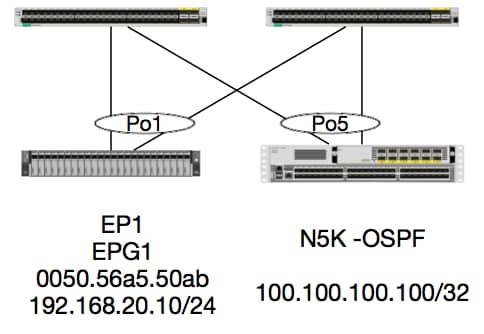
In dit voorbeeld volgen we de pakketstroom van een pakketje van EP1 dat ICMP naar een loopback stuurt op een N5K met OSPF. N5K is verbonden via een L3Out op hetzelfde paar EX-switches.
Aangezien we de lokale EP-programmering aan het begin van dit document hebben geverifieerd, gaan we ervan uit dat het EP correct is geleerd in hardware en doorgaan met de routeverificatie.
Laten we eerst de OSPF-status en de routeringstabel controleren:
leaf6# show ip ospf neighbors vrf jr:sb
 OSPF Process ID default VRF jr:sb
 Total number of neighbors: 2
 Neighbor ID     Pri State            Up Time  Address         Interface
 27.27.27.1        1 FULL/BDR         00:22:39 10.10.27.1      Vlan28   <---- Leaf5
 27.27.27.3        1 FULL/DROTHER     00:22:37 10.10.27.3      Vlan28   <----  N5K
leaf6# show ip route vrf jr:sb 100.100.100.100
IP Route Table for VRF "jr:sb"
'*' denotes best ucast next-hop
'**' denotes best mcast next-hop
'[x/y]' denotes [preference/metric]
'%<string>' in via output denotes VRF <string>

100.100.100.100/32, ubest/mbest: 1/0
    *via 10.10.27.3, vlan28, [110/5], 00:16:58, ospf-default, intra
Dus we weten dat de routingtabel de volgende hop toont als de 5K op 10.10.27.3. Goede start, maar hoe kunnen we verifiëren welke hardware heeft?
Laten we eerst de aangrenzingstabel in hardware controleren om er zeker van te zijn dat we ARP hebben opgelost naar 10.10.27.3 en dat deze is geprogrammeerd met de juiste interface:
leaf6# vsh_lc
module-1# show forwarding adjacency

IPv4 adjacency information, adjacency count 20

next-hop        rewrite info   interface       phy i/f
--------------  -------------- --------------- ---------------
10.10.27.1      0022.bdf8.19ff Vlan28          Tunnel3
10.10.27.3      8c60.4f02.88fc Vlan28          port-channel5
MAC-adressen die overeenkomen met die op de 5K:
ACI-5548-B# show interface vlan 3117
Vlan3117 is up, line protocol is up
  Hardware is EtherSVI, address is  8c60.4f02.88fc
  Internet Address is 10.10.27.3/29
  MTU 1500 bytes, BW 1000000 Kbit, DLY 10 usec
Op EX-platforms is er een "hw_vrf_idx" die is toegewezen aan een VRF. Aan deze index wordt gerefereerd wanneer we de hardwareprogrammering verifiëren. Laten we de index eens bekijken:
module-1# show system internal eltmc info vrf jr:sb
VRF-TABLE: jr:sb
            vrf_type:         tenant   :::      context_id:              6
       overlay_index:              0   :::            vnid:        2129921
               scope:              5   :::          sclass:          16386
         v4_table_id:            0x5   :::     v6_table_id:     0x80000005
          intf_count:              5   :::   intrn_vlan_id:              0
            VRF Intf:         Vlan11   ::: src_plcy_incomp:              0
            vnid_hex:       0x208001   :::  ingress_policy:            0x1
       vrf_intf_list: Vlan28,Vlan16,Vlan9,Vlan11,loopback2,
          hw_vrf_idx:           4612   ::: nb_egr_outer_bd:              0
     sb_egr_outer_bd:              0
         vrf_bd_list: 28,16,11,9,
     sb_egr_outer_bd:              0   :::      sdk_vrf_id:              5

          [SDK Info]:
            vrf_name:          jr:sb
              vrf_id:              5   :::      hw_vrf_idx:           4612
            vrf_vnid:        2129921   :::        is_infra:              0
      tornbinfrahwbd:              0   :::  torsbinfrahwbd:              0
   ingressBdAclLabel:              0   ::: ingBdAclLblMask:              0
    egressBdAclLabel:              0   ::: egrBdAclLblMask:              0
            sg_label:              5   :::          sclass:          16386
       sp_incomplete:              1   :::      sclassprio:              3

[SDB INFO]:
v4 table
            vrf type:              1
              vrf id:              5
                vnid:        2129921
 internal infra vlan:              0
 external router mac:00:22:bd:f8:19:ff
v6 table
            vrf type:              1
              vrf id:              5
                vnid:        2129921
 internal infra vlan:              0
 external router mac:00:22:bd:f8:19:ff
::::
Nadat we de nabijheid hebben gedetecteerd, moet HAL een route programmeren. We kunnen dit controleren met de volgende opdracht:
module-1# show platform internal hal l3 routes | head

------------------------------------------------------------------------------------------------------------------------------------------------------------------------------------------------
LEGEND:                                                                                                                                                                                        |
------------------------------------------------------------------------------------------------------------------------------------------------------------------------------------------------
LID: Logical ID           RID: Route ID               PID: Physical ID       NB-ID:Next-Base ID       HIT IDX: Next-Hop HitIndex   CLP : Class Priority       TBI: Trie Base Index             |
SC : Sup-Copy             SSR: Src Sup-Redirect       DSR: Dst Sup-Redirect  TDD  :TTL Disable        NB: NextBaseType             SDC : Src Direct Connect   TRO: Trie Offset                 |
SPI: Src Policy Inc       DPI: Dst Policy Inc         DR : Default Route     LE   :Learn Enable        [E:Ecmp/A:Adj]              ILL : Is Link Local        ISS: Is Shared Services          |
RT : Route Type           FWD: Forwarding             HR : Host Routes       EP   :Ext Prefixes       DLR: Default Lpm Route       CLSS: Class Id             RDEL: Route in Deletion          |
BNE: Bind Notify Enable   SNE: Sclass Notify Enable   BE : Bounce Enable     IDL  :Ivxlan DoNotLearn  DL : Dest Local              SA  : Src Only             AI : Age Interval                |
SF : Static Flag          SH : Src Hit                DH: Dest Hit                                                                                                                             |
module-1# show platform internal hal l3 routes

------------------------------------------------------------------------------------------------------------------------------------------------------------------------------------------------
LEGEND:                                                                                                                                                                                        |
------------------------------------------------------------------------------------------------------------------------------------------------------------------------------------------------
LID: Logical ID           RID: Route ID               PID: Physical ID       NB-ID:Next-Base ID       HIT IDX: Next-Hop HitIndex   CLP : Class Priority       TBI: Trie Base Index             |
SC : Sup-Copy             SSR: Src Sup-Redirect       DSR: Dst Sup-Redirect  TDD  :TTL Disable        NB: NextBaseType             SDC : Src Direct Connect   TRO: Trie Offset                 |
SPI: Src Policy Inc       DPI: Dst Policy Inc         DR : Default Route     LE   :Learn Enable        [E:Ecmp/A:Adj]              ILL : Is Link Local        ISS: Is Shared Services          |
RT : Route Type           FWD: Forwarding             HR : Host Routes       EP   :Ext Prefixes       DLR: Default Lpm Route       CLSS: Class Id             RDEL: Route in Deletion          |
BNE: Bind Notify Enable   SNE: Sclass Notify Enable   BE : Bounce Enable     IDL  :Ivxlan DoNotLearn  DL : Dest Local              SA  : Src Only             AI : Age Interval                |
SF : Static Flag          SH : Src Hit                DH: Dest Hit                                                                                                                             |
------------------------------------------------------------------------------------------------------------------------------------------------------------------------------------------------
|     |                                           |   |     |          | LID |<------------------ Trie ------------->|<Dleft Trie>|                                                            |
| VRF |                 Prefix/Len                | RT| RID |    LID   | Type| PID | FPID/| HIT |N|  NB-ID  |  NB Hw | PID | FPID/|   TBI   |TRO|Ifindex|CLSS|CLP| AI |SH|DH| Flags            |
|-----|-------------------------------------------|---|-----|----------|-----|     | TID  | IDX |B|         |  Idx   |     |  TID |---------|---|-------|----|---|----|--|--|------------------|
|-----|-------------------------------------------|---|-----|----------|-----|<------------------ DLEFT ------------>|-----|------|---------|---|-------|----|---|----|--|--|------------------|
|     |                                           |   |     |          |     | PID | FPID/| HIT |N|  NB-ID  |  NB Hw |     |      |         |   |       |    |   |    |  |  |                  |
|     |                                           |   |     |          |     |     |  TID | IDX |B|         |  Idx   |     |      |         |   |       |    |   |    |  |  |                  |
|     |                                           |   |     |          |     |<------------------ TCAM ------------->|     |      |         |   |       |    |   |    |  |  |                  |
|     |                                           |   |     |          |     | PID | TCAM | HIT |N|  NB-ID  |  NB Hw |     |      |         |   |       |    |   |    |  |  |                  |
|     |                                           |   |     |          |     |     |  ID  | IDX |B|         |  Idx   |     |      |         |   |       |    |   |    |  |  |                  |
------------------------------------------------------------------------------------------------------------------------------------------------------------------------------------------------
|Sandbox_ID: 0  Asic Bitmap: 0x0
--------------------------------------------------------------------------------------------------------------------------------------------------------------------------------------------

module-1# show platform internal hal l3 routes | egrep 100.100.100.100
| 4612|                        100.100.100.100/ 32| UC|   e4|      4a04| TRIE|   10| 5/  0| 6010|A|     7567|    802e| 186a| 1/  2|       10|  0|      0|   f|  3|   0| 0| 0|spi,dpi
Deze output geeft ons informatie over de volgende hoproute. 4612 is de hw_vrf_idx van de jr:sb VRF. Om de Next Hop te verifiëren, wordt de "NB Hw Idx" in TCAM gebruikt tegen de volgende tabel:
module-1# show platform internal hal l3 nexthops
Non-Sandbox Mode
LEGEND:
-------
NHOP ID       : Nhop Identifier (Hex)             CONS          : H/W S/W info Consistency
TYPE          : Nexthop Type                      ACTN          : Nexthop Action
Vrf           : L3 Vrf of the Nhop                L3 INTF       : L3 interface index (Hex)
L2 INTF       : L2 interface index (Hex)          BDID Or RwVRF : Bridge Domain Id Or Rewrite Vrfid (Hex)
INFR          : ACI Infra valid                   PVRF          : Preserve VRF
LRN           : Learn Enabled                     VRFR          : VRF Rewrite
PID           : Physical ID                       FPID          : FP of this nexthop
TLID          : Tile Id within FP                 HIT IDX       : Location of this Nhop (Hex)

Mac Entry:
TYP         : Type                      INTF        : Interface related Info (Hex)
LRN         : Learn Info                DL          : Destination Local
MLD         : Unused                    VNB         : Vnid use BD
DFL         : Default Entry             VLD         : MacKey Valid
FT          : FID Type                  FV          : FID Valid
FID         : FID value (Hex)           Mac         : L2 MAC Address
L2 Ifabric Info:
CLSS        : Source Class                        CLP         : Source Class Priority
EPG         : EndPoint Group                      BNE         : Bind Notification Enabled
SNE         : Source Address Notification Enabled CNE         : Source class Notification Enabled
DL          : iVxlan DL                           SPI         : Source Policy Incomplete
DPI         : Dest Policy Incomplete
IP Address  : IP address

Sandbox_ID: 0  Asic Bitmap: 0x0
Summary info for 31 L3 Nexthop objects
         C T A                       BDID  I P   V         T    |---------------------Mac Entry-------------------|----L2 Ifabric Info----|
 NHOP    O Y C         L3       L2    Or   N V L R         L HIT|T        L   M V D V|--------------Mac Key-------|     C      B S C   S D|
  ID     N P T        INTF     INTF  RwVRF F R R F      FP I IDX|Y  INTF  R D L N F L|F F  FID                    |     L      N N N D P P|
 (Hex)   S E N Vrf    (H)       (H)   (H)  R F N R PID  ID D (H)|P  (H)   N L D B L D|T V  (H)       Mac          |CLSS P EPG  E E E L I I| IP Address
--------+-+-+-+----+--------+--------+----+-+-+-+-+----+--+-+----+-+------+-+-+-+-+-+-+-+-+------+-----------------+----+-+----+-+-+-+-+-+-+-----------------------------

module-1# show platform internal hal l3 nexthops | grep 802e
    7567 N I F    5  901001c 16000004   1c 0 0 0 0   2e  9 0 802e 0     22 0 0 0 0 0 1 1 1   1214 8c:60:4f:02:88:fc    0 0 2c0d 0 0 0 0 0 0 10.10.27.3
Hier nemen we de "NB Hw Idx" en koppelen deze aan de "HIT IDX". Dit toont ons het item dat overeenkomt met de Next Hop MAC / IP. Dit is het equivalent van het kijken naar "l3 defip show" en "l3 egress show" in Broadcom op Generation 1 ACI Leaf Switches.
Zoals we kunnen zien, heeft de tabel de juiste info:
L2 INTF: 0x16000004 ---> De ifIndex van Port-channel 5
HIT IDX: De Index gereden van de Nb Hw Idx in hal 3 routes
MAC: 8c:60:4f:02:88:fc --> MAC van volgende HOP SVI op 5K
EPG: SCLASS van L3 EPG
IP-adres: 10.10.27.3 ---> Next Hop IP van SVI op 5K
ELAM
leaf6# pwd
/var/sysmgr/tmp_logs

leaf6# cat elam_report.txt | grep ip.da
    sug_pr_lu_vec_l3v.ip.da: 0x0000000000000000064646464
leaf6# cat elam_report.txt | grep ip.sa
    sug_pr_lu_vec_l3v.ip.sa: 0x00000000000000000C0A8140A

leaf6# cat elam_report.txt | grep adj
    sug_lurw_vec.dst_addr.adj: 0x8C604F0288FC
      sug_lurw_vec.dst_addr.adj.padfield: 0x04F0288FC
      sug_lurw_vec.dst_addr.adj.idx: 0x2318
  sug_lurw_vec.adj_vld: 0x0

leaf6# cat elam_report.txt | grep macdarslt.hit_idx
        sug_fpc_lookup_vec.fplu_vec.rslt.macdarslt.hit_idx: 0x802E
1 EP --> EP of SVI op afstand - Wervelkolomverificatie
Topologie
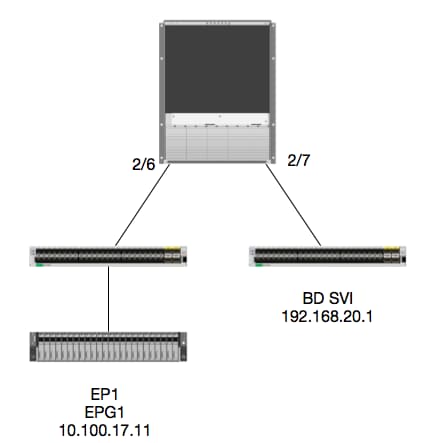
logica
In dit voorbeeld volgen we de pakketstroom van een pakket van EP1 dat bestemd is voor een Remote BD Switched Virtual Interface (SVI). Het doel van dit voorbeeld is om Spine Forwarding te verifiëren om ervoor te zorgen dat het pakket naar het juiste blad wordt verzonden. Laten we aannemen dat het pakketje naar de Spine Proxy op de Ingress Leaf is gestuurd.
Laten we op de wervelkolom eerst het protocol van de Raad van Orakels (COOP) voor het bestemmings-IP verifiëren, omdat het pakket naar de wervelkolom-proxy wordt verzonden voor een opzoeking:
calo1-spine1# show coop internal info ip-db | grep -A 10 192.168.20.1
IP address : 192.168.20.1
Vrf : 2129921
Flags : 0
EP vrf vnid : 2129921
EP IP :  192.168.20.1
Publisher Id : 10.0.224.88
Record timestamp : 11 04 2016 16:41:16 422062712
Publish timestamp : 11 04 2016 16:41:16 424633605
Seq No: 0
Remote publish timestamp: 01 01 1970 00:00:00 0
URIB Tunnel Info
Num tunnels : 1
	Tunnel address : 10.0.224.88    <---- REMOTE LEAF
	Tunnel ref count : 1
Laten we eens kijken welk blad dat TEP-adres heeft:
spine1# acidiag fnvread | grep 10.0.224.88
     105        1          calo1-leaf5      FDO20160TPS     10.0.224.88/32    leaf         active   0
Omdat we weten dat het pakket in de wervelkolom komt op Module 2, Port 6, kunnen we het aan Module 2 koppelen en naar de Port Layout kijken.
spine1# vsh
Cisco iNX-OS Debug Shell
This shell should only be used for internal commands and exists
for legacy reasons. User should use ibash infrastructure as this
will be deprecated.
calo1-spine1# attach module 2
Attaching to module 2 ...
To exit type 'exit', to abort type '$.'
No directory, logging in with HOME=/
Bad terminal type: "xterm-256color". Will assume vt100.
Cisco iNX-OS Debug Shell
This shell should only be used for internal commands and exists
for legacy reasons. User should use ibash infrastructure as this
will be deprecated.
Loading parse tree (LC). Please be patient...
module-2#

module-2# show platform internal hal l2 port gpd
Legend:
-------
IfId:       Interface Id                                    IfName:      Interface Name
I P:        Is PC Mbr                                       IfId:           Interface Id
Uc PC Cfg:      UcPcCfg Idx                                 Uc PC MbrId:    Uc Pc Mbr Id
As:             Asic                                        AP:             Asic Port
Sl:             Slice                                       Sp:             Slice Port
Ss:             Slice SrcId                                 Ovec:           Ovector (slice | srcid)
L S:            Local Slot                                  Reprogram:
L3:             Is L3
    P:    PifTable                                          Xla Idx:        Xlate Idx
    RP:   Rw PifTable                                       Ovx Idx:        OXlate Idx
    IP:   If Profile Table                                  N L3:           Num. of L3 Ifs
    RS:   Rw SrcId Table                                    NI L3:          Num. of Infra L3 Ifs
    DP:   DPort Table                                       Vif Tid:        Vif Tid
    SP:   SrcPortState Table                                RwV Tid:        RwVif Tid
    RSP:  RwSrcPortstate Table                              Ing Lbl:        Ingress Acl Label
    UC:   UCPcCfg                                           Egr Lbl:        Egress Acl Label
    UM:   UCPcMbr                                           Reprogram:
PROF ID:        Lport Profile Id
    VS:   VifStateTable                                     HI:             LportProfile Hw Install
    RV:   Rw VifTable
Num. of Sandboxes: 1

Sandbox_ID: 0, BMP: 0x0
 Port Count: 7

============================================================================================================================================
                       Uc   Uc                          |       Reprogram       |                                         | Rep |
                     I PC   Pc                        L |   R I R D    R  U U X | L Xla Ovx N  NI Vif    RwV    Ing  Egr  | V R | PROF H
IfId     Ifname      P Cfg  MbrID As AP Sl Sp Ss Ovec S | P P P S P Sp Sp C M L | 3 Idx Idx L3 L3 Tid    Tid    Lbl  Lbl  | S V | ID   I
=============================================================================================================================================
1f5      SpInBndMgmt 0 9de  1a    0  0  0  0  0  0    0   0 0 0 0 0 0  0  0 0 0   0 0   0   0  0  D-2d4  D-3e1  0    0      0 0   1    0
1a080000 Eth2/1      0 9a   1c    0  11 0  10 20 20   1   0 0 0 0 0 0  0  0 0 0   1 b   b   1  1  D-f3   D-61   100  0      0 0   1    0
1a081000 Eth2/2      0 9b   22    0  d  0  c  18 18   1   0 0 0 0 0 0  0  0 0 0   1 c   c   1  1  D-1ee  D-30b  100  0      0 0   1    0
1a084000 Eth2/5      0 9e   1e    0  3d 1  14 28 a8   1   0 0 0 0 0 0  0  0 0 0   1 1   1   1  1  D-19a  D-2ee  100  0      0 0   1    0
1a085000 Eth2/6      0 9f   24    0  39 1  10 20 a0   1   0 0 0 0 0 0  0  0 0 0   1 e   e   1  1  D-87   D-184  100  0      0 0   1    0
1a086000 Eth2/7      0 a0   26    0  35 1  c  18 98   1   0 0 0 0 0 0  0  0 0 0   1 d   d   1  1  D-1d0  D-357  100  0      0 0   1    0
1a088000 Eth2/9      0 a2   20    1  d  0  c  18 18   1   0 0 0 0 0 0  0  0 0 0   0 0   0   0  0  D-3ea  D-1a9  100  0      0 0   1    0
Ethernet 2/6 is de interface die verbinding maakt met Leaf 6 op ASIC 0 SLICE 1
Nu weten we op welke ASIC onze ELAM moet draaien. ASIC 0.
module-2# debug platform internal tah elam asic 0
module-2(DBG-TAH-elam)# trigger reset
module-2(DBG-TAH-elam)# trigger init in-select 13 out-select 0
module-2(DBG-TAH-elam-insel13)# set inner ipv4 src_ip 10.100.17.11 dst_ip 192.168.20.1
module-2(DBG-TAH-elam-insel13)# start
stat
module-2(DBG-TAH-elam-insel13)# stat
ELAM STATUS
===========
Asic 0 Slice 0 Status Armed
Asic 0 Slice 1 Status Armed

module-2(DBG-TAH-elam-insel13)# stat
ELAM STATUS
===========
Asic 0 Slice 0 Status Triggered   <---- Packet triggered from FM
Asic 0 Slice 1 Status Triggered   <---- Packet triggered from Front Panel
Als we naar de ELAM kijken, kunnen we de vectorindex vinden:
Front Panel ELAM drove sug_elam_out_sidebnd_no_spare_vec.ovector_idx: 0xB8
Nu, hoe brengen we 0xb8 in kaart naar een poort? Omdat we weten dat het pakket naar een Fabric Module (FM) moet worden verzonden voor een opzoeking, kunnen we naar de interne poorttoewijzing kijken om de beste FM te vinden:
module-2# show platform internal hal l2 internal-port pi
Num. of Sandboxes: 1
Legend:
-------
IfId:      Interface Id                IfName:     Interface Name
As:        Asic                        AP:         Asic Port
Sl:        Slice                       SP:         Slice Port
Ss:        Slice SrcId                 Ovec:       Ovector
UcPcCfgId: Uc Pc CfgId                 Lb Mbrid:   LB MbrId

Sandbox_ID: 0, BMP: 0x0
 Internal Port Count: 32

======================================================================
                                                         UcPc  Lb
IfId     IfName                      As AP Sl SP Ss Ovec CfgId MbrId
======================================================================
7d       -                           0  21 0  20 38 38   0     4
7e       -                           0  29 1  0  0  80   0     8
7f       -                           1  21 0  20 38 38   0     c
80       -                           1  29 1  0  0  80   0     10
81       -                           2  21 0  20 38 38   0     14
82       -                           2  29 1  0  0  80   0     18
83       -                           3  21 0  20 38 38   0     1c
84       -                           3  29 1  0  0  80   0     20
95       -                           0  19 0  18 30 30   0     3
96       -                           0  49 1  20 38 b8   0     7
97       -                           1  19 0  18 30 30   0     b
98       -                           1  49 1  20 38 b8   0     f
99       -                           2  19 0  18 30 30   0     13
9a       -                           2  49 1  20 38 b8   0     17
9b       -                           3  19 0  18 30 30   0     1b
9c       -                           3  49 1  20 38 b8   0     1f
ad       -                           0  25 0  24 40 40   0     1
ae       -                           0  41 1  18 30 b0   0     6
af       -                           1  25 0  24 40 40   0     9
b0       -                           1  41 1  18 30 b0   0     e
b1       -                           2  25 0  24 40 40   0     11
b2       -                           2  41 1  18 30 b0   0     16
b3       -                           3  25 0  24 40 40   0     19
b4       -                           3  41 1  18 30 b0   0     1e
dd       -                           0  15 0  14 28 28   0     2
de       -                           0  4d 1  24 40 c0   0     5
df       -                           1  15 0  14 28 28   0     a
e0       -                           1  4d 1  24 40 c0   0     d
e1       -                           2  15 0  14 28 28   0     12
e2       -                           2  4d 1  24 40 c0   0     15
e3       -                           3  15 0  14 28 28   0     1a
e4       -                           3  4d 1  24 40 c0   0     1d
Met behulp van ASIC0 / Ovec B8 krijgen we MbrId 0x7, Slice maakt niet uit.
Deze MbrId is de interface op de USD die wordt toegewezen aan een interface op een FM. Houd er rekening mee dat deze MbrId in hex is en moet worden geconverteerd naar decimaal.
We kunnen achterhalen welke FM door te kijken naar de USD-interfaces en Port 7 te inspecteren:
module-2# show platform internal usd port info | grep -A 3 "Int 7"(if the interface has multiple digits, will be "Int##" with no space)

Port  73.0 (Int 7)    : Admin UP   Link UP   Remote slot22.asic0
                slice:1 slice port:32 lcl srcid:56 gbl srcid:184
                asic mrl:0xd07c010, mac mrl:0x12c84010, mac:16, chan:0
                speed 106G serdes: 0x328 0x329 0x32a 0x32b
De "sleuf" is 0 gebaseerd en de FM-nummering is 1 gebaseerd, dus we moeten 1 toevoegen aan het hier vermelde nummer. Dit betekent dat het pakket naar FM 23 moet worden verzonden.
Synthetische IP
Net als in Alpine is er een synthetisch IP-adres dat wordt gebruikt als het buitenste IP-adres om de hash voor de COOP-lookup te bepalen. Om dit te vinden, moet u deze opdracht en grep uitvoeren voor de binnenste DST IP:
module-2(DBG-TAH-elam-insel7)# show forwarding route synthetic vrf all | grep 192.168.20.1
SYNTH-88        1.203.211.185/32    0x208001          192.168.20.1
Hieruit blijkt dat 1.203.211.185 onze synthetische IP is. Op basis hiervan kunnen we ook de "Outer DST IP" op onze FM elam instellen om dit te zijn. We moeten de FM activeren:
Fabric Module ELAM
module-23(DBG-TAH-elam-insel7)# trigger reset
module-23(DBG-TAH-elam)# trigger init in-select 13 out-select 0
module-23(DBG-TAH-elam-insel13)# set outer ipv4 dst_ip 1.203.211.185   <----- DST IP IS THE SYNTHETIC IP
module-23(DBG-TAH-elam-insel13)# set inner ipv4 src_ip 10.100.17.11 dst_ip 192.168.20.1
module-23(DBG-TAH-elam-insel13)# start
stat
module-23(DBG-TAH-elam-insel13)# stat
ELAM STATUS
===========
Asic 0 Slice 0 Status Armed
Asic 0 Slice 1 Status Armed
Asic 0 Slice 2 Status Armed
Asic 0 Slice 3 Status Armed
Asic 0 Slice 4 Status Armed
Asic 0 Slice 5 Status Armed

module-23(DBG-TAH-elam-insel13)# stat
ELAM STATUS
===========
Asic 0 Slice 0 Status Armed
Asic 0 Slice 1 Status Armed
Asic 0 Slice 2 Status Triggered    <---- Triggered on SLICE 2
Asic 0 Slice 3 Status Armed
Asic 0 Slice 4 Status Armed
Asic 0 Slice 5 Status Armed
Dump natuurlijk het volledige rapport, maar laten we eens kijken naar de ovector_idx voor dit pakket dat we hebben geactiveerd:
lac_elam_out_sidebnd_no_spare_vec.ovector_idx: 0x20 <------ Vector Index gebruikt in onderstaande opdracht
Hoe komen we erachter welke interface die vector heeft? Op de FM, voer dit uit:
** Door bug CSCvf42796  , alle FM-opdrachten toevoegen met "| no-more". Anders worden bepaalde tabelvermeldingen mogelijk niet weergegeven in de uiteindelijke uitvoer.
module-23(DBG-TAH-elam-insel13)# show platform internal hal l2 port gpd | no-more
Legend:
-------
IfId:       Interface Id                                    IfName:      Interface Name
I P:        Is PC Mbr                                       IfId:           Interface Id
Uc PC Cfg:      UcPcCfg Idx                                 Uc PC MbrId:    Uc Pc Mbr Id
As:             Asic                                        AP:             Asic Port
Sl:             Slice                                       Sp:             Slice Port
Ss:             Slice SrcId                                 Ovec:           Ovector (slice | srcid)
L S:            Local Slot                                  Reprogram:
L3:             Is L3
    P:    PifTable                                          Xla Idx:        Xlate Idx
    RP:   Rw PifTable                                       Ovx Idx:        OXlate Idx
    IP:   If Profile Table                                  N L3:           Num. of L3 Ifs
    RS:   Rw SrcId Table                                    NI L3:          Num. of Infra L3 Ifs
    DP:   DPort Table                                       Vif Tid:        Vif Tid
    SP:   SrcPortState Table                                RwV Tid:        RwVif Tid
    RSP:  RwSrcPortstate Table                              Ing Lbl:        Ingress Acl Label
    UC:   UCPcCfg                                           Egr Lbl:        Egress Acl Label
    UM:   UCPcMbr                                           Reprogram:
PROF ID:        Lport Profile Id
    VS:   VifStateTable                                     HI:             LportProfile Hw Install
    RV:   Rw VifTable
Num. of Sandboxes: 1

Sandbox_ID: 1, BMP: 0x1
 Port Count: 8

============================================================================================================================================
                       Uc   Uc                          |       Reprogram       |                                         | Rep |
                     I PC   Pc                        L |   R I R D    R  U U X | L Xla Ovx N  NI Vif    RwV    Ing  Egr  | V R | PROF H
IfId     Ifname      P Cfg  MbrID As AP Sl Sp Ss Ovec S | P P P S P Sp Sp C M L | 3 Idx Idx L3 L3 Tid    Tid    Lbl  Lbl  | S V | ID   I
=============================================================================================================================================
ae       fc0-lc1:0-0 1 0    3     0  11 0  10 20 20   1   0 0 0 0 0 0  0  0 0 0   0 0   0   0  0  -      -      0    0      0 0   0    0
af       fc0-lc1:0-1 1 0    4     0  3d 2  c  18 98   1   0 0 0 0 0 0  0  0 0 0   0 0   0   0  0  -      -      0    0      0 0   0    0
b0       fc0-lc1:1-0 1 0    13    0  d  0  c  18 18   1   0 0 0 0 0 0  0  0 0 0   0 0   0   0  0  -      -      0    0      0 0   0    0
b1       fc0-lc1:1-1 1 0    14    0  39 2  8  10 90   1   0 0 0 0 0 0  0  0 0 0   0 0   0   0  0  -      -      0    0      0 0   0    0
b2       fc0-lc1:2-0 1 0    23    0  5d 3  14 28 e8   1   0 0 0 0 0 0  0  0 0 0   0 0   0   0  0  -      -      0    0      0 0   0    0
b3       fc0-lc1:2-1 1 0    24    0  21 1  8  10 50   1   0 0 0 0 0 0  0  0 0 0   0 0   0   0  0  -      -      0    0      0 0   0    0
b4       fc0-lc1:3-0 1 0    33    0  51 3  8  10 d0   1   0 0 0 0 0 0  0  0 0 0   0 0   0   0  0  -      -      0    0      0 0   0    0
Die vector wordt toegewezen aan LC1 (lijnkaart in sleuf 2, omdat deze 0 is), op ASIC 0 / SLICE 0. Zoals we weten van de ELAM-run oorspronkelijk op de LC, hebben we dit segment geactiveerd:
module-2# debug platform internal tah elam asic 0
module-2(DBG-TAH-elam)# trigger reset
module-2(DBG-TAH-elam)# trigger init in-select 13 out-select 0
module-2(DBG-TAH-elam-insel13)# set inner ipv4 src_ip 10.100.17.11 dst_ip 192.168.20.1
module-2(DBG-TAH-elam-insel13)# start
stat
module-2(DBG-TAH-elam-insel13)# stat
ELAM STATUS
===========
Asic 0 Slice 0 Status Armed
Asic 0 Slice 1 Status Armed

module-2(DBG-TAH-elam-insel13)# stat
ELAM STATUS
===========
Asic 0 Slice 0 Status Triggered   <---- Packet triggered from FM
Asic 0 Slice 1 Status Triggered   <---- Packet triggered from Front Panel
De vector op dit ELAM is sug_elam_out_sidebnd_no_spare_vec.ovector_idx: 0x98, die we kennen van de "hal l2 poort gpd", wijst naar de juiste interface op de LC:
============================================================================================================================================
                       Uc   Uc                          |       Reprogram       |                                         | Rep |
                     I PC   Pc                        L |   R I R D    R  U U X | L Xla Ovx N  NI Vif    RwV    Ing  Egr  | V R | PROF H
IfId     Ifname      P Cfg  MbrID As AP Sl Sp Ss Ovec S | P P P S P Sp Sp C M L | 3 Idx Idx L3 L3 Tid    Tid    Lbl  Lbl  | S V | ID   I
=============================================================================================================================================
1f5      SpInBndMgmt 0 9de  1a    0  0  0  0  0  0    0   0 0 0 0 0 0  0  0 0 0   0 0   0   0  0  D-2d4  D-3e1  0    0      0 0   1    0
1a080000 Eth2/1      0 9a   1c    0  11 0  10 20 20   1   0 0 0 0 0 0  0  0 0 0   1 b   b   1  1  D-f3   D-61   100  0      0 0   1    0
1a081000 Eth2/2      0 9b   22    0  d  0  c  18 18   1   0 0 0 0 0 0  0  0 0 0   1 c   c   1  1  D-1ee  D-30b  100  0      0 0   1    0
1a084000 Eth2/5      0 9e   1e    0  3d 1  14 28 a8   1   0 0 0 0 0 0  0  0 0 0   1 1   1   1  1  D-19a  D-2ee  100  0      0 0   1    0
1a085000 Eth2/6      0 9f   24    0  39 1  10 20 a0   1   0 0 0 0 0 0  0  0 0 0   1 e   e   1  1  D-87   D-184  100  0      0 0   1    0
1a086000 Eth2/7      0 a0   26    0  35 1  c  18 98   1   0 0 0 0 0 0  0  0 0 0   1 d   d   1  1  D-1d0  D-357  100  0      0 0   1    0
1a088000 Eth2/9      0 a2   20    1  d  0  c  18 18   1   0 0 0 0 0 0  0  0 0 0   0 0   0   0  0  D-3ea  D-1a9  100  0      0 0   1    0
Ethernet 2/7 is de interface die verbinding maakt met Leaf 5.
Extra scenario: Een ovector krijgen die niet in de "hal internal-port pi" -uitvoer staat
Topologie
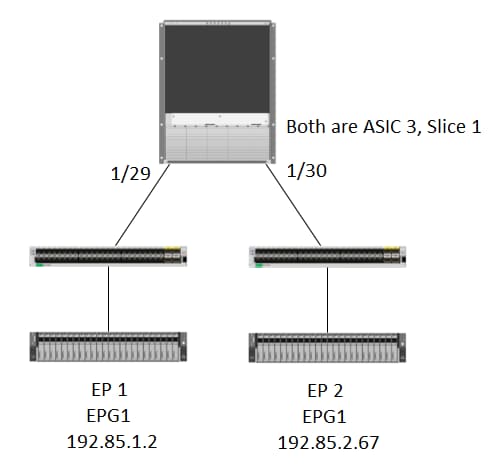
logica
Er zijn enkele scenario's waarbij we een pakket vangen dat geen Ovector heeft in de tabel "show platform internal hal l2 internal-port pi". In het onderstaande scenario vangen we eigenlijk het pakket dat terugkomt van de FM, dus we moeten naar een andere tabel kijken om te zien welke voorpaneelpoort het pakket selecteert.
Merk op dat de bovenstaande topologie een volledig andere omgeving is waar het transitverkeer wordt geleerd (geen proxyroutering). De module is een N9K-X9732C-EX.
@module-1# debug platform internal tah elam asic 3
@module-1(DBG-elam)# trigger reset
@module-1(DBG-elam)# trigg init in-select 13 out-select 0
@module-1(DBG-elam-insel13)# set inner ipv4 src_ip 192.85.1.2 dst_ip 192.85.2.67
@module-1(DBG-elam-insel13)# star
@module-1(DBG-elam-insel13)# stat
ELAM STATUS
===========
Asic 3 Slice 0 Status Armed
Asic 3 Slice 1 Status Triggered

@module-1(DBG-elam-insel13)# report | grep ovector
  sug_elam_out_sidebnd_no_spare_vec.ovector_idx: 0xA0    <<<<<<<<<<<<<<<<<  now we look for this in the "hal internal-port pi" command


@module-1# show platform internal hal l2 internal-port pi
No sandboxes exist
Num. of Sandboxes: 1
Legend:
-------
IfId:      Interface Id                IfName:     Interface Name
As:        Asic                        AP:         Asic Port
Sl:        Slice                       SP:         Slice Port
Ss:        Slice SrcId                 Ovec:       Ovector
UcPcCfgId: Uc Pc CfgId                 Lb Mbrid:   LB MbrId

Sandbox_ID: 0, BMP: 0x0
 Internal Port Count: 24

======================================================================
                                                         UcPc  Lb
IfId     IfName                      As AP Sl SP Ss Ovec CfgId MbrId
======================================================================
7d       -                           0  21 0  20 38 38   0     4
7e       -                           0  29 1  0  0  80   0     8
7f       -                           1  21 0  20 38 38   0     c
80       -                           1  29 1  0  0  80   0     10
81       -                           2  21 0  20 38 38   0     14
82       -                           2  29 1  0  0  80   0     18
83       -                           3  21 0  20 38 38   0     1c
84       -                           3  29 1  0  0  80   0     20
ad       -                           0  25 0  24 40 40   0     1
ae       -                           0  41 1  18 30 b0   0     6
af       -                           1  25 0  24 40 40   0     9
b0       -                           1  41 1  18 30 b0   0     e
b1       -                           2  25 0  24 40 40   0     11
b2       -                           2  41 1  18 30 b0   0     16
b3       -                           3  25 0  24 40 40   0     19
b4       -                           3  41 1  18 30 b0   0     1e
dd       -                           0  15 0  14 28 28   0     2
de       -                           0  4d 1  24 40 c0   0     5
df       -                           1  15 0  14 28 28   0     a
e0       -                           1  4d 1  24 40 c0   0     d
e1       -                           2  15 0  14 28 28   0     12
e2       -                           2  4d 1  24 40 c0   0     15
e3       -                           3  15 0  14 28 28   0     1a
e4       -                           3  4d 1  24 40 c0   0     1d  <<<<<<<  we cant find an entry that matches 0xA0


@module-1# show platform internal hal l2 port gpd
Legend:
-------
<snip>

Sandbox_ID: 0, BMP: 0x0
 Port Count: 6

============================================================================================================================================
                       Uc   Uc                          |       Reprogram       |                                         | Rep |
                     I PC   Pc                        L |   R I R D    R  U U X | L Xla Ovx N  NI Vif    RwV    Ing  Egr  | V R | PROF H
IfId     Ifname      P Cfg  MbrID As AP Sl Sp Ss Ovec S | P P P S P Sp Sp C M L | 3 Idx Idx L3 L3 Tid    Tid    Lbl  Lbl  | S V | ID   I
=============================================================================================================================================
1f5      SpInBndMgmt 0 9de  1a    0  0  0  0  0  0    0   0 0 0 0 0 0  0  0 0 0   0 0   0   0  0  D-2d4  D-3e1  0    0      0 0   1    0
1a000000 Eth1/1      0 1b   1c    0  11 0  10 20 20   1   0 0 0 0 0 0  0  0 0 0   1 1   1   1  1  D-13b  D-33b  500  0      1 0   3    0
1a01c000 Eth1/29     0 37   1e    3  3d 1  14 28 a8   1   0 0 0 0 0 0  0  0 0 0   1 8   8   1  1  D-3f2  D-7a   100  0      0 0   2    0
1a01d000 Eth1/30     0 38   20    3  39 1  10 20 a0   1   0 0 0 0 0 0  0  0 0 0   1 5   5   1  1  D-36e  D-362  100  0      0 0   2    0
1a01e000 Eth1/31     0 39   22    3  35 1  c  18 98   1   0 0 0 0 0 0  0  0 0 0   1 9   9   1  1  D-273  D-8    100  0      0 0   2    0
1a01f000 Eth1/32     0 3a   24    3  31 1  8  10 90   1   0 0 0 0 0 0  0  0 0 0   1 a   a   1  1  D-154  D-5d   100  0      0 0   2    0
1/30 is de phys-interface die verbinding maakt met leaf 102, geverifieerd door topologie, ASIC 3, Slice 1
Bijgedragen door Cisco-engineers
- Joseph Ristaino
 Feedback
Contact Cisco
- Een ondersteuningscase openen

- (Vereist een Cisco-servicecontract)