Catalyst 9800 Wireless Controller에서 설치 모드 변경

소개
이 문서에서는 Catalyst 9800 WLC(Wireless Controller)에서 여러 유형의 설치 모드를 변경하는 방법에 대해 설명합니다.
사전 요구 사항
요구 사항
다음 주제에 대한 지식을 보유하고 있으면 유용합니다.
-
Catalyst 9800 Wireless LAN Controller 및 Access Point(AP) 플랫폼
- Catalyst 9800 Wireless LAN Controllers 소프트웨어 기능 집합
사용되는 구성 요소
이 문서의 정보는 다음 소프트웨어 및 하드웨어 버전을 기반으로 합니다.
- C9800-L 버전 17.15.5
이 문서의 정보는 특정 랩 환경의 디바이스를 토대로 작성되었습니다. 이 문서에 사용된 모든 디바이스는 초기화된(기본) 컨피그레이션으로 시작되었습니다. 현재 네트워크가 작동 중인 경우 모든 명령의 잠재적인 영향을 미리 숙지하시기 바랍니다.
배경 정보
이 문서에서는 CLI(Command Line Interface)를 통해 Catalyst 9800 WLC(Wireless Controller)에서 여러 유형의 설치 모드를 변환하는 방법을 살펴봅니다.
이 절차를 사용하여 9800 WLC를 업그레이드할 수도 있습니다.
Catalyst 9800 WLC에서 Cisco IOS® XE를 번들 및 설치 모드에서 실행할 수 있는 두 가지 방법이 있습니다.
설치 모드
설치 모드는 번들 모드에서 사용할 수 없는 몇 가지 중요한 아키텍처 기능을 잠금 해제하기 위해 컨트롤러를 부팅하기 위해 이진 파일에서 미리 추출된 .pkg 파일을 플래시로 사용합니다. 컨트롤러는 추출에서 packages.conf 생성된 파일을 부트 변수로 사용합니다. 이 모드를 사용하면 컨트롤러는 번들 모드보다 더 빠른 부팅 시간을 경험하고 더 적은 RAM을 소비합니다.
번들 모드
컨트롤러가 부팅 변수로 이진 이미지(.bin)를 사용하여 부팅하는 경우 시스템은 번들 모드에서 작동합니다. 이 모드에서 컨트롤러는 RAM에 .bin 파일을 추출하여 실행합니다.
이 모드는 부팅 시 추출된 패키지가 RAM에 복사되므로 설치 모드보다 더 많은 메모리를 사용합니다.
시작하기 전에
모드 간에 변환하기 위해 어떤 절차를 수행해야 하는지 확인하려면 9800 WLC의 작동 모드를 확인합니다.
명령을 show version | include Installation mode 실행하여 현재 설치 모드를 확인합니다.
WLC#show version | include Installation mode
Installation mode is INSTALL
구성
설치에서 번들 모드로
CLI 절차
1단계. 새 이미지를 확장하기 위해 플래시에 충분한 공간이 있는지 확인합니다.
WLC#show bootflash:
...
277 42838080 Oct 08 2025 14:22:06.0000000000 +00:00 wlc9500C-rpboot.2025-10-05_08.14_prabhask.SSA.pkg
279 19921673 Dec 13 2025 19:27:45.0000000000 +00:00 system-report_20251213-192546-Pacific.tar.gz
235937792 bytes available (5746528256 bytes used)
2단계. 공간이 부족한 경우 이전에 추가한 패키지를 폐기하기 위해 이전 설치 파일을 정리합니다.
WLC#install remove inactive
install_remove: START Mon Jun 08 22:31:01 Central 2026
install_remove: Removing IMG
Cleaning up unnecessary package files
No path specified, will use booted path /tmp/sw/isos/packages.conf
Cleaning /bootflash
Scanning boot directory for packages ... done.
Preparing packages list to delete ...
[R0]: /bootflash/C9800-L-universalk9_wlc.17.15.05.SPA.bin File is in use, will not delete.
[R0]: /bootflash/C9800-L-universalk9_wlc.17.15.05.SPA.conf File is in use, will not delete.
The following files will be deleted:
[R0]: /bootflash/packages.conf
[R0]: /bootflash/C9800-L-universalk9_wlc.17.12.04.Cisco bug ID CSCwn02956.SPA.apsp.bin
[R0]: /bootflash/C9800-L-rommon.1612-3r.pkg
[R0]: /bootflash/C9800-L-universalk9_wlc.17.15.03.SPA.bin
[R0]: /bootflash/C9800-L-mono-universalk9_wlc.17.15.03.SPA.pkg
[R0]: /bootflash/C9800-L-universalk9_wlc.17.15.03.SPA.conf
[R0]: /bootflash/C9800-L-rpboot.17.15.03.SPA.pkg
[R0]: /bootflash/C9800-L-universalk9_wlc.17.09.06.SPA.bin
[R0]: /bootflash/C9800-L-mono-universalk9_wlc.17.09.06.SPA.pkg
[R0]: /bootflash/C9800-L-rpboot.17.09.06.SPA.pkg
[R0]: /bootflash/C9800-L-universalk9_wlc.17.09.06.SPA.conf
[R0]: /bootflash/C9800-L-universalk9_wlc.17.15.03.Cisco bug ID CSCwp18505
[R0]: /bootflash/C9800-L-mono-universalk9_wlc.17.12.04.SPA.pkg
[R0]: /bootflash/C9800-L-rpboot.17.12.04.SPA.pkg
[R0]: /bootflash/C9800-L-mono-universalk9_wlc.17.15.05.SPA.pkg
[R0]: /bootflash/C9800-L-rpboot.17.15.05.SPA.pkg
Do you want to remove the above files? [y/n]y
Deleting file /bootflash/packages.conf ... done.
Deleting file /bootflash/C9800-L-universalk9_wlc.17.12.04.Cisco bug ID CSCwn02956
Deleting file /bootflash/C9800-L-rommon.1612-3r.pkg ... done.
Deleting file /bootflash/C9800-L-universalk9_wlc.17.15.03.SPA.bin ... done.
Deleting file /bootflash/C9800-L-mono-universalk9_wlc.17.15.03.SPA.pkg ... done.
Deleting file /bootflash/C9800-L-universalk9_wlc.17.15.03.SPA.conf ... done.
Deleting file /bootflash/C9800-L-rpboot.17.15.03.SPA.pkg ... done.
Deleting file /bootflash/C9800-L-universalk9_wlc.17.09.06.SPA.bin ... done.
Deleting file /bootflash/C9800-L-mono-universalk9_wlc.17.09.06.SPA.pkg ... done.
Deleting file /bootflash/C9800-L-rpboot.17.09.06.SPA.pkg ... done.
Deleting file /bootflash/C9800-L-universalk9_wlc.17.09.06.SPA.conf ... done.
Deleting file /bootflash/C9800-L-universalk9_wlc.17.15.03.Cisco bug ID CSCwp18505
Deleting file /bootflash/C9800-L-mono-universalk9_wlc.17.12.04.SPA.pkg ... done.
Deleting file /bootflash/C9800-L-rpboot.17.12.04.SPA.pkg ... done.
Deleting file /bootflash/C9800-L-mono-universalk9_wlc.17.15.05.SPA.pkg ... done.
Deleting file /bootflash/C9800-L-rpboot.17.15.05.SPA.pkg ... done.
Deleting /flash/.images/17.15.02.0.4538.1732779336 ... /flash/.images/17.15.05.0.8370.1771573356 done.
Deleting /flash/.images/17.12.04.0.31.1732211533 ... /flash/.images/17.15.05.0.8370.1771573356 done.
Deleting /flash/.images/17.15.03.0.5635.1742971301 ... /flash/.images/17.15.05.0.8370.1771573356 done.
SUCCESS: Files deleted.
--- Starting Post_Remove_Cleanup ---
Performing REMOVE_POSTCHECK on all members
Finished Post_Remove_Cleanup
SUCCESS: install_remove Mon Jun 08 22:31:17 Central 2026
WLC#dir bootflash: | i bytes
26458804224 bytes total (18033250304 bytes free)
3단계. 플래시에 새 이미지를 복사합니다.
WLC#copy tftp: bootflash:
Address or name of remote host []? 10.152.200.238
Source filename []? C9800-L-universalk9_wlc.17.15.05.SPA.bin
Destination filename [C9800-L-universalk9_wlc.17.15.05.SPA.bin]?
Accessing tftp://10.152.200.238/C9800-L-universalk9_wlc.17.15.05.SPA.bin...
Loading C9800-L-universalk9_wlc.17.15.05.SPA.bin from 10.152.200.238 (via Vlan210): !!!!!!!!!!!!!!!!!!!!!!!!!!!!!!!!!!!!!!!!!!
4단계. 이미지가 플래시에 성공적으로 복사되었는지 확인하고 이미지 무결성을 확인합니다.
WLC#dir bootflash:*.bin
Directory of bootflash:/*.bin
Directory of bootflash:/
 95 -rw- 1635303343 Jun 5 2026 23:24:36 +00:00 C9800-L-universalk9_wlc.17.15.05.SPA.bin.SPA.bin

WLC#verify /md5 bootflash:C9800-L-universalk9_wlc.17.15.05.SPA.bin
........................................................................
........................................................................
........................................................................
........................................................................Done!
verify /md5 (bootflash:C9800-L-universalk9_wlc.17.15.05.SPA.bin) = 9fb93d840278a5de2b454ade1016ddce
결과를 Cisco 소프트웨어 다운로드 사이트의 대상 이미지에 대한 릴리스 세부사항에 제공된 MD5 체크섬과 비교하려면 값이 정확하게 일치해야 합니다.
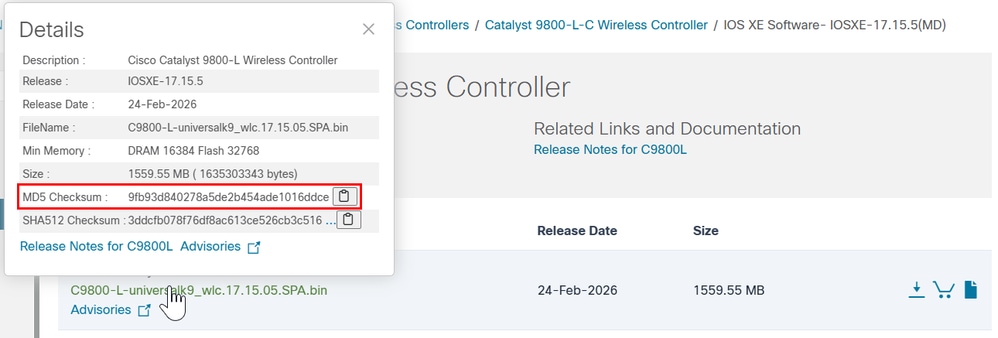
5단계. 현재 부팅 변수를 확인합니다. 변수가 로 설정된 경우packages.confWLC가 현재 설치 모드에서 실행 중입니다. 번들 모드로 변환하려면 기존 부트 변수를 삭제하고 .bin 이미지를 새 부트 변수로 설정합니다. 이러한 변경 후 컨피그레이션을 저장해야 합니다. 그렇지 않으면 새 부트 변수는 다시 로드 후에도 유지되지 않습니다.
WLC#show bootvar
BOOT variable = bootflash:packages.conf,12;
CONFIG_FILE variable =
BOOTLDR variable does not exist
Configuration register is 0x2102
WLC#conf t
WLC(config)#no boot system
WLC(config)#do write
WLC(config)#boot system bootflash:C9800-L-universalk9_wlc.17.15.05.SPA.bin
WLC(config)#do write
WLC(config)#end
6단계. 부트 변수가 로 설정되어 있는지 확인하려면 이 명령을 bootflash:실행합니다.
이제 출력이 표시됩니다. BOOT variable = bootflash:
WLC#show bootvar
BOOT variable = bootflash:C9800-L-universalk9_wlc.17.15.05.SPA.bin,12;
CONFIG_FILE variable does not exist
BOOTLDR variable does not exist
Configuration register is 0x102

Standby not ready to show bootvar
7단계. 번들 모드로 부팅하려면 컨트롤러를 다시 로드합니다.
WLC#reload
Reload command is being issued on Active unit, this will reload the whole stack
Proceed with reload? [confirm]
8단계. WLC 초기화 프로세스를 모니터링하여 번들 모드에서 부팅되는지 확인합니다.
...
32768K bytes of non-volatile configuration memory.
16777216K bytes of physical memory.
26251263K bytes of eUSB flash at bootflash:.
0K bytes of Cloud S3 Storage at cloudfs:.

Base Ethernet MAC Address : FF:FF:FF:FF:FF:FF

Installation mode is BUNDLE
GUI 절차
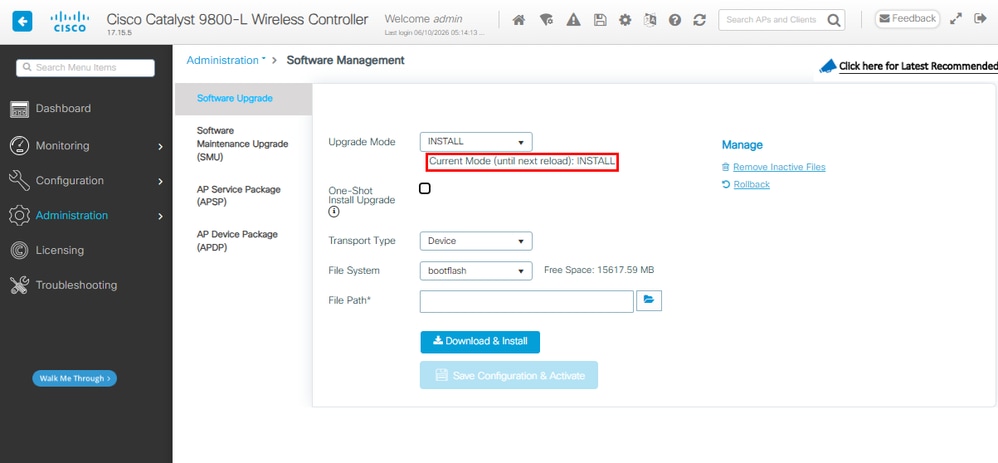
1단계. 현재 모드를 확인합니다. Administration(관리) > Software Management(소프트웨어 관리) > Software Upgrade(소프트웨어 업그레이드)로 이동하여 Upgrade Mode(업그레이드 모드)에서 시스템이 현재 설치 모드임을 나타내는지 확인합니다.
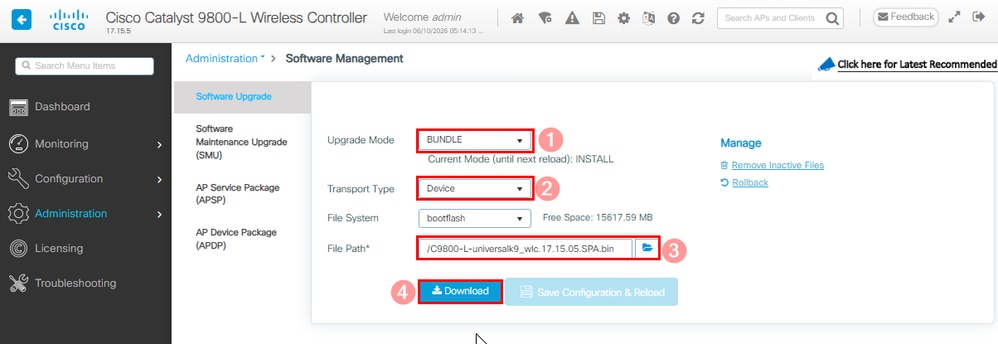
2단계. Upgrade Mode(업그레이드 모드) 및 Select Bundle(번들 선택)에서 사용 가능한 드롭다운 목록을 클릭합니다. 그런 다음 Transport Type(전송 유형)을 선택하고 .bin 파일의 File Path(파일 경로)를 선택한 다음 Download(다운로드)를 선택합니다.
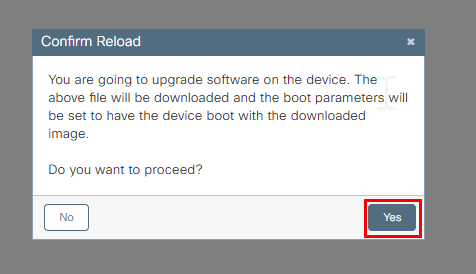
3단계. 시스템 다시 로드 동의를 확인합니다. 이 순간 번들 모드로의 변환이 시작됩니다.
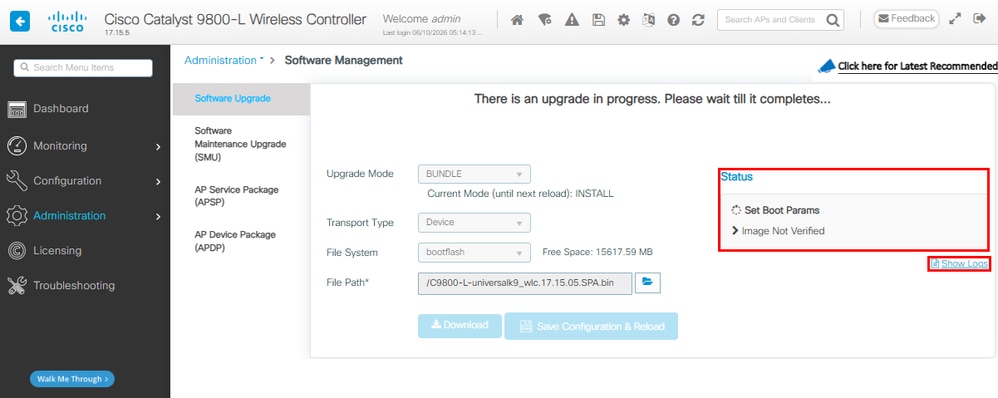
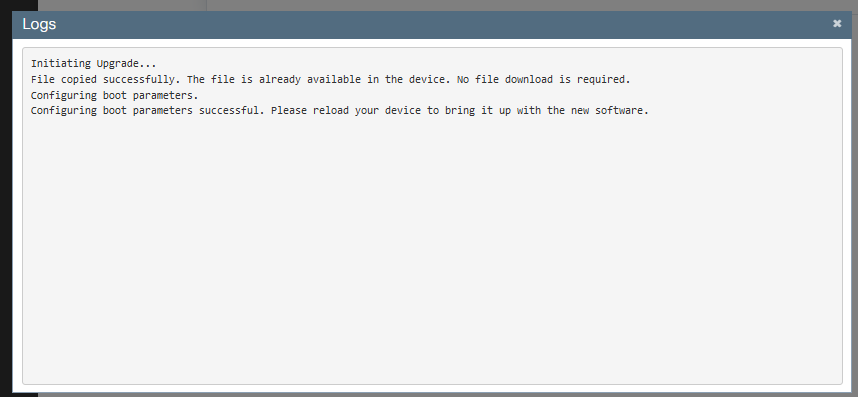
4단계. 오른쪽 Status(상태) 섹션 및 Show Logs(로그 표시) 팝업 창에서 업그레이드를 모니터링합니다.
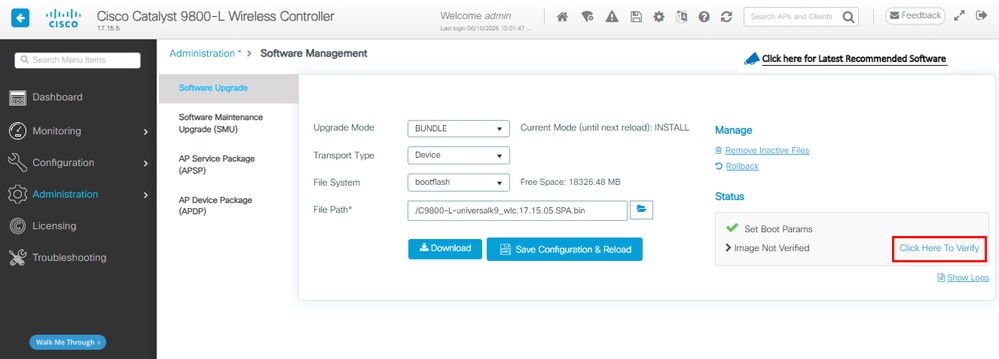
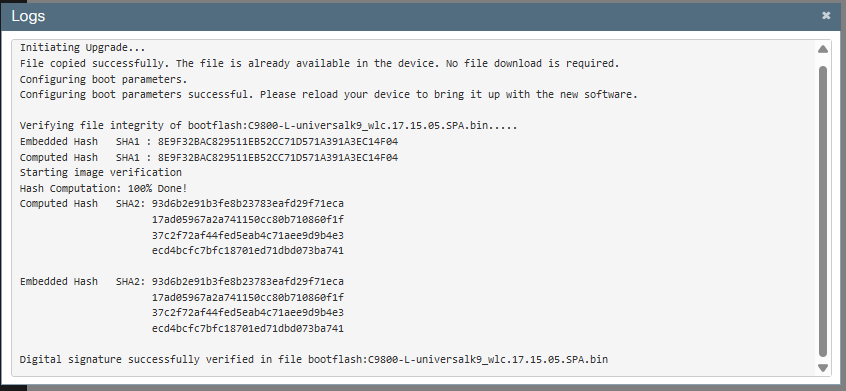
5단계. 이미지를 확인합니다.
6단계. 컨피그레이션을 저장하고 다시 로드를 확인합니다.
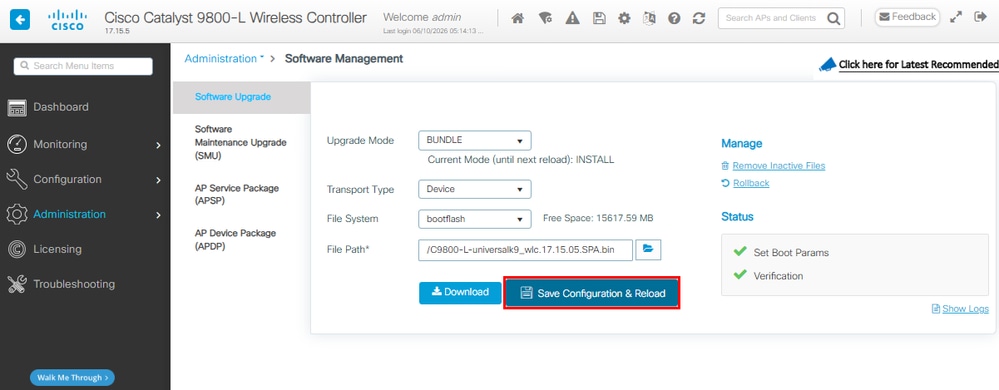
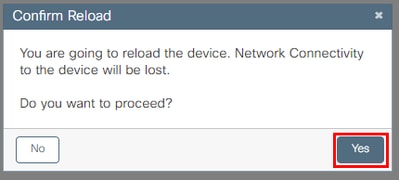
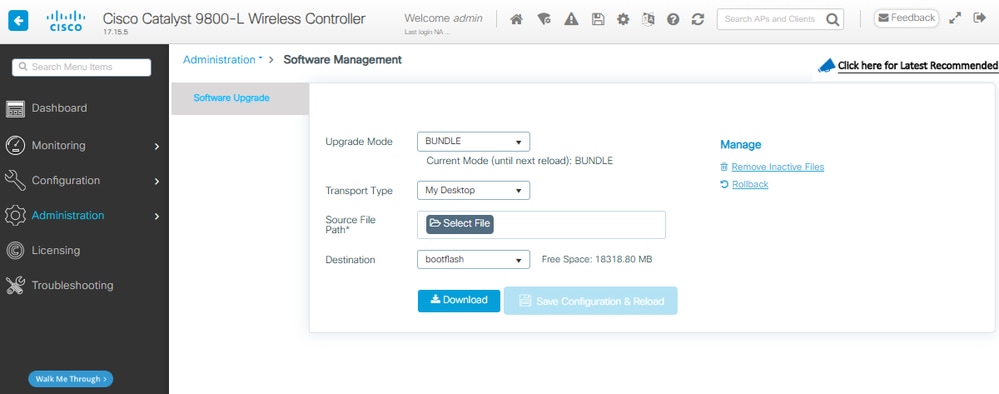
7단계. WLC 다시 로드를 모니터링하고 GUI를 사용할 수 있게 되면 Administration(관리) > Software Management(소프트웨어 관리) > Software Upgrade(소프트웨어 업그레이드)로 이동합니다. 업그레이드 모드에서는 현재 시스템이 번들 모드로 작동 중임을 나타냅니다.
번들에서 설치 모드로
CLI 절차
1단계. 새 이미지를 확장하기 위해 플래시에 충분한 공간이 있는지 확인합니다.
WLC#dir bootflash: | i bytes free
26458804224 bytes total (9501368320 bytes free)
2단계. 공간이 부족한 경우 이전에 추가한 패키지를 폐기하기 위해 이전 설치 파일을 정리합니다.
WLC#install remove inactive
install_remove: START Tue Jun 09 21:21:34 Central 2026
install_remove: Removing IMG
Cleaning up unnecessary package files
No path specified, will use booted path /tmp/sw/isos/packages.conf

Cleaning /bootflash
Scanning boot directory for packages ... done.
Preparing packages list to delete ...
[R0]: /bootflash/packages.conf File is in use, will not delete.
[R0]: /bootflash/C9800-L-universalk9_wlc.17.15.05.SPA.bin File is in use, will not delete.
[R0]: /bootflash/C9800-L-universalk9_wlc.17.15.05.SPA.conf File is in use, will not delete.

The following files will be deleted:
[R0]: /bootflash/C9800-L-mono-universalk9_wlc.17.15.05.SPA.pkg
[R0]: /bootflash/C9800-L-rpboot.17.15.05.SPA.pkg

Do you want to remove the above files? [y/n]y

Deleting file /bootflash/C9800-L-mono-universalk9_wlc.17.15.05.SPA.pkg ... done.
Deleting file /bootflash/C9800-L-rpboot.17.15.05.SPA.pkg ... done.
SUCCESS: Files deleted.

--- Starting Post_Remove_Cleanup ---
Performing REMOVE_POSTCHECK on all members
Finished Post_Remove_Cleanup
SUCCESS: install_remove Tue Jun 09 21:22:08 Central 2026

WLC#dir bootflash: | i bytes free
26458804224 bytes total (19666468864 bytes free)
3단계. 새 이미지를 플래시에 복사합니다.
WLC#copy tftp: flash:
Address or name of remote host []? 10.152.200.238
Source filename []? C9800-L-universalk9_wlc.17.15.05.SPA.bin
Destination filename [C9800-L-universalk9_wlc.17.15.05.SPA.bin]?
Accessing tftp://10.152.200.238/C9800-L-universalk9_wlc.17.15.05.SPA.bin...
Loading C9800-L-universalk9_wlc.17.15.05.SPA.bin from 10.152.200.238 (via Vlan210): !!!!!!!!!!!!!!!!!!!!!!!!!!!!!!!!!!!!!!!!!!
4단계. 이미지가 플래시에 성공적으로 복사되었는지 확인하고 이미지 무결성을 확인합니다.
WLC#dir bootflash:*.bin
Directory of bootflash:/*.bin
Directory of bootflash:/
 95 -rw- 1635303343 Jun 5 2026 23:24:36 +00:00 C9800-L-universalk9_wlc.17.15.05.SPA.bin.SPA.bin

WLC#verify /md5 bootflash:C9800-L-universalk9_wlc.17.15.05.SPA.bin
........................................................................
........................................................................
........................................................................
........................................................................Done!
verify /md5 (bootflash:C9800-L-universalk9_wlc.17.15.05.SPA.bin) = 9fb93d840278a5de2b454ade1016ddce
결과를 Cisco 소프트웨어 다운로드 사이트의 대상 이미지에 대한 릴리스 세부사항에 제공된 MD5 체크섬과 비교하려면 값이 정확하게 일치해야 합니다.
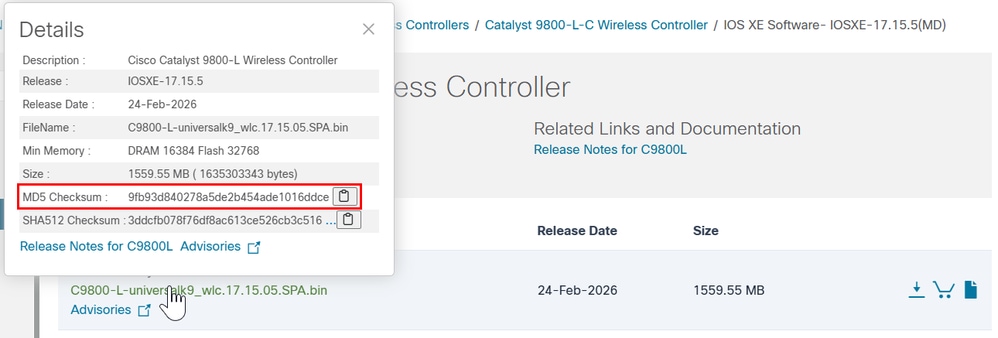
5단계. 현재 부팅 변수를 확인합니다. 변수가 .bin 파일을 가리키는 경우 시스템은 현재 번들 모드에서 실행 중입니다. 이 단계에서는 부팅 변수를 수동으로 구성할 필요가 없습니다. 설치 프로세스에서는 업그레이드 중에 로 자동bootflash:packages.conf으로 업데이트합니다.
WLC#show bootvar
BOOT variable = bootflash:C9800-L-universalk9_wlc.17.15.05.SPA.bin,12;
CONFIG_FILE variable does not exist
BOOTLDR variable does not exist
Configuration register is 0x102
Standby not ready to show bootvar
6단계. 플래시에 소프트웨어 설치 이미지 번들에서 설치 모드로 변환하려면 one-shot CLI install add file bootflash: 명령을 사용합니다.
WLC#install add file bootflash:C9800-L-universalk9_wlc.17.15.05.SPA.bin activate commit
7단계. 시스템 다시 로드y (yes) 동의를 입력합니다. 설치가 완료되면 컨트롤러가 다시 로드됩니다.
install_add_activate_commit: START Mon Jun 08 22:53:20 Central 2026
install_add: START Mon Jun 08 22:53:20 Central 2026
install_add: Adding IMG
--- Starting initial file syncing ---
Copying bootflash:C9800-L-universalk9_wlc.17.15.05.SPA.bin from Chassis 1/R0 to Chassis 1/R0
Info: Finished copying to the selected Chassis
Finished initial file syncing

--- Starting Add ---
Performing Add on all members
Checking status of Add on [1/R0]
Add: Passed on [1/R0]
Image added. Version: 17.15.05.0.8370

Finished Add

install_activate: START Mon Jun 08 22:53:59 Central 2026
install_activate: Activating IMG
Following packages shall be activated:
/bootflash/C9800-L-mono-universalk9_wlc.17.15.05.SPA.pkg
/bootflash/C9800-L-rpboot.17.15.05.SPA.pkg

This operation may require a reload of the system. Do you want to proceed? [y/n]y

--- Starting Activate ---
Performing Activate on all members
[1] Activate package(s) on Chassis 1/R0
[1] Finished Activate on Chassis 1/R0
Checking status of Activate on [1/R0]
Activate: Passed on [1/R0]
Finished Activate

--- Starting Commit ---
Performing Commit on all members
[1] Commit package(s) on Chassis 1/R0
[1] Finished Commit on Chassis 1/R0
Checking status of Commit on [1/R0]
Commit: Passed on [1/R0]
Finished Commit operation

SUCCESS: install_add_activate_commit Mon Jun 08 22:55:34 Central 2026

Initializing Hardware ...
8단계. WLC 초기화 프로세스를 모니터링하여 설치 모드에서 부팅되는지 확인합니다.
...
32768K bytes of non-volatile configuration memory.
16777216K bytes of physical memory.
26251263K bytes of eUSB flash at bootflash:.
0K bytes of Cloud S3 Storage at cloudfs:.

Base Ethernet MAC Address : FF:FF:FF:FF:FF:FF

Installation mode is INSTALL
GUI 절차
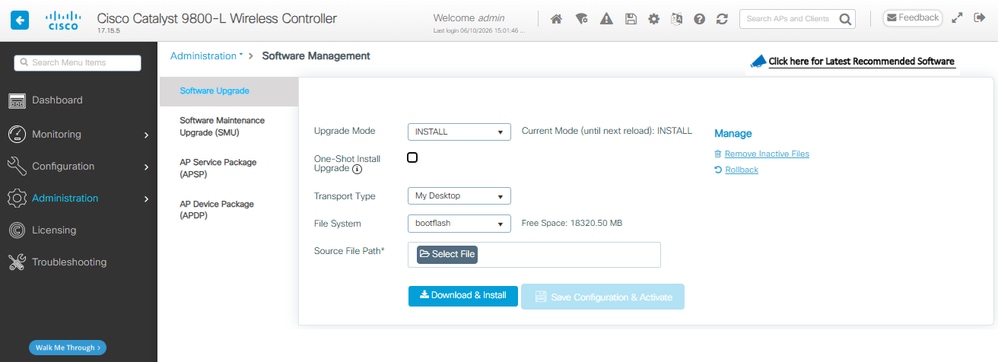
1단계. 현재 모드를 확인합니다. Administration(관리) > Software Management(소프트웨어 관리) > Software Upgrade(소프트웨어 업그레이드)로 이동하여 Upgrade Mode(업그레이드 모드)에서 시스템이 현재 번들 모드에 있음을 나타내는지 확인합니다.
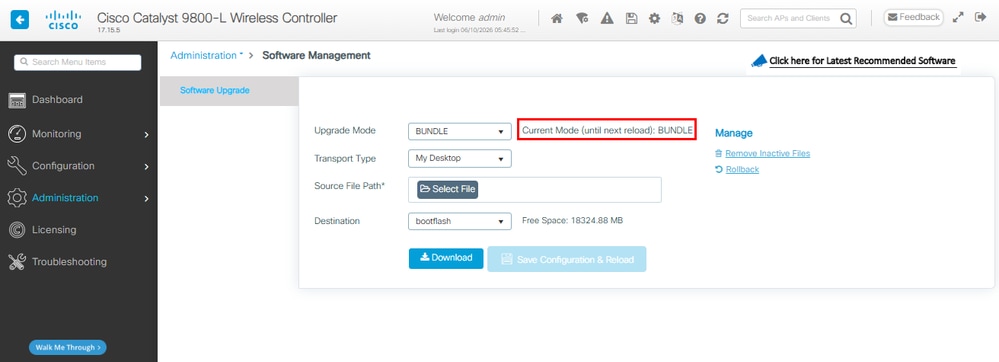
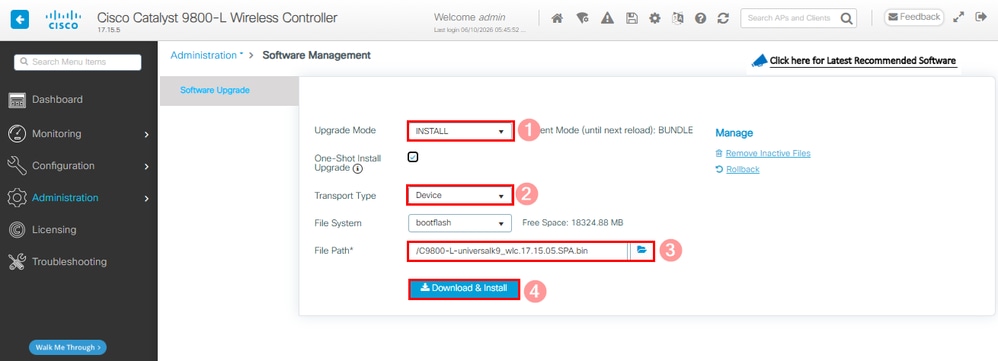
2단계. 업그레이드 모드에서 사용 가능한 드롭다운 목록을 클릭하고 설치를 선택합니다. 그런 다음 Transport Type(전송 유형)을 선택하고 .bin 파일의 File Path(파일 경로)를 선택한 다음 Download & Install(다운로드 및 설치)을 선택합니다.
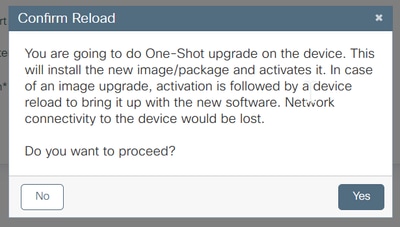
3단계. 시스템 다시 로드 동의를 확인합니다. 이 순간 설치 모드로의 변환이 시작됩니다.
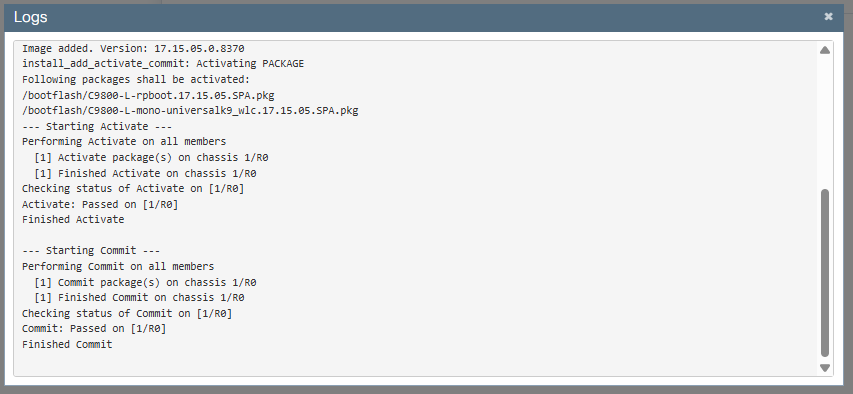
4단계. 오른쪽 Status(상태) 섹션 및 Show Logs(로그 표시) 팝업 창에서 업그레이드를 모니터링합니다.
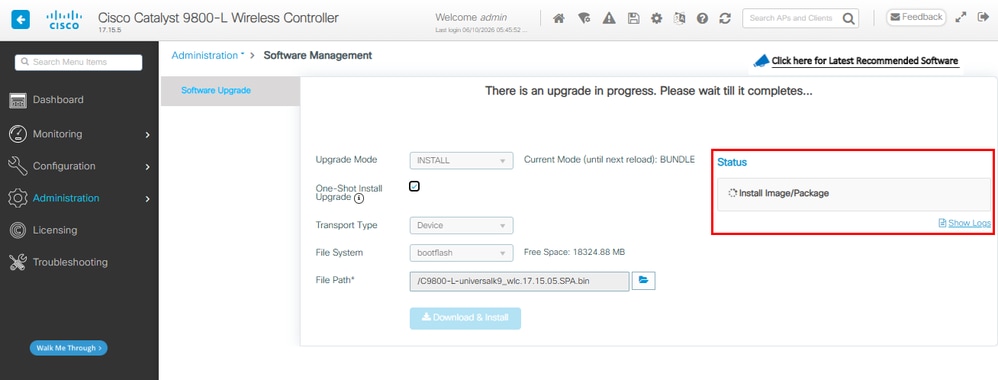
변경 커밋(commit of change)의 일부로 시스템이 다시 로드됩니다.
5단계. WLC 다시 로드를 모니터링하고 GUI를 사용할 수 있게 되면 Administration(관리) > Software Management(소프트웨어 관리) > Software Upgrade(소프트웨어 업그레이드)로 이동합니다. 업그레이드 모드가 시스템이 현재 설치 모드에서 작동 중임을 나타냅니다.
다음을 확인합니다.
설정이 올바르게 작동하는지 확인하려면 이 섹션을 활용하십시오.
컨트롤러 재부팅 후 컨트롤러의 현재 설치 모드를 확인할 수 있습니다. 변환show version이 성공했는지 확인하려면 명령을 실행합니다.
설치 모드
WLC#show version | include System image|Installation mode|IOS XE Software
Cisco IOS XE Software, Version 17.15.05
System image file is "bootflash:packages.conf"
Installation mode is INSTALL
번들 모드
WLC#show version | include System image|Installation mode|IOS XE Software
Cisco IOS XE Software, Version 17.15.05
System image file is "bootflash:/C9800-L-universalk9_wlc.17.15.05.SPA.bin"
Installation mode is BUNDLE
문제 해결
현재 이 구성의 문제를 해결하는 데 사용할 수 있는 특정 정보가 없습니다.
관련 정보
- Cisco Catalyst 9800-CL Cloud Wireless Controller 설치 설명서
- 무선 LAN 컨트롤러에 대한 TAC 권장 IOS XE 빌드
- 최종 사용자 설명서
- Cisco 기술 지원 및 다운로드
개정 이력
| 개정 | 게시 날짜 | 의견 |
|---|---|---|
3.0 |
11-Jun-2026
|
대체 텍스트를 추가했습니다.
업데이트된 스타일 요구 사항 및 서식. |
2.0 |
30-Nov-2023
|
재인증 |
1.0 |
15-Apr-2021
|
최초 릴리스 |
 피드백
피드백