EVPN VxLAN Cat9000에서 외부 DHCP 문제 해결

소개
이 문서에서는 Cat9000 플랫폼의 외부 EVPN VxLAN 환경에서 DHCP 문제를 해결하는 방법을 설명합니다.
사전 요구 사항
요구 사항
다음 주제에 대한 지식을 보유하고 있으면 유용합니다.
- Cat9000 플랫폼의 Virtual eXtensible LAN
- VxLAN 환경의 검색 호스트 구성 프로토콜
- BGP(Border Gateway Protocol)
이러한 항목에 대한 자세한 내용은 다음을 참조하십시오.
- 장: BGP EVPN VXLAN Fabric Cat9300에서 DHCP 릴레이 구성
- 장: BGP EVPN VXLAN Fabric Cat9400에서 DHCP 릴레이 구성
- 장: BGP EVPN VXLAN Fabric Cat9500에서 DHCP 릴레이 구성
- 장: BGP EVPN VXLAN Fabric Cat9600에서 DHCP 릴레이 구성
사용되는 구성 요소
이 문서의 정보는 Cisco IOS XE 소프트웨어를 기반으로 합니다.
이 문서의 정보는 특정 랩 환경의 디바이스를 토대로 작성되었습니다. 이 문서에 사용된 모든 디바이스는 초기화된(기본) 컨피그레이션으로 시작되었습니다. 현재 네트워크가 작동 중인 경우 모든 명령의 잠재적인 영향을 미리 숙지하시기 바랍니다.
네트워크 다이어그램
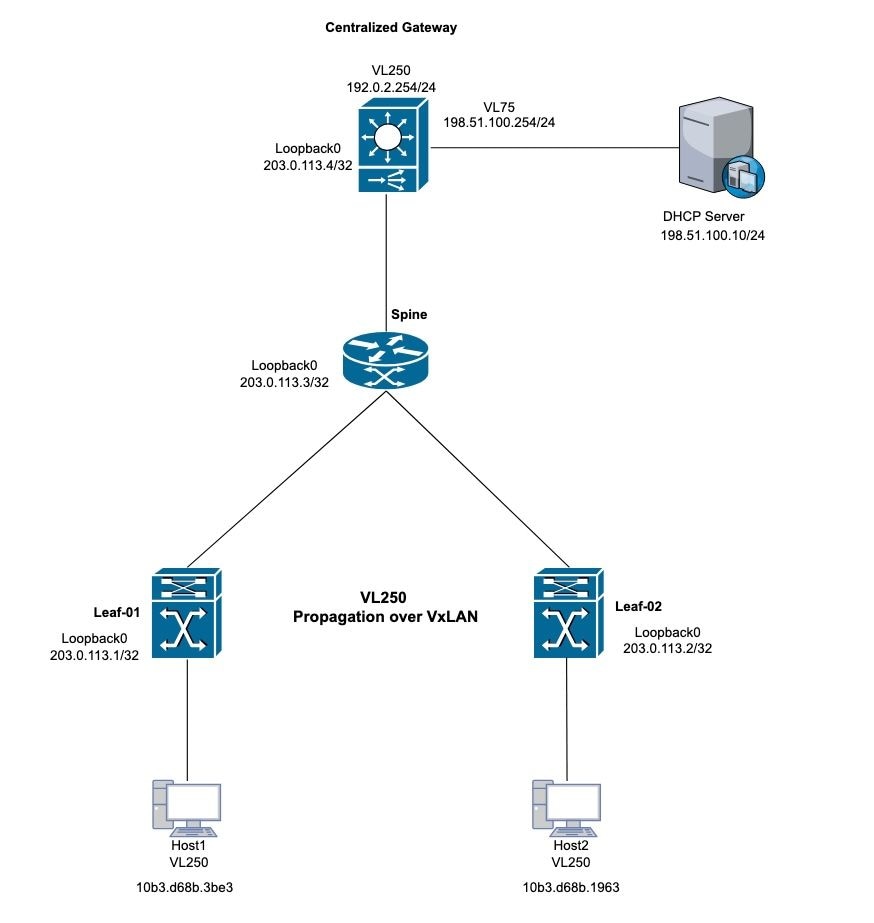 DHCP VxLAN 토폴로지
고객 사례 1: 외부 서버(패브릭 내부의 중앙 집중식 게이트웨이)에서 IP 주소를 가져올 수 없습니다.
이 토폴로지는 VLAN 250용 VxLAN 레이어 2를 사용합니다. 호스트에는 외부 DHCP 서버의 IP 주소가 필요합니다.
Leaf-01 확인
1단계. Leaf-1에서 로컬 호스트에 대한 MAC 주소 학습을 확인합니다.
2단계. 또한 기본 게이트웨이 MAC 주소가 학습되었는지 확인합니다. 학습된 MAC 주소와 기본 게이트웨이 IP 주소가 모두 BGP 테이블의 항목으로 올바르게 설치되었는지 확인합니다.
Leaf-1#show mac address-table address 10b3.d68b.3be3 (host mac address)
            Mac Address Table
-------------------------------------------

Vlan    Mac Address     Type     Ports
----   -----------      -------- -----
250    10b3.d68b.3be3   DYNAMIC  Twe1/0/1

Centralized-Gateway#show interface vlan 250 | include bia (remote mac address)
Hardware is Ethernet SVI, address is 3473.2db8.bee3 (bia 3473.2db8.bee3)
Leaf-1#show bgp l2vpn evpn 10b3.d68b.3be3 (local mac address)
BGP routing table entry for [2][203.0.113.1:250][0][48][10B3D68B3BE3][0][*]/20, version 3
Paths: (1 available, best #1, table evi_250)
 Advertised to update-groups:
    2
Refresh Epoch 1
Local
  0.0.0.0 (via default) from 0.0.0.0 (203.0.113.1)
    Origin incomplete, localpref 100, weight 32768, valid, sourced, local, best
    EVPN ESI: 00000000000000000000, Label1 10250
    Extended Community: RT:10:250 ENCAP:8
    Local irb vxlan vtep:
     vrf:not found, l3-vni:0
     local router mac:0000.0000.0000
     core-irb interface:(not found)
     vtep-ip:203.0.113.1
   rx pathid: 0, tx pathid: 0x0
   Updated on Oct 14 2025 22:27:32 UTC

Leaf-1#show bgp l2vpn evpn 3473.2db8.bee3 (remote mac address)
BGP routing table entry for [2][203.0.113.1:250][0][48][34732DB8BEE3][32][192.0.2.254]/24, version 9
Paths: (1 available, best #1, table evi_250)
  Flag: 0x100
  Not advertised to any peer
  Refresh Epoch 4
  Local, imported path from [2][203.0.113.4:250][0][48][34732DB8BEE3][32][192.0.2.254]/24 (global)
    203.0.113.4 (metric 3) (via default) from 203.0.113.3 (203.0.113.3)
      Origin incomplete, metric 0, localpref 100, valid, internal, best
      EVPN ESI: 00000000000000000000, Label1 10250
      Extended Community: RT:10:250 ENCAP:8 EVPN DEF GW:0:0
      Originator: 203.0.113.4, Cluster list: 203.0.113.3
      rx pathid: 0, tx pathid: 0x0
      Updated on Oct 14 2025 14:48:35 UTC
BGP routing table entry for [2][203.0.113.4:250][0][48][34732DB8BEE3][32][192.0.2.254]/24, version 8
Paths: (1 available, best #1, table EVPN-BGP-Table)
  Flag: 0x100
  Not advertised to any peer
  Refresh Epoch 4
  Local
    203.0.113.4 (metric 3) (via default) from 203.0.113.3 (203.0.113.3)
      Origin incomplete, metric 0, localpref 100, valid, internal, best
      EVPN ESI: 00000000000000000000, Label1 10250
      Extended Community: RT:10:250 ENCAP:8 EVPN DEF GW:0:0
      Originator: 203.0.113.4, Cluster list: 203.0.113.3
      rx pathid: 0, tx pathid: 0x0
      Updated on Oct 14 2025 14:48:35 UTC
3단계. Leaf-1과 기본 게이트웨이 간의 MAC 주소 학습을 검증합니다. Leaf-1은 트렁크 포트를 통해 로컬 MAC 주소를 학습하고 BGP를 통해 원격 MAC 주소를 학습합니다.
Leaf-1#show l2route evpn mac
EVI         ETag  Prod    Mac Address                                          Next Hop(s) Seq Number
----- ---------- ----- -------------- ---------------------------------------------------- ----------
250            0 L2VPN 10b3.d68b.3b81                                         Twe1/0/1:250          0
250            0 L2VPN 10b3.d68b.3be3                                         Twe1/0/1:250          0 (Host local mac address)
250            0   BGP 3473.2db8.bee3                                  V:10250 203.0.113.4          0 (CGW SVI mac address)
4단계. L2VPN EVPN 인스턴스 내에서 Leaf-1 스위치에서 기본 게이트웨이 학습을 확인합니다.
Leaf-1#show l2vpn evpn default-gateway
Valid Default Gateway Address                  EVI  VLAN  MAC Address    Source
----- --------------------------------------- ----- ----- -------------- -----------
Y     192.0.2.254                             250   250   3473.2db8.bee3 203.0.113.4
5단계. VxLAN 관점이 올바르면 DHCP로 이동하여 문제를 해결합니다.
6단계. Leaf-1에서 DHCP 게이트웨이로의 DORA 프로세스를 확인합니다. Leaf-01에서 ip dhcp snooping 패킷을 디버그하고 검색에서 로그 항목을 생성하는지 확인합니다. 로그 생성이 발생하지 않으면 PC에 연결하는 인터페이스에서 패킷 캡처를 활성화합니다.
Leaf-1#debug ip dhcp snooping packet
DHCP Snooping Packet debugging is on
Leaf-1#
*Oct 21 19:33:16.358: DHCP_SNOOPING: received new DHCP packet from input interface (TwentyFiveGigE1/0/1)
*Oct 21 19:33:16.358: DHCP Memory dump is printed for process packet
<snip>
*Oct 21 19:33:16.367: DHCP_SNOOPING: process new DHCP packet, message type: DHCPDISCOVER, input interface: Twe1/0/1, MAC da: ffff.ffff.ffff, MAC sa: 10b3.d68b.3be3, IP da: 255.255.255.255, IP sa: 0.0.0.0, DHCP ciaddr: 0.0.0.0, DHCP yiaddr: 0.0.0.0, DHCP siaddr: 0.0.0.0, DHCP giaddr: 0.0.0.0, DHCP chaddr: 10b3.d68b.3be3, efp_id: -1865499306, vlan_id: 250, bootpflag:0x32768(Broadcast)
*Oct 21 19:33:16.367: DHCP_SNOOPING: add relay information option.
*Oct 21 19:33:16.367: DHCP_SNOOPING: Encoding opt82 CID in vlan-mod-port format
*Oct 21 19:33:16.367: DHCP_SNOOPING:VxLAN : vlan_id 250 VNI 10250 mod 1 port 1
*Oct 21 19:33:16.367: DHCP_SNOOPING: Encoding opt82 RID in MAC address format
*Oct 21 19:33:16.367: DHCP_SNOOPING: binary dump of relay info option, length: 26 data:
0x52 0x18 0x1 0xC 0x1 0xA 0x0 0x8 0x0 0x0 0x28 0xA 0x1 0x1 0x0 0x0 0x2 0x8 0x0 0x6 0x4C 0x5D 0x3C 0xEB 0x43 0x40
*Oct 21 19:33:16.367: DHCPS BRIDGE PAK: vlan=250 platform_flags=1
*Oct 21 19:33:16.367: DHCP_SNOOPING: bridge packet get invalid mat entry: FFFF.FFFF.FFFF, packet is flooded to ingress VLAN: (250)
*Oct 21 19:33:16.367: DHCP_SNOOPING: L2RELAY: sent unicast packet to default gw: 3473.2db8.bee3 vlan 0 src intf TwentyFiveGigE1/0/1
*Oct 21 19:33:20.058: DHCP_SNOOPING: received new DHCP packet from input interface (TwentyFiveGigE1/0/1)
*Oct 21 19:33:20.058: DHCP Memory dump is printed for process packet
7단계. debug가 트리거되지 않으면 검증을 위해 패킷 캡처를 수행합니다. 인그레스 검색 패킷을 캡처하려면 지정된 구문을 사용합니다.
monitor capture <name> interface <int> in match ipv4 protocol udp any range 67 68 any range 67 68 start
monitor capture <name> stop
monitor capture export file flash:<name>.pcap
show monitor capture <name> buffer display-filter "eth.addr==[mac address]" detailed

참고: Wireshark 필터 구문을 준수하는 표시 필터 문자열을 캡처합니다.
Leaf-1#monitor capture cap interface twe1/0/1 in match ipv4 protocol udp any range 67 68 any range 67 68 start
Started capture point : cap
Leaf-1#
*Oct 21 22:57:04.719: %BUFCAP-6-ENABLE: Capture Point cap enabled.
Leaf-1#
Leaf-1#monitor capture cap stop
Capture statistics collected at software:
        Capture duration - 96 seconds
        Packets received - 10
        Packets dropped - 0
        Packets oversized - 0

Bytes dropped in asic - 0

Capture buffer will exists till exported or cleared

Stopped capture point : cap

*Oct 21 22:58:40.810: %BUFCAP-6-DISABLE: Capture Point cap disabled.

Leaf-1#show monitor capture cap buffer display-filter "eth,addr==10:b3:d6:8b:3b:e3" detailed
Starting the packet display ........ Press Ctrl + Shift + 6 to exit
Frame 1: 371 bytes on wire (2968 bits), 371 bytes captured (2968 bits) on interface /tmp/epc_ws/wif_to_ts_pipe, id 0
    Interface id: 0 (/tmp/epc_ws/wif_to_ts_pipe)
        Interface name: /tmp/epc_ws/wif_to_ts_pipe
    Encapsulation type: Ethernet (1)
    Arrival Time: Oct 21, 2025 22:57:07.843851000 UTC
     [Time shift for this packet: 0.000000000 seconds]
    Epoch Time: 1761087427.843851000 seconds
  <snip>
    [Protocols in frame: eth:ethertype:vlan:ethertype:ip:udp:dhcp]
Ethernet II, Src: 10:b3:d6:8b:3b:e3 (10:b3:d6:8b:3b:e3), Dst: ff:ff:ff:ff:ff:ff (ff:ff:ff:ff:ff:ff)
   Destination: ff:ff:ff:ff:ff:ff (ff:ff:ff:ff:ff:ff)
       Address: ff:ff:ff:ff:ff:ff (ff:ff:ff:ff:ff:ff)
       .... ..1. .... .... .... .... = LG bit: Locally administered address (this is NOT the factory default)
       .... ...1 .... .... .... .... = IG bit: Group address (multicast/broadcast)
   Source: 10:b3:d6:8b:3b:e3 (10:b3:d6:8b:3b:e3)
       Address: 10:b3:d6:8b:3b:e3 (10:b3:d6:8b:3b:e3)
       .... ..0. .... .... .... .... = LG bit: Globally unique address (factory default)
       .... ...0 .... .... .... .... = IG bit: Individual address (unicast)
   Type: 802.1Q Virtual LAN (0x8100)
802.1Q Virtual LAN, PRI: 0, DEI: 0, ID: 250
    000. .... .... .... = Priority: Best Effort (default) (0)
    ...0 .... .... .... = DEI: Ineligible
    .... 0000 1111 1010 = ID: 250
Type: IPv4 (0x0800)

<snip>

User Datagram Protocol, Src Port: 68, Dst Port: 67
    Source Port: 68
    Destination Port: 67
    Length: 333
    Checksum: 0xdf55 [unverified]
    [Checksum Status: Unverified]
    [Stream index: 0]
    [Timestamps]
        [Time since first frame: 0.000000000 seconds]
        [Time since previous frame: 0.000000000 seconds]
Dynamic Host Configuration Protocol (Discover)
Message type: Boot Request (1)
Hardware type: Ethernet (0x01)
Hardware address length: 6
Hops: 0
Transaction ID: 0x3bd7aadb
Seconds elapsed: 7
Bootp flags: 0x8000, Broadcast flag (Broadcast)
    1... .... .... .... = Broadcast flag: Broadcast
    .000 0000 0000 0000 = Reserved flags: 0x0000
Client IP address: 0.0.0.0
Your (client) IP address: 0.0.0.0
Next server IP address: 0.0.0.0
Relay agent IP address: 0.0.0.0
Client MAC address: 10:b3:d6:8b:3b:e3 (10:b3:d6:8b:3b:e3)
Client hardware address padding: 00000000000000000000
Server host name not given
Boot file name not given
Magic cookie: DHCP
Option: (53) DHCP Message Type (Discover)
<snip>
8단계. 패킷 캡처를 통해 VxLAN 패킷 캡슐화를 검증합니다. 이 유효성 검사에 대해 다양한 필터를 적용합니다. VxLAN은 UDP 포트 4789를 사용합니다.
monitor capture cap interface <outgoing interface > out match ipv4 protocol udp any any eq 4789 (Interface that is pointing to the RR or VTEP via BGP)
Leaf-1#show ip bgp all summary
For address family: L2VPN E-VPN
<snip>
Neighbor       V           AS MsgRcvd MsgSent    TblVer InQ OutQ Up/Down   State/PfxRcd
203.0.113.3     4           10    4204    4122       365   0    0 2d13h            2

Leaf-1#show ip route 203.0.113.3
Routing entry for 203.0.113.3/32
Known via "ospf 1", distance 110, metric 2, type intra area
Last update from 172.x.x.2 on TwentyFiveGigE1/0/2, 2d13h ago
Routing Descriptor Blocks:
* 172.x.x.2, from 203.0.113.3, 2d13h ago, via TwentyFiveGigE1/0/2

Leaf-1#monitor capture cap interface twe1/0/2 out match ipv4 protocol udp any any eq 4789 start
*Oct 21 23:51:07.689: %BUFCAP-6-ENABLE: Capture Point cap enabled.

Leaf-1#show monitor capture cap buffer display-filter "eth.addr==10:b3:d6:8b:3b:e3" detailed
Starting the packet display ........ Press Ctrl + Shift + 6 to exit

Frame 1: 443 bytes on wire (3544 bits), 443 bytes captured (3544 bits) on interface /tmp/epc_ws/wif_to_ts_pipe, id 0
    Interface id: 0 (/tmp/epc_ws/wif_to_ts_pipe)
        Interface name: /tmp/epc_ws/wif_to_ts_pipe
    Encapsulation type: Ethernet (1)
    Arrival Time: Oct 21, 2025 23:51:34.848693000 UTC
    [Time shift for this packet: 0.000000000 seconds]
    Epoch Time: 1761090694.848693000 seconds
   <snip>
   [Protocols in frame: eth:ethertype:ip:udp:vxlan:eth:ethertype:ip:udp:dhcp]
Ethernet II, Src: 00:00:00:00:00:00 (00:00:00:00:00:00), Dst: 00:00:00:00:00:00 (00:00:00:00:00:00)
    Destination: 00:00:00:00:00:00 (00:00:00:00:00:00)
        Address: 00:00:00:00:00:00 (00:00:00:00:00:00)
        .... ..0. .... .... .... .... = LG bit: Globally unique address (factory default)
        .... ...0 .... .... .... .... = IG bit: Individual address (unicast)
    Source: 00:00:00:00:00:00 (00:00:00:00:00:00)
        Address: 00:00:00:00:00:00 (00:00:00:00:00:00)
        .... ..0. .... .... .... .... = LG bit: Globally unique address (factory default)
        .... ...0 .... .... .... .... = IG bit: Individual address (unicast)
Type: IPv4 (0x0800)
Internet Protocol Version 4, Src: 203.0.113.1, Dst: 203.0.113.4
    0100 .... = Version: 4
    .... 0101 = Header Length: 20 bytes (5)
    Differentiated Services Field: 0x00 (DSCP: CS0, ECN: Not-ECT)
        0000 00.. = Differentiated Services Codepoint: Default (0)
        .... ..00 = Explicit Congestion Notification: Not ECN-Capable Transport (0)
<snip>
User Datagram Protocol, Src Port: 65479, Dst Port: 4789
    Source Port: 65479
    Destination Port: 4789
    Length: 409
    [Checksum: [missing]]
    [Checksum Status: Not present]
    [Stream index: 0]
    [Timestamps]
        [Time since first frame: 0.000000000 seconds]
        [Time since previous frame: 0.000000000 seconds]
Virtual eXtensible Local Area Network
Flags: 0x0800, VXLAN Network ID (VNI)
    0... .... .... .... = GBP Extension: Not defined
    .... .... .0.. .... = Don't Learn: False
    .... 1... .... .... = VXLAN Network ID (VNI): True
    .... .... .... 0... = Policy Applied: False
    .000 .000 0.00 .000 = Reserved(R): 0x0000
Group Policy ID: 0
VXLAN Network Identifier (VNI): 10250
Reserved: 0
<snip>
User Datagram Protocol, Src Port: 68, Dst Port: 67
    Source Port: 68
    Destination Port: 67
    Length: 359
    Checksum: 0x767d [unverified]
    [Checksum Status: Unverified]
    [Stream index: 1]
    [Timestamps]
         [Time since first frame: 0.000000000 seconds]
         [Time since previous frame: 0.000000000 seconds]
Dynamic Host Configuration Protocol (Discover)
    Message type: Boot Request (1)
    Hardware type: Ethernet (0x01)
    Hardware address length: 6
    Hops: 0
    Transaction ID: 0xd4c42ec1
    Seconds elapsed: 0
    Bootp flags: 0x8000, Broadcast flag (Broadcast)
        1... .... .... .... = Broadcast flag: Broadcast
        .000 0000 0000 0000 = Reserved flags: 0x0000
    Client IP address: 0.0.0.0
    Your (client) IP address: 0.0.0.0
    Next server IP address: 0.0.0.0
    Relay agent IP address: 0.0.0.0
    Client MAC address: 10:b3:d6:8b:3b:e3 (10:b3:d6:8b:3b:e3)
    Client hardware address padding: 00000000000000000000
    Server host name not given
    Boot file name not given
    Magic cookie: DHCP
중앙 게이트웨이 확인
1단계. BGP 및 L2 EVPN 경로에서 학습한 호스트 MAC 주소를 검증합니다(이 단계에서는 초기 Leaf 확인 절차를 반영함).
Centralized-Gateway#show bgp l2vpn evpn 10b3.d68b.3be3 (remote host mac address)
BGP routing table entry for [2][203.0.113.1:250][0][48][10B3D68B3BE3][0][*]/20, version 12
Paths: (1 available, best #1, table EVPN-BGP-Table)
  Not advertised to any peer
  Refresh Epoch 1
  Local
 203.0.113.1 (metric 3) (via default) from 203.0.113.3 (203.0.113.3) (learned via RR)
  Origin incomplete, metric 0, localpref 100, valid, internal, best
  EVPN ESI: 00000000000000000000, Label1 10250
  Extended Community: RT:10:250 ENCAP:8
  Originator: 203.0.113.1, Cluster list: 203.0.113.3
  rx pathid: 0, tx pathid: 0x0
  Updated on Oct 27 2025 17:53:37 UTC
BGP routing table entry for [2][203.0.113.4:250][0][48][10B3D68B3BE3][0][*]/20, version 14
Paths: (1 available, best #1, table evi_250)
  Not advertised to any peer
  Refresh Epoch 1
  Local, imported path from [2][203.0.113.1:250][0][48][10B3D68B3BE3][0][*]/20 (global)
    203.0.113.1 (metric 3) (via default) from 203.0.113.3 (203.0.113.3)
    Origin incomplete, metric 0, localpref 100, valid, internal, best
    EVPN ESI: 00000000000000000000, Label1 10250
    Extended Community: RT:10:250 ENCAP:8
    Originator: 203.0.113.1, Cluster list: 203.0.113.3
    rx pathid: 0, tx pathid: 0x0
    Updated on Oct 27 2025 17:53:37 UTC

Centralized-Gateway#show l2route evpn mac mac-address 10b3.d68b.3be3
EVI         ETag  Prod    Mac Address                                          Next Hop(s) Seq Number
----- ---------- ----- -------------- ---------------------------------------------------- ----------
250            0   BGP 10b3.d68b.3be3                                  V:10250 203.0.113.1          0
2단계. 중앙 게이트웨이에서 DHCP 릴레이 정보 및 DHCP 스누핑 컨피그레이션을 확인합니다.
Centralized-Gateway#show running-config | section dhcp
ip dhcp-relay source-interface Loopback0
ip dhcp relay information option vpn
ip dhcp relay information option
ip dhcp compatibility suboption link-selection standard
ip dhcp compatibility suboption server-override standard
ip dhcp snooping vlan 250
ip dhcp snooping
3단계. DHCP 서버와의 연결을 확인하고 VLAN 250 인터페이스에서 ping을 소싱합니다.
Centralized-Gateway#ping 198.51.100.10 source vlan 250
Type escape sequence to abort.
Sending 5, 100-byte ICMP Echos to 198.51.100.10, timeout is 2 seconds:
Packet sent with a source address of 192.0.2.254
!!!!!
Success rate is 100 percent (5/5), round-trip min/avg/max = 1/1/1 ms
4단계. 패킷 캡처를 수행하여 원격 호스트의 검색 메시지가 중앙 게이트웨이에 도착하는지 확인합니다.
Centralized-Gateway#monitor capture cap interface vlan250 in match ipv4 protocol udp any range 67 68 any range 67 68
Centralized-Gateway#monitor capture cap start
Started capture point : cap
Centralized-Gateway#show monitor capture cap buffer display-filter "eth.addr==10:b3:d6:8b:3b:e3" detailed
Starting the packet display ........ Press Ctrl + Shift + 6 to exit

Frame 1: 401 bytes on wire (3208 bits), 401 bytes captured (3208 bits) on interface /tmp/epc_ws/wif_to_ts_pipe, id 0
    Interface id: 0 (/tmp/epc_ws/wif_to_ts_pipe)
        Interface name: /tmp/epc_ws/wif_to_ts_pipe
    Encapsulation type: Ethernet (1)
    Arrival Time: Oct 27, 2025 20:43:30.774923000 UTC
    [Time shift for this packet: 0.000000000 seconds]
    Epoch Time: 1761597810.774923000 seconds
 <snip>
    [Protocols in frame: eth:ethertype:cmd:ethertype:ip:udp:dhcp]
Ethernet II, Src: 10:b3:d6:8b:3b:e3 (10:b3:d6:8b:3b:e3), Dst: 34:73:2d:b8:be:e3 (34:73:2d:b8:be:e3)
    Destination: 34:73:2d:b8:be:e3 (34:73:2d:b8:be:e3)
        Address: 34:73:2d:b8:be:e3 (34:73:2d:b8:be:e3)
        .... ..0. .... .... .... .... = LG bit: Globally unique address (factory default)
        .... ...0 .... .... .... .... = IG bit: Individual address (unicast)
    Source: 10:b3:d6:8b:3b:e3 (10:b3:d6:8b:3b:e3)
        Address: 10:b3:d6:8b:3b:e3 (10:b3:d6:8b:3b:e3)
        .... ..0. .... .... .... .... = LG bit: Globally unique address (factory default)
        .... ...0 .... .... .... .... = IG bit: Individual address (unicast)
   Type: CiscoMetaData (0x8909)
<snip>
Internet Protocol Version 4, Src: 0.0.0.0, Dst: 255.255.255.255
    0100 .... = Version: 4
    .... 0101 = Header Length: 20 bytes (5)
    Differentiated Services Field: 0x00 (DSCP: CS0, ECN: Not-ECT)
        0000 00.. = Differentiated Services Codepoint: Default (0)
        .... ..00 = Explicit Congestion Notification: Not ECN-Capable Transport (0)
    Total Length: 379
    Identification: 0x0230 (560)
    Flags: 0x00
        0... .... = Reserved bit: Not set
        .0.. .... = Don't fragment: Not set
        ..0. .... = More fragments: Not set
    Fragment Offset: 0
    Time to Live: 255
    Protocol: UDP (17)
    Header Checksum: 0xb842 [validation disabled]
    [Header checksum status: Unverified]
    Source Address: 0.0.0.0
    Destination Address: 255.255.255.255
User Datagram Protocol, Src Port: 68, Dst Port: 67
    Source Port: 68
    Destination Port: 67
    Length: 359
    Checksum: 0x8f64 [unverified]
    [Checksum Status: Unverified]
    [Stream index: 0]
    [Timestamps]
        [Time since first frame: 0.000000000 seconds]
        [Time since previous frame: 0.000000000 seconds]
    UDP payload (351 bytes)
Dynamic Host Configuration Protocol (Discover)
    Message type: Boot Request (1)
    Hardware type: Ethernet (0x01)
    Hardware address length: 6
    Hops: 0
    Transaction ID: 0xf23af863
    Seconds elapsed: 0
    Bootp flags: 0x8000, Broadcast flag (Broadcast)
        1... .... .... .... = Broadcast flag: Broadcast
        .000 0000 0000 0000 = Reserved flags: 0x0000
    Client IP address: 0.0.0.0
    Your (client) IP address: 0.0.0.0
    Next server IP address: 0.0.0.0
    Relay agent IP address: 0.0.0.0
    Client MAC address: 10:b3:d6:8b:3b:e3 (10:b3:d6:8b:3b:e3)
    Client hardware address padding: 00000000000000000000
    Server host name not given
    Boot file name not given
    Magic cookie: DHCP
    Option: (53) DHCP Message Type (Discover)
        Length: 1
        DHCP: Discover (1)
    Option: (57) Maximum DHCP Message Size
        Length: 2
        Maximum DHCP Message Size: 1200
    Option: (61) Client identifier
        Length: 27
        Type: 0
    Client Identifier: cisco-10b3.d68b.3be3-Vl250
<snip>
5단계. 스위치에서 후속 패킷 캡처를 수행합니다. Discovery egress 및 Offer 인그레스(ingress)를 확인합니다.
Centralized-Gateway#no monitor capture cap
Centralized-Gateway#monitor capture cap interface vlan 75 both match ipv4 protocol udp any range 67 68 any range 67 68
Centralized-Gateway#monitor capture cap start
Started capture point : cap

Centralized-Gateway#monitor capture cap stop
Capture statistics collected at software:
        Capture duration - 78 seconds
        Packets received - 0
        Packets dropped - 0
        Packets oversized - 0
Bytes dropped in asic - 0
6단계. 패킷 캡처에 패킷이 표시되지 않으면 DHCP 디버그를 진행하고 플랫폼의 패킷 상태를 확인합니다.
Centralized-Gateway#debug ip dhcp snooping packet
<snip>
*Oct 27 22:20:24.444: DHCP_SNOOPING: process new DHCP packet, message type: DHCPDISCOVER, input interface: Tu0, MAC da: 3473.2db8.bee3, MAC sa: 10b3.d68b.3be3, IP da: 255.255.255.255, IP sa: 0.0.0.0, DHCP ciaddr: 0.0.0.0, DHCP yiaddr: 0.0.0.0, DHCP siaddr: 0.0.0.0, DHCP giaddr: 0.0.0.0, DHCP chaddr: 10b3.d68b.3be3, efp_id: -1137609462, vlan_id: 250, bootpflag:0x32768(Broadcast)
*Oct 27 22:20:24.445: DHCPS BRIDGE PAK: vlan=250 platform_flags=1
*Oct 27 22:20:24.445: DHCP_SNOOPING: Packet destined to SVI Mac:3473.2db8.bee3
*Oct 27 22:20:24.445: DHCP_SNOOPING: bridge packet send packet to cpu port: Vlan250.
*Oct 27 22:20:24.445: DHCP_SNOOPING: bridge packet send packet to port: GigabitEthernet1/0/2, pak_vlan 250.
*Oct 27 22:20:27.952: DHCP_SNOOPING: received new DHCP packet from input interface (Tunnel0)
*Oct 27 22:20:27.952: DHCP Memory dump is printed for process packet.

Centralized-Gateway#debug ip dhcp server packet detail
*Oct 27 22:27:58.009: DHCPD: BOOTREQUEST from 0063.6973.636f.2d31.3062.332e.6436.3862.2e33.6265.332d.566c.3235.30 forwarded to 198.51.100.10.
*Oct 27 22:28:02.008: DHCPD: tableid for 192.0.2.254 on Vlan250 is 0
*Oct 27 22:28:02.008: DHCPD: client's VPN is .
*Oct 27 22:28:02.008: DHCPD: No option 125
*Oct 27 22:28:02.008: DHCPD: Option 124: Vendor Class Information
*Oct 27 22:28:02.008: DHCPD: Enterprise ID: 9
*Oct 27 22:28:02.008: DHCPD: Vendor-class-data-len: 13
*Oct 27 22:28:02.008: DHCPD: Data: 43393330304C2D3234502D3447
*Oct 27 22:28:02.008: DHCPD: Option 125 not present in the msg.
*Oct 27 22:28:02.008: DHCPD: Option 125 not present in the msg.
*Oct 27 22:28:02.008: DHCPD: Looking up binding using address 192.0.2.254
*Oct 27 22:28:02.008: DHCPD: setting giaddr to 192.0.2.254.
*Oct 27 22:28:02.008: DHCPD: relay information option before replacing suboptions
*Oct 27 22:28:02.008: DHCPD: 5218010c010a00080000280a01010000020800064c5d3ceb4340
*Oct 27 22:28:02.008: DHCPD: replacing suboptions in relay information option.
*Oct 27 22:28:02.008: DHCPD: relay information option content (add/replace):
*Oct 27 22:28:02.008: DHCPD: 52060504c00002fe
*Oct 27 22:28:02.008: DHCPD: giaddr changed to 203.0.113.4
7단계. DHCP 서버에 연결하는 인터페이스에 지정된 명령이 포함되어 있는지 확인합니다(이 경우 DHCP 패킷 삭제를 방지함).
Centralized-Gateway#sh running-config interface gi1/0/2
Building configuration...

Current configuration : 149 bytes
!
interface GigabitEthernet1/0/2
description to L2_switch
switchport trunk allowed vlan 75,250
switchport mode trunk
ip dhcp snooping trust
end
참고: ip dhcp snooping trust 명령은 레이어 2 트렁크 인터페이스에만 적용됩니다.
문제 해결
VxLAN 컨피그레이션은 예상대로 작동합니다. 그러나 DHCP 서버 릴레이는 IP 주소 203.0.113.4에 DHCP 응답을 보냅니다. DHCP 서버는 이 IP 주소에 연결할 수 없습니다. 이러한 연결 부족으로 인해 중앙 게이트웨이에서 유니캐스트 패킷이 중단되었습니다.
이 문제를 해결하기 위해 새 루프백 1 인터페이스가 구성되었고 이 루프백 릴레이 주소와의 연결을 제공하기 위해 IP 주소에 대한 경로가 설정되었습니다.
DHCP 로그:
DHCP-Server#debug ip dhcp server packet detail
DHCP server packet detail debugging is on.
*Oct 28 00:23:43.464: DHCPD: DHCPDISCOVER received from client 0063.6973.636f.2d31.3062.332e.6436.3862.2e33.6265.332d.566c.3235.30 through relay 203.0.113.4.DHCPD: Setting only requested parameters
*Oct 28 00:23:43.464: DHCPD: Option 125 not present in the msg.
*Oct 28 00:23:43.465: DHCPD: egress Interfce GigabitEthernet0/0/4.75
*Oct 28 00:23:43.465: DHCPD: unicasting BOOTREPLY for client 10b3.d68b.3be3 to relay 203.0.113.4.

DHCP-Server#ping 203.0.113.4
Type escape sequence to abort.
Sending 5, 100-byte ICMP Echos to 203.0.113.4, timeout is 2 seconds:
.....
Success rate is 0 percent (0/5)
DHCP-Server#
중앙 게이트웨이: 릴레이 기능을 위해 새 루프백 인터페이스에 대한 연결을 구성합니다.
Centralized-Gateway#configure terminal
Enter configuration commands, one per line. End with CNTL/Z.
Centralized-Gateway(config)#interface loopback 1
Centralized-Gateway(config-if)#ip address 198.51.100.25 255.255.255.255
Centralized-Gateway(config-if)#router eigrp 1
Centralized-Gateway(config-router)#network 198.51.100.25 0.0.0.0
Centralized-Gateway(config-router)#exit
Centralized-Gateway(config)#no ip dhcp-relay source-interface Loopback0
Centralized-Gateway(config)#ip dhcp-relay source-interface Loopback1

DHCP-Server#ping 198.51.100.25
Type escape sequence to abort.
Sending 5, 100-byte ICMP Echos to 198.51.100.25, timeout is 2 seconds:
!!!!!
Success rate is 100 percent (5/5), round-trip min/avg/max = 1/2/9 ms
DHCP-Server#
고객 사례 2: 외부 서버(패브릭 외부의 중앙 집중식 게이트웨이)에서 IP 주소를 가져올 수 없습니다.
이 토폴로지는 VLAN 250용 VXLAN 레이어 2를 사용합니다. 호스트는 패브릭 외부에 있는 외부 DHCP 서버에서 IP 주소를 가져옵니다.
 외부 DHCP VxLAN 토폴로지
Leaf-01 확인
1단계. Leaf-1에서 기본 게이트웨이의 올바른 광고를 확인합니다. DHCP 서버는 VxLAN 패브릭 외부에 있으므로 IP 주소 할당의 올바른 기능을 위한 핵심 요구 사항입니다.
Leaf-1#show l2vpn evpn default-gateway
Valid Default Gateway Address EVI VLAN MAC Address Source
----- --------------------------------------- ----- ----- -------------- -----------
2단계. 이전 출력이 비어 있으면 DHCP 문제 해결을 계속합니다. 관련 DHCP 스누핑 컨피그레이션이 Leaf 디바이스에 있는지 확인합니다.
Leaf-1#show running-config | section dhcp
ip dhcp relay information option vpn
ip dhcp relay information option
ip dhcp compatibility suboption link-selection standard
ip dhcp compatibility suboption server-override standard
ip dhcp snooping vlan 250
ip dhcp snooping
Leaf-2#show running-config | section dhcp
ip dhcp relay information option vpn
ip dhcp relay information option
ip dhcp compatibility suboption link-selection standard
ip dhcp compatibility suboption server-override standard
ip dhcp snooping vlan 250
ip dhcp snooping
3단계. 디바이스에서 DHCP를 사용하여 IP 주소를 적극적으로 요청하는 경우 적절한 디버깅 명령을 활성화하여 플랫폼의 패킷 상태를 확인합니다.
*Dec 6 22:42:19.568: DHCP_SNOOPING: received new DHCP packet from input interface (TwentyFiveGigE1/0/1)
*Dec 6 22:42:19.568: DHCP Memory dump is printed for process packet
<snip>
*Dec 6 22:42:19.578: DHCP_SNOOPING: process new DHCP packet, message type: DHCPDISCOVER, input interface: Twe1/0/1, MAC da: ffff.ffff.ffff, MAC sa: 10b3.d68b.3be3, IP da: 255.255.255.255, IP sa: 0.0.0.0, DHCP ciaddr: 0.0.0.0, DHCP yiaddr: 0.0.0.0, DHCP siaddr: 0.0.0.0, DHCP giaddr: 0.0.0.0, DHCP chaddr: 10b3.d68b.3be3, efp_id: 1984524378, vlan_id: 250, bootpflag:0x32768(Broadcast)
*Dec 6 22:42:19.578: DHCP_SNOOPING: add relay information option.
*Dec 6 22:42:19.578: DHCP_SNOOPING: Encoding opt82 CID in vlan-mod-port format
*Dec 6 22:42:19.578: DHCP_SNOOPING:VxLAN : vlan_id 250 VNI 10250 mod 1 port 1
*Dec 6 22:42:19.578: DHCP_SNOOPING: Encoding opt82 RID in MAC address format
*Dec 6 22:42:19.578: DHCP_SNOOPING: binary dump of relay info option, length: 26 data:
0x52 0x18 0x1 0xC 0x1 0xA 0x0 0x8 0x0 0x0 0x28 0xA 0x1 0x1 0x0 0x0 0x2 0x8 0x0 0x6 0x4C 0x5D 0x3C 0xEB 0x43 0x40
*Dec 6 22:42:19.579: DHCPS BRIDGE PAK: vlan=250 platform_flags=1
*Dec 6 22:42:19.579: DHCP_SNOOPING: bridge packet get invalid mat entry: FFFF.FFFF.FFFF, packet is flooded to ingress VLAN: (250)
*Dec 6 22:42:19.579: DHCP_SNOOPING: L2RELAY: cannot find default gw for bd 250: src intf TwentyFiveGigE1/0/1
참고: 최종 디버그 메시지는 디바이스가 VLAN 250의 기본 게이트웨이를 식별할 수 없음을 나타냅니다.
Leaf-02 확인
Leaf-2는 VxLAN 패브릭 내부의 액티브 보더 리프이므로 기본 게이트웨이와 관련된 정보를 전달하는 역할을 담당합니다.
1단계. L2VPN EVPN의 기능을 검증하여 기본 게이트웨이를 알립니다.
Leaf-2#show l2vpn evpn summary
L2VPN EVPN
EVPN Instances (excluding point-to-point): 1
VLAN Based: 1
Vlans: 1
BGP: ASN 65000, address-family l2vpn evpn configured
Router ID: 203.0.113.2
Global Replication Type: Ingress
ARP/ND Flooding Suppression: Enabled
Connectivity to Core: UP
MAC Duplication: seconds 180 limit 5
MAC Addresses: 5
Local: 3
Remote: 2
Duplicate: 0
IP Duplication: seconds 180 limit 5
IP Addresses: 2
Local: 2
Remote: 0
Duplicate: 0
Advertise Default Gateway: No
Default Gateway Addresses: 0
Local: 0
Remote: 0
Maximum number of Route Targets per EAD-ES route: 200
Multi-home aliasing: Enabled
Multi-home send proxy MAC/IP: Enabled
Multi-home device ID: 0000.5e00.0101
Global IP Local Learn: Enabled
IP local learning limits
IPv4: 4 addresses per-MAC
IPv6: 12 addresses per-MAC
IP local learning timers
Down: 10 minutes
Poll: 1 minutes
Reachable: 5 minutes
Stale: 30 minutes
Auto route-target: vni-based
Advertise Multicast: No
Global Anycast Gateway MAC: No
2단계. 이전 출력에서는 Leaf-2가 Default-Gateway를 동일한 VxLAN 패브릭 내의 다른 Leaf-1로 광고하지 않는지 확인합니다. 올바른 광고를 수행하는 데 필요한 컨피그레이션을 진행합니다.
Leaf-2(config)#l2vpn evpn
Leaf-2(config-evpn)#default-gateway advertise
3단계. 컨피그레이션이 추가되면 L2VPN EVPN 기능을 활성화해야 합니다.
Leaf-2#show l2vpn evpn summary
--snip--
Advertise Default Gateway: Yes
4단계. 활성화되면 VxLAN 패브릭 내의 다른 Leaf에 대한 기본 게이트웨이에 대한 적절한 광고를 구성합니다.
문제 해결 1
L2VPN EVPN 및 DHCP Snooping 컨피그레이션은 예상대로 작동합니다. 그러나 기본 게이트웨이 광고가 수행되지 않습니다. 따라서 Leaf-1에 연결된 엔드 디바이스는 DHCP 서버로부터 IP 주소를 수신할 수 없습니다.
이 문제를 해결하려면 광고를 구성해야 합니다.
1단계. BGP를 통해 기본 게이트웨이를 네트워크의 다른 Leaf 디바이스에 알리려면 경로 맵과 함께 ACL을 구성합니다.
Leaf-2(config)#ip access-list extended GW250
Leaf-2(config-ext-nacl)#10 permit ip host 192.0.2.254 any (permit the IP address if the GW)

Leaf-2(config)#route-map CGW
Leaf-2(config-route-map)#match ip address GW250
Leaf-2(config-route-map)#match evpn route-type 2-mac-ip
Leaf-2(config-route-map)#set extcommunity default-gw

Leaf-2(config)#router bgp 65000
Leaf-2(config-router)#address-family l2vpn evpn
Leaf-2(config-router-af)#neighbor 203.0.113.3 route-map CGW out
2단계. 이전 컨피그레이션을 추가한 후 Leaf-1을 확인하여 올바른 기본 게이트웨이 광고를 확인합니다.
Leaf-1#show l2vpn evpn default-gateway
Valid Default Gateway Address                 EVI   VLAN  MAC Address    Source
----- --------------------------------------- ----- ----- -------------- -----------
  Y   192.0.2.254                             250   250   3473.2db8.bee3 203.0.113.2
참고: Border VTEP에서 기본 게이트웨이를 확인하면 빈 값이 표시됩니다. 이는 중앙 집중식 게이트웨이가 Border VTEP에 직접 연결되어 있기 때문에 예상되는 동작입니다.
Leaf-2#show l2vpn evpn default-gateway
Valid Default Gateway Address EVI VLAN MAC Address Source
----- --------------------------------------- ----- ----- -------------- -----------
이제 Leaf 디바이스가 기본 게이트웨이 광고를 올바르게 표시합니다. 엔드 디바이스가 DHCP로부터 IP 주소를 올바르게 수신하는지 확인합니다.
호스트 1 확인
1단계. 호스트 1에서 DHCP를 통해 IP 주소를 요청합니다.
Host1#show running-config interface vlan 250
Building configuration...
Current configuration : 42 bytes
!
interface Vlan250
ip address dhcp
end
2단계. IP 주소가 올바르게 할당되었는지 확인합니다.
Host1#show ip interface brief | include DHCP
Vlan250   unassigned   YES    DHCP    up    up
3단계. 기본 게이트웨이가 Border Leaf에 의해 올바르게 광고된 후 IP 주소가 올바르게 할당되지 않은 경우 DHCP 트러블슈팅을 진행합니다.
리프 2 확인
1단계. DHCP, 특히 DHCP 스누핑에 대한 디버깅을 활성화하여 VXLAN 패브릭 외부로 패킷을 전달할 때 디바이스에서 패킷을 처리하는 방법을 관찰합니다.
Leaf-2#debug ip dhcp snooping packet
DHCP Snooping Packet debugging is on
2단계. 호스트 디바이스에서 DHCP 프로세스를 다시 시작하고 로그를 검토합니다.
Leaf-2#debug ip dhcp snooping packet
*Dec 12 20:11:43.891: DHCP_SNOOPING: received new DHCP packet from input interface (Tunnel0)
*Dec 12 20:11:43.891: DHCP Memory dump is printed for process packet
<snip>
*Dec 12 20:11:43.902: DHCP_SNOOPING: process new DHCP packet, message type: DHCPDISCOVER, input interface: Tu0, MAC da: 3473.2db8.bee3, MAC sa: 10b3.d68b.3be3, IP da: 255.255.255.255, IP sa: 0.0.0.0, DHCP ciaddr: 0.0.0.0, DHCP yiaddr: 0.0.0.0, DHCP siaddr: 0.0.0.0, DHCP giaddr: 0.0.0.0, DHCP chaddr: 10b3.d68b.3be3, efp_id: -2136403878, vlan_id: 250, bootpflag:0x32768(Broadcast)
*Dec 12 20:11:43.902: DHCPS BRIDGE PAK: vlan=250 platform_flags=1
*Dec 12 20:11:43.902: DHCP_SNOOPING: bridge packet output port set is null, packet is dropped.
3단계. 이전 로그는 패킷이 삭제되고 있음을 나타냅니다. 이 메시지는 스위치의 DHCP 스누핑 기능이 출력 포트가 잘못되어 전달할 수 없는 DHCP 패킷을 받았음을 의미합니다. 이는 일반적으로 DHCP 스누핑에서 DHCP 패킷을 전달하는 데 필요한 적절한 이그레스 포트를 확인할 수 없을 때 발생합니다.
4단계. 이 문제를 해결하려면 중앙 게이트웨이를 가리키는 인터페이스를 신뢰할 수 있는 인터페이스로 구성해야 합니다.
Leaf-2(config)#interface fortyGigabitEthernet 2/0/1
Leaf-2(config-if)#ip dhcp snooping trust
5단계. DHCP를 통한 IP 주소 할당이 현재 예상대로 작동하는지 확인합니다.
Leaf-2#debug ip dhcp snooping packet
*Dec 12 20:33:54.156: DHCP Memory dump is printed for process packet

<snip>
*Dec 12 20:33:54.167: DHCP_SNOOPING: process new DHCP packet, message type: DHCPDISCOVER, input interface: Tu0, MAC da: 3473.2db8.bee3, MAC sa: 10b3.d68b.3be3, IP da: 255.255.255.255, IP sa: 0.0.0.0, DHCP ciaddr: 0.0.0.0, DHCP yiaddr: 0.0.0.0, DHCP siaddr: 0.0.0.0, DHCP giaddr: 0.0.0.0, DHCP chaddr: 10b3.d68b.3be3, efp_id: -2136403878, vlan_id: 250, bootpflag:0x32768(Broadcast)
*Dec 12 20:33:54.167: DHCPS BRIDGE PAK: vlan=250 platform_flags=1
*Dec 12 20:33:54.167: DHCP_SNOOPING: bridge packet send packet to port: FortyGigabitEthernet2/0/1, pak_vlan 250.
6단계. 증거는 디바이스가 이제 DHCPDISCOVER 패킷을 통해 물리적 인터페이스를 올바르게 식별하며, 인터페이스가 DHCP 스누핑 관점에서 신뢰된 것으로 표시되므로 전달해야 함을 나타냅니다. 그러나 IP 주소 할당이 여전히 예상대로 작동하지 않습니다.
중앙 게이트웨이 확인
1단계. 이제 Border Leaf에서 적절한 인터페이스를 통해 DHCP 패킷을 전달하면서 IP 주소 할당에 계속 실패하는 경우 표준 DHCP 트러블슈팅 절차를 진행합니다.
Centralized-Gateway#debug ip dhcp server packet
DHCP server packet debugging is on.

*Dec 12 20:39:36.029: DHCPD: tableid for 192.0.2.254 on Vlan250 is 0
*Dec 12 20:39:36.029: DHCPD: client's VPN is .
*Dec 12 20:39:36.029: DHCPD: No option 125
*Dec 12 20:39:36.029: DHCPD: Option 124: Vendor Class Information
*Dec 12 20:39:36.029: DHCPD: Enterprise ID: 9
*Dec 12 20:39:36.029: DHCPD: Vendor-class-data-len: 13
*Dec 12 20:39:36.029: DHCPD: Data: 43393330304C2D3234502D3447
*Dec 12 20:39:36.029: DHCPD: inconsistent relay information.
*Dec 12 20:39:36.029: DHCPD: relay information option exists, but giaddr is zero
2단계. 중앙 게이트웨이의 디버그 출력 및 패킷 캡처 결과에 따라, giaddr 필드가 0으로 설정된 경우 디바이스에서 패킷을 삭제하지 못하도록 추가 컨피그레이션이 필요합니다.
릴레이 정보 옵션이 있는 DHCP 패킷이 수신되었지만 게이트웨이 IP 주소(giaddr)가 모두 0으로 설정된 경우 DHCP 릴레이 에이전트는 기본적으로 패킷을 삭제합니다. 이 동작을 해결하려면 ip dhcp relay information trusted 명령을 구성합니다.
3단계. 디바이스에서 패킷을 수신하는지 확인하려면 패킷 캡처를 수행합니다.
Configure an Access-list to filter the interested traffic.
Extended IP access list dhcp
 10 permit udp any any eq 67
 20 permit udp any eq 67 any

Configure the capture.
Centralized-Gateway#monitor capture tac interface gigabitethernet1/0/1 both access-list dhcp buffer size 10
Centralized-Gateway#monitor capture cap start
Started capture point : cap

Centralized-Gateway#monitor capture cap stop
Capture statistics collected at software:
 Capture duration - 58 seconds
 Packets received - 6
 Packets dropped - 0
 Packets oversized - 0
 Bytes dropped in asic - 0

Centralized-Gateway#show monitor capture cap buffer display-filter "eth.addr==10:b3:d6:8b:3b:e3" detailed
Starting the packet display ........ Press Ctrl + Shift + 6 to exit

Frame 1: 397 bytes on wire (3176 bits), 397 bytes captured (3176 bits) on interface /tmp/epc_ws/wif_to_ts_pipe, id 0
    Interface id: 0 (/tmp/epc_ws/wif_to_ts_pipe)
        Interface name: /tmp/epc_ws/wif_to_ts_pipe
    Encapsulation type: Ethernet (1)
    Arrival Time: Dec 12, 2025 18:35:21.821468000 UTC
    [Time shift for this packet: 0.000000000 seconds]
    Epoch Time: 1765564521.821468000 seconds
    [Time delta from previous captured frame: 0.000000000 seconds]
    [Time delta from previous displayed frame: 0.000000000 seconds]
    [Time since reference or first frame: 0.000000000 seconds]
    Frame Number: 1
    Frame Length: 397 bytes (3176 bits)
    Capture Length: 397 bytes (3176 bits)
    [Frame is marked: False]
    [Frame is ignored: False]
    [Protocols in frame: eth:ethertype:vlan:ethertype:ip:udp:dhcp]
Ethernet II, Src: 10:b3:d6:8b:3b:e3 (10:b3:d6:8b:3b:e3), Dst: 34:73:2d:b8:be:e3 (34:73:2d:b8:be:e3)
    Destination: 34:73:2d:b8:be:e3 (34:73:2d:b8:be:e3)
        Address: 34:73:2d:b8:be:e3 (34:73:2d:b8:be:e3)
        .... ..0. .... .... .... .... = LG bit: Globally unique address (factory default)
        .... ...0 .... .... .... .... = IG bit: Individual address (unicast)
    Source: 10:b3:d6:8b:3b:e3 (10:b3:d6:8b:3b:e3)
        Address: 10:b3:d6:8b:3b:e3 (10:b3:d6:8b:3b:e3)
        .... ..0. .... .... .... .... = LG bit: Globally unique address (factory default)
        .... ...0 .... .... .... .... = IG bit: Individual address (unicast)
    Type: 802.1Q Virtual LAN (0x8100)
802.1Q Virtual LAN, PRI: 0, DEI: 0, ID: 250
    000. .... .... .... = Priority: Best Effort (default) (0)
    ...0 .... .... .... = DEI: Ineligible
    .... 0000 1111 1010 = ID: 250
    Type: IPv4 (0x0800)
Internet Protocol Version 4, Src: 0.0.0.0, Dst: 255.255.255.255
    0100 .... = Version: 4
    .... 0101 = Header Length: 20 bytes (5)
    Differentiated Services Field: 0x00 (DSCP: CS0, ECN: Not-ECT)
        0000 00.. = Differentiated Services Codepoint: Default (0)
        .... ..00 = Explicit Congestion Notification: Not ECN-Capable Transport (0)
    Total Length: 379
    Identification: 0x4b04 (19204)
    Flags: 0x00
        0... .... = Reserved bit: Not set
        .0.. .... = Don't fragment: Not set
        ..0. .... = More fragments: Not set
    Fragment Offset: 0
    Time to Live: 255
    Protocol: UDP (17)
    Header Checksum: 0x6f6e [validation disabled]
    [Header checksum status: Unverified]
    Source Address: 0.0.0.0
    Destination Address: 255.255.255.255
User Datagram Protocol, Src Port: 68, Dst Port: 67
    Source Port: 68
    Destination Port: 67
    Length: 359
    Checksum: 0x2ae5 [unverified]
    [Checksum Status: Unverified]
    [Stream index: 0]
    [Timestamps]
        [Time since first frame: 0.000000000 seconds]
        [Time since previous frame: 0.000000000 seconds]
    UDP payload (351 bytes)
Dynamic Host Configuration Protocol (Discover)
    Message type: Boot Request (1)
    Hardware type: Ethernet (0x01)
    Hardware address length: 6
    Hops: 0
    Transaction ID: 0xe9986585
    Seconds elapsed: 0
    Bootp flags: 0x8000, Broadcast flag (Broadcast)
        1... .... .... .... = Broadcast flag: Broadcast
        .000 0000 0000 0000 = Reserved flags: 0x0000
    Client IP address: 0.0.0.0
    Your (client) IP address: 0.0.0.0
    Next server IP address: 0.0.0.0
    Relay agent IP address: 0.0.0.0
    Client MAC address: 10:b3:d6:8b:3b:e3 (10:b3:d6:8b:3b:e3)
    Client hardware address padding: 00000000000000000000
    Server host name not given
    Boot file name not given
    Magic cookie: DHCP
    Option: (53) DHCP Message Type (Discover)
        Length: 1
        DHCP: Discover (1)
    Option: (57) Maximum DHCP Message Size
        Length: 2
        Maximum DHCP Message Size: 1200
    Option: (61) Client identifier
        Length: 27
        Type: 0
        Client Identifier: cisco-10b3.d68b.3be3-Vl250
4단계. 이전 패킷 캡처에 따르면 DHCP 패킷이 디바이스에서 올바르게 수신됩니다.
문제 해결 2
1단계. 중앙 게이트웨이의 디버그 출력 및 패킷 캡처 결과에 따라, giaddr 필드가 0으로 설정된 경우 디바이스에서 패킷을 삭제하지 못하도록 추가 컨피그레이션이 필요합니다.
릴레이 정보 옵션이 있는 DHCP 패킷이 수신되었지만 게이트웨이 IP 주소(giaddr)가 모두 0으로 설정된 경우 DHCP 릴레이 에이전트는 일반적으로 패킷을 삭제합니다.
이 동작을 해결하려면 ip dhcp relay information trusted 명령을 구성합니다.
Centralized-Gateway(config)#interface vlan 250
Centralized-Gateway(config-if)#ip dhcp relay information trusted
2단계. 호스트 1에서 IP 주소를 요청하는 확인을 계속 진행합니다.
Host1#
*Dec 12 21:32:12.659: %DHCP-6-ADDRESS_ASSIGN: Interface Vlan250 assigned DHCP address 192.0.2.1, mask 255.255.255.0, hostname Host1

Leaf-2#
*Dec 12 21:36:03.232: DHCP_SNOOPING: received new DHCP packet from input interface (Tunnel0)
<snip>
*Dec 12 21:36:03.243: DHCP_SNOOPING: process new DHCP packet, message type: DHCPDISCOVER, input interface: Tu0, MAC da: 3473.2db8.bee3, MAC sa: 10b3.d68b.3be3, IP da: 255.255.255.255, IP sa: 0.0.0.0, DHCP ciaddr: 0.0.0.0, DHCP yiaddr: 0.0.0.0, DHCP siaddr: 0.0.0.0, DHCP giaddr: 0.0.0.0, DHCP chaddr: 10b3.d68b.3be3, efp_id: -2136403878, vlan_id: 250, bootpflag:0x32768(Broadcast)
*Dec 12 21:36:03.243: DHCPS BRIDGE PAK: vlan=250 platform_flags=1
*Dec 12 21:36:03.243: DHCP_SNOOPING: bridge packet send packet to port: FortyGigabitEthernet2/0/1, pak_vlan 250.
*Dec 12 21:36:03.245: DHCP_SNOOPING: received new DHCP packet from input interface (FortyGigabitEthernet2/0/1)
<snip>
*Dec 12 21:36:03.255: DHCP_SNOOPING: process new DHCP packet, message type: DHCPOFFER, input interface: Fo2/0/1, MAC da: ffff.ffff.ffff, MAC sa: 3473.2db8.bee3, IP da: 255.255.255.255, IP sa: 192.0.2.254, DHCP ciaddr: 0.0.0.0, DHCP yiaddr: 192.0.2.1, DHCP siaddr: 0.0.0.0, DHCP giaddr: 192.0.2.254, DHCP chaddr: 10b3.d68b.3be3, efp_id: -2136403878, vlan_id: 250, bootpflag:0x32768(Broadcast)
*Dec 12 21:36:03.255: DHCP_SNOOPING: binary dump of option 82, length: 26 data:
0x52 0x18 0x1 0xC 0x1 0xA 0x0 0x8 0x0 0x0 0x28 0xA 0x1 0x1 0x0 0x0 0x2 0x8 0x0 0x6 0x4C 0x5D 0x3C 0xEB 0x43 0x40
*Dec 12 21:36:03.256: DHCP_SNOOPING: binary dump of extracted circuit id, length: 14 data:
0x1 0xC 0x1 0xA 0x0 0x8 0x0 0x0 0x28 0xA 0x1 0x1 0x0 0x0
*Dec 12 21:36:03.256: DHCP_SNOOPING: binary dump of extracted remote id, length: 10 data:
0x2 0x8 0x0 0x6 0x4C 0x5D 0x3C 0xEB 0x43 0x40
*Dec 12 21:36:03.256: actual_fmt_cid OPT82_FMT_CID_VXLAN_MOD_PORT_INTF global_opt82_fmt_rid OPT82_FMT_RID_DEFAULT_GLOBAL global_opt82_fmt_cid OPT82_FMT_CID_DEFAULT_GLOBAL cid: sub_option_length 12
*Dec 12 21:36:03.256: dhcp_snooping_platform_is_local_dhcp_packet: VXLAN-MOD-PORT opt82 vni 10250, vlan_id 250
*Dec 12 21:36:03.256: DHCP_SNOOPING: opt82 data indicates not a local packet
*Dec 12 21:36:03.256: DHCP_SNOOPING: EVPN enabled Ex GW:fabric relay can't parse option 82 data of the message,it is either in wrong format or not inserted by local switch
*Dec 12 21:36:03.256: DHCP_SNOOPING: client address lookup failed to locate client interface, retry lookup using packet mac DA: ffff.ffff.ffff
*Dec 12 21:36:03.256: DHCP_SNOOPING: lookup packet destination port failed to get mat entry for mac: 10b3.d68b.3be3 vlan_id 250
*Dec 12 21:36:03.256: DHCP_SNOOPING: L2RELAY: Ex GW unicast bridge packet to fabric: vlan id 250 from Fo2/0/1
<snip>
*Dec 12 21:36:03.401: DHCP_SNOOPING: process new DHCP packet, message type: DHCPREQUEST, input interface: Tu0, MAC da: 3473.2db8.bee3, MAC sa: 10b3.d68b.3be3, IP da: 255.255.255.255, IP sa: 0.0.0.0, DHCP ciaddr: 0.0.0.0, DHCP yiaddr: 0.0.0.0, DHCP siaddr: 0.0.0.0, DHCP giaddr: 0.0.0.0, DHCP chaddr: 10b3.d68b.3be3, efp_id: -2136403878, vlan_id: 250, bootpflag:0x32768(Broadcast)
*Dec 12 21:36:03.401: DHCPS BRIDGE PAK: vlan=250 platform_flags=1
*Dec 12 21:36:03.401: DHCP_SNOOPING: bridge packet send packet to port: FortyGigabitEthernet2/0/1, pak_vlan 250.
*Dec 12 21:36:03.402: DHCP_SNOOPING: received new DHCP packet from input interface (FortyGigabitEthernet2/0/1)
<snip>
*Dec 12 21:36:03.413: DHCP_SNOOPING: process new DHCP packet, message type: DHCPACK, input interface: Fo2/0/1, MAC da: ffff.ffff.ffff, MAC sa: 3473.2db8.bee3, IP da: 255.255.255.255, IP sa: 192.0.2.254, DHCP ciaddr: 0.0.0.0, DHCP yiaddr: 192.0.2.1, DHCP siaddr: 0.0.0.0, DHCP giaddr: 192.0.2.254, DHCP chaddr: 10b3.d68b.3be3, efp_id: -2136403878, vlan_id: 250, bootpflag:0x32768(Broadcast)
*Dec 12 21:36:03.413: DHCP_SNOOPING: binary dump of option 82, length: 26 data:
0x52 0x18 0x1 0xC 0x1 0xA 0x0 0x8 0x0 0x0 0x28 0xA 0x1 0x1 0x0 0x0 0x2 0x8 0x0 0x6 0x4C 0x5D 0x3C 0xEB 0x43 0x40
*Dec 12 21:36:03.413: DHCP_SNOOPING: binary dump of extracted circuit id, length: 14 data:
0x1 0xC 0x1 0xA 0x0 0x8 0x0 0x0 0x28 0xA 0x1 0x1 0x0 0x0
*Dec 12 21:36:03.413: DHCP_SNOOPING: binary dump of extracted remote id, length: 10 data:
0x2 0x8 0x0 0x6 0x4C 0x5D 0x3C 0xEB 0x43 0x40
*Dec 12 21:36:03.413: actual_fmt_cid OPT82_FMT_CID_VXLAN_MOD_PORT_INTF global_opt82_fmt_rid OPT82_FMT_RID_DEFAULT_GLOBAL global_opt82_fmt_cid OPT82_FMT_CID_DEFAULT_GLOBAL cid: sub_option_length 12
*Dec 12 21:36:03.413: dhcp_snooping_platform_is_local_dhcp_packet: VXLAN-MOD-PORT opt82 vni 10250, vlan_id 250
*Dec 12 21:36:03.413: DHCP_SNOOPING: opt82 data indicates not a local packet
*Dec 12 21:36:03.413: DHCP_SNOOPING: EVPN enabled Ex GW:fabric relay can't parse option 82 data of the message,it is either in wrong format or not inserted by local switch
*Dec 12 21:36:03.413: DHCP_SNOOPING: client address lookup failed to locate client interface, retry lookup using packet mac DA: ffff.ffff.ffff
*Dec 12 21:36:03.413: DHCP_SNOOPING: lookup packet destination port failed to get mat entry for mac: 10b3.d68b.3be3 vlan_id 250
*Dec 12 21:36:03.413: DHCP_SNOOPING: can't find client's destination port, packet is assumed to be not from local switch, no binding update is needed.
*Dec 12 21:36:03.413: DHCP_SNOOPING: client address lookup failed to locate client interface, retry lookup using packet mac DA: ffff.ffff.ffff
*Dec 12 21:36:03.413: DHCP_SNOOPING: lookup packet destination port failed to get mat entry for mac: 10b3.d68b.3be3 vlan_id 250
*Dec 12 21:36:03.413: DHCP_SNOOPING: L2RELAY: Ex GW unicast bridge packet to fabric: vlan id 250 from Fo2/0/1
3단계. IP 주소가 올바르게 할당되었으며 호스트 2의 관점에서 동일한 동작을 검증하는 것이 좋습니다.
Host2#
*Dec 12 21:13:03.926: %DHCP-6-ADDRESS_ASSIGN: Interface Vlan250 assigned DHCP address 192.0.2.2, mask 255.255.255.0, hostname Host2

Leaf-2#
*Dec 12 22:08:15.417: DHCP_SNOOPING: received new DHCP packet from input interface (FortyGigabitEthernet2/0/2)
<snip>
*Dec 12 22:08:15.428: DHCP_SNOOPING: process new DHCP packet, message type: DHCPDISCOVER, input interface: Fo2/0/2, MAC da: ffff.ffff.ffff, MAC sa: 10b3.d68b.1963, IP da: 255.255.255.255, IP sa: 0.0.0.0, DHCP ciaddr: 0.0.0.0, DHCP yiaddr: 0.0.0.0, DHCP siaddr: 0.0.0.0, DHCP giaddr: 0.0.0.0, DHCP chaddr: 10b3.d68b.1963, efp_id: -2136403878, vlan_id: 250, bootpflag:0x32768(Broadcast)
*Dec 12 22:08:15.428: DHCP_SNOOPING: add relay information option.
*Dec 12 22:08:15.428: DHCP_SNOOPING: Encoding opt82 CID in vlan-mod-port format
*Dec 12 22:08:15.428: DHCP_SNOOPING:VxLAN : vlan_id 250 VNI 10250 mod 2 port 2
*Dec 12 22:08:15.428: DHCP_SNOOPING: Encoding opt82 RID in MAC address format
*Dec 12 22:08:15.428: DHCP_SNOOPING: binary dump of relay info option, length: 26 data:
0x52 0x18 0x1 0xC 0x1 0xA 0x0 0x8 0x0 0x0 0x28 0xA 0x2 0x2 0x0 0x0 0x2 0x8 0x0 0x6 0x68 0x7D 0xB4 0xA8 0xAF 0x0
*Dec 12 22:08:15.428: DHCPS BRIDGE PAK: vlan=250 platform_flags=1
*Dec 12 22:08:15.428: DHCP_SNOOPING: bridge packet get invalid mat entry: FFFF.FFFF.FFFF, packet is flooded to ingress VLAN: (250)
*Dec 12 22:08:15.428: DHCP_SNOOPING: L2RELAY: cannot find default gw for bd 250: src intf FortyGigabitEthernet2/0/2
*Dec 12 22:08:15.430: DHCP_SNOOPING: received new DHCP packet from input interface (FortyGigabitEthernet2/0/1)
<snip>
*Dec 12 22:08:15.440: DHCP_SNOOPING: process new DHCP packet, message type: DHCPOFFER, input interface: Fo2/0/1, MAC da: ffff.ffff.ffff, MAC sa: 3473.2db8.bee3, IP da: 255.255.255.255, IP sa: 192.0.2.254, DHCP ciaddr: 0.0.0.0, DHCP yiaddr: 192.0.2.2, DHCP siaddr: 0.0.0.0, DHCP giaddr: 192.0.2.254, DHCP chaddr: 10b3.d68b.1963, efp_id: -2136403878, vlan_id: 250, bootpflag:0x32768(Broadcast)
*Dec 12 22:08:15.440: DHCP_SNOOPING: binary dump of option 82, length: 26 data:
0x52 0x18 0x1 0xC 0x1 0xA 0x0 0x8 0x0 0x0 0x28 0xA 0x2 0x2 0x0 0x0 0x2 0x8 0x0 0x6 0x68 0x7D 0xB4 0xA8 0xAF 0x0
*Dec 12 22:08:15.440: DHCP_SNOOPING: binary dump of extracted circuit id, length: 14 data:
0x1 0xC 0x1 0xA 0x0 0x8 0x0 0x0 0x28 0xA 0x2 0x2 0x0 0x0
*Dec 12 22:08:15.440: DHCP_SNOOPING: binary dump of extracted remote id, length: 10 data:
0x2 0x8 0x0 0x6 0x68 0x7D 0xB4 0xA8 0xAF 0x0
*Dec 12 22:08:15.440: actual_fmt_cid OPT82_FMT_CID_VXLAN_MOD_PORT_INTF global_opt82_fmt_rid OPT82_FMT_RID_DEFAULT_GLOBAL global_opt82_fmt_cid OPT82_FMT_CID_DEFAULT_GLOBAL cid: sub_option_length 12
*Dec 12 22:08:15.440: dhcp_snooping_platform_is_local_dhcp_packet: VXLAN-MOD-PORT opt82 vni 10250, vlan_id 250
*Dec 12 22:08:15.440: DHCP_SNOOPING: opt82 data indicates local packet
*Dec 12 22:08:15.440: DHCP_SNOOPING: remove relay information option.
*Dec 12 22:08:15.440: DHCP_SNOOPING opt82_fmt_cid_intf OPT82_FMT_CID_VXLAN_MOD_PORT_INTF opt82_fmt_cid_global OPT82_FMT_CID_DEFAULT_GLOBAL cid: sub_option_length 12
*Dec 12 22:08:15.440: DHCP_SNOOPING: VxLAN vlan_id 250 VNI 10250 mod 2 port 2
*Dec 12 22:08:15.440: DHCP_SNOOPING: mod 2 port 2 idb Fo2/0/2 found for 10b3.d68b.1963
*Dec 12 22:08:15.441: DHCP_SNOOPING: calling forward_dhcp_reply
*Dec 12 22:08:15.441: platform lookup dest vlan for input_if: FortyGigabitEthernet2/0/1, is NOT tunnel, if_output: NULL, if_output->vlan_id: 99999, pak->vlan_id: 250
*Dec 12 22:08:15.441: DHCP_SNOOPING opt82_fmt_cid_intf OPT82_FMT_CID_VXLAN_MOD_PORT_INTF opt82_fmt_cid_global OPT82_FMT_CID_DEFAULT_GLOBAL cid: sub_option_length 12
*Dec 12 22:08:15.441: DHCP_SNOOPING: VxLAN vlan_id 250 VNI 10250 mod 2 port 2
*Dec 12 22:08:15.441: DHCP_SNOOPING: mod 2 port 2 idb Fo2/0/2 found for 10b3.d68b.1963
*Dec 12 22:08:15.441: DHCP_SNOOPING: vlan 250 after pvlan check
<snip>
*Dec 12 22:08:15.930: DHCP_SNOOPING: process new DHCP packet, message type: DHCPREQUEST, input interface: Fo2/0/2, MAC da: ffff.ffff.ffff, MAC sa: 10b3.d68b.1963, IP da: 255.255.255.255, IP sa: 0.0.0.0, DHCP ciaddr: 0.0.0.0, DHCP yiaddr: 0.0.0.0, DHCP siaddr: 0.0.0.0, DHCP giaddr: 0.0.0.0, DHCP chaddr: 10b3.d68b.1963, efp_id: -2136403878, vlan_id: 250, bootpflag:0x32768(Broadcast)
*Dec 12 22:08:15.930: DHCP_SNOOPING: add relay information option.
*Dec 12 22:08:15.930: DHCP_SNOOPING: Encoding opt82 CID in vlan-mod-port format
*Dec 12 22:08:15.930: DHCP_SNOOPING:VxLAN : vlan_id 250 VNI 10250 mod 2 port 2
*Dec 12 22:08:15.930: DHCP_SNOOPING: Encoding opt82 RID in MAC address format
*Dec 12 22:08:15.930: DHCP_SNOOPING: binary dump of relay info option, length: 26 data:
0x52 0x18 0x1 0xC 0x1 0xA 0x0 0x8 0x0 0x0 0x28 0xA 0x2 0x2 0x0 0x0 0x2 0x8 0x0 0x6 0x68 0x7D 0xB4 0xA8 0xAF 0x0
*Dec 12 22:08:15.930: DHCPS BRIDGE PAK: vlan=250 platform_flags=1
*Dec 12 22:08:15.930: DHCP_SNOOPING: bridge packet get invalid mat entry: FFFF.FFFF.FFFF, packet is flooded to ingress VLAN: (250)
*Dec 12 22:08:15.930: DHCP_SNOOPING: L2RELAY: cannot find default gw for bd 250: src intf FortyGigabitEthernet2/0/2
*Dec 12 22:08:15.932: DHCP_SNOOPING: received new DHCP packet from input interface (FortyGigabitEthernet2/0/1)
<snip>
*Dec 12 22:08:15.940: DHCP_SNOOPING: process new DHCP packet, message type: DHCPACK, input interface: Fo2/0/1, MAC da: ffff.ffff.ffff, MAC sa: 3473.2db8.bee3, IP da: 255.255.255.255, IP sa: 192.0.2.254, DHCP ciaddr: 0.0.0.0, DHCP yiaddr: 192.0.2.2, DHCP siaddr: 0.0.0.0, DHCP giaddr: 192.0.2.254, DHCP chaddr: 10b3.d68b.1963, efp_id: -2136403878, vlan_id: 250, bootpflag:0x32768(Broadcast)
*Dec 12 22:08:15.943: DHCP_SNOOPING: binary dump of option 82, length: 26 data:
0x52 0x18 0x1 0xC 0x1 0xA 0x0 0x8 0x0 0x0 0x28 0xA 0x2 0x2 0x0 0x0 0x2 0x8 0x0 0x6 0x68 0x7D 0xB4 0xA8 0xAF 0x0
*Dec 12 22:08:15.943: DHCP_SNOOPING: binary dump of extracted circuit id, length: 14 data:
0x1 0xC 0x1 0xA 0x0 0x8 0x0 0x0 0x28 0xA 0x2 0x2 0x0 0x0
<snip>
개정 이력
| 개정 | 게시 날짜 | 의견 |
|---|---|---|
1.0 |
15-Jun-2026
|
최초 릴리스 |
 피드백
피드백