소개:
이 문서에서는 UCS Central 버전 2.0 이상에서 SSH 호스트 키 불일치로 인한 UCS Central 백업 실패를 해결하는 방법에 대해 설명합니다.
사전 요구 사항
요건:
이 문서에서는 다음 항목에 대해 알고 있다고 가정합니다.
- Cisco UCS Central
- 기본 Linux 명령 이해.
사용되는 구성 요소
이 문서의 정보는 특정 랩 환경의 디바이스를 토대로 작성되었습니다. 이 문서에 사용된 모든 디바이스는 초기화된(기본) 컨피그레이션으로 시작되었습니다. 현재 네트워크가 작동 중인 경우 모든 명령의 잠재적인 영향을 미리 숙지하시기 바랍니다.
문제 설명:
UCS Central 백업 작업이 실패하고 Status(상태) 탭에 다음 오류 메시지가 표시됩니다.
“Host key has changed for the remote server. Clear the cached host key and retry.”
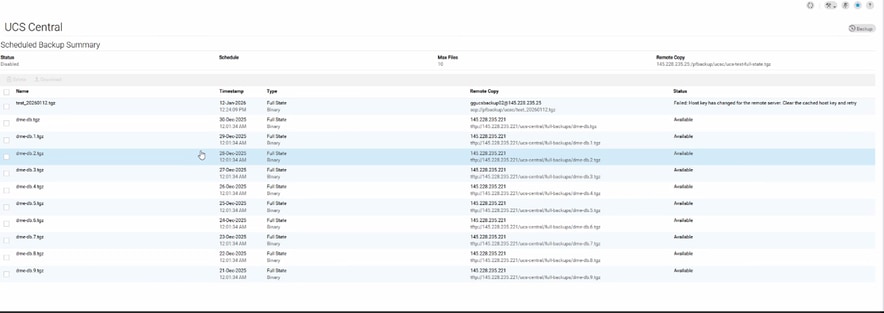
로그 증거:
# From svc_ops_dme.log:

Jan 6 11:36:47 degtlue2100 svc_ops_dme[1597]: [EVENT][E14194351][79965][transition][internal][] [FSM:STAGE:ASYNC]: uploading data to backup server(FSM-STAGE:sam:dme:MgmtDataExporterExportData:upload)
Jan 6 11:36:47 degtlue2100 svc_ops_dme[1597]: [EVENT][E14194351][79966][transition][internal][] [FSM:STAGE:STALE-FAIL]: uploading data to backup server(FSM-STAGE:sam:dme:MgmtDataExporterExportData:upload)
Jan 6 11:36:47 degtlue2100 svc_ops_dme[1597]: [EVENT][E14194351][79968][transition][internal][] [FSM:STAGE:REMOTE-ERROR]: Result: end-point-failed Code: unspecified Message: Host key has changed for the remote server. Clear the cached host key and retry (sam:dme:MgmtDataExporterExportData:upload)     <<<<<<<
Jan 6 11:36:47 degtlue2100 svc_ops_dme[1597]: [EVENT][E14194351][79970][transition][internal][] [FSM:STAGE:FAILED]: uploading data to backup server(FSM-STAGE:sam:dme:MgmtDataExporterExportData:upload)
해결책:
- UCS Central 시스템에 대한 SSH 세션을 설정합니다.
2. 설치된 UCS Central 패키지 버전을 확인합니다.
Central-HTTS1# connect local-mgmt
Cisco UCS Central
TAC support: http://www.cisco.com/tac
Copyright (c) 2011-2025, Cisco Systems, Inc. All rights reserved.
The copyrights to certain works contained in this software are
owned by other third parties and used and distributed under
license. Certain components of this software are licensed under
the GNU General Public License (GPL) version 2.0 or the GNU
Lesser General Public License (LGPL) Version 2.1 or later version. A copy of each
such license is available at
https://opensource.org/license/gpl-2-0 and
https://opensource.org/license/lgpl-2-1
Central-HTTS1(local-mgmt)# show version

Name                Package             Version        GUI
----                -------             -------        ----
core                Base System         2.1(1a)        2.1(1a)
central-mgr         Central Manager     2.1(1a)        2.1(1a)
service-reg         Service Registry    2.1(1a)        2.1(1a)
identifier-mgr      Identifier Manager  2.1(1a)        2.1(1a)
operation-mgr       Operations Manager  2.1(1a)        2.1(1a)
resource-mgr        Resource Manager    2.1(1a)        2.1(1a)
policy-mgr          Policy Manager      2.1(1a)        2.1(1a)
stats-mgr           Statistics Manager  2.1(1a)        2.1(1a)
server-mgr          Server Manager      2.1(1a)        2.1(1a)
gch                 Generic Call Home   2.1(1a)        none
rel-key             Release Key         2.1(1a)        none

Central-HTTS1(local-mgmt)#
3. 중앙 서버에서 토큰을 가져옵니다.
Central-HTTS1(local-mgmt)# show token

0HPPCXXYGVR
* 응답 키 생성기의 토큰 사용: https://cspg-releng.cisco.com/UCSPassGen.php

참고: 먼저 UCSC 버전을 선택합니다. (2.0 또는 2.1). 그렇지 않으면 루트 사용자에 대해 비밀번호가 작동하지 않습니다. UCS Central에서 얻은 토큰을 붙여넣기하기 전에 비밀번호 생성 웹 사이트의 Debug-Token 필드에서 "token"이라는 단어를 삭제해야 합니다. 텍스트가 그렇지 않으면 남아 있으며 잘못된 비밀번호를 생성합니다.
4. 루트 자격 증명과 응답 키를 비밀번호로 사용하여 UCS Central에 대한 새 SSH 세션을 시작합니다.
login as: root
root@ <IP Address> password:
Last login: Tue Jan 13 17:57:20 2026 from <IP Address>
5. 이 경로로 이동하여 'known_hosts' 파일에서 영향을 받는 서버의 IP 주소를 확인합니다.
[root@Central-HTTS1 ~]# cd /root/.ssh
[root@Central-HTTS1 .ssh]# cat known_hosts

[root@Central-HTTS1 ~]# cd /root/
anaconda-ks.cfg  .bash_profile    .cshrc           ks-pre.log       .ssh/
.bash_history    .bashrc          ks-post1.log     opt/             .tcshrc
.bash_logout     .config/         ks-post.log      original-ks.cfg  .viminfo

[root@Central-HTTS1 ~]# cd /root/.ssh/
[root@Central-HTTS1 .ssh]# ls
id_rsa  id_rsa.pub  known_hosts

[root@Central-HTTS1 .ssh]# cat known_hosts
영향을 받는 서버의 IP 주소가 파일에 있는 경우 'vim' 편집기를 사용하여 해당 항목을 수동으로 제거하십시오.
특정 라인으로 이동한 후 'dd'를 입력하여 삭제합니다.
[root@Central-HTTS1 .ssh]# vi known_hosts
[root@Central-HTTS1 .ssh]# vi known_hosts
....
....
....
!wq     (Write and Quit  >> Saving changes and exiting)
영향받는 IP 주소를 제거한 후 파일을 저장하고 :wq를 사용하여 편집기를 종료합니다.
known_hosts 파일이 업데이트되면 UCS Central에서 백업 작업을 다시 시도하십시오.
그런 다음 이번에는 백업이 성공적으로 완료됩니다.

 피드백
피드백