Central에서 UCSM 등록 문제 해결

소개
이 문서에서는 UCS Central에 등록하는 UCSM과 관련된 몇 가지 일반적인 문제를 해결하는 방법을 설명합니다
사전 요구 사항
요구 사항
다음 주제에 대한 지식을 보유하고 있으면 유용합니다.
- Cisco UCS(Unified Computing System)
- UCS Central
사용되는 구성 요소
이 문서의 정보는 다음 소프트웨어 및 하드웨어 버전을 기반으로 합니다.
- Cisco UCSM(Unified Computing System Manager)
- 패브릭 인터커넥트(FI)
- ESXi VM에서 실행되는 UCS Central
이 문서의 정보는 특정 랩 환경의 디바이스를 토대로 작성되었습니다. 이 문서에 사용된 모든 디바이스는 초기화된(기본) 컨피그레이션으로 시작되었습니다. 현재 네트워크가 작동 중인 경우 모든 명령의 잠재적인 영향을 미리 숙지하시기 바랍니다.
문제 해결 방법
트러블슈팅은 서드파티 인증서가 아닌 UCSM 및 중앙의 자체 서명 인증서에 중점을 둡니다
- 기본 문제 해결
- UCSM에서 중앙의 등록 상태 차단
- 업그레이드 후 UCSM 중앙 상태가 진행 중
- UCSM은 중앙에서 가시성을 잃음
- 확인할 로그
- 문제 해결 명령
기본 문제 해결
다음 기본 검사가 완료되었는지 확인하십시오.
- 공유 암호가 일치하지 않습니다.
- UCS Central 디바이스에 연결할 수 없습니다.
- UCS Central GUID가 이미 등록된 UCS Central의 GUID와 다릅니다.
- UCSM과 UCS Central 간에 시간이 동기화되어 있지 않습니다.
- UCSM에서 만료된 인증서
- 기본 키링 인증서가 없습니다. HTTPS에 서드파티 CA를 사용할 수 있지만 UCSM 등록은 기본 키 링 인증서를 사용하므로 삭제해서는 안 됩니다.
- UCSM이 UCSC로부터 핸드셰이크 요청을 받고 있는지 확인합니다.
Central# connect local-mgmt
Central(local-mgmt)# test ucsm-connectivity <ucsm_ip>
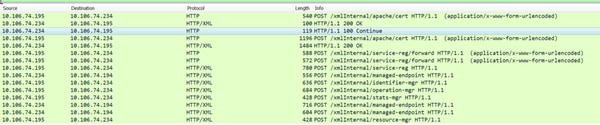
UCSM의 패킷 캡처가 중앙 공급자에 성공적으로 등록됨

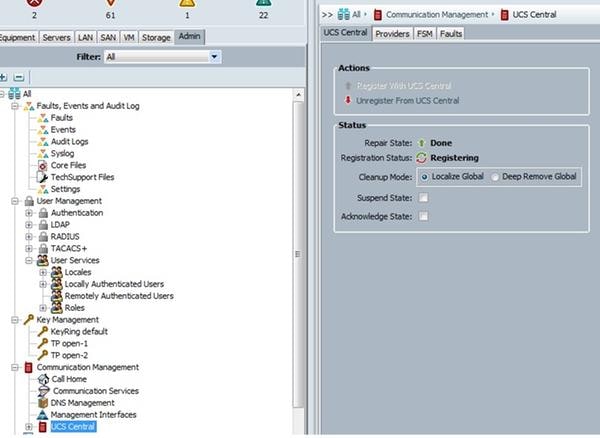
UCSM에서 central의 등록을 취소하지 마십시오. 모든 글로벌 서비스 프로파일을 등록 취소하면 UCS 도메인의 로컬이 됩니다. 로컬 서비스 프로파일을 다시 전역으로 만들 수 있습니다. 그러나 매우 복잡한 프로세스이며 서비스에 영향을 미칩니다.
UCSM이 Central에 등록 상태를 중단했습니다.
UCS Manager가 UCS Central에 등록되어 있고 해당 UCS Manager가 3.1.1로 업그레이드 중인 경우 UCS Manager는 등록 상태로 전환되어 그대로 유지됩니다.
중앙 DME 로그에 너무 많은 컬 오류가 관찰됨
  9603: [WARN][0x27699940][Apr  5 18:00:54.714][write:net]  write of 3752 bytes using curl failed, code=7, error: 'Couldn't connect to server', ep:  https://10.106.74.195:443/xmlInternal/managed-endpoint
9604: [WARN][0x27699940][Apr  5 18:00:54.714][write:net]  non-critical curl write error.
UCSM DME에서
[INFO][0x682ffb90][Nov  1 16:05:24.886][sam_sec:check_cert_val] X509_verify_cert_error_string - ok
[INFO][0x682ffb90][Nov  1 16:05:24.886][sam_sec:X509VerifyCert] ErrorMsg:ok ErrorNo:0
[INFO][0x682ffb90][Nov  1 16:05:24.886][app_sam_dme:processKey] something wrong with KR-default certificate, status - 18
인증서에 SHA1 대신 기존 MDS 해시를 사용하는 UCSM 때문일 수 있습니다
[WARN][0x674ffb90][Nov 22 19:11:49.227][net:write] write of 546 bytes using curl failed, code=60, error: 'Peer certificate cannot be authenticated with given CA certificates(SSL certificate problem: self signed certificate)', ep:  https://10.106.74.234:443/xmlInternal/service-reg
[INFO][0x674ffb90][Nov 22 19:11:49.227][net:certFailure] certificate is bad for connection to ' https://10.136.58.4:443/xmlInternal/service-reg';
UCS Manager가 UCS Central에 성공적으로 등록하고 인증서 오류를 수정하게 되므로 이 해결 방법을 수행합니다
기본 키링은 UCS Central CLI의 디바이스 프로필 섹션에서 다시 생성할 수 있습니다.
connect policy-mgr
 scope org
 scope device-profile
 scope security
 scope keyring default
 set regenerate yes
 commit-buffer
해결 방법이 해결되지 않을 경우 Cisco TAC에 케이스를 제기하여 추가 검증
UCS Manager가 2.1.3 이하의 초기 버전에서 UCS Central에 등록된 경우 그런 다음 3.1.1로 업그레이드하는 동안 언급된 등록 문제가 여전히 나타납니다.
UCS 2.1.3 이하 릴리스에서는 UCSM에서 인증서를 분할하지 않으므로 이러한 TAC 개입이 필요합니다. TAC는 인증서에 대한 올바른 소프트링크를 생성하도록 인증서를 다시 해시해야 합니다.
업그레이드 후 UCSM 중앙 상태가 진행 중
데이터베이스가 Central과 UCS 간에 동기화되지 않았기 때문입니다.
리소스 관리자 로그에서 관찰된 이러한 오류
[WARN][0xbbce9940][Aug 11 10:23:18.194][storeMo:mit_init] SQL error [SQLParamData failure: Error while executing the query (non-fatal);
ERROR:  duplicate key value violates unique constraint "InstanceId2DN_dn_key"] stmt [INSERT INTO "InstanceId2DN"("instanceId","dn","className","parent") VALUES (?,?,?,?)]
[INFO][0xbbce9940][Aug 11 10:23:18.194][report:exception_handl] FATAL[3|150] /ramfs/buildsa/150407-104741-rev219791-FCSa/resMgr/sam/src/lib/framework/core/sql/MitDbImpl.cc(1167):storeMo: Failed to connect to database. Transaction aborted.
[INFO][0xbbce9940][Aug 11 10:23:18.201][report:exception_handl] ERROR[3|150] /ramfs/buildsa/150407-104741-rev219791-FCSa/resMgr/sam/src/lib/framework/core/proc/Doer.cc(795):exceptionCB: exception encountered during processing: "Failed to connect to database. Transaction aborted." [150] Failed to connect to database. Transaction aborted.
[INFO][0xbbce9940][Aug 11 10:23:18.201][failedCb:tx] TX FAILED
데이터베이스 동기화 문제입니다. Cisco TAC에 케이스를 제출하여 더 자세히 검증하십시오.
UCSM은 Central을 통해 가시성을 잃음
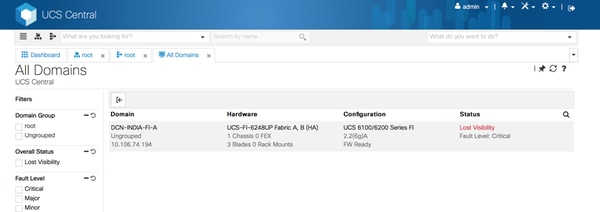
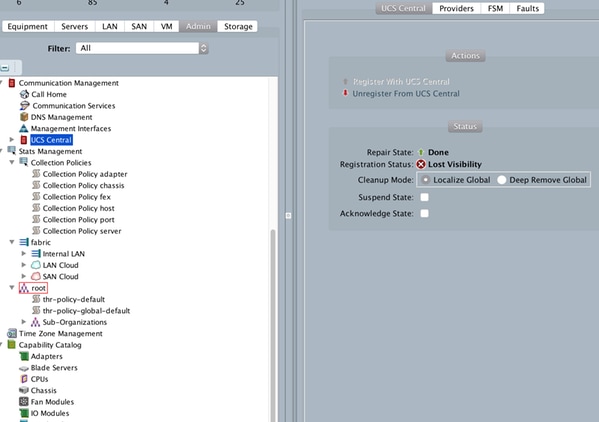
등록 상태 확인
"lost-visibility(가시성 손실)"가 표시되면 하나 이상의 필수 포트에서 UCS Central에 연결할 수 없습니다. UCS Central에서 플래시 GUI(Flex)를 사용하는 경우 다음 포트를 Central에 개방해야 합니다. 443, 80, 843. HTML GUI에는 포트 443만 필요합니다.
확인할 로그
UCSM
/var/sysmgr/sam_logs/pa_setup.log
svc_sam_dme.log files on FI
중앙
Svc_dme_reg.log
문제 해결 명령
Central# connect policy-mgr
Central# scope org
Central# scope device-profile
Central# scope security
Central# Show keyring detail
UCSM# scope system
UCSM# scope security
UCSM# show keyring detail
connect local-mgmt
telnet <Central IP> <port>
^ (Shift+6) ] with no spaces to exit
  FSM status
       scope system
       scope control-ep policy
       show fsm status
Central# connect service-reg
Central(service-reg)# show fault
Central(service-reg)# show clients detail
Registered Clients:
    ID: 1008
    Registered Client IP: 10.106.74.194
    Registered Client IPV6: ::
    Registered Client Connection Protocol: Ipv4
    Registered Client Name: DCN-INDIA-FI-A
    Registered Client GUID: e832cfc2-548b-11e4-b8f2-002a6a6f6dc1
    Registered Client Version: 2.2(6g)
    Registered Client Type: Managed Endpoint
    Registered Client Capability: Policy Client Module
    Registered Client Last Poll Timestamp: 2016-12-08T12:33:36.417
    Registered Client Operational State: Registered
    Registered Client Suspend State: Off
    Registered Client License State: License Graceperiod
    Registered Client grace period used: 33
    Registered Client Network Connection State: Connected
알려진 결함
- Cisco 버그 ID CSCuy07652 ECMR6에서 Delmar-mr2로 다운그레이드하면 도메인이 "등록"됩니다.
- Cisco 버그 ID CSCuv07227 UCSM 재등록 실패, fw 업그레이드 중.
- Cisco 버그 ID CSCuu91088 Central에서 인벤토리를 새로 고칠 수 없습니다.
- Cisco Bug ID CSCut72698 저대역폭 환경의 기존 UCS에서 전체 인벤토리 실패 보고
관련 정보
Cisco UCS Central에 Cisco UCS 도메인 등록
개정 이력
| 개정 | 게시 날짜 | 의견 |
|---|---|---|
1.0 |
21-Dec-2016
|
최초 릴리스 |
 피드백
피드백