nameif nlp_int_tap 및 IP Address 169.254.1.1을 사용하여 내부 데이터 인터페이스의 목적을 명확히 합니다.

소개
이 문서에서는 IP 주소가 169.254.1.1인 내부 데이터 nlp_int_tap 인터페이스의 목적에 대해 설명합니다.
사전 요구 사항
요구 사항
기본 제품 지식
사용되는 구성 요소
이 문서의 정보는 특정 랩 환경의 디바이스를 토대로 작성되었습니다. 이 문서에 사용된 모든 디바이스는 초기화된(기본) 컨피그레이션으로 시작되었습니다. 현재 네트워크가 작동 중인 경우 모든 명령의 잠재적인 영향을 미리 숙지하시기 바랍니다.
이 문서의 정보는 다음 소프트웨어 및 하드웨어 버전을 기반으로 합니다.
- FDM(Secure Firewall Device Manager) 또는 FMC(Secure Firewall Management Center)에서 관리되는 FTD(Secure Firewall Threat Defense) 7.x, 10.x
- 보안 ASA 9.18 이상
배경 정보
nameif nlp_int_tap 및 169.254.1.1 IP 주소가 있는 내부 데이터 인터페이스는 Lina라는 데이터 플레인 엔진과 백엔드 운영 체제(OS) 간의 연결을 제공하는 데 사용되는 내부 인터페이스입니다.
다음과 같은 서비스에 대한 일반적인 연결을 제공하는 데 사용됩니다.
- SNMP - SNMP 데몬은 OS에서 별도의 프로세스로 실행됩니다.
- Cisco SSH 스택으로 ASA에 대한 SSH 액세스 - SSH 데몬은 OS에서 별도의 프로세스로 실행됩니다.
- 데이터 인터페이스를 통한 FTD에 대한 SSH 액세스 - SSH 데몬은 OS에서 별도의 프로세스로 실행됩니다.
- FTD에서 VRF 인식 외부 인증 - 외부 인증 서버에 대한 액세스는 글로벌 또는 사용자 VRF의 데이터 인터페이스를 통해 제공됩니다.
- 데이터 인터페이스를 통한 FTD 관리의 경우 sftunnel, DNS 확인, 라이센싱, 외부 인증, NTP 등의 관리 서비스 또는 OS가 관리 인터페이스를 통해 명시적으로 고정 경로를 구성하지 않은 모든 대상에 액세스합니다.
Lina 확인
플랫폼에 따라 Lina 엔진에서 nameif nlp_int_tap가 Internal-DataX/Y 인터페이스에 할당되며 다른 명령 출력에서 표시됩니다.
이는 서로 다른 방화벽의 결과입니다.
- FTD를 실행하는 보안 방화벽 6170:
CSF6170-1# show interface ip brief
Interface                  IP-Address      OK?           Method Status      Protocol
…
Internal-Data1/1           169.254.1.1     YES           unset  up          up
…


CSF6170-1# show controller
Internal-Data1/1:
   ASA IPS/VM Internal Management Data Interface en_vtun rev00, port id 10
     Major Configuration Parameters
         Device Name           : en_vtun
         Linux Tun/Tap Device  : /dev/net/tun/tap_nlp
…

CSF6170-1# show interface detail | begin nlp_int_tap        <-- Output except Internal-Data slot and port ID is similar in other devices
Interface Internal-Data1/1 "nlp_int_tap", is up, line protocol is up
  Hardware is en_vtun rev00, BW Unknown Speed-Capability, DLY 1000 usec
        (Full-duplex), (1000 Mbps)
        Input flow control is unsupported, output flow control is unsupported
        MAC address 0000.0100.0001, MTU 1500
        IP address 169.254.1.1, subnet mask 255.255.255.248
        12409 packets input, 837229 bytes, 0 no buffer
        Received 0 broadcasts, 0 runts, 0 giants
        0 input errors, 0 CRC, 0 frame, 0 overrun, 0 ignored, 0 abort
        0 pause input, 0 resume input
        0 L2 decode drops, 0 demux drops
        12371 packets output, 816494 bytes, 0 underruns
        0 pause output, 0 resume output
        0 output errors, 0 collisions, 0 interface resets
        0 late collisions, 0 deferred
        0 input reset drops, 0 output reset drops
        input queue (blocks free curr/low): hardware (0/0)
        output queue (blocks free curr/low): hardware (0/0)
  Traffic Statistics for "nlp_int_tap":
        12409 packets input, 663503 bytes
        12371 packets output, 643300 bytes
        43 packets dropped
      1 minute input rate 0 pkts/sec,  0 bytes/sec
      1 minute output rate 0 pkts/sec,  0 bytes/sec
      1 minute drop rate, 0 pkts/sec
      5 minute input rate 0 pkts/sec,  0 bytes/sec
      5 minute output rate 0 pkts/sec,  0 bytes/sec
      5 minute drop rate, 0 pkts/sec
  Control Point Interface States:
        Interface number is 7
        Interface config status is active
        Interface state is active


CSF6170-1# capture nlp interface ?                  <-- Same as in other devices
  cplane       Capture packets on controlplane interface
  data-plane   Capture packets on dataplane interface
  nlp_int_tap  Capture packets on nlp_int_tap interface
Available interfaces to listen:
  eventing     Name of interface Management1/2
  inside       Name of interface Ethernet1/1
  management   Name of interface Management1/1


CSF6170-1# show asp table interfaces               <-- Same as in other devices
…
Soft-np interface 'nlp_int_tap' is up
    context single_vf, nicnum 10, mtu 1500
        vlan <None>, Not shared, seclvl 100
        12409 packets input, 12371 packets output
        flags 0x0
…


CSF6170-1# show asp table routing                  <-- Same as in other devices
route table timestamp: 37
…
in   169.254.1.0     255.255.255.248 nlp_int_tap
in   fd00:0:0:1::1   ffff:ffff:ffff:ffff:ffff:ffff:ffff:ffff nlp_int_tap
in   fd00:0:0:1::    ffff:ffff:ffff:ffff:: nlp_int_tap
out  255.255.255.255 255.255.255.255 nlp_int_tap
out  169.254.1.1     255.255.255.255 nlp_int_tap
out  169.254.1.0     255.255.255.248 nlp_int_tap
out  224.0.0.0       240.0.0.0       nlp_int_tap
out  fd00:0:0:1::1   ffff:ffff:ffff:ffff:ffff:ffff:ffff:ffff nlp_int_tap
out  fd00:0:0:1::    ffff:ffff:ffff:ffff:: nlp_int_tap
out  fe80::          ffc0::          nlp_int_tap
out  ff00::          ff00::          nlp_int_tap
…
- Firepower 4145 실행 ASA:
asa# show interface ip brief
Interface                  IP-Address      OK?           Method Status      Protocol
…
Internal-Data0/2           169.254.1.1     YES           unset  up          up
…

asa# show controller
Internal-Data0/2:
   ASA IPS/VM Internal Management Data Interface en_vtun rev00, port id 4102
     Major Configuration Parameters
         Device Name           : en_vtun
         Linux Tun/Tap Device  : /dev/net/tun/tap_nlp
…
- 가상 FTD:
firewall# show interface ip brief
Interface                  IP-Address      OK? Method Status                Protocol
…
Internal-Data0/1           169.254.1.1     YES unset  up                    up
…

firewall# show controller
Internal-Data0/1:
ASA IPS/VM Internal Management Data Interface en_vtun rev00, port id 12
     Major Configuration Parameters
         Device Name           : en_vtun
         Linux Tun/Tap Device  : /dev/net/tun/tap_nlp
…
- 가상 ASA:
asav# show interface ip brief
…
Internal-Data0/0           169.254.1.1     YES unset  up                    up
…
firewall# show controller
Internal-Data0/0:
   ASA IPS/VM Internal Management Data Interface en_vtun rev00, port id 4
     Major Configuration Parameters
         Device Name           : en_vtun
         Linux Tun/Tap Device  : /dev/net/tun/tap_nlp
…
요점:
- nameif nlp_int_tap는 서로 다른 플랫폼의 서로 다른 내부 데이터 인터페이스에 할당됩니다.
- show asp table routing 명령 출력에 따라 nameif nlp_int_tap의 Internal-Data 인터페이스에는 IPv4 주소 169.254.1.1/29 및 IPv6 주소 fd00:0:0:1::1/64가 할당됩니다.
- show controller 명령 출력에 따르면, 이 인터페이스는 /dev/net/tun/tap_nlp에서 사용할 수 있는 Linux Tun/Tap 인터페이스(구체적으로 tap)입니다.
OS 확인
/dev/net/tun/tap_nlp는 다음 IP 주소를 사용하는 Linux 탭 인터페이스입니다.
- IPV4: 가상 디바이스의 경우 169.254.1.2/29이고 하드웨어 디바이스의 경우 169.254.1.3/29입니다.
- IPV6: fd00:0:0:1::2/64(가상 디바이스) 및 fd00:0:0:1::3/64(하드웨어 디바이스)
가상 및 하드웨어 FTD 장치에서 확인:
- 가상 FTD:
admin@firewall:~$ ip addr show dev tap_nlp
14: tap_nlp: <BROADCAST,MULTICAST,UP,LOWER_UP> mtu 1500 qdisc pfifo_fast state UP group default qlen 1000
    link/ether 06:dd:c8:b9:e9:cc brd ff:ff:ff:ff:ff:ff
    inet 169.254.1.2/29 brd 169.254.1.7 scope global tap_nlp:1
       valid_lft forever preferred_lft forever
    inet6 fd00:0:0:1::2/64 scope global
       valid_lft forever preferred_lft forever
    inet6 fe80::4dd:c8ff:feb9:e9cc/64 scope link
       valid_lft forever preferred_lft forever
- 보안 방화벽 6170:
admin@CSF6170-1:~$ ip addr show dev tap_nlp
7: tap_nlp: <BROADCAST,MULTICAST,UP,LOWER_UP> mtu 1500 qdisc pfifo_fast state UP group default qlen 1000
    link/ether b2:5b:a0:bf:f6:69 brd ff:ff:ff:ff:ff:ff
    inet 169.254.1.3/29 brd 169.254.1.7 scope global tap_nlp:1
       valid_lft forever preferred_lft forever
    inet6 fd00:0:0:1::3/64 scope global
       valid_lft forever preferred_lft forever
    inet6 fe80::b05b:a0ff:febf:f669/64 scope link
       valid_lft forever preferred_lft forever
Lina에 다시 연결을 제공하려면 OS에서 tap_nlp 인터페이스의 소스 IP 주소가 있는 패킷의 라우팅 테이블 조회를 위한 라우팅 규칙을 설치합니다.
admin@firewall:~$ ip rule show
0:      from all lookup local
32765:  from 169.254.1.2 lookup 1 <-- For packets sourced from 169.254.1.2 (or .3 in case of hardware devices), the routing table 1 is used
32766:  from all lookup main
32767:  from all lookup default

admin@firewall:~$ ip -6 rule show
0:      from all lookup local
32765:  from fd00:0:0:1::2 lookup 1 <-- For packets sourced from xxxx::2 (or xxxx:3 in case of hardware devices), the routing table 1 is used
32766:  from all lookup main

admin@firewall:~$ ip route show table 1
default via 169.254.1.1 dev tap_nlp <-- Next hop for the default route in table 1 is 169.254.1.1 (Lina)

admin@firewall:~$ ip -6 route show table 1
default via fd00:0:0:1::1 dev tap_nlp metric 1024 pref medium <-- Next hop for the default route in table 1 is fd00:0:0:1::1 (Lina)
요점:
- IPv4 및 IPv6 라우팅 규칙은 nlp_tap 인터페이스 주소에서 소싱된 패킷에 대한 경로 조회가 라우팅 테이블 1에서 수행됨을 지시합니다.
- 라우팅 테이블 1의 IPv4 및 IPv6 버전에는 Lina nlp_int_tap 인터페이스에 속하는 다음 홉 주소가 있는 기본 경로가 포함됩니다.
패킷 경로 및 캡처 포인트
이 섹션에서는 두 가지 경우의 패킷 경로 및 캡처 포인트를 보여줍니다.
- 데이터 인터페이스에 대한 관리가 비활성화되어 있습니다.
- 데이터 인터페이스를 통한 관리가 활성화됩니다.
데이터 인터페이스를 통한 관리가 비활성화되었습니다.
이 섹션에서는 FTD의 패킷 경로 및 캡처 포인트 확인과 다음 컨피그레이션 세부사항에 대해 설명합니다.
- FTD는 FMC에서 관리합니다.
- 데이터 인터페이스를 통한 관리 기능 없음 즉, 관리 인터페이스는 OS와 외부 네트워크 간의 연결을 제공하는 데 사용됩니다.
> show network management-data-interface
Physical Interface               Name of the Interface <-- empty output indicates disabled feature
- 다음 기능 중 하나 이상이 구성되었습니다.
- ASA 또는 FTD의 SNMP.
- Cisco SSH 스택으로 ASA에 대한 SSH 액세스 ASA 버전 9.23 이상에서는 Cisco SSH 스택이 활성화되며 비활성화할 수 없습니다.
- 데이터 인터페이스를 통한 FTD에 대한 SSH 액세스
- FDM 관리 FTD의 데이터 인터페이스를 통한 HTTPS 액세스
- 패킷 캡처는 모든 캡처 포인트에서 구성됩니다.
앞서 언급한 기능 중 하나가 구성된 경우 수동 2회 NAT 규칙이 자동으로 구성됩니다. 기능 포트/프로토콜에 따라 NAT 규칙은 다릅니다.
다음은 데이터 인터페이스를 통한 FTD SSH 액세스를 위한 수동 Twice NAT 규칙이 포함된 출력의 예입니다.
firewall# show nat detail
Manual NAT Policies Implicit (Section 0)
1 (nlp_int_tap) to (inside) source static nlp_server__ssh_0.0.0.0_intf3 interface  destination static 0_0.0.0.0_1 0_0.0.0.0_1 service tcp ssh ssh
    translate_hits = 6, untranslate_hits = 6
    Source - Origin: 169.254.1.2/32, Translated: 192.0.2.1/24
    Destination - Origin: 0.0.0.0/0, Translated: 0.0.0.0/0
    Service - Protocol: tcp Real: ssh Mapped: ssh

2 (nlp_int_tap) to (inside) source static nlp_server__ssh_::_intf3 interface ipv6  destination static 0_::_2 0_::_2 service tcp ssh ssh
    translate_hits = 0, untranslate_hits = 0
    Source - Origin: fd00:0:0:1::2/128, Translated:
    Destination - Origin: ::/0, Translated: ::/0
    Service - Protocol: tcp Real: ssh Mapped: ssh

3 (nlp_int_tap) to (inside) source dynamic nlp_client_0_0.0.0.0_6proto22_intf3 interface  destination static nlp_client_0_ipv4_2 nlp_client_0_ipv4_2 service nlp_client_0_6svc22_1 nlp_client_0_6svc22_1
    translate_hits = 0, untranslate_hits = 0
    Source - Origin: 169.254.1.2/32, Translated: 192.0.2.1/24
    Destination - Origin: 0.0.0.0/0, Translated: 0.0.0.0/0
    Service - Origin: tcp destination eq ssh , Translated: tcp destination eq ssh

4 (nlp_int_tap) to (inside) source dynamic nlp_client_0_ipv6_::_6proto22_intf3 interface ipv6  destination static nlp_client_0_ipv6_4 nlp_client_0_ipv6_4 service nlp_client_0_6svc22_3 nlp_client_0_6svc22_3
    translate_hits = 0, untranslate_hits = 0
    Source - Origin: fd00:0:0:1::2/128, Translated:
    Destination - Origin: ::/0, Translated: ::/0
    Service - Origin: tcp destination eq ssh , Translated: tcp destination eq ssh
이 다이어그램에는 패킷 경로 및 캡처 포인트가 나와 있습니다.
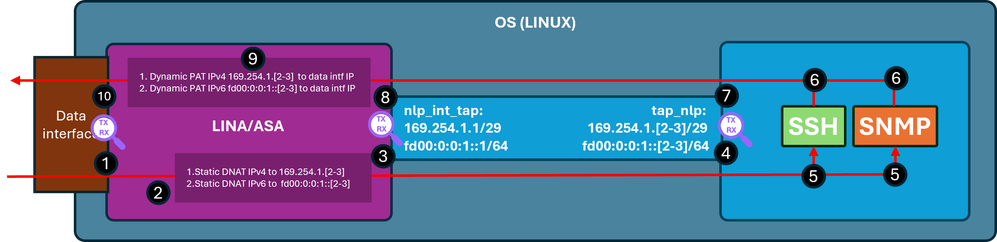
확인 단계(앞서 언급한 기능에만 해당):
- Capture point - 포트 22의 IP 192.0.2.2에서 IP 192.0.2.1로 SSH를 위한 인그레스 TCP SYN 패킷입니다. IP 192.0.2.1은 내부 인터페이스의 주소입니다.
firewall# show run ssh
ssh 0.0.0.0 0.0.0.0 inside
ssh ::/0 inside

firewall# show ip
System IP Addresses:
Interface                Name                   IP address      Subnet mask     Method
GigabitEthernet0/0       inside                 192.0.2.1        255.255.255.0   manual
Current IP Addresses:
Interface                Name                   IP address      Subnet mask     Method
GigabitEthernet0/0       inside                 192.0.2.1        255.255.255.0   manual


firewall# show capture
capture capi type raw-data trace interface inside [Capturing - 218 bytes]
  match tcp any any

capture nlp type raw-data trace interface nlp_int_tap [Capturing - 218 bytes]
  match tcp any any

firewall# show capture capi
1 packets captured
   1: 19:52:27.776830       192.0.2.2.22420 > 192.0.2.1.22: S 240217016:240217016(0) win 8192
2. 캡처 추적은 대상 IP를 192.0.2.1에서 IP 169.254.1.2로 변환하고 패킷을 nlp_int_tap 이그레스 인터페이스로 전환하는 일치하는 NAT 규칙을 나타냅니다.
firewall# show capture capi trace packet-number 1
Phase: 1
Type: CAPTURE
Subtype:
Result: ALLOW
Elapsed time: 22936 ns
Config:
Additional Information:
MAC Access list

Phase: 2
Type: ACCESS-LIST
Subtype:
Result: ALLOW
Elapsed time: 22936 ns
Config:
Implicit Rule
Additional Information:
MAC Access list

Phase: 3
Type: UN-NAT
Subtype: static
Result: ALLOW
Elapsed time: 11224 ns
Config:
nat (nlp_int_tap,inside) source static nlp_server__ssh_0.0.0.0_intf3 interface destination static 0_0.0.0.0_1 0_0.0.0.0_1 <-- matching NAT rule
Additional Information:
NAT divert to egress interface nlp_int_tap(vrfid:0)  <-- Egress interface is nlp_int_tap
Untranslate 192.0.2.1/22 to 169.254.1.2/22           <-- Destination address was translated to 169.254.1.2
…

Phase: 15
Type: INPUT-ROUTE-LOOKUP-FROM-OUTPUT-ROUTE-LOOKUP
Subtype: Resolve Preferred Egress interface
Result: ALLOW
Elapsed time: 13664 ns
Config:
Additional Information:
Found next-hop 169.254.1.2 using egress ifc  nlp_int_tap(vrfid:0) <-- next hop is the nlp_int_tap with IP 169.254.1.2

Phase: 16
Type: ADJACENCY-LOOKUP
Subtype: Resolve Nexthop IP address to MAC
Result: ALLOW
Elapsed time: 2440 ns
Config:
Additional Information:
Found adjacency entry for Next-hop 169.254.1.2 on interface  nlp_int_tap
Adjacency :Active
MAC address 06dd.c8b9.e9cc hits 1 reference 1 <-- next hop MAC address

Phase: 17
Type: CAPTURE
Subtype:
Result: ALLOW
Elapsed time: 8296 ns
Config:
Additional Information:
MAC Access list

Result:
input-interface: inside(vrfid:0)
input-status: up
input-line-status: up
output-interface: nlp_int_tap(vrfid:0)
output-status: up
output-line-status: up
Action: allow
Time Taken: 191292 ns
3. 캡처 포인트 - 대상 IP 169.254.1.2 포트 22가 포함된 패킷이 nlp_int_tap 인터페이스로 전송됩니다.
firewall# show capture nlp
1 packets captured
   1: 19:52:27.776998       192.0.2.2.22420 > 169.254.1.2.22: S 1456431278:1456431278(0) win 8192
4. 캡처 포인트 - 목적지 IP 169.254.1.2 포트 22가 있는 패킷이 OS tap_nlp 인터페이스에서 수신됩니다.
admin@firewall:~$ sudo tcpdump -n -i tap_nlp tcp
Password:
HS_PACKET_BUFFER_SIZE is set to 4.
tcpdump: verbose output suppressed, use -v or -vv for full protocol decode
listening on tap_nlp, link-type EN10MB (Ethernet), capture size 262144 bytes

19:52:27.796029 IP 192.0.2.2.22420 > 169.254.1.2.22: Flags [S], seq 1456431278, win 8192, length 0
5. SSH 데몬은 포트 22에서 수신 대기하고, SYN 패킷을 수신하며, 다음과 같이 처리합니다.
admin@firewall:~$ sudo netstat -pan | grep :22
Password:
tcp        0      0 0.0.0.0:22              0.0.0.0:*               LISTEN      6026/sshd: /usr/sbi
tcp6       0      0 :::22                   :::*                    LISTEN      6026/sshd: /usr/sbi
6. SSH는 SYN ACK 패킷을 생성합니다.
7.Capture point - 소스 IP 169.254.1.2 포트 22 및 목적지 IP 192.0.2.2가 포함된 SYN ACK 패킷이 tap_nlp 인터페이스 외부로 전송됩니다.
admin@firewall:~$ sudo tcpdump -n -i tap_nlp tcp
Password:
HS_PACKET_BUFFER_SIZE is set to 4.
tcpdump: verbose output suppressed, use -v or -vv for full protocol decode
listening on tap_nlp, link-type EN10MB (Ethernet), capture size 262144 bytes
19:52:27.796029 IP 192.0.2.2.22420 > 169.254.1.2.22: Flags [S], seq 1456431278, win 8192, length 0
19:52:27.796112 IP 169.254.1.2.22 > 192.0.2.2.22420: Flags [S.], seq 2122129677, ack 1456431279, win 64240, options [mss 1460], length 0
8. Capture point(캡처 포인트) - 소스 IP 169.254.1.2 포트 22 및 목적지 IP 주소 192.0.2.2가 포함된 SYN ACK 패킷이 Lina nlp_int_tap 인터페이스에서 수신됩니다.
firewall# show capture nlp
2 packets captured

   1: 19:52:27.776998       192.0.2.2.22420 > 169.254.1.2.22: S 1456431278:1456431278(0) win 8192
   2: 19:52:27.777776       169.254.1.2.22 > 192.0.2.2.22420: S 2122129677:2122129677(0) ack 1456431279 win 64240
9. 이 SYN ACK 패킷은 기존/설정된 연결의 일부로 처리되며, Lina 엔진이 IP 169.254.1.2에서 내부 IP 192.0.2.1로 패킷의 소스를 변환하는 역방향 NAT 규칙을 적용하고 내부를 이그레스 인터페이스로 선택합니다. Cisco SSH 스택을 사용하여 ASA에 SSH 연결할 경우 소스 포트는 4122에서 22로 다시 변환됩니다.
firewall# show capture nlp trace packet-number 2
2 packets captured
   1: 19:52:27.776998       192.0.2.2.22420 > 169.254.1.2.22: S 1456431278:1456431278(0) win 8192
   2: 19:52:27.777776       169.254.1.2.22 > 192.0.2.2.22420: S 2122129677:2122129677(0) ack 1456431279 win 64240

Phase: 1
Type: CAPTURE
Subtype:
Result: ALLOW
Elapsed time: 2196 ns
Config:
Additional Information:
MAC Access list

Phase: 2
Type: ACCESS-LIST
Subtype:
Result: ALLOW
Elapsed time: 2196 ns
Config:
Implicit Rule
Additional Information:
MAC Access list

Phase: 3
Type: FLOW-LOOKUP
Subtype:
Result: ALLOW
Elapsed time: 2928 ns
Config:
Additional Information:
Found flow with id 239305, using existing flow

Phase: 4
Type: INPUT-ROUTE-LOOKUP-FROM-OUTPUT-ROUTE-LOOKUP
Subtype: Resolve Preferred Egress interface
Result: ALLOW
Elapsed time: 10736 ns
Config:
Additional Information:
Found next-hop 192.0.2.2 using egress ifc  inside(vrfid:0)

Phase: 5
Type: ADJACENCY-LOOKUP
Subtype: Resolve Nexthop IP address to MAC
Result: ALLOW
Elapsed time: 1952 ns
Config:
Additional Information:
Found adjacency entry for Next-hop 192.0.2.2 on interface  inside
Adjacency :Active
MAC address 0000.0000.1234 hits 0 reference 1

Phase: 6
Type: CAPTURE
Subtype:
Result: ALLOW
Elapsed time: 10736 ns
Config:
Additional Information:
MAC Access list

Result:
input-interface: nlp_int_tap(vrfid:0)
input-status: up
input-line-status: up
output-interface: inside(vrfid:0)
output-status: up
output-line-status: up
Action: allow
Time Taken: 30744 ns
10. 캡처 포인트 - 패킷이 내부 인터페이스를 떠나 목적지로 향합니다.
firewall# show capture capi
2 packets captured

   1: 19:52:27.776830       192.0.2.2.22420 > 192.0.2.1.22: S 240217016:240217016(0) win 8192
   2: 19:52:27.777807       192.0.2.1.22 > 192.0.2.2.22420: S 2835714564:2835714564(0) ack 240217017 win 64240
데이터 인터페이스를 통한 관리 사용
FMC 관리 FTD에서 Management over Data Interface가 활성화된 경우 다음 변경 사항이 자동으로 적용됩니다.
- CLISH에서 기본 게이트웨이는 데이터 인터페이스입니다. OS 레벨 기본 게이트웨이는 tap_nlp를 통해 이루어지며 다음 홉은 Lina IP 169.254.1.1을 가리킵니다.
> show network management-data-interface

Physical Interface               Name of the Interface
Ethernet1/2              inside

> show network
===============[ System Information ]===============
Hostname                  : FPR1150-2
DNS from router           : enabled
Management port           : 8305
IPv4 Default route
  Gateway                 : data-interfaces

==================[ management0 ]===================
Admin State               : enabled
Admin Speed               : 1gbps
Operation Speed           : 1gbps
Link                      : up
Channels                  : Management & Events
Mode                      : Non-Autonegotiation
MDI/MDIX                  : Auto/MDIX
MTU                       : 1500
MAC Address               : 4C:E1:75:DD:89:00

----------------------[ IPv4 ]----------------------
Configuration             : Manual
Address                   : 192.0.2.29
Netmask                   : 255.255.255.0
----------------------[ IPv6 ]----------------------
Configuration             : Disabled

===============[ Proxy Information ]================
State                     : Disabled
Authentication            : Disabled

======[ System Information - Data Interfaces ]======
DNS Servers               :
Interfaces                : Ethernet1/2

==================[ Ethernet1/2 ]===================
State                     : Enabled
Link                      : Up
Name                      : inside
MTU                       : 1500
MAC Address               : 4C:E1:75:DD:89:25
----------------------[ IPv4 ]----------------------
Configuration             : Manual
Address                   : 198.51.100.254
Netmask                   : 255.255.255.0
Gateway                   : 198.51.100.1
----------------------[ IPv6 ]----------------------
Configuration             : Disabled

admin@firewall:~$ ip route show default
default via 169.254.1.1 dev tap_nlp
- 일반적으로 Lina에는 데이터 인터페이스를 통해 구성되는 기본 경로가 있습니다. 이는 FMC에서 배포된 사용자 컨피그레이션입니다.
firewall# show route

Codes: L - local, C - connected, S - static, R - RIP, M - mobile, B - BGP
       D - EIGRP, EX - EIGRP external, O - OSPF, IA - OSPF inter area
       N1 - OSPF NSSA external type 1, N2 - OSPF NSSA external type 2
       E1 - OSPF external type 1, E2 - OSPF external type 2, V - VPN
       i - IS-IS, su - IS-IS summary, L1 - IS-IS level-1, L2 - IS-IS level-2
       ia - IS-IS inter area, * - candidate default, U - per-user static route
       o - ODR, P - periodic downloaded static route, + - replicated route
       SI - Static InterVRF, BI - BGP InterVRF
Gateway of last resort is 198.51.100.1 to network 0.0.0.0

S*       0.0.0.0 0.0.0.0 [1/0] via 198.51.100.1, inside
C        198.51.100.0 255.255.255.0 is directly connected, inside
L        198.51.100.254 255.255.255.255 is directly connected, inside
- sftunnel 포트 8305에 대한 Lina 수동 2회 NAT 규칙은 IPv4 및 IPv6 스택 모두에 설치됩니다. 또한 OS에서 외부 네트워크로의 연결을 허용하기 위해 OS tap_nlp 인터페이스의 IPv4 및 IPv6 주소에 대한 동적 PAT가 데이터 인터페이스를 통해 구성됩니다.
firewall# show nat detail
Manual NAT Policies Implicit (Section 0)
1 (nlp_int_tap) to (inside) source static nlp_server__sftunnel_0.0.0.0_intf3 interface  destination static 0_0.0.0.0_5 0_0.0.0.0_5 service tcp 8305 8305
    translate_hits = 6, untranslate_hits = 6
    Source - Origin: 169.254.1.3/32, Translated: 198.51.100.254/24
    Destination - Origin: 0.0.0.0/0, Translated: 0.0.0.0/0
    Service - Protocol: tcp Real: 8305 Mapped: 8305

2 (nlp_int_tap) to (inside) source static nlp_server__sftunnel_::_intf3 interface ipv6  destination static 0_::_6 0_::_6 service tcp 8305 8305
    translate_hits = 0, untranslate_hits = 0
    Source - Origin: fd00:0:0:1::3/128, Translated:
    Destination - Origin: ::/0, Translated: ::/0
    Service - Protocol: tcp Real: 8305 Mapped: 8305

3 (nlp_int_tap) to (inside) source dynamic nlp_client_0_intf3 interface
    translate_hits = 64, untranslate_hits = 0
    Source - Origin: 169.254.1.3/32, Translated: 198.51.100.254/24 <-- Dynamic IPv4 PAT on inside interface

4 (nlp_int_tap) to (inside) source dynamic nlp_client_0_ipv6_intf3 interface ipv6
    translate_hits = 0, untranslate_hits = 0
    Source - Origin: fd00:0:0:1::3/128, Translated: <-- Dynamic IPv6 PAT on inside interface
이 다이어그램에는 패킷 경로 및 캡처 포인트가 나와 있습니다.
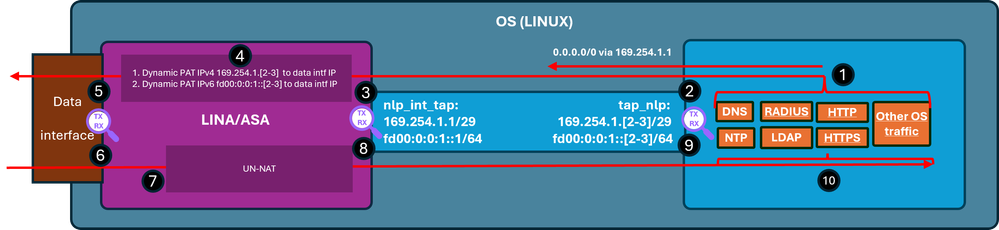
확인 단계(이 예에서는 NTP 트래픽에 대한 확인 단계입니다. 라이센싱 등을 포함한 모든 OS 생성 트래픽에도 동일한 논리가 적용됩니다.)
- NTP 클라이언트는 외부 NTP 서버 IP 주소로 보낼 패킷을 생성합니다.
admin@firewall:~$ sudo ntpq -pn
Password:
     remote           refid      st t when poll reach   delay   offset  jitter
==============================================================================
*192.0.2.222  192.0.2.111    2 u   31   64  377   27.540   +0.104   0.105
 127.127.1.1     .LOCL.          10 l 1093   64    0    0.000   +0.000   0.000
OS 관점에서 다음 홉은 소스 주소와 동일한 인터페이스 IP 169.254.1.3을 사용하여 tap_nlp 인터페이스를 통해 이루어집니다.
admin@firewall:~$ ip route get 192.0.2.222
192.0.2.222 via 169.254.1.1 dev tap_nlp src 169.254.1.3 uid 101
    cache
- Capture point(캡처 포인트) - 패킷이 tap_nlp 인터페이스로 전송됩니다.
admin@firewall:~$ sudo tcpdump -n -i tap_nlp udp and port 123
HS_PACKET_BUFFER_SIZE is set to 4.
tcpdump: verbose output suppressed, use -v or -vv for full protocol decode
listening on tap_nlp, link-type EN10MB (Ethernet), capture size 262144 bytes
22:39:59.728791 IP 169.254.1.3.123 > 192.0.2.222.123: NTPv4, Client, length 48
- Capture point - 패킷이 Lina nlp_tap_interface 인터페이스에 도착합니다.
firewall# show capture
capture nlp type raw-data trace interface nlp_int_tap [Capturing - 10600 bytes]
  match udp any any eq ntp

firewall# show capture nlp
96 packets captured
   3: 22:39:59.726112       169.254.1.3.123 > 192.0.2.222.123:  udp 48
- 경로 조회를 기반으로 Lina는 내부를 이그레스 인터페이스로 식별한 다음 패킷 소스 IP 주소를 169.254.1.3에서 데이터 인터페이스 IP 주소로 변경하는 동적 PAT 규칙을 적용합니다.
firewall# show capture nlp trace packet-number 3
96 packets captured

   3: 22:39:59.726112       169.254.1.3.123 > 192.0.2.222.123:  udp 48

Phase: 1
Type: CAPTURE
Subtype:
Result: ALLOW
Elapsed time: 4608 ns
Config:
Additional Information:
MAC Access list

Phase: 2
Type: ACCESS-LIST
Subtype:
Result: ALLOW
Elapsed time: 4608 ns
Config:
Implicit Rule
Additional Information:
MAC Access list

Phase: 3
Type: INPUT-ROUTE-LOOKUP
Subtype: Resolve Egress Interface
Result: ALLOW
Elapsed time: 24576 ns
Config:
Additional Information:
Found next-hop 198.51.100.1 using egress ifc  inside(vrfid:0)

…
Phase: 6
Type: NAT
Subtype:
Result: ALLOW
Elapsed time: 853 ns
Config:
nat (nlp_int_tap,inside) source dynamic nlp_client_0_intf3 interface
Additional Information:
Dynamic translate 169.254.1.3/123 to 198.51.100.254/58840

…
Phase: 13
Type: INPUT-ROUTE-LOOKUP-FROM-OUTPUT-ROUTE-LOOKUP
Subtype: Resolve Preferred Egress interface
Result: ALLOW
Elapsed time: 8192 ns
Config:
Additional Information:
Found next-hop 198.51.100.1 using egress ifc  inside(vrfid:0)

Phase: 14
Type: ADJACENCY-LOOKUP
Subtype: Resolve Nexthop IP address to MAC
Result: ALLOW
Elapsed time: 3072 ns
Config:
Additional Information:
Found adjacency entry for Next-hop 198.51.100.1 on interface  inside
Adjacency :Active
MAC address c02c.1782.2cbf hits 5 reference 3

Phase: 15
Type: CAPTURE
Subtype:
Result: ALLOW
Elapsed time: 11264 ns
Config:
Additional Information:
MAC Access list

Result:
input-interface: nlp_int_tap(vrfid:0)
input-status: up
input-line-status: up
output-interface: inside(vrfid:0)
output-status: up
output-line-status: up
Action: allow
Time Taken: 173567 ns

firewall# show route

Codes: L - local, C - connected, S - static, R - RIP, M - mobile, B - BGP
       D - EIGRP, EX - EIGRP external, O - OSPF, IA - OSPF inter area
       N1 - OSPF NSSA external type 1, N2 - OSPF NSSA external type 2
       E1 - OSPF external type 1, E2 - OSPF external type 2, V - VPN
       i - IS-IS, su - IS-IS summary, L1 - IS-IS level-1, L2 - IS-IS level-2
       ia - IS-IS inter area, * - candidate default, U - per-user static route
       o - ODR, P - periodic downloaded static route, + - replicated route
       SI - Static InterVRF, BI - BGP InterVRF
Gateway of last resort is 198.51.100.1 to network 0.0.0.0

S*       0.0.0.0 0.0.0.0 [1/0] via 198.51.100.1, inside
C        198.51.100.0 255.255.255.0 is directly connected, inside
L        198.51.100.254 255.255.255.255 is directly connected, inside
- 캡처 포인트 - 패킷이 이그레스 인터페이스를 통해 전송됩니다.
firewall# show capture capi
112 packets captured
   1: 22:39:59.726387       198.51.100.254.58840 > 192.0.2.222.123:  udp 48
- 캡처 포인트 - NTP 서버가 응답 패킷을 전송합니다.
firewall# show capture capi
112 packets captured
   1: 22:39:59.726387       198.51.100.254.58840 > 192.0.2.222.123:  udp 48
   2: 22:39:59.756796       192.0.2.222.123 > 198.51.100.254.58840:  udp 48
- Lina는 설정된 연결의 일부로 응답을 처리하고 역방향 NAT를 적용합니다. 이 정보에 따라 대상은 169.254.1.3으로 변환되며 이그레스 인터페이스는 nlp_int_tap입니다.
firewall# show capture capi trace packet-number 2
120 packets captured
   2: 22:39:59.756796       192.0.2.222.123 > 198.51.100.254.58840:  udp 48
…

Phase: 3
Type: FLOW-LOOKUP
Subtype:
Result: ALLOW
Elapsed time: 6144 ns
Config:
Additional Information:
Found flow with id 1226, using existing flow

Phase: 4
Type: INPUT-ROUTE-LOOKUP-FROM-OUTPUT-ROUTE-LOOKUP
Subtype: Resolve Preferred Egress interface
Result: ALLOW
Elapsed time: 11264 ns
Config:
Additional Information:
Found next-hop 169.254.1.3 using egress ifc  nlp_int_tap(vrfid:0)

Phase: 5
Type: ADJACENCY-LOOKUP
Subtype: Resolve Nexthop IP address to MAC
Result: ALLOW
Elapsed time: 3072 ns
Config:
Additional Information:
Found adjacency entry for Next-hop 169.254.1.3 on interface  nlp_int_tap
Adjacency :Active
MAC address 9641.fdd8.1038 hits 4159 reference 4

Phase: 6
Type: CAPTURE
Subtype:
Result: ALLOW
Elapsed time: 17920 ns
Config:
Additional Information:
MAC Access list

Result:
input-interface: inside(vrfid:0)
input-status: up
input-line-status: up
output-interface: nlp_int_tap(vrfid:0)
output-status: up
output-line-status: up
Action: allow
Time Taken: 47104 nsw
- 캡처 포인트 - 응답 패킷이 nlp_int_tap 인터페이스로 전송됩니다.
firewall# show capture nlp
132 packets captured

   3: 22:39:59.726112       169.254.1.3.123 > 192.0.2.222.123:  udp 48
   4: 22:39:59.756903       192.0.2.222.123 > 169.254.1.3.123:  udp 48
- 캡처 포인트 - 재생 패킷이 OS tap_nlp 인터페이스에 도착합니다.
admin@firewall:~$ sudo tcpdump -n -i tap_nlp udp and port 123
HS_PACKET_BUFFER_SIZE is set to 4.
tcpdump: verbose output suppressed, use -v or -vv for full protocol decode
listening on tap_nlp, link-type EN10MB (Ethernet), capture size 262144 bytes
22:39:59.728791 IP 169.254.1.3.123 > 192.0.2.222.123: NTPv4, Client, length 48
22:39:59.759683 IP 192.0.2.222.123 > 169.254.1.3.123: NTPv4, Server, length 48
- 응답 패킷은 NTP 클라이언트에서 소비되고 처리됩니다.
요약
OS /dev/net/tun/tap_nlp 인터페이스는 Lina에서 nlp_int_tap로 표시됩니다. 이 인터페이스의 목적은 Lina와 OS 간의 연결을 제공하는 것입니다. 필수 NAT 규칙과 함께 이 인터페이스는 소프트웨어에서 자동으로 관리되며 사용자의 개입이 필요하지 않습니다.
참조
개정 이력
| 개정 | 게시 날짜 | 의견 |
|---|---|---|
1.0 |
08-Jun-2026
|
최초 릴리스 |
 피드백
피드백