ESA에서 맞춤형 CA 목록 인증서 만료 알림 문제 해결

소개
이 문서에서는 AsyncOS 14.x로 업그레이드한 후 ESA(Secure Email Gateway)에서 사용자 지정 CA 인증서 만료 알림에 대해 설명합니다.
개요
증상은 업그레이드 중에 사용자 지정 CA(Certificate Authority) 목록에 추가된 인증서에 대한 만료 알림입니다. 사용자 지정 목록의 인증서 만료는 시스템 목록의 인증서에 영향을 주지 않으므로 정보 알림으로 영향이 제한됩니다. 해결 방법은 인증서 소스를 확인하고 필요한 맞춤형 CA 인증서를 교체하거나 맞춤형 목록에서 만료된 인증서를 제거하는 것입니다.
사용되는 구성 요소
이 문서는 AsyncOS 14.0 이상을 실행하는 Cisco Secure Email Gateway를 기반으로 합니다.
이 문서의 정보는 특정 랩 환경의 디바이스를 토대로 작성되었습니다. 이 문서에 사용된 모든 디바이스는 초기화된(기본) 컨피그레이션으로 시작되었습니다. 현재 네트워크가 작동 중인 경우 모든 명령의 잠재적인 영향을 미리 숙지하시기 바랍니다.
배경 정보
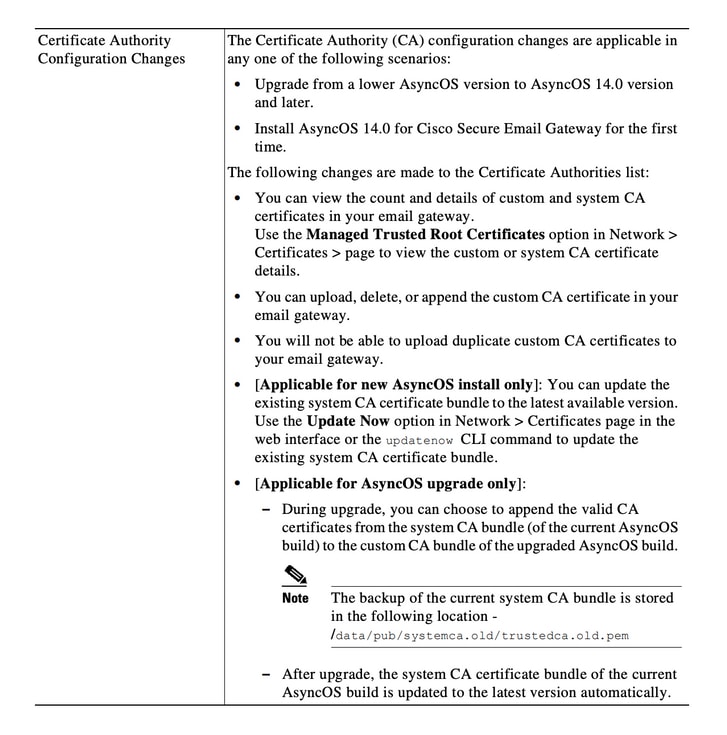
AsyncOS 14.x로 업그레이드하는 동안 이전 시스템 인증서를 사용자 지정 CA 목록에 추가할지 여부를 확인하는 메시지가 표시됩니다. 이 동작은 이미지 1과 같이 AsyncOS 14.0 릴리스 노트에도 설명되어 있습니다. AsyncOS 14.0용 Cisco Secure Email Gateway 릴리스 노트를 참조하십시오.
이미지 1. 이전 시스템 인증서를 사용자 지정 CA 목록에 추가하기 위한 업그레이드 프롬프트를 보여 주는 릴리스 노트를 발췌합니다.
문제
AsyncOS 14.x로 업그레이드한 후 사용자 지정 목록에 추가된 이전 시스템 인증서는 시간이 지남에 따라 만료되고 이 예와 같은 알림을 생성할 수 있습니다.
2021년 6월 26일 11:27:29 -0400 귀하의 인증서 CA:Root CA Generalitat Valenciana가 5일 후에 만료됩니다.
이러한 경고는 업그레이드 시 사용자 지정 목록에 추가된 이전 시스템 인증서가 만료되거나 만료가 임박하여 이전에 사용된 사용자 지정 인증서를 나타냅니다.
솔루션
사용자 지정 목록의 이전 시스템 인증서에 대한 알림은 정보 제공용이므로, 사용자 지정 목록에서 이를 제거하거나 만료되도록 선택할 수 있습니다.
이 조건은 서비스에 영향을 주지 않지만 경고가 바람직하지 않을 수 있습니다.
조직에 필요하지만 현재 시스템 목록에 포함되지 않은 사용자 지정 CA 인증서에 대한 알림이 표시되면 CA에 문의하여 업데이트된 인증서를 찾아 Cisco Secure Email Gateway Admin Guide 인증서 관리 절차에 설명된 대로 교체합니다.
시스템 CA 인증서 번들은 업그레이드 후 정기적으로 업데이트됩니다. 사용자 지정 목록의 인증서 만료는 시스템 목록의 인증서에 영향을 미치지 않습니다.
시스템 목록과 사용자 지정 목록이 모두 활성화되었는지 확인하려면 Network(네트워크) > Certificates(인증서) > Certificate Authorities(인증 기관) > Edit Settings(설정 수정)로 이동합니다.
시스템 및 사용자 지정 목록을 동일한 메뉴에서 내보내거나 CLI 명령 certconfig 및 certauthority를 사용하여 두 목록의 인증서를 필요에 따라 검토할 수도 있습니다.
맞춤형 CA 목록에서 알림을 생성하는 인증서를 제거하려면 어플라이언스에 대한 SSH를 통해 관리자로서 다음 단계를 완료합니다.
- certconfig를 실행합니다.
- certauthority를 입력한 다음 custom을 입력합니다.
- delete를 입력하고 경고와 일치하는 인증서를 선택합니다.
- 삭제를 확인한 다음 커밋을 실행하여 변경 사항을 저장합니다.
이 CLI 예에서는 워크플로를 보여 줍니다.
example.com> certconfig

Choose the operation you want to perform:
- CERTIFICATE - Import, Create a request, Edit or Remove Certificate Profiles
- CERTAUTHORITY - Manage System and Customized Authorities
- CRL - Manage Certificate Revocation Lists
[]> certauthority

Certificate Authority Summary
Custom List: Enabled
System List: Enabled

Choose the operation you want to perform:
- CUSTOM - Manage Custom Certificate Authorities
- SYSTEM - Manage System Certificate Authorities
[]> custom

Choose the operation you want to perform:
- DISABLE - Disable the custom certificate authorities list
- IMPORT - Import the list of custom certificate authorties
- EXPORT - Export the list of custom certificate authorties
- DELETE - Remove a certificate from the custom certificate authorty list
- PRINT - Print the list of custom certificate authorties
- CHECK_CA_FLAG - Check CA flag in uploaded custom CA certs
[]> delete

You must enter a value from 1 to 104.
...
59. [Root CA Generalitat Valenciana] <<< Select this certificate based on the sample alert in this example
...
93. [thawte Primary Root CA]

Select the custom CA certificate you want to delete
[]> 59

Are you sure you want to delete "Root CA Generalitat Valenciana"? [N]> Y
Custom CA certificate "Root CA Generalitat Valenciana" removed

Choose the operation you want to perform:
- DISABLE - Disable the custom certificate authorities list
- IMPORT - Import the list of custom certificate authorties
- EXPORT - Export the list of custom certificate authorties
- DELETE - Remove a certificate from the custom certificate authorty list
- PRINT - Print the list of custom certificate authorties
- CHECK_CA_FLAG - Check CA flag in uploaded custom CA certs
[]> [ENTER]

Certificate Authority Summary
Custom List: Enabled
System List: Enabled
Choose the operation you want to perform:
- CUSTOM - Manage Custom Certificate Authorities
- SYSTEM - Manage System Certificate Authorities
[]> [ENTER]

Choose the operation you want to perform:
- CERTIFICATE - Import, Create a request, Edit or Remove Certificate Profiles
- CERTAUTHORITY - Manage System and Customized Authorities
- CRL - Manage Certificate Revocation Lists
[]> [ENTER]

example.com> commit
마지막에 커밋을 실행해야 합니다.
관련 정보
개정 이력
| 개정 | 게시 날짜 | 의견 |
|---|---|---|
2.0 |
07-Jul-2026
|
재인증. |
1.0 |
29-Jun-2021
|
최초 릴리스 |
 피드백
피드백