비 FIPS 호환 PBE 알고리즘으로 PKCS#12 파일 설치 실패 문제 해결

다운로드 옵션
편견 없는 언어
본 제품에 대한 문서 세트는 편견 없는 언어를 사용하기 위해 노력합니다. 본 설명서 세트의 목적상, 편견 없는 언어는 나이, 장애, 성별, 인종 정체성, 민족 정체성, 성적 지향성, 사회 경제적 지위 및 교차성에 기초한 차별을 의미하지 않는 언어로 정의됩니다. 제품 소프트웨어의 사용자 인터페이스에서 하드코딩된 언어, RFP 설명서에 기초한 언어 또는 참조된 서드파티 제품에서 사용하는 언어로 인해 설명서에 예외가 있을 수 있습니다. 시스코에서 어떤 방식으로 포용적인 언어를 사용하고 있는지 자세히 알아보세요.
이 번역에 관하여
Cisco는 전 세계 사용자에게 다양한 언어로 지원 콘텐츠를 제공하기 위해 기계 번역 기술과 수작업 번역을 병행하여 이 문서를 번역했습니다. 아무리 품질이 높은 기계 번역이라도 전문 번역가의 번역 결과물만큼 정확하지는 않습니다. Cisco Systems, Inc.는 이 같은 번역에 대해 어떠한 책임도 지지 않으며 항상 원본 영문 문서(링크 제공됨)를 참조할 것을 권장합니다.
소개
이 문서에서는 Cisco FMC(Firepower Management Center)를 통해 FIPS(Non-Federal Information Processing Standard) 호환 PBE(Password-Based Encryption) 알고리즘으로 PKCS(Public Key Cryptography Standards)#12 파일 설치 실패를 해결하는 방법에 대해 설명합니다. 이를 식별하고 OpenSSL을 사용하여 새 호환 번들을 생성하는 절차에 대해 설명합니다.
배경 정보
Cisco FTD(Firepower Threat Defense)는 관리되는 디바이스에서 CC(Common Criteria) 또는 UCAP(Unified Capabilities Approved Products List) 모드를 활성화할 때 FIPS 140 준수를 지원합니다. 이 컨피그레이션은 FMC 플랫폼 설정 정책의 일부입니다. 적용한 후 FTD의 show running-config 출력에 fips enable 명령이 나타납니다.
PKCS#12는 개인 키와 해당 ID 인증서를 번들링하는 데 사용되는 파일 형식을 정의합니다. 검증 체인에 속하는 루트 또는 중간 인증서도 포함할 수 있습니다. PBE 알고리즘은 PKCS#12 파일의 인증서 및 개인 키 부분을 보호합니다. 메시지 인증 체계(MD2/MD5/SHA1)와 암호화 체계(RC2/RC4/DES)의 조합 결과, 여러 PBE 알고리즘이 있지만 FIPS를 준수하는 유일한 알고리즘은 PBE-SHA1-3DES입니다.
참고: Cisco 제품의 FIPS에 대해 자세히 알아보려면 FIPS 140으로 이동하십시오.
참고: FTD 및 FMC에 사용 가능한 보안 인증 표준에 대한 자세한 내용은 FMC 컨피그레이션 가이드의 보안 인증 규정 준수 장으로 이동합니다.
사전 요구 사항
요구 사항
다음 주제에 대한 지식을 보유하고 있으면 유용합니다.
- PKI(Public Key Infrastructure)
- OpenSSL
사용되는 구성 요소
이 문서의 정보는 다음 소프트웨어 버전을 기반으로 합니다.
- FMCv - 6.5.0.4(빌드 57)
- FTDv - 6.5.0(빌드 115)
이 문서의 정보는 특정 랩 환경의 디바이스를 토대로 작성되었습니다. 이 문서에 사용된 모든 디바이스는 초기화된(기본) 컨피그레이션으로 시작되었습니다. 현재 네트워크가 작동 중인 경우 모든 명령의 잠재적인 영향을 미리 숙지하시기 바랍니다.
참고: Cisco ASA(Adaptive Security Appliance)와 같은 유사한 문제가 있는 다른 플랫폼에서도 이 문서에 설명된 접근 방식을 구현할 수 있습니다. 인증서가 FIPS를 준수하지 않는 경우 문제가 발생하기 때문입니다.
참고: 이 문서에서는 PKCS#12 구성 요소 자체가 ID 인증서 서명에 사용된 Rivest, Shamir, Adleman(RSA) 키 길이 또는 서명 알고리즘 같은 다른 이유로 인해 규정을 준수하지 않는 조건을 다루지 않습니다. 이러한 경우 FIPS 규정을 준수하려면 인증서를 다시 발급해야 합니다.
문제
FTD에서 FIPS 모드가 활성화된 경우 PKCS#12 파일을 보호하는 데 사용되는 PBE 알고리즘이 FIPS를 준수하지 않으면 인증서 설치가 실패할 수 있습니다.
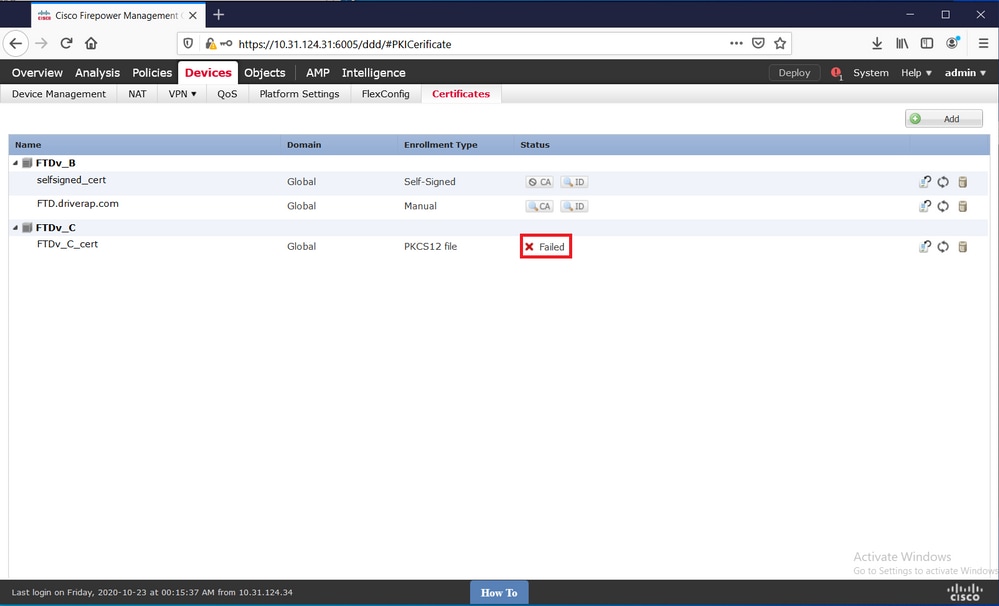
참고: FMC에서 관리하는 FTD의 Certificate Installation and Renewal on FTD(인증서 설치 및 갱신)의 PKCS12 Enrollment(PKCS12 등록) 섹션에서 FMC를 사용하여 PKCS#12 파일을 설치하는 방법에 대한 단계별 절차를 찾습니다.
이러한 이유로 인증서 설치가 실패할 경우 PKI 디버그는 아래 오류를 인쇄합니다.
firepower# debug crypto ca 14
firepower# show debug
debug crypto ca enabled at level 14
Conditional debug filters:
Conditional debug features:

firepower# PKI[13]: crypto_parsepkcs12, pki_ossl_pkcs12.c:1484
PKI[13]: pki_unpack_p12, pki_ossl_pkcs12.c:1414
PKI[4]: Error unpacking pkcs7 encrypted data
PKI[1]: error:060A60A3:digital envelope routines:FIPS_CIPHERINIT:disabled for fips in fips_enc.c line 143.
PKI[1]: error:06074078:digital envelope routines:EVP_PBE_CipherInit:keygen failure in evp_pbe.c line 203.
PKI[1]: error:23077073:PKCS12 routines:PKCS12_pbe_crypt:pkcs12 algor cipherinit error in p12_decr.c line 93.
PKI[1]: error:2306A075:PKCS12 routines:PKCS12_item_decrypt_d2i:pkcs12 pbe crypt error in p12_decr.c line 145.
PKI[4]: pkcs7 encryption algorithm may not be fips compliant
PKI[4]: Error unpacking pkcs12 struct to extract keys and certs
PKI[13]: label: FTDv_C_cert
PKI[13]: TP list is NULL
PKI[13]: label: FTDv_C_cert
PKI[13]: TP list label: FTDv_C_cert
PKI[14]: pki_ossl_set_cert_store_dirty, pki_ossl_certstore.c:38
PKI[13]: crypto_pki_get_ossl_env, pki_ossl.c:41
PKI[13]: label: FTDv_C_cert
PKI[13]: TP list label: FTDv_C_cert
또한 OpenSSL을 통해 PKCS#12에 규정준수를 위반한 FIPS PBE 알고리즘이 포함되어 있음을 확인할 수 있습니다.
OpenSSL> pkcs12 -info -in ftdv_C_.p12 -noout
Enter Import Password:
MAC Iteration 2048
MAC verified OK
PKCS7 Encrypted data: pbeWithSHA1And40BitRC2-CBC, Iteration 2048
Certificate bag
Certificate bag
PKCS7 Data
Shrouded Keybag: pbeWithSHA1And3-KeyTripleDES-CBC, Iteration 2048
이전 출력에는 각각 인증서와 개인 키를 보호하는 pbeWithSHA1And40BitRC2-CBC와 pbeWithSHA1And3-KeyTripleDES-CBC라는 두 가지 PBE 알고리즘이 있습니다. 첫 번째는 FIPS 규격이 아닙니다.
솔루션
해결 방법은 인증서 및 개인 키 보호를 위해 PBE-SHA1-3DES 알고리즘을 구성하는 것입니다. 위의 예에서는 인증서 알고리즘만 변경하면 됩니다. 먼저 OpenSSL을 활용하여 원래 PKCS#12 파일의 PEM(Privacy-Enhanced Mail) 버전을 가져와야 합니다.
OpenSSL> pkcs12 -in ftdv_C_.p12 -out ftdv_C_.pem
Enter Import Password:
MAC verified OK
Enter PEM pass phrase:
Verifying - Enter PEM pass phrase:
마지막으로, 이전 단계에서 얻은 PEM 파일을 사용하여 FIPS 호환 PBE 알고리즘과 함께 아래 명령을 사용하여 새로운 PKCS#12 파일을 생성해야 합니다.
OpenSSL> pkcs12 -certpbe PBE-SHA1-3DES -export -in ftdv_C_.pem -out ftdv_C_FIPS_compliant.p12
Enter pass phrase for ftdv_C_.pem:
Enter Export Password:
Verifying - Enter Export Password:
unable to write 'random state'
참고: 개인 키를 보호하는 알고리즘도 변경해야 하는 경우 -keybe 키워드 뒤에 PBE-SHA1-3DES를 동일한 명령에 추가할 수 있습니다. pkcs12 -certpbe PBE-SHA1-3DES -keypbe PBE-SHA1-3DES -export -in -out -out <PKCS12 cert file>.
확인
FIPS 알고리즘이 사용 중인지 확인하기 위해 PKCS#12 파일 구조에 대한 정보를 얻으려면 동일한 OpenSSL 명령을 사용합니다.
OpenSSL> pkcs12 -info -in ftdv_C_FIPS_compliant.p12 -noout
Enter Import Password:
MAC Iteration 2048
MAC verified OK
PKCS7 Encrypted data: pbeWithSHA1And3-KeyTripleDES-CBC, Iteration 2048
Certificate bag
Certificate bag
PKCS7 Data
Shrouded Keybag: pbeWithSHA1And3-KeyTripleDES-CBC, Iteration 2048
이제 PKI 디버그는 인증서 설치가 성공하면 아래에 출력을 표시합니다.
PKI[13]: crypto_parsepkcs12, pki_ossl_pkcs12.c:1484
PKI[13]: pki_unpack_p12, pki_ossl_pkcs12.c:1414
PKI[13]: pki_unpack_bags, pki_ossl_pkcs12.c:1383
PKI[13]: pki_unpack_bag, pki_ossl_pkcs12.c:1313
PKI[13]: add_cert, pki_ossl_pkcs12.c:1284
PKI[13]: add_cert_node, pki_ossl_pkcs12.c:1187
PKI[13]: pki_unpack_bag, pki_ossl_pkcs12.c:1313
PKI[13]: add_cert, pki_ossl_pkcs12.c:1284
PKI[13]: add_cert_node, pki_ossl_pkcs12.c:1187
PKI[13]: pki_unpack_bags, pki_ossl_pkcs12.c:1383
PKI[13]: pki_unpack_bag, pki_ossl_pkcs12.c:1313
PKI[13]: add_key, pki_ossl_pkcs12.c:1252
PKI[13]: add_cert_node, pki_ossl_pkcs12.c:1187
PKI[14]: compare_key_ids, pki_ossl_pkcs12.c:1150
PKI[12]: transfer_p12_contents_to_asa, pki_ossl_pkcs12.c:375
PKI[13]: label: FTDv_C_FIPS_Compliant
PKI[13]: TP list is NULL

CRYPTO_PKI: examining router cert:
CRYPTO_PKI: issuerName=/O=Cisco/OU=TAC/CN=RootCA_C1117
CRYPTO_PKI: subjectname=/CN=ftdv/unstructuredName=C1117_DRIVERAP.driverap.com
CRYPTO_PKI: key type is RSAPKI[13]: GetKeyUsage, pki_ossl_pkcs12.c:278

CRYPTO_PKI: bitValue of ET_KEY_USAGE = a0
CRYPTO_PKI: Certificate Key Usage = GENERAL_PURPOSE
CRYPTO_PKI: adding RSA Keypair
CRYPTO_PKI: adding as a router certificate.
CRYPTO_PKI: InsertCertData: subject name =

30 3b 31 0d 30 0b 06 03 55 04 03 13 04 66 74 64 76 31 2a 30
28 06 09 2a 86 48 86 f7 0d 01 09 02 16 1b 43 31 31 31 37 5f
44 52 49 56 45 52 41 50 2e 64 72 69 76 65 72 61 70 2e 63 6f
6d
CRYPTO_PKI: InsertCertData: issuer name =

30 35 31 0e 30 0c 06 03 55 04 0a 13 05 43 69 73 63 6f 31 0c
30 0a 06 03 55 04 0b 13 03 54 41 43 31 15 30 13 06 03 55 04
03 0c 0c 52 6f 6f 74 43 41 5f 43 31 31 31 37
CRYPTO_PKI: InsertCertData: serial number = 16 | .

CRYPTO_PKI: looking for cert in handle=0x00002abdcb8cac50, digest=
aa 49 1e c2 c1 d5 30 60 4a 88 57 c8 3d 4e 3c 1c | .I....0`J.W.=N<.

CRYPTO_PKI: Cert record not found, returning E_NOT_FOUND
CRYPTO_PKI: Inserted cert into list.PKI[14]: pki_ossl_set_cert_store_dirty, pki_ossl_certstore.c:38
PKI[13]: crypto_pki_get_ossl_env, pki_ossl.c:41
PKI[9]: Cleaned PKI cache successfully
PKI[9]: Starting to build the PKI cache
PKI[4]: No identity cert found for TP: FTDv_C_FIPS_Compliant
PKI[4]: Failed to cache certificate chain for the trustpoint FTDv_C_FIPS_Compliant or none available
PKI[13]: CERT_GetTrustedIssuerNames, vpn3k_cert_api.c:1760
PKI[14]: map_status, vpn3k_cert_api.c:2229
PKI[4]: Failed to retrieve trusted issuers list or no trustpoint configured
PKI[13]: CERT_FreeTrustedIssuerNames, vpn3k_cert_api.c:1782
PKI[13]: crypto_pkcs12_add_sync_record, pki_ossl_pkcs12.c:144
PKI[13]: label: FTDv_C_FIPS_Compliant
PKI[13]: TP list label: FTDv_C_FIPS_Compliant

CRYPTO_PKI(Cert Lookup) issuer="cn=RootCA_C1117,ou=TAC,o=Cisco" serial number=16 | .

CRYPTO_PKI: looking for cert in handle=0x00002abdcb8cac50, digest=
aa 49 1e c2 c1 d5 30 60 4a 88 57 c8 3d 4e 3c 1c | .I....0`J.W.=N<.

CRYPTO_PKI: ID cert in trustpoint FTDv_C_FIPS_Compliant successfully validated with CA cert.

CRYPTO_PKI: crypto_pki_authenticate_tp_cert()

CRYPTO_PKI: trustpoint FTDv_C_FIPS_Compliant authentication status = 0

CRYPTO_PKI: InsertCertData: subject name =

30 35 31 0e 30 0c 06 03 55 04 0a 13 05 43 69 73 63 6f 31 0c
30 0a 06 03 55 04 0b 13 03 54 41 43 31 15 30 13 06 03 55 04
03 0c 0c 52 6f 6f 74 43 41 5f 43 31 31 31 37
CRYPTO_PKI: InsertCertData: issuer name =

30 35 31 0e 30 0c 06 03 55 04 0a 13 05 43 69 73 63 6f 31 0c
30 0a 06 03 55 04 0b 13 03 54 41 43 31 15 30 13 06 03 55 04
03 0c 0c 52 6f 6f 74 43 41 5f 43 31 31 31 37
CRYPTO_PKI: InsertCertData: serial number = 01 | .

CRYPTO_PKI: looking for cert in handle=0x00002abdcb8cac50, digest=
17 9d 0e b0 15 9d cd a2 5a 01 95 bf c6 8c 4f 2e | ........Z.....O.

CRYPTO_PKI: Cert record not found, returning E_NOT_FOUND
CRYPTO_PKI: Inserted cert into list.PKI[14]: pki_ossl_set_cert_store_dirty, pki_ossl_certstore.c:38
PKI[13]: crypto_pki_get_ossl_env, pki_ossl.c:41
PKI[9]: Cleaned PKI cache successfully
PKI[9]: Starting to build the PKI cache

CRYPTO_PKI(Cert Lookup) issuer="cn=RootCA_C1117,ou=TAC,o=Cisco" serial number=16 | .

CRYPTO_PKI: looking for cert in handle=0x00002abdcb8cac50, digest=
aa 49 1e c2 c1 d5 30 60 4a 88 57 c8 3d 4e 3c 1c | .I....0`J.W.=N<.
PKI[7]: Get Certificate Chain: number of certs returned=2
PKI[13]: CERT_GetDNbyBuffer, vpn3k_cert_api.c:993
PKI[14]: map_status, vpn3k_cert_api.c:2229
PKI[7]: Built trustpoint cache for FTDv_C_FIPS_Compliant
PKI[13]: CERT_GetTrustedIssuerNames, vpn3k_cert_api.c:1760
PKI[14]: map_status, vpn3k_cert_api.c:2229
PKI[9]: Added 1 issuer hashes to cache.
PKI[13]: CERT_FreeTrustedIssuerNames, vpn3k_cert_api.c:1782
PKI[13]: crypto_pkcs12_free_sync_record, pki_ossl_pkcs12.c:113
PKI[13]: label: FTDv_C_FIPS_Compliant
PKI[13]: TP list label: FTDv_C_FIPS_Compliant
PKI[13]: label: FTDv_C_FIPS_Compliant
PKI[13]: TP list label: FTDv_C_FIPS_Compliant
PKI[14]: pki_ossl_set_cert_store_dirty, pki_ossl_certstore.c:38
PKI[13]: crypto_pki_get_ossl_env, pki_ossl.c:41
PKI[13]: label: FTDv_C_FIPS_Compliant
PKI[13]: TP list label: FTDv_C_FIPS_Compliant

CRYPTO_PKI: certificate data
<omitted output>
CRYPTO_PKI: status = 0: failed to get extension from cert

CRYPTO_PKI: certificate data
<omitted output>
PKI[13]: label: FTDv_C_FIPS_Compliant
PKI[13]: TP list label: FTDv_C_FIPS_Compliant
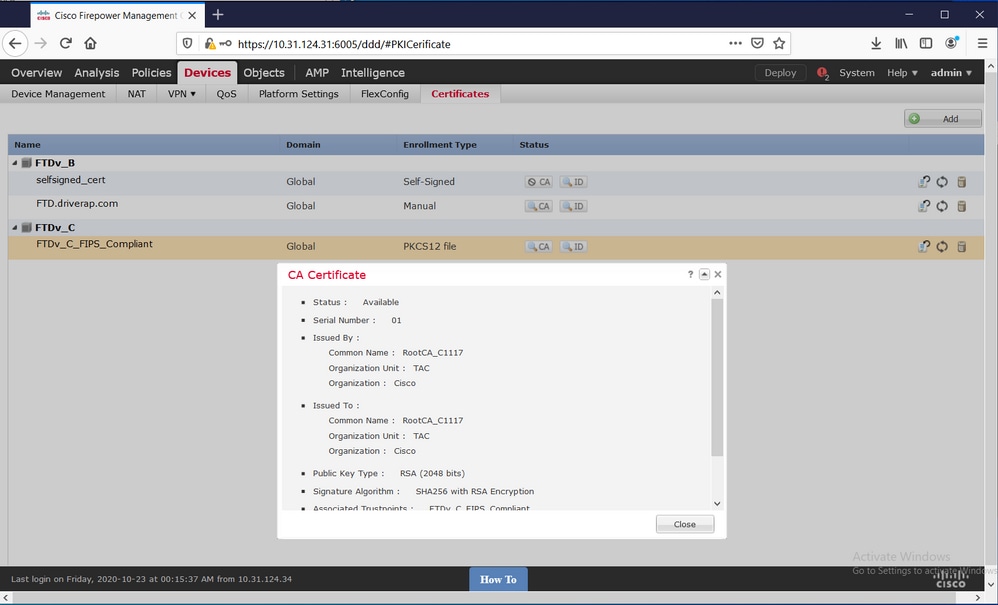
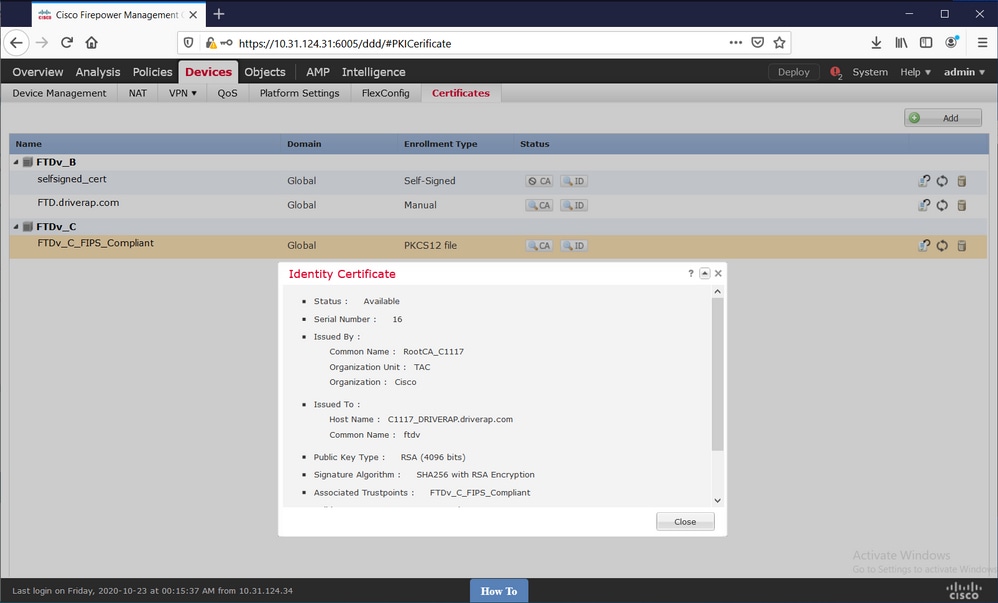
마지막으로, FMC는 CA 및 ID 인증서를 모두 사용 가능한 상태로 표시합니다.
 피드백
피드백