소개
이 문서에서는 온라인 모드에서 Catalyst 8300 라우터에 HSEC 라이센스를 설치하는 방법에 대해 설명합니다.
사전 요구 사항
다음 항목에 대한 지식:
- Smart Licensing 지식
- Cisco IOS® XE의 지식
- HSEC 라이센스 지식 이 라이센스는 export control 라이센스라고도 합니다.
라우터 사전 요구 사항:
배경 정보
Configure Licenses and Throughput for Catalyst 8000 Series Physical Platforms(Catalyst 8000 Series 물리적 플랫폼의 라이센스 및 처리량 구성)에 대한 공식 가이드가 있지만, 여러 Catalyst 8000 라우터 플랫폼 간의 라이센싱 기능이 혼합되어 있는 것에 대해 설명합니다.
이 가이드는 인스턴스가 CSSM(Cisco Smart Software Manager)에 직접 연결된 경우 자동 모드로 실행되는 8300에만 중점을 둡니다.
사용되는 구성 요소
이 문서에서는 다음 요소를 사용합니다.

참고: 안정적인 골든 스타 또는 권장 버전으로 소프트웨어를 최신 상태로 유지해야 합니다.
이 문서의 정보는 특정 랩 환경의 디바이스를 토대로 작성되었습니다. 이 문서에 사용된 모든 디바이스는 초기화된(기본) 컨피그레이션으로 시작되었습니다. 현재 네트워크가 작동 중인 경우 모든 명령의 잠재적인 영향을 미리 숙지하시기 바랍니다.
개념
SLAC(Smart License Authorization Code)
Smart License Authorization Code는 HSEC 라이센스를 사용할 수 있도록 디바이스에 설치해야 하는 코드입니다.
이 코드는 디바이스에서 요청하고 디바이스에 설치해야 합니다. 그 후에는 암호화된 트래픽에 대해 더 높은 처리량 수준을 구성할 수 있습니다.
Catalyst 8000 Series 물리적 플랫폼의 라이센스 및 처리량 구성 설명서의 공식 설명서 가이드에서 HSECK9 라이센스 사용에 대한 지침 섹션을 참조하십시오.
자세한 내용은 다음 장을 참조하십시오. 정책을 사용하는 Smart Licensing에 대한 작업 라이브러리입니다.
CSSM(Cisco Software Smart Manager)
라이센스를 관리하는 클라우드의 원격 서버 엔티티입니다.
CSSM은 레거시 Smart Software Manager에 액세스할 수 있는 Cisco Software Central에서 액세스할 수 있으며, Cisco License Central에서 업데이트된 웹 페이지 버전에 액세스할 수 있습니다.
단계
1단계. 장치에 Cisco DNA 부팅 수준이 있는지 확인합니다.
Cisco DNA 부팅 레벨 및 기능에 대해 알아보려면 Matrix Cisco DNA Software, SD-WAN 및 Routing Matrices를 참조하십시오.
show version: 명령을 사용하여 디바이스의 부팅 수준을 확인합니다.
Router#show version

Technology Package License Information:

-----------------------------------------------------------------
Technology     Type         Technology-package Technology-package
                            Current            Next Reboot
-----------------------------------------------------------------
Smart License  Perpetual    network-advantage  network-advantage
Smart License  Subscription dna-advantage      dna-advantage
2단계. Smart Transport 및 기본 URL 정의
Router(config)#license smart transport smart
Router(config)#license smart url default
3단계. 필요한 경우 프록시 정의
Router(config)#license smart proxy address
Router(config)#license smart proxy port
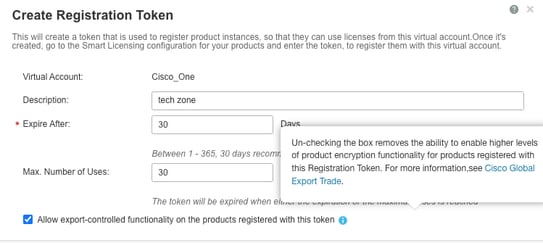
4단계. 등록 허용 내보내기 제어 기능에 사용되는 토큰 확인
디바이스가 CSSM에 등록된 경우 다음 스크린샷과 같이 내보내기 제어 기능을 허용하는 토큰이 허용되었는지 확인합니다.
5단계. 디바이스에서 토큰 구성
Router#license smart trust idtoken all force
CSSM과의 통신이 설치된 show log and trust code에서 복원되는 것을 볼 수 있습니다
*Dec  1 23:42:28.633: %SMART_LIC-5-COMM_RESTORED: Communications with Cisco Smart Software Manager (CSSM) restored
*Dec  1 23:42:28.656: %SMART_LIC-6-POLICY_INSTALL_SUCCESS: A new licensing policy was successfully installed
*Dec  1 23:42:28.720: %SMART_LIC-6-TRUST_INSTALL_SUCCESS: A new licensing trust code was successfully installed on P:C8300-1N1S-4T2X,S:.
6단계. Trust Code Installed(신뢰 코드 설치) 및 ACK Received(ACK 수신) 확인(show license status 명령 사용)
Router#show license status
Utility:
  Status: DISABLED

Smart Licensing Using Policy:
  Status: ENABLED

Account Information:
  Smart Account:  As of Dec 01 23:41:50 2025 UTC
  Virtual Account:

Data Privacy:
  Sending Hostname: yes
    Callhome hostname privacy: DISABLED
    Smart Licensing hostname privacy: DISABLED
  Version privacy: DISABLED

Transport:
  Type: Smart
  URL: https://smartreceiver.cisco.com/licservice/license
  Proxy:
    Address:
    Port:
    Username:
    Password:
  VRF:

Policy:
  Policy in use: Installed On Dec 01 23:42:28 2025 UTC
  Policy name: SLE Policy
  Reporting ACK required: yes (Customer Policy)
  Unenforced/Non-Export Perpetual Attributes:
    First report requirement (days): 30 (Customer Policy)
    Reporting frequency (days): 60 (Customer Policy)
    Report on change (days): 60 (Customer Policy)
  Unenforced/Non-Export Subscription Attributes:
    First report requirement (days): 120 (Customer Policy)
    Reporting frequency (days): 111 (Customer Policy)
    Report on change (days): 111 (Customer Policy)
  Enforced (Perpetual/Subscription) License Attributes:
    First report requirement (days): 30 (Customer Policy)
    Reporting frequency (days): 90 (Customer Policy)
    Report on change (days): 60 (Customer Policy)
  Export (Perpetual/Subscription) License Attributes:
    First report requirement (days): 30 (Customer Policy)
    Reporting frequency (days): 30 (Customer Policy)
    Report on change (days): 30 (Customer Policy)

Miscellaneous:
  Custom Id:

Usage Reporting:
  Last ACK received: Dec 01 23:48:00 2025 UTC<<<<<<<< ACK
  Next ACK deadline: Jan 30 23:48:00 2026 UTC
  Reporting push interval: 30  days
  Next ACK push check:
  Next report push: Dec 31 23:43:03 2025 UTC
  Last report push: Dec 01 23:43:03 2025 UTC
  Last report file write:

Trust Code Installed: Dec 01 23:42:28 2025 UTC<<<<<<<<<<

Device Telemetry Report Summary:
================================
Data Channel: AVAILABLE
Reports on disk: 1
7단계. show license authorization 명령으로 기존 권한 부여 확인
Show license authorization은 HSEC 또는 Export control에 대한 권한 부여 코드가 이미 설치되어 있는지 표시합니다.
참고: 일부 디바이스에는 이 SLAC(Smart License Authorization Code)가 주문에 포함된 경우 공장에서 이미 설치되어 있습니다.
Router#show license authorization
Last Data Push:
Last File Export:

Overall status:
  Active: PID:C8300-1N1S-4T2X,SN:
    Status: NOT INSTALLED

Purchased Licenses:
  No Purchase Information Available


Router#
설치되지 않은 경우 다음 단계를 진행합니다.
8단계. SLAC 요청
인증 코드가 아직 설치되지 않은 경우 제품 인스턴스, 즉 장치에서 SLAC 코드를 요청합니다.
SLAC를 요청하려면 명령 라이센스 기능 hseck9를 사용합니다.
Router(config)#license feature hseck9
이후에 성공적으로 가져온 SLAC 코드를 볼 수 있습니다.
Router(config)#
*Dec  1 23:55:06.978: %SMART_LIC-6-AUTHORIZATION_INSTALL_SUCCESS: A new licensing authorization code was successfully installed on PID:C8300-1N1S-4T2X,SN:
*Dec  1 23:55:07.004: %SMART_LIC-6-EXPORT_CONTROLLED: Usage of export controlled features is allowed for feature hseck9
9단계. 권한 부여 확인
SLAC가 요청되면 show license authorization을 실행하여 인증 코드가 제대로 설치되었는지 확인할 수 있습니다.
Router#show license authorization
Last Data Push: Dec 01 23:55:06 2025 UTC via Smart
Last File Export:

Overall status:
  Active: PID:C8300-1N1S-4T2X,SN:
    Status: SMART AUTHORIZATION INSTALLED on Dec 01 23:55:06 2025 UTC
    Last Confirmation code:

Authorizations:
  Router US Export Lic. for DNA (DNA_HSEC):
    Description: U.S. Export Restriction Compliance license for DNA based Routers
    Total available count: 1
    Enforcement type: EXPORT RESTRICTED
    Term information:
      Active: PID:C8300-1N1S-4T2X,SN:
        Authorization type: SMART AUTHORIZATION INSTALLED
        License type: PERPETUAL
          Term Count: 1

Purchased Licenses:
  No Purchase Information Available


Router#
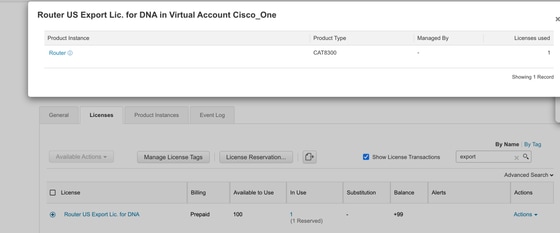
포털에서 라이센스가 사용되고 예약되었는지 확인합니다.
처리량 변경
SLAC가 성공적으로 설치되면 그에 따라 처리량을 변경합니다.
Router(config)#platform hardware throughput crypto 2.5G
% These values don't take effect until the next reboot. Please save the configuration.
Router(config)#
*Dec  2 00:01:19.108: %CRYPTO_SL_TP_LEVELS-6-SAVE_CONFIG_AND_RELOAD: New throughput level not applied until reload; please save config
Router(config)#do wr
Building configuration...
[OK]
Router(config)#
*Dec  2 00:01:28.776: %SYS-6-PRIVCFG_ENCRYPT_SUCCESS: Successfully encrypted private config file
Router(config)#do reload
WARNING:
Boot variable either does not exist or buffer is too small
This may impact autoboot of the router. Proceed with caution
Do you wish to proceed with reload anyway[confirm]
Proceed with reload? [confirm]
참고: 암호화되지 않은 트래픽은 기본적으로 제한 해제됩니다.
show platform hardware throughput crypto 명령을 통해 현재 암호화 처리량을 확인합니다.
Router#show platform hardware throughput crypto
Current configured crypto throughput level: 2.5G

 피드백
피드백