EX 하드웨어 ACI Packet Forwarding Deep Dive.

다운로드 옵션
편견 없는 언어
본 제품에 대한 문서 세트는 편견 없는 언어를 사용하기 위해 노력합니다. 본 설명서 세트의 목적상, 편견 없는 언어는 나이, 장애, 성별, 인종 정체성, 민족 정체성, 성적 지향성, 사회 경제적 지위 및 교차성에 기초한 차별을 의미하지 않는 언어로 정의됩니다. 제품 소프트웨어의 사용자 인터페이스에서 하드코딩된 언어, RFP 설명서에 기초한 언어 또는 참조된 서드파티 제품에서 사용하는 언어로 인해 설명서에 예외가 있을 수 있습니다. 시스코에서 어떤 방식으로 포용적인 언어를 사용하고 있는지 자세히 알아보세요.
이 번역에 관하여
Cisco는 전 세계 사용자에게 다양한 언어로 지원 콘텐츠를 제공하기 위해 기계 번역 기술과 수작업 번역을 병행하여 이 문서를 번역했습니다. 아무리 품질이 높은 기계 번역이라도 전문 번역가의 번역 결과물만큼 정확하지는 않습니다. Cisco Systems, Inc.는 이 같은 번역에 대해 어떠한 책임도 지지 않으며 항상 원본 영문 문서(링크 제공됨)를 참조할 것을 권장합니다.
목차
소개
이 문서에서는 ACI(Application Centric Infrastructure)에서 "EX" 기반 ACI 스위치를 사용하는 다양한 전달 시나리오에 대해 설명합니다. 하드웨어가 올바르게 프로그래밍되었는지 확인하는 방법을 보여 주며, 적절한 EPG(엔드포인트 그룹)의 올바른 대상 엔드포인트(EP)에 패킷을 전달합니다.
사전 요구 사항
요구 사항
이 문서에 대한 특정 요건이 없습니다.
사용되는 구성 요소
이 문서의 정보는 다음 하드웨어 및 소프트웨어 버전을 기반으로 합니다.
- EX 하드웨어를 사용하는 2개의 스파인 스위치와 2개의 리프 스위치로 구성된 ACI 패브릭
- 각 Leaf 스위치에 연결되는 업링크 2개가 있는 ESXi 호스트
- 라우터 역할을 하는 Nexus 5000 디바이스입니다.
- 초기 설정에 사용되는 APIC(Application Policy Infrastructure Controller)
이 문서의 정보는 특정 랩 환경의 디바이스를 토대로 작성되었습니다. 이 문서에 사용된 모든 디바이스는 초기화된(기본) 컨피그레이션으로 시작되었습니다. 현재 네트워크가 작동 중인 경우, 모든 명령어의 잠재적인 영향을 미리 숙지하시기 바랍니다.
시나리오
동일한 EPG/동일한 리프에 EP 2개 - 스위치드 프레임
토폴로지
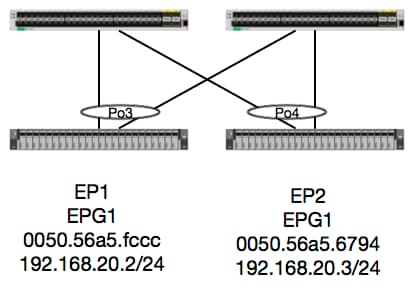
이 토폴로지에서 EP1에서 EP2로의 흐름은 L2 흐름이며 소스 트래픽이 들어오는 leaf에서 로컬로 스위칭되어야 합니다. 레이어 2(L2) 흐름에서 가장 먼저 확인할 사항은 스위치가 프레임을 수신했는지 위치를 확인하는 mac 주소 테이블입니다.
leaf4# show mac address-table | grep fccc
* 30       0050.56a5.fccc    dynamic      -       F    F    po3
leaf4# show mac address-table | grep 6794
* 30       0050.56a5.6794    dynamic      -       F    F    po4
캡슐화 VLAN을 확인하기 위해 EP 데이터베이스도 확인할 수 있습니다.
leaf4# show endpoint mac 0050.56a5.fccc
Legend:
 O - peer-attached    H - vtep             a - locally-aged     S - static
 V - vpc-attached     p - peer-aged        L - local            M - span
 s - static-arp       B - bounce
+-----------------------------------+---------------+-----------------+--------------+-------------+
      VLAN/                           Encap           MAC Address       MAC Info/       Interface
      Domain                          VLAN            IP Address        IP Info
+-----------------------------------+---------------+-----------------+--------------+-------------+
30                                        vlan-2268    0050.56a5.fccc LV                        po3
Joey-Tenant:Joey-Internal                 vlan-2268      192.168.20.2 LV                        po3


calo2-leaf4# show endpoint mac 0050.56a5.6794
Legend:
 O - peer-attached    H - vtep             a - locally-aged     S - static
 V - vpc-attached     p - peer-aged        L - local            M - span
 s - static-arp       B - bounce
+-----------------------------------+---------------+-----------------+--------------+-------------+
      VLAN/                           Encap           MAC Address       MAC Info/       Interface
      Domain                          VLAN            IP Address        IP Info
+-----------------------------------+---------------+-----------------+--------------+-------------+
30                                        vlan-2268    0050.56a5.6794 LV                        po4
Joey-Tenant:Joey-Internal                 vlan-2268      192.168.20.3 LV                        po4
FD_VLAN 30 일치는 알고 있지만, 항상 소프트웨어에서 매핑을 검증할 수 있습니다.
leaf4# show vlan extended | grep 2268
 30   enet  CE         vlan-2268
그리고 물론 하드웨어를 체크하여 VLAN 30이 VLAN 2268에 전면 패널 캡슐화로 매핑되는지 확인할 수 있습니다.
leaf4# vsh_lc
module-1# show system internal eltmc info vlan 30


             vlan_id:             30   :::      hw_vlan_id:             22
           vlan_type:        FD_VLAN   :::         bd_vlan:             28
   access_encap_type:         802.1q   :::    access_encap:           2268
   fabric_encap_type:          VXLAN   :::    fabric_encap:          11960
              sclass:          32778   :::           scope:             11
            untagged:              0
     acess_encap_hex:          0x8dc   :::  fabric_enc_hex:         0x2eb8
     pd_vlan_ft_mask:            0x8
    fd_learn_disable:              0
        qos_class_id:              0   :::      qos_pap_id:              0
          qq_met_ptr:             25   :::      ipmc_index:              0
   ingressBdAclLabel:              0   ::: ingBdAclLblMask:              0
    egressBdAclLabel:              0   ::: egrBdAclLblMask:              0
         qos_map_idx:              0   :::     qos_map_pri:              0
        qos_map_dscp:              0   :::      qos_map_tc:              0
        vlan_ft_mask:          0xe30
           hw_bd_idx:              0   :::      hw_epg_idx:          11267
          intf_count:              2   ::: glbl_scp_if_cnt:              2

<SNIPPED>
EP가 소프트웨어에서 학습된 것을 감안할 때, 우리는 또한 하드웨어가 이러한 EP의 L2 정보를 프로그래밍했음을 검증할 수 있다. 새 하드웨어에는 하드웨어의 소프트웨어 상태인 HAL(Hardware Abstraction Layer)이 있습니다. HAL의 업무는 소프트웨어 프로그래밍 요청을 받아 하드웨어로 푸시하는 것입니다.
엔드포인트에 대한 L2 하드웨어 정보를 보려면 HAL의 L2 테이블에서 지정된 mac 주소를 확인할 수 있습니다.
leaf4# vsh_lc
module-1# show platform internal hal ep l2 mac 0050.56a5.fccc
LEGEND:
-------
BDId:              BD Id                                                   BD Name:        BD Name
T:                 EP Type (Pl: Physical Vl: Virtual Xr: Remote            EP Mac:         Mac
L2 IfId:           L2 Interface                                            L2 IfName:      L2 IfName
FDId:              FD Id                                                   FD Name:        FD Name
S Class:           S Class                                                 Age Intvl:      Age Interval
P A:               Packet Action (F: Forward, T: Trap to CPU,
                                  L: Log & Forward, D: Drop, N: None)
S T:               Static Ep                                               S E:            Secure EP
L D:               Learn Disable                                           B N D:          Bind Notify Disable
E N D:             Epg Notify Disable                                      B E:            Bounce Enable
I D L:             IVxlan Dont Learn                                       SPI:            Source Policy Incomplete
DPI:               Dest Policy Incomplete                                  SPA:            Source Policy Applied
DPA:               Dest Policy Applied                                     DSS:            Dest Shared Service
IL:                Is Local                                                VUB:            Vnid Use Bd
SO:                SA Only

 L2 EP Count: 1

======================================================================================================================
                                                                                            B E   I S D S D D   V
     BD           EP                L2       L2               FD        S     Age   P S S L N N B D P P P P S I U S
BdId Name      T  Mac               IfId     Ifname      FDId Name      Class Intvl A T E D D D E L I I A A S L B O
======================================================================================================================
1c   BD-28     Pl 00:50:56:a5:fc:cc 16000002 Po3         1e   FD-30     800a  29f   F 0 0 0 1 0 0 0 0 0 0 0 0 1 0 0


module-1# show platform internal hal ep l2 mac 0050.56a5.6794
======================================================================================================================
                                                                                            B E   I S D S D D   V
     BD           EP                L2       L2               FD        S     Age   P S S L N N B D P P P P S I U S
BdId Name      T  Mac               IfId     Ifname      FDId Name      Class Intvl A T E D D D E L I I A A S L B O
======================================================================================================================
1c   BD-28     Pl 00:50:56:a5:67:94 16000003 Po4         1e   FD-30     800a  29f   F 0 0 0 1 0 0 0 0 0 0 0 0 1 0 0
이제 하드웨어를 설계했으므로 ELAM을 수행하여 패킷이 어디로 이동해야 하는지 알아보겠습니다.
엘람
leaf4# vsh_lc
module-1# debug platform internal tah elam asic 0
module-1(DBG-TAH-elam)# trigger reset
module-1(DBG-TAH-elam)# trigger init in-select 6 out-select 0
module-1(DBG-TAH-elam-insel6)# set outer l2 src_mac 0050.56a5.fccc dst_mac 0050.56a5.6794
module-1(DBG-TAH-elam-insel6)# start
module-1(DBG-TAH-elam-insel6)# stat
ELAM STATUS
===========
Asic 0 Slice 0 Status Armed
Asic 0 Slice 1 Status Triggered

module-1(DBG-TAH-elam-insel6)# report | grep ovec
  sug_elam_out_sidebnd_no_spare_vec.ovector_idx: 0x9E
좋습니다. 따라서 Leaf4는 Asic 0 슬라이스 1에서 프레임을 받았습니다. 새로운 하드웨어에 ELAM이 추가되면서 트러블슈팅에 매우 중요한 필드가 새롭게 추가되었습니다. ovector_idx. 이 인덱스는 프레임/패킷이 전달되어야 하는 물리적 포트 인덱스입니다. ovector_idx가 있으면 이 명령을 사용하여 매핑되는 포트를 찾을 수 있습니다.
module-1(DBG-TAH-elam-insel6)# show platform internal hal l2 port gpd
Legend:
-------
IfId:       Interface Id                                    IfName:      Interface Name
I P:        Is PC Mbr                                       IfId:           Interface Id
Uc PC Cfg:      UcPcCfg Idx                                 Uc PC MbrId:    Uc Pc Mbr Id
As:             Asic                                        AP:             Asic Port
Sl:             Slice                                       Sp:             Slice Port
Ss:             Slice SrcId                                 Ovec:           Ovector (slice | srcid)
L S:            Local Slot                                  Reprogram:
L3:             Is L3
    P:    PifTable                                          Xla Idx:        Xlate Idx
    RP:   Rw PifTable                                       Ovx Idx:        OXlate Idx
    IP:   If Profile Table                                  N L3:           Num. of L3 Ifs
    RS:   Rw SrcId Table                                    NI L3:          Num. of Infra L3 Ifs
    DP:   DPort Table                                       Vif Tid:        Vif Tid
    SP:   SrcPortState Table                                RwV Tid:        RwVif Tid
    RSP:  RwSrcPortstate Table                              Ing Lbl:        Ingress Acl Label
    UC:   UCPcCfg                                           Egr Lbl:        Egress Acl Label
    UM:   UCPcMbr                                           Reprogram:
PROF ID:        Lport Profile Id
    VS:   VifStateTable                                     HI:             LportProfile Hw Install
    RV:   Rw VifTable
Num. of Sandboxes: 1

Sandbox_ID: 0, BMP: 0x0
 Port Count: 8

============================================================================================================================================
                       Uc   Uc                          |       Reprogram       |                                         | Rep |
                     I PC   Pc                        L |   R I R D    R  U U X | L Xla Ovx N  NI Vif    RwV    Ing  Egr  | V R | PROF H
IfId     Ifname      P Cfg  MbrID As AP Sl Sp Ss Ovec S | P P P S P Sp Sp C M L | 3 Idx Idx L3 L3 Tid    Tid    Lbl  Lbl  | S V | ID   I
=============================================================================================================================================
1a004000 Eth1/5      1 0    1d    0  d  0  c  18 18   1   0 0 0 0 0 0  0  0 0 0   0 0   0   0  0  -      -      800  0      0 1   0    0
1a005000 Eth1/6      1 0    b     0  e  0  d  1a 1a   1   0 0 0 0 0 0  0  0 0 0   0 0   0   0  0  -      -      800  0      0 1   0    0
1a006000 Eth1/7      0 26   5     0  f  0  e  1c 1c   1   0 0 0 0 0 0  0  0 0 0   0 0   0   0  0  D-256  -      800  0      0 1   e    0
1a007000 Eth1/8      0 2e   7     0  10 0  f  1e 1e   1   0 0 0 0 0 0  0  0 0 0   0 0   0   0  0  D-84   -      800  0      0 1   30   0
1a01e000 Eth1/31     1 0    2d    0  37 1  e  1c 9c   1   0 0 0 0 0 0  0  0 0 0   0 0   0   0  0  -      -      0    0      0 1   0    0
1a01f000 Eth1/32     1 0    3d    0  38 1  f  1e 9e   1   0 0 0 0 0 0  0  0 0 0   0 0   0   0  0  -      -      0    0      0 1   0    0
1a030000 Eth1/49     0 2    1     0  49 1  20 38 b8   1   0 0 0 0 0 0  0  0 0 0   1 8   6   2  2  D-24d  -      400  0      0 0   1    0
1a031000 Eth1/50     0 3    3     0  29 1  0  0  80   1   0 0 0 0 0 0  0  0 0 0   1 9   7   2  2  D-350  -      400  0      0 0   1    0
스위치는 패킷이 인터페이스 Ethernet 1/32에서 전달되어야 한다고 생각합니다. PO4에서 해당 mac 주소를 파악했습니까?
leaf4# show port-channel summary
Flags:  D - Down        P - Up in port-channel (members)
        I - Individual  H - Hot-standby (LACP only)
        s - Suspended   r - Module-removed
        S - Switched    R - Routed
        U - Up (port-channel)
        M - Not in use. Min-links not met
        F - Configuration failed
-------------------------------------------------------------------------------
Group Port-       Type     Protocol  Member Ports
      Channel
-------------------------------------------------------------------------------
1     Po1(SU)     Eth      LACP      Eth1/5(P)
2     Po2(SU)     Eth      LACP      Eth1/6(P)
3     Po3(SU)     Eth      LACP      Eth1/31(P)
4     Po4(SU)     Eth      LACP      Eth1/32(P)
예. 따라서 패킷이 인터페이스 1/32에서 대상 호스트로 전달됩니다.
서로 다른 EPG/동일 리프에 있는 EP 2개 - 라우팅된 패킷
토폴로지
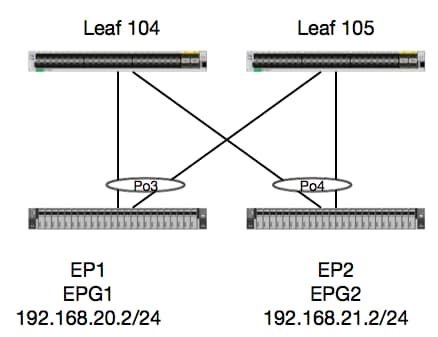
이 예에서는 동일한 vPC 리프 쌍에 있는 EP1에서 EP2로의 패킷 흐름을 추적합니다. 두 EP는 다른 BD를 사용하는 다른 EPG에 있습니다.
항상 가장 먼저 해야 할 일은 EP 데이터베이스를 검사하여 EP를 학습했는지 확인하는 것입니다.
leaf4# show endpoint ip 192.168.20.2
Legend:
 O - peer-attached    H - vtep             a - locally-aged     S - static
 V - vpc-attached     p - peer-aged        L - local            M - span
 s - static-arp       B - bounce
+-----------------------------------+---------------+-----------------+--------------+-------------+
      VLAN/                           Encap           MAC Address       MAC Info/       Interface
      Domain                          VLAN            IP Address        IP Info
+-----------------------------------+---------------+-----------------+--------------+-------------+
30                                        vlan-2268    0050.56a5.fccc LV                        po3
Joey-Tenant:Joey-Internal                 vlan-2268      192.168.20.2 LV                        po3


calo2-leaf4# show endpoint ip 192.168.21.2
Legend:
 O - peer-attached    H - vtep             a - locally-aged     S - static
 V - vpc-attached     p - peer-aged        L - local            M - span
 s - static-arp       B - bounce
+-----------------------------------+---------------+-----------------+--------------+-------------+
      VLAN/                           Encap           MAC Address       MAC Info/       Interface
      Domain                          VLAN            IP Address        IP Info
+-----------------------------------+---------------+-----------------+--------------+-------------+
8                                         vlan-2200    0050.56a5.0c11 LV                        po4
Joey-Tenant:Joey-Internal                 vlan-2200      192.168.21.2 LV                        po4
EP를 학습했고 IP 정보를 알고 있으므로 하드웨어에서 EP 학습 정보를 볼 수 있어야 합니다.
leaf4# vsh_lc
module-1# show platform internal hal ep l3 all
LEGEND:
-------
VrfName:           Vrf Name                                                T:              Type (Pl: Physical, Vl: Virtual, Xr: Remote)
EP IP:             Endpoint IP
S Class:           S Class                                                 Age Intvl:      Age Interval
S T:               Static Ep                                               S E:            Secure EP
L D:               Learn Disable                                           B N D:          Bind Notify Disable
E N D:             Epg Notify Disable                                      B E:            Bounce Enable
I D L:             IVxlan Dont Learn                                       SPI:            Source Policy Incomplete
DPI:               Dest Policy Incomplete                                  SPA:            Source Policy Applied
DPA:               Dest Policy Applied                                     DSS:            Dest Shared Service
IL:                Is Local                                                VUB:            Vnid Use Bd
SO:                SA Only                                                 EP NH L3IfName: EP Next Hop L3 If Name
NHT:               Next Hop Type (L2: L2 Entry L3: L3 Next Hop)            BD Name:        L2 NH BD Name
EP Mac:            EP Mac                                                  L3 IfName:      L3 NH If Name
L2 IfName:         L2 If Name                                              FD Name:        L2 Entry FD Name
IP:                L3 NH IP

 L3 EP Count: 12

===========================================================================================================================================================================================
                                                                   B E   I S D S D D   V   EP-NH        N  |
Vrf              EP                              S     Age   S S L N N B D P P P P S I U S L3           H  | BD        EP                L3           L2          FD
Name          T  IP                              Class Intvl T E D D D E L I I A A S L B O IfName       T  | Name      Mac               IfName       Ifname      Name      IP
===========================================================================================================================================================================================
common*rewall Pl 10.6.112.1                      1     0     1 0 0 0 0 0 1 1 0 0 0 0 1 0 0 -            L3   -         00:00:00:00:00:00 -            -           -         0.0.0.0
common*rewall Pl 10.6.114.1                      1     0     1 0 0 0 0 0 1 1 0 0 0 0 1 0 0 -            L3   -         00:00:00:00:00:00 -            -           -         0.0.0.0
common*rewall Pl 10.6.114.129                    1     0     1 0 0 0 0 0 1 1 0 0 0 0 1 0 0 -            L3   -         00:00:00:00:00:00 -            -           -         0.0.0.0
common*efault Pl 100.100.101.1                   1     0     1 0 0 0 0 0 1 1 0 0 0 0 1 0 0 -            L3   -         00:00:00:00:00:00 -            -           -         0.0.0.0
Joey-T*ternal Pl 192.168.1.1                     1     0     1 0 0 0 0 0 1 1 0 0 0 0 1 0 0 -            L3   -         00:00:00:00:00:00 -            -           -         0.0.0.0
Joey-T*ternal Xr 192.168.1.100                   8013  128   0 0 0 1 0 0 0 0 0 0 0 0 0 1 0 -            L3   -         00:0c:0c:0c:0c:0c Tunnel2      Tunnel2     -         0.0.0.0
Joey-T*ernal2 Pl 192.168.3.1                     1     0     1 0 0 0 0 0 1 1 0 0 0 0 1 0 0 -            L3   -         00:00:00:00:00:00 -            -           -         0.0.0.0
Joey-T*ternal Pl 192.168.20.1                    1     0     1 0 0 0 0 0 1 1 0 0 0 0 1 0 0 -            L3   -         00:00:00:00:00:00 -            -           -         0.0.0.0
Joey-T*ternal Pl 192.168.20.2                    800a  0     0 0 0 0 0 0 0 0 0 0 0 0 1 0 0 -            L2   BD-28     00:50:56:a5:fc:cc -            Po3         FD-30     -
Joey-T*ternal Pl 192.168.21.1                    1     0     1 0 0 0 0 0 1 1 0 0 0 0 1 0 0 -            L3   -         00:00:00:00:00:00 -            -           -         0.0.0.0
Joey-T*ternal Pl 192.168.21.2                    800c  0     0 0 0 0 0 0 0 0 0 0 0 0 1 0 0 -            L2   BD-7      00:50:56:a5:0c:11 -            Po4         FD-8      -
Joey-T*ternal Pl 2001:0:0:100::1                 1     0     1 0 0 0 0 0 1 1 0 0 0 0 1 0 0 -            L3   -         00:00:00:00:00:00 -            -           -         0.0.0.0
HAL Layer3(l3) 테이블은 l3에서 학습한 EP에 대한 VLAN/포트 정보를 제공하기 때문에 매우 자연스러운 것입니다. 목적지가 Po4에 존재하므로 패킷은 Po4의 모든 포트에서 전달되어야 합니다.
ELAM을 실행해서 뭘 얻는지 보자!
엘람
leaf4# vsh_lc
module-1# debug platform internal tah elam asic 0
module-1(DBG-TAH-elam)# trigger init in-select 6 out-select 0
module-1(DBG-TAH-elam-insel6)# set outer ipv4 src_ip 192.168.20.2 dst_ip 192.168.21.2
module-1(DBG-TAH-elam-insel6)# start
module-1(DBG-TAH-elam-insel6)# stat
ELAM STATUS
===========
Asic 0 Slice 0 Status Armed
Asic 0 Slice 1 Status Armed

module-1(DBG-TAH-elam-insel6)# stat
ELAM STATUS
===========
Asic 0 Slice 0 Status Armed
Asic 0 Slice 1 Status Triggered

module-1(DBG-TAH-elam-insel6)# report | grep ovec
  sug_elam_out_sidebnd_no_spare_vec.ovector_idx: 0x9E
좋습니다. 그래서 패킷을 트리거했고, "ovector_idx"가 0x9E라는 것을 발견했습니다. ovector 인덱스는 패킷이 전달되어야 하는 발신 물리적 인터페이스 인덱스입니다. 그러면 해당 인덱스가 있는 포트를 살펴보겠습니다.
module-1(DBG-TAH-elam-insel6)# show platform internal hal l2 port gpd
Legend:
-------
IfId:       Interface Id                                    IfName:      Interface Name
I P:        Is PC Mbr                                       IfId:           Interface Id
Uc PC Cfg:      UcPcCfg Idx                                 Uc PC MbrId:    Uc Pc Mbr Id
As:             Asic                                        AP:             Asic Port
Sl:             Slice                                       Sp:             Slice Port
Ss:             Slice SrcId                                 Ovec:           Ovector (slice | srcid)
L S:            Local Slot                                  Reprogram:
L3:             Is L3
    P:    PifTable                                          Xla Idx:        Xlate Idx
    RP:   Rw PifTable                                       Ovx Idx:        OXlate Idx
    IP:   If Profile Table                                  N L3:           Num. of L3 Ifs
    RS:   Rw SrcId Table                                    NI L3:          Num. of Infra L3 Ifs
    DP:   DPort Table                                       Vif Tid:        Vif Tid
    SP:   SrcPortState Table                                RwV Tid:        RwVif Tid
    RSP:  RwSrcPortstate Table                              Ing Lbl:        Ingress Acl Label
    UC:   UCPcCfg                                           Egr Lbl:        Egress Acl Label
    UM:   UCPcMbr                                           Reprogram:
PROF ID:        Lport Profile Id
    VS:   VifStateTable                                     HI:             LportProfile Hw Install
    RV:   Rw VifTable
Num. of Sandboxes: 1

Sandbox_ID: 0, BMP: 0x0
 Port Count: 8

============================================================================================================================================
                       Uc   Uc                          |       Reprogram       |                                         | Rep |
                     I PC   Pc                        L |   R I R D    R  U U X | L Xla Ovx N  NI Vif    RwV    Ing  Egr  | V R | PROF H
IfId     Ifname      P Cfg  MbrID As AP Sl Sp Ss Ovec S | P P P S P Sp Sp C M L | 3 Idx Idx L3 L3 Tid    Tid    Lbl  Lbl  | S V | ID   I
=============================================================================================================================================
1a004000 Eth1/5      1 0    1d    0  d  0  c  18 18   1   0 0 0 0 0 0  0  0 0 0   0 0   0   0  0  -      -      800  0      0 1   0    0
1a005000 Eth1/6      1 0    b     0  e  0  d  1a 1a   1   0 0 0 0 0 0  0  0 0 0   0 0   0   0  0  -      -      800  0      0 1   0    0
1a006000 Eth1/7      0 26   5     0  f  0  e  1c 1c   1   0 0 0 0 0 0  0  0 0 0   0 0   0   0  0  D-256  -      800  0      0 1   c    0
1a007000 Eth1/8      0 2f   7     0  10 0  f  1e 1e   1   0 0 0 0 0 0  0  0 0 0   0 0   0   0  0  D-199  -      800  0      0 1   2e   0
1a01e000 Eth1/31     1 0    2d    0  37 1  e  1c 9c   1   0 0 0 0 0 0  0  0 0 0   0 0   0   0  0  -      -      0    0      0 1   0    0
1a01f000 Eth1/32     1 0    3d    0  38 1  f  1e 9e   1   0 0 0 0 0 0  0  0 0 0   0 0   0   0  0  -      -      0    0      0 1   0    0
1a030000 Eth1/49     0 2    1     0  49 1  20 38 b8   1   0 0 0 0 0 0  0  0 0 0   1 6   4   2  2  D-24d  -      400  0      0 0   1    0
1a031000 Eth1/50     0 3    3     0  29 1  0  0  80   1   0 0 0 0 0 0  0  0 0 0   1 5   3   2  2  D-350  -      400  0      0 0   1    0
1/32번 포트로 보내야 할 것 같은데, 맞나요?
leaf4# show port-channel summary
Flags:  D - Down        P - Up in port-channel (members)
        I - Individual  H - Hot-standby (LACP only)
        s - Suspended   r - Module-removed
        S - Switched    R - Routed
        U - Up (port-channel)
        M - Not in use. Min-links not met
        F - Configuration failed
-------------------------------------------------------------------------------
Group Port-       Type     Protocol  Member Ports
      Channel
-------------------------------------------------------------------------------
1     Po1(SU)     Eth      LACP      Eth1/5(P)
2     Po2(SU)     Eth      LACP      Eth1/6(P)
3     Po3(SU)     Eth      LACP      Eth1/31(P)
4     Po4(SU)     Eth      LACP      Eth1/32(P)
네, 맞습니다.
서로 다른 EPG/Different Leaf의 EP 2개 - 라우팅된 패킷
토폴로지
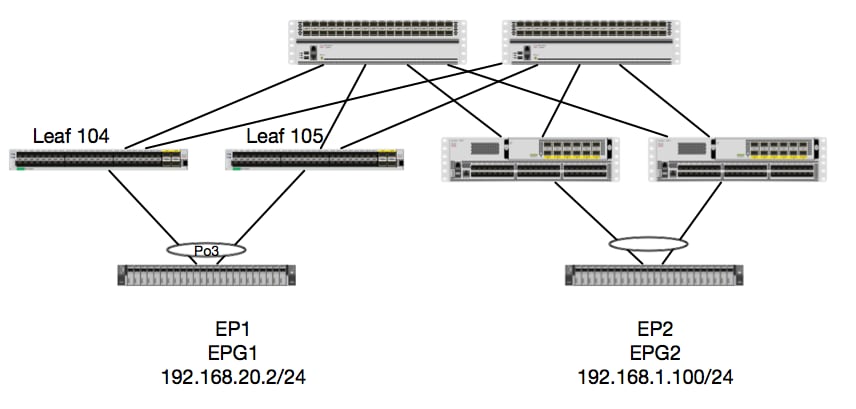
이 예에서는 EP1에서 EP2로의 패킷 흐름을 추적합니다. 여기서 EP1은 EX vPC 쌍에 있고 EP2는 원격 Generation 1 vPC 리프 쌍에 있습니다. 두 EP는 다른 BD를 사용하는 다른 EPG에 있습니다.
다시, EP가 학습된 곳을 확인해 봅시다.
leaf4# show endpoint ip 192.168.20.2
Legend:
 O - peer-attached    H - vtep             a - locally-aged     S - static
 V - vpc-attached     p - peer-aged        L - local            M - span
 s - static-arp       B - bounce
+-----------------------------------+---------------+-----------------+--------------+-------------+
      VLAN/                           Encap           MAC Address       MAC Info/       Interface
      Domain                          VLAN            IP Address        IP Info
+-----------------------------------+---------------+-----------------+--------------+-------------+
30                                        vlan-2268    0050.56a5.fccc LV                        po3
Joey-Tenant:Joey-Internal                 vlan-2268      192.168.20.2 LV                        po3


calo2-leaf4# show endpoint ip 192.168.1.100
Legend:
 O - peer-attached    H - vtep             a - locally-aged     S - static
 V - vpc-attached     p - peer-aged        L - local            M - span
 s - static-arp       B - bounce
+-----------------------------------+---------------+-----------------+--------------+-------------+
      VLAN/                           Encap           MAC Address       MAC Info/       Interface
      Domain                          VLAN            IP Address        IP Info
+-----------------------------------+---------------+-----------------+--------------+-------------+
Joey-Tenant:Joey-Internal                               192.168.1.100                       tunnel2
이제 하드웨어가 프로그래밍한 내용을 확인해 보겠습니다.
leaf4# vsh_lc
module-1# show platform internal hal ep l3 all
LEGEND:
-------
VrfName:           Vrf Name                                                T:              Type (Pl: Physical, Vl: Virtual, Xr: Remote)
EP IP:             Endpoint IP
S Class:           S Class                                                 Age Intvl:      Age Interval
S T:               Static Ep                                               S E:            Secure EP
L D:               Learn Disable                                           B N D:          Bind Notify Disable
E N D:             Epg Notify Disable                                      B E:            Bounce Enable
I D L:             IVxlan Dont Learn                                       SPI:            Source Policy Incomplete
DPI:               Dest Policy Incomplete                                  SPA:            Source Policy Applied
DPA:               Dest Policy Applied                                     DSS:            Dest Shared Service
IL:                Is Local                                                VUB:            Vnid Use Bd
SO:                SA Only                                                 EP NH L3IfName: EP Next Hop L3 If Name
NHT:               Next Hop Type (L2: L2 Entry L3: L3 Next Hop)            BD Name:        L2 NH BD Name
EP Mac:            EP Mac                                                  L3 IfName:      L3 NH If Name
L2 IfName:         L2 If Name                                              FD Name:        L2 Entry FD Name
IP:                L3 NH IP

 L3 EP Count: 12

===========================================================================================================================================================================================
                                                                   B E   I S D S D D   V   EP-NH        N  |
Vrf              EP                              S     Age   S S L N N B D P P P P S I U S L3           H  | BD        EP                L3           L2          FD
Name          T  IP                              Class Intvl T E D D D E L I I A A S L B O IfName       T  | Name      Mac               IfName       Ifname      Name      IP
===========================================================================================================================================================================================
common*rewall Pl 10.6.112.1                      1     0     1 0 0 0 0 0 1 1 0 0 0 0 1 0 0 -            L3   -         00:00:00:00:00:00 -            -           -         0.0.0.0
common*rewall Pl 10.6.114.1                      1     0     1 0 0 0 0 0 1 1 0 0 0 0 1 0 0 -            L3   -         00:00:00:00:00:00 -            -           -         0.0.0.0
common*rewall Pl 10.6.114.129                    1     0     1 0 0 0 0 0 1 1 0 0 0 0 1 0 0 -            L3   -         00:00:00:00:00:00 -            -           -         0.0.0.0
common*efault Pl 100.100.101.1                   1     0     1 0 0 0 0 0 1 1 0 0 0 0 1 0 0 -            L3   -         00:00:00:00:00:00 -            -           -         0.0.0.0
Joey-T*ternal Pl 192.168.1.1                     1     0     1 0 0 0 0 0 1 1 0 0 0 0 1 0 0 -            L3   -         00:00:00:00:00:00 -            -           -         0.0.0.0
Joey-T*ternal Xr 192.168.1.100                   8013  128   0 0 0 1 0 0 0 0 0 0 0 0 0 1 0 -            L3   -         00:0c:0c:0c:0c:0c Tunnel2      Tunnel2     -         0.0.0.0
Joey-T*ernal2 Pl 192.168.3.1                     1     0     1 0 0 0 0 0 1 1 0 0 0 0 1 0 0 -            L3   -         00:00:00:00:00:00 -            -           -         0.0.0.0
Joey-T*ternal Pl 192.168.20.1                    1     0     1 0 0 0 0 0 1 1 0 0 0 0 1 0 0 -            L3   -         00:00:00:00:00:00 -            -           -         0.0.0.0
Joey-T*ternal Pl 192.168.20.2                    800a  0     0 0 0 0 0 0 0 0 0 0 0 0 1 0 0 -            L2   BD-28     00:50:56:a5:fc:cc -            Po3         FD-30     -
Joey-T*ternal Pl 192.168.21.1                    1     0     1 0 0 0 0 0 1 1 0 0 0 0 1 0 0 -            L3   -         00:00:00:00:00:00 -            -           -         0.0.0.0
Joey-T*ternal Pl 192.168.21.2                    800c  0     0 0 0 0 0 0 0 0 0 0 0 0 1 0 0 -            L2   BD-7      00:50:56:a5:0c:11 -            Po4         FD-8      -
Joey-T*ternal Pl 2001:0:0:100::1                 1     0     1 0 0 0 0 0 1 1 0 0 0 0 1 0 0 -            L3   -         00:00:00:00:00:00 -            -           -         0.0.0.0
하드웨어는 터널 2에 EP가 있다고 생각합니다. 터널 2의 대상은 무엇입니까?
module-1# show system internal eltmc info interface tunnel2
            IfInfo:
           interface:        Tunnel2   :::         ifindex:      402718722
                 iod:             66   :::           state:             up
                 Mod:              0   :::            Port:              0
        Tunnel Index:              0   :::   Tunnel Dst ip:     0xc0a87843
        Tunnel Encap:         ivxlan   ::: Tunnel VPC Peer:              0
   Tunnel Dst ip str: 192.168.120.67   :::      Tunnel ept:            0x1

          [SDK Info]:
          tunnl_name:
              vrf_id:              2   :::        if_index:     0x18010002
          hwencapidx:              0   :::       encaptype:              1
           mac_proxy:              0   :::        v4_proxy:              0
            v6_proxy:              0   :::    ip_addr_type:              0
        ipv4_address:     0xc0a87843

[SDB INFO]:
                 iod:             66
         pc_if_index:              0
        fab_if_index:              0
               sv_if:              0
             src_idx:              0
            int_vlan:              0
          encap_vlan:              0
     mod_port_status:     0x41620003
           v6_tbl_id:     0x80000002
           v4_tbl_id:            0x2
          router_mac:00.00.00.00.00.00
          unnumbered:              0
            trunk_id:              0
          tunnel_mod:              0
         tunnel_port:              0
              tep_ip:     0xc0a87843
          ip_if_mode:              0
          sdk_vrf_id:              2
                 mtu:           9366   :::        ipmtu_id:              0
       is_fex_fabric:              0
대상이 vPC 외부에 있으므로 대상 IP는 원격 리프의 vPC 가상 IP여야 합니다. 원격 Leaf를 확인하고 다음을 확인합니다.
leaf1# show system internal epm vpc


Local TEP IP                  : 192.168.160.95
Peer TEP IP                   : 192.168.160.93
vPC configured                : Yes
vPC VIP                       : 192.168.120.67
MCT link status               : Up
Local vPC version bitmap      : 0x7
Peer vPC version bitmap       : 0x7
Negotiated vPC version        : 3
Peer advertisement received   : Yes
Tunnel to vPC peer            : Up
완벽합니다. 따라서 원격 vPC 쌍에서 대상 EP를 학습했습니다. 이제 ELAM에서 확인하는 내용을 확인하고 패킷을 올바르게 전달하는지 확인합니다.
엘람
module-1# debug platform internal tah elam asic 0
module-1(DBG-TAH-elam)# trigger init in-select 6 out-select 0
module-1(DBG-TAH-elam-insel6)# set outer ipv4 src_ip 192.168.20.2 dst_ip 192.168.1.100
module-1(DBG-TAH-elam-insel6)# start
module-1(DBG-TAH-elam-insel6)# stat
ELAM STATUS
===========
Asic 0 Slice 0 Status Armed
Asic 0 Slice 1 Status Triggered
이제 EX Hardware의 원격 대상에는 패킷 흐름 문제를 해결할 때 매우 중요한 2개의 ELAM 값이 있습니다. ovector_idx는 이전과 같고 encap_idx는 다음과 같습니다.
module-1(DBG-TAH-elam-insel6)# report | grep ovec
  sug_elam_out_sidebnd_no_spare_vec.ovector_idx: 0xB8
module-1(DBG-TAH-elam-insel6)# report | grep encap
  sug_lurw_vec.encap_l2_idx: 0x0
  sug_lurw_vec.encap_pcid: 0x0
  sug_lurw_vec.encap_idx: 0x6
  sug_lurw_vec.encap_vld: 0x1
EX 하드웨어에서는 패킷이 전달되어야 하는 목적지 포트를 구동할 수 있습니다. 이전에는 일반적으로 encap idx를 확인하고 대상 idx가 올바른 터널인지 확인했습니다. 여기서 8B에 매핑되는 포트를 확인할 수 있습니다.
module-1(DBG-TAH-elam-insel6)# show platform internal hal l2 port gpd
Legend:
-------
IfId:       Interface Id                                    IfName:      Interface Name
I P:        Is PC Mbr                                       IfId:           Interface Id
Uc PC Cfg:      UcPcCfg Idx                                 Uc PC MbrId:    Uc Pc Mbr Id
As:             Asic                                        AP:             Asic Port
Sl:             Slice                                       Sp:             Slice Port
Ss:             Slice SrcId                                 Ovec:           Ovector (slice | srcid)
L S:            Local Slot                                  Reprogram:
L3:             Is L3
    P:    PifTable                                          Xla Idx:        Xlate Idx
    RP:   Rw PifTable                                       Ovx Idx:        OXlate Idx
    IP:   If Profile Table                                  N L3:           Num. of L3 Ifs
    RS:   Rw SrcId Table                                    NI L3:          Num. of Infra L3 Ifs
    DP:   DPort Table                                       Vif Tid:        Vif Tid
    SP:   SrcPortState Table                                RwV Tid:        RwVif Tid
    RSP:  RwSrcPortstate Table                              Ing Lbl:        Ingress Acl Label
    UC:   UCPcCfg                                           Egr Lbl:        Egress Acl Label
    UM:   UCPcMbr                                           Reprogram:
PROF ID:        Lport Profile Id
    VS:   VifStateTable                                     HI:             LportProfile Hw Install
    RV:   Rw VifTable
Num. of Sandboxes: 1

Sandbox_ID: 0, BMP: 0x0
 Port Count: 8

============================================================================================================================================
                       Uc   Uc                          |       Reprogram       |                                         | Rep |
                     I PC   Pc                        L |   R I R D    R  U U X | L Xla Ovx N  NI Vif    RwV    Ing  Egr  | V R | PROF H
IfId     Ifname      P Cfg  MbrID As AP Sl Sp Ss Ovec S | P P P S P Sp Sp C M L | 3 Idx Idx L3 L3 Tid    Tid    Lbl  Lbl  | S V | ID   I
=============================================================================================================================================
1a004000 Eth1/5      1 0    1d    0  d  0  c  18 18   1   0 0 0 0 0 0  0  0 0 0   0 0   0   0  0  -      -      800  0      0 1   0    0
1a005000 Eth1/6      1 0    b     0  e  0  d  1a 1a   1   0 0 0 0 0 0  0  0 0 0   0 0   0   0  0  -      -      800  0      0 1   0    0
1a006000 Eth1/7      0 26   5     0  f  0  e  1c 1c   1   0 0 0 0 0 0  0  0 0 0   0 0   0   0  0  D-256  -      800  0      0 1   c    0
1a007000 Eth1/8      0 2f   7     0  10 0  f  1e 1e   1   0 0 0 0 0 0  0  0 0 0   0 0   0   0  0  D-199  -      800  0      0 1   2e   0
1a01e000 Eth1/31     1 0    2d    0  37 1  e  1c 9c   1   0 0 0 0 0 0  0  0 0 0   0 0   0   0  0  -      -      0    0      0 1   0    0
1a01f000 Eth1/32     1 0    3d    0  38 1  f  1e 9e   1   0 0 0 0 0 0  0  0 0 0   0 0   0   0  0  -      -      0    0      0 1   0    0
1a030000 Eth1/49     0 2    1     0  49 1  20 38 b8   1   0 0 0 0 0 0  0  0 0 0   1 6   4   2  2  D-24d  -      400  0      0 0   1    0
1a031000 Eth1/50     0 3    3     0  29 1  0  0  80   1   0 0 0 0 0 0  0  0 0 0   1 5   3   2  2  D-350  -      400  0      0 0   1    0
스위치는 인터페이스 Eth1/49의 스파인으로 전달해야 한다고 생각하지만 캡슐화 키가 올바른지 어떻게 확인할 수 있습니까?
먼저 터널에 대한 하드웨어 정보를 확인해야 합니다. 이 HAL 명령을 실행하여 이 작업을 수행할 수 있습니다.
module-1(DBG-TAH-elam-insel6)# show platform internal hal tunnel rtep pi
Non-Sandbox Mode
LEGEND:
-------
Tun Ifid:  Tunnel Ifid                                             IfName:     Tunnel If Name
Lid:       Logical Id                                              ET:        Encap Type V: Vxlan I: IVxlan N: NVGRE
VrfId:     Vrf Id                                                  Vrf Name: Vrf Name
IP:        Tunnel's IP
Hw Enc:    Hw Encap Idx                                            IVP:        Is VPC Peer
IL:        Is Local                                                P4:         Proxy for v4
P6:        Proxy for V6                                            PM:         Proxy for Mac
II:        Is Ingress Only                                         IC:         Is Copy Service
C OBd:     Copy Service Outer Bd                                   U D:        Use DF
NBT:       Next Base Type E: ECMP N: Next-Hop                      NB Id:      Next Base Id
NH cnt:    Next Hop Count                                          VrfId:      Vrf Id
Vrf Name:  Vrf Name                                                IP:         IP Address
Mac:       Mac                                                     L3 IfId:    L3 IfId
L3IfName:  L3 If Name                                              L2 IfId:    L2 IfId
L2IfName:  L2 If Name

Num. of Sandboxes: 1

Sandbox_ID: 0, BMP: 0x0
 Remote Tep Count: 15

================================================================================================================================================================================================
=======
                                                                    I                   N N          |

                      E             Vrf                        Hw   V I P P P I I C   U B B      NH  |        Vrf                                          L3       L3           L2       L2

IfId     Ifname       T Lid  VrfId  Name         IP            Enc  P L 4 6 M I C OBd D T Id     Cnt | VrfId  Name         IP            Mac               IfId     IfName       IfId     IfName

================================================================================================================================================================================================
=======
18010002 Tunnel2      I 3005 2      overlay-1    192.168.120.670    0 0 0 0 0 0 0 1   0 E 2      2     2      overlay-1    0.0.0.0       0d:0d:0d:0d:0d:00 1a030001 Eth1/49.1    1a030000 Eth1/4
9
                                                                                                       2      overlay-1    0.0.0.0       0d:0d:0d:0d:0d:00 1a031002 Eth1/50.2    1a031000 Eth1/5
0
이 출력은 Cisco가 관심을 갖는 몇 가지 가치를 제공합니다.
IfId - 터널에 할당된 인터페이스 ID
IP - 대상의 IP입니다. ELTMC와 일치해야 합니다.
L3 IfId - 스위치가 적절한 대상으로 포워딩하는 데 사용할 수 있는 레이어 3 인터페이스입니다.
IfId를 알게 되면 Elam에서 가져온 캡슐화가 터널 목적지와 일치하는지 확인할 수 있습니다.
module-1(DBG-TAH-elam-insel9)# show platform internal hal tunnel rtep apd
Non-Sandbox Mode
LEGEND:
-------
ifId:        Interface Id                                   IP:           IP address
HwVrfId:     Hardware Vrf Id                                SrcTepIdx:    Source Tep Index
BDXlate:     Egress BDXlate                                 DstInfoIdx:   Destination info index
RwEncapIdx:  Rw Encap Index                                 ECMPIdx:      ECMP Index
Num:         Number of hops                                 ECMPMbrIdx:   ECMP member Index
L2 Index:    L2 Index                                       RwDmacIdx:    Rw Dmax Index

Num. of Sandboxes: 1

Sandbox_ID: 0, BMP: 0x0
 Remote Tep Count: 15

==============================================================================================================================
ifId     IP             HwVrfId BDXlate SrcTepIdx DstInfoIdx RwEncapIdx ECMPIdx  ECMPMbrIdx Num     L2Index  RwDmacIdx
==============================================================================================================================
18010002 192.168.120.67 2       1       3a9a      3005       6          0        0          2       1a030000 0         <---- RwEncapIdx is 6!  Same as the "encap_idx" in the ELAM Report.
                                                                                                    1a031000 1
이 터널의 RwEncapIdx(Re-Write Encap Index)는 6이며, 이는 elam에 표시되었습니다.
1 EP —> L3 out - 라우팅된 플로우
토폴로지
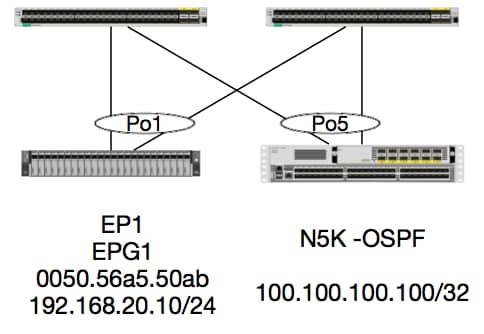
이 예에서는 OSPF를 실행하는 N5K의 루프백에 ICMP를 전송하는 EP1에서 패킷의 패킷 흐름을 추적합니다. N5K는 동일한 EX 스위치 쌍에서 L3Out을 통해 연결됩니다.
이 문서의 시작 부분에서 로컬 EP 프로그래밍을 확인했으므로 하드웨어에서 EP가 올바르게 학습되었다고 가정하고 경로 확인을 계속 진행하겠습니다.
먼저 OSPF 상태 및 라우팅 테이블을 확인합니다.
leaf6# show ip ospf neighbors vrf jr:sb
 OSPF Process ID default VRF jr:sb
 Total number of neighbors: 2
 Neighbor ID     Pri State            Up Time  Address         Interface
 27.27.27.1        1 FULL/BDR         00:22:39 10.10.27.1      Vlan28   <---- Leaf5
 27.27.27.3        1 FULL/DROTHER     00:22:37 10.10.27.3      Vlan28   <----  N5K
leaf6# show ip route vrf jr:sb 100.100.100.100
IP Route Table for VRF "jr:sb"
'*' denotes best ucast next-hop
'**' denotes best mcast next-hop
'[x/y]' denotes [preference/metric]
'%<string>' in via output denotes VRF <string>

100.100.100.100/32, ubest/mbest: 1/0
    *via 10.10.27.3, vlan28, [110/5], 00:16:58, ospf-default, intra
라우팅 테이블에 5K의 다음 홉이 10.10.27.3으로 표시된다는 것을 알고 있습니다. 시작은 좋지만 하드웨어가 무엇인지 어떻게 확인할 수 있을까요?
먼저 하드웨어의 인접성 테이블을 확인하여 ARP가 10.10.27.3으로 확인되었고 올바른 인터페이스로 프로그래밍되었는지 확인해 보겠습니다.
leaf6# vsh_lc
module-1# show forwarding adjacency

IPv4 adjacency information, adjacency count 20

next-hop        rewrite info   interface       phy i/f
--------------  -------------- --------------- ---------------
10.10.27.1      0022.bdf8.19ff Vlan28          Tunnel3
10.10.27.3      8c60.4f02.88fc Vlan28          port-channel5
MAC 주소는 5K의 주소와 일치합니다.
ACI-5548-B# show interface vlan 3117
Vlan3117 is up, line protocol is up
  Hardware is EtherSVI, address is  8c60.4f02.88fc
  Internet Address is 10.10.27.3/29
  MTU 1500 bytes, BW 1000000 Kbit, DLY 10 usec
EX 플랫폼에는 VRF에 할당된 "hw_vrf_idx"가 있습니다. 이 인덱스는 하드웨어 프로그래밍을 확인할 때 참조됩니다. 색인을 찾아보겠습니다.
module-1# show system internal eltmc info vrf jr:sb
VRF-TABLE: jr:sb
            vrf_type:         tenant   :::      context_id:              6
       overlay_index:              0   :::            vnid:        2129921
               scope:              5   :::          sclass:          16386
         v4_table_id:            0x5   :::     v6_table_id:     0x80000005
          intf_count:              5   :::   intrn_vlan_id:              0
            VRF Intf:         Vlan11   ::: src_plcy_incomp:              0
            vnid_hex:       0x208001   :::  ingress_policy:            0x1
       vrf_intf_list: Vlan28,Vlan16,Vlan9,Vlan11,loopback2,
          hw_vrf_idx:           4612   ::: nb_egr_outer_bd:              0
     sb_egr_outer_bd:              0
         vrf_bd_list: 28,16,11,9,
     sb_egr_outer_bd:              0   :::      sdk_vrf_id:              5

          [SDK Info]:
            vrf_name:          jr:sb
              vrf_id:              5   :::      hw_vrf_idx:           4612
            vrf_vnid:        2129921   :::        is_infra:              0
      tornbinfrahwbd:              0   :::  torsbinfrahwbd:              0
   ingressBdAclLabel:              0   ::: ingBdAclLblMask:              0
    egressBdAclLabel:              0   ::: egrBdAclLblMask:              0
            sg_label:              5   :::          sclass:          16386
       sp_incomplete:              1   :::      sclassprio:              3

[SDB INFO]:
v4 table
            vrf type:              1
              vrf id:              5
                vnid:        2129921
 internal infra vlan:              0
 external router mac:00:22:bd:f8:19:ff
v6 table
            vrf type:              1
              vrf id:              5
                vnid:        2129921
 internal infra vlan:              0
 external router mac:00:22:bd:f8:19:ff
::::
인접성을 탐지한 후 HAL은 경로를 프로그래밍해야 합니다. 다음 명령을 사용하여 이를 확인할 수 있습니다.
module-1# show platform internal hal l3 routes | head

------------------------------------------------------------------------------------------------------------------------------------------------------------------------------------------------
LEGEND:                                                                                                                                                                                        |
------------------------------------------------------------------------------------------------------------------------------------------------------------------------------------------------
LID: Logical ID           RID: Route ID               PID: Physical ID       NB-ID:Next-Base ID       HIT IDX: Next-Hop HitIndex   CLP : Class Priority       TBI: Trie Base Index             |
SC : Sup-Copy             SSR: Src Sup-Redirect       DSR: Dst Sup-Redirect  TDD  :TTL Disable        NB: NextBaseType             SDC : Src Direct Connect   TRO: Trie Offset                 |
SPI: Src Policy Inc       DPI: Dst Policy Inc         DR : Default Route     LE   :Learn Enable        [E:Ecmp/A:Adj]              ILL : Is Link Local        ISS: Is Shared Services          |
RT : Route Type           FWD: Forwarding             HR : Host Routes       EP   :Ext Prefixes       DLR: Default Lpm Route       CLSS: Class Id             RDEL: Route in Deletion          |
BNE: Bind Notify Enable   SNE: Sclass Notify Enable   BE : Bounce Enable     IDL  :Ivxlan DoNotLearn  DL : Dest Local              SA  : Src Only             AI : Age Interval                |
SF : Static Flag          SH : Src Hit                DH: Dest Hit                                                                                                                             |
module-1# show platform internal hal l3 routes

------------------------------------------------------------------------------------------------------------------------------------------------------------------------------------------------
LEGEND:                                                                                                                                                                                        |
------------------------------------------------------------------------------------------------------------------------------------------------------------------------------------------------
LID: Logical ID           RID: Route ID               PID: Physical ID       NB-ID:Next-Base ID       HIT IDX: Next-Hop HitIndex   CLP : Class Priority       TBI: Trie Base Index             |
SC : Sup-Copy             SSR: Src Sup-Redirect       DSR: Dst Sup-Redirect  TDD  :TTL Disable        NB: NextBaseType             SDC : Src Direct Connect   TRO: Trie Offset                 |
SPI: Src Policy Inc       DPI: Dst Policy Inc         DR : Default Route     LE   :Learn Enable        [E:Ecmp/A:Adj]              ILL : Is Link Local        ISS: Is Shared Services          |
RT : Route Type           FWD: Forwarding             HR : Host Routes       EP   :Ext Prefixes       DLR: Default Lpm Route       CLSS: Class Id             RDEL: Route in Deletion          |
BNE: Bind Notify Enable   SNE: Sclass Notify Enable   BE : Bounce Enable     IDL  :Ivxlan DoNotLearn  DL : Dest Local              SA  : Src Only             AI : Age Interval                |
SF : Static Flag          SH : Src Hit                DH: Dest Hit                                                                                                                             |
------------------------------------------------------------------------------------------------------------------------------------------------------------------------------------------------
|     |                                           |   |     |          | LID |<------------------ Trie ------------->|<Dleft Trie>|                                                            |
| VRF |                 Prefix/Len                | RT| RID |    LID   | Type| PID | FPID/| HIT |N|  NB-ID  |  NB Hw | PID | FPID/|   TBI   |TRO|Ifindex|CLSS|CLP| AI |SH|DH| Flags            |
|-----|-------------------------------------------|---|-----|----------|-----|     | TID  | IDX |B|         |  Idx   |     |  TID |---------|---|-------|----|---|----|--|--|------------------|
|-----|-------------------------------------------|---|-----|----------|-----|<------------------ DLEFT ------------>|-----|------|---------|---|-------|----|---|----|--|--|------------------|
|     |                                           |   |     |          |     | PID | FPID/| HIT |N|  NB-ID  |  NB Hw |     |      |         |   |       |    |   |    |  |  |                  |
|     |                                           |   |     |          |     |     |  TID | IDX |B|         |  Idx   |     |      |         |   |       |    |   |    |  |  |                  |
|     |                                           |   |     |          |     |<------------------ TCAM ------------->|     |      |         |   |       |    |   |    |  |  |                  |
|     |                                           |   |     |          |     | PID | TCAM | HIT |N|  NB-ID  |  NB Hw |     |      |         |   |       |    |   |    |  |  |                  |
|     |                                           |   |     |          |     |     |  ID  | IDX |B|         |  Idx   |     |      |         |   |       |    |   |    |  |  |                  |
------------------------------------------------------------------------------------------------------------------------------------------------------------------------------------------------
|Sandbox_ID: 0  Asic Bitmap: 0x0
--------------------------------------------------------------------------------------------------------------------------------------------------------------------------------------------

module-1# show platform internal hal l3 routes | egrep 100.100.100.100
| 4612|                        100.100.100.100/ 32| UC|   e4|      4a04| TRIE|   10| 5/  0| 6010|A|     7567|    802e| 186a| 1/  2|       10|  0|      0|   f|  3|   0| 0| 0|spi,dpi
이 출력은 다음 홉 경로에 대한 정보를 제공합니다. 4612는 jr:sb VRF의 hw_vrf_idx입니다. Next Hop을 확인하기 위해 TCAM의 "NB Hw Idx"가 다음 테이블에 대해 사용됩니다.
module-1# show platform internal hal l3 nexthops
Non-Sandbox Mode
LEGEND:
-------
NHOP ID       : Nhop Identifier (Hex)             CONS          : H/W S/W info Consistency
TYPE          : Nexthop Type                      ACTN          : Nexthop Action
Vrf           : L3 Vrf of the Nhop                L3 INTF       : L3 interface index (Hex)
L2 INTF       : L2 interface index (Hex)          BDID Or RwVRF : Bridge Domain Id Or Rewrite Vrfid (Hex)
INFR          : ACI Infra valid                   PVRF          : Preserve VRF
LRN           : Learn Enabled                     VRFR          : VRF Rewrite
PID           : Physical ID                       FPID          : FP of this nexthop
TLID          : Tile Id within FP                 HIT IDX       : Location of this Nhop (Hex)

Mac Entry:
TYP         : Type                      INTF        : Interface related Info (Hex)
LRN         : Learn Info                DL          : Destination Local
MLD         : Unused                    VNB         : Vnid use BD
DFL         : Default Entry             VLD         : MacKey Valid
FT          : FID Type                  FV          : FID Valid
FID         : FID value (Hex)           Mac         : L2 MAC Address
L2 Ifabric Info:
CLSS        : Source Class                        CLP         : Source Class Priority
EPG         : EndPoint Group                      BNE         : Bind Notification Enabled
SNE         : Source Address Notification Enabled CNE         : Source class Notification Enabled
DL          : iVxlan DL                           SPI         : Source Policy Incomplete
DPI         : Dest Policy Incomplete
IP Address  : IP address

Sandbox_ID: 0  Asic Bitmap: 0x0
Summary info for 31 L3 Nexthop objects
         C T A                       BDID  I P   V         T    |---------------------Mac Entry-------------------|----L2 Ifabric Info----|
 NHOP    O Y C         L3       L2    Or   N V L R         L HIT|T        L   M V D V|--------------Mac Key-------|     C      B S C   S D|
  ID     N P T        INTF     INTF  RwVRF F R R F      FP I IDX|Y  INTF  R D L N F L|F F  FID                    |     L      N N N D P P|
 (Hex)   S E N Vrf    (H)       (H)   (H)  R F N R PID  ID D (H)|P  (H)   N L D B L D|T V  (H)       Mac          |CLSS P EPG  E E E L I I| IP Address
--------+-+-+-+----+--------+--------+----+-+-+-+-+----+--+-+----+-+------+-+-+-+-+-+-+-+-+------+-----------------+----+-+----+-+-+-+-+-+-+-----------------------------

module-1# show platform internal hal l3 nexthops | grep 802e
    7567 N I F    5  901001c 16000004   1c 0 0 0 0   2e  9 0 802e 0     22 0 0 0 0 0 1 1 1   1214 8c:60:4f:02:88:fc    0 0 2c0d 0 0 0 0 0 0 10.10.27.3
여기서는 "NB Hw Idx"를 가져와 "HIT IDX"에 매핑합니다. 이는 Next Hop MAC/IP에 해당하는 항목을 보여줍니다. 이는 Broadcom on Generation 1 ACI Leaf Switch에서 "l3 defip show" 및 "l3 egress show"를 확인하는 것과 같습니다.
우리가 볼 수 있듯이, 표에는 정확한 정보가 있다:
L2 내부: 0x16000004 —> 포트 채널 5의 ifIndex
히트 IDX: hal l3 경로의 Nb Hw Idx에서 구동되는 인덱스
MAC: 8c:60:4f:02:88:fc —> 5K에서 다음 홉 SVI의 MAC
EPG: L3 EPG 범위
IP 주소: 10.10.27.3 —> 5K에서 SVI의 다음 홉 IP
엘람
leaf6# pwd
/var/sysmgr/tmp_logs

leaf6# cat elam_report.txt | grep ip.da
    sug_pr_lu_vec_l3v.ip.da: 0x0000000000000000064646464
leaf6# cat elam_report.txt | grep ip.sa
    sug_pr_lu_vec_l3v.ip.sa: 0x00000000000000000C0A8140A

leaf6# cat elam_report.txt | grep adj
    sug_lurw_vec.dst_addr.adj: 0x8C604F0288FC
      sug_lurw_vec.dst_addr.adj.padfield: 0x04F0288FC
      sug_lurw_vec.dst_addr.adj.idx: 0x2318
  sug_lurw_vec.adj_vld: 0x0

leaf6# cat elam_report.txt | grep macdarslt.hit_idx
        sug_fpc_lookup_vec.fplu_vec.rslt.macdarslt.hit_idx: 0x802E
1 EP —> 원격 EP 또는 SVI - 스파인 확인
토폴로지
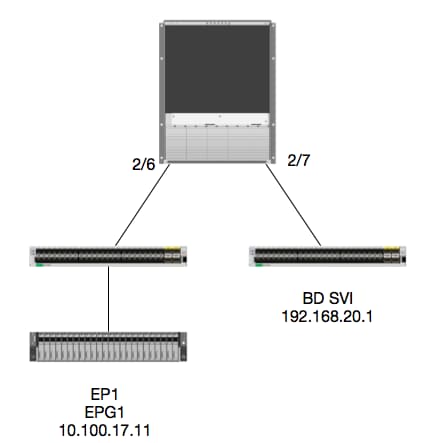
논리
이 예에서는 EP1에서 SVI(Remote BD Switched Virtual Interface)로 향하는 패킷의 패킷 흐름을 추적합니다. 이 예의 목적은 패킷이 올바른 Leaf로 전송되도록 Spine Forwarding을 확인하는 것입니다. 인그레스 리프의 스파인 프록시로 패킷을 전송했다고 가정합니다.
Spine에서 먼저 목적지 IP에 대한 COOP(Council of Oracles Protocol)를 확인합니다. 패킷이 조회를 위해 Spine Proxy로 전송되기 때문입니다.
calo1-spine1# show coop internal info ip-db | grep -A 10 192.168.20.1
IP address : 192.168.20.1
Vrf : 2129921
Flags : 0
EP vrf vnid : 2129921
EP IP :  192.168.20.1
Publisher Id : 10.0.224.88
Record timestamp : 11 04 2016 16:41:16 422062712
Publish timestamp : 11 04 2016 16:41:16 424633605
Seq No: 0
Remote publish timestamp: 01 01 1970 00:00:00 0
URIB Tunnel Info
Num tunnels : 1
	Tunnel address : 10.0.224.88    <---- REMOTE LEAF
	Tunnel ref count : 1
leaf에 해당 TEP 주소가 있는지 확인합니다.
spine1# acidiag fnvread | grep 10.0.224.88
     105        1          calo1-leaf5      FDO20160TPS     10.0.224.88/32    leaf         active   0
패킷이 모듈 2, 포트 6의 스파인으로 들어오는 것을 알고 있으므로 모듈 2에 연결하고 포트 레이아웃을 살펴볼 수 있습니다.
spine1# vsh
Cisco iNX-OS Debug Shell
This shell should only be used for internal commands and exists
for legacy reasons. User should use ibash infrastructure as this
will be deprecated.
calo1-spine1# attach module 2
Attaching to module 2 ...
To exit type 'exit', to abort type '$.'
No directory, logging in with HOME=/
Bad terminal type: "xterm-256color". Will assume vt100.
Cisco iNX-OS Debug Shell
This shell should only be used for internal commands and exists
for legacy reasons. User should use ibash infrastructure as this
will be deprecated.
Loading parse tree (LC). Please be patient...
module-2#

module-2# show platform internal hal l2 port gpd
Legend:
-------
IfId:       Interface Id                                    IfName:      Interface Name
I P:        Is PC Mbr                                       IfId:           Interface Id
Uc PC Cfg:      UcPcCfg Idx                                 Uc PC MbrId:    Uc Pc Mbr Id
As:             Asic                                        AP:             Asic Port
Sl:             Slice                                       Sp:             Slice Port
Ss:             Slice SrcId                                 Ovec:           Ovector (slice | srcid)
L S:            Local Slot                                  Reprogram:
L3:             Is L3
    P:    PifTable                                          Xla Idx:        Xlate Idx
    RP:   Rw PifTable                                       Ovx Idx:        OXlate Idx
    IP:   If Profile Table                                  N L3:           Num. of L3 Ifs
    RS:   Rw SrcId Table                                    NI L3:          Num. of Infra L3 Ifs
    DP:   DPort Table                                       Vif Tid:        Vif Tid
    SP:   SrcPortState Table                                RwV Tid:        RwVif Tid
    RSP:  RwSrcPortstate Table                              Ing Lbl:        Ingress Acl Label
    UC:   UCPcCfg                                           Egr Lbl:        Egress Acl Label
    UM:   UCPcMbr                                           Reprogram:
PROF ID:        Lport Profile Id
    VS:   VifStateTable                                     HI:             LportProfile Hw Install
    RV:   Rw VifTable
Num. of Sandboxes: 1

Sandbox_ID: 0, BMP: 0x0
 Port Count: 7

============================================================================================================================================
                       Uc   Uc                          |       Reprogram       |                                         | Rep |
                     I PC   Pc                        L |   R I R D    R  U U X | L Xla Ovx N  NI Vif    RwV    Ing  Egr  | V R | PROF H
IfId     Ifname      P Cfg  MbrID As AP Sl Sp Ss Ovec S | P P P S P Sp Sp C M L | 3 Idx Idx L3 L3 Tid    Tid    Lbl  Lbl  | S V | ID   I
=============================================================================================================================================
1f5      SpInBndMgmt 0 9de  1a    0  0  0  0  0  0    0   0 0 0 0 0 0  0  0 0 0   0 0   0   0  0  D-2d4  D-3e1  0    0      0 0   1    0
1a080000 Eth2/1      0 9a   1c    0  11 0  10 20 20   1   0 0 0 0 0 0  0  0 0 0   1 b   b   1  1  D-f3   D-61   100  0      0 0   1    0
1a081000 Eth2/2      0 9b   22    0  d  0  c  18 18   1   0 0 0 0 0 0  0  0 0 0   1 c   c   1  1  D-1ee  D-30b  100  0      0 0   1    0
1a084000 Eth2/5      0 9e   1e    0  3d 1  14 28 a8   1   0 0 0 0 0 0  0  0 0 0   1 1   1   1  1  D-19a  D-2ee  100  0      0 0   1    0
1a085000 Eth2/6      0 9f   24    0  39 1  10 20 a0   1   0 0 0 0 0 0  0  0 0 0   1 e   e   1  1  D-87   D-184  100  0      0 0   1    0
1a086000 Eth2/7      0 a0   26    0  35 1  c  18 98   1   0 0 0 0 0 0  0  0 0 0   1 d   d   1  1  D-1d0  D-357  100  0      0 0   1    0
1a088000 Eth2/9      0 a2   20    1  d  0  c  18 18   1   0 0 0 0 0 0  0  0 0 0   0 0   0   0  0  D-3ea  D-1a9  100  0      0 0   1    0
Ethernet 2/6은 ASIC 0 SLICE 1에 있는 Leaf 6에 연결되는 인터페이스입니다.
이제 어떤 ASIC에서 ELAM을 실행할지 알 수 있습니다. ASIC 0.
module-2# debug platform internal tah elam asic 0
module-2(DBG-TAH-elam)# trigger reset
module-2(DBG-TAH-elam)# trigger init in-select 13 out-select 0
module-2(DBG-TAH-elam-insel13)# set inner ipv4 src_ip 10.100.17.11 dst_ip 192.168.20.1
module-2(DBG-TAH-elam-insel13)# start
stat
module-2(DBG-TAH-elam-insel13)# stat
ELAM STATUS
===========
Asic 0 Slice 0 Status Armed
Asic 0 Slice 1 Status Armed

module-2(DBG-TAH-elam-insel13)# stat
ELAM STATUS
===========
Asic 0 Slice 0 Status Triggered   <---- Packet triggered from FM
Asic 0 Slice 1 Status Triggered   <---- Packet triggered from Front Panel
ELAM을 보면 벡터 색인을 찾을 수 있습니다.
Front Panel ELAM drove sug_elam_out_sidebnd_no_spare_vec.ovector_idx: 0xB8
0xb8을 포트에 어떻게 매핑합니까? 패킷을 조회하기 위해 FM(Fabric Module)으로 보내야 한다는 사실을 알고 있으므로 내부 포트 매핑을 통해 대상 FM을 찾을 수 있습니다.
module-2# show platform internal hal l2 internal-port pi
Num. of Sandboxes: 1
Legend:
-------
IfId:      Interface Id                IfName:     Interface Name
As:        Asic                        AP:         Asic Port
Sl:        Slice                       SP:         Slice Port
Ss:        Slice SrcId                 Ovec:       Ovector
UcPcCfgId: Uc Pc CfgId                 Lb Mbrid:   LB MbrId

Sandbox_ID: 0, BMP: 0x0
 Internal Port Count: 32

======================================================================
                                                         UcPc  Lb
IfId     IfName                      As AP Sl SP Ss Ovec CfgId MbrId
======================================================================
7d       -                           0  21 0  20 38 38   0     4
7e       -                           0  29 1  0  0  80   0     8
7f       -                           1  21 0  20 38 38   0     c
80       -                           1  29 1  0  0  80   0     10
81       -                           2  21 0  20 38 38   0     14
82       -                           2  29 1  0  0  80   0     18
83       -                           3  21 0  20 38 38   0     1c
84       -                           3  29 1  0  0  80   0     20
95       -                           0  19 0  18 30 30   0     3
96       -                           0  49 1  20 38 b8   0     7
97       -                           1  19 0  18 30 30   0     b
98       -                           1  49 1  20 38 b8   0     f
99       -                           2  19 0  18 30 30   0     13
9a       -                           2  49 1  20 38 b8   0     17
9b       -                           3  19 0  18 30 30   0     1b
9c       -                           3  49 1  20 38 b8   0     1f
ad       -                           0  25 0  24 40 40   0     1
ae       -                           0  41 1  18 30 b0   0     6
af       -                           1  25 0  24 40 40   0     9
b0       -                           1  41 1  18 30 b0   0     e
b1       -                           2  25 0  24 40 40   0     11
b2       -                           2  41 1  18 30 b0   0     16
b3       -                           3  25 0  24 40 40   0     19
b4       -                           3  41 1  18 30 b0   0     1e
dd       -                           0  15 0  14 28 28   0     2
de       -                           0  4d 1  24 40 c0   0     5
df       -                           1  15 0  14 28 28   0     a
e0       -                           1  4d 1  24 40 c0   0     d
e1       -                           2  15 0  14 28 28   0     12
e2       -                           2  4d 1  24 40 c0   0     15
e3       -                           3  15 0  14 28 28   0     1a
e4       -                           3  4d 1  24 40 c0   0     1d
ASIC0 / Ovec B8을 사용하여 MbrId 0x7을 가져옵니다. 슬라이스는 중요하지 않습니다.
이 MbrId는 FM의 인터페이스에 매핑되는 USD의 인터페이스입니다. 이 MbrId는 16진수이며 십진수로 변환해야 합니다.
USD 인터페이스와 포트 7을 검사하여 어떤 FM인지 확인할 수 있습니다.
module-2# show platform internal usd port info | grep -A 3 "Int 7"(if the interface has multiple digits, will be "Int##" with no space)

Port  73.0 (Int 7)    : Admin UP   Link UP   Remote slot22.asic0
                slice:1 slice port:32 lcl srcid:56 gbl srcid:184
                asic mrl:0xd07c010, mac mrl:0x12c84010, mac:16, chan:0
                speed 106G serdes: 0x328 0x329 0x32a 0x32b
"슬롯"은 0을 기준으로 하고 FM 넘버링은 1을 기준으로 하기 때문에 여기에 나와 있는 넘버에 1을 추가해야 합니다. 이는 패킷이 FM 23으로 전송되어야 함을 의미한다.
가상 IP
Alpine에서와 마찬가지로 Outer IP 주소로 사용되는 합성 IP가 COOP 조회를 위한 해시를 결정합니다. 이를 찾으려면 내부 DST IP에 대해 이 명령 및 grep를 실행해야 합니다.
module-2(DBG-TAH-elam-insel7)# show forwarding route synthetic vrf all | grep 192.168.20.1
SYNTH-88        1.203.211.185/32    0x208001          192.168.20.1
이는 1.203.211.185가 우리의 합성 IP임을 보여준다. 이를 바탕으로, 우리는 또한 우리의 FM 엘람에서 "외부 DST IP"를 이것으로 설정할 수 있다. 우리는 FM을 작동시켜야 합니다.
패브릭 모듈 ELAM
module-23(DBG-TAH-elam-insel7)# trigger reset
module-23(DBG-TAH-elam)# trigger init in-select 13 out-select 0
module-23(DBG-TAH-elam-insel13)# set outer ipv4 dst_ip 1.203.211.185   <----- DST IP IS THE SYNTHETIC IP
module-23(DBG-TAH-elam-insel13)# set inner ipv4 src_ip 10.100.17.11 dst_ip 192.168.20.1
module-23(DBG-TAH-elam-insel13)# start
stat
module-23(DBG-TAH-elam-insel13)# stat
ELAM STATUS
===========
Asic 0 Slice 0 Status Armed
Asic 0 Slice 1 Status Armed
Asic 0 Slice 2 Status Armed
Asic 0 Slice 3 Status Armed
Asic 0 Slice 4 Status Armed
Asic 0 Slice 5 Status Armed

module-23(DBG-TAH-elam-insel13)# stat
ELAM STATUS
===========
Asic 0 Slice 0 Status Armed
Asic 0 Slice 1 Status Armed
Asic 0 Slice 2 Status Triggered    <---- Triggered on SLICE 2
Asic 0 Slice 3 Status Armed
Asic 0 Slice 4 Status Armed
Asic 0 Slice 5 Status Armed
물론 전체 보고서를 덤프하지만, 트리거한 이 패킷의 ovector_idx를 살펴보겠습니다.
lac_elam_out_sidebnd_no_spare_vec.ovector_idx: 0x20 <----- 아래 명령에 사용된 Ovector 인덱스
어떤 인터페이스에 그 벡터가 있는지 어떻게 알 수 있을까요? FM에서 다음을 실행합니다.
** 버그 CSCvf로 인해42796  , "| no-more"와 함께 모든 FM 명령을 추가합니다. 그렇지 않으면, 특정 테이블 엔트리가 최종 출력에서 표시되지 않을 수 있다.
module-23(DBG-TAH-elam-insel13)# show platform internal hal l2 port gpd | no-more
Legend:
-------
IfId:       Interface Id                                    IfName:      Interface Name
I P:        Is PC Mbr                                       IfId:           Interface Id
Uc PC Cfg:      UcPcCfg Idx                                 Uc PC MbrId:    Uc Pc Mbr Id
As:             Asic                                        AP:             Asic Port
Sl:             Slice                                       Sp:             Slice Port
Ss:             Slice SrcId                                 Ovec:           Ovector (slice | srcid)
L S:            Local Slot                                  Reprogram:
L3:             Is L3
    P:    PifTable                                          Xla Idx:        Xlate Idx
    RP:   Rw PifTable                                       Ovx Idx:        OXlate Idx
    IP:   If Profile Table                                  N L3:           Num. of L3 Ifs
    RS:   Rw SrcId Table                                    NI L3:          Num. of Infra L3 Ifs
    DP:   DPort Table                                       Vif Tid:        Vif Tid
    SP:   SrcPortState Table                                RwV Tid:        RwVif Tid
    RSP:  RwSrcPortstate Table                              Ing Lbl:        Ingress Acl Label
    UC:   UCPcCfg                                           Egr Lbl:        Egress Acl Label
    UM:   UCPcMbr                                           Reprogram:
PROF ID:        Lport Profile Id
    VS:   VifStateTable                                     HI:             LportProfile Hw Install
    RV:   Rw VifTable
Num. of Sandboxes: 1

Sandbox_ID: 1, BMP: 0x1
 Port Count: 8

============================================================================================================================================
                       Uc   Uc                          |       Reprogram       |                                         | Rep |
                     I PC   Pc                        L |   R I R D    R  U U X | L Xla Ovx N  NI Vif    RwV    Ing  Egr  | V R | PROF H
IfId     Ifname      P Cfg  MbrID As AP Sl Sp Ss Ovec S | P P P S P Sp Sp C M L | 3 Idx Idx L3 L3 Tid    Tid    Lbl  Lbl  | S V | ID   I
=============================================================================================================================================
ae       fc0-lc1:0-0 1 0    3     0  11 0  10 20 20   1   0 0 0 0 0 0  0  0 0 0   0 0   0   0  0  -      -      0    0      0 0   0    0
af       fc0-lc1:0-1 1 0    4     0  3d 2  c  18 98   1   0 0 0 0 0 0  0  0 0 0   0 0   0   0  0  -      -      0    0      0 0   0    0
b0       fc0-lc1:1-0 1 0    13    0  d  0  c  18 18   1   0 0 0 0 0 0  0  0 0 0   0 0   0   0  0  -      -      0    0      0 0   0    0
b1       fc0-lc1:1-1 1 0    14    0  39 2  8  10 90   1   0 0 0 0 0 0  0  0 0 0   0 0   0   0  0  -      -      0    0      0 0   0    0
b2       fc0-lc1:2-0 1 0    23    0  5d 3  14 28 e8   1   0 0 0 0 0 0  0  0 0 0   0 0   0   0  0  -      -      0    0      0 0   0    0
b3       fc0-lc1:2-1 1 0    24    0  21 1  8  10 50   1   0 0 0 0 0 0  0  0 0 0   0 0   0   0  0  -      -      0    0      0 0   0    0
b4       fc0-lc1:3-0 1 0    33    0  51 3  8  10 d0   1   0 0 0 0 0 0  0  0 0 0   0 0   0   0  0  -      -      0    0      0 0   0    0
이 벡터는 ASIC 0/SLICE 0에서 LC1(슬롯 2의 라인 카드, 0을 기반으로 함)에 매핑됩니다. 원래 LC에서 실행되는 ELAM에서 알 수 있듯이 이 슬라이스에서 트리거됩니다.
module-2# debug platform internal tah elam asic 0
module-2(DBG-TAH-elam)# trigger reset
module-2(DBG-TAH-elam)# trigger init in-select 13 out-select 0
module-2(DBG-TAH-elam-insel13)# set inner ipv4 src_ip 10.100.17.11 dst_ip 192.168.20.1
module-2(DBG-TAH-elam-insel13)# start
stat
module-2(DBG-TAH-elam-insel13)# stat
ELAM STATUS
===========
Asic 0 Slice 0 Status Armed
Asic 0 Slice 1 Status Armed

module-2(DBG-TAH-elam-insel13)# stat
ELAM STATUS
===========
Asic 0 Slice 0 Status Triggered   <---- Packet triggered from FM
Asic 0 Slice 1 Status Triggered   <---- Packet triggered from Front Panel
이 ELAM의 ovector는 sug_elam_out_sidebnd_no_spare_vec.ovector_idx입니다. "hal l2 port gpd"에서 알고 있는 0x98은 LC의 올바른 인터페이스에 매핑됩니다.
============================================================================================================================================
                       Uc   Uc                          |       Reprogram       |                                         | Rep |
                     I PC   Pc                        L |   R I R D    R  U U X | L Xla Ovx N  NI Vif    RwV    Ing  Egr  | V R | PROF H
IfId     Ifname      P Cfg  MbrID As AP Sl Sp Ss Ovec S | P P P S P Sp Sp C M L | 3 Idx Idx L3 L3 Tid    Tid    Lbl  Lbl  | S V | ID   I
=============================================================================================================================================
1f5      SpInBndMgmt 0 9de  1a    0  0  0  0  0  0    0   0 0 0 0 0 0  0  0 0 0   0 0   0   0  0  D-2d4  D-3e1  0    0      0 0   1    0
1a080000 Eth2/1      0 9a   1c    0  11 0  10 20 20   1   0 0 0 0 0 0  0  0 0 0   1 b   b   1  1  D-f3   D-61   100  0      0 0   1    0
1a081000 Eth2/2      0 9b   22    0  d  0  c  18 18   1   0 0 0 0 0 0  0  0 0 0   1 c   c   1  1  D-1ee  D-30b  100  0      0 0   1    0
1a084000 Eth2/5      0 9e   1e    0  3d 1  14 28 a8   1   0 0 0 0 0 0  0  0 0 0   1 1   1   1  1  D-19a  D-2ee  100  0      0 0   1    0
1a085000 Eth2/6      0 9f   24    0  39 1  10 20 a0   1   0 0 0 0 0 0  0  0 0 0   1 e   e   1  1  D-87   D-184  100  0      0 0   1    0
1a086000 Eth2/7      0 a0   26    0  35 1  c  18 98   1   0 0 0 0 0 0  0  0 0 0   1 d   d   1  1  D-1d0  D-357  100  0      0 0   1    0
1a088000 Eth2/9      0 a2   20    1  d  0  c  18 18   1   0 0 0 0 0 0  0  0 0 0   0 0   0   0  0  D-3ea  D-1a9  100  0      0 0   1    0
Ethernet 2/7은 Leaf 5에 연결되는 인터페이스입니다.
추가 시나리오: "hal internal-port pi" 출력에 없는 Ovector를 가져오는 중
토폴로지
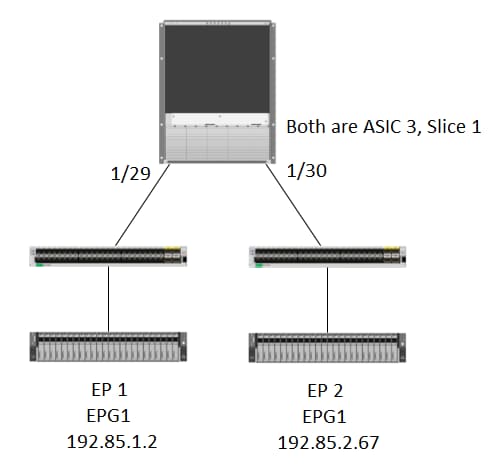
논리
"show platform internal hal l2 internal-port pi" 테이블에 Ovector가 없는 패킷을 포착하는 몇 가지 시나리오가 있습니다. 아래 시나리오에서는 FM에서 돌아오는 패킷을 실제로 포착하므로, 다른 표를 보고 패킷이 어떤 전면 패널 포트를 선택하는지 확인해야 합니다.
위 토폴로지는 전송 트래픽이 학습되는 완전히 다른 환경입니다(프록시 라우팅 없음). 모듈은 N9K-X9732C-EX입니다.
@module-1# debug platform internal tah elam asic 3
@module-1(DBG-elam)# trigger reset
@module-1(DBG-elam)# trigg init in-select 13 out-select 0
@module-1(DBG-elam-insel13)# set inner ipv4 src_ip 192.85.1.2 dst_ip 192.85.2.67
@module-1(DBG-elam-insel13)# star
@module-1(DBG-elam-insel13)# stat
ELAM STATUS
===========
Asic 3 Slice 0 Status Armed
Asic 3 Slice 1 Status Triggered

@module-1(DBG-elam-insel13)# report | grep ovector
  sug_elam_out_sidebnd_no_spare_vec.ovector_idx: 0xA0    <<<<<<<<<<<<<<<<<  now we look for this in the "hal internal-port pi" command


@module-1# show platform internal hal l2 internal-port pi
No sandboxes exist
Num. of Sandboxes: 1
Legend:
-------
IfId:      Interface Id                IfName:     Interface Name
As:        Asic                        AP:         Asic Port
Sl:        Slice                       SP:         Slice Port
Ss:        Slice SrcId                 Ovec:       Ovector
UcPcCfgId: Uc Pc CfgId                 Lb Mbrid:   LB MbrId

Sandbox_ID: 0, BMP: 0x0
 Internal Port Count: 24

======================================================================
                                                         UcPc  Lb
IfId     IfName                      As AP Sl SP Ss Ovec CfgId MbrId
======================================================================
7d       -                           0  21 0  20 38 38   0     4
7e       -                           0  29 1  0  0  80   0     8
7f       -                           1  21 0  20 38 38   0     c
80       -                           1  29 1  0  0  80   0     10
81       -                           2  21 0  20 38 38   0     14
82       -                           2  29 1  0  0  80   0     18
83       -                           3  21 0  20 38 38   0     1c
84       -                           3  29 1  0  0  80   0     20
ad       -                           0  25 0  24 40 40   0     1
ae       -                           0  41 1  18 30 b0   0     6
af       -                           1  25 0  24 40 40   0     9
b0       -                           1  41 1  18 30 b0   0     e
b1       -                           2  25 0  24 40 40   0     11
b2       -                           2  41 1  18 30 b0   0     16
b3       -                           3  25 0  24 40 40   0     19
b4       -                           3  41 1  18 30 b0   0     1e
dd       -                           0  15 0  14 28 28   0     2
de       -                           0  4d 1  24 40 c0   0     5
df       -                           1  15 0  14 28 28   0     a
e0       -                           1  4d 1  24 40 c0   0     d
e1       -                           2  15 0  14 28 28   0     12
e2       -                           2  4d 1  24 40 c0   0     15
e3       -                           3  15 0  14 28 28   0     1a
e4       -                           3  4d 1  24 40 c0   0     1d  <<<<<<<  we cant find an entry that matches 0xA0


@module-1# show platform internal hal l2 port gpd
Legend:
-------
<snip>

Sandbox_ID: 0, BMP: 0x0
 Port Count: 6

============================================================================================================================================
                       Uc   Uc                          |       Reprogram       |                                         | Rep |
                     I PC   Pc                        L |   R I R D    R  U U X | L Xla Ovx N  NI Vif    RwV    Ing  Egr  | V R | PROF H
IfId     Ifname      P Cfg  MbrID As AP Sl Sp Ss Ovec S | P P P S P Sp Sp C M L | 3 Idx Idx L3 L3 Tid    Tid    Lbl  Lbl  | S V | ID   I
=============================================================================================================================================
1f5      SpInBndMgmt 0 9de  1a    0  0  0  0  0  0    0   0 0 0 0 0 0  0  0 0 0   0 0   0   0  0  D-2d4  D-3e1  0    0      0 0   1    0
1a000000 Eth1/1      0 1b   1c    0  11 0  10 20 20   1   0 0 0 0 0 0  0  0 0 0   1 1   1   1  1  D-13b  D-33b  500  0      1 0   3    0
1a01c000 Eth1/29     0 37   1e    3  3d 1  14 28 a8   1   0 0 0 0 0 0  0  0 0 0   1 8   8   1  1  D-3f2  D-7a   100  0      0 0   2    0
1a01d000 Eth1/30     0 38   20    3  39 1  10 20 a0   1   0 0 0 0 0 0  0  0 0 0   1 5   5   1  1  D-36e  D-362  100  0      0 0   2    0
1a01e000 Eth1/31     0 39   22    3  35 1  c  18 98   1   0 0 0 0 0 0  0  0 0 0   1 9   9   1  1  D-273  D-8    100  0      0 0   2    0
1a01f000 Eth1/32     0 3a   24    3  31 1  8  10 90   1   0 0 0 0 0 0  0  0 0 0   1 a   a   1  1  D-154  D-5d   100  0      0 0   2    0
1/30은 토폴로지, ASIC 3, 슬라이스 1에 의해 검증된 리프 102에 연결되는 phys 인터페이스입니다.
 피드백
피드백