Risoluzione dei problemi relativi al traceroute da FTD che non visualizza le informazioni sull'hop nonostante il ping ICMP sia riuscito
Sommario
Problema
Si manifestano tutti i seguenti sintomi:
Errore di tracciamento routing: I comandi di tracciamento routing avviati direttamente dal dispositivo Cisco Firewall Threat Defense (FTD) restituiscono coerentemente solo * * * per tutti gli hop quando si indirizzano a indirizzi IP esterni.
Connettività riuscita: I test ping ICMP sulla stessa destinazione hanno esito positivo e il traffico ICMP è autorizzato esplicitamente nei criteri di controllo di accesso.
Questo comportamento impedisce la visibilità sugli hop di percorso per il traffico proveniente dal dispositivo FTD, influendo sulle attività di risoluzione dei problemi dei percorsi di rete.
Esempio
Ping sulla destinazione in corso:
firepower# ping 192.168.203.89
Type escape sequence to abort.
Sending 5, 100-byte ICMP Echos to 192.168.203.89, timeout is 2 seconds:
!!!!!
Success rate is 100 percent (5/5), round-trip min/avg/max = 1/2/10 ms
Tuttavia, il comando traceroute non funziona:
firepower# traceroute 192.168.203.89
Type escape sequence to abort.
Tracing the route to 192.168.203.89
 1*  *  *
 2*  *  *
 3*  *  *
...
 30*  *  *
firepower#
Ambiente
Cisco Secure Firewall Threat Defense (FTD).
Prima osservazione: 7.4, 7.4.2.3, 7.6.2. Potrebbero essere interessate anche altre versioni.
Cisco Secure Firewall Management Center (FMC / cdFMC / FDM) per la gestione.
Regole NAT statiche in uso, incluse le configurazioni bidirezionali.
Comandi traceroute eseguiti dalla CLI FTD (modalità Lina).
ICMP consentito nei criteri di controllo di accesso.
Topologia

Risoluzione
Le possibili soluzioni dipendono dallo scopo della regola NAT configurata.
Soluzione 1
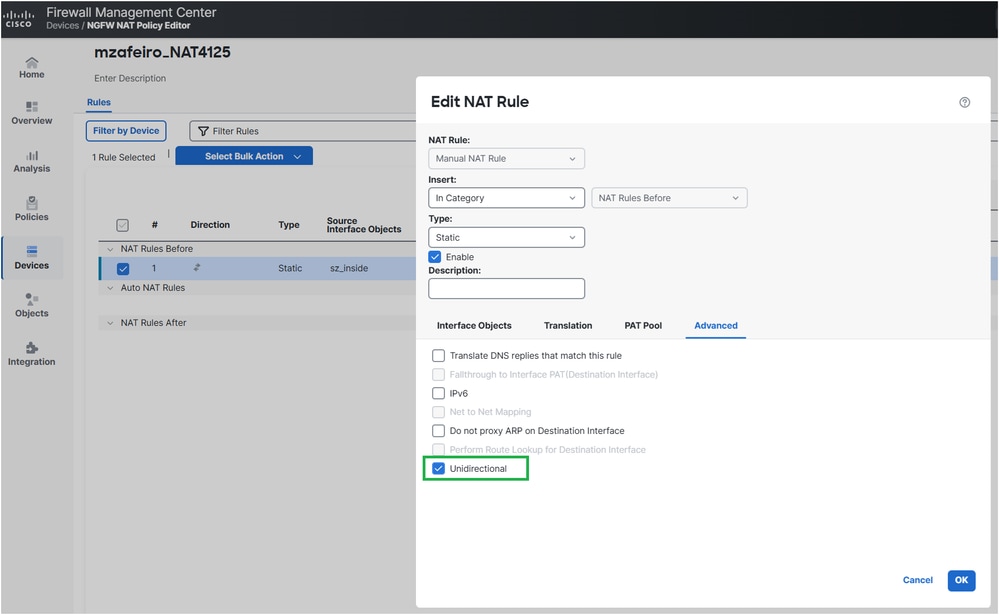
Se l'obiettivo era convertire l'IP del server interno solo per l'accesso in uscita, è possibile configurare la regola NAT come unidirezionale.
In FMC ciò può essere fatto dalla regola NAT Opzioni avanzate:
La configurazione NAT distribuita:
firepower# show run nat
nat (INSIDE,OUTSIDE) source static server_host interface unidirectional
firepower#
Verifica
firepower# traceroute 192.168.203.89
Type escape sequence to abort.
Tracing the route to 192.168.203.89
 1  192.168.201.88 2 msec 2 msec 2 msec
 2  192.168.203.89 1 msec *  1 msec
Soluzione 2
Se l'obiettivo è che il server interno sia raggiungibile dall'esterno, è possibile rendere la regola NAT più specifica configurando l'inoltro delle porte:
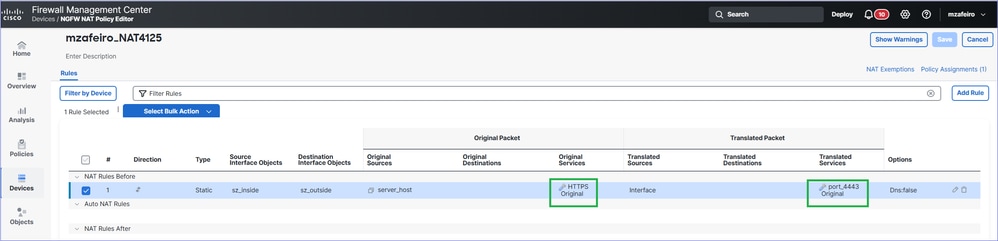
La configurazione NAT distribuita:
firepower# show run nat
nat (INSIDE,OUTSIDE) source static server_host interface service SVC_25769850586 SVC_25769850587
Verifica
firepower# traceroute 192.168.203.89
Type escape sequence to abort.
Tracing the route to 192.168.203.89
 1  192.168.201.88 2 msec 2 msec 2 msec
 2  192.168.203.89 1 msec *  1 msec
Come funziona
Ping
1.- Il firewall invia un messaggio di richiesta echo (ICMP Tipo 8 Codice 0).
2.- Viene creata una nuova connessione firewall per ICMP.
3.- Il firewall riceve un messaggio di risposta echo (ICMP tipo 0 codice 0).
4.- Il messaggio corrisponde alla connessione creata al punto 2.
5.- Il messaggio di risposta echo viene utilizzato dal firewall.
Traceroute
1.- Il firewall invia tre pacchetti UDP a partire dalle porte 33434, 33435 e 33436 alla destinazione con TTL 1.
2.- Viene creata una nuova connessione firewall per UDP.
3.- Il firewall riceve un valore TTL ICMP superato in transito (codice tipo 11 0) o una porta ICMP non raggiungibile (codice tipo 3 3).
4.- Una volta che i pacchetti ICMP arrivano sul firewall, vengono trattati come connessioni diverse dai pacchetti UDP del passaggio 2.
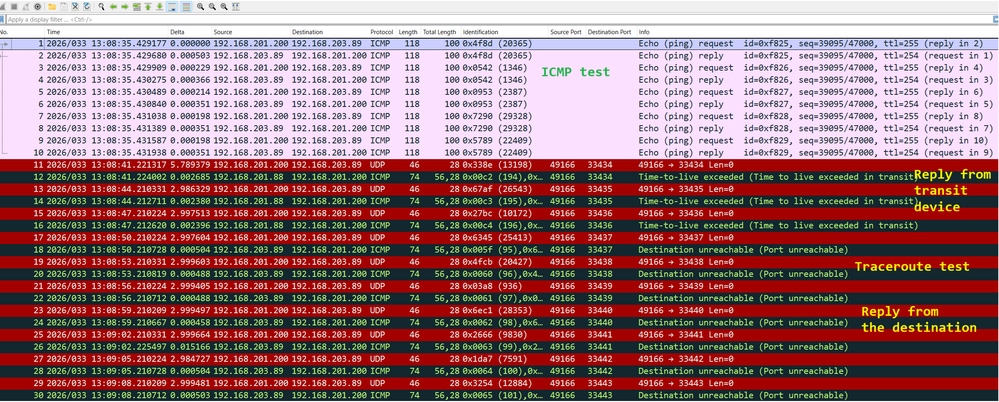
Questa condizione può essere rilevata in Wireshark:
Risoluzione dei problemi
Passaggio 1
Abilitare le acquisizioni dei pacchetti sull'interfaccia di uscita del firewall con il comando tracerestituisce il modo in cui il firewall tratta i pacchetti in entrata:
firepower# capture CAPI trace interface OUTSIDE match ip host 192.168.203.89 host 192.168.201.100
Passaggio 2
Test con ping:
firepower# ping 192.168.203.89
Type escape sequence to abort.
Sending 5, 100-byte ICMP Echos to 192.168.203.89, timeout is 2 seconds:
!!!!!
Success rate is 100 percent (5/5), round-trip min/avg/max = 1/1/1 ms
Provare quindi con traceroute:
firepower# traceroute 192.168.203.89
Type escape sequence to abort.
Tracing the route to 192.168.203.89
 1*  *  *
 2*  *  *
 3*  *  *
 4*  *  *
 5*  *  *
 6*  *  *
 7*  *  *
…
Passaggio 3
Controllare il contenuto dell'acquisizione:
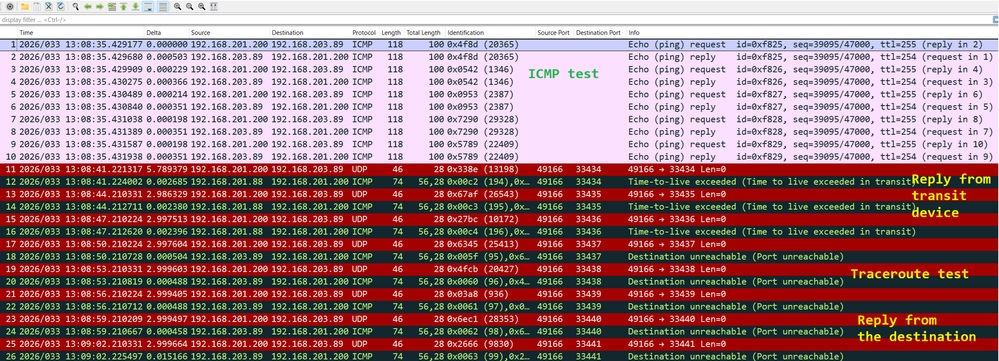
I pacchetti da 1 a 10 sono correlati al test ping ICMP.
I pacchetti da 11 a 16 sono correlati al traceroute. Le risposte vengono dal primo hop.
I pacchetti 17-28 sono anche correlati al traceroute. Le risposte provengono dall'endpoint di destinazione.
firepower# show capture CAPI
190 packets captured
1: 13:50:27.345471       802.1Q vlan#201 P0 192.168.201.200 > 192.168.203.89 icmp: echo request
2: 13:50:27.345975       802.1Q vlan#201 P0 192.168.203.89 > 192.168.201.200 icmp: echo reply
3: 13:50:27.346219       802.1Q vlan#201 P0 192.168.201.200 > 192.168.203.89 icmp: echo request
4: 13:50:27.346600       802.1Q vlan#201 P0 192.168.203.89 > 192.168.201.200 icmp: echo reply
5: 13:50:27.346814       802.1Q vlan#201 P0 192.168.201.200 > 192.168.203.89 icmp: echo request
6: 13:50:27.347165       802.1Q vlan#201 P0 192.168.203.89 > 192.168.201.200 icmp: echo reply
7: 13:50:27.347378       802.1Q vlan#201 P0 192.168.201.200 > 192.168.203.89 icmp: echo request
8: 13:50:27.347714       802.1Q vlan#201 P0 192.168.203.89 > 192.168.201.200 icmp: echo reply
9: 13:50:27.347928       802.1Q vlan#201 P0 192.168.201.200 > 192.168.203.89 icmp: echo request
10: 13:50:27.348279       802.1Q vlan#201 P0 192.168.203.89 > 192.168.201.200 icmp: echo reply
11: 13:50:33.229724       802.1Q vlan#201 P0 192.168.201.200.49168 > 192.168.203.89.33434:  udp 0
12: 13:50:33.232562       802.1Q vlan#201 P0 192.168.201.88 > 192.168.201.200 icmp: time exceeded in-transit
13: 13:50:36.220279       802.1Q vlan#201 P0 192.168.201.200.49168 > 192.168.203.89.33435:  udp 0
14: 13:50:36.222827       802.1Q vlan#201 P0 192.168.201.88 > 192.168.201.200 icmp: time exceeded in-transit
15: 13:50:39.220172       802.1Q vlan#201 P0 192.168.201.200.49168 > 192.168.203.89.33436:  udp 0
16: 13:50:39.222675       802.1Q vlan#201 P0 192.168.201.88 > 192.168.201.200 icmp: time exceeded in-transit
17: 13:50:42.220157       802.1Q vlan#201 P0 192.168.201.200.49168 > 192.168.203.89.33437:  udp 0
18: 13:50:42.220737       802.1Q vlan#201 P0 192.168.203.89 > 192.168.201.200 icmp: 192.168.203.89 udp port 33437 unreachable
19: 13:50:45.220264       802.1Q vlan#201 P0 192.168.201.200.49168 > 192.168.203.89.33438:  udp 0
20: 13:50:45.220752       802.1Q vlan#201 P0 192.168.203.89 > 192.168.201.200 icmp: 192.168.203.89 udp port 33438 unreachable
21: 13:50:48.220157       802.1Q vlan#201 P0 192.168.201.200.49168 > 192.168.203.89.33439:  udp 0
22: 13:50:48.220645       802.1Q vlan#201 P0 192.168.203.89 > 192.168.201.200 icmp: 192.168.203.89 udp port 33439 unreachable
23: 13:50:51.220157       802.1Q vlan#201 P0 192.168.201.200.49168 > 192.168.203.89.33440:  udp 0
24: 13:50:51.220645       802.1Q vlan#201 P0 192.168.203.89 > 192.168.201.200 icmp: 192.168.203.89 udp port 33440 unreachable
25: 13:50:54.220264       802.1Q vlan#201 P0 192.168.201.200.49168 > 192.168.203.89.33441:  udp 0
26: 13:50:54.220752       802.1Q vlan#201 P0 192.168.203.89 > 192.168.201.200 icmp: 192.168.203.89 udp port 33441 unreachable
27: 13:50:57.220157       802.1Q vlan#201 P0 192.168.201.200.49168 > 192.168.203.89.33442:  udp 0
28: 13:50:57.220645       802.1Q vlan#201 P0 192.168.203.89 > 192.168.201.200 icmp: 192.168.203.89 udp port 33442 unreachable
Passaggio 4
Tracciare i pacchetti ICMP in entrata dal test ping.
Il pacchetto 2 è la risposta alla richiesta ping ICMP inviata nel pacchetto 1.
firepower# show capture CAPI packet-number 2 trace
190 packets captured
2: 13:50:27.345975       802.1Q vlan#201 P0 192.168.203.89 > 192.168.201.200 icmp: echo reply
…
Phase: 4
Type: FLOW-LOOKUP
Subtype:
Result: ALLOW
Elapsed time: 488 ns
Config:
Additional Information:
Found flow with id 143799, using existing flow
…
Phase: 6
Type: ADJACENCY-LOOKUP
Subtype: Resolve Nexthop IP address to MAC
Result: ALLOW
Elapsed time: 1952 ns
Config:
Additional Information:
Found adjacency entry for Next-hop 0.0.0.0 on interface  identity
Adjacency :Active
MAC address 0000.0000.0000 hits 483359 reference 2

Result:
input-interface: OUTSIDE(vrfid:0)
input-status: up
input-line-status: up
output-interface: NP Identity Ifc
Action: allow
Time Taken: 18056 ns
1 packet shown
I punti chiave della traccia sono:
Il pacchetto corrisponde a un flusso esistente.
L'interfaccia di output è il firewall stesso (interfaccia di identità).
Passaggio 5
Tracciare i pacchetti ICMP in entrata dal test traceroute.
Il pacchetto 12 è la risposta dell'host di transito:
firepower#  show capture CAPI packet-number 12 trace
190 packets captured
12: 13:50:33.232562       802.1Q vlan#201 P0 192.168.201.88 > 192.168.201.200 icmp: time exceeded in-transit

Phase: 3
Type: UN-NAT
Subtype: static
Result: ALLOW
Elapsed time: 6344 ns
Config:
nat (INSIDE,OUTSIDE) source static server_host interface
Additional Information:
NAT divert to egress interface INSIDE(vrfid:0)
Untranslate 192.168.201.200/49168 to 192.168.200.50/49168

Phase: 7
Type: ACCESS-LIST
Subtype:
Result: ALLOW
Elapsed time: 97 ns
Config:
access-group CSM_FW_ACL_ global
access-list CSM_FW_ACL_ advanced permit ip any any rule-id 268436480
access-list CSM_FW_ACL_ remark rule-id 268436480: ACCESS POLICY: mzafeiro_empty - Default
access-list CSM_FW_ACL_ remark rule-id 268436480: L4 RULE: DEFAULT ACTION RULE
Additional Information:
 This packet will be sent to snort for additional processing where a verdict will be reached
...
Phase: 18
Type: FLOW-CREATION
Subtype:
Result: ALLOW
Elapsed time: 16104 ns
Config:
Additional Information:
New flow created with id 143805, packet dispatched to next module
...
Phase: 20
Type: SNORT
Subtype: identity
Result: ALLOW
Elapsed time: 39496 ns
Config:
Additional Information:
user id: no auth, realm id: 0, device type: 0, auth type: invalid, auth proto: basic, username: none, AD domain: none,
src sgt: 0, src sgt type: unknown, dst sgt: 0, dst sgt type: unknown, abp src: none, abp dst: none, location: none

Result:
input-interface: OUTSIDE(vrfid:0)
input-status: up
input-line-status: up
output-interface: INSIDE(vrfid:0)
output-status: up
output-line-status: up
Action: allow
Time Taken: 158341 ns
Il pacchetto fa parte di una nuova connessione (non corrisponde a un flusso esistente).
Il pacchetto è soggetto a Network Address Translation (in particolare, UN-NAT indica la destinazione NAT).
Il pacchetto viene considerato come traffico di transito attraverso il firewall e viene sottoposto a policy di controllo dell'accesso (ACP, Access Control Policy) e a ispezione Snort.
L'interfaccia di output (in uscita) è INSIDE. Ciò è dovuto alla traduzione NAT.
Causa
In questo caso, il problema è causato da questa regola NAT statica:
firepower# show run nat
nat (INSIDE,OUTSIDE) source static server_host interface
Contenuto correlato
Cronologia delle revisioni
| Revisione | Data di pubblicazione | Commenti |
|---|---|---|
4.0 |
09-Jul-2026
|
Le immagini sono state ricaricate e il testo è stato corretto. |
2.0 |
22-Apr-2026
|
Tutto il testo, formattazione. |
1.0 |
09-Apr-2026
|
Versione iniziale |

 Feedback