Configurazione del concatenamento EAP con TEAP
Sommario
Introduzione
Questo documento descrive come configurare ISE e Windows supplicant for Extensible Authentication Protocol (EAP) Chaining con TEAP.
Prerequisiti
Requisiti
Cisco raccomanda la conoscenza dei seguenti argomenti:
-
ISE
-
Configurazione del supplicant di Windows
Componenti usati
Le informazioni fornite in questo documento si basano sulle seguenti versioni software e hardware:
- Cisco ISE versione 3.0
- Windows 10 Build 2004
- Conoscenza del protocollo TEAP (Extensible Authentication Protocol) basato su tunnel
Le informazioni discusse in questo documento fanno riferimento a dispositivi usati in uno specifico ambiente di emulazione. Su tutti i dispositivi menzionati nel documento la configurazione è stata ripristinata ai valori predefiniti. Se la rete è operativa, valutare attentamente eventuali conseguenze derivanti dall'uso dei comandi.
Premesse
TEAP è un metodo EAP (Extensible Authentication Protocol) basato su tunnel che stabilisce un tunnel sicuro ed esegue altri metodi EAP sotto la protezione di tale tunnel protetto.
L'autenticazione TEAP si verifica in due fasi dopo lo scambio iniziale di richiesta/risposta di identità EAP. Nella prima fase, TEAP utilizza l'handshake TLS per fornire uno scambio di chiavi autenticato e per stabilire un tunnel protetto. Una volta stabilito il tunnel, la seconda fase inizia con il peer e il server impegnati in un'ulteriore conversazione per stabilire le autenticazioni e i criteri di autorizzazione necessari.
Cisco ISE 2.7 e versioni successive supportano il protocollo TEAP. Gli oggetti TLV (Type-Length-Value) vengono utilizzati all'interno del tunnel per trasportare i dati relativi all'autenticazione tra il peer EAP e il server EAP. Microsoft ha introdotto il supporto per TEAP in Windows versione 10/2004, rilasciato nel maggio 2020.
Il concatenamento EAP consente l'autenticazione di computer e utente nell'ambito di una sessione EAP/Radius anziché di due sessioni separate. In precedenza, per ottenere questo risultato, è necessario disporre del modulo Cisco AnyConnect NAM e utilizzare EAP-FAST sul supplicant Windows, in quanto il supplicant Windows nativo non lo supporta. È ora possibile utilizzare Windows Native Supplicant per eseguire il concatenamento EAP con ISE 2.7 utilizzando TEAP.
Configurazione
Cisco ISE Configuration
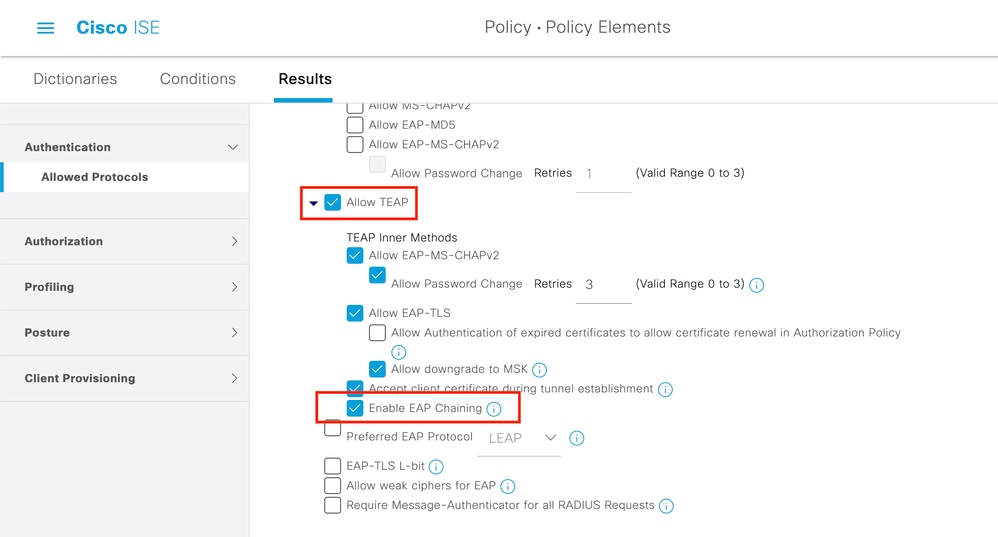
1. È necessario modificare i protocolli consentiti per abilitare il concatenamento TEAP ed EAP.
2. Passare a ISE > Policy > Policy Elements > Results > Authentication > Allowed Protocols > Add New. (Policy > Elementi criteri > Risultati > Autenticazione > Protocolli consentiti > Aggiungi nuovo). Selezionare le caselle di controllo TEAP e EAP chaining (Concatenamento EAP e TEAP).
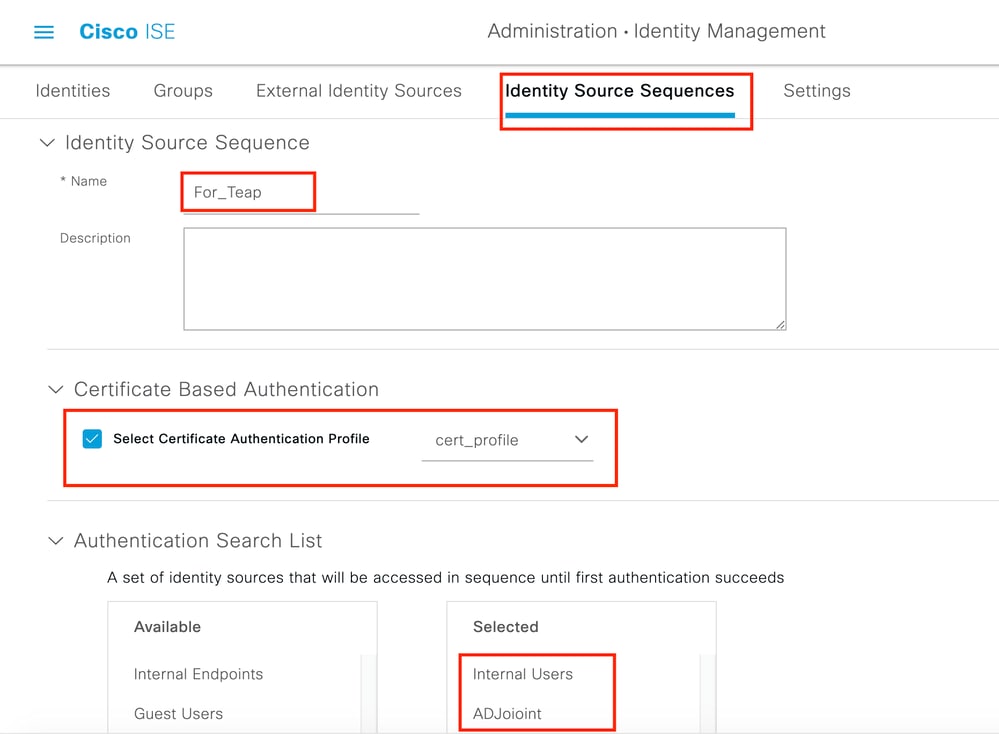
3. Creare un profilo di certificato e aggiungerlo alla sequenza Origine identità.
4. Passare a ISE > Amministrazione > Identità > Sequenza origine identità e scegliere il profilo di autenticazione certificato.
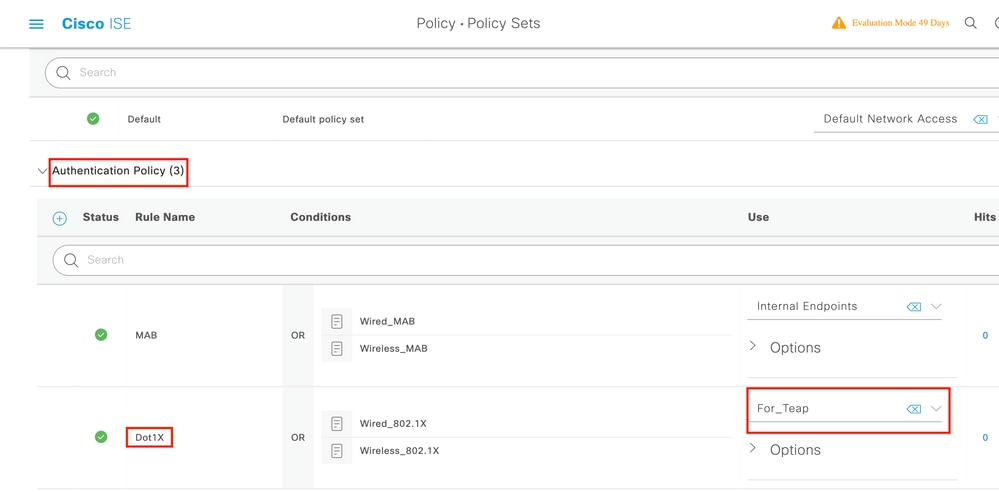
5. È necessario chiamare questa sequenza nei criteri di autenticazione.
6. Selezionare ISE > Policy > Policy Sets. Choose the Policy Set forDot1x > Authentication Policy (Policy di autenticazione) e scegliere le sequenze di origine dell'identità create al passo 3.
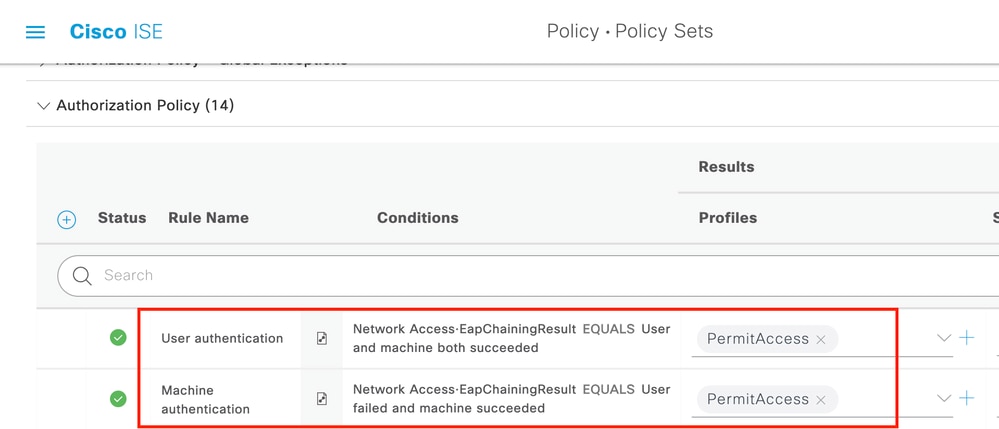
7. A questo punto, è necessario modificare i criteri di autorizzazione nel set di criteri Dot1x.
8. Selezionare ISE > Policy > Policy. Sets (Set di criteri)Choose the Policy Set for Dot1x > Authentication Policy (Scegli set di criteri per dot1x > Criteri di autenticazione). È necessario creare due regole. La prima regola verifica che il computer sia autenticato, ma l'utente non lo è. La seconda regola verifica che l'utente e il computer siano autenticati.
9. La configurazione è completata dal lato server ISE.
Configurazione supplicant nativo di Windows
Configurare l'impostazione di autenticazione della rete cablata in questo documento.
1. Selezionare Pannello di controllo > Centro connessioni di rete e condivisione > Modifica impostazioni scheda e fare clic con il pulsante destro del mouse su Connessione LAN > Proprietà. Fare clic sulla scheda Autenticazione.
2. Fare clic su Autenticazione a discesa e scegliere Microsoft EAP-TEAP.
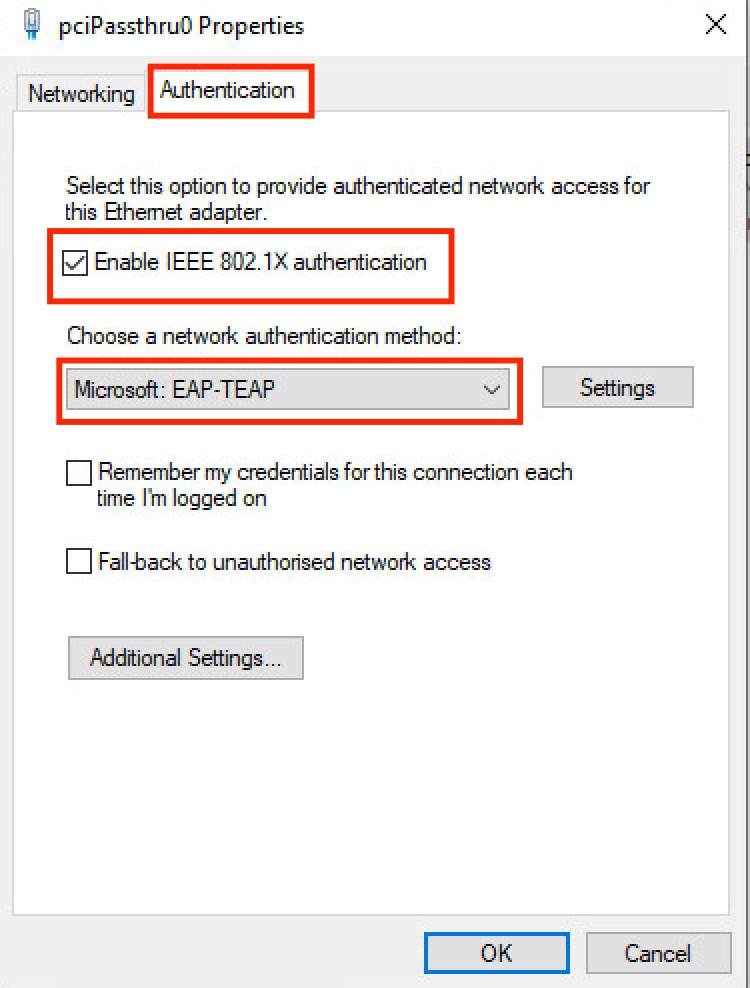
3. Fare clic sul pulsante Settings accanto a TEAP.
- Mantieni attiva privacy identità abilitata con anonimo come identità.
- Selezionare i server CA radice sotto Autorità di certificazione radice attendibili per firmare il certificato per l'autenticazione EAP sul numero di serie del servizio (PSN) ISE.
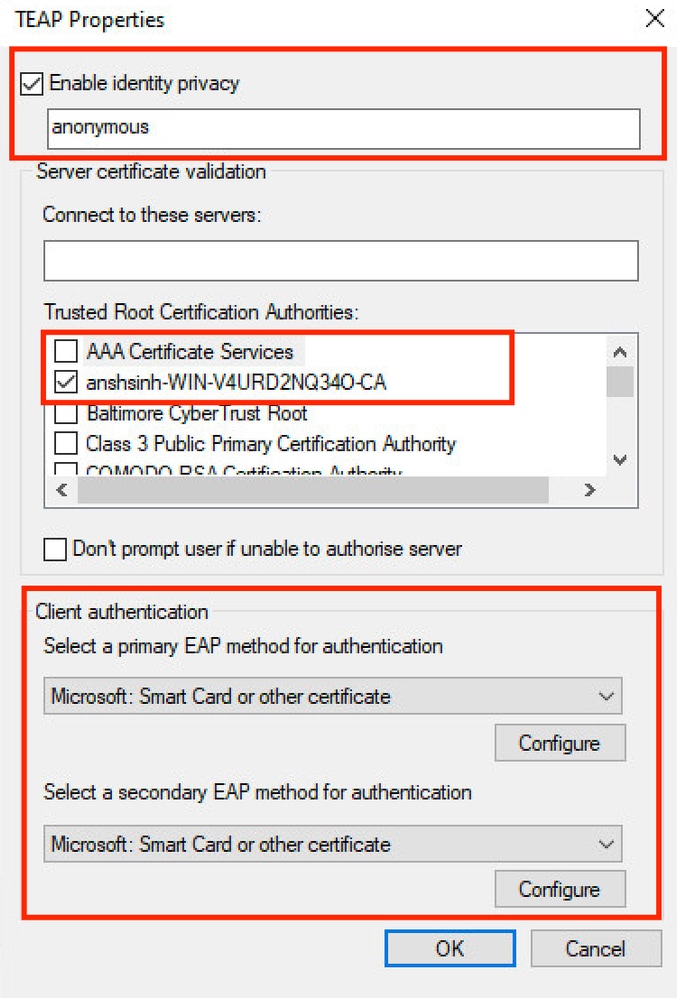
4. In Autenticazione client, scegliere il metodo EAP per l'autenticazione a Microsoft: Smart card di un altro certificato.
5. Per ogni elenco a discesa del metodo EAP, fare clic sul pulsante Configura, modificare in base al requisito e fare clic su OK.
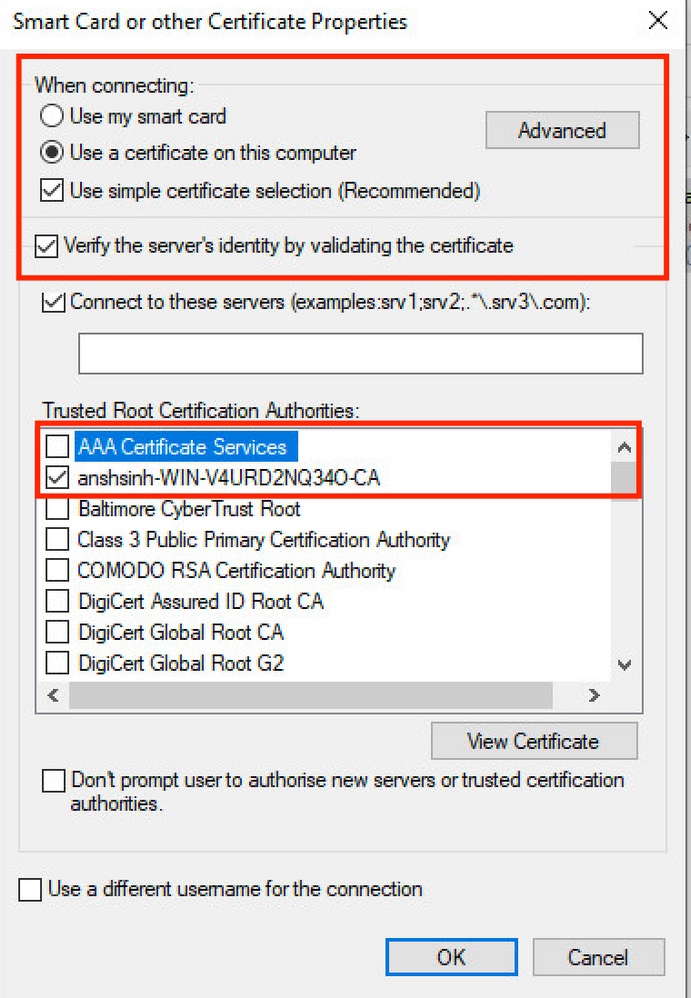
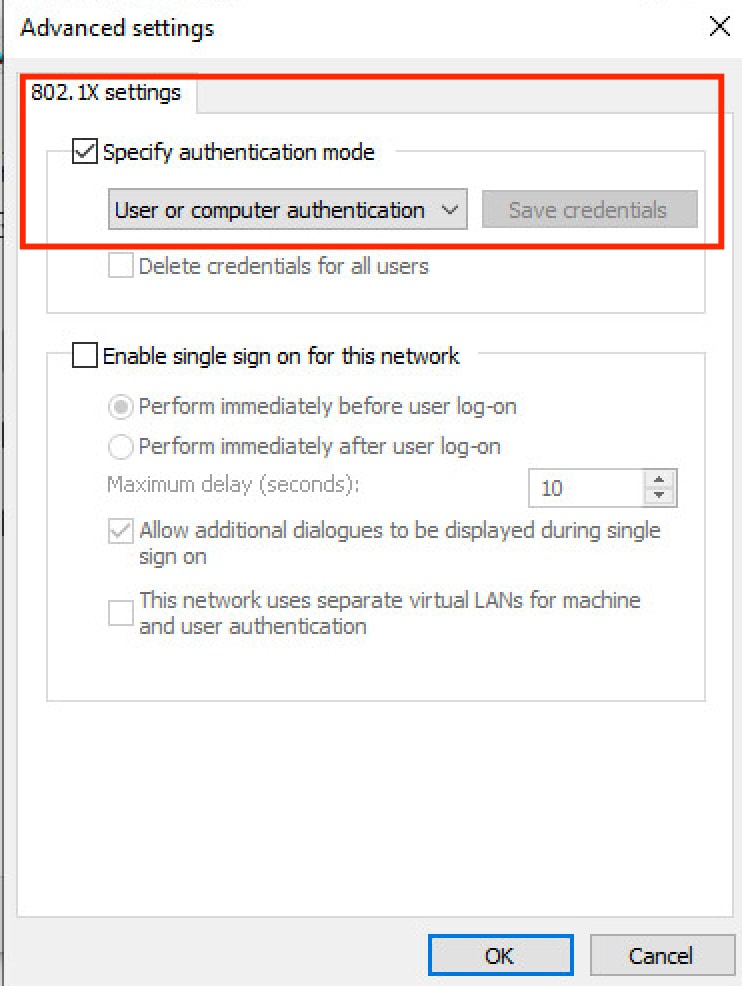
6. Fare clic su Impostazioni aggiuntive pulsante in basso.
- Abilita Specifica modalità di autenticazione.
- Impostare il menu a discesa sull'impostazione appropriata.
- Scegliere Autenticazione utente o computer in modo che entrambi siano autenticati e fare clic su OK.
Verifica
È possibile riavviare il computer con Windows 10 oppure disconnettersi e accedere. Quando viene visualizzata la schermata di accesso di Windows, viene attivata l'autenticazione del computer.
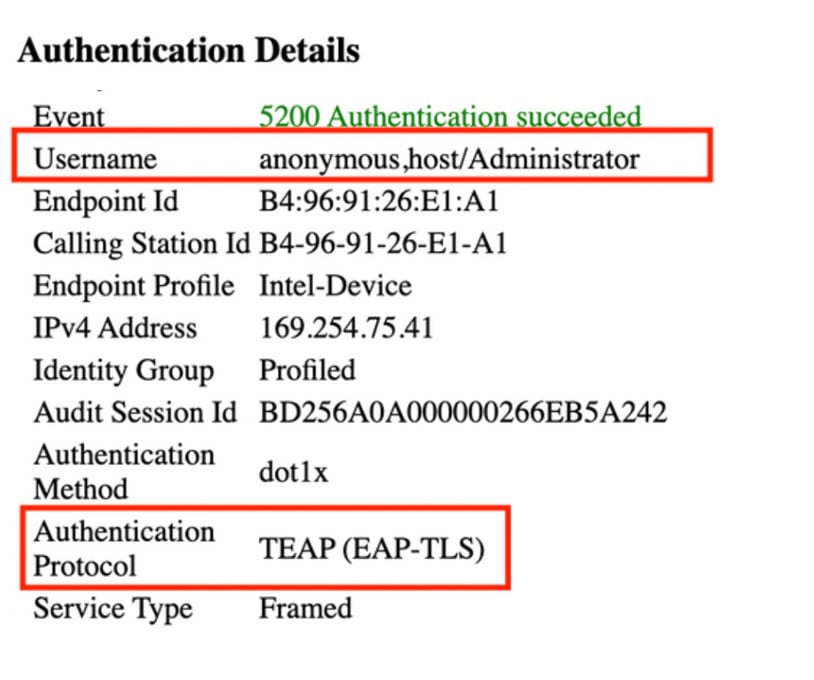
Nei log attivi viene visualizzato anonimo, host/amministratore (in questo esempio viene visualizzato il nome del computer) nel campo Identity. Verrà visualizzato l'anonimato perché è stata configurata la privacy del richiedente per l'identità.
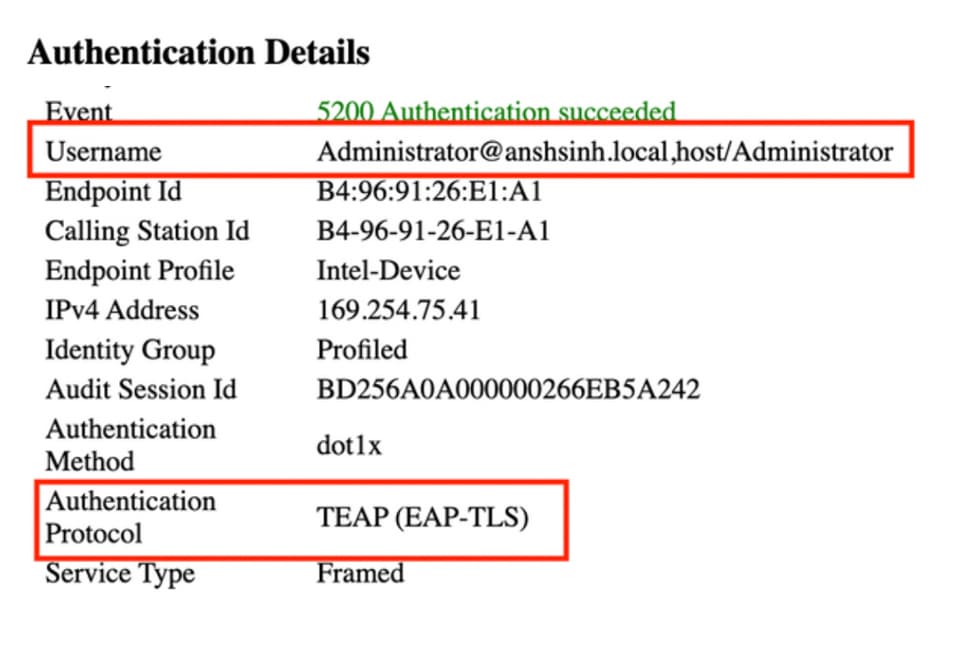
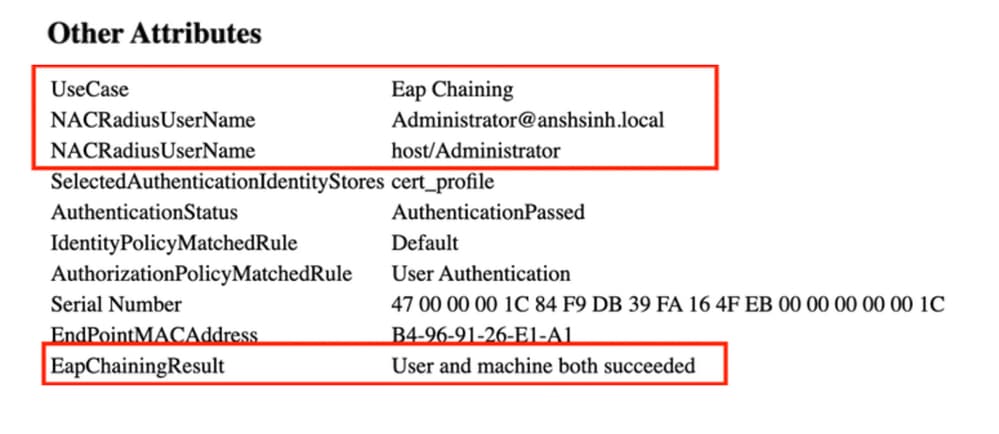
Quando si accede al PC con le credenziali, i log attivi vengono visualizzati come Administrator@example.local, host/amministratore. Concatenamento EAP in cui l'autenticazione di computer e utente è stata eseguita in una sessione EAP.
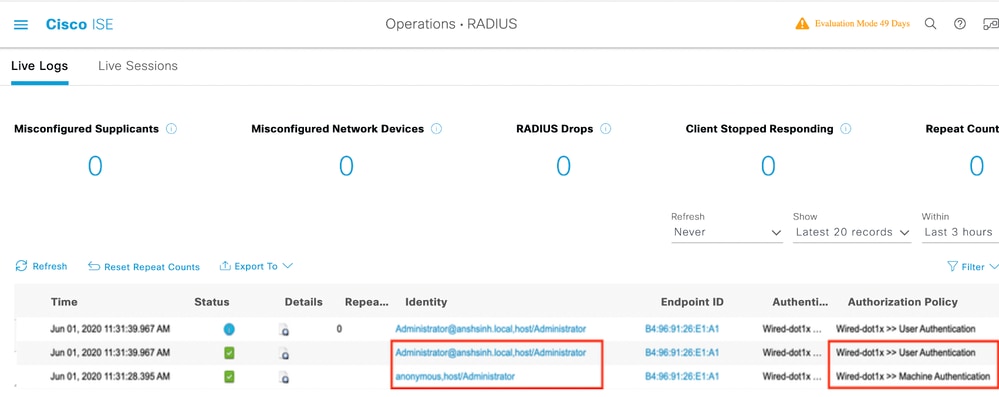
Rapporto dettagliato sull'autenticazione
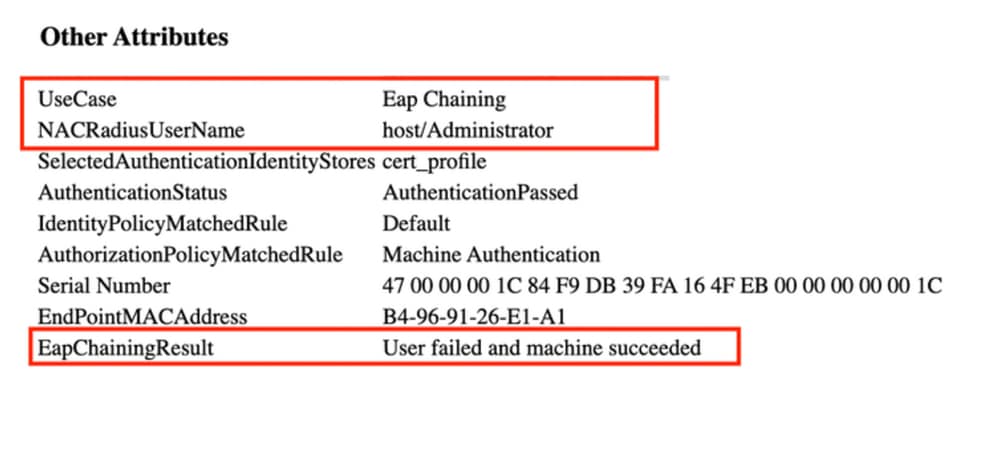
Nei Live Log Details, le autenticazioni del computer mostrano solo una singola NACRadiusUsername voce; tuttavia, l'autenticazione dell'utente e del computer concatenati mostra due voci (una per l'utente e una per il computer). Inoltre, nella sezione Authentication Details (Dettagli di autenticazione) viene visualizzato che il protocollo TEAP (EAP-TLS) è stato utilizzato per il protocollo di autenticazione. Se si utilizza MSCHAPv2 per l'autenticazione di computer e utenti, il protocollo di autenticazione visualizza TEAP (Microsoft: Password protetta (EAP-MSCHAP v2.0)
Autenticazione computer
Autenticazione utente e computer
Risoluzione dei problemi
Su ISE è necessario abilitare i seguenti debug:
- runtime-AAA
- nsf
- sessione nsf
Active Directory (per risolvere i problemi tra ISE e AD)
In Windows è possibile controllare i registri del Visualizzatore eventi.
Analisi log in tempo reale
Autenticazione computer
11001 Received RADIUS Access-Request
11017 RADIUS created a new session
...
...
11507 Extracted EAP-Response/Identity
12756 Prepared EAP-Request proposing TEAP with challenge
...
...
12758 Extracted EAP-Response containing TEAP challenge-response and accepting TEAP as negotiated
12800 Extracted first TLS record; TLS handshake started
12805 Extracted TLS ClientHello message
12806 Prepared TLS ServerHello message
12807 Prepared TLS Certificate message
12808 Prepared TLS ServerKeyExchange message
12809 Prepared TLS CertificateRequest message
...
...
12811 Extracted TLS Certificate message containing client certificate
12812 Extracted TLS ClientKeyExchange message
12813 Extracted TLS CertificateVerify message
12804 Extracted TLS Finished message
12801 Prepared TLS ChangeCipherSpec message
12802 Prepared TLS Finished message
12816 TLS handshake succeeded
...
...
11559 Client certificate was requested but not received inside the tunnel. Will continue with inner method.
11620 TEAP full handshake finished successfully
...
...
11627 Starting EAP chaining
11573 Selected identity type 'User'
11564 TEAP inner method started
11521 Prepared EAP-Request/Identity for inner EAP method
...
...
11567 Identity type provided by client is equal to requested
11522 Extracted EAP-Response/Identity for inner EAP method
11806 Prepared EAP-Request for inner method proposing EAP-MSCHAP with challenge
11596 Prepared EAP-Request with another TEAP challenge
11006 Returned RADIUS Access-Challenge
11001 Received RADIUS Access-Request
...
...
11515 Supplicant declined inner EAP method selected by Authentication Policy but did not proposed another one; inner EAP negotiation failed
11520 Prepared EAP-Failure for inner EAP method
11566 TEAP inner method finished with failure
22028 Authentication failed and the advanced options are ignored
33517 Sent TEAP Intermediate Result TLV indicating failure
11596 Prepared EAP-Request with another TEAP challenge
...
...
11574 Selected identity type 'Machine'
11564 TEAP inner method started
11521 Prepared EAP-Request/Identity for inner EAP method
...
...
11567 Identity type provided by client is equal to requested
11522 Extracted EAP-Response/Identity for inner EAP method
11806 Prepared EAP-Request for inner method proposing EAP-MSCHAP with challenge
11596 Prepared EAP-Request with another TEAP challenge
...
...
12523 Extracted EAP-Response/NAK for inner method requesting to use EAP-TLS instead
12522 Prepared EAP-Request for inner method proposing EAP-TLS with challenge
12625 Valid EAP-Key-Name attribute received
11596 Prepared EAP-Request with another TEAP challenge
...
...
12524 Extracted EAP-Response containing EAP-TLS challenge-response for inner method and accepting EAP-TLS as negotiated
12800 Extracted first TLS record; TLS handshake started
12545 Client requested EAP-TLS session ticket
12546 The EAP-TLS session ticket received from supplicant. Inner EAP-TLS does not support stateless session resume. Performing full authentication
12805 Extracted TLS ClientHello message
12806 Prepared TLS ServerHello message
12807 Prepared TLS Certificate message
12808 Prepared TLS ServerKeyExchange message
12809 Prepared TLS CertificateRequest message
12527 Prepared EAP-Request for inner method with another EAP-TLS challenge
...
...
12571 ISE will continue to CRL verification if it is configured for specific CA - certificate for Users
12811 Extracted TLS Certificate message containing client certificate
12812 Extracted TLS ClientKeyExchange message
12813 Extracted TLS CertificateVerify message
12804 Extracted TLS Finished message
12801 Prepared TLS ChangeCipherSpec message
12802 Prepared TLS Finished message
12816 TLS handshake succeeded
12509 EAP-TLS full handshake finished successfully
...
...
12527 Prepared EAP-Request for inner method with another EAP-TLS challenge
11596 Prepared EAP-Request with another TEAP challenge
...
...
61025 Open secure connection with TLS peer
15041 Evaluating Identity Policy
22072 Selected identity source sequence - forAD1
22070 Identity name is taken from certificate attribute
22037 Authentication Passed
12528 Inner EAP-TLS authentication succeeded
11519 Prepared EAP-Success for inner EAP method
11565 TEAP inner method finished successfully
...
...
33516 Sent TEAP Intermediate Result TLV indicating success
11596 Prepared EAP-Request with another TEAP challenge
11006 Returned RADIUS Access-Challenge
11001 Received RADIUS Access-Request
11018 RADIUS is re-using an existing session
11595 Extracted EAP-Response containing TEAP challenge-response
11637 Inner method supports EMSK but the client provided only MSK. Allow downgrade as per configuration
11576 TEAP cryptobinding verification passed
...
...
15036 Evaluating Authorization Policy
24209 Looking up Endpoint in Internal Endpoints IDStore - anonymous,host/Administrator
24211 Found Endpoint in Internal Endpoints IDStore
11055 User name change detected for the session. Attributes for the session will be removed from the cache
15048 Queried PIP - Network Access.EapChainingResult
15016 Selected Authorization Profile - PermitAccess
33514 Sent TEAP Result TLV indicating success
...
...
11597 TEAP authentication phase finished successfully
11503 Prepared EAP-Success
11002 Returned RADIUS Access-Accept
Autenticazione utente e computer
11001 Received RADIUS Access-Request
11017 RADIUS created a new session
...
...
12756 Prepared EAP-Request proposing TEAP with challenge
...
...
12758 Extracted EAP-Response containing TEAP challenge-response and accepting TEAP as negotiated
12800 Extracted first TLS record; TLS handshake started
12805 Extracted TLS ClientHello message
12806 Prepared TLS ServerHello message
12807 Prepared TLS Certificate message
12808 Prepared TLS ServerKeyExchange message
12809 Prepared TLS CertificateRequest message
11596 Prepared EAP-Request with another TEAP challenge
...
...
12811 Extracted TLS Certificate message containing client certificate
12812 Extracted TLS ClientKeyExchange message
12813 Extracted TLS CertificateVerify message
12804 Extracted TLS Finished message
12801 Prepared TLS ChangeCipherSpec message
12802 Prepared TLS Finished message
12816 TLS handshake succeeded
11559 Client certificate was requested but not received inside the tunnel. Will continue with inner method.
11620 TEAP full handshake finished successfully
11596 Prepared EAP-Request with another TEAP challenge
...
...
11595 Extracted EAP-Response containing TEAP challenge-response
11627 Starting EAP chaining
11573 Selected identity type 'User'
11564 TEAP inner method started
11521 Prepared EAP-Request/Identity for inner EAP method
11596 Prepared EAP-Request with another TEAP challenge
...
...
11567 Identity type provided by client is equal to requested
11522 Extracted EAP-Response/Identity for inner EAP method
11806 Prepared EAP-Request for inner method proposing EAP-MSCHAP with challenge
11596 Prepared EAP-Request with another TEAP challenge
...
...
12523 Extracted EAP-Response/NAK for inner method requesting to use EAP-TLS instead
12522 Prepared EAP-Request for inner method proposing EAP-TLS with challenge
...
...
11595 Extracted EAP-Response containing TEAP challenge-response
12524 Extracted EAP-Response containing EAP-TLS challenge-response for inner method and accepting EAP-TLS as negotiated
12800 Extracted first TLS record; TLS handshake started
12545 Client requested EAP-TLS session ticket
12546 The EAP-TLS session ticket received from supplicant. Inner EAP-TLS does not support stateless session resume. Performing full authentication
12805 Extracted TLS ClientHello message
12806 Prepared TLS ServerHello message
12807 Prepared TLS Certificate message
12808 Prepared TLS ServerKeyExchange message
12809 Prepared TLS CertificateRequest message
12527 Prepared EAP-Request for inner method with another EAP-TLS challenge
...
...
12526 Extracted EAP-Response for inner method containing TLS challenge-response
12571 ISE will continue to CRL verification if it is configured for specific CA - certificate for Users
12811 Extracted TLS Certificate message containing client certificate
12812 Extracted TLS ClientKeyExchange message
12813 Extracted TLS CertificateVerify message
12804 Extracted TLS Finished message
12801 Prepared TLS ChangeCipherSpec message
12802 Prepared TLS Finished message
12816 TLS handshake succeeded
12509 EAP-TLS full handshake finished successfully
12527 Prepared EAP-Request for inner method with another EAP-TLS challenge
...
...
12526 Extracted EAP-Response for inner method containing TLS challenge-response
61025 Open secure connection with TLS peer
15041 Evaluating Identity Policy
22072 Selected identity source sequence - forAD1
22070 Identity name is taken from certificate attribute
22037 Authentication Passed
12528 Inner EAP-TLS authentication succeeded
11519 Prepared EAP-Success for inner EAP method
11565 TEAP inner method finished successfully
33516 Sent TEAP Intermediate Result TLV indicating success
11596 Prepared EAP-Request with another TEAP challenge
...
...
11595 Extracted EAP-Response containing TEAP challenge-response
11637 Inner method supports EMSK but the client provided only MSK. Allow downgrade as per configuration
11576 TEAP cryptobinding verification passed
11574 Selected identity type 'Machine'
11564 TEAP inner method started
...
...
11806 Prepared EAP-Request for inner method proposing EAP-MSCHAP with challenge
11596 Prepared EAP-Request with another TEAP challenge
...
...
12523 Extracted EAP-Response/NAK for inner method requesting to use EAP-TLS instead
12522 Prepared EAP-Request for inner method proposing EAP-TLS with challenge
...
...
12524 Extracted EAP-Response containing EAP-TLS challenge-response for inner method and accepting EAP-TLS as negotiated
12800 Extracted first TLS record; TLS handshake started
12545 Client requested EAP-TLS session ticket
12546 The EAP-TLS session ticket received from supplicant. Inner EAP-TLS does not support stateless session resume. Performing full authentication
12805 Extracted TLS ClientHello message
12806 Prepared TLS ServerHello message
12807 Prepared TLS Certificate message
12808 Prepared TLS ServerKeyExchange message
12809 Prepared TLS CertificateRequest message
12527 Prepared EAP-Request for inner method with another EAP-TLS challenge
...
...
12526 Extracted EAP-Response for inner method containing TLS challenge-response
12571 ISE will continue to CRL verification if it is configured for specific CA - certificate for Users
12811 Extracted TLS Certificate message containing client certificate
12812 Extracted TLS ClientKeyExchange message
12813 Extracted TLS CertificateVerify message
12804 Extracted TLS Finished message
12801 Prepared TLS ChangeCipherSpec message
12802 Prepared TLS Finished message
12816 TLS handshake succeeded
12509 EAP-TLS full handshake finished successfully
12527 Prepared EAP-Request for inner method with another EAP-TLS challenge
11596 Prepared EAP-Request with another TEAP challenge
11006 Returned RADIUS Access-Challenge
11001 Received RADIUS Access-Request
11018 RADIUS is re-using an existing session
11595 Extracted EAP-Response containing TEAP challenge-response
12526 Extracted EAP-Response for inner method containing TLS challenge-response
61025 Open secure connection with TLS peer
15041 Evaluating Identity Policy
22072 Selected identity source sequence - forAD1
22070 Identity name is taken from certificate attribute
22037 Authentication Passed
12528 Inner EAP-TLS authentication succeeded
11519 Prepared EAP-Success for inner EAP method
11565 TEAP inner method finished successfully
33516 Sent TEAP Intermediate Result TLV indicating success
11596 Prepared EAP-Request with another TEAP challenge
11006 Returned RADIUS Access-Challenge
11001 Received RADIUS Access-Request
11018 RADIUS is re-using an existing session
11595 Extracted EAP-Response containing TEAP challenge-response
11637 Inner method supports EMSK but the client provided only MSK. Allow downgrade as per configuration
11576 TEAP cryptobinding verification passed
15036 Evaluating Authorization Policy
24209 Looking up Endpoint in Internal Endpoints IDStore - Administrator@example.local,host/Administrator
24211 Found Endpoint in Internal Endpoints IDStore
11055 User name change detected for the session. Attributes for the session will be removed from the cache
15048 Queried PIP - Network Access.EapChainingResult
15016 Selected Authorization Profile - PermitAccess
33514 Sent TEAP Result TLV indicating success
11596 Prepared EAP-Request with another TEAP challenge
11006 Returned RADIUS Access-Challenge
11001 Received RADIUS Access-Request
11018 RADIUS is re-using an existing session
11595 Extracted EAP-Response containing TEAP challenge-response
11597 TEAP authentication phase finished successfully
11503 Prepared EAP-Success
11002 Returned RADIUS Access-Accept
Informazioni correlate
- Tunnel Extensible Authentication Protocol (TEAP) versione 1
- Ripresa della sessione TLS (Transport Layer Security) senza stato lato server
- Comprendere le implementazioni di EAP-FAST e di concatenamento su AnyConnect NAM e ISE
- Documentazione e supporto tecnico – Cisco Systems
Cronologia delle revisioni
| Revisione | Data di pubblicazione | Commenti |
|---|---|---|
4.0 |
19-Aug-2026
|
Controllo ortografico e grammaticale aggiornato, inserimento di righe orizzontali per separare le sezioni per garantire la leggibilità, testo alternativo fisso e avvisi CCW fissi. |
3.0 |
18-Jun-2024
|
Titolo, introduzione, testo alternativo, traduzione automatica e formattazione aggiornati. |
1.0 |
10-Dec-2020
|
Versione iniziale |

 Feedback