Configurazione e risoluzione dei problemi delle impostazioni NTP su Firepower e Secure Firewall
Sommario
Introduzione
In questo documento viene descritto come configurare, verificare e risolvere i problemi relativi al Network Time Protocol (NTP) sui dispositivi Cisco Firepower e Cisco Secure Firewall.
Prerequisiti
Requisiti
Nessun requisito specifico previsto per questo documento.
Componenti usati
- FPR4140 con FXOS 2.3(1.130) e 2.8(1.105).
- FPR2110 con modalità piattaforma ASA.
- FPR1140 con modalità appliance ASA.
- CSF220 con FTD 10.x
Le informazioni discusse in questo documento fanno riferimento a dispositivi usati in uno specifico ambiente di emulazione. Su tutti i dispositivi menzionati nel documento la configurazione è stata ripristinata ai valori predefiniti. Se la rete è operativa, valutare attentamente eventuali conseguenze derivanti dall'uso dei comandi.
Premesse
L'operazione NTP dipende dalla piattaforma in uso.
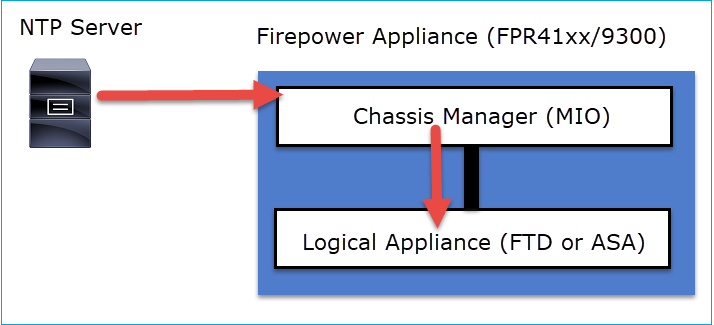
FPR4100/FPR9300, FPR2100 (modalità piattaforma)
Il tempo ASA o FTD viene ricavato da MIO (Management Input/Output) di Firepower Chassis Manager (FCM) dello chassis. MIO è il supervisore dello chassis Firepower.
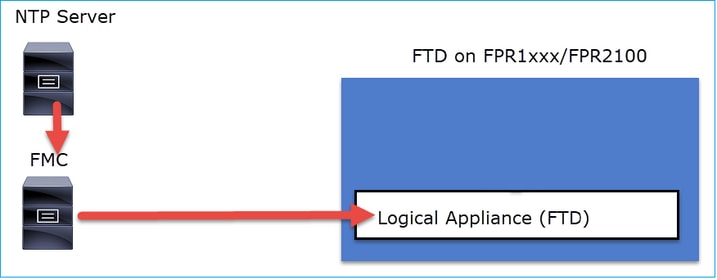
FPR1000, FPR2100 (modalità appliance), CSF200/3100/4200/6100
Su FTD, l'ora è presa dal FMC o da un server NTP:
Per questa distribuzione, controllare i seguenti documenti:
- Configurazione della sincronizzazione dell'ora NTP per la difesa dalle minacce
- Risoluzione dei problemi con Network Time Protocol (NTP) sui sistemi Firepower
Ulteriori informazioni:
Il protocollo NTP viene utilizzato per la sincronizzazione dell'ora. NTP utilizza come trasporto il numero di porta UDP 123.
Configurazione
NTP su FPR4100/9300
Punti chiave
- Per configurare NTP su un accessorio FPR4100/9300, accedere a FCM e selezionare la scheda Impostazioni piattaforma.
- L'NTP sui dispositivi logici (ASA o FTD) è sincronizzato con l'MIO.
- Non è possibile sincronizzare NTP su FTD con Firewall Management Center (FMC), anche se si sceglie questa opzione, NTP su FTD è sincronizzato con MIO. È pertanto consigliabile che FMC e FCM utilizzino lo stesso server NTP.
- Il CCP non è un server NTP completo. Tramite sftunnel è possibile configurare le impostazioni di tempo per i dispositivi gestiti. Pertanto, non può essere utilizzato come server NTP per lo chassis FPR4100/9300.
- Per una corretta installazione di Smart License è necessaria una configurazione NTP corretta.
NTP su CSF200/1200/3100/4200/6100
- Configurare le impostazioni NTP sull'applicazione logica stessa. L'ASA in modalità appliance o in caso di gestione FTD on-box da Gestione dispositivi firewall (FDM).
- Se l'FTD è gestito dall'FMC (gestione off-box), configurare l'NTP sul FMC.
Configurazione dell'NTP su FPR2100/4100/9300
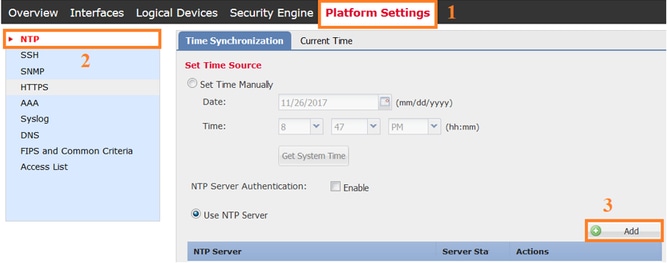
- Per configurare l'NTP su un accessorio FPR2100 in modalità piattaforma, selezionare la scheda Impostazioni piattaforma dal gestore dello chassis.
Passaggio 1. Accedere alla GUI dello chassis manager con le credenziali utente locali e selezionare Platform Settings > NTP. Selezionare il pulsante Add:
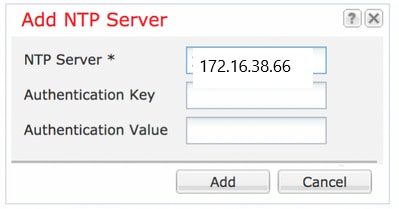
Passaggio 2. Specificare l'indirizzo IP o il nome host del server NTP (se si utilizza un nome host per il server NTP, è necessario configurare un server DNS).
- In caso di un'ASA in modalità piattaforma, l'NTP sul dispositivo logico è sincronizzato con l'MIO.
- Per FTD su FPR2100 che utilizza la modalità accessorio, è necessario configurare NTP su FMC.
- Per le appliance ASA su FPR2100 che utilizzano la modalità appliance, configurare il protocollo NTP sull'appliance ASA.
Verifica
Verifica della sincronizzazione NTP sugli accessori FPR4100/9300
Monitorare lo stato del server.
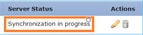
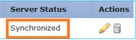
Riferimento stato server
- Non disponibile: Stato predefinito visualizzato subito dopo la configurazione del server NTP.
- Non raggiungibile/Non valido: Illustrato in questi scenari:
- Quando l'indirizzo IP o il nome host del server NTP non è raggiungibile dal protocollo NTP.
- Quando l'indirizzo IP o il nome host del server NTP è raggiungibile, ma l'host remoto non è un server NTP.
- Altri errori interni, ad esempio quando l'esecuzione della query non riesce, eccezione generata, stato di sincronizzazione temporale non definito rilevato e così via.
- Sincronizzazione in corso: Il server è raggiungibile e supporta il protocollo NTP. La convergenza temporale iniziale è ancora in corso e non è stata ancora completata.
- Sincronizzato: L'host viene dichiarato come peer di sincronizzazione del sistema e con esso l'orologio di tempo è sincronizzato.
- Candidato: L'host è il peer candidato (in standby). Un server NTP candidato indica che si tratta di un server NTP valido che ha comunicato con l'appliance Firepower, ma il modulo è stato sincronizzato con un altro server NTP ed è quindi in standby. Può essere selezionato come peer successivo nella sincronizzazione se viene eliminato quello corrente.
- Outlier: Server NTP scartato a causa di differenze significative (scostamento di tempo e ritardo di andata e ritorno) rispetto agli altri server NTP.
Verificare lo stato peer NTP:
FPR4100# connect fxos
FPR4100(fxos)# show ntp peer-status
Total peers : 4
* - selected for sync, + -  peer mode(active),
- - peer mode(passive), = - polled in client mode
    remote               local                 st   poll   reach delay
------------------------------------------------------------------------
=172.16.38.66           10.62.148.196           1 1024      17   0.20996
*172.31.201.67          10.62.148.196           1 1024     377   0.03035
=172.16.38.65           10.62.148.196           1 1024     377   0.19914
=172.31.20.115          10.62.148.196           1 1024     377   0.02905
Verificare la configurazione e la sincronizzazione del server NTP:
FPR4100# scope system
FPR4100 /system # scope services
FPR4100 /system/services # show ntp-server detail
NTP server hostname:
    Name: 172.16.38.65Time Sync Status: Candidate
    NTP SHA-1 key id: 0
    Error Msg:

    Name: 172.16.38.66
    Time Sync Status: Time Sync In Progress
    NTP SHA-1 key id: 0
    Error Msg:

    Name: 172.31.20.115
    Time Sync Status: Candidate
    NTP SHA-1 key id: 0
    Error Msg:

    Name: 172.31.201.67
    Time Sync Status: Time Synchronized
    NTP SHA-1 key id: 0
    Error Msg:
Verificare l'associazione NTP:
FPR4100# connect module 1 console
Firepower-module1>show ntp association

     remote           refid      st t when poll reach   delay   offset  jitter
==============================================================================
*203.0.113.126   172.31.201.67   2 u   39   64  370    0.070    0.445   0.210

ind assid status  conf reach auth condition  last_event cnt
===========================================================
  1 16696  961a   yes   yes  none  sys.peer    sys_peer  1

associd=16696 status=961a conf, reach, sel_sys.peer, 1 event, sys_peer,
srcadr=203.0.113.126, srcport=123, dstadr=203.0.113.1, dstport=123,
leap=00, stratum=2, precision=-21, rootdelay=29.053, rootdisp=70.496,
refid=172.31.201.67,
reftime=e24d4bd9.3b680f6d  Fri, Apr 24 2020 11:28:25.232,
rec=e24d4d34.170bd724  Fri, Apr 24 2020 11:34:12.090, reach=370,
unreach=0, hmode=3, pmode=4, hpoll=6, ppoll=6, headway=0,
flash=20 pkt_stratum, keyid=0, offset=0.445, delay=0.070,
dispersion=2.152, jitter=0.210, xleave=0.017,

filtdelay=     0.08    0.11    0.08    0.10    0.07    0.08    0.09    0.07,
filtoffset=    0.17    0.18    0.29    0.29    0.45    0.45    0.69    0.69,
filtdisp=      0.00    0.03    0.99    1.02    2.03    2.06    3.03    3.06

associd=16696 status=961a conf, reach, sel_sys.peer, 1 event, sys_peer,
remote host:           203.0.113.126:123
local address:         203.0.113.1:123
time last received:    39
time until next send:  26
reachability change:   170025
packets sent:          5048
packets received:      5048
bad authentication:    0
bogus origin:          0
duplicate:             0
bad dispersion:        27
bad reference time:    0
Verificare le informazioni di sistema NTP:
FPR4100# connect module 1 console
Firepower-module1> show ntp sysinfo
associd=0 status=0615 leap_none, sync_ntp, 1 event, clock_sync,
version="ntpd 4.2.8p11@1.3728-o Sat Dec  8 06:11:47 UTC 2018 (2)",
processor="x86_64", system="Linux/3.10.62-ltsi-WR10.0.0.29_standard",
leap=00, stratum=3, precision=-24, rootdelay=29.129, rootdisp=24.276,
refid=203.0.113.126,
reftime=e24dd3bf.170a6210  Fri, Apr 24 2020 21:08:15.090,
clock=e24dd437.59b86104  Fri, Apr 24 2020 21:10:15.350, peer=16696, tc=6,
mintc=3, offset=0.009911, frequency=7.499, sys_jitter=0.023550,
clk_jitter=0.004, clk_wander=0.001

associd=0 status=0615 leap_none, sync_ntp, 1 event, clock_sync,
system peer:        203.0.113.126:123
system peer mode:   client
leap indicator:     00
stratum:            3
log2 precision:     -24
root delay:         29.129
root dispersion:    24.276
reference ID:       203.0.113.126
reference time:     e24dd3bf.170a6210  Fri, Apr 24 2020 21:08:15.090
system jitter:      0.023550
clock jitter:       0.004
clock wander:       0.001
broadcast delay:    -50.000
symm. auth. delay:  0.000

uptime:                 204908
sysstats reset:         204908
packets received:       19928
current version:        6069
older version:          0
bad length or format:   0
authentication failed:  0
declined:               0
restricted:             0
rate limited:           0
KoD responses:          0
processed for time:     6040

associd=0 status=0615 leap_none, sync_ntp, 1 event, clock_sync,
pll offset:            0.006196
pll frequency:         7.49899
maximum error:         0.097039
estimated error:       3e-06
kernel status:         pll nano
pll time constant:     6
precision:             1e-06
frequency tolerance:   500
pps frequency:         0
pps stability:         0
pps jitter:            0
calibration interval   0
calibration cycles:    0
jitter exceeded:       0
stability exceeded:    0
calibration errors:    0

time since reset:       204908
receive buffers:        10
free receive buffers:   9
used receive buffers:   0
low water refills:      1
dropped packets:        0
ignored packets:        0
received packets:       19930
packets sent:           26811
packet send failures:   0
input wakeups:          224931
useful input wakeups:   20034
Ulteriore verifica:
FTD220 /eth-uplink # scope eth-uplink ; scope fabric a
FTD220 /eth-uplink/fabric # show ntp-overall-status

NTP Overall Time-Sync Status: Time Synchronized
Verificare la sincronizzazione NTP tra MIO e il dispositivo logico (blade) sugli accessori FPR4100/9300
Sugli FPR4100/9300 le impostazioni NTP vengono trasferite su FTD tramite MIO (chassis). La configurazione NTP dalla CLI FTD o dall'interfaccia utente FMC non è possibile.
Ogni blade FTD utilizza un ID riferimento interno: 203.0.113.126 per comunicare con l'MIO per la sincronizzazione dell'ora e, in base a tale sincronizzazione, indica se è sincronizzato o meno. L'FTD CLI riflette questo. Nell'esempio, l'IP NTP è l'ID di riferimento interno e non l'IP effettivo del server NTP. Una modifica dell'indirizzo IP del server NTP in FCM non influisce su questo output poiché l'ID di riferimento è sempre lo stesso:
 > show ntp
NTP Server                : 203.0.113.126
Status                    : Being Used
Offset                    : -0.078 (milliseconds)
Last Update               : 43 (seconds)
Verificare la configurazione NTP sulla modalità piattaforma FRP2100 e su CSF200/1200/3100/4200/6100:
FTD220# scope system
FTD220 /system # scope services
FTD220 /system/services # show ntp-server detail

NTP server hostname:
    Name: 172.31.201.67
    Time Sync Status: Time Synchronized
    Error Msg:
Su FTD è possibile anche verificare le impostazioni NTP dalla modalità CLISH:
> show ntp
NTP Server : 172.31.201.67
Status : Being Used
Offset : +0.819 (milliseconds)
Last Update : 3 (seconds)

NTP Server : 127.127.1.1
Status : Available
Offset : +0.000 (milliseconds)
Last Update : 418 (seconds)
Se l'FTD ottiene il proprio tempo dal FMC, viene visualizzato l'indirizzo IP 127.0.0.2:
FTD220 /system/services # show ntp-server detail expand

NTP server hostname:
Name: 127.0.0.2
Time Sync Status: Time Synchronized
Error Msg:

In questo caso, da CLISH è possibile vedere anche l'indirizzo IP 127.0.0.2:
> show ntp
NTP Server : 127.0.0.2
Status : Being Used
Offset : +0.008 (milliseconds)
Last Update : 6 (seconds)

NTP Server : 127.127.1.1
Status : Available
Offset : +0.000 (milliseconds)
Last Update : - (seconds)
Risoluzione dei problemi comuni
1. FXOS non è in grado di risolvere il nome host del server NTP
L'interfaccia utente di FCM mostra:

Azione consigliata
Utilizzare il comando ping per verificare la risoluzione dei nomi host del server NTP
FPR4100(local-mgmt)# ping ntp.esl.cisco.com
Invalid Host Name.
Possibili cause
- Server DNS non configurato.
- Il server DNS non è in grado di risolvere il nome host.
2. Problemi di connettività tra FXOS e il server NTP sulla porta UDP 123
L'interfaccia utente di FCM mostra:

Azione consigliata
Acquisire immagini sull'interfaccia di gestione dello chassis e verificare la comunicazione bidirezionale sulla porta UDP 123:
FPR4100(fxos)# ethanalyzer local interface mgmt capture-filter "udp port 123"
Capturing on 'eth0'
1 2020-04-30 20:09:54.150237760 10.62.148.196 → 172.16.4.161 NTP 90 NTP Version 3, client
2 2020-04-30 20:14:14.150172804 10.62.148.196 → 172.16.4.161 NTP 90 NTP Version 3, client
3 2020-04-30 20:23:13.150171682 10.62.148.196 → 172.16.4.161 NTP 90 NTP Version 3, client
Possibili cause
- Il server configurato non è un server NTP.
- Un dispositivo nel percorso, ad esempio un firewall, blocca o modifica il traffico.
3. Problemi di connettività intermittente tra FXOS e server NTP
L'interfaccia utente di FCM mostra:

Azioni consigliate
Avviare il processo di sincronizzazione NTP dalla CLI di FXOS
FPR4100# connect fxos
FPR4100(fxos)# ntp sync-retry
Acquisizione di immagini sull'interfaccia di gestione dello chassis con lo strumento di comando ethanalyzer CLI.
Possibile causa
- Problemi intermittenti di connettività tra FXOS e il server NTP
Difetti correlati
Consultare le Note sulla versione per individuare eventuali difetti noti/corretti.
Informazioni correlate
- Guide alla configurazione di FXOS
- Risoluzione dei problemi con Network Time Protocol (NTP) sui sistemi Firepower
Cronologia delle revisioni
| Revisione | Data di pubblicazione | Commenti |
|---|---|---|
5.0 |
26-May-2026
|
Spaziatura, grammatica e ortografia aggiornate. |
4.0 |
25-May-2026
|
Certificazione |
3.0 |
14-May-2025
|
Problemi di formattazione secondari. |
2.0 |
28-Nov-2022
|
PII rimossa.
Testo alternativo aggiunto.
Aggiornamento dei tag dei caratteri, del titolo e dell'introduzione, dei requisiti di stile, della traduzione automatica, dei rilievi e della formattazione. |
1.0 |
03-May-2020
|
Versione iniziale |

 Feedback