Comprendre la mise à niveau logicielle rapide améliorée - Quad-SUP sur Catalyst 6500 VSS

Options de téléchargement
Langage exempt de préjugés
Dans le cadre de la documentation associée à ce produit, nous nous efforçons d’utiliser un langage exempt de préjugés. Dans cet ensemble de documents, le langage exempt de discrimination renvoie à une langue qui exclut la discrimination en fonction de l’âge, des handicaps, du genre, de l’appartenance raciale de l’identité ethnique, de l’orientation sexuelle, de la situation socio-économique et de l’intersectionnalité. Des exceptions peuvent s’appliquer dans les documents si le langage est codé en dur dans les interfaces utilisateurs du produit logiciel, si le langage utilisé est basé sur la documentation RFP ou si le langage utilisé provient d’un produit tiers référencé. Découvrez comment Cisco utilise le langage inclusif.
À propos de cette traduction
Cisco a traduit ce document en traduction automatisée vérifiée par une personne dans le cadre d’un service mondial permettant à nos utilisateurs d’obtenir le contenu d’assistance dans leur propre langue. Il convient cependant de noter que même la meilleure traduction automatisée ne sera pas aussi précise que celle fournie par un traducteur professionnel.
Table des matières
Introduction
Ce document décrit une procédure étape par étape ISSU/eFSU sur les commutateurs de la gamme Cisco Catalyst 6500 en mode VSS avec l'utilisation du Supervisor 6T avec double hébergement dans une configuration Quad-SUP.
Conditions préalables
Exigences
Cisco vous recommande de prendre connaissance des rubriques suivantes :
- Connaissances de base de la configuration et de la configuration du système de commutation virtuelle (VSS) QUAD-SUP du Catalyst 6500
- Copie d'images à l'aide de la méthode TFTP/USB/WebUI
Composants utilisés
Les informations contenues dans ce document sont basées sur le système de commutation virtuelle Cisco Catalyst 6500 sur le logiciel Cisco IOS® version 15.5(1)SY12 ou ultérieure
les versions logicielles et matérielles.
The information in this document was created from the devices in a specific lab environment. All of the devices used in this document started with a cleared (default) configuration. Si votre réseau est en ligne, assurez-vous de bien comprendre l’incidence possible des commandes.
Topologie
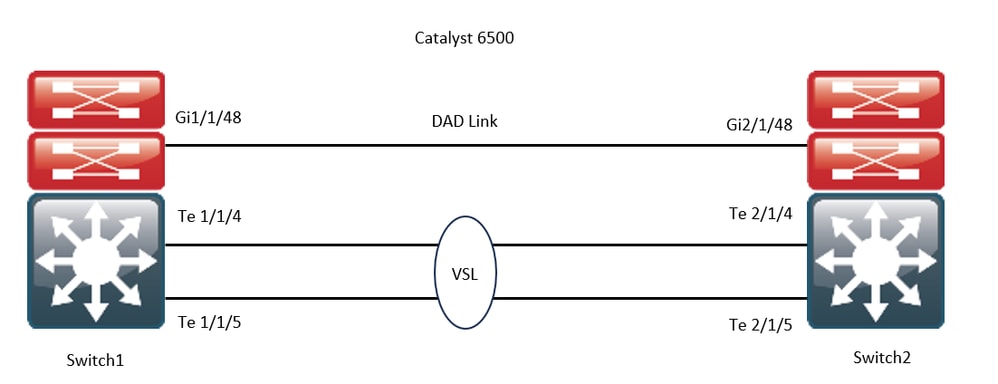
Vérification de la matrice de compatibilité
Étape 1. Reportez-vous à ce document Cisco ; https://www.cisco.com/c/en/us/support/switches/catalyst-6500-series-switches/products-release-notes-list.html#anchor142.
Étape 2 : vérification à l’aide de la commande de l’ILC du périphérique
WS-C6504-E-1#show issu comp-matrix stored

Number of Matrices in Table = 1

(1) Matrix for s2t54-ADVENTERPRISEK9-M(10) - s2t54-ADVENTERPRISEK9-M(10)
==========================================
Start Flag (0xDEADBABE)

My Image ver: 15.5(1)SY13
Peer Version Compatibility
------------ -------------
15.1(2)SY Incomp(1)
15.1(2)SY1 Incomp(1)
15.1(2)SY2 Incomp(1)
15.5(1)SY Dynamic(0)
15.5(1)SY1 Dynamic(0)
15.1(2)SY12 Incomp(1)
15.2(1)SY6 Incomp(1)
15.4(1)SY4 Incomp(1)
15.5(1)SY2 Dynamic(0)
15.5(1)SY3 Dynamic(0)
15.5(1)SY4 Dynamic(0)
15.5(1)SY5 Dynamic(0)
15.5(1)SY6 Dynamic(0)
15.5(1)SY7 Dynamic(0)
15.5(1)SY8 Dynamic(0)
15.5(1)SY9 Dynamic(0)
15.5(1)SY10 Dynamic(0)
15.5(1)SY11 Dynamic(0)
15.5(1)SY12 Dynamic(0)
15.5(1)SY13 Comp(3)
Procédure De Mise À Niveau
Étape 1. Assurez-vous que la nouvelle image Cisco IOS (Logiciel Cisco IOS Version 15.5(1)SY13) est présente dans le bootdisk,slavebootdisk,ics-bootdisk,slave-ics-bootdisk.
WS-C6504-E-1#dir bootdisk: | i SY13
8 -rw- 167430292 Apr 16 2024 22:55:58 +00:00 s2t54-adventerprisek9-mz.SPA.155-1.SY13.bin
WS-C6504-E-1#dir slavebootdisk: | i SY13
19 -rw- 167430292 Apr 16 2024 00:37:58 +00:00 s2t54-adventerprisek9-mz.SPA.155-1.SY13.bin
WS-C6504-E-1#dir ics-bootdisk: | i SY13
11 -rw- 167430292 Apr 16 2024 23:06:18 +00:00 s2t54-adventerprisek9-mz.SPA.155-1.SY13.bin
WS-C6504-E-1#dir slave-ics-bootdisk: | i SY13
5 -rw- 167430292 Apr 16 2024 23:20:18 +00:00 s2t54-adventerprisek9-mz.SPA.155-1.SY13.bin
Étape 2. Utilisez ces commandes afin de vérifier que le VSS est prêt à exécuter la procédure de mise à niveau :
WS-C6504-E-1#show redundancy
Redundant System Information :
------------------------------
       Available system uptime = 1 day, 4 hours, 41 minutes
Switchovers system experienced = 0
              Standby failures = 1
        Last switchover reason = none
                 Hardware Mode = Duplex
    Configured Redundancy Mode = sso
     Operating Redundancy Mode = sso
              Maintenance Mode = Disabled
                Communications = Up
Current Processor Information :
-------------------------------
               Active Location = slot 1/1
        Current Software state = ACTIVE                                                           >> Switch 1 Slot 1 is active
       Uptime in current state = 1 day, 4 hours, 41 minutes
                 Image Version = Cisco IOS Software, s2t54 Software (s2t54-ADVENTERPRISEK9-M), Version 15.5(1)SY12, RELEASE SOFTWARE (fc1)
Technical Support: http://www.cisco.com/techsupport
Copyright (c) 1986-2023 by Cisco Systems, Inc.
Compiled Tue 05-Sep-23 11:24 by mcpre
                          BOOT = bootdisk:s2t54-adventerprisek9-mz.SPA.155-1.SY12.bin,12;
                   CONFIG_FILE =
                       BOOTLDR =
        Configuration register = 0x2102
Peer Processor Information :
----------------------------
              Standby Location = slot 2/1
        Current Software state = STANDBY HOT                                                      >> Switch 2 Slot 1 is standby
       Uptime in current state = 19 hours, 43 minutes
                 Image Version = Cisco IOS Software, s2t54 Software (s2t54-ADVENTERPRISEK9-M), Version 15.5(1)SY12, RELEASE SOFTWARE (fc1)
Technical Support: http://www.cisco.com/techsupport
Copyright (c) 1986-2023 by Cisco Systems, Inc.
Compiled Tue 05-Sep-23 11:24 by mcpre
                          BOOT = bootdisk:s2t54-adventerprisek9-mz.SPA.155-1.SY12.bin,12;
                   CONFIG_FILE =
                       BOOTLDR =
        Configuration register = 0x2102
WS-C6504-E-1#show issu state detail
 The system is configured to be upgraded in staggered mode.
 4 supervisor nodes are found to be online.
 Summary: the system will be upgraded in staggered mode.

Slot = 1/1
RP State = Active
ISSU State = Init
Boot Variable = bootdisk:s2t54-adventerprisek9-mz.SPA.155-1.SY12.bin,12;
      Operating Mode = sso
      ISSU Sub-State = No Upgrade Operation in Progress
      Starting Image = N/A
        Target Image = N/A
     Current Version = bootdisk:s2t54-adventerprisek9-mz.SPA.155-1.SY12.bin

Slot = 2/1
RP State = Standby
ISSU State = Init
Boot Variable = bootdisk:s2t54-adventerprisek9-mz.SPA.155-1.SY12.bin,12;
      Operating Mode = sso
      ISSU Sub-State = No Upgrade Operation in Progress
      Starting Image = N/A
        Target Image = N/A
     Current Version = bootdisk:s2t54-adventerprisek9-mz.SPA.155-1.SY12.bin

Slot = 1/2
RP State = Active-ICS
ISSU State = Init
Boot Variable = bootdisk:s2t54-adventerprisek9-mz.SPA.155-1.SY12.bin,12;
      Operating Mode = sso
      ISSU Sub-State = No Upgrade Operation in Progress
      Starting Image = N/A
        Target Image = N/A
     Current Version = bootdisk:s2t54-adventerprisek9-mz.SPA.155-1.SY12.bin

Slot = 2/2
RP State = Standby-ICS
ISSU State = Init
Boot Variable = bootdisk:s2t54-adventerprisek9-mz.SPA.155-1.SY12.bin,12;
      Operating Mode = sso
      ISSU Sub-State = No Upgrade Operation in Progress
      Starting Image = N/A
        Target Image = N/A
     Current Version = bootdisk:s2t54-adventerprisek9-mz.SPA.155-1.SY12.bin
Étape 3. Utilisez la commande issu loadversionafin de démarrer le processus de mise à niveau.
Dans cette étape, le châssis de secours VSS redémarre, se recharge avec la nouvelle image et s'initialise en tant que châssis de secours VSS en mode de redondance SSO (Stateful Switchover), exécutant la nouvelle image. Cette étape est terminée lorsque la configuration du châssis est synchronisée, comme indiqué par le message Bulk sync successful. Le chargement de la nouvelle image et la transition du châssis VSS en veille vers le mode SSO peuvent prendre de quelques secondes à quelques minutes.
WS-C6504-E-1#issu loadversion 1/1 bootdisk:s2t54-adventerprisek9-mz.SPA.155-1.SY13.bin 2/1 slavebootdisk:s2t54-adventerprisek9-mz.SPA.155-1.SY13.bin
System configuration has been modified. Save? [yes/no]: y
Building configuration...
[OK]
*Apr 17 00:43:14.195: %ISSU_PROCESS-SW1-3-LOADVERSION: Loadversion sequence will begin in 60 seconds. Enter 'issu abortversion' to cancel.
*Apr 17 00:43:44.195: %ISSU_PROCESS-SW1-6-LOADVERSION_INFO: Resetting Standby shortly
*Apr 17 00:43:44.195: %ISSU_PROCESS-SW1-6-LOADVERSION_INFO: Resetting Standby ICS shortly
*Apr 17 00:43:44.199: %ISSU_PROCESS-SW2_STBY-6-SELF_RELOAD: slot 33 countdown to self-reload started, 30 second delay
*Apr 17 00:43:44.199: %ISSU_PROCESS-SW2-2_STBY-6-SELF_RELOAD: slot 34 countdown to self-reload started, 30 second delay
*Apr 17 00:44:29.195: %ISSU_PROCESS-SW1-6-LOADVERSION_INFO: Standby ICS has gone offline
*Apr 17 00:44:29.195: %ISSU_PROCESS-SW1-6-LOADVERSION_INFO: Standby has gone offline
*Apr 17 00:46:59.195: %ISSU_PROCESS-SW1-6-LOADVERSION_INFO: Standby has come online, wait for Standby ICS
*Apr 17 00:47:44.503: %ISSU_PROCESS-SW1-6-LOADVERSION_INFO: Standby ICS has come online
*Apr 17 00:49:15.363: %ISSU_PROCESS-SW1-6-LOADVERSION_INFO: Standby reached terminal state
*Apr 17 00:49:29.199: %ISSU_PROCESS-SW1-6-LOADVERSION_INFO: Standby ICS reached terminal state, wait for system to settle
*Apr 17 00:49:59.195: %ISSU_PROCESS-SW1-3-LOADVERSION: Loadversion has completed. Please issue the 'issu runversion' command after all modules come online.
*Apr 17 00:49:59.195: %ISSU_PROCESS-SW1-3-LOADVERSION: Loadversion has completed. Please issue the 'issu runversion' command after all modules come online.
Étape 4. La variable de démarrage pour standby doit pointer vers une nouvelle image dans le résultat show issu state detail.
WS-C6504-E-1#show issu state detail
 The system is configured to be upgraded in in-tandem mode.
 4 supervisor nodes are found to be online.
         Summary: an in-tandem upgrade is in progress.

Slot = 1/1
RP State = Active
ISSU State = Load Version
Boot Variable = bootdisk:s2t54-adventerprisek9-mz.SPA.155-1.SY12.bin,12;bootdisk:s2t54-adventerprisek9-mz.SPA.155-1.SY13.bin,12
      Operating Mode = sso
      ISSU Sub-State = Load Version Completed
      Starting Image = bootdisk:s2t54-adventerprisek9-mz.SPA.155-1.SY12.bin
        Target Image = bootdisk:s2t54-adventerprisek9-mz.SPA.155-1.SY13.bin
     Current Version = bootdisk:s2t54-adventerprisek9-mz.SPA.155-1.SY12.bin

Slot = 2/1
RP State = Standby
ISSU State = Load Version
Boot Variable = bootdisk:s2t54-adventerprisek9-mz.SPA.155-1.SY13.bin,12;bootdisk:s2t54-adventerprisek9-mz.SPA.155-1.SY12.bin,12
      Operating Mode = sso
      ISSU Sub-State = Load Version Completed
      Starting Image = bootdisk:s2t54-adventerprisek9-mz.SPA.155-1.SY12.bin
        Target Image = bootdisk:s2t54-adventerprisek9-mz.SPA.155-1.SY13.bin
     Current Version = bootdisk:s2t54-adventerprisek9-mz.SPA.155-1.SY13.bin                       >> Standby Chassis has been upgraded to latest code

Slot = 1/2
RP State = Active-ICS
ISSU State = Load Version
Boot Variable = bootdisk:s2t54-adventerprisek9-mz.SPA.155-1.SY12.bin,12;bootdisk:s2t54-adventerprisek9-mz.SPA.155-1.SY13.bin,12
      Operating Mode = sso
      ISSU Sub-State = Load Version Completed
      Starting Image = bootdisk:s2t54-adventerprisek9-mz.SPA.155-1.SY12.bin
        Target Image = bootdisk:s2t54-adventerprisek9-mz.SPA.155-1.SY13.bin
     Current Version = bootdisk:s2t54-adventerprisek9-mz.SPA.155-1.SY12.bin

Slot = 2/2
RP State = Standby-ICS
ISSU State = Load Version
Boot Variable = bootdisk:s2t54-adventerprisek9-mz.SPA.155-1.SY13.bin,12;bootdisk:s2t54-adventerprisek9-mz.SPA.155-1.SY12.bin,12
      Operating Mode = sso
      ISSU Sub-State = Load Version Completed
      Starting Image = bootdisk:s2t54-adventerprisek9-mz.SPA.155-1.SY12.bin
        Target Image = bootdisk:s2t54-adventerprisek9-mz.SPA.155-1.SY13.bin
     Current Version = bootdisk:s2t54-adventerprisek9-mz.SPA.155-1.SY13.bin                       >> Standby Chassis has been upgraded to latest code
Étape 5. Lorsque le châssis de secours VSS exécute avec succès la nouvelle image dans l'état de redondance SSO et que toutes les cartes de ligne du châssis de secours VSS sont actives et en ligne, entrez la commande issu runversion afin de forcer une commutation. Le châssis VSS de secours mis à niveau prend le relais en tant que nouveau châssis actif, exécutant la nouvelle image. Le châssis précédemment actif se recharge et s'initialise en tant que nouveau châssis VSS de secours en mode SSO, en exécutant l'ancienne image (au cas où la mise à niveau logicielle devrait être abandonnée et l'ancienne image restaurée). Cette étape est terminée lorsque la configuration du châssis est synchronisée, comme indiqué par le message Bulk sync successful.
WS-C6504-E-1#issu runversion
This command will reload the Active unit.  Proceed ? [confirm]y
%issu runversion initiated successfully
*Apr 17 00:54:42.707: %ISSU_PROCESS-SW1-2_STBY-6-SELF_RELOAD: slot 18 countdown to self-reload started, 3 second delay
*Apr 17 00:54:44.715: %RF-SW1-5-RF_RELOAD: Self reload. Reason: Admin ISSU runversion CLI
*Apr 17 00:54:46.719: %SYS-SW1-5-SWITCHOVER: Switchover requested by Exec. Reason: Admin ISSU runversion CLI.
Initializing as Virtual Switch STANDBY processor
*Apr 17 00:57:14.023: %VSLP-5-VSL_UP:  Ready for control traffic
*Apr 17 00:57:24.919: %PFREDUN-SW1_STBY-6-STANDBY: Initializing for SSO mode in Default Domain
Étape 6 : vérification de l’état une fois le basculement effectué
WS-C6504-E-1#show issu state detail
 The system is configured to be upgraded in in-tandem mode.
 4 supervisor nodes are found to be online.
         Summary: an in-tandem upgrade is in progress.

Slot = 2/1
RP State = Active
ISSU State = Run Version
Boot Variable = bootdisk:s2t54-adventerprisek9-mz.SPA.155-1.SY13.bin,12;bootdisk:s2t54-adventerprisek9-mz.SPA.155-1.SY12.bin,12
      Operating Mode = sso
      ISSU Sub-State = Run Version after Switchover
      Starting Image = bootdisk:s2t54-adventerprisek9-mz.SPA.155-1.SY12.bin
        Target Image = bootdisk:s2t54-adventerprisek9-mz.SPA.155-1.SY13.bin
     Current Version = bootdisk:s2t54-adventerprisek9-mz.SPA.155-1.SY13.bin                       >> Switch 2 became the active after switchover

Slot = 1/1
RP State = Standby
ISSU State = Run Version
Boot Variable = bootdisk:s2t54-adventerprisek9-mz.SPA.155-1.SY12.bin,12;
      Operating Mode = sso
      ISSU Sub-State = Run Version in Progress
      Starting Image = bootdisk:s2t54-adventerprisek9-mz.SPA.155-1.SY12.bin
        Target Image = bootdisk:s2t54-adventerprisek9-mz.SPA.155-1.SY13.bin
     Current Version = bootdisk:s2t54-adventerprisek9-mz.SPA.155-1.SY12.bin

Slot = 2/2
RP State = Active-ICS
ISSU State = Run Version
Boot Variable = bootdisk:s2t54-adventerprisek9-mz.SPA.155-1.SY13.bin,12;bootdisk:s2t54-adventerprisek9-mz.SPA.155-1.SY12.bin,12
      Operating Mode = sso
      ISSU Sub-State = Run Version in Progress
      Starting Image = bootdisk:s2t54-adventerprisek9-mz.SPA.155-1.SY12.bin
        Target Image = bootdisk:s2t54-adventerprisek9-mz.SPA.155-1.SY13.bin
     Current Version = bootdisk:s2t54-adventerprisek9-mz.SPA.155-1.SY13.bin

Slot = 1/2
RP State = Standby-ICS
ISSU State = Run Version
Boot Variable = bootdisk:s2t54-adventerprisek9-mz.SPA.155-1.SY12.bin,12;
      Operating Mode = sso
      ISSU Sub-State = Run Version in Progress
      Starting Image = bootdisk:s2t54-adventerprisek9-mz.SPA.155-1.SY12.bin
        Target Image = bootdisk:s2t54-adventerprisek9-mz.SPA.155-1.SY13.bin
     Current Version = bootdisk:s2t54-adventerprisek9-mz.SPA.155-1.SY12.bin
WS-C6504-E-1#sh redundancy
Redundant System Information :
------------------------------
       Available system uptime = 44 minutes
Switchovers system experienced = 1
              Standby failures = 0
        Last switchover reason = user forced
                 Hardware Mode = Duplex
    Configured Redundancy Mode = sso
     Operating Redundancy Mode = sso
              Maintenance Mode = Disabled
                Communications = Up
Current Processor Information :
-------------------------------
               Active Location = slot 2/1
        Current Software state = ACTIVE
       Uptime in current state = 7 minutes
                 Image Version = Cisco IOS Software, s2t54 Software (s2t54-ADVENTERPRISEK9-M), Version 15.5(1)SY13, RELEASE SOFTWARE (fc1)
Technical Support: http://www.cisco.com/techsupport
Copyright (c) 1986-2024 by Cisco Systems, Inc.
Compiled Tue 19-Mar-24 06:59 by mcpre
                          BOOT = bootdisk:s2t54-adventerprisek9-mz.SPA.155-1.SY13.bin,12;bootdisk:s2t54-adventerprisek9-mz.SPA.155-1.SY12.bin,12
                   CONFIG_FILE =
                       BOOTLDR =
        Configuration register = 0x2102
Peer Processor Information :
----------------------------
              Standby Location = slot 1/1
        Current Software state = STANDBY HOT
       Uptime in current state = 2 minutes
                 Image Version = Cisco IOS Software, s2t54 Software (s2t54-ADVENTERPRISEK9-M), Version 15.5(1)SY12, RELEASE SOFTWARE (fc1)
Technical Support: http://www.cisco.com/techsupport
Copyright (c) 1986-2023 by Cisco Systems, Inc.
Compiled Tue 05-Sep-23 11:24 by mcpre
                          BOOT = bootdisk:s2t54-adventerprisek9-mz.SPA.155-1.SY12.bin,12;
                   CONFIG_FILE =
                       BOOTLDR =
        Configuration register = 0x2102
Étape 7. Utilisez la commande issue acceptversion afin d’arrêter le temporisateur de restauration. Cela est nécessaire car si le minuteur expire, le châssis mis à niveau se recharge et revient à la version logicielle précédente.
WS-C6504-E-1# show issu rollback-timer
Rollback Process State = In progress
 Configured Rollback Time = 00:45:00
 Automatic Rollback Time = 00:37:28
WS-C6504-E-1# issu acceptversion
% Rollback timer stopped. Please issue the commitversion command.
View the rollback timer to see that the rollback process has been stopped:
WS-C6504-E-1# show issu rollback-timer
Rollback Process State = Not in progress                                                         >> Rollback Process is stopped after the acceptversion
Étape 8. Dans le cas où Fabric Extender (FEX) est utilisé dans la configuration, utilisez la commande issu runversion fex all afin de démarrer la procédure de téléchargement et de mise à niveau de l'image sur le FEX (6800IA). Le FEX déclenche le téléchargement de l'image à partir du nouveau bundle logiciel du Supervisor6T (ici, le logiciel Cisco IOS Version 15.5(1)SY13). Si vous utilisez des piles FEX, le maître est chargé d'extraire l'image de ses membres.
Étape 9. Afin de continuer, entrez la commande issue comitversion pour mettre à niveau le châssis VSS en veille et terminer la séquence In-Service Software Upgrade (ISSU). Le châssis de secours VSS redémarre, se recharge avec la nouvelle image et s'initialise en tant que châssis de secours VSS dans l'état de redondance SSO, exécutant la nouvelle image. Cette étape est terminée lorsque la configuration du châssis est synchronisée, comme indiqué par le message Bulk sync successful, et que toutes les cartes de ligne sur le nouveau VSS-Standby sont actives et en ligne.
WS-C6504-E-1# issu commitversion
%issu commitversion initiated successfully, upgrade sequence will continue shortly
WS-C6504-E-1#
*Apr 17 01:02:57.607: %ISSU_PROCESS-SW2-3-COMMITVERSION: issu commitversion; Commitversion sequence will begin in 60 seconds. Enter 'issu abortversion' to cancel.
*Apr 17 01:03:27.607: %ISSU_PROCESS-SW2-6-COMMITVERSION_INFO: Resetting Standby shortly
*Apr 17 01:03:27.607: %ISSU_PROCESS-SW2-6-COMMITVERSION_INFO: Resetting Standby ICS shortly
*Apr 17 01:03:27.611: %ISSU_PROCESS-SW1-2_STBY-6-SELF_RELOAD: slot 18 countdown to self-reload started, 30 second delay
*Apr 17 01:03:27.611: %ISSU_PROCESS-SW1_STBY-6-SELF_RELOAD: slot 17 countdown to self-reload started, 30 second delay
*Apr 17 01:04:12.607: %ISSU_PROCESS-SW2-6-COMMITVERSION_INFO: Standby ICS has gone offline
*Apr 17 01:04:12.607: %ISSU_PROCESS-SW2-6-COMMITVERSION_INFO: Standby has gone offline
*Apr 17 01:06:42.607: %ISSU_PROCESS-SW2-6-COMMITVERSION_INFO: Standby has come online, wait for Standby ICS
*Apr 17 01:07:28.315: %ISSU_PROCESS-SW2-6-COMMITVERSION_INFO: Standby ICS has come online
*Apr 17 01:08:59.623: %ISSU_PROCESS-SW2-6-COMMITVERSION_INFO: Standby has reached terminal state
*Apr 17 01:09:12.699: %ISSU_PROCESS-SW2-6-COMMITVERSION_INFO: Standby ICS reached terminal state
*Apr 17 01:09:12.751: %ISSU_PROCESS-SW2-6-COMMITVERSION_INFO: Upgrade has completed, updating boot configuration
Building configuration...
[OK]
Étape 10. Vérifiez si la mise à niveau est terminée.
WS-C6504-E-1#sh redundancy
Redundant System Information :
------------------------------
       Available system uptime = 55 minutes
Switchovers system experienced = 1
              Standby failures = 1
        Last switchover reason = user forced
                 Hardware Mode = Duplex
    Configured Redundancy Mode = sso
     Operating Redundancy Mode = sso
              Maintenance Mode = Disabled
                Communications = Up
Current Processor Information :
-------------------------------
               Active Location = slot 2/1
        Current Software state = ACTIVE
       Uptime in current state = 17 minutes
                 Image Version = Cisco IOS Software, s2t54 Software (s2t54-ADVENTERPRISEK9-M), Version 15.5(1)SY13, RELEASE SOFTWARE (fc1)
Technical Support: http://www.cisco.com/techsupport
Copyright (c) 1986-2024 by Cisco Systems, Inc.
Compiled Tue 19-Mar-24 06:59 by mcpre
                          BOOT = bootdisk:s2t54-adventerprisek9-mz.SPA.155-1.SY13.bin,12;bootdisk:s2t54-adventerprisek9-mz.SPA.155-1.SY12.bin,12
                   CONFIG_FILE =
                       BOOTLDR =
        Configuration register = 0x2102
Peer Processor Information :
----------------------------
              Standby Location = slot 1/1
        Current Software state = STANDBY HOT
       Uptime in current state = 3 minutes
                 Image Version = Cisco IOS Software, s2t54 Software (s2t54-ADVENTERPRISEK9-M), Version 15.5(1)SY13, RELEASE SOFTWARE (fc1)
Technical Support: http://www.cisco.com/techsupport
Copyright (c) 1986-2024 by Cisco Systems, Inc.
Compiled Tue 19-Mar-24 06:59 by mcpre
                          BOOT = bootdisk:s2t54-adventerprisek9-mz.SPA.155-1.SY13.bin,12;bootdisk:s2t54-adventerprisek9-mz.SPA.155-1.SY12.bin,12                             >> Standby has been upgraded
                   CONFIG_FILE =
                       BOOTLDR =
        Configuration register = 0x2102
WS-C6504-E-1# show module switch all
 Switch Number:     1   Role:  Virtual Switch Standby
----------------------  -----------------------------
Mod Ports Card Type                              Model              Serial No.
--- ----- -------------------------------------- ------------------ -----------
  1    5  Supervisor Engine 2T 10GE w/ CTS (Hot) VS-SUP2T-10G       xxxx
  2    5  Supervisor Engine 2T 10GE w/ CTS (CSSO VS-SUP2T-10G       xxxx
  3   48  CEF720 48 port 10/100/1000mb Ethernet  WS-X6748-GE-TX     xxxx
Mod MAC addresses                       Hw    Fw           Sw           Status
--- ---------------------------------- ------ ------------ ------------ -------
  1  xxxx. xxxx. xxxx to xxxx. xxxx. xxxx 1.5   12.2(50r)SYS 15.5(1)SY13  Ok
  2  xxxx. xxxx. xxxx to xxxx. xxxx. xxxx 1.3   12.2(50r)SYS 15.5(1)SY13  Ok
  3  xxxx. xxxx. xxxx to xxxx. xxxx. xxxx 3.2   12.2(18r)S1  15.5(1)SY13  Ok
Mod  Sub-Module                  Model              Serial       Hw     Status
---- --------------------------- ------------------ ----------- ------- -------
  1  Policy Feature Card 4       VS-F6K-PFC4         xxxx        1.2    Ok
  1  CPU Daughterboard           VS-F6K-MSFC5        xxxx        2.0    Ok
  2  Policy Feature Card 4       VS-F6K-PFC4         xxxx        1.2    Ok
  2  CPU Daughterboard           VS-F6K-MSFC5        xxxx        1.4    Ok
  3  Centralized Forwarding Card WS-F6700-CFC        xxxx        4.1    Ok
Mod  Online Diag Status
---- -------------------
  1  Pass
  2  Pass
  3  Pass
 Switch Number:     2   Role:   Virtual Switch Active
----------------------  -----------------------------
Mod Ports Card Type                              Model              Serial No.
--- ----- -------------------------------------- ------------------ -----------
  1    5  Supervisor Engine 2T 10GE w/ CTS (Acti VS-SUP2T-10G       xxxx
  2    5  Supervisor Engine 2T 10GE w/ CTS (CSSO VS-SUP2T-10G       xxxx
  3   48  CEF720 48 port 10/100/1000mb Ethernet  WS-X6748-GE-TX     xxxx
Mod MAC addresses                       Hw    Fw           Sw           Status
--- ---------------------------------- ------ ------------ ------------ -------
  1  xxxx. xxxx. xxxx to xxxx. xxxx. xxxx 1.5   12.2(50r)SYS 15.5(1)SY13  Ok
  2  xxxx. xxxx. xxxx to xxxx. xxxx. xxxx 2.1   12.2(50r)SYS 15.5(1)SY13  Ok
  3  xxxx. xxxx. xxxx to xxxx. xxxx. xxxx 3.6   12.2(18r)S1  15.5(1)SY13  Ok
Mod  Sub-Module                  Model              Serial       Hw     Status
---- --------------------------- ------------------ ----------- ------- -------
  1  Policy Feature Card 4       VS-F6K-PFC4        xxxx         1.2    Ok
  1  CPU Daughterboard           VS-F6K-MSFC5       xxxx         2.0    Ok
  2  Policy Feature Card 4       VS-F6K-PFC4        xxxx         3.0    Ok
  2  CPU Daughterboard           VS-F6K-MSFC5       xxxx         3.1    Ok
  3  Centralized Forwarding Card WS-F6700-CFC       xxxx         4.1    Ok
Mod  Online Diag Status
---- -------------------
  1  Pass
  2  Pass
  3  Pass
WS-C6504-E-1# sh issu state detail
 The system is configured to be upgraded in in-tandem mode.
 4 supervisor nodes are found to be online.
 Summary: the system will be upgraded in in-tandem mode.
Slot = 2/1
RP State = Active
ISSU State = Init
Boot Variable = bootdisk:s2t54-adventerprisek9-mz.SPA.155-1.SY13.bin,12;bootdisk:s2t54-adventerprisek9-mz.SPA.155-1.SY12.bin,12
      Operating Mode = sso
      ISSU Sub-State = No Upgrade Operation in Progress
      Starting Image = N/A
        Target Image = N/A
     Current Version = bootdisk:s2t54-adventerprisek9-mz.SPA.155-1.SY13.bin
Slot = 1/1
RP State = Standby
ISSU State = Init
Boot Variable = bootdisk:s2t54-adventerprisek9-mz.SPA.155-1.SY13.bin,12;bootdisk:s2t54-adventerprisek9-mz.SPA.155-1.SY12.bin,12
      Operating Mode = sso
      ISSU Sub-State = No Upgrade Operation in Progress
      Starting Image = N/A
        Target Image = N/A
     Current Version = bootdisk:s2t54-adventerprisek9-mz.SPA.155-1.SY13.bin
Slot = 2/2
RP State = Active-ICS
ISSU State = Init
Boot Variable = bootdisk:s2t54-adventerprisek9-mz.SPA.155-1.SY13.bin,12;bootdisk:s2t54-adventerprisek9-mz.SPA.155-1.SY12.bin,12
      Operating Mode = sso
      ISSU Sub-State = No Upgrade Operation in Progress
      Starting Image = N/A
        Target Image = N/A
     Current Version = bootdisk:s2t54-adventerprisek9-mz.SPA.155-1.SY13.bin
Slot = 1/2
RP State = Standby-ICS
ISSU State = Init
Boot Variable = bootdisk:s2t54-adventerprisek9-mz.SPA.155-1.SY13.bin,12;bootdisk:s2t54-adventerprisek9-mz.SPA.155-1.SY12.bin,12
      Operating Mode = sso
      ISSU Sub-State = No Upgrade Operation in Progress
      Starting Image = N/A
        Target Image = N/A
     Current Version = bootdisk:s2t54-adventerprisek9-mz.SPA.155-1.SY13.bin
Études de cas de dépannage
Scénario 1. Mise à niveau en mode échelonné lorsque la connectivité VSL croisée est absente
WS-C6504-E-1#issu loadversion 1/1 bootdisk:s2t54-adventerprisek9-mz.SPA.155-1.SY13.bin 2/1 slavebootdisk:s2t54-adventerprisek9-mz.SPA.155-1.SY13.bin
WS-C6504-E-1#*Apr 16 23:31:12.528: SW1:  Quad-sup ISSU Staggered mode VSL requirement(Parallel/Cross VSL connectivity) is NOT met. Disable Staggered mode using config cli "no issu upgrade staggered" to perform ISSU in default mode which is In-tandem.
Vous obtenez un message d'erreur indiquant que la condition n'est pas remplie car vous ne disposez pas d'une connexion VSL croisée pour continuer.
Vous pouvez effectuer la mise à niveau en désactivant l'option échelonnée.
WS-C6504-E-1(conf t)# no issu upgrade staggered
WS-C6504-E-1#issu loadversion 1/1 bootdisk:s2t54-adventerprisek9-mz.SPA.155-1.SY13.bin 2/1 slavebootdisk:s2t54-adventerprisek9-mz.SPA.155-1.SY13.bin
System configuration has been modified. Save? [yes/no]: y
Building configuration...
[OK]
*Apr 17 00:43:14.195: %ISSU_PROCESS-SW1-3-LOADVERSION: Loadversion sequence will begin in 60 seconds. Enter 'issu abortversion' to cancel.
*Apr 17 00:43:44.195: %ISSU_PROCESS-SW1-6-LOADVERSION_INFO: Resetting Standby shortly
*Apr 17 00:43:44.195: %ISSU_PROCESS-SW1-6-LOADVERSION_INFO: Resetting Standby ICS shortly
Tandem ou décalé
Il est également possible de mettre à niveau le VSS pour un superviseur tandem ou double (SUP). Cependant, un châssis est mis hors ligne pendant toute la période de démarrage des superviseurs.
Un superviseur à la fois est rechargé dans le mode par défaut du Sup2T, en mode décalé. Cela implique qu'un superviseur utilisant cette version est présent lorsque les cartes de ligne sont préparées pour le rechargement. Comme le rechargement des cartes de ligne est beaucoup plus rapide que celui des superviseurs, le châssis subit beaucoup moins de temps d'arrêt.
En outre, il indique qu'un superviseur utilisant le programme obsolète est disponible, ce qui permet un temps de restauration beaucoup plus rapide si nécessaire. Pour Sup2T, le mode par défaut est décalé.
La méthode de mise à niveau échelonnée peut être désactivée à l'aide de cette commande.
Scénario 2. Actif frappé avec une image plus ancienne
Ici, en gros, vous pouvez être frappé à la version d'exécution ISSU.
Pour la version d'exécution d'ISSU, il y a déjà un minuteur de restauration activé. Si vous ne pouvez pas continuer, le minuteur revient automatiquement à l'image précédente.
En ce qui concerne la version ISSU Commit, le minuteur de restauration est désactivé puisque vous avez donné une version acceptée. Par conséquent, vous devez exécuter cette commande afin de revenir à l'image plus ancienne.
WS-C6504-E-1# issu abortversion
Scénario 3. L'état de veille n'est pas activé après le basculement
Déconnectez physiquement la liaison VSL (Virtual Switch Link) et mettez à niveau le périphérique vers la nouvelle image en utilisant la méthode USB/TFTP.
Après la mise à niveau, mettez le périphérique hors tension. Connectez la liaison VSL et amenez le périphérique dans le VSS afin qu'il puisse former un état de veille.
Scénario 4. Le SUP ICS de post-mise à niveau reste dans une version antérieure
Connectez le SUP seul dans un châssis de rechange ou de secours où l'impact n'est pas visible puisque le moteur actif fonctionne correctement.
Mettez à niveau le périphérique vers une nouvelle image en utilisant la méthode USB/TFTP.
Mettez-le hors tension et placez-le dans le même logement afin que l'image soit mise à niveau et revienne en mode de veille (ICS) avec une image plus récente.
Historique de révision
| Révision | Date de publication | Commentaires |
|---|---|---|
1.0 |
10-May-2024
|
Première publication |
Contribution d’experts de Cisco
- Naresh MuraliResponsable technique Cisco
- Arathy KrishnaIngénieur TAC Cisco
 Commentaires
Contacter Cisco
- Ouvrir un dossier d’assistance

- (Un contrat de service de Cisco est requis)