Use iPerf en los switches Catalyst 9000 para realizar pruebas de ancho de banda
Contenido
Introducción
Este documento describe cómo utilizar iPerf en los switches Catalyst de la serie 9000 para realizar pruebas de ancho de banda.
Prerequisites
Requirements
Cisco recomienda que tenga conocimiento sobre estos temas:
- Alojamiento de aplicaciones en switches Catalyst serie 9000
- Linux
Componentes Utilizados
La información que contiene este documento se basa en las siguientes versiones de software y hardware.
- C9300
- Cisco IOS® XE 17.3.5
- Cisco IOS® XE versión 17.6.4

Nota: Consulte la guía de configuración adecuada para conocer los comandos que se utilizan para habilitar estas funciones en otras plataformas de Cisco.
La información que contiene este documento se creó a partir de los dispositivos en un ambiente de laboratorio específico. Todos los dispositivos que se utilizan en este documento se pusieron en funcionamiento con una configuración verificada (predeterminada). Si tiene una red en vivo, asegúrese de entender el posible impacto de cualquier comando.
Productos Relacionados
Este documento también puede utilizarse con estas versiones de software y hardware:
- C9300X
- C9400
Antecedentes
iPerf3 es una herramienta para mediciones activas del ancho de banda máximo alcanzable en redes IP. iPerf utiliza las diferentes capacidades de TCP y UDP para proporcionar estadísticas sobre el ancho de banda.
Nota: Consulte la documentación oficial de iPerf para obtener más información relacionada con esta herramienta.
Video
Instalación de iPerf
Restricciones
- El alojamiento de aplicaciones no tiene en cuenta el routing y el reenvío virtuales (VRF).
- En las versiones anteriores a Cisco IOS® XE Amsterdam 17.3.3, el alojamiento de aplicaciones requiere asignaciones de almacenamiento dedicado y está deshabilitado en la memoria de inicialización.
- En Cisco IOS® XE Amsterdam 17.3.3 y versiones posteriores, el alojamiento de aplicaciones está habilitado en la memoria flash de inicialización; sin embargo, solo se alojan las aplicaciones firmadas por Cisco.
- No se admite la memoria extraíble de bus serie universal (USB) del panel frontal.
- Los switches Catalyst de Cisco serie 9300 solo admiten USB certificados por Cisco en el panel posterior.
- Los switches Catalyst de Cisco serie 9500 de alto rendimiento y los switches Catalyst de Cisco serie 9600 no admiten USB de panel frontal para el alojamiento de aplicaciones.
- Los switches Catalyst de Cisco serie 9500 y 9500 de alto rendimiento y los switches Catalyst de Cisco serie 9600 no admiten interfaces AppGigabitEthernet.
- Los switches Cisco Catalyst 9410R no admiten alojamiento de aplicaciones en la versión anterior a Cisco IOS® XE Bengaluru 17.5.1.
- Configure el comando enable en las interfaces AppGigabitEthernet para habilitar el alojamiento de aplicaciones en los switches Catalyst de Cisco serie 9410R.
Pasos de instalación
- Descargue la última imagen de iPerf y verifique que esté almacenada en la unidad SSD USB:
C9300-AC1#dir usbflash1:/
Directory of usbflash1:/

12      -rw-          6043136  Jan 26 2023 21:55:35 +00:00  iPerf.tar
2. Elija una VLAN o configure una nueva para la conectividad iPerf:
C9300-AC1(config)#interface vlan 10
C9300-AC1(config-if)#ip add 192.168.10.11 255.255.255.0
3. Configure la interfaz AppGigabitEthernet:
C9300-AC1(config)#int Ap1/0/1
C9300-AC1(config-if)#switchport mode trunk
4. Configure iPerf docker y asócielo con una VLAN:
C9300-AC1(config)#app-hosting appid iPerf
C9300-AC1(config-app-hosting)#app-vnic AppGigabitEthernet trunk
C9300-AC1(config-config-app-hosting-trunk)#vlan 10 guest-interface 0
C9300-AC1(config-config-app-hosting-vlan-access-ip)#guest-ipaddress 192.168.10.21 netmask 255.255.255.0
5. Configure como gateway predeterminado para la aplicación la IP de la SVI que eligió para la conectividad iPerf:
C9300-AC1(config)#app-hosting appid iPerf
C9300-AC1(config-app-hosting)#app-default-gateway 192.168.10.11 guest-int
6. Inicie el servicio IOX y verifique que esté en running estado con el comando EXEC show iox-service privilegiado:
C9300-AC1(config)#iox
C9300-AC1(config)#do show iox-service

IOx Infrastructure Summary:
---------------------------
IOx service (CAF)              : Running
IOx service (HA)               : Running
IOx service (IOxman)           : Not Ready
IOx service (Sec storage)      : Not Running
Libvirtd 5.5.0                 : Running
Dockerd 18.03.0                : Running
Sync Status                    : Disabled
7. Instale la aplicación iPerf desde SSD y verifique que esté implementada:
C9300-AC1#app-hosting install appid iPerf package usbflash1:iPerf.tar
Installing package 'usbflash1:iPerf.tar' for 'iPerf'. Use 'show app-hosting list' for progress.

C9300-AC1#show app-hosting list
App id                                   State
---------------------------------------------------------
iPerf                                    DEPLOYED
8. Active e inicie la aplicación iPerf:
C9300-AC1#app-hosting activate appid iPerf
iPerf activated successfully
Current state is: ACTIVATED

C9300-AC1#show app-hosting list
App id                                   State
---------------------------------------------------------
iPerf                                    ACTIVATED

C9300-AC1#app-hosting start appid iPerf
iPerf started successfully
Current state is: RUNNING
C9300-AC1#
C9300-AC1#show app-hosting list
App id                                   State
---------------------------------------------------------
iPerf                                    RUNNING
Nota: Una vez que iPerf está en runningestado, se ejecuta como servidor de forma predeterminada.
Verificación
Para verificar los detalles de la aplicación, puede utilizar el show app-hosting utilization appid [app-name] comando EXEC privilegiado:
C9300-AC1#show app-hosting detail appid iPerf
App id                 : iPerf
Owner                  : iox
State                  : RUNNING
Application
  Type                 : docker
  Name                 : mlabbe/iperf3
  Version              : latest
  Description          :
  Author               :
  Path                 : usbflash1:iPerf.tar
  URL Path             :
Activated profile name : default

Resource reservation
  Memory               : 409 MB
  Disk                 : 10 MB
  CPU                  : 1480 units
  CPU-percent          : 20 %
  VCPU                 : 1

Platform resource profiles
  Profile Name                  CPU(unit)  Memory(MB)  Disk(MB)
  --------------------------------------------------------------

Attached devices
  Type              Name               Alias
  ---------------------------------------------
  serial/shell     iox_console_shell   serial0
  serial/aux       iox_console_aux     serial1
  serial/syslog    iox_syslog          serial2
  serial/trace     iox_trace           serial3

Network interfaces
   ---------------------------------------
eth0:
   MAC address         : 52:54:dd:d2:df:af
   IPv4 address        : 192.168.10.21
   IPv6 address        : ::
   Network name        : mgmt-bridge-v10


Docker
------
Run-time information
  Command              :
  Entry-point          : iperf3 -s
  Run options in use   :
  Package run options  :
Application health information
  Status               : 0
  Last probe error     :
  Last probe output    :
Para verificar la utilización de la aplicación, puede utilizar el comando EXEC show app-hosting utilization appid [app-name]privilegiado:
C9300-AC1# show app-hosting utilization appid iPerf
Application: iPerf
CPU Utilization:
  CPU Allocation: 1480 units
  CPU Used:       0.00 %
  CPU Cores:
Memory Utilization:
  Memory Allocation: 409 MB
  Memory Used:       1064 KB
Disk Utilization:
  Disk Allocation: 10 MB
  Disk Used:       0.00 MB
Para verificar los detalles en el contenedor de aplicaciones, puede utilizar el comando EXEC app-hosting connect appid [app-name] sessionprivilegiado:
C9300-AC1#app-hosting connect appid iPerf session
/ $
/ $ #Verify IP address assigned
/ $
/ $ ifconfig
eth0
          inet addr:192.168.10.21  Bcast:0.0.0.0  Mask:255.255.255.0

/ $
/ $ #Verify iPerf is running as server
/ $
/ $ ps
PID   USER     TIME  COMMAND
    1 iperf     0:00 iperf3 -s
  390 iperf     0:00 /bin/sh
  398 iperf     0:00 ps
/ $
Pruebas de ancho de banda
Diagrama de la red
Los métodos para realizar pruebas de ancho de banda que se explican en este documento se basan en el siguiente diagrama de red:
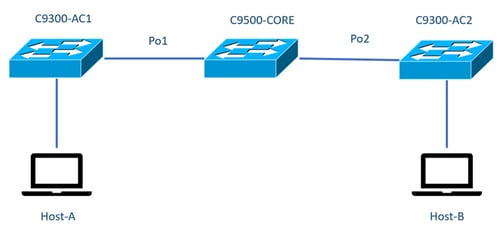
Nota: Los ejemplos de configuración de la sección instalación de iPerf se tomaron del mismo entorno de laboratorio.
Asignación de dirección IP para los dispositivos anteriores:
| C9300-AC1 |
C9300-AC2 |
| SVI 192 168 10 11 iPerf 192.168.10.21 |
SVI 192.168.10.12 iPerf 192.168.10.22 |
Nota: Todos los dispositivos utilizados en estos ejemplos se encuentran en el mismo dominio de VLAN, VLAN 10.
Método 1: Switch como cliente
En este ejemplo, se mide el ancho de banda de C9300-AC1 a C9300-AC2. C9300-AC1 es el cliente.
1. Ejecute el comando app-hosting connect appid iPerf sessionpara introducir la indicación del contenedor de aplicaciones:
C9300-AC1#app-hosting connect appid iPerf session
/ $
2. Una vez que esté en la indicación del contenedor de aplicaciones, utilice el iperf3 -c comando para iniciar la prueba de ancho de banda:
/ $ iperf3 -c 192.168.10.22
Connecting to host 192.168.10.22, port 5201
[  5] local 192.168.10.21 port 34906 connected to 192.168.10.22 port 5201
[ ID] Interval           Transfer     Bitrate         Retr  Cwnd
[  5]   0.00-1.00   sec   114 MBytes   955 Mbits/sec    2    833 KBytes
[  5]   1.00-2.00   sec   113 MBytes   947 Mbits/sec    3    923 KBytes
[  5]   2.00-3.00   sec   111 MBytes   934 Mbits/sec   77    974 KBytes
[  5]   3.00-4.00   sec   113 MBytes   945 Mbits/sec    1   1.03 MBytes
[  5]   4.00-5.00   sec   112 MBytes   940 Mbits/sec  109   1.08 MBytes
[  5]   5.00-6.00   sec   111 MBytes   931 Mbits/sec  395    820 KBytes
[  5]   6.00-7.00   sec   111 MBytes   933 Mbits/sec  198    882 KBytes
[  5]   7.00-8.00   sec   112 MBytes   944 Mbits/sec    2    970 KBytes
[  5]   8.00-9.00   sec   111 MBytes   933 Mbits/sec    9   1.02 MBytes
[  5]   9.00-10.00  sec   111 MBytes   933 Mbits/sec  524   1.04 MBytes
- - - - - - - - - - - - - - - - - - - - - - - - -
[ ID] Interval           Transfer     Bitrate         Retr
[  5]   0.00-10.00  sec  1.09 GBytes   940 Mbits/sec  1320             sender
[  5]   0.00-10.01  sec  1.09 GBytes   937 Mbits/sec                  receiver

iperf Done.
/ $
3. Una vez finalizada la prueba, escriba exitpara volver a la CLI del switch.
Nota: Dado que iPerf se ejecuta como servidor de forma predeterminada, no se necesitan más comandos en el servidor.
Método 2: PC como cliente
En este ejemplo, se mide el ancho de banda del host A al C9300-AC2 (servidor iPerf).
- Asegúrese de que ha descargado iPerf en el PC.
- Una vez que tenga iPerf almacenado en su PC, navegue hasta iperf3.exe desde el símbolo del sistema:
C:\Users\user\Downloads\iperf-3.1.3-win64\iperf-3.1.3-win64>iperf3.exe3. Desde su PC, use la opción -c. Esto indica que el PC es el cliente:
C:\Users\user\Downloads\iperf-3.1.3-win64\iperf-3.1.3-win64>iperf3.exe -c 192.168.10.22
Connecting to host 192.168.10.22, port 5201
[  4] local 192.168.10.2 port 56009 connected to 192.168.10.22 port 5201
[ ID] Interval           Transfer     Bandwidth
[  4]   0.00-1.00   sec   109 MBytes   916 Mbits/sec
[  4]   1.00-2.00   sec  0.00 Bytes  0.00 bits/sec
[  4]   2.00-3.00   sec  0.00 Bytes  0.00 bits/sec
[  4]   3.00-4.00   sec  93.6 MBytes   786 Mbits/sec
[  4]   4.00-5.00   sec  15.1 MBytes   127 Mbits/sec
[  4]   5.00-6.02   sec  0.00 Bytes  0.00 bits/sec
[  4]   6.02-7.00   sec  78.2 MBytes   666 Mbits/sec
[  4]   7.00-8.00   sec  42.9 MBytes   360 Mbits/sec
[  4]   8.00-9.00   sec  0.00 Bytes  0.00 bits/sec
[  4]   9.00-10.00  sec  49.4 MBytes   414 Mbits/sec
- - - - - - - - - - - - - - - - - - - - - - - - -
[ ID] Interval           Transfer     Bandwidth
[  4]   0.00-10.00  sec   388 MBytes   326 Mbits/sec              sender
[  4]   0.00-10.00  sec   388 MBytes   326 Mbits/sec              receiver

iperf Done.

Consejo: Para el método tradicional, necesita utilizar 2 PC, uno como servidor y otro como cliente. Para el PC que actúa como servidor, utilice el iperf3.exe -s comando .
Información Relacionada
- Informe técnico sobre el alojamiento de aplicaciones en switches Catalyst de Cisco serie 9000
- Guía de configuración de capacidad de programación, Cisco IOS® XE Bengaluru 17.6.x
- Supervisión del rendimiento de la red con alojamiento de aplicaciones Catalyst 9300
Historial de revisiones
| Revisión | Fecha de publicación | Comentarios |
|---|---|---|
3.0 |
29-Jul-2026
|
Recertificación: formato actualizado. |
2.0 |
10-Mar-2023
|
Versión de vídeo integrada de este |
1.0 |
02-Feb-2023
|
Versión inicial |

 Comentarios
Contacte a Cisco
- Abrir un caso de soporte

- (Requiere un Cisco Service Contract)