Comprenda la actualización de software rápida mejorada: Quad-SUP en Catalyst 6500 VSS

Opciones de descarga
Lenguaje no discriminatorio
El conjunto de documentos para este producto aspira al uso de un lenguaje no discriminatorio. A los fines de esta documentación, "no discriminatorio" se refiere al lenguaje que no implica discriminación por motivos de edad, discapacidad, género, identidad de raza, identidad étnica, orientación sexual, nivel socioeconómico e interseccionalidad. Puede haber excepciones en la documentación debido al lenguaje que se encuentra ya en las interfaces de usuario del software del producto, el lenguaje utilizado en función de la documentación de la RFP o el lenguaje utilizado por un producto de terceros al que se hace referencia. Obtenga más información sobre cómo Cisco utiliza el lenguaje inclusivo.
Acerca de esta traducción
Cisco ha traducido este documento combinando la traducción automática y los recursos humanos a fin de ofrecer a nuestros usuarios en todo el mundo contenido en su propio idioma. Tenga en cuenta que incluso la mejor traducción automática podría no ser tan precisa como la proporcionada por un traductor profesional. Cisco Systems, Inc. no asume ninguna responsabilidad por la precisión de estas traducciones y recomienda remitirse siempre al documento original escrito en inglés (insertar vínculo URL).
Contenido
Introducción
Este documento describe un procedimiento paso a paso ISSU/eFSU en los Cisco Catalyst 6500 Series Switches en modo VSS con el uso del Supervisor 6T con doble reposición en una configuración Quad-SUP.
Prerequisites
Requirements
Cisco recomienda que tenga conocimiento sobre estos temas:
- Conocimientos básicos sobre la instalación y configuración del sistema de switching virtual (VSS) QUAD-SUP de Catalyst 6500
- Copia de imágenes mediante el método TFTP/USB/WebUI
Componentes Utilizados
La información de este documento se basa en Cisco Catalyst 6500 Virtual Switching System en Cisco IOS® Software Release 15.5(1)SY12 o posterior
versiones de software y hardware.
La información que contiene este documento se creó a partir de los dispositivos en un ambiente de laboratorio específico. Todos los dispositivos que se utilizan en este documento se pusieron en funcionamiento con una configuración verificada (predeterminada). Si tiene una red en vivo, asegúrese de entender el posible impacto de cualquier comando.
Topología
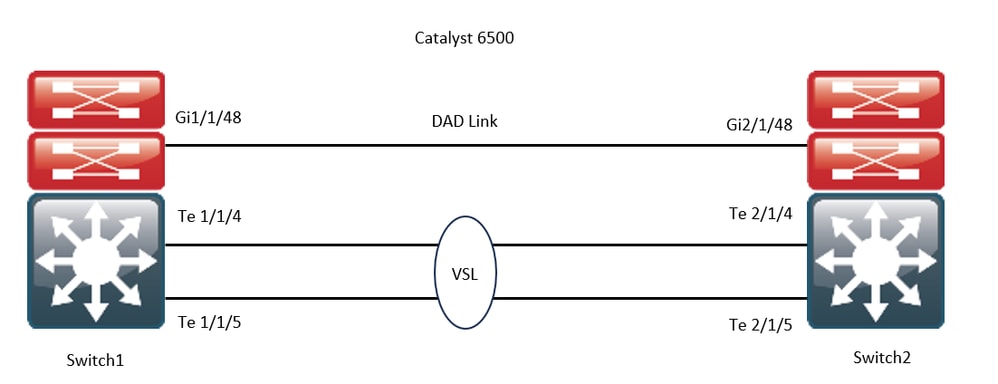
Comprobación de matriz de compatibilidad
Paso 1. Consulte este documento de Cisco; https://www.cisco.com/c/en/us/support/switches/catalyst-6500-series-switches/products-release-notes-list.html#anchor142.
Paso 2. Verifique usando el comando en la CLI del dispositivo:
WS-C6504-E-1#show issu comp-matrix stored

Number of Matrices in Table = 1

(1) Matrix for s2t54-ADVENTERPRISEK9-M(10) - s2t54-ADVENTERPRISEK9-M(10)
==========================================
Start Flag (0xDEADBABE)

My Image ver: 15.5(1)SY13
Peer Version Compatibility
------------ -------------
15.1(2)SY Incomp(1)
15.1(2)SY1 Incomp(1)
15.1(2)SY2 Incomp(1)
15.5(1)SY Dynamic(0)
15.5(1)SY1 Dynamic(0)
15.1(2)SY12 Incomp(1)
15.2(1)SY6 Incomp(1)
15.4(1)SY4 Incomp(1)
15.5(1)SY2 Dynamic(0)
15.5(1)SY3 Dynamic(0)
15.5(1)SY4 Dynamic(0)
15.5(1)SY5 Dynamic(0)
15.5(1)SY6 Dynamic(0)
15.5(1)SY7 Dynamic(0)
15.5(1)SY8 Dynamic(0)
15.5(1)SY9 Dynamic(0)
15.5(1)SY10 Dynamic(0)
15.5(1)SY11 Dynamic(0)
15.5(1)SY12 Dynamic(0)
15.5(1)SY13 Comp(3)
Procedimiento de actualización
Paso 1. Asegúrese de que la nueva imagen de Cisco IOS (Cisco IOS Software Release 15.5(1)SY13) esté presente en el bootdisk,slavebootdisk,ics-bootdisk,slave-ics-bootdisk.
WS-C6504-E-1#dir bootdisk: | i SY13
8 -rw- 167430292 Apr 16 2024 22:55:58 +00:00 s2t54-adventerprisek9-mz.SPA.155-1.SY13.bin
WS-C6504-E-1#dir slavebootdisk: | i SY13
19 -rw- 167430292 Apr 16 2024 00:37:58 +00:00 s2t54-adventerprisek9-mz.SPA.155-1.SY13.bin
WS-C6504-E-1#dir ics-bootdisk: | i SY13
11 -rw- 167430292 Apr 16 2024 23:06:18 +00:00 s2t54-adventerprisek9-mz.SPA.155-1.SY13.bin
WS-C6504-E-1#dir slave-ics-bootdisk: | i SY13
5 -rw- 167430292 Apr 16 2024 23:20:18 +00:00 s2t54-adventerprisek9-mz.SPA.155-1.SY13.bin
Paso 2. Utilice estos comandos para verificar que el VSS está listo para ejecutar el procedimiento de actualización:
WS-C6504-E-1#show redundancy
Redundant System Information :
------------------------------
       Available system uptime = 1 day, 4 hours, 41 minutes
Switchovers system experienced = 0
              Standby failures = 1
        Last switchover reason = none
                 Hardware Mode = Duplex
    Configured Redundancy Mode = sso
     Operating Redundancy Mode = sso
              Maintenance Mode = Disabled
                Communications = Up
Current Processor Information :
-------------------------------
               Active Location = slot 1/1
        Current Software state = ACTIVE                                                           >> Switch 1 Slot 1 is active
       Uptime in current state = 1 day, 4 hours, 41 minutes
                 Image Version = Cisco IOS Software, s2t54 Software (s2t54-ADVENTERPRISEK9-M), Version 15.5(1)SY12, RELEASE SOFTWARE (fc1)
Technical Support: http://www.cisco.com/techsupport
Copyright (c) 1986-2023 by Cisco Systems, Inc.
Compiled Tue 05-Sep-23 11:24 by mcpre
                          BOOT = bootdisk:s2t54-adventerprisek9-mz.SPA.155-1.SY12.bin,12;
                   CONFIG_FILE =
                       BOOTLDR =
        Configuration register = 0x2102
Peer Processor Information :
----------------------------
              Standby Location = slot 2/1
        Current Software state = STANDBY HOT                                                      >> Switch 2 Slot 1 is standby
       Uptime in current state = 19 hours, 43 minutes
                 Image Version = Cisco IOS Software, s2t54 Software (s2t54-ADVENTERPRISEK9-M), Version 15.5(1)SY12, RELEASE SOFTWARE (fc1)
Technical Support: http://www.cisco.com/techsupport
Copyright (c) 1986-2023 by Cisco Systems, Inc.
Compiled Tue 05-Sep-23 11:24 by mcpre
                          BOOT = bootdisk:s2t54-adventerprisek9-mz.SPA.155-1.SY12.bin,12;
                   CONFIG_FILE =
                       BOOTLDR =
        Configuration register = 0x2102
WS-C6504-E-1#show issu state detail
 The system is configured to be upgraded in staggered mode.
 4 supervisor nodes are found to be online.
 Summary: the system will be upgraded in staggered mode.

Slot = 1/1
RP State = Active
ISSU State = Init
Boot Variable = bootdisk:s2t54-adventerprisek9-mz.SPA.155-1.SY12.bin,12;
      Operating Mode = sso
      ISSU Sub-State = No Upgrade Operation in Progress
      Starting Image = N/A
        Target Image = N/A
     Current Version = bootdisk:s2t54-adventerprisek9-mz.SPA.155-1.SY12.bin

Slot = 2/1
RP State = Standby
ISSU State = Init
Boot Variable = bootdisk:s2t54-adventerprisek9-mz.SPA.155-1.SY12.bin,12;
      Operating Mode = sso
      ISSU Sub-State = No Upgrade Operation in Progress
      Starting Image = N/A
        Target Image = N/A
     Current Version = bootdisk:s2t54-adventerprisek9-mz.SPA.155-1.SY12.bin

Slot = 1/2
RP State = Active-ICS
ISSU State = Init
Boot Variable = bootdisk:s2t54-adventerprisek9-mz.SPA.155-1.SY12.bin,12;
      Operating Mode = sso
      ISSU Sub-State = No Upgrade Operation in Progress
      Starting Image = N/A
        Target Image = N/A
     Current Version = bootdisk:s2t54-adventerprisek9-mz.SPA.155-1.SY12.bin

Slot = 2/2
RP State = Standby-ICS
ISSU State = Init
Boot Variable = bootdisk:s2t54-adventerprisek9-mz.SPA.155-1.SY12.bin,12;
      Operating Mode = sso
      ISSU Sub-State = No Upgrade Operation in Progress
      Starting Image = N/A
        Target Image = N/A
     Current Version = bootdisk:s2t54-adventerprisek9-mz.SPA.155-1.SY12.bin
Paso 3. Utilice el issu loadversioncomando para iniciar el proceso de actualización.
En este paso, el chasis en espera de VSS se reinicia, se recarga con la nueva imagen y se inicializa como el chasis en espera de VSS en el modo de redundancia de Stateful Switchover (SSO), ejecutando la nueva imagen. Este paso se completa cuando se sincroniza la configuración del chasis, como se indica en el mensaje Sincronización masiva correcta. La carga de la nueva imagen puede tardar de varios segundos a pocos minutos y el chasis en espera de VSS puede pasar al modo SSO.
WS-C6504-E-1#issu loadversion 1/1 bootdisk:s2t54-adventerprisek9-mz.SPA.155-1.SY13.bin 2/1 slavebootdisk:s2t54-adventerprisek9-mz.SPA.155-1.SY13.bin
System configuration has been modified. Save? [yes/no]: y
Building configuration...
[OK]
*Apr 17 00:43:14.195: %ISSU_PROCESS-SW1-3-LOADVERSION: Loadversion sequence will begin in 60 seconds. Enter 'issu abortversion' to cancel.
*Apr 17 00:43:44.195: %ISSU_PROCESS-SW1-6-LOADVERSION_INFO: Resetting Standby shortly
*Apr 17 00:43:44.195: %ISSU_PROCESS-SW1-6-LOADVERSION_INFO: Resetting Standby ICS shortly
*Apr 17 00:43:44.199: %ISSU_PROCESS-SW2_STBY-6-SELF_RELOAD: slot 33 countdown to self-reload started, 30 second delay
*Apr 17 00:43:44.199: %ISSU_PROCESS-SW2-2_STBY-6-SELF_RELOAD: slot 34 countdown to self-reload started, 30 second delay
*Apr 17 00:44:29.195: %ISSU_PROCESS-SW1-6-LOADVERSION_INFO: Standby ICS has gone offline
*Apr 17 00:44:29.195: %ISSU_PROCESS-SW1-6-LOADVERSION_INFO: Standby has gone offline
*Apr 17 00:46:59.195: %ISSU_PROCESS-SW1-6-LOADVERSION_INFO: Standby has come online, wait for Standby ICS
*Apr 17 00:47:44.503: %ISSU_PROCESS-SW1-6-LOADVERSION_INFO: Standby ICS has come online
*Apr 17 00:49:15.363: %ISSU_PROCESS-SW1-6-LOADVERSION_INFO: Standby reached terminal state
*Apr 17 00:49:29.199: %ISSU_PROCESS-SW1-6-LOADVERSION_INFO: Standby ICS reached terminal state, wait for system to settle
*Apr 17 00:49:59.195: %ISSU_PROCESS-SW1-3-LOADVERSION: Loadversion has completed. Please issue the 'issu runversion' command after all modules come online.
*Apr 17 00:49:59.195: %ISSU_PROCESS-SW1-3-LOADVERSION: Loadversion has completed. Please issue the 'issu runversion' command after all modules come online.
Paso 4. La variable de arranque para standby debe apuntar a una nueva imagen en la show issu state detail salida.
WS-C6504-E-1#show issu state detail
 The system is configured to be upgraded in in-tandem mode.
 4 supervisor nodes are found to be online.
         Summary: an in-tandem upgrade is in progress.

Slot = 1/1
RP State = Active
ISSU State = Load Version
Boot Variable = bootdisk:s2t54-adventerprisek9-mz.SPA.155-1.SY12.bin,12;bootdisk:s2t54-adventerprisek9-mz.SPA.155-1.SY13.bin,12
      Operating Mode = sso
      ISSU Sub-State = Load Version Completed
      Starting Image = bootdisk:s2t54-adventerprisek9-mz.SPA.155-1.SY12.bin
        Target Image = bootdisk:s2t54-adventerprisek9-mz.SPA.155-1.SY13.bin
     Current Version = bootdisk:s2t54-adventerprisek9-mz.SPA.155-1.SY12.bin

Slot = 2/1
RP State = Standby
ISSU State = Load Version
Boot Variable = bootdisk:s2t54-adventerprisek9-mz.SPA.155-1.SY13.bin,12;bootdisk:s2t54-adventerprisek9-mz.SPA.155-1.SY12.bin,12
      Operating Mode = sso
      ISSU Sub-State = Load Version Completed
      Starting Image = bootdisk:s2t54-adventerprisek9-mz.SPA.155-1.SY12.bin
        Target Image = bootdisk:s2t54-adventerprisek9-mz.SPA.155-1.SY13.bin
     Current Version = bootdisk:s2t54-adventerprisek9-mz.SPA.155-1.SY13.bin                       >> Standby Chassis has been upgraded to latest code

Slot = 1/2
RP State = Active-ICS
ISSU State = Load Version
Boot Variable = bootdisk:s2t54-adventerprisek9-mz.SPA.155-1.SY12.bin,12;bootdisk:s2t54-adventerprisek9-mz.SPA.155-1.SY13.bin,12
      Operating Mode = sso
      ISSU Sub-State = Load Version Completed
      Starting Image = bootdisk:s2t54-adventerprisek9-mz.SPA.155-1.SY12.bin
        Target Image = bootdisk:s2t54-adventerprisek9-mz.SPA.155-1.SY13.bin
     Current Version = bootdisk:s2t54-adventerprisek9-mz.SPA.155-1.SY12.bin

Slot = 2/2
RP State = Standby-ICS
ISSU State = Load Version
Boot Variable = bootdisk:s2t54-adventerprisek9-mz.SPA.155-1.SY13.bin,12;bootdisk:s2t54-adventerprisek9-mz.SPA.155-1.SY12.bin,12
      Operating Mode = sso
      ISSU Sub-State = Load Version Completed
      Starting Image = bootdisk:s2t54-adventerprisek9-mz.SPA.155-1.SY12.bin
        Target Image = bootdisk:s2t54-adventerprisek9-mz.SPA.155-1.SY13.bin
     Current Version = bootdisk:s2t54-adventerprisek9-mz.SPA.155-1.SY13.bin                       >> Standby Chassis has been upgraded to latest code
Paso 5. Cuando el chasis en espera de VSS ejecute correctamente la nueva imagen en el estado de redundancia SSO y todas las tarjetas de línea en el chasis en espera de VSS estén activas y en línea, ingrese el comando issu runversion para forzar un switchover. El chasis en espera de VSS actualizado toma el relevo como el nuevo chasis activo, ejecutando la nueva imagen. El chasis anteriormente activo se recarga y se inicializa como el nuevo chasis en espera de VSS en modo SSO, ejecutando la imagen anterior (en caso de que la actualización de software deba anularse y se restaure la imagen anterior). Este paso se completa cuando se sincroniza la configuración del chasis, como se indica en el mensaje Sincronización masiva correcta.
WS-C6504-E-1#issu runversion
This command will reload the Active unit.  Proceed ? [confirm]y
%issu runversion initiated successfully
*Apr 17 00:54:42.707: %ISSU_PROCESS-SW1-2_STBY-6-SELF_RELOAD: slot 18 countdown to self-reload started, 3 second delay
*Apr 17 00:54:44.715: %RF-SW1-5-RF_RELOAD: Self reload. Reason: Admin ISSU runversion CLI
*Apr 17 00:54:46.719: %SYS-SW1-5-SWITCHOVER: Switchover requested by Exec. Reason: Admin ISSU runversion CLI.
Initializing as Virtual Switch STANDBY processor
*Apr 17 00:57:14.023: %VSLP-5-VSL_UP:  Ready for control traffic
*Apr 17 00:57:24.919: %PFREDUN-SW1_STBY-6-STANDBY: Initializing for SSO mode in Default Domain
Paso 6. Verifique el estado una vez que se haya realizado el switchover.
WS-C6504-E-1#show issu state detail
 The system is configured to be upgraded in in-tandem mode.
 4 supervisor nodes are found to be online.
         Summary: an in-tandem upgrade is in progress.

Slot = 2/1
RP State = Active
ISSU State = Run Version
Boot Variable = bootdisk:s2t54-adventerprisek9-mz.SPA.155-1.SY13.bin,12;bootdisk:s2t54-adventerprisek9-mz.SPA.155-1.SY12.bin,12
      Operating Mode = sso
      ISSU Sub-State = Run Version after Switchover
      Starting Image = bootdisk:s2t54-adventerprisek9-mz.SPA.155-1.SY12.bin
        Target Image = bootdisk:s2t54-adventerprisek9-mz.SPA.155-1.SY13.bin
     Current Version = bootdisk:s2t54-adventerprisek9-mz.SPA.155-1.SY13.bin                       >> Switch 2 became the active after switchover

Slot = 1/1
RP State = Standby
ISSU State = Run Version
Boot Variable = bootdisk:s2t54-adventerprisek9-mz.SPA.155-1.SY12.bin,12;
      Operating Mode = sso
      ISSU Sub-State = Run Version in Progress
      Starting Image = bootdisk:s2t54-adventerprisek9-mz.SPA.155-1.SY12.bin
        Target Image = bootdisk:s2t54-adventerprisek9-mz.SPA.155-1.SY13.bin
     Current Version = bootdisk:s2t54-adventerprisek9-mz.SPA.155-1.SY12.bin

Slot = 2/2
RP State = Active-ICS
ISSU State = Run Version
Boot Variable = bootdisk:s2t54-adventerprisek9-mz.SPA.155-1.SY13.bin,12;bootdisk:s2t54-adventerprisek9-mz.SPA.155-1.SY12.bin,12
      Operating Mode = sso
      ISSU Sub-State = Run Version in Progress
      Starting Image = bootdisk:s2t54-adventerprisek9-mz.SPA.155-1.SY12.bin
        Target Image = bootdisk:s2t54-adventerprisek9-mz.SPA.155-1.SY13.bin
     Current Version = bootdisk:s2t54-adventerprisek9-mz.SPA.155-1.SY13.bin

Slot = 1/2
RP State = Standby-ICS
ISSU State = Run Version
Boot Variable = bootdisk:s2t54-adventerprisek9-mz.SPA.155-1.SY12.bin,12;
      Operating Mode = sso
      ISSU Sub-State = Run Version in Progress
      Starting Image = bootdisk:s2t54-adventerprisek9-mz.SPA.155-1.SY12.bin
        Target Image = bootdisk:s2t54-adventerprisek9-mz.SPA.155-1.SY13.bin
     Current Version = bootdisk:s2t54-adventerprisek9-mz.SPA.155-1.SY12.bin
WS-C6504-E-1#sh redundancy
Redundant System Information :
------------------------------
       Available system uptime = 44 minutes
Switchovers system experienced = 1
              Standby failures = 0
        Last switchover reason = user forced
                 Hardware Mode = Duplex
    Configured Redundancy Mode = sso
     Operating Redundancy Mode = sso
              Maintenance Mode = Disabled
                Communications = Up
Current Processor Information :
-------------------------------
               Active Location = slot 2/1
        Current Software state = ACTIVE
       Uptime in current state = 7 minutes
                 Image Version = Cisco IOS Software, s2t54 Software (s2t54-ADVENTERPRISEK9-M), Version 15.5(1)SY13, RELEASE SOFTWARE (fc1)
Technical Support: http://www.cisco.com/techsupport
Copyright (c) 1986-2024 by Cisco Systems, Inc.
Compiled Tue 19-Mar-24 06:59 by mcpre
                          BOOT = bootdisk:s2t54-adventerprisek9-mz.SPA.155-1.SY13.bin,12;bootdisk:s2t54-adventerprisek9-mz.SPA.155-1.SY12.bin,12
                   CONFIG_FILE =
                       BOOTLDR =
        Configuration register = 0x2102
Peer Processor Information :
----------------------------
              Standby Location = slot 1/1
        Current Software state = STANDBY HOT
       Uptime in current state = 2 minutes
                 Image Version = Cisco IOS Software, s2t54 Software (s2t54-ADVENTERPRISEK9-M), Version 15.5(1)SY12, RELEASE SOFTWARE (fc1)
Technical Support: http://www.cisco.com/techsupport
Copyright (c) 1986-2023 by Cisco Systems, Inc.
Compiled Tue 05-Sep-23 11:24 by mcpre
                          BOOT = bootdisk:s2t54-adventerprisek9-mz.SPA.155-1.SY12.bin,12;
                   CONFIG_FILE =
                       BOOTLDR =
        Configuration register = 0x2102
Paso 7. Utilice el comando issu accept version para detener el Temporizador de Rollback. Esto es necesario porque si el temporizador caduca, el chasis actualizado se recarga y vuelve a la versión de software anterior.
WS-C6504-E-1# show issu rollback-timer
Rollback Process State = In progress
 Configured Rollback Time = 00:45:00
 Automatic Rollback Time = 00:37:28
WS-C6504-E-1# issu acceptversion
% Rollback timer stopped. Please issue the commitversion command.
View the rollback timer to see that the rollback process has been stopped:
WS-C6504-E-1# show issu rollback-timer
Rollback Process State = Not in progress                                                         >> Rollback Process is stopped after the acceptversion
Paso 8. En caso de que se utilice Fabric Extender (FEX) en la configuración, utilice el comando issu runversion fex all para iniciar el procedimiento de descarga y actualización de la imagen en FEX (6800IA). El FEX activa la descarga de imágenes desde el nuevo paquete de software del Supervisor6T (aquí, Cisco IOS Software Release 15.5(1)SY13). Si utiliza pilas FEX, el maestro es responsable de extraer la imagen de sus miembros.
Paso 9. Para continuar, ingrese el comando issu commit version para actualizar el chasis VSS en espera y completar la secuencia de actualización de software en funcionamiento (ISSU). El chasis en espera de VSS se reinicia, se recarga con la nueva imagen y se inicializa como el chasis en espera de VSS en el estado de redundancia SSO, ejecutando la nueva imagen. Este paso se completa cuando se sincroniza la configuración del chasis, como lo indica el mensaje sincronización masiva correcta, y todas las tarjetas de línea en el nuevo VSS en espera están activas y en línea.
WS-C6504-E-1# issu commitversion
%issu commitversion initiated successfully, upgrade sequence will continue shortly
WS-C6504-E-1#
*Apr 17 01:02:57.607: %ISSU_PROCESS-SW2-3-COMMITVERSION: issu commitversion; Commitversion sequence will begin in 60 seconds. Enter 'issu abortversion' to cancel.
*Apr 17 01:03:27.607: %ISSU_PROCESS-SW2-6-COMMITVERSION_INFO: Resetting Standby shortly
*Apr 17 01:03:27.607: %ISSU_PROCESS-SW2-6-COMMITVERSION_INFO: Resetting Standby ICS shortly
*Apr 17 01:03:27.611: %ISSU_PROCESS-SW1-2_STBY-6-SELF_RELOAD: slot 18 countdown to self-reload started, 30 second delay
*Apr 17 01:03:27.611: %ISSU_PROCESS-SW1_STBY-6-SELF_RELOAD: slot 17 countdown to self-reload started, 30 second delay
*Apr 17 01:04:12.607: %ISSU_PROCESS-SW2-6-COMMITVERSION_INFO: Standby ICS has gone offline
*Apr 17 01:04:12.607: %ISSU_PROCESS-SW2-6-COMMITVERSION_INFO: Standby has gone offline
*Apr 17 01:06:42.607: %ISSU_PROCESS-SW2-6-COMMITVERSION_INFO: Standby has come online, wait for Standby ICS
*Apr 17 01:07:28.315: %ISSU_PROCESS-SW2-6-COMMITVERSION_INFO: Standby ICS has come online
*Apr 17 01:08:59.623: %ISSU_PROCESS-SW2-6-COMMITVERSION_INFO: Standby has reached terminal state
*Apr 17 01:09:12.699: %ISSU_PROCESS-SW2-6-COMMITVERSION_INFO: Standby ICS reached terminal state
*Apr 17 01:09:12.751: %ISSU_PROCESS-SW2-6-COMMITVERSION_INFO: Upgrade has completed, updating boot configuration
Building configuration...
[OK]
Paso 10. Compruebe si se ha completado la actualización.
WS-C6504-E-1#sh redundancy
Redundant System Information :
------------------------------
       Available system uptime = 55 minutes
Switchovers system experienced = 1
              Standby failures = 1
        Last switchover reason = user forced
                 Hardware Mode = Duplex
    Configured Redundancy Mode = sso
     Operating Redundancy Mode = sso
              Maintenance Mode = Disabled
                Communications = Up
Current Processor Information :
-------------------------------
               Active Location = slot 2/1
        Current Software state = ACTIVE
       Uptime in current state = 17 minutes
                 Image Version = Cisco IOS Software, s2t54 Software (s2t54-ADVENTERPRISEK9-M), Version 15.5(1)SY13, RELEASE SOFTWARE (fc1)
Technical Support: http://www.cisco.com/techsupport
Copyright (c) 1986-2024 by Cisco Systems, Inc.
Compiled Tue 19-Mar-24 06:59 by mcpre
                          BOOT = bootdisk:s2t54-adventerprisek9-mz.SPA.155-1.SY13.bin,12;bootdisk:s2t54-adventerprisek9-mz.SPA.155-1.SY12.bin,12
                   CONFIG_FILE =
                       BOOTLDR =
        Configuration register = 0x2102
Peer Processor Information :
----------------------------
              Standby Location = slot 1/1
        Current Software state = STANDBY HOT
       Uptime in current state = 3 minutes
                 Image Version = Cisco IOS Software, s2t54 Software (s2t54-ADVENTERPRISEK9-M), Version 15.5(1)SY13, RELEASE SOFTWARE (fc1)
Technical Support: http://www.cisco.com/techsupport
Copyright (c) 1986-2024 by Cisco Systems, Inc.
Compiled Tue 19-Mar-24 06:59 by mcpre
                          BOOT = bootdisk:s2t54-adventerprisek9-mz.SPA.155-1.SY13.bin,12;bootdisk:s2t54-adventerprisek9-mz.SPA.155-1.SY12.bin,12                             >> Standby has been upgraded
                   CONFIG_FILE =
                       BOOTLDR =
        Configuration register = 0x2102
WS-C6504-E-1# show module switch all
 Switch Number:     1   Role:  Virtual Switch Standby
----------------------  -----------------------------
Mod Ports Card Type                              Model              Serial No.
--- ----- -------------------------------------- ------------------ -----------
  1    5  Supervisor Engine 2T 10GE w/ CTS (Hot) VS-SUP2T-10G       xxxx
  2    5  Supervisor Engine 2T 10GE w/ CTS (CSSO VS-SUP2T-10G       xxxx
  3   48  CEF720 48 port 10/100/1000mb Ethernet  WS-X6748-GE-TX     xxxx
Mod MAC addresses                       Hw    Fw           Sw           Status
--- ---------------------------------- ------ ------------ ------------ -------
  1  xxxx. xxxx. xxxx to xxxx. xxxx. xxxx 1.5   12.2(50r)SYS 15.5(1)SY13  Ok
  2  xxxx. xxxx. xxxx to xxxx. xxxx. xxxx 1.3   12.2(50r)SYS 15.5(1)SY13  Ok
  3  xxxx. xxxx. xxxx to xxxx. xxxx. xxxx 3.2   12.2(18r)S1  15.5(1)SY13  Ok
Mod  Sub-Module                  Model              Serial       Hw     Status
---- --------------------------- ------------------ ----------- ------- -------
  1  Policy Feature Card 4       VS-F6K-PFC4         xxxx        1.2    Ok
  1  CPU Daughterboard           VS-F6K-MSFC5        xxxx        2.0    Ok
  2  Policy Feature Card 4       VS-F6K-PFC4         xxxx        1.2    Ok
  2  CPU Daughterboard           VS-F6K-MSFC5        xxxx        1.4    Ok
  3  Centralized Forwarding Card WS-F6700-CFC        xxxx        4.1    Ok
Mod  Online Diag Status
---- -------------------
  1  Pass
  2  Pass
  3  Pass
 Switch Number:     2   Role:   Virtual Switch Active
----------------------  -----------------------------
Mod Ports Card Type                              Model              Serial No.
--- ----- -------------------------------------- ------------------ -----------
  1    5  Supervisor Engine 2T 10GE w/ CTS (Acti VS-SUP2T-10G       xxxx
  2    5  Supervisor Engine 2T 10GE w/ CTS (CSSO VS-SUP2T-10G       xxxx
  3   48  CEF720 48 port 10/100/1000mb Ethernet  WS-X6748-GE-TX     xxxx
Mod MAC addresses                       Hw    Fw           Sw           Status
--- ---------------------------------- ------ ------------ ------------ -------
  1  xxxx. xxxx. xxxx to xxxx. xxxx. xxxx 1.5   12.2(50r)SYS 15.5(1)SY13  Ok
  2  xxxx. xxxx. xxxx to xxxx. xxxx. xxxx 2.1   12.2(50r)SYS 15.5(1)SY13  Ok
  3  xxxx. xxxx. xxxx to xxxx. xxxx. xxxx 3.6   12.2(18r)S1  15.5(1)SY13  Ok
Mod  Sub-Module                  Model              Serial       Hw     Status
---- --------------------------- ------------------ ----------- ------- -------
  1  Policy Feature Card 4       VS-F6K-PFC4        xxxx         1.2    Ok
  1  CPU Daughterboard           VS-F6K-MSFC5       xxxx         2.0    Ok
  2  Policy Feature Card 4       VS-F6K-PFC4        xxxx         3.0    Ok
  2  CPU Daughterboard           VS-F6K-MSFC5       xxxx         3.1    Ok
  3  Centralized Forwarding Card WS-F6700-CFC       xxxx         4.1    Ok
Mod  Online Diag Status
---- -------------------
  1  Pass
  2  Pass
  3  Pass
WS-C6504-E-1# sh issu state detail
 The system is configured to be upgraded in in-tandem mode.
 4 supervisor nodes are found to be online.
 Summary: the system will be upgraded in in-tandem mode.
Slot = 2/1
RP State = Active
ISSU State = Init
Boot Variable = bootdisk:s2t54-adventerprisek9-mz.SPA.155-1.SY13.bin,12;bootdisk:s2t54-adventerprisek9-mz.SPA.155-1.SY12.bin,12
      Operating Mode = sso
      ISSU Sub-State = No Upgrade Operation in Progress
      Starting Image = N/A
        Target Image = N/A
     Current Version = bootdisk:s2t54-adventerprisek9-mz.SPA.155-1.SY13.bin
Slot = 1/1
RP State = Standby
ISSU State = Init
Boot Variable = bootdisk:s2t54-adventerprisek9-mz.SPA.155-1.SY13.bin,12;bootdisk:s2t54-adventerprisek9-mz.SPA.155-1.SY12.bin,12
      Operating Mode = sso
      ISSU Sub-State = No Upgrade Operation in Progress
      Starting Image = N/A
        Target Image = N/A
     Current Version = bootdisk:s2t54-adventerprisek9-mz.SPA.155-1.SY13.bin
Slot = 2/2
RP State = Active-ICS
ISSU State = Init
Boot Variable = bootdisk:s2t54-adventerprisek9-mz.SPA.155-1.SY13.bin,12;bootdisk:s2t54-adventerprisek9-mz.SPA.155-1.SY12.bin,12
      Operating Mode = sso
      ISSU Sub-State = No Upgrade Operation in Progress
      Starting Image = N/A
        Target Image = N/A
     Current Version = bootdisk:s2t54-adventerprisek9-mz.SPA.155-1.SY13.bin
Slot = 1/2
RP State = Standby-ICS
ISSU State = Init
Boot Variable = bootdisk:s2t54-adventerprisek9-mz.SPA.155-1.SY13.bin,12;bootdisk:s2t54-adventerprisek9-mz.SPA.155-1.SY12.bin,12
      Operating Mode = sso
      ISSU Sub-State = No Upgrade Operation in Progress
      Starting Image = N/A
        Target Image = N/A
     Current Version = bootdisk:s2t54-adventerprisek9-mz.SPA.155-1.SY13.bin
Casos prácticos de resolución de problemas
Situación 1. Actualización en modo escalonado cuando no hay conectividad VSL cruzada
WS-C6504-E-1#issu loadversion 1/1 bootdisk:s2t54-adventerprisek9-mz.SPA.155-1.SY13.bin 2/1 slavebootdisk:s2t54-adventerprisek9-mz.SPA.155-1.SY13.bin
WS-C6504-E-1#*Apr 16 23:31:12.528: SW1:  Quad-sup ISSU Staggered mode VSL requirement(Parallel/Cross VSL connectivity) is NOT met. Disable Staggered mode using config cli "no issu upgrade staggered" to perform ISSU in default mode which is In-tandem.
Aparece un mensaje de error que indica que no se cumple el requisito, ya que no dispone de una conexión VSL cruzada para continuar.
Puede realizar la actualización desactivando la función escalonada.
WS-C6504-E-1(conf t)# no issu upgrade staggered
WS-C6504-E-1#issu loadversion 1/1 bootdisk:s2t54-adventerprisek9-mz.SPA.155-1.SY13.bin 2/1 slavebootdisk:s2t54-adventerprisek9-mz.SPA.155-1.SY13.bin
System configuration has been modified. Save? [yes/no]: y
Building configuration...
[OK]
*Apr 17 00:43:14.195: %ISSU_PROCESS-SW1-3-LOADVERSION: Loadversion sequence will begin in 60 seconds. Enter 'issu abortversion' to cancel.
*Apr 17 00:43:44.195: %ISSU_PROCESS-SW1-6-LOADVERSION_INFO: Resetting Standby shortly
*Apr 17 00:43:44.195: %ISSU_PROCESS-SW1-6-LOADVERSION_INFO: Resetting Standby ICS shortly
Tándem frente a escalonado
La actualización del VSS para tándem o supervisor dual (SUP) también es factible. Sin embargo, deja un chasis fuera de línea durante todo el período de arranque de los supervisores.
Un supervisor a la vez se vuelve a cargar en el modo predeterminado del motor supervisor 2T, el modo escalonado. Esto implica que un supervisor que utiliza esa versión está presente cuando las tarjetas de línea se preparan para la recarga. Dado que las tarjetas de línea se recargan mucho más rápido que los supervisores, el chasis experimenta un tiempo de inactividad significativamente menor como resultado.
Además, indica que hay disponible un supervisor que utiliza el programa obsoleto, lo que proporciona un tiempo de reversión mucho más rápido si es necesario. Para el motor supervisor 2T, el modo predeterminado es escalonado.
El método de actualización escalonada se puede inhabilitar mediante este comando.
Escenario 2. Golpe activo con imagen anterior
Aquí, básicamente, usted puede ser golpeado en la ISSU Run Version.
Para la versión de ejecución de ISSU ya hay un temporizador de reversión habilitado. En caso de que no pueda continuar, el temporizador vuelve automáticamente a la imagen anterior.
Con respecto a la versión de confirmación de ISSU, el temporizador de reversión está inhabilitado porque usted dio una versión aceptada. Por lo tanto, debe ejecutar este comando para volver a la imagen anterior.
WS-C6504-E-1# issu abortversion
Situación 3. El cambio posterior al modo en espera no se está produciendo
Desconecte físicamente el enlace de switch virtual (VSL) y actualice el dispositivo a la nueva imagen mediante el método USB/TFTP.
Después de la actualización, apague el dispositivo. Conecte el enlace VSL y lleve el dispositivo al VSS para que pueda formar un modo de espera.
Escenario 4. El SUP de ICS posterior a la actualización permanece en la versión anterior
Conecte el SUP solo en un chasis de repuesto o en espera en el que no se observe el impacto, ya que el activo funciona correctamente.
Actualice el dispositivo a una nueva imagen usando el método USB/TFTP.
A continuación, apáguelo y colóquelo en la misma ranura para que la imagen se actualice y vuelva a aparecer como en espera en el chasis (ICS) con una imagen más reciente.
Historial de revisiones
| Revisión | Fecha de publicación | Comentarios |
|---|---|---|
1.0 |
10-May-2024
|
Versión inicial |
Con la colaboración de ingenieros de Cisco
- Naresh MuraliLíder técnico de Cisco
- Arathy KrishnaIngeniero del TAC de Cisco
 Comentarios
Contacte a Cisco
- Abrir un caso de soporte

- (Requiere un Cisco Service Contract)