Ändern der Installationsmodi auf dem Catalyst Wireless Controller 9800
Inhalt
Einleitung
In diesem Dokument wird beschrieben, wie Sie auf einem Catalyst 9800 Wireless Controller (WLC) zwischen den verschiedenen Installationsmodi wechseln.
Voraussetzungen
Anforderungen
Cisco empfiehlt, dass Sie über Kenntnisse in folgenden Bereichen verfügen:
-
Catalyst 9800 Wireless LAN Controller und Access Points (APs)-Plattformen
- Catalyst 9800 Wireless LAN Controller Software-Funktionssätze
Verwendete Komponenten
Die Informationen in diesem Dokument basieren auf der folgenden Software- und Hardwareversion:
- C9800-L Version 17.15.5
Die Informationen in diesem Dokument beziehen sich auf Geräte in einer speziell eingerichteten Testumgebung. Alle Geräte, die in diesem Dokument benutzt wurden, begannen mit einer gelöschten (Nichterfüllungs) Konfiguration. Wenn Ihr Netzwerk in Betrieb ist, stellen Sie sicher, dass Sie die möglichen Auswirkungen aller Befehle kennen.
Hintergrundinformationen
In diesem Dokument wird erläutert, wie Sie die verschiedenen Installationsmodi auf einem Catalyst 9800 Wireless Controller (WLC) über die Befehlszeilenschnittstelle (CLI) konvertieren.
Dieses Verfahren kann auch verwendet werden, um den 9800 WLC zu aktualisieren.
Es gibt zwei Möglichkeiten, Cisco IOS® XE auf einem Catalyst 9800 WLC im Paket- und Installationsmodus auszuführen.
Installationsmodus
Der Installationsmodus verwendet vorextrahierte .pkg-Dateien aus der Binärdatei, die in diese Flash-Dateien geschrieben werden, um den Controller zu starten und einige wichtige Architekturfunktionen zu entsperren, die im Paketmodus nicht verfügbar sind. Der Controller verwendet die packages.conf Datei, die aus der Extraktion erstellt wurde, als Bootvariable. In diesem Modus kann der Controller schneller gestartet werden und benötigt weniger RAM als im Paketmodus.
Paketmodus
Das System arbeitet im Paketmodus, wenn der Controller mit dem Binärabbild (.bin) als Boot-Variable bootet. In diesem Modus extrahiert der Controller die .bin-Datei in den RAM und führt von dort aus.
In diesem Modus wird mehr Speicher als im Installationsmodus verwendet, da die aus dem Bootvorgang extrahierten Pakete in den RAM kopiert werden.
Vorbereitungen
Überprüfen Sie den Betriebsmodus des 9800 WLC, um zu bestimmen, welches Verfahren Sie durchführen müssen, um zwischen den Modi umzuwandeln.
Führen Sie den show version | include Installation mode Befehl aus, um den aktuellen Installationsmodus anzuzeigen.
WLC#show version | include Installation mode
Installation mode is INSTALL
Konfigurieren
Vom Installations- zum Paketmodus
CLI-Verfahren
Schritt 1: Stellen Sie sicher, dass genügend Flash-Speicherplatz vorhanden ist, um ein neues Image zu erweitern.
WLC#show bootflash:
...
277 42838080 Oct 08 2025 14:22:06.0000000000 +00:00 wlc9500C-rpboot.2025-10-05_08.14_prabhask.SSA.pkg
279 19921673 Dec 13 2025 19:27:45.0000000000 +00:00 system-report_20251213-192546-Pacific.tar.gz
235937792 bytes available (5746528256 bytes used)
Schritt 2. Säubern Sie alte Installationsdateien, falls nicht genügend Platz vorhanden ist, und verwerfen Sie alte hinzugefügte Pakete.
WLC#install remove inactive
install_remove: START Mon Jun 08 22:31:01 Central 2026
install_remove: Removing IMG
Cleaning up unnecessary package files
No path specified, will use booted path /tmp/sw/isos/packages.conf
Cleaning /bootflash
Scanning boot directory for packages ... done.
Preparing packages list to delete ...
[R0]: /bootflash/C9800-L-universalk9_wlc.17.15.05.SPA.bin File is in use, will not delete.
[R0]: /bootflash/C9800-L-universalk9_wlc.17.15.05.SPA.conf File is in use, will not delete.
The following files will be deleted:
[R0]: /bootflash/packages.conf
[R0]: /bootflash/C9800-L-universalk9_wlc.17.12.04.Cisco bug ID CSCwn02956.SPA.apsp.bin
[R0]: /bootflash/C9800-L-rommon.1612-3r.pkg
[R0]: /bootflash/C9800-L-universalk9_wlc.17.15.03.SPA.bin
[R0]: /bootflash/C9800-L-mono-universalk9_wlc.17.15.03.SPA.pkg
[R0]: /bootflash/C9800-L-universalk9_wlc.17.15.03.SPA.conf
[R0]: /bootflash/C9800-L-rpboot.17.15.03.SPA.pkg
[R0]: /bootflash/C9800-L-universalk9_wlc.17.09.06.SPA.bin
[R0]: /bootflash/C9800-L-mono-universalk9_wlc.17.09.06.SPA.pkg
[R0]: /bootflash/C9800-L-rpboot.17.09.06.SPA.pkg
[R0]: /bootflash/C9800-L-universalk9_wlc.17.09.06.SPA.conf
[R0]: /bootflash/C9800-L-universalk9_wlc.17.15.03.Cisco bug ID CSCwp18505
[R0]: /bootflash/C9800-L-mono-universalk9_wlc.17.12.04.SPA.pkg
[R0]: /bootflash/C9800-L-rpboot.17.12.04.SPA.pkg
[R0]: /bootflash/C9800-L-mono-universalk9_wlc.17.15.05.SPA.pkg
[R0]: /bootflash/C9800-L-rpboot.17.15.05.SPA.pkg
Do you want to remove the above files? [y/n]y
Deleting file /bootflash/packages.conf ... done.
Deleting file /bootflash/C9800-L-universalk9_wlc.17.12.04.Cisco bug ID CSCwn02956
Deleting file /bootflash/C9800-L-rommon.1612-3r.pkg ... done.
Deleting file /bootflash/C9800-L-universalk9_wlc.17.15.03.SPA.bin ... done.
Deleting file /bootflash/C9800-L-mono-universalk9_wlc.17.15.03.SPA.pkg ... done.
Deleting file /bootflash/C9800-L-universalk9_wlc.17.15.03.SPA.conf ... done.
Deleting file /bootflash/C9800-L-rpboot.17.15.03.SPA.pkg ... done.
Deleting file /bootflash/C9800-L-universalk9_wlc.17.09.06.SPA.bin ... done.
Deleting file /bootflash/C9800-L-mono-universalk9_wlc.17.09.06.SPA.pkg ... done.
Deleting file /bootflash/C9800-L-rpboot.17.09.06.SPA.pkg ... done.
Deleting file /bootflash/C9800-L-universalk9_wlc.17.09.06.SPA.conf ... done.
Deleting file /bootflash/C9800-L-universalk9_wlc.17.15.03.Cisco bug ID CSCwp18505
Deleting file /bootflash/C9800-L-mono-universalk9_wlc.17.12.04.SPA.pkg ... done.
Deleting file /bootflash/C9800-L-rpboot.17.12.04.SPA.pkg ... done.
Deleting file /bootflash/C9800-L-mono-universalk9_wlc.17.15.05.SPA.pkg ... done.
Deleting file /bootflash/C9800-L-rpboot.17.15.05.SPA.pkg ... done.
Deleting /flash/.images/17.15.02.0.4538.1732779336 ... /flash/.images/17.15.05.0.8370.1771573356 done.
Deleting /flash/.images/17.12.04.0.31.1732211533 ... /flash/.images/17.15.05.0.8370.1771573356 done.
Deleting /flash/.images/17.15.03.0.5635.1742971301 ... /flash/.images/17.15.05.0.8370.1771573356 done.
SUCCESS: Files deleted.
--- Starting Post_Remove_Cleanup ---
Performing REMOVE_POSTCHECK on all members
Finished Post_Remove_Cleanup
SUCCESS: install_remove Mon Jun 08 22:31:17 Central 2026
WLC#dir bootflash: | i bytes
26458804224 bytes total (18033250304 bytes free)
Schritt 3. Kopieren Sie das neue Image in den Flash-Speicher.
WLC#copy tftp: bootflash:
Address or name of remote host []? 10.152.200.238
Source filename []? C9800-L-universalk9_wlc.17.15.05.SPA.bin
Destination filename [C9800-L-universalk9_wlc.17.15.05.SPA.bin]?
Accessing tftp://10.152.200.238/C9800-L-universalk9_wlc.17.15.05.SPA.bin...
Loading C9800-L-universalk9_wlc.17.15.05.SPA.bin from 10.152.200.238 (via Vlan210): !!!!!!!!!!!!!!!!!!!!!!!!!!!!!!!!!!!!!!!!!!
Schritt 4: Bestätigen Sie, dass das Image erfolgreich in den Flash-Speicher kopiert wurde, und überprüfen Sie die Integrität des Images.
WLC#dir bootflash:*.bin
Directory of bootflash:/*.bin
Directory of bootflash:/
 95 -rw- 1635303343 Jun 5 2026 23:24:36 +00:00 C9800-L-universalk9_wlc.17.15.05.SPA.bin.SPA.bin

WLC#verify /md5 bootflash:C9800-L-universalk9_wlc.17.15.05.SPA.bin
........................................................................
........................................................................
........................................................................
........................................................................Done!
verify /md5 (bootflash:C9800-L-universalk9_wlc.17.15.05.SPA.bin) = 9fb93d840278a5de2b454ade1016ddce
Vergleichen Sie das Ergebnis mit der MD5-Prüfsumme in den Versionsinformationen für das Zielabbild auf der Cisco Software Download Site, die Werte müssen genau übereinstimmen.
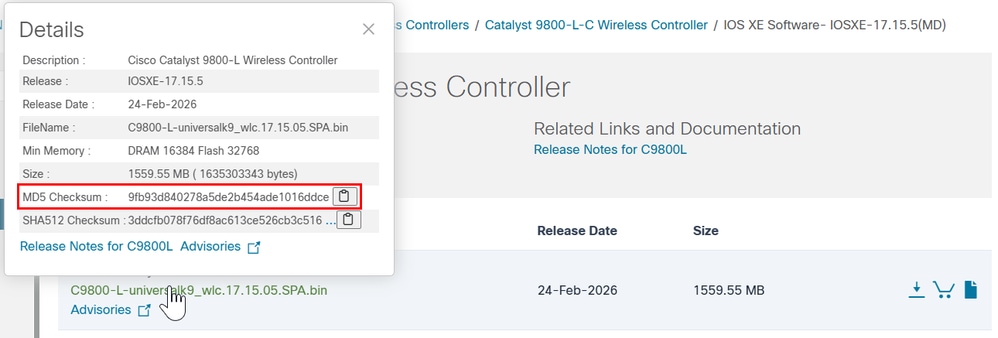
Schritt 5: Überprüfen Sie die aktuelle Boot-Variable. Wenn die Variable auf packages.confeingestellt ist, läuft der WLC derzeit im Installationsmodus. Um in den Paketmodus zu konvertieren, löschen Sie die vorhandene Boot-Variable, und legen Sie das .bin-Image als neue Boot-Variable fest. Sie müssen die Konfiguration nach diesen Änderungen speichern. Andernfalls bleibt die neue Boot-Variable nach einem Neuladen nicht erhalten.
WLC#show bootvar
BOOT variable = bootflash:packages.conf,12;
CONFIG_FILE variable =
BOOTLDR variable does not exist
Configuration register is 0x2102
WLC#conf t
WLC(config)#no boot system
WLC(config)#do write
WLC(config)#boot system bootflash:C9800-L-universalk9_wlc.17.15.05.SPA.bin
WLC(config)#do write
WLC(config)#end
Schritt 6. Führen Sie diesen Befehl aus, um zu überprüfen, ob die Boot-Variable auf bootflash:gesetzt ist.
Die Ausgabe wird nun angezeigt. BOOT variable = bootflash:
WLC#show bootvar
BOOT variable = bootflash:C9800-L-universalk9_wlc.17.15.05.SPA.bin,12;
CONFIG_FILE variable does not exist
BOOTLDR variable does not exist
Configuration register is 0x102

Standby not ready to show bootvar
Schritt 7: Laden Sie den Controller neu, um im Paketmodus zu booten.
WLC#reload
Reload command is being issued on Active unit, this will reload the whole stack
Proceed with reload? [confirm]
Schritt 8: Überwachen Sie den WLC-Initialisierungsprozess, um sicherzustellen, dass er im Paketmodus startet.
...
32768K bytes of non-volatile configuration memory.
16777216K bytes of physical memory.
26251263K bytes of eUSB flash at bootflash:.
0K bytes of Cloud S3 Storage at cloudfs:.

Base Ethernet MAC Address : FF:FF:FF:FF:FF:FF

Installation mode is BUNDLE
GUI-Verfahren
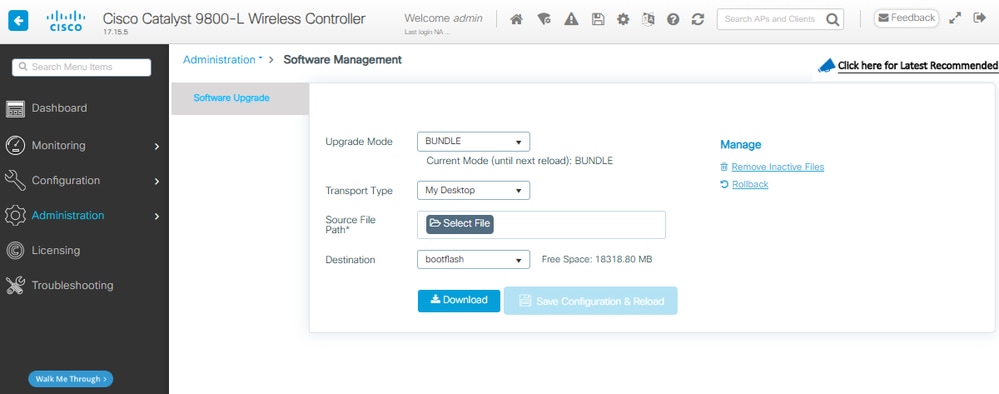
Schritt 1: Überprüfen des aktuellen Modus Navigieren Sie zu Administration > Software Management > Software Upgrade, und überprüfen Sie, ob der Aktualisierungsmodus anzeigt, dass sich das System derzeit im Installationsmodus befindet.
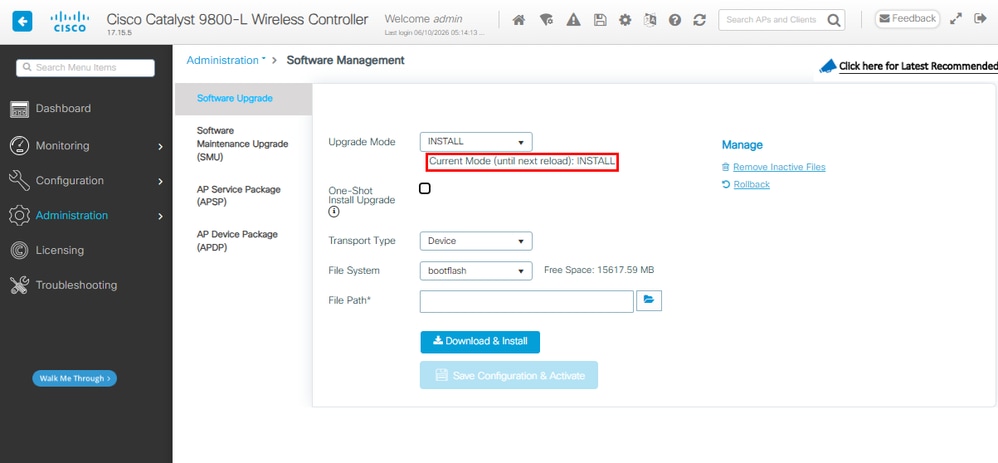
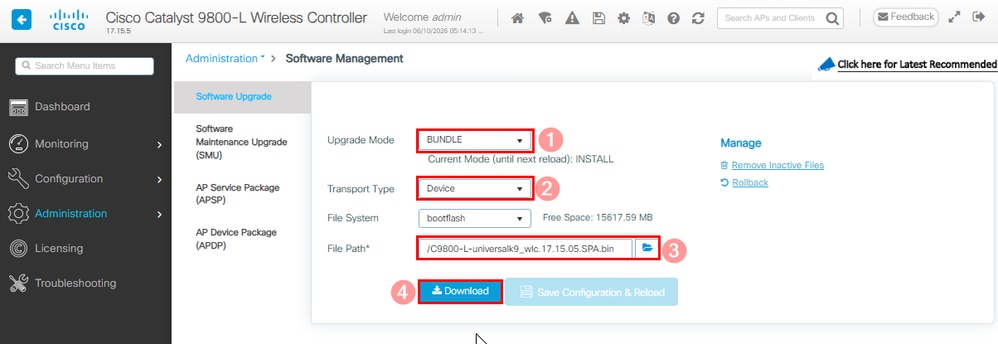
Schritt 2: Klicken Sie auf die Dropdown-Liste unter Upgrade Mode (Aktualisierungsmodus) und Select Bundle (Paket auswählen). Wählen Sie dann den Transporttyp und dann den Dateipfad für die .bin-Datei gefolgt von Download.
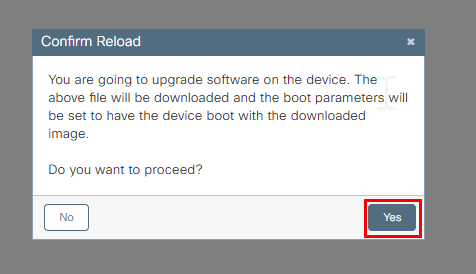
Schritt 3: Bestätigen Sie die Zustimmung zum erneuten Laden des Systems. In diesem Moment wird die Umwandlung in den Paketmodus gestartet.
Schritt 4: Überwachen Sie das Upgrade auf der rechten Seite des Abschnitts "Status" und im Popup-Fenster "Protokolle anzeigen".
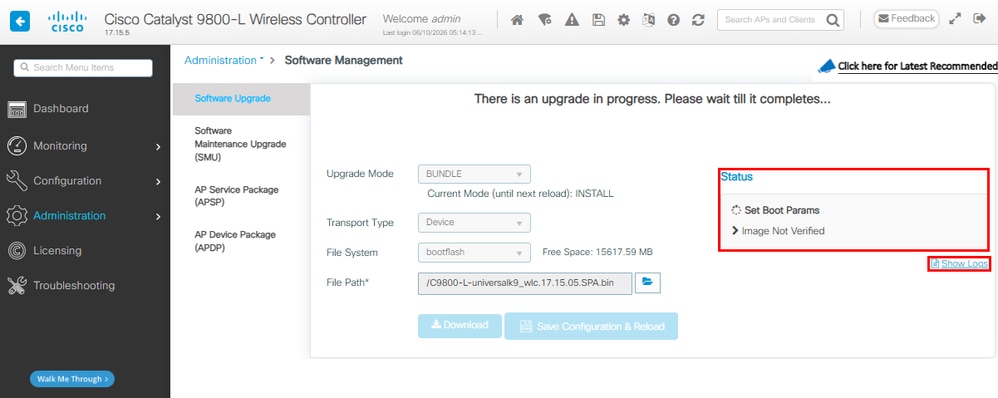
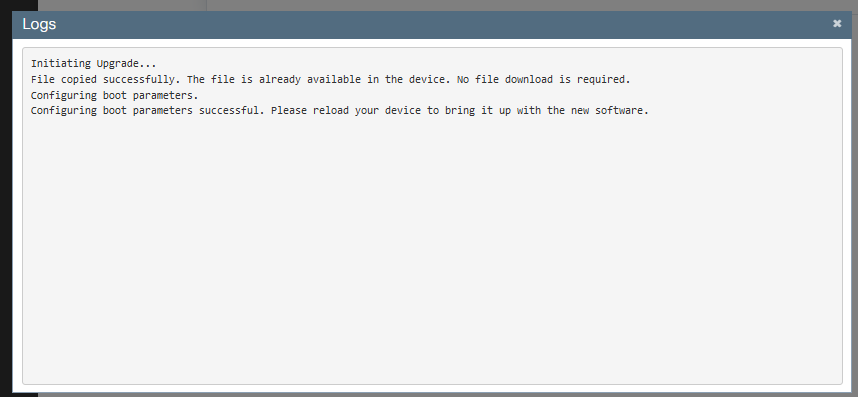
Schritt 5: Überprüfen Sie das Image.
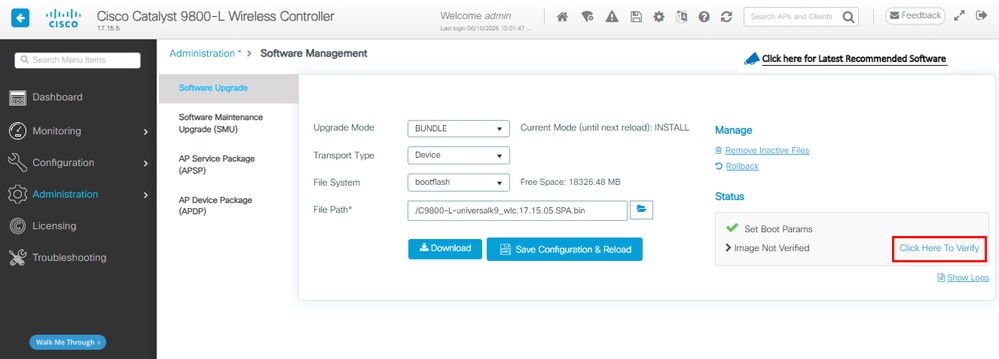
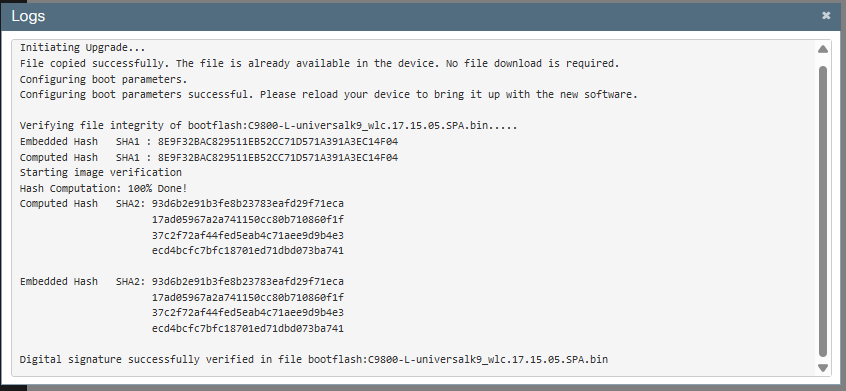
Schritt 6: Speichern Sie die Konfiguration, und bestätigen Sie das Neuladen.
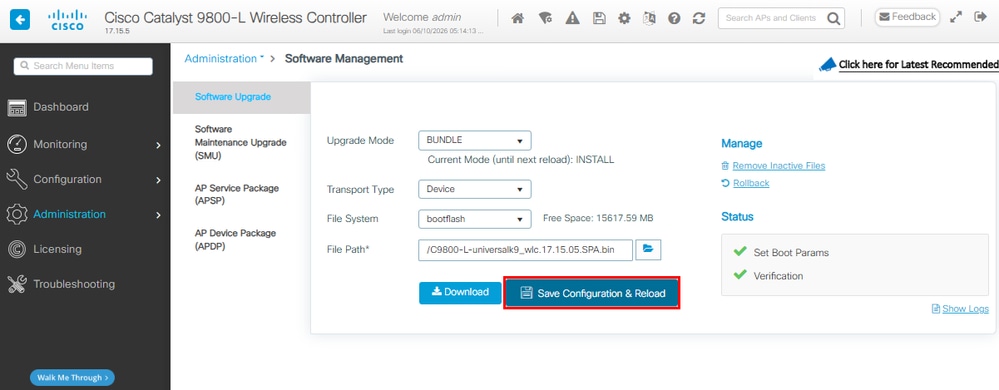
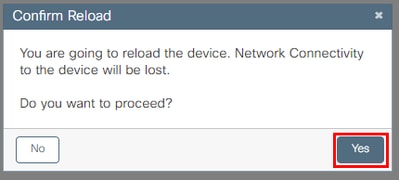
Schritt 7: Überwachen Sie den erneuten Laden des WLC. Sobald die GUI verfügbar ist, navigieren Sie zu Administration > Software Management > Software Upgrade. Beachten Sie, dass der Aktualisierungsmodus anzeigt, dass das System derzeit im Paketmodus betrieben wird.
Vom Paket zum Installationsmodus
CLI-Verfahren
Schritt 1: Stellen Sie sicher, dass genügend Flash-Speicherplatz vorhanden ist, um ein neues Image zu erweitern.
WLC#dir bootflash: | i bytes free
26458804224 bytes total (9501368320 bytes free)
Schritt 2. Säubern Sie alte Installationsdateien, falls nicht genügend Platz vorhanden ist, und verwerfen Sie alte hinzugefügte Pakete.
WLC#install remove inactive
install_remove: START Tue Jun 09 21:21:34 Central 2026
install_remove: Removing IMG
Cleaning up unnecessary package files
No path specified, will use booted path /tmp/sw/isos/packages.conf

Cleaning /bootflash
Scanning boot directory for packages ... done.
Preparing packages list to delete ...
[R0]: /bootflash/packages.conf File is in use, will not delete.
[R0]: /bootflash/C9800-L-universalk9_wlc.17.15.05.SPA.bin File is in use, will not delete.
[R0]: /bootflash/C9800-L-universalk9_wlc.17.15.05.SPA.conf File is in use, will not delete.

The following files will be deleted:
[R0]: /bootflash/C9800-L-mono-universalk9_wlc.17.15.05.SPA.pkg
[R0]: /bootflash/C9800-L-rpboot.17.15.05.SPA.pkg

Do you want to remove the above files? [y/n]y

Deleting file /bootflash/C9800-L-mono-universalk9_wlc.17.15.05.SPA.pkg ... done.
Deleting file /bootflash/C9800-L-rpboot.17.15.05.SPA.pkg ... done.
SUCCESS: Files deleted.

--- Starting Post_Remove_Cleanup ---
Performing REMOVE_POSTCHECK on all members
Finished Post_Remove_Cleanup
SUCCESS: install_remove Tue Jun 09 21:22:08 Central 2026

WLC#dir bootflash: | i bytes free
26458804224 bytes total (19666468864 bytes free)
Schritt 3: Kopieren Sie das neue Image in den Flash-Speicher.
WLC#copy tftp: flash:
Address or name of remote host []? 10.152.200.238
Source filename []? C9800-L-universalk9_wlc.17.15.05.SPA.bin
Destination filename [C9800-L-universalk9_wlc.17.15.05.SPA.bin]?
Accessing tftp://10.152.200.238/C9800-L-universalk9_wlc.17.15.05.SPA.bin...
Loading C9800-L-universalk9_wlc.17.15.05.SPA.bin from 10.152.200.238 (via Vlan210): !!!!!!!!!!!!!!!!!!!!!!!!!!!!!!!!!!!!!!!!!!
Schritt 4: Bestätigen Sie, dass das Image erfolgreich in den Flash-Speicher kopiert wurde, und überprüfen Sie die Integrität des Images.
WLC#dir bootflash:*.bin
Directory of bootflash:/*.bin
Directory of bootflash:/
 95 -rw- 1635303343 Jun 5 2026 23:24:36 +00:00 C9800-L-universalk9_wlc.17.15.05.SPA.bin.SPA.bin

WLC#verify /md5 bootflash:C9800-L-universalk9_wlc.17.15.05.SPA.bin
........................................................................
........................................................................
........................................................................
........................................................................Done!
verify /md5 (bootflash:C9800-L-universalk9_wlc.17.15.05.SPA.bin) = 9fb93d840278a5de2b454ade1016ddce
Vergleichen Sie das Ergebnis mit der MD5-Prüfsumme in den Versionsinformationen für das Zielabbild auf der Cisco Software Download Site, die Werte müssen genau übereinstimmen.
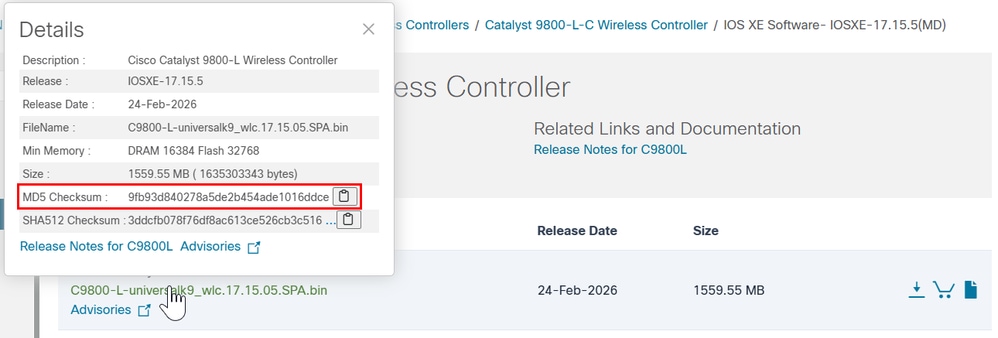
Schritt 5: Überprüfen Sie die aktuelle Boot-Variable. Wenn die Variable auf eine .bin-Datei zeigt, wird das System derzeit im Paketmodus ausgeführt. In diesem Schritt ist keine manuelle Konfiguration der Bootvariable erforderlich. während des Upgrades automatisch auf aktualisiert wird bootflash:packages.conf.
WLC#show bootvar
BOOT variable = bootflash:C9800-L-universalk9_wlc.17.15.05.SPA.bin,12;
CONFIG_FILE variable does not exist
BOOTLDR variable does not exist
Configuration register is 0x102
Standby not ready to show bootvar
Schritt 6: Software-Installations-Image zu Flash. Verwenden Sie für die Umwandlung von Paket in Installationsmodus den Befehl One-Shot CLI install add file bootflash:.
WLC#install add file bootflash:C9800-L-universalk9_wlc.17.15.05.SPA.bin activate commit
Schritt 7: Geben Sie y (yes) für die Zustimmung zum erneuten Laden des Systems ein. Nach Abschluss der Installation wird der Controller neu geladen.
install_add_activate_commit: START Mon Jun 08 22:53:20 Central 2026
install_add: START Mon Jun 08 22:53:20 Central 2026
install_add: Adding IMG
--- Starting initial file syncing ---
Copying bootflash:C9800-L-universalk9_wlc.17.15.05.SPA.bin from Chassis 1/R0 to Chassis 1/R0
Info: Finished copying to the selected Chassis
Finished initial file syncing

--- Starting Add ---
Performing Add on all members
Checking status of Add on [1/R0]
Add: Passed on [1/R0]
Image added. Version: 17.15.05.0.8370

Finished Add

install_activate: START Mon Jun 08 22:53:59 Central 2026
install_activate: Activating IMG
Following packages shall be activated:
/bootflash/C9800-L-mono-universalk9_wlc.17.15.05.SPA.pkg
/bootflash/C9800-L-rpboot.17.15.05.SPA.pkg

This operation may require a reload of the system. Do you want to proceed? [y/n]y

--- Starting Activate ---
Performing Activate on all members
[1] Activate package(s) on Chassis 1/R0
[1] Finished Activate on Chassis 1/R0
Checking status of Activate on [1/R0]
Activate: Passed on [1/R0]
Finished Activate

--- Starting Commit ---
Performing Commit on all members
[1] Commit package(s) on Chassis 1/R0
[1] Finished Commit on Chassis 1/R0
Checking status of Commit on [1/R0]
Commit: Passed on [1/R0]
Finished Commit operation

SUCCESS: install_add_activate_commit Mon Jun 08 22:55:34 Central 2026

Initializing Hardware ...
Schritt 8: Überwachen Sie den WLC-Initialisierungsprozess, um sicherzustellen, dass er im Installationsmodus gestartet wird.
...
32768K bytes of non-volatile configuration memory.
16777216K bytes of physical memory.
26251263K bytes of eUSB flash at bootflash:.
0K bytes of Cloud S3 Storage at cloudfs:.

Base Ethernet MAC Address : FF:FF:FF:FF:FF:FF

Installation mode is INSTALL
GUI-Verfahren
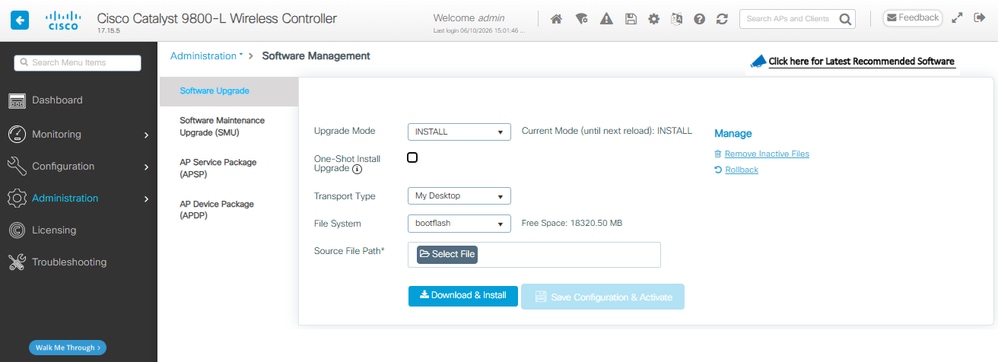
Schritt 1: Überprüfen des aktuellen Modus Navigieren Sie zu Administration > Software Management > Software Upgrade, und überprüfen Sie, ob der Aktualisierungsmodus anzeigt, dass sich das System derzeit im Paketmodus befindet.
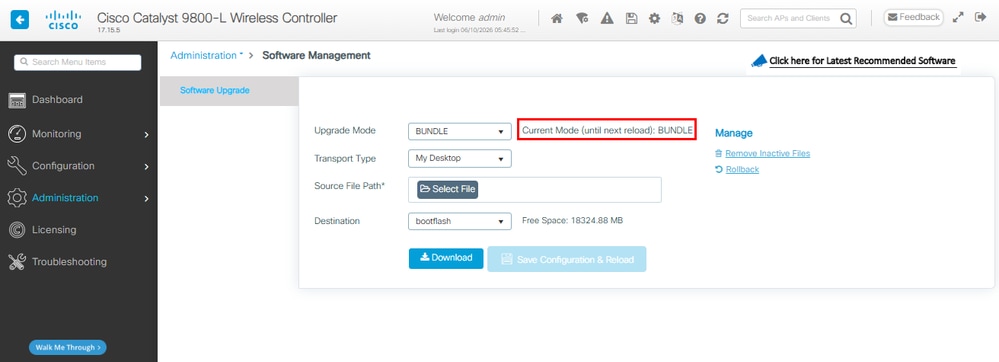
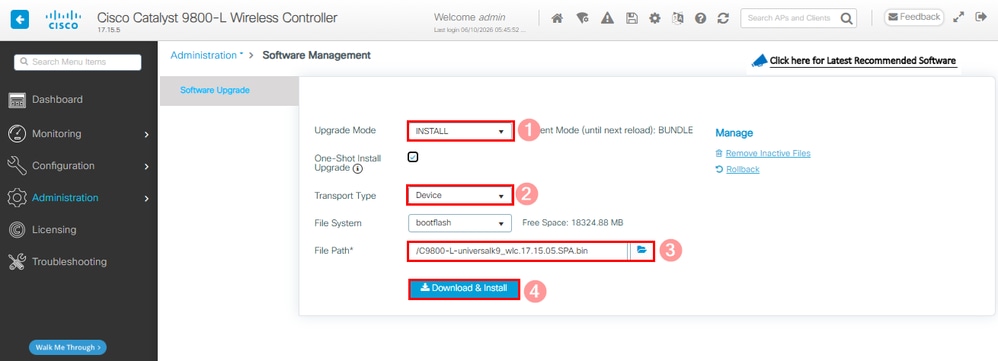
Schritt 2: Klicken Sie auf die Dropdown-Liste unter Upgrade Mode (Aktualisierungsmodus), und wählen Sie Install (Installieren). Wählen Sie dann den Transporttyp und anschließend den Dateipfad für die .bin-Datei, gefolgt von Download und Installation.
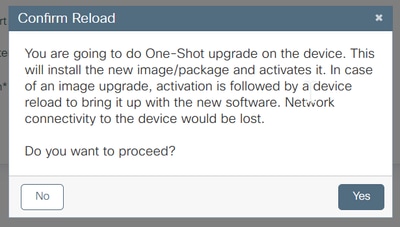
Schritt 3: Bestätigen Sie die Zustimmung zum erneuten Laden des Systems. In diesem Moment startet die Umwandlung in den Installationsmodus.
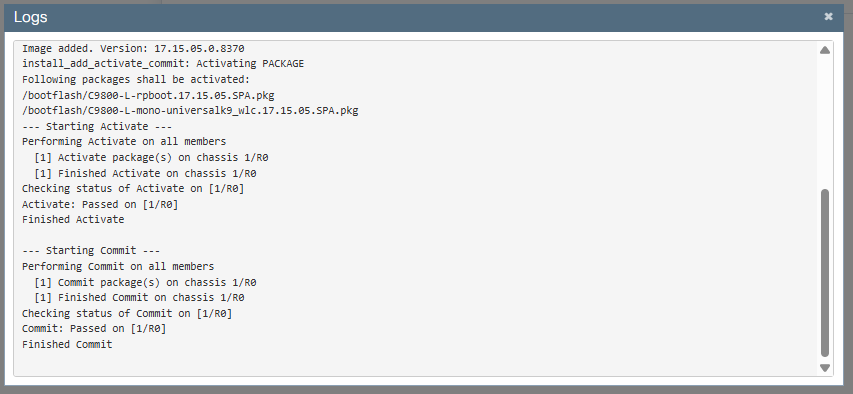
Schritt 4: Überwachen Sie das Upgrade auf der rechten Seite des Abschnitts "Status" und im Popup-Fenster "Protokolle anzeigen".
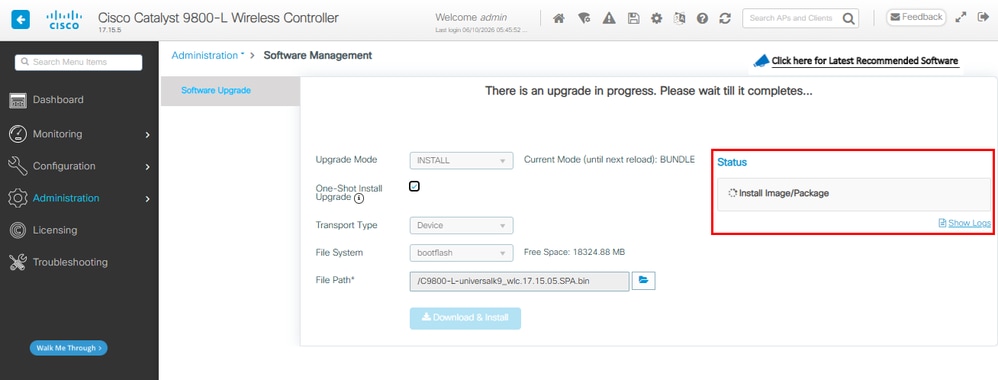
Das System wird im Rahmen des Änderungscommit neu geladen.
Schritt 5: Überwachen Sie den erneuten Laden des WLC. Sobald die GUI verfügbar ist, navigieren Sie zu Administration > Software Management > Software Upgrade. Beachten Sie, dass der Aktualisierungsmodus anzeigt, dass sich das System derzeit im Installationsmodus befindet.
Überprüfung
Nutzen Sie diesen Abschnitt, um zu überprüfen, ob Ihre Konfiguration ordnungsgemäß funktioniert.
Nach dem Neustart des Controllers können Sie den aktuellen Installationsmodus des Controllers überprüfen. Führen Sie den show version Befehl aus, um zu bestätigen, dass die Konvertierung erfolgreich war.
Installationsmodus
WLC#show version | include System image|Installation mode|IOS XE Software
Cisco IOS XE Software, Version 17.15.05
System image file is "bootflash:packages.conf"
Installation mode is INSTALL
Paketmodus
WLC#show version | include System image|Installation mode|IOS XE Software
Cisco IOS XE Software, Version 17.15.05
System image file is "bootflash:/C9800-L-universalk9_wlc.17.15.05.SPA.bin"
Installation mode is BUNDLE
Fehlerbehebung
Es sind derzeit keine spezifischen Informationen zur Fehlerbehebung für diese Konfiguration verfügbar.
Zugehörige Informationen
- Cisco Catalyst 9800-CL Cloud Wireless Controller - Installationshandbuch
- TAC-Empfehlungen für IOS XE Builds für Wireless LAN Controller
- Benutzerhandbuch
- Technischer Support und Downloads von Cisco
Revisionsverlauf
| Überarbeitung | Veröffentlichungsdatum | Kommentare |
|---|---|---|
3.0 |
11-Jun-2026
|
Alternativer Text hinzugefügt.
Aktualisierte Stilanforderungen und Formatierung. |
2.0 |
30-Nov-2023
|
Rezertifizierung |
1.0 |
15-Apr-2021
|
Erstveröffentlichung |

 Feedback
Cisco kontaktieren
- Eine Supportanfrage öffnen

- (Erfordert einen Cisco Servicevertrag)