Fehlerbehebung bei externem DHCP auf EVPN VxLAN Cat9000
Inhalt
Einleitung
In diesem Dokument wird die Fehlerbehebung bei DHCP-Problemen in externen EVPN-VxLAN-Umgebungen auf Cat9000-Plattformen beschrieben.
Voraussetzungen
Anforderungen
Cisco empfiehlt, dass Sie über Kenntnisse in folgenden Bereichen verfügen:
- Virtuelles erweiterbares LAN auf Catalyst 9000-Plattformen
- Discovery Host Configuration Protocols in VxLAN-Umgebungen
- Border Gateway Protocol (BGP)
Weitere Informationen zu diesen Themen finden Sie unter:
- Kapitel: Konfigurieren des DHCP-Relays in einem BGP EVPN VXLAN Fabric CAT9300
- Kapitel: Konfigurieren des DHCP-Relays in einem BGP EVPN VXLAN Fabric CAT9400
- Kapitel: Konfigurieren des DHCP-Relays in einem BGP EVPN VXLAN Fabric CAT9500
- Kapitel: Konfigurieren des DHCP-Relays in einem BGP EVPN VXLAN Fabric CAT9600
Verwendete Komponenten
Die Informationen in diesem Dokument basieren auf der Cisco IOS XE Software.
Die Informationen in diesem Dokument beziehen sich auf Geräte in einer speziell eingerichteten Testumgebung. Alle Geräte, die in diesem Dokument benutzt wurden, begannen mit einer gelöschten (Nichterfüllungs) Konfiguration. Wenn Ihr Netzwerk in Betrieb ist, stellen Sie sicher, dass Sie die möglichen Auswirkungen aller Befehle kennen.
Netzwerkdiagramm
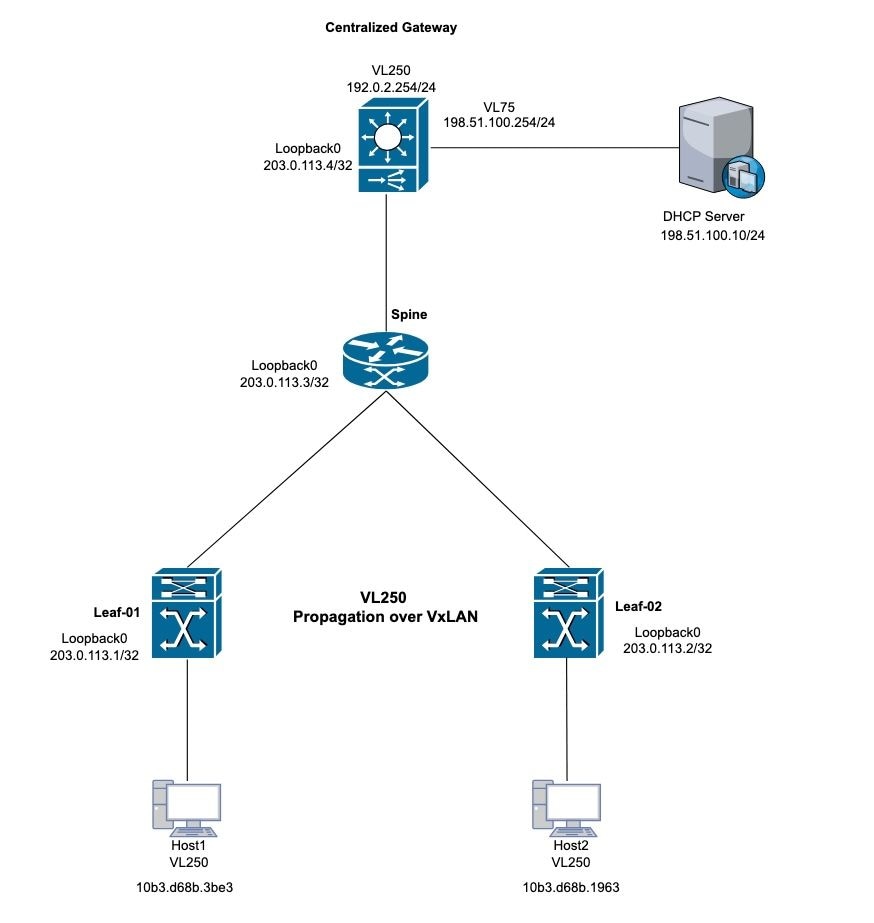 DHCP VxLAN-Topologie
Anwenderbericht 1: Keine IP-Adresse vom externen Server (zentrales Gateway innerhalb der Fabric)
Diese Topologie verwendet VxLAN Layer 2 für VLAN 250. Der Host benötigt IP-Adressen vom externen DHCP-Server.
LEAF-01-Verifizierung
Schritt 1: Überprüfen Sie auf Leaf-1, ob die MAC-Adresse von den lokalen Hosts gelernt wurde.
Schritt 2: Überprüfen Sie außerdem, ob die standardmäßige Gateway-MAC-Adresse abgefragt wurde. Stellen Sie sicher, dass sowohl die ermittelten MAC-Adressen als auch die IP-Adresse des Standard-Gateways korrekt als Einträge in der BGP-Tabelle installiert sind.
Leaf-1#show mac address-table address 10b3.d68b.3be3 (host mac address)
            Mac Address Table
-------------------------------------------

Vlan    Mac Address     Type     Ports
----   -----------      -------- -----
250    10b3.d68b.3be3   DYNAMIC  Twe1/0/1

Centralized-Gateway#show interface vlan 250 | include bia (remote mac address)
Hardware is Ethernet SVI, address is 3473.2db8.bee3 (bia 3473.2db8.bee3)
Leaf-1#show bgp l2vpn evpn 10b3.d68b.3be3 (local mac address)
BGP routing table entry for [2][203.0.113.1:250][0][48][10B3D68B3BE3][0][*]/20, version 3
Paths: (1 available, best #1, table evi_250)
 Advertised to update-groups:
    2
Refresh Epoch 1
Local
  0.0.0.0 (via default) from 0.0.0.0 (203.0.113.1)
    Origin incomplete, localpref 100, weight 32768, valid, sourced, local, best
    EVPN ESI: 00000000000000000000, Label1 10250
    Extended Community: RT:10:250 ENCAP:8
    Local irb vxlan vtep:
     vrf:not found, l3-vni:0
     local router mac:0000.0000.0000
     core-irb interface:(not found)
     vtep-ip:203.0.113.1
   rx pathid: 0, tx pathid: 0x0
   Updated on Oct 14 2025 22:27:32 UTC

Leaf-1#show bgp l2vpn evpn 3473.2db8.bee3 (remote mac address)
BGP routing table entry for [2][203.0.113.1:250][0][48][34732DB8BEE3][32][192.0.2.254]/24, version 9
Paths: (1 available, best #1, table evi_250)
  Flag: 0x100
  Not advertised to any peer
  Refresh Epoch 4
  Local, imported path from [2][203.0.113.4:250][0][48][34732DB8BEE3][32][192.0.2.254]/24 (global)
    203.0.113.4 (metric 3) (via default) from 203.0.113.3 (203.0.113.3)
      Origin incomplete, metric 0, localpref 100, valid, internal, best
      EVPN ESI: 00000000000000000000, Label1 10250
      Extended Community: RT:10:250 ENCAP:8 EVPN DEF GW:0:0
      Originator: 203.0.113.4, Cluster list: 203.0.113.3
      rx pathid: 0, tx pathid: 0x0
      Updated on Oct 14 2025 14:48:35 UTC
BGP routing table entry for [2][203.0.113.4:250][0][48][34732DB8BEE3][32][192.0.2.254]/24, version 8
Paths: (1 available, best #1, table EVPN-BGP-Table)
  Flag: 0x100
  Not advertised to any peer
  Refresh Epoch 4
  Local
    203.0.113.4 (metric 3) (via default) from 203.0.113.3 (203.0.113.3)
      Origin incomplete, metric 0, localpref 100, valid, internal, best
      EVPN ESI: 00000000000000000000, Label1 10250
      Extended Community: RT:10:250 ENCAP:8 EVPN DEF GW:0:0
      Originator: 203.0.113.4, Cluster list: 203.0.113.3
      rx pathid: 0, tx pathid: 0x0
      Updated on Oct 14 2025 14:48:35 UTC
Schritt 3: Validieren Sie die MAC-Adressenzuweisung zwischen Leaf-1 und dem Standard-Gateway. Leaf-1 erfasst lokale MAC-Adressen über den Trunk-Port und Remote-MAC-Adressen über BGP.
Leaf-1#show l2route evpn mac
EVI         ETag  Prod    Mac Address                                          Next Hop(s) Seq Number
----- ---------- ----- -------------- ---------------------------------------------------- ----------
250            0 L2VPN 10b3.d68b.3b81                                         Twe1/0/1:250          0
250            0 L2VPN 10b3.d68b.3be3                                         Twe1/0/1:250          0 (Host local mac address)
250            0   BGP 3473.2db8.bee3                                  V:10250 203.0.113.4          0 (CGW SVI mac address)
Schritt 4: Überprüfen Sie die Standardgateway-Lernfunktion für den Leaf-1-Switch in der L2VPN-EVPN-Instanz.
Leaf-1#show l2vpn evpn default-gateway
Valid Default Gateway Address                  EVI  VLAN  MAC Address    Source
----- --------------------------------------- ----- ----- -------------- -----------
Y     192.0.2.254                             250   250   3473.2db8.bee3 203.0.113.4
Schritt 5: Wenn die VxLAN-Perspektive richtig ist, fahren Sie mit DHCP zur Fehlerbehebung fort.
Schritt 6: Bestätigen Sie den DORA-Prozess von Leaf-1 zum DHCP-Gateway. Aktivieren Sie auf Leaf-01 das Debuggen des ip dhcp-Snooping-Pakets, und überprüfen Sie, ob die Erkennung Protokolleinträge generiert. Wenn keine Protokollgenerierung erfolgt, aktivieren Sie die Paketerfassung an der Schnittstelle, die mit dem PC verbunden ist.
Leaf-1#debug ip dhcp snooping packet
DHCP Snooping Packet debugging is on
Leaf-1#
*Oct 21 19:33:16.358: DHCP_SNOOPING: received new DHCP packet from input interface (TwentyFiveGigE1/0/1)
*Oct 21 19:33:16.358: DHCP Memory dump is printed for process packet
<snip>
*Oct 21 19:33:16.367: DHCP_SNOOPING: process new DHCP packet, message type: DHCPDISCOVER, input interface: Twe1/0/1, MAC da: ffff.ffff.ffff, MAC sa: 10b3.d68b.3be3, IP da: 255.255.255.255, IP sa: 0.0.0.0, DHCP ciaddr: 0.0.0.0, DHCP yiaddr: 0.0.0.0, DHCP siaddr: 0.0.0.0, DHCP giaddr: 0.0.0.0, DHCP chaddr: 10b3.d68b.3be3, efp_id: -1865499306, vlan_id: 250, bootpflag:0x32768(Broadcast)
*Oct 21 19:33:16.367: DHCP_SNOOPING: add relay information option.
*Oct 21 19:33:16.367: DHCP_SNOOPING: Encoding opt82 CID in vlan-mod-port format
*Oct 21 19:33:16.367: DHCP_SNOOPING:VxLAN : vlan_id 250 VNI 10250 mod 1 port 1
*Oct 21 19:33:16.367: DHCP_SNOOPING: Encoding opt82 RID in MAC address format
*Oct 21 19:33:16.367: DHCP_SNOOPING: binary dump of relay info option, length: 26 data:
0x52 0x18 0x1 0xC 0x1 0xA 0x0 0x8 0x0 0x0 0x28 0xA 0x1 0x1 0x0 0x0 0x2 0x8 0x0 0x6 0x4C 0x5D 0x3C 0xEB 0x43 0x40
*Oct 21 19:33:16.367: DHCPS BRIDGE PAK: vlan=250 platform_flags=1
*Oct 21 19:33:16.367: DHCP_SNOOPING: bridge packet get invalid mat entry: FFFF.FFFF.FFFF, packet is flooded to ingress VLAN: (250)
*Oct 21 19:33:16.367: DHCP_SNOOPING: L2RELAY: sent unicast packet to default gw: 3473.2db8.bee3 vlan 0 src intf TwentyFiveGigE1/0/1
*Oct 21 19:33:20.058: DHCP_SNOOPING: received new DHCP packet from input interface (TwentyFiveGigE1/0/1)
*Oct 21 19:33:20.058: DHCP Memory dump is printed for process packet
Schritt 7: Wenn das Debuggen nicht ausgelöst wird, führen Sie eine Paketerfassung zur Validierung durch. Verwenden Sie die angegebene Syntax, um eingehende Ermittlungspakete zu erfassen:
monitor capture <name> interface <int> in match ipv4 protocol udp any range 67 68 any range 67 68 start
monitor capture <name> stop
monitor capture export file flash:<name>.pcap
show monitor capture <name> buffer display-filter "eth.addr==[mac address]" detailed

Anmerkung: Erfassen Sie die Anzeigefilterzeichenfolgen, die der Wireshark-Filtersyntax entsprechen.
Leaf-1#monitor capture cap interface twe1/0/1 in match ipv4 protocol udp any range 67 68 any range 67 68 start
Started capture point : cap
Leaf-1#
*Oct 21 22:57:04.719: %BUFCAP-6-ENABLE: Capture Point cap enabled.
Leaf-1#
Leaf-1#monitor capture cap stop
Capture statistics collected at software:
        Capture duration - 96 seconds
        Packets received - 10
        Packets dropped - 0
        Packets oversized - 0

Bytes dropped in asic - 0

Capture buffer will exists till exported or cleared

Stopped capture point : cap

*Oct 21 22:58:40.810: %BUFCAP-6-DISABLE: Capture Point cap disabled.

Leaf-1#show monitor capture cap buffer display-filter "eth,addr==10:b3:d6:8b:3b:e3" detailed
Starting the packet display ........ Press Ctrl + Shift + 6 to exit
Frame 1: 371 bytes on wire (2968 bits), 371 bytes captured (2968 bits) on interface /tmp/epc_ws/wif_to_ts_pipe, id 0
    Interface id: 0 (/tmp/epc_ws/wif_to_ts_pipe)
        Interface name: /tmp/epc_ws/wif_to_ts_pipe
    Encapsulation type: Ethernet (1)
    Arrival Time: Oct 21, 2025 22:57:07.843851000 UTC
     [Time shift for this packet: 0.000000000 seconds]
    Epoch Time: 1761087427.843851000 seconds
  <snip>
    [Protocols in frame: eth:ethertype:vlan:ethertype:ip:udp:dhcp]
Ethernet II, Src: 10:b3:d6:8b:3b:e3 (10:b3:d6:8b:3b:e3), Dst: ff:ff:ff:ff:ff:ff (ff:ff:ff:ff:ff:ff)
   Destination: ff:ff:ff:ff:ff:ff (ff:ff:ff:ff:ff:ff)
       Address: ff:ff:ff:ff:ff:ff (ff:ff:ff:ff:ff:ff)
       .... ..1. .... .... .... .... = LG bit: Locally administered address (this is NOT the factory default)
       .... ...1 .... .... .... .... = IG bit: Group address (multicast/broadcast)
   Source: 10:b3:d6:8b:3b:e3 (10:b3:d6:8b:3b:e3)
       Address: 10:b3:d6:8b:3b:e3 (10:b3:d6:8b:3b:e3)
       .... ..0. .... .... .... .... = LG bit: Globally unique address (factory default)
       .... ...0 .... .... .... .... = IG bit: Individual address (unicast)
   Type: 802.1Q Virtual LAN (0x8100)
802.1Q Virtual LAN, PRI: 0, DEI: 0, ID: 250
    000. .... .... .... = Priority: Best Effort (default) (0)
    ...0 .... .... .... = DEI: Ineligible
    .... 0000 1111 1010 = ID: 250
Type: IPv4 (0x0800)

<snip>

User Datagram Protocol, Src Port: 68, Dst Port: 67
    Source Port: 68
    Destination Port: 67
    Length: 333
    Checksum: 0xdf55 [unverified]
    [Checksum Status: Unverified]
    [Stream index: 0]
    [Timestamps]
        [Time since first frame: 0.000000000 seconds]
        [Time since previous frame: 0.000000000 seconds]
Dynamic Host Configuration Protocol (Discover)
Message type: Boot Request (1)
Hardware type: Ethernet (0x01)
Hardware address length: 6
Hops: 0
Transaction ID: 0x3bd7aadb
Seconds elapsed: 7
Bootp flags: 0x8000, Broadcast flag (Broadcast)
    1... .... .... .... = Broadcast flag: Broadcast
    .000 0000 0000 0000 = Reserved flags: 0x0000
Client IP address: 0.0.0.0
Your (client) IP address: 0.0.0.0
Next server IP address: 0.0.0.0
Relay agent IP address: 0.0.0.0
Client MAC address: 10:b3:d6:8b:3b:e3 (10:b3:d6:8b:3b:e3)
Client hardware address padding: 00000000000000000000
Server host name not given
Boot file name not given
Magic cookie: DHCP
Option: (53) DHCP Message Type (Discover)
<snip>
Schritt 8: Validieren der VxLAN-Paketkapselung über die Paketerfassung Wenden Sie verschiedene Filter für diese Validierung an. VxLAN verwendet den UDP-Port 4789.
monitor capture cap interface <outgoing interface > out match ipv4 protocol udp any any eq 4789 (Interface that is pointing to the RR or VTEP via BGP)
Leaf-1#show ip bgp all summary
For address family: L2VPN E-VPN
<snip>
Neighbor       V           AS MsgRcvd MsgSent    TblVer InQ OutQ Up/Down   State/PfxRcd
203.0.113.3     4           10    4204    4122       365   0    0 2d13h            2

Leaf-1#show ip route 203.0.113.3
Routing entry for 203.0.113.3/32
Known via "ospf 1", distance 110, metric 2, type intra area
Last update from 172.x.x.2 on TwentyFiveGigE1/0/2, 2d13h ago
Routing Descriptor Blocks:
* 172.x.x.2, from 203.0.113.3, 2d13h ago, via TwentyFiveGigE1/0/2

Leaf-1#monitor capture cap interface twe1/0/2 out match ipv4 protocol udp any any eq 4789 start
*Oct 21 23:51:07.689: %BUFCAP-6-ENABLE: Capture Point cap enabled.

Leaf-1#show monitor capture cap buffer display-filter "eth.addr==10:b3:d6:8b:3b:e3" detailed
Starting the packet display ........ Press Ctrl + Shift + 6 to exit

Frame 1: 443 bytes on wire (3544 bits), 443 bytes captured (3544 bits) on interface /tmp/epc_ws/wif_to_ts_pipe, id 0
    Interface id: 0 (/tmp/epc_ws/wif_to_ts_pipe)
        Interface name: /tmp/epc_ws/wif_to_ts_pipe
    Encapsulation type: Ethernet (1)
    Arrival Time: Oct 21, 2025 23:51:34.848693000 UTC
    [Time shift for this packet: 0.000000000 seconds]
    Epoch Time: 1761090694.848693000 seconds
   <snip>
   [Protocols in frame: eth:ethertype:ip:udp:vxlan:eth:ethertype:ip:udp:dhcp]
Ethernet II, Src: 00:00:00:00:00:00 (00:00:00:00:00:00), Dst: 00:00:00:00:00:00 (00:00:00:00:00:00)
    Destination: 00:00:00:00:00:00 (00:00:00:00:00:00)
        Address: 00:00:00:00:00:00 (00:00:00:00:00:00)
        .... ..0. .... .... .... .... = LG bit: Globally unique address (factory default)
        .... ...0 .... .... .... .... = IG bit: Individual address (unicast)
    Source: 00:00:00:00:00:00 (00:00:00:00:00:00)
        Address: 00:00:00:00:00:00 (00:00:00:00:00:00)
        .... ..0. .... .... .... .... = LG bit: Globally unique address (factory default)
        .... ...0 .... .... .... .... = IG bit: Individual address (unicast)
Type: IPv4 (0x0800)
Internet Protocol Version 4, Src: 203.0.113.1, Dst: 203.0.113.4
    0100 .... = Version: 4
    .... 0101 = Header Length: 20 bytes (5)
    Differentiated Services Field: 0x00 (DSCP: CS0, ECN: Not-ECT)
        0000 00.. = Differentiated Services Codepoint: Default (0)
        .... ..00 = Explicit Congestion Notification: Not ECN-Capable Transport (0)
<snip>
User Datagram Protocol, Src Port: 65479, Dst Port: 4789
    Source Port: 65479
    Destination Port: 4789
    Length: 409
    [Checksum: [missing]]
    [Checksum Status: Not present]
    [Stream index: 0]
    [Timestamps]
        [Time since first frame: 0.000000000 seconds]
        [Time since previous frame: 0.000000000 seconds]
Virtual eXtensible Local Area Network
Flags: 0x0800, VXLAN Network ID (VNI)
    0... .... .... .... = GBP Extension: Not defined
    .... .... .0.. .... = Don't Learn: False
    .... 1... .... .... = VXLAN Network ID (VNI): True
    .... .... .... 0... = Policy Applied: False
    .000 .000 0.00 .000 = Reserved(R): 0x0000
Group Policy ID: 0
VXLAN Network Identifier (VNI): 10250
Reserved: 0
<snip>
User Datagram Protocol, Src Port: 68, Dst Port: 67
    Source Port: 68
    Destination Port: 67
    Length: 359
    Checksum: 0x767d [unverified]
    [Checksum Status: Unverified]
    [Stream index: 1]
    [Timestamps]
         [Time since first frame: 0.000000000 seconds]
         [Time since previous frame: 0.000000000 seconds]
Dynamic Host Configuration Protocol (Discover)
    Message type: Boot Request (1)
    Hardware type: Ethernet (0x01)
    Hardware address length: 6
    Hops: 0
    Transaction ID: 0xd4c42ec1
    Seconds elapsed: 0
    Bootp flags: 0x8000, Broadcast flag (Broadcast)
        1... .... .... .... = Broadcast flag: Broadcast
        .000 0000 0000 0000 = Reserved flags: 0x0000
    Client IP address: 0.0.0.0
    Your (client) IP address: 0.0.0.0
    Next server IP address: 0.0.0.0
    Relay agent IP address: 0.0.0.0
    Client MAC address: 10:b3:d6:8b:3b:e3 (10:b3:d6:8b:3b:e3)
    Client hardware address padding: 00000000000000000000
    Server host name not given
    Boot file name not given
    Magic cookie: DHCP
Zentrales Gateway-Verifizierung
Schritt 1: Validieren Sie die vom BGP und den L2-EVPN-Routen bezogene Host-MAC-Adresse (dieser Schritt spiegelt das ursprüngliche Leaf-Verifizierungsverfahren wider).
Centralized-Gateway#show bgp l2vpn evpn 10b3.d68b.3be3 (remote host mac address)
BGP routing table entry for [2][203.0.113.1:250][0][48][10B3D68B3BE3][0][*]/20, version 12
Paths: (1 available, best #1, table EVPN-BGP-Table)
  Not advertised to any peer
  Refresh Epoch 1
  Local
 203.0.113.1 (metric 3) (via default) from 203.0.113.3 (203.0.113.3) (learned via RR)
  Origin incomplete, metric 0, localpref 100, valid, internal, best
  EVPN ESI: 00000000000000000000, Label1 10250
  Extended Community: RT:10:250 ENCAP:8
  Originator: 203.0.113.1, Cluster list: 203.0.113.3
  rx pathid: 0, tx pathid: 0x0
  Updated on Oct 27 2025 17:53:37 UTC
BGP routing table entry for [2][203.0.113.4:250][0][48][10B3D68B3BE3][0][*]/20, version 14
Paths: (1 available, best #1, table evi_250)
  Not advertised to any peer
  Refresh Epoch 1
  Local, imported path from [2][203.0.113.1:250][0][48][10B3D68B3BE3][0][*]/20 (global)
    203.0.113.1 (metric 3) (via default) from 203.0.113.3 (203.0.113.3)
    Origin incomplete, metric 0, localpref 100, valid, internal, best
    EVPN ESI: 00000000000000000000, Label1 10250
    Extended Community: RT:10:250 ENCAP:8
    Originator: 203.0.113.1, Cluster list: 203.0.113.3
    rx pathid: 0, tx pathid: 0x0
    Updated on Oct 27 2025 17:53:37 UTC

Centralized-Gateway#show l2route evpn mac mac-address 10b3.d68b.3be3
EVI         ETag  Prod    Mac Address                                          Next Hop(s) Seq Number
----- ---------- ----- -------------- ---------------------------------------------------- ----------
250            0   BGP 10b3.d68b.3be3                                  V:10250 203.0.113.1          0
Schritt 2: Überprüfen der DHCP-Relay-Informationen und der DHCP-Snooping-Konfiguration auf dem zentralen Gateway
Centralized-Gateway#show running-config | section dhcp
ip dhcp-relay source-interface Loopback0
ip dhcp relay information option vpn
ip dhcp relay information option
ip dhcp compatibility suboption link-selection standard
ip dhcp compatibility suboption server-override standard
ip dhcp snooping vlan 250
ip dhcp snooping
Schritt 3: Überprüfen der Verbindung zum DHCP-Server und Senden eines Pings von der VLAN 250-Schnittstelle
Centralized-Gateway#ping 198.51.100.10 source vlan 250
Type escape sequence to abort.
Sending 5, 100-byte ICMP Echos to 198.51.100.10, timeout is 2 seconds:
Packet sent with a source address of 192.0.2.254
!!!!!
Success rate is 100 percent (5/5), round-trip min/avg/max = 1/1/1 ms
Schritt 4: Führen Sie eine Paketerfassung durch, um zu überprüfen, ob die Erkennungsmeldungen von den Remote-Hosts das zentrale Gateway erreichen.
Centralized-Gateway#monitor capture cap interface vlan250 in match ipv4 protocol udp any range 67 68 any range 67 68
Centralized-Gateway#monitor capture cap start
Started capture point : cap
Centralized-Gateway#show monitor capture cap buffer display-filter "eth.addr==10:b3:d6:8b:3b:e3" detailed
Starting the packet display ........ Press Ctrl + Shift + 6 to exit

Frame 1: 401 bytes on wire (3208 bits), 401 bytes captured (3208 bits) on interface /tmp/epc_ws/wif_to_ts_pipe, id 0
    Interface id: 0 (/tmp/epc_ws/wif_to_ts_pipe)
        Interface name: /tmp/epc_ws/wif_to_ts_pipe
    Encapsulation type: Ethernet (1)
    Arrival Time: Oct 27, 2025 20:43:30.774923000 UTC
    [Time shift for this packet: 0.000000000 seconds]
    Epoch Time: 1761597810.774923000 seconds
 <snip>
    [Protocols in frame: eth:ethertype:cmd:ethertype:ip:udp:dhcp]
Ethernet II, Src: 10:b3:d6:8b:3b:e3 (10:b3:d6:8b:3b:e3), Dst: 34:73:2d:b8:be:e3 (34:73:2d:b8:be:e3)
    Destination: 34:73:2d:b8:be:e3 (34:73:2d:b8:be:e3)
        Address: 34:73:2d:b8:be:e3 (34:73:2d:b8:be:e3)
        .... ..0. .... .... .... .... = LG bit: Globally unique address (factory default)
        .... ...0 .... .... .... .... = IG bit: Individual address (unicast)
    Source: 10:b3:d6:8b:3b:e3 (10:b3:d6:8b:3b:e3)
        Address: 10:b3:d6:8b:3b:e3 (10:b3:d6:8b:3b:e3)
        .... ..0. .... .... .... .... = LG bit: Globally unique address (factory default)
        .... ...0 .... .... .... .... = IG bit: Individual address (unicast)
   Type: CiscoMetaData (0x8909)
<snip>
Internet Protocol Version 4, Src: 0.0.0.0, Dst: 255.255.255.255
    0100 .... = Version: 4
    .... 0101 = Header Length: 20 bytes (5)
    Differentiated Services Field: 0x00 (DSCP: CS0, ECN: Not-ECT)
        0000 00.. = Differentiated Services Codepoint: Default (0)
        .... ..00 = Explicit Congestion Notification: Not ECN-Capable Transport (0)
    Total Length: 379
    Identification: 0x0230 (560)
    Flags: 0x00
        0... .... = Reserved bit: Not set
        .0.. .... = Don't fragment: Not set
        ..0. .... = More fragments: Not set
    Fragment Offset: 0
    Time to Live: 255
    Protocol: UDP (17)
    Header Checksum: 0xb842 [validation disabled]
    [Header checksum status: Unverified]
    Source Address: 0.0.0.0
    Destination Address: 255.255.255.255
User Datagram Protocol, Src Port: 68, Dst Port: 67
    Source Port: 68
    Destination Port: 67
    Length: 359
    Checksum: 0x8f64 [unverified]
    [Checksum Status: Unverified]
    [Stream index: 0]
    [Timestamps]
        [Time since first frame: 0.000000000 seconds]
        [Time since previous frame: 0.000000000 seconds]
    UDP payload (351 bytes)
Dynamic Host Configuration Protocol (Discover)
    Message type: Boot Request (1)
    Hardware type: Ethernet (0x01)
    Hardware address length: 6
    Hops: 0
    Transaction ID: 0xf23af863
    Seconds elapsed: 0
    Bootp flags: 0x8000, Broadcast flag (Broadcast)
        1... .... .... .... = Broadcast flag: Broadcast
        .000 0000 0000 0000 = Reserved flags: 0x0000
    Client IP address: 0.0.0.0
    Your (client) IP address: 0.0.0.0
    Next server IP address: 0.0.0.0
    Relay agent IP address: 0.0.0.0
    Client MAC address: 10:b3:d6:8b:3b:e3 (10:b3:d6:8b:3b:e3)
    Client hardware address padding: 00000000000000000000
    Server host name not given
    Boot file name not given
    Magic cookie: DHCP
    Option: (53) DHCP Message Type (Discover)
        Length: 1
        DHCP: Discover (1)
    Option: (57) Maximum DHCP Message Size
        Length: 2
        Maximum DHCP Message Size: 1200
    Option: (61) Client identifier
        Length: 27
        Type: 0
    Client Identifier: cisco-10b3.d68b.3be3-Vl250
<snip>
Schritt 5: Führen Sie eine nachfolgende Paketerfassung auf dem Switch durch. Überprüfen Sie den Ausgang der Erkennung und den Eingang des Angebots.
Centralized-Gateway#no monitor capture cap
Centralized-Gateway#monitor capture cap interface vlan 75 both match ipv4 protocol udp any range 67 68 any range 67 68
Centralized-Gateway#monitor capture cap start
Started capture point : cap

Centralized-Gateway#monitor capture cap stop
Capture statistics collected at software:
        Capture duration - 78 seconds
        Packets received - 0
        Packets dropped - 0
        Packets oversized - 0
Bytes dropped in asic - 0
Schritt 6: Wenn bei der Paketerfassung keine Pakete angezeigt werden, fahren Sie mit dem DHCP-Debugging fort, und validieren Sie den Paketstatus auf der Plattform.
Centralized-Gateway#debug ip dhcp snooping packet
<snip>
*Oct 27 22:20:24.444: DHCP_SNOOPING: process new DHCP packet, message type: DHCPDISCOVER, input interface: Tu0, MAC da: 3473.2db8.bee3, MAC sa: 10b3.d68b.3be3, IP da: 255.255.255.255, IP sa: 0.0.0.0, DHCP ciaddr: 0.0.0.0, DHCP yiaddr: 0.0.0.0, DHCP siaddr: 0.0.0.0, DHCP giaddr: 0.0.0.0, DHCP chaddr: 10b3.d68b.3be3, efp_id: -1137609462, vlan_id: 250, bootpflag:0x32768(Broadcast)
*Oct 27 22:20:24.445: DHCPS BRIDGE PAK: vlan=250 platform_flags=1
*Oct 27 22:20:24.445: DHCP_SNOOPING: Packet destined to SVI Mac:3473.2db8.bee3
*Oct 27 22:20:24.445: DHCP_SNOOPING: bridge packet send packet to cpu port: Vlan250.
*Oct 27 22:20:24.445: DHCP_SNOOPING: bridge packet send packet to port: GigabitEthernet1/0/2, pak_vlan 250.
*Oct 27 22:20:27.952: DHCP_SNOOPING: received new DHCP packet from input interface (Tunnel0)
*Oct 27 22:20:27.952: DHCP Memory dump is printed for process packet.

Centralized-Gateway#debug ip dhcp server packet detail
*Oct 27 22:27:58.009: DHCPD: BOOTREQUEST from 0063.6973.636f.2d31.3062.332e.6436.3862.2e33.6265.332d.566c.3235.30 forwarded to 198.51.100.10.
*Oct 27 22:28:02.008: DHCPD: tableid for 192.0.2.254 on Vlan250 is 0
*Oct 27 22:28:02.008: DHCPD: client's VPN is .
*Oct 27 22:28:02.008: DHCPD: No option 125
*Oct 27 22:28:02.008: DHCPD: Option 124: Vendor Class Information
*Oct 27 22:28:02.008: DHCPD: Enterprise ID: 9
*Oct 27 22:28:02.008: DHCPD: Vendor-class-data-len: 13
*Oct 27 22:28:02.008: DHCPD: Data: 43393330304C2D3234502D3447
*Oct 27 22:28:02.008: DHCPD: Option 125 not present in the msg.
*Oct 27 22:28:02.008: DHCPD: Option 125 not present in the msg.
*Oct 27 22:28:02.008: DHCPD: Looking up binding using address 192.0.2.254
*Oct 27 22:28:02.008: DHCPD: setting giaddr to 192.0.2.254.
*Oct 27 22:28:02.008: DHCPD: relay information option before replacing suboptions
*Oct 27 22:28:02.008: DHCPD: 5218010c010a00080000280a01010000020800064c5d3ceb4340
*Oct 27 22:28:02.008: DHCPD: replacing suboptions in relay information option.
*Oct 27 22:28:02.008: DHCPD: relay information option content (add/replace):
*Oct 27 22:28:02.008: DHCPD: 52060504c00002fe
*Oct 27 22:28:02.008: DHCPD: giaddr changed to 203.0.113.4
Schritt 7: Überprüfen Sie, ob die Schnittstellen, die mit dem DHCP-Server verbunden sind, den angegebenen Befehl enthalten (dadurch wird verhindert, dass das DHCP-Paket verloren geht).
Centralized-Gateway#sh running-config interface gi1/0/2
Building configuration...

Current configuration : 149 bytes
!
interface GigabitEthernet1/0/2
description to L2_switch
switchport trunk allowed vlan 75,250
switchport mode trunk
ip dhcp snooping trust
end
Anmerkung: Der Befehl ip dhcp snooping trust gilt nur für Layer-2-Trunk-Schnittstellen.
Problemlösung
Die VxLAN-Konfiguration funktioniert wie erwartet. Der DHCP-Server-Relay sendet jedoch DHCP-Antworten an die IP-Adresse 203.0.113.4. Der DHCP-Server war für diese IP-Adresse nicht erreichbar. Diese fehlende Verbindung führte dazu, dass Unicast-Pakete am zentralen Gateway verloren gingen.
Um dieses Problem zu beheben, wurde eine neue Loopback 1-Schnittstelle konfiguriert und eine Route für die IP-Adresse eingerichtet, um die Verbindung mit dieser Loopback-Relay-Adresse herzustellen.
DHCP-Protokolle:
DHCP-Server#debug ip dhcp server packet detail
DHCP server packet detail debugging is on.
*Oct 28 00:23:43.464: DHCPD: DHCPDISCOVER received from client 0063.6973.636f.2d31.3062.332e.6436.3862.2e33.6265.332d.566c.3235.30 through relay 203.0.113.4.DHCPD: Setting only requested parameters
*Oct 28 00:23:43.464: DHCPD: Option 125 not present in the msg.
*Oct 28 00:23:43.465: DHCPD: egress Interfce GigabitEthernet0/0/4.75
*Oct 28 00:23:43.465: DHCPD: unicasting BOOTREPLY for client 10b3.d68b.3be3 to relay 203.0.113.4.

DHCP-Server#ping 203.0.113.4
Type escape sequence to abort.
Sending 5, 100-byte ICMP Echos to 203.0.113.4, timeout is 2 seconds:
.....
Success rate is 0 percent (0/5)
DHCP-Server#
Zentrales Gateway: Konfigurieren der Verbindung zur neuen Loopback-Schnittstelle für die Relay-Funktion
Centralized-Gateway#configure terminal
Enter configuration commands, one per line. End with CNTL/Z.
Centralized-Gateway(config)#interface loopback 1
Centralized-Gateway(config-if)#ip address 198.51.100.25 255.255.255.255
Centralized-Gateway(config-if)#router eigrp 1
Centralized-Gateway(config-router)#network 198.51.100.25 0.0.0.0
Centralized-Gateway(config-router)#exit
Centralized-Gateway(config)#no ip dhcp-relay source-interface Loopback0
Centralized-Gateway(config)#ip dhcp-relay source-interface Loopback1

DHCP-Server#ping 198.51.100.25
Type escape sequence to abort.
Sending 5, 100-byte ICMP Echos to 198.51.100.25, timeout is 2 seconds:
!!!!!
Success rate is 100 percent (5/5), round-trip min/avg/max = 1/2/9 ms
DHCP-Server#
Anwenderbericht 2: Keine IP-Adresse vom externen Server (zentrales Gateway außerhalb der Fabric)
Diese Topologie verwendet VXLAN Layer 2 für VLAN 250. Der Host bezieht seine IP-Adresse von einem externen DHCP-Server, der sich außerhalb der Fabric befindet.
 Externe DHCP-VxLAN-Topologie
LEAF-01-Verifizierung
Schritt 1: Überprüfen Sie auf Leaf-1 die korrekte Ankündigung auf dem Standardgateway. Da sich der DHCP-Server außerhalb der VxLAN-Struktur befindet, ist dies eine Grundvoraussetzung für die korrekte Funktion der IP-Adresszuweisung.
Leaf-1#show l2vpn evpn default-gateway
Valid Default Gateway Address EVI VLAN MAC Address Source
----- --------------------------------------- ----- ----- -------------- -----------
Schritt 2: Wenn die vorherige Ausgabe leer ist, fahren Sie mit der DHCP-Fehlerbehebung fort. Überprüfen Sie, ob die relevanten DHCP-Snooping-Konfigurationen auf den Leaf-Geräten vorhanden sind.
Leaf-1#show running-config | section dhcp
ip dhcp relay information option vpn
ip dhcp relay information option
ip dhcp compatibility suboption link-selection standard
ip dhcp compatibility suboption server-override standard
ip dhcp snooping vlan 250
ip dhcp snooping
Leaf-2#show running-config | section dhcp
ip dhcp relay information option vpn
ip dhcp relay information option
ip dhcp compatibility suboption link-selection standard
ip dhcp compatibility suboption server-override standard
ip dhcp snooping vlan 250
ip dhcp snooping
Schritt 3: Wenn ein Gerät aktiv eine IP-Adresse mithilfe von DHCP anfordert, aktivieren Sie den entsprechenden Debugging-Befehl, um den Paketstatus auf der Plattform zu validieren.
*Dec 6 22:42:19.568: DHCP_SNOOPING: received new DHCP packet from input interface (TwentyFiveGigE1/0/1)
*Dec 6 22:42:19.568: DHCP Memory dump is printed for process packet
<snip>
*Dec 6 22:42:19.578: DHCP_SNOOPING: process new DHCP packet, message type: DHCPDISCOVER, input interface: Twe1/0/1, MAC da: ffff.ffff.ffff, MAC sa: 10b3.d68b.3be3, IP da: 255.255.255.255, IP sa: 0.0.0.0, DHCP ciaddr: 0.0.0.0, DHCP yiaddr: 0.0.0.0, DHCP siaddr: 0.0.0.0, DHCP giaddr: 0.0.0.0, DHCP chaddr: 10b3.d68b.3be3, efp_id: 1984524378, vlan_id: 250, bootpflag:0x32768(Broadcast)
*Dec 6 22:42:19.578: DHCP_SNOOPING: add relay information option.
*Dec 6 22:42:19.578: DHCP_SNOOPING: Encoding opt82 CID in vlan-mod-port format
*Dec 6 22:42:19.578: DHCP_SNOOPING:VxLAN : vlan_id 250 VNI 10250 mod 1 port 1
*Dec 6 22:42:19.578: DHCP_SNOOPING: Encoding opt82 RID in MAC address format
*Dec 6 22:42:19.578: DHCP_SNOOPING: binary dump of relay info option, length: 26 data:
0x52 0x18 0x1 0xC 0x1 0xA 0x0 0x8 0x0 0x0 0x28 0xA 0x1 0x1 0x0 0x0 0x2 0x8 0x0 0x6 0x4C 0x5D 0x3C 0xEB 0x43 0x40
*Dec 6 22:42:19.579: DHCPS BRIDGE PAK: vlan=250 platform_flags=1
*Dec 6 22:42:19.579: DHCP_SNOOPING: bridge packet get invalid mat entry: FFFF.FFFF.FFFF, packet is flooded to ingress VLAN: (250)
*Dec 6 22:42:19.579: DHCP_SNOOPING: L2RELAY: cannot find default gw for bd 250: src intf TwentyFiveGigE1/0/1
Anmerkung: Die letzte Debugmeldung zeigt an, dass das Gerät das Standard-Gateway für VLAN 250 nicht identifizieren konnte.
Leaf-02-Verifizierung
Da Leaf-2 das aktive Grenz-Leaf innerhalb der VxLAN-Struktur ist, ist es für die Weiterleitung der Informationen in Bezug auf das Standard-Gateway verantwortlich.
Schritt 1: Fahren Sie mit der Überprüfung der Fähigkeit von L2VPN EVPN, das Standard-Gateway anzukündigen, fort.
Leaf-2#show l2vpn evpn summary
L2VPN EVPN
EVPN Instances (excluding point-to-point): 1
VLAN Based: 1
Vlans: 1
BGP: ASN 65000, address-family l2vpn evpn configured
Router ID: 203.0.113.2
Global Replication Type: Ingress
ARP/ND Flooding Suppression: Enabled
Connectivity to Core: UP
MAC Duplication: seconds 180 limit 5
MAC Addresses: 5
Local: 3
Remote: 2
Duplicate: 0
IP Duplication: seconds 180 limit 5
IP Addresses: 2
Local: 2
Remote: 0
Duplicate: 0
Advertise Default Gateway: No
Default Gateway Addresses: 0
Local: 0
Remote: 0
Maximum number of Route Targets per EAD-ES route: 200
Multi-home aliasing: Enabled
Multi-home send proxy MAC/IP: Enabled
Multi-home device ID: 0000.5e00.0101
Global IP Local Learn: Enabled
IP local learning limits
IPv4: 4 addresses per-MAC
IPv6: 12 addresses per-MAC
IP local learning timers
Down: 10 minutes
Poll: 1 minutes
Reachable: 5 minutes
Stale: 30 minutes
Auto route-target: vni-based
Advertise Multicast: No
Global Anycast Gateway MAC: No
Schritt 2: Die vorherige Ausgabe validiert, dass Leaf-2 das Standard-Gateway nicht dem anderen Leaf-1 in derselben VxLAN-Struktur meldet. Fahren Sie mit der Konfiguration fort, die für die korrekte Ankündigung erforderlich ist.
Leaf-2(config)#l2vpn evpn
Leaf-2(config-evpn)#default-gateway advertise
Schritt 3: Nach dem Hinzufügen der Konfiguration muss die L2VPN-EVPN-Funktion aktiviert werden.
Leaf-2#show l2vpn evpn summary
--snip--
Advertise Default Gateway: Yes
Schritt 4: Konfigurieren Sie nach der Aktivierung die entsprechende Ankündigung für das Standard-Gateway zum anderen Leaf in der VxLAN-Struktur.
Problemlösung 1
L2VPN-EVPN- und DHCP-Snooping-Konfigurationsfunktionen wie erwartet. Die Standard-Gateway-Ankündigung wird jedoch nicht ausgeführt. Aus diesem Grund können die Endgeräte, die mit Leaf-1 verbunden sind, keine IP-Adresse vom DHCP-Server erhalten.
Um dieses Problem zu beheben, muss die Ankündigung konfiguriert werden.
Schritt 1: Konfigurieren Sie eine ACL und eine Routing-Map, um den anderen Leaf-Geräten im Netzwerk das Standard-Gateway per BGP anzukündigen.
Leaf-2(config)#ip access-list extended GW250
Leaf-2(config-ext-nacl)#10 permit ip host 192.0.2.254 any (permit the IP address if the GW)

Leaf-2(config)#route-map CGW
Leaf-2(config-route-map)#match ip address GW250
Leaf-2(config-route-map)#match evpn route-type 2-mac-ip
Leaf-2(config-route-map)#set extcommunity default-gw

Leaf-2(config)#router bgp 65000
Leaf-2(config-router)#address-family l2vpn evpn
Leaf-2(config-router-af)#neighbor 203.0.113.3 route-map CGW out
Schritt 2: Nachdem die vorherige Konfiguration hinzugefügt wurde, überprüfen Sie Leaf-1, um die richtige Standard-Gateway-Benachrichtigung anzuzeigen.
Leaf-1#show l2vpn evpn default-gateway
Valid Default Gateway Address                 EVI   VLAN  MAC Address    Source
----- --------------------------------------- ----- ----- -------------- -----------
  Y   192.0.2.254                             250   250   3473.2db8.bee3 203.0.113.2
Anmerkung: Bei der Überprüfung des Standard-Gateways wird im Border VTEP ein leerer Wert angezeigt. Dieses Verhalten wird erwartet, da das zentrale Gateway direkt mit dem Border VTEP verbunden ist.
Leaf-2#show l2vpn evpn default-gateway
Valid Default Gateway Address EVI VLAN MAC Address Source
----- --------------------------------------- ----- ----- -------------- -----------
Die Leaf-Geräte zeigen nun korrekt die Standard-Gateway-Anzeige an. Überprüfen Sie, ob die Endgeräte die IP-Adresse korrekt von DHCP empfangen.
Host 1-Verifizierung
Schritt 1: Anfordern einer IP-Adresse auf Host 1 über DHCP:
Host1#show running-config interface vlan 250
Building configuration...
Current configuration : 42 bytes
!
interface Vlan250
ip address dhcp
end
Schritt 2: Überprüfen Sie, ob die IP-Adresse korrekt zugewiesen wurde:
Host1#show ip interface brief | include DHCP
Vlan250   unassigned   YES    DHCP    up    up
Schritt 3: Wenn die IP-Adresse nicht richtig zugewiesen wird, nachdem das Standard-Gateway vom Border Leaf ordnungsgemäß angekündigt wurde, fahren Sie mit der DHCP-Fehlerbehebung fort.
Leaf 2-Verifizierung
Schritt 1: Aktivieren Sie das Debugging für DHCP, insbesondere für DHCP-Snooping, um zu beobachten, wie das Gerät Pakete verarbeitet, wenn diese außerhalb der VXLAN-Struktur weitergeleitet werden.
Leaf-2#debug ip dhcp snooping packet
DHCP Snooping Packet debugging is on
Schritt 2. Starten Sie den DHCP-Prozess auf dem Hostgerät neu, und überprüfen Sie die Protokolle:
Leaf-2#debug ip dhcp snooping packet
*Dec 12 20:11:43.891: DHCP_SNOOPING: received new DHCP packet from input interface (Tunnel0)
*Dec 12 20:11:43.891: DHCP Memory dump is printed for process packet
<snip>
*Dec 12 20:11:43.902: DHCP_SNOOPING: process new DHCP packet, message type: DHCPDISCOVER, input interface: Tu0, MAC da: 3473.2db8.bee3, MAC sa: 10b3.d68b.3be3, IP da: 255.255.255.255, IP sa: 0.0.0.0, DHCP ciaddr: 0.0.0.0, DHCP yiaddr: 0.0.0.0, DHCP siaddr: 0.0.0.0, DHCP giaddr: 0.0.0.0, DHCP chaddr: 10b3.d68b.3be3, efp_id: -2136403878, vlan_id: 250, bootpflag:0x32768(Broadcast)
*Dec 12 20:11:43.902: DHCPS BRIDGE PAK: vlan=250 platform_flags=1
*Dec 12 20:11:43.902: DHCP_SNOOPING: bridge packet output port set is null, packet is dropped.
Schritt 3: Die vorherigen Protokolle zeigen an, dass das Paket verworfen wird. Diese Meldung bedeutet, dass die DHCP-Snooping-Funktion auf dem Switch ein DHCP-Paket empfangen hat, das nicht weitergeleitet werden kann, weil der Ausgangsport ungültig ist. Dies tritt in der Regel dann auf, wenn DHCP-Snooping nicht in der Lage ist, den geeigneten Ausgangsport für die Weiterleitung des DHCP-Pakets zu bestimmen.
Schritt 4: Um dieses Problem zu beheben, muss die zum zentralen Gateway weisende Schnittstelle als vertrauenswürdig konfiguriert sein.
Leaf-2(config)#interface fortyGigabitEthernet 2/0/1
Leaf-2(config-if)#ip dhcp snooping trust
Schritt 5: Überprüfen Sie, ob die IP-Adresszuweisung über DHCP jetzt wie erwartet funktioniert.
Leaf-2#debug ip dhcp snooping packet
*Dec 12 20:33:54.156: DHCP Memory dump is printed for process packet

<snip>
*Dec 12 20:33:54.167: DHCP_SNOOPING: process new DHCP packet, message type: DHCPDISCOVER, input interface: Tu0, MAC da: 3473.2db8.bee3, MAC sa: 10b3.d68b.3be3, IP da: 255.255.255.255, IP sa: 0.0.0.0, DHCP ciaddr: 0.0.0.0, DHCP yiaddr: 0.0.0.0, DHCP siaddr: 0.0.0.0, DHCP giaddr: 0.0.0.0, DHCP chaddr: 10b3.d68b.3be3, efp_id: -2136403878, vlan_id: 250, bootpflag:0x32768(Broadcast)
*Dec 12 20:33:54.167: DHCPS BRIDGE PAK: vlan=250 platform_flags=1
*Dec 12 20:33:54.167: DHCP_SNOOPING: bridge packet send packet to port: FortyGigabitEthernet2/0/1, pak_vlan 250.
Schritt 6: Der Beweis zeigt an, dass das Gerät die physische Schnittstelle nun korrekt über das DHCPDISCOVER-Paket identifiziert und weitergeleitet werden muss, da die Schnittstelle in Bezug auf DHCP-Snooping als vertrauenswürdig markiert ist. Die IP-Adresszuweisung funktioniert jedoch immer noch nicht wie erwartet.
Zentrales Gateway-Verifizierung
Schritt 1: Wenn der Border Leaf nun DHCP-Pakete über die entsprechende Schnittstelle weiterleitet und die IP-Adresszuweisung weiterhin fehlschlägt, fahren Sie mit den standardmäßigen DHCP-Fehlerbehebungsverfahren fort.
Centralized-Gateway#debug ip dhcp server packet
DHCP server packet debugging is on.

*Dec 12 20:39:36.029: DHCPD: tableid for 192.0.2.254 on Vlan250 is 0
*Dec 12 20:39:36.029: DHCPD: client's VPN is .
*Dec 12 20:39:36.029: DHCPD: No option 125
*Dec 12 20:39:36.029: DHCPD: Option 124: Vendor Class Information
*Dec 12 20:39:36.029: DHCPD: Enterprise ID: 9
*Dec 12 20:39:36.029: DHCPD: Vendor-class-data-len: 13
*Dec 12 20:39:36.029: DHCPD: Data: 43393330304C2D3234502D3447
*Dec 12 20:39:36.029: DHCPD: inconsistent relay information.
*Dec 12 20:39:36.029: DHCPD: relay information option exists, but giaddr is zero
Schritt 2: Basierend auf der Debug-Ausgabe des zentralen Gateways und den Ergebnissen der Paketerfassung ist eine zusätzliche Konfiguration erforderlich, um zu verhindern, dass das Gerät Pakete verwirft, wenn das giaddr-Feld auf null gesetzt ist.
Wenn ein DHCP-Paket mit der Option für Relay-Informationen empfangen wird, die Gateway-IP-Adresse (giaddr) jedoch auf Null gesetzt ist, verwirft der DHCP-Relay-Agent das Paket standardmäßig. Um dieses Verhalten zu beheben, konfigurieren Sie den Befehl ip dhcp relay information trusted.
Schritt 3: Um zu überprüfen, ob das Gerät das Paket empfängt, führen Sie eine Paketerfassung durch:
Configure an Access-list to filter the interested traffic.
Extended IP access list dhcp
 10 permit udp any any eq 67
 20 permit udp any eq 67 any

Configure the capture.
Centralized-Gateway#monitor capture tac interface gigabitethernet1/0/1 both access-list dhcp buffer size 10
Centralized-Gateway#monitor capture cap start
Started capture point : cap

Centralized-Gateway#monitor capture cap stop
Capture statistics collected at software:
 Capture duration - 58 seconds
 Packets received - 6
 Packets dropped - 0
 Packets oversized - 0
 Bytes dropped in asic - 0

Centralized-Gateway#show monitor capture cap buffer display-filter "eth.addr==10:b3:d6:8b:3b:e3" detailed
Starting the packet display ........ Press Ctrl + Shift + 6 to exit

Frame 1: 397 bytes on wire (3176 bits), 397 bytes captured (3176 bits) on interface /tmp/epc_ws/wif_to_ts_pipe, id 0
    Interface id: 0 (/tmp/epc_ws/wif_to_ts_pipe)
        Interface name: /tmp/epc_ws/wif_to_ts_pipe
    Encapsulation type: Ethernet (1)
    Arrival Time: Dec 12, 2025 18:35:21.821468000 UTC
    [Time shift for this packet: 0.000000000 seconds]
    Epoch Time: 1765564521.821468000 seconds
    [Time delta from previous captured frame: 0.000000000 seconds]
    [Time delta from previous displayed frame: 0.000000000 seconds]
    [Time since reference or first frame: 0.000000000 seconds]
    Frame Number: 1
    Frame Length: 397 bytes (3176 bits)
    Capture Length: 397 bytes (3176 bits)
    [Frame is marked: False]
    [Frame is ignored: False]
    [Protocols in frame: eth:ethertype:vlan:ethertype:ip:udp:dhcp]
Ethernet II, Src: 10:b3:d6:8b:3b:e3 (10:b3:d6:8b:3b:e3), Dst: 34:73:2d:b8:be:e3 (34:73:2d:b8:be:e3)
    Destination: 34:73:2d:b8:be:e3 (34:73:2d:b8:be:e3)
        Address: 34:73:2d:b8:be:e3 (34:73:2d:b8:be:e3)
        .... ..0. .... .... .... .... = LG bit: Globally unique address (factory default)
        .... ...0 .... .... .... .... = IG bit: Individual address (unicast)
    Source: 10:b3:d6:8b:3b:e3 (10:b3:d6:8b:3b:e3)
        Address: 10:b3:d6:8b:3b:e3 (10:b3:d6:8b:3b:e3)
        .... ..0. .... .... .... .... = LG bit: Globally unique address (factory default)
        .... ...0 .... .... .... .... = IG bit: Individual address (unicast)
    Type: 802.1Q Virtual LAN (0x8100)
802.1Q Virtual LAN, PRI: 0, DEI: 0, ID: 250
    000. .... .... .... = Priority: Best Effort (default) (0)
    ...0 .... .... .... = DEI: Ineligible
    .... 0000 1111 1010 = ID: 250
    Type: IPv4 (0x0800)
Internet Protocol Version 4, Src: 0.0.0.0, Dst: 255.255.255.255
    0100 .... = Version: 4
    .... 0101 = Header Length: 20 bytes (5)
    Differentiated Services Field: 0x00 (DSCP: CS0, ECN: Not-ECT)
        0000 00.. = Differentiated Services Codepoint: Default (0)
        .... ..00 = Explicit Congestion Notification: Not ECN-Capable Transport (0)
    Total Length: 379
    Identification: 0x4b04 (19204)
    Flags: 0x00
        0... .... = Reserved bit: Not set
        .0.. .... = Don't fragment: Not set
        ..0. .... = More fragments: Not set
    Fragment Offset: 0
    Time to Live: 255
    Protocol: UDP (17)
    Header Checksum: 0x6f6e [validation disabled]
    [Header checksum status: Unverified]
    Source Address: 0.0.0.0
    Destination Address: 255.255.255.255
User Datagram Protocol, Src Port: 68, Dst Port: 67
    Source Port: 68
    Destination Port: 67
    Length: 359
    Checksum: 0x2ae5 [unverified]
    [Checksum Status: Unverified]
    [Stream index: 0]
    [Timestamps]
        [Time since first frame: 0.000000000 seconds]
        [Time since previous frame: 0.000000000 seconds]
    UDP payload (351 bytes)
Dynamic Host Configuration Protocol (Discover)
    Message type: Boot Request (1)
    Hardware type: Ethernet (0x01)
    Hardware address length: 6
    Hops: 0
    Transaction ID: 0xe9986585
    Seconds elapsed: 0
    Bootp flags: 0x8000, Broadcast flag (Broadcast)
        1... .... .... .... = Broadcast flag: Broadcast
        .000 0000 0000 0000 = Reserved flags: 0x0000
    Client IP address: 0.0.0.0
    Your (client) IP address: 0.0.0.0
    Next server IP address: 0.0.0.0
    Relay agent IP address: 0.0.0.0
    Client MAC address: 10:b3:d6:8b:3b:e3 (10:b3:d6:8b:3b:e3)
    Client hardware address padding: 00000000000000000000
    Server host name not given
    Boot file name not given
    Magic cookie: DHCP
    Option: (53) DHCP Message Type (Discover)
        Length: 1
        DHCP: Discover (1)
    Option: (57) Maximum DHCP Message Size
        Length: 2
        Maximum DHCP Message Size: 1200
    Option: (61) Client identifier
        Length: 27
        Type: 0
        Client Identifier: cisco-10b3.d68b.3be3-Vl250
Schritt 4: Gemäß der vorherigen Paketerfassung wird das DHCP-Paket vom Gerät richtig empfangen.
Problemlösung 2
Schritt 1: Basierend auf der Debug-Ausgabe des zentralen Gateways und den Ergebnissen der Paketerfassung ist eine zusätzliche Konfiguration erforderlich, um zu verhindern, dass das Gerät Pakete verwirft, wenn das giaddr-Feld auf null gesetzt ist.
Wenn ein DHCP-Paket mit der Option für Relay-Informationen empfangen wird, die Gateway-IP-Adresse (giaddr) jedoch auf Null gesetzt ist, verwirft der DHCP-Relay-Agent das Paket in der Regel.
Um dieses Verhalten zu beheben, konfigurieren Sie den Befehl ip dhcp relay information trusted.
Centralized-Gateway(config)#interface vlan 250
Centralized-Gateway(config-if)#ip dhcp relay information trusted
Schritt 2: Fahren Sie mit der Verifizierung fort und fordern Sie eine IP-Adresse von Host 1 an.
Host1#
*Dec 12 21:32:12.659: %DHCP-6-ADDRESS_ASSIGN: Interface Vlan250 assigned DHCP address 192.0.2.1, mask 255.255.255.0, hostname Host1

Leaf-2#
*Dec 12 21:36:03.232: DHCP_SNOOPING: received new DHCP packet from input interface (Tunnel0)
<snip>
*Dec 12 21:36:03.243: DHCP_SNOOPING: process new DHCP packet, message type: DHCPDISCOVER, input interface: Tu0, MAC da: 3473.2db8.bee3, MAC sa: 10b3.d68b.3be3, IP da: 255.255.255.255, IP sa: 0.0.0.0, DHCP ciaddr: 0.0.0.0, DHCP yiaddr: 0.0.0.0, DHCP siaddr: 0.0.0.0, DHCP giaddr: 0.0.0.0, DHCP chaddr: 10b3.d68b.3be3, efp_id: -2136403878, vlan_id: 250, bootpflag:0x32768(Broadcast)
*Dec 12 21:36:03.243: DHCPS BRIDGE PAK: vlan=250 platform_flags=1
*Dec 12 21:36:03.243: DHCP_SNOOPING: bridge packet send packet to port: FortyGigabitEthernet2/0/1, pak_vlan 250.
*Dec 12 21:36:03.245: DHCP_SNOOPING: received new DHCP packet from input interface (FortyGigabitEthernet2/0/1)
<snip>
*Dec 12 21:36:03.255: DHCP_SNOOPING: process new DHCP packet, message type: DHCPOFFER, input interface: Fo2/0/1, MAC da: ffff.ffff.ffff, MAC sa: 3473.2db8.bee3, IP da: 255.255.255.255, IP sa: 192.0.2.254, DHCP ciaddr: 0.0.0.0, DHCP yiaddr: 192.0.2.1, DHCP siaddr: 0.0.0.0, DHCP giaddr: 192.0.2.254, DHCP chaddr: 10b3.d68b.3be3, efp_id: -2136403878, vlan_id: 250, bootpflag:0x32768(Broadcast)
*Dec 12 21:36:03.255: DHCP_SNOOPING: binary dump of option 82, length: 26 data:
0x52 0x18 0x1 0xC 0x1 0xA 0x0 0x8 0x0 0x0 0x28 0xA 0x1 0x1 0x0 0x0 0x2 0x8 0x0 0x6 0x4C 0x5D 0x3C 0xEB 0x43 0x40
*Dec 12 21:36:03.256: DHCP_SNOOPING: binary dump of extracted circuit id, length: 14 data:
0x1 0xC 0x1 0xA 0x0 0x8 0x0 0x0 0x28 0xA 0x1 0x1 0x0 0x0
*Dec 12 21:36:03.256: DHCP_SNOOPING: binary dump of extracted remote id, length: 10 data:
0x2 0x8 0x0 0x6 0x4C 0x5D 0x3C 0xEB 0x43 0x40
*Dec 12 21:36:03.256: actual_fmt_cid OPT82_FMT_CID_VXLAN_MOD_PORT_INTF global_opt82_fmt_rid OPT82_FMT_RID_DEFAULT_GLOBAL global_opt82_fmt_cid OPT82_FMT_CID_DEFAULT_GLOBAL cid: sub_option_length 12
*Dec 12 21:36:03.256: dhcp_snooping_platform_is_local_dhcp_packet: VXLAN-MOD-PORT opt82 vni 10250, vlan_id 250
*Dec 12 21:36:03.256: DHCP_SNOOPING: opt82 data indicates not a local packet
*Dec 12 21:36:03.256: DHCP_SNOOPING: EVPN enabled Ex GW:fabric relay can't parse option 82 data of the message,it is either in wrong format or not inserted by local switch
*Dec 12 21:36:03.256: DHCP_SNOOPING: client address lookup failed to locate client interface, retry lookup using packet mac DA: ffff.ffff.ffff
*Dec 12 21:36:03.256: DHCP_SNOOPING: lookup packet destination port failed to get mat entry for mac: 10b3.d68b.3be3 vlan_id 250
*Dec 12 21:36:03.256: DHCP_SNOOPING: L2RELAY: Ex GW unicast bridge packet to fabric: vlan id 250 from Fo2/0/1
<snip>
*Dec 12 21:36:03.401: DHCP_SNOOPING: process new DHCP packet, message type: DHCPREQUEST, input interface: Tu0, MAC da: 3473.2db8.bee3, MAC sa: 10b3.d68b.3be3, IP da: 255.255.255.255, IP sa: 0.0.0.0, DHCP ciaddr: 0.0.0.0, DHCP yiaddr: 0.0.0.0, DHCP siaddr: 0.0.0.0, DHCP giaddr: 0.0.0.0, DHCP chaddr: 10b3.d68b.3be3, efp_id: -2136403878, vlan_id: 250, bootpflag:0x32768(Broadcast)
*Dec 12 21:36:03.401: DHCPS BRIDGE PAK: vlan=250 platform_flags=1
*Dec 12 21:36:03.401: DHCP_SNOOPING: bridge packet send packet to port: FortyGigabitEthernet2/0/1, pak_vlan 250.
*Dec 12 21:36:03.402: DHCP_SNOOPING: received new DHCP packet from input interface (FortyGigabitEthernet2/0/1)
<snip>
*Dec 12 21:36:03.413: DHCP_SNOOPING: process new DHCP packet, message type: DHCPACK, input interface: Fo2/0/1, MAC da: ffff.ffff.ffff, MAC sa: 3473.2db8.bee3, IP da: 255.255.255.255, IP sa: 192.0.2.254, DHCP ciaddr: 0.0.0.0, DHCP yiaddr: 192.0.2.1, DHCP siaddr: 0.0.0.0, DHCP giaddr: 192.0.2.254, DHCP chaddr: 10b3.d68b.3be3, efp_id: -2136403878, vlan_id: 250, bootpflag:0x32768(Broadcast)
*Dec 12 21:36:03.413: DHCP_SNOOPING: binary dump of option 82, length: 26 data:
0x52 0x18 0x1 0xC 0x1 0xA 0x0 0x8 0x0 0x0 0x28 0xA 0x1 0x1 0x0 0x0 0x2 0x8 0x0 0x6 0x4C 0x5D 0x3C 0xEB 0x43 0x40
*Dec 12 21:36:03.413: DHCP_SNOOPING: binary dump of extracted circuit id, length: 14 data:
0x1 0xC 0x1 0xA 0x0 0x8 0x0 0x0 0x28 0xA 0x1 0x1 0x0 0x0
*Dec 12 21:36:03.413: DHCP_SNOOPING: binary dump of extracted remote id, length: 10 data:
0x2 0x8 0x0 0x6 0x4C 0x5D 0x3C 0xEB 0x43 0x40
*Dec 12 21:36:03.413: actual_fmt_cid OPT82_FMT_CID_VXLAN_MOD_PORT_INTF global_opt82_fmt_rid OPT82_FMT_RID_DEFAULT_GLOBAL global_opt82_fmt_cid OPT82_FMT_CID_DEFAULT_GLOBAL cid: sub_option_length 12
*Dec 12 21:36:03.413: dhcp_snooping_platform_is_local_dhcp_packet: VXLAN-MOD-PORT opt82 vni 10250, vlan_id 250
*Dec 12 21:36:03.413: DHCP_SNOOPING: opt82 data indicates not a local packet
*Dec 12 21:36:03.413: DHCP_SNOOPING: EVPN enabled Ex GW:fabric relay can't parse option 82 data of the message,it is either in wrong format or not inserted by local switch
*Dec 12 21:36:03.413: DHCP_SNOOPING: client address lookup failed to locate client interface, retry lookup using packet mac DA: ffff.ffff.ffff
*Dec 12 21:36:03.413: DHCP_SNOOPING: lookup packet destination port failed to get mat entry for mac: 10b3.d68b.3be3 vlan_id 250
*Dec 12 21:36:03.413: DHCP_SNOOPING: can't find client's destination port, packet is assumed to be not from local switch, no binding update is needed.
*Dec 12 21:36:03.413: DHCP_SNOOPING: client address lookup failed to locate client interface, retry lookup using packet mac DA: ffff.ffff.ffff
*Dec 12 21:36:03.413: DHCP_SNOOPING: lookup packet destination port failed to get mat entry for mac: 10b3.d68b.3be3 vlan_id 250
*Dec 12 21:36:03.413: DHCP_SNOOPING: L2RELAY: Ex GW unicast bridge packet to fabric: vlan id 250 from Fo2/0/1
Schritt 3: Die IP-Adresse wurde korrekt zugewiesen, und es wird empfohlen, dasselbe Verhalten aus Sicht von Host 2 zu validieren.
Host2#
*Dec 12 21:13:03.926: %DHCP-6-ADDRESS_ASSIGN: Interface Vlan250 assigned DHCP address 192.0.2.2, mask 255.255.255.0, hostname Host2

Leaf-2#
*Dec 12 22:08:15.417: DHCP_SNOOPING: received new DHCP packet from input interface (FortyGigabitEthernet2/0/2)
<snip>
*Dec 12 22:08:15.428: DHCP_SNOOPING: process new DHCP packet, message type: DHCPDISCOVER, input interface: Fo2/0/2, MAC da: ffff.ffff.ffff, MAC sa: 10b3.d68b.1963, IP da: 255.255.255.255, IP sa: 0.0.0.0, DHCP ciaddr: 0.0.0.0, DHCP yiaddr: 0.0.0.0, DHCP siaddr: 0.0.0.0, DHCP giaddr: 0.0.0.0, DHCP chaddr: 10b3.d68b.1963, efp_id: -2136403878, vlan_id: 250, bootpflag:0x32768(Broadcast)
*Dec 12 22:08:15.428: DHCP_SNOOPING: add relay information option.
*Dec 12 22:08:15.428: DHCP_SNOOPING: Encoding opt82 CID in vlan-mod-port format
*Dec 12 22:08:15.428: DHCP_SNOOPING:VxLAN : vlan_id 250 VNI 10250 mod 2 port 2
*Dec 12 22:08:15.428: DHCP_SNOOPING: Encoding opt82 RID in MAC address format
*Dec 12 22:08:15.428: DHCP_SNOOPING: binary dump of relay info option, length: 26 data:
0x52 0x18 0x1 0xC 0x1 0xA 0x0 0x8 0x0 0x0 0x28 0xA 0x2 0x2 0x0 0x0 0x2 0x8 0x0 0x6 0x68 0x7D 0xB4 0xA8 0xAF 0x0
*Dec 12 22:08:15.428: DHCPS BRIDGE PAK: vlan=250 platform_flags=1
*Dec 12 22:08:15.428: DHCP_SNOOPING: bridge packet get invalid mat entry: FFFF.FFFF.FFFF, packet is flooded to ingress VLAN: (250)
*Dec 12 22:08:15.428: DHCP_SNOOPING: L2RELAY: cannot find default gw for bd 250: src intf FortyGigabitEthernet2/0/2
*Dec 12 22:08:15.430: DHCP_SNOOPING: received new DHCP packet from input interface (FortyGigabitEthernet2/0/1)
<snip>
*Dec 12 22:08:15.440: DHCP_SNOOPING: process new DHCP packet, message type: DHCPOFFER, input interface: Fo2/0/1, MAC da: ffff.ffff.ffff, MAC sa: 3473.2db8.bee3, IP da: 255.255.255.255, IP sa: 192.0.2.254, DHCP ciaddr: 0.0.0.0, DHCP yiaddr: 192.0.2.2, DHCP siaddr: 0.0.0.0, DHCP giaddr: 192.0.2.254, DHCP chaddr: 10b3.d68b.1963, efp_id: -2136403878, vlan_id: 250, bootpflag:0x32768(Broadcast)
*Dec 12 22:08:15.440: DHCP_SNOOPING: binary dump of option 82, length: 26 data:
0x52 0x18 0x1 0xC 0x1 0xA 0x0 0x8 0x0 0x0 0x28 0xA 0x2 0x2 0x0 0x0 0x2 0x8 0x0 0x6 0x68 0x7D 0xB4 0xA8 0xAF 0x0
*Dec 12 22:08:15.440: DHCP_SNOOPING: binary dump of extracted circuit id, length: 14 data:
0x1 0xC 0x1 0xA 0x0 0x8 0x0 0x0 0x28 0xA 0x2 0x2 0x0 0x0
*Dec 12 22:08:15.440: DHCP_SNOOPING: binary dump of extracted remote id, length: 10 data:
0x2 0x8 0x0 0x6 0x68 0x7D 0xB4 0xA8 0xAF 0x0
*Dec 12 22:08:15.440: actual_fmt_cid OPT82_FMT_CID_VXLAN_MOD_PORT_INTF global_opt82_fmt_rid OPT82_FMT_RID_DEFAULT_GLOBAL global_opt82_fmt_cid OPT82_FMT_CID_DEFAULT_GLOBAL cid: sub_option_length 12
*Dec 12 22:08:15.440: dhcp_snooping_platform_is_local_dhcp_packet: VXLAN-MOD-PORT opt82 vni 10250, vlan_id 250
*Dec 12 22:08:15.440: DHCP_SNOOPING: opt82 data indicates local packet
*Dec 12 22:08:15.440: DHCP_SNOOPING: remove relay information option.
*Dec 12 22:08:15.440: DHCP_SNOOPING opt82_fmt_cid_intf OPT82_FMT_CID_VXLAN_MOD_PORT_INTF opt82_fmt_cid_global OPT82_FMT_CID_DEFAULT_GLOBAL cid: sub_option_length 12
*Dec 12 22:08:15.440: DHCP_SNOOPING: VxLAN vlan_id 250 VNI 10250 mod 2 port 2
*Dec 12 22:08:15.440: DHCP_SNOOPING: mod 2 port 2 idb Fo2/0/2 found for 10b3.d68b.1963
*Dec 12 22:08:15.441: DHCP_SNOOPING: calling forward_dhcp_reply
*Dec 12 22:08:15.441: platform lookup dest vlan for input_if: FortyGigabitEthernet2/0/1, is NOT tunnel, if_output: NULL, if_output->vlan_id: 99999, pak->vlan_id: 250
*Dec 12 22:08:15.441: DHCP_SNOOPING opt82_fmt_cid_intf OPT82_FMT_CID_VXLAN_MOD_PORT_INTF opt82_fmt_cid_global OPT82_FMT_CID_DEFAULT_GLOBAL cid: sub_option_length 12
*Dec 12 22:08:15.441: DHCP_SNOOPING: VxLAN vlan_id 250 VNI 10250 mod 2 port 2
*Dec 12 22:08:15.441: DHCP_SNOOPING: mod 2 port 2 idb Fo2/0/2 found for 10b3.d68b.1963
*Dec 12 22:08:15.441: DHCP_SNOOPING: vlan 250 after pvlan check
<snip>
*Dec 12 22:08:15.930: DHCP_SNOOPING: process new DHCP packet, message type: DHCPREQUEST, input interface: Fo2/0/2, MAC da: ffff.ffff.ffff, MAC sa: 10b3.d68b.1963, IP da: 255.255.255.255, IP sa: 0.0.0.0, DHCP ciaddr: 0.0.0.0, DHCP yiaddr: 0.0.0.0, DHCP siaddr: 0.0.0.0, DHCP giaddr: 0.0.0.0, DHCP chaddr: 10b3.d68b.1963, efp_id: -2136403878, vlan_id: 250, bootpflag:0x32768(Broadcast)
*Dec 12 22:08:15.930: DHCP_SNOOPING: add relay information option.
*Dec 12 22:08:15.930: DHCP_SNOOPING: Encoding opt82 CID in vlan-mod-port format
*Dec 12 22:08:15.930: DHCP_SNOOPING:VxLAN : vlan_id 250 VNI 10250 mod 2 port 2
*Dec 12 22:08:15.930: DHCP_SNOOPING: Encoding opt82 RID in MAC address format
*Dec 12 22:08:15.930: DHCP_SNOOPING: binary dump of relay info option, length: 26 data:
0x52 0x18 0x1 0xC 0x1 0xA 0x0 0x8 0x0 0x0 0x28 0xA 0x2 0x2 0x0 0x0 0x2 0x8 0x0 0x6 0x68 0x7D 0xB4 0xA8 0xAF 0x0
*Dec 12 22:08:15.930: DHCPS BRIDGE PAK: vlan=250 platform_flags=1
*Dec 12 22:08:15.930: DHCP_SNOOPING: bridge packet get invalid mat entry: FFFF.FFFF.FFFF, packet is flooded to ingress VLAN: (250)
*Dec 12 22:08:15.930: DHCP_SNOOPING: L2RELAY: cannot find default gw for bd 250: src intf FortyGigabitEthernet2/0/2
*Dec 12 22:08:15.932: DHCP_SNOOPING: received new DHCP packet from input interface (FortyGigabitEthernet2/0/1)
<snip>
*Dec 12 22:08:15.940: DHCP_SNOOPING: process new DHCP packet, message type: DHCPACK, input interface: Fo2/0/1, MAC da: ffff.ffff.ffff, MAC sa: 3473.2db8.bee3, IP da: 255.255.255.255, IP sa: 192.0.2.254, DHCP ciaddr: 0.0.0.0, DHCP yiaddr: 192.0.2.2, DHCP siaddr: 0.0.0.0, DHCP giaddr: 192.0.2.254, DHCP chaddr: 10b3.d68b.1963, efp_id: -2136403878, vlan_id: 250, bootpflag:0x32768(Broadcast)
*Dec 12 22:08:15.943: DHCP_SNOOPING: binary dump of option 82, length: 26 data:
0x52 0x18 0x1 0xC 0x1 0xA 0x0 0x8 0x0 0x0 0x28 0xA 0x2 0x2 0x0 0x0 0x2 0x8 0x0 0x6 0x68 0x7D 0xB4 0xA8 0xAF 0x0
*Dec 12 22:08:15.943: DHCP_SNOOPING: binary dump of extracted circuit id, length: 14 data:
0x1 0xC 0x1 0xA 0x0 0x8 0x0 0x0 0x28 0xA 0x2 0x2 0x0 0x0
<snip>
Revisionsverlauf
| Überarbeitung | Veröffentlichungsdatum | Kommentare |
|---|---|---|
1.0 |
15-Jun-2026
|
Erstveröffentlichung |

 Feedback
Cisco kontaktieren
- Eine Supportanfrage öffnen

- (Erfordert einen Cisco Servicevertrag)