تكوين اتصال ASA IPsec VTI ب Azure

المقدمة
يصف هذا المستند كيفية تكوين اتصال واجهة النفق الظاهرية (VTI) ل IPsec الخاص بجهاز الأمان القابل للتكيف (ASA) ب Azure.
المتطلبات الأساسية
المتطلبات
توصي Cisco بأن تكون لديك معرفة بالمواضيع التالية:
- ASA يربط مباشرة إلى الإنترنت مع عام ساكن إستاتيكي IPv4 عنوان أن يركض ASA 9.8.1 أو متأخر
- حساب Azure
المكونات المستخدمة
لا يقتصر هذا المستند على إصدارات برامج ومكونات مادية معينة.
تم إنشاء المعلومات الواردة في هذا المستند من الأجهزة الموجودة في بيئة معملية خاصة. بدأت جميع الأجهزة المُستخدمة في هذا المستند بتكوين ممسوح (افتراضي). إذا كانت شبكتك قيد التشغيل، فتأكد من فهمك للتأثير المحتمل لأي أمر.
معلومات أساسية
في ASA 9.8.1، تم توسيع ميزة VTI ل IPsec لاستخدام IKEv2، ومع ذلك، لا تزال مقصورة على SVTI IPv4 عبر IPv4. تم إنتاج دليل التكوين هذا باستخدام واجهة ASA CLI وبوابة Azure. كما يمكن إجراء تكوين مدخل Azure باستخدام PowerShell أو باستخدام واجهة برمجة تطبيقات (API). لمزيد من المعلومات حول طرق تكوين Azure، ارجع إلى وثائق Azure.

ملاحظة: حاليا، VTI ساندت فقط في سياق وحيد، يوجه أسلوب.
التكوين
يفترض هذا الدليل أنه لم يتم تكوين Azure Cloud. يمكن تخطي بعض هذه الخطوات إذا تم إنشاء الموارد بالفعل.
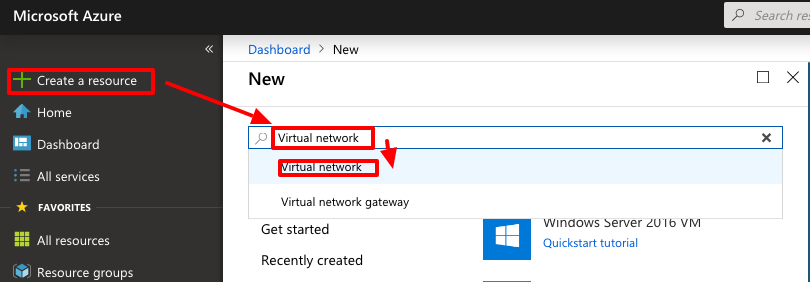
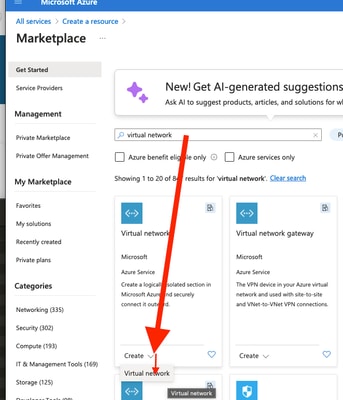
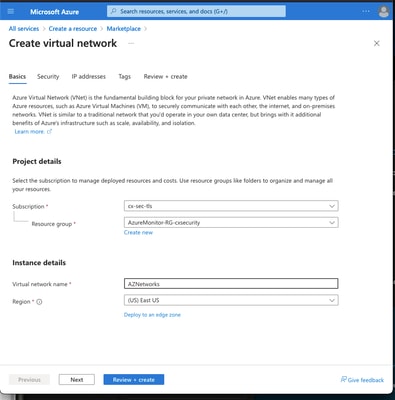
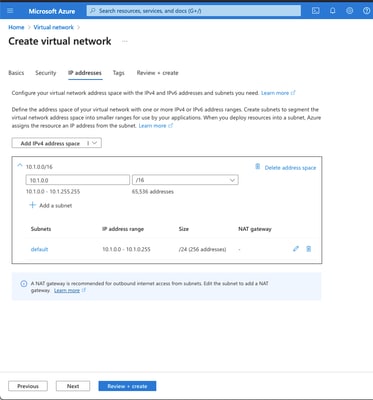
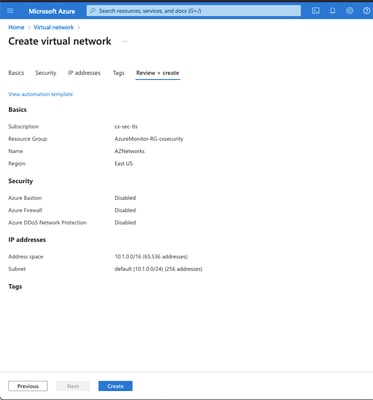
الخطوة 1. تكوين شبكة داخل Azure
هذه هي مساحة عنوان الشبكة الموجودة في سحابة Azure. يجب أن تكون مساحة العنوان هذه كبيرة بما يكفي لاستيعاب الشبكات الفرعية داخلها، كما هو موضح في الصورة.
   |
|
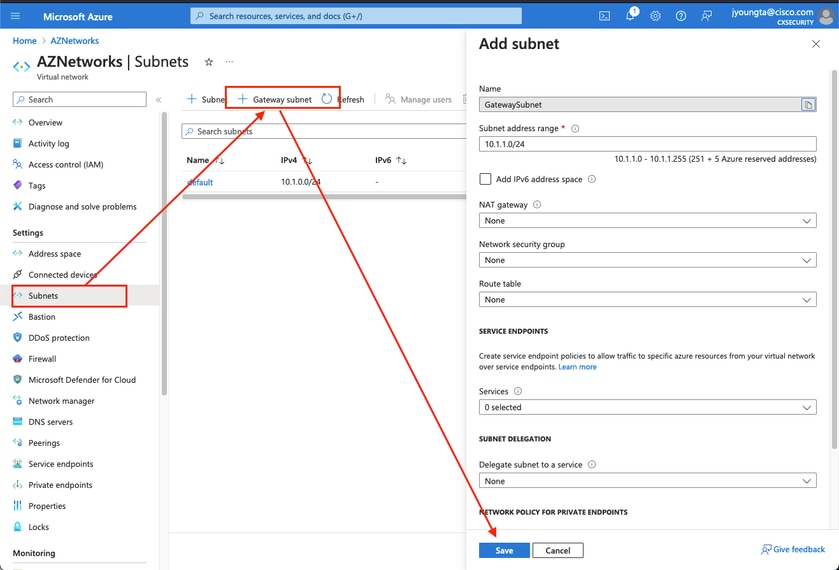
الخطوة 2. تعديل الشبكة الظاهرية لإنشاء شبكة فرعية لعبارة
1. انتقل إلى الشبكة الظاهرية وأضف شبكة فرعية للعبارة. في هذا المثال، يتم إستخدام 10.1.1.0/24.
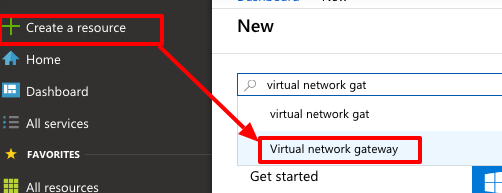
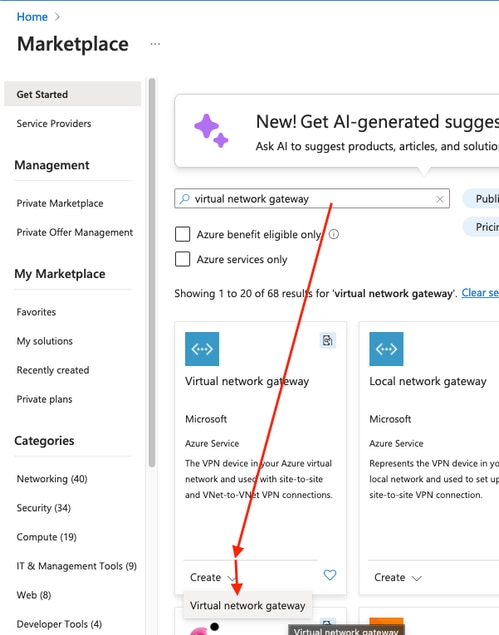
الخطوة 3. إنشاء بوابة شبكة ظاهرية
1. هذه هي نقطة نهاية VPN التي يتم إستضافتها في السحابة. هذا هو الجهاز الذي يقوم ASA بإنشاء نفق IPsec معه. كما تقوم هذه الخطوة بإنشاء IP عام، والذي يتم تعيينه لبوابة الشبكة الظاهرية. قد تستغرق هذه الخطوة من 15 إلى 20 دقيقة حتى تكتمل.
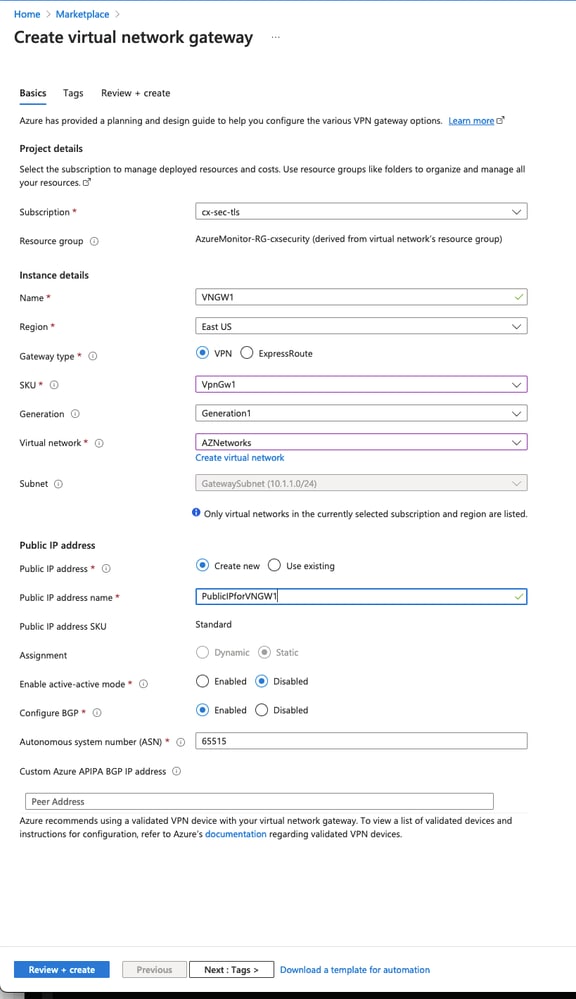 |
|
الخطوة 4. إنشاء بوابة شبكة محلية
1. عبارة الشبكة المحلية هي المورد الذي يمثل ASA.
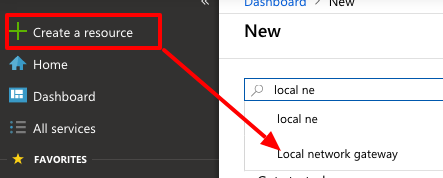
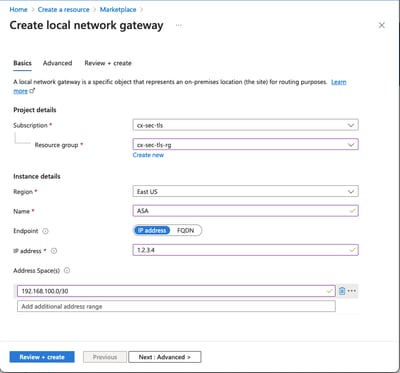 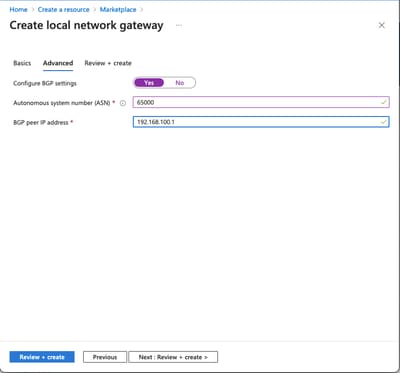 |
|
الخطوة 5. قم بإنشاء اتصال جديد بين بوابة الشبكة الظاهرية وبوابة الشبكة المحلية، كما هو موضح في الصورة
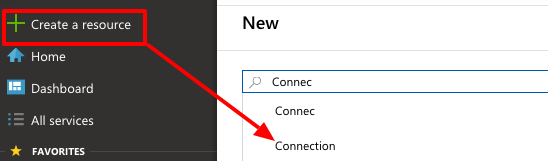
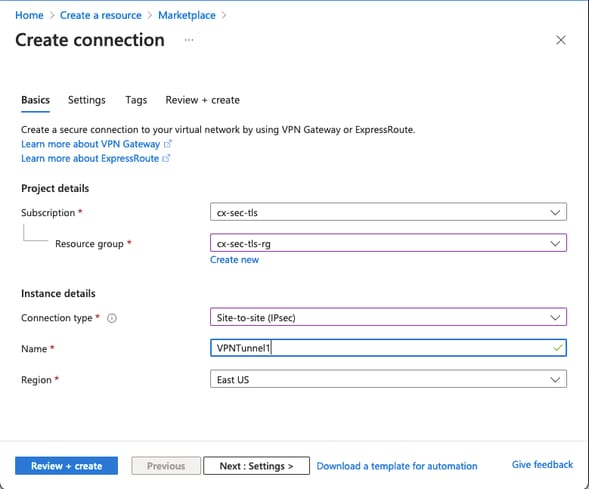
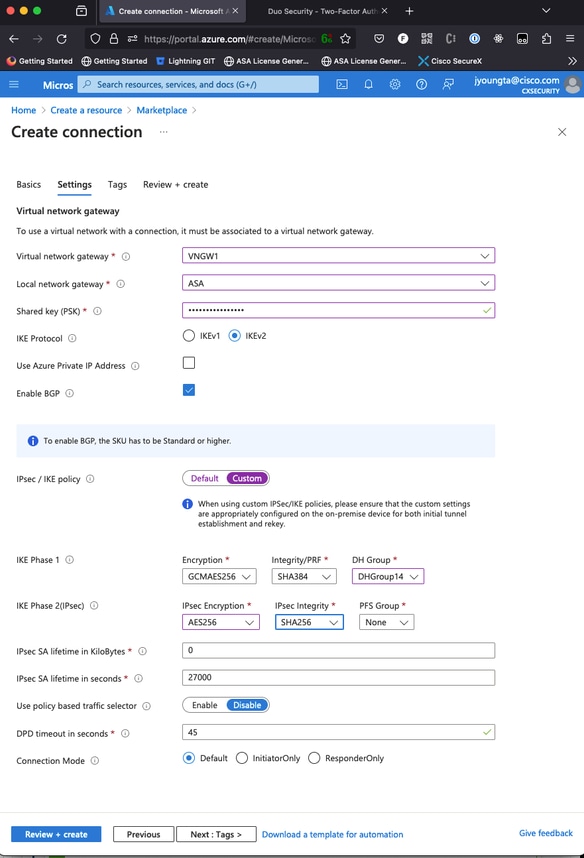
الخطوة 6. تكوين ASA
1. أولا، قم بتمكين IKEv2 على الواجهة الخارجية وتكوين سياسات IKEv2.
crypto ikev2 policy 10
 encryption aes-gcm-256 aes-gcm-192 aes-gcm
 integrity null
 group 14 5 2
 prf sha512 sha384 sha256 sha
 lifetime seconds 86400
crypto ikev2 policy 20
 encryption aes-256 aes-192 aes
 integrity sha512 sha384 sha256 sha
 group 14 5 2
 prf sha512 sha384 sha256 sha
 lifetime seconds 86400
crypto ikev2 enable outside
الخطوة 6. تكوين مجموعة تحويل IPsec وملف تعريف IPsec
crypto ipsec ikev2 ipsec-proposal AZURE-PROPOSAL
 protocol esp encryption aes-256
 protocol esp integrity sha-256
crypto ipsec profile AZURE-PROPOSAL
 set ikev2 ipsec-proposal AZURE-PROPOSAL
الخطوة 7. قم بتكوين مجموعة النفق.
1. استرد عنوان IPv4 العام لبوابة الشبكة الظاهرية التي تم إنشاؤها في الخطوة 3، كما هو موضح في الصورة.
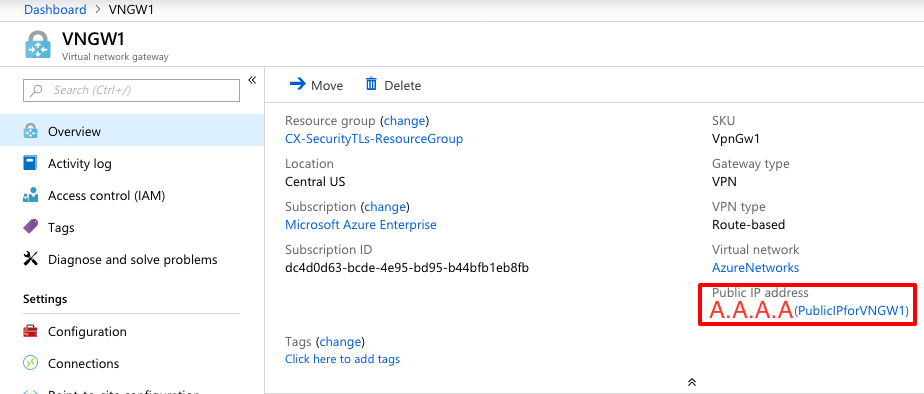
2. بعد ذلك، قم بتكوين على ASA، سياسة مجموعة ومجموعة نفق باستخدام المفتاح المشترك مسبقا المحدد في الخطوة 3.
group-policy AZURE internal
group-policy AZURE attributes
 vpn-tunnel-protocol ikev2
tunnel-group A.A.A.A type ipsec-l2l
tunnel-group A.A.A.A general-attributes
 default-group-policy AZURE
tunnel-group A.A.A.A ipsec-attributes
 ikev2 remote-authentication pre-shared-key *****
 ikev2 local-authentication pre-shared-key *****
الخطوة 8. تكوين واجهة النفق
1. في الخطوة 4، قم بتكوين بوابة الشبكة المحلية، وعنوان شبكة، وعنوان IP لاتصال BGP الذي تم تكوينه. هذا هو عنوان IP والشبكة أن يشكل على ال VTI.
interface Tunnel1
 nameif AZURE
 ip address 192.168.100.1 255.255.255.252
 tunnel source interface outside
 tunnel destination A.A.A.A
 tunnel mode ipsec ipv4
 tunnel protection ipsec profile AZURE-PROPOSAL
 no shutdown
2. خيار 1. قم بتكوين مسارات تبادل التوجيه الديناميكي باستخدام Azure باستخدام BGP.
2 أ.. حدد موقع عنوان IP الخاص بموجه BGP في Azure لعرض تكوين بوابة الشبكة الظاهرية التي تم إنشاؤها في الخطوة 3. في هذا المثال، هي 10.1.2.254.
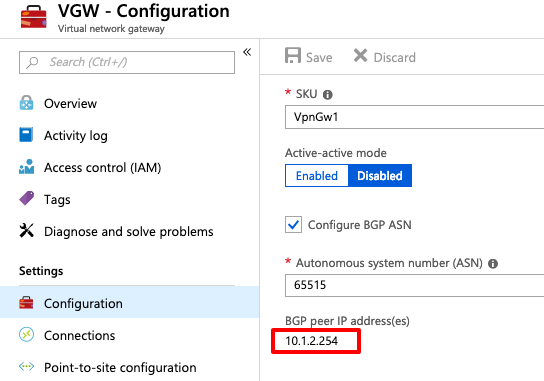
3. على ASA، قم بتكوين مسار ثابت يشير إلى 10.1.2.254 خارج نفق VTI. في هذا المثال، يوجد 192.168.100.2 ضمن الشبكة الفرعية نفسها الخاصة ب VTI. وعلى الرغم من أنه لا يوجد جهاز لديه عنوان IP هذا، إلا أن ASA يقوم بتثبيت المسار الذي يشير إلى واجهة VTI.
route AZURE 10.1.2.254 255.255.255.255 192.168.100.2 1
4. بعد ذلك، شكلت BGP على ال ASA. الشبكة 192.168.2.0/24 هي وحدات ASAs داخل الواجهة ومسار يتم نشره في السحابة. وبالإضافة إلى ذلك، يتم الإعلان عن الشبكات التي تم تكوينها في Azure ل ASA.
router bgp 65000
 bgp log-neighbor-changes
 bgp graceful-restart
 address-family ipv4 unicast
  neighbor 10.1.2.254 remote-as 65515
  neighbor 10.1.2.254 ebgp-multihop 255
  neighbor 10.1.2.254 activate
  network 192.168.2.0
  network 192.168.100.0 mask 255.255.255.252
  no auto-summary
  no synchronization
 exit-address-family
الخيار 2. قم بتكوين التوجيه الثابت، وتكوين المسارات بشكل ثابت على كل من ASA و Azure. قم بتكوين ASA لإرسال حركة مرور البيانات إلى شبكات Azure عبر نفق VTI.
route AZURE 10.1.0.0 255.255.0.0 192.168.100.2 1
1. تعديل عبارة الشبكة المحلية التي تم إنشاؤها في الخطوة 4 باستخدام الشبكات الموجودة خلف ASA والشبكة الفرعية على واجهة النفق. بعد ذلك، أضف البادئات ضمن قسم إضافة مسافات شبكة إضافية.
التحقق من الصحة
أستخدم هذا القسم لتأكيد عمل التكوين بشكل صحيح.
الخطوة 1. تحقق من إنشاء جلسة عمل IKEv2 من خلال تشغيل الأمر show crypto ikev2 sa.
ciscoasa# show crypto ikev2 sa

IKEv2 SAs:

Session-id:6, Status:UP-ACTIVE, IKE count:1, CHILD count:1

Tunnel-id Local                                               Remote                                                  Status         Role
2006974029 B.B.B.B.    /500                                   A.A.A.A/500                                             READY          INITIATOR
      Encr: AES-CBC, keysize: 256, Hash: SHA96, DH Grp:2, Auth sign: PSK, Auth verify: PSK
      Life/Active Time: 86400/4640 sec
Child sa: local selector  0.0.0.0/0 - 255.255.255.255/65535
          remote selector 0.0.0.0/0 - 255.255.255.255/65535
          ESP spi in/out: 0x74e90416/0xba17723a
الخطوة 2. تحقق من أنه قد تم التفاوض أيضا حول IPsec SA عن طريق تشغيل الأمر show crypto ipSec SA.
ciscoasa# show crypto ipsec sa
interface: AZURE
    Crypto map tag: __vti-crypto-map-3-0-1, seq num: 65280, local addr: B.B.B.B

      local ident (addr/mask/prot/port): (0.0.0.0/0.0.0.0/0/0)
      remote ident (addr/mask/prot/port): (0.0.0.0/0.0.0.0/0/0)
      current_peer: A.A.A.A


      #pkts encaps: 240, #pkts encrypt: 240, #pkts digest: 240
      #pkts decaps: 377, #pkts decrypt: 377, #pkts verify: 377
      #pkts compressed: 0, #pkts decompressed: 0
      #pkts not compressed: 240, #pkts comp failed: 0, #pkts decomp failed: 0
      #pre-frag successes: 0, #pre-frag failures: 0, #fragments created: 0
      #PMTUs sent: 0, #PMTUs rcvd: 0, #decapsulated frgs needing reassembly: 0
      #TFC rcvd: 0, #TFC sent: 0
      #Valid ICMP Errors rcvd: 0, #Invalid ICMP Errors rcvd: 0
      #send errors: 0, #recv errors: 0

      local crypto endpt.: B.B.B.B/500, remote crypto endpt.: A.A.A.A/500
      path mtu 1500, ipsec overhead 78(44), media mtu 1500
      PMTU time remaining (sec): 0, DF policy: copy-df
      ICMP error validation: disabled, TFC packets: disabled
      current outbound spi: BA17723A
      current inbound spi : 74E90416

    inbound esp sas:
      spi: 0x74E90416 (1961427990)
         SA State: active
         transform: esp-aes-256 esp-sha-256-hmac no compression
         in use settings ={L2L, Tunnel, IKEv2, VTI, }
         slot: 0, conn_id: 1722, crypto-map: __vti-crypto-map-3-0-1
         sa timing: remaining key lifetime (kB/sec): (3962863/24100)
         IV size: 16 bytes
         replay detection support: Y
         Anti replay bitmap:
          0xFFFFFFFF 0xFFFFFFFF
    outbound esp sas:
      spi: 0xBA17723A (3122098746)
         SA State: active
         transform: esp-aes-256 esp-sha-256-hmac no compression
         in use settings ={L2L, Tunnel, IKEv2, VTI, }
         slot: 0, conn_id: 1722, crypto-map: __vti-crypto-map-3-0-1
         sa timing: remaining key lifetime (kB/sec): (4008947/24100)
         IV size: 16 bytes
         replay detection support: Y
         Anti replay bitmap:
          0x00000000 0x00000001

ciscoasa#
الخطوة 3. تحقق من الاتصال عبر النفق بموجه BGP البعيد عن طريق تشغيل الأمر ping و ping tcp للتحقق من توجيه الطبقة 3 واتصال الطبقة 4 ل BGP أو موارد نقطة النهاية إذا كنت تستخدم التوجيه الثابت.
ciscoasa# ping 10.1.2.254
Type escape sequence to abort.
Sending 5, 100-byte ICMP Echos to 10.1.2.254, timeout is 2 seconds:
!!!!!
Success rate is 100 percent (5/5), round-trip min/avg/max = 40/42/50 ms
ciscoasa# ping tcp 10.1.2.254 179
Type escape sequence to abort.
No source specified. Pinging from identity interface.
Sending 5 TCP SYN requests to 10.1.2.254 port 179
from 192.168.100.1, timeout is 2 seconds:
!!!!!
Success rate is 100 percent (5/5), round-trip min/avg/max = 41/42/42 ms
ciscoasa#
الخطوة 4. عند إستخدام بروتوكول BGP، تحقق من تلقي مسارات اتصال BGP والإعلان عنها إلى Azure وجدول التوجيه الخاص ب ASA.
ciscoasa# show bgp summary
BGP router identifier 192.168.100.1, local AS number 65000
BGP table version is 6, main routing table version 6
4 network entries using 800 bytes of memory
5 path entries using 400 bytes of memory
2/2 BGP path/bestpath attribute entries using 416 bytes of memory
1 BGP AS-PATH entries using 24 bytes of memory
0 BGP route-map cache entries using 0 bytes of memory
0 BGP filter-list cache entries using 0 bytes of memory
BGP using 1640 total bytes of memory
BGP activity 14/10 prefixes, 17/12 paths, scan interval 60 secs

Neighbor        V           AS MsgRcvd MsgSent   TblVer  InQ OutQ Up/Down  State/PfxRcd
10.1.2.254      4        65515 73      60             6    0    0 01:02:26  3

ciscoasa# show bgp neighbors 10.1.2.254 routes

BGP table version is 6, local router ID is 192.168.100.1
Status codes: s suppressed, d damped, h history, * valid, > best, i - internal,
              r RIB-failure, S Stale, m multipath
Origin codes: i - IGP, e - EGP, ? - incomplete

   Network          Next Hop        Metric LocPrf Weight  Path
*> 10.1.0.0/16      10.1.2.254                         0  65515 i   <<< This is the virtual network defined in Azure
*  192.168.100.0/30 10.1.2.254                         0  65515 i
r> 192.168.100.1/32 10.1.2.254                         0  65515 i

Total number of prefixes 3
ciscoasa# show bgp neighbors 10.1.2.254 advertised-routes

BGP table version is 6, local router ID is 192.168.100.1
Status codes: s suppressed, d damped, h history, * valid, > best, i - internal,
              r RIB-failure, S Stale, m multipath
Origin codes: i - IGP, e - EGP, ? - incomplete

   Network          Next Hop        Metric LocPrf Weight  Path
*> 192.168.2.0      0.0.0.0              0         32768  i        <<< These are the routes being advertised to Azure
*> 192.168.100.0/30 0.0.0.0              0         32768  i        <<<

Total number of prefixes 2
ciscoasa#
ciscoasa# show route

Codes: L - local, C - connected, S - static, R - RIP, M - mobile, B - BGP
       D - EIGRP, EX - EIGRP external, O - OSPF, IA - OSPF inter area
       N1 - OSPF NSSA external type 1, N2 - OSPF NSSA external type 2
       E1 - OSPF external type 1, E2 - OSPF external type 2, V - VPN
       i - IS-IS, su - IS-IS summary, L1 - IS-IS level-1, L2 - IS-IS level-2
       ia - IS-IS inter area, * - candidate default, U - per-user static route
       o - ODR, P - periodic downloaded static route, + - replicated route
Gateway of last resort is 10.1.251.33 to network 0.0.0.0

S*       0.0.0.0 0.0.0.0 [1/0] via B.B.B.C, outside
B        10.1.0.0 255.255.0.0 [20/0] via 10.1.1.254, 01:03:33
S        10.1.2.254 255.255.255.255 [1/0] via 192.168.100.2, AZURE
C        B.B.B.A 255.255.255.224 is directly connected, outside
L        B.B.B.B 255.255.255.255 is directly connected, outside
C        192.168.2.0 255.255.255.0 is directly connected, inside
L        192.168.2.2 255.255.255.255 is directly connected, inside
C        192.168.100.0 255.255.255.252 is directly connected, AZURE
L        192.168.100.1 255.255.255.255 is directly connected, AZURE
الخطوة 5. إختبار اتصال جهاز عبر النفق. في هذا مثال، هو Ubuntu VM أن يركض في Azure.
ciscoasa# ping 10.1.0.4
Type escape sequence to abort.
Sending 5, 100-byte ICMP Echos to 10.1.0.4, timeout is 2 seconds:
!!!!!
Success rate is 100 percent (5/5), round-trip min/avg/max = 40/42/50 ms
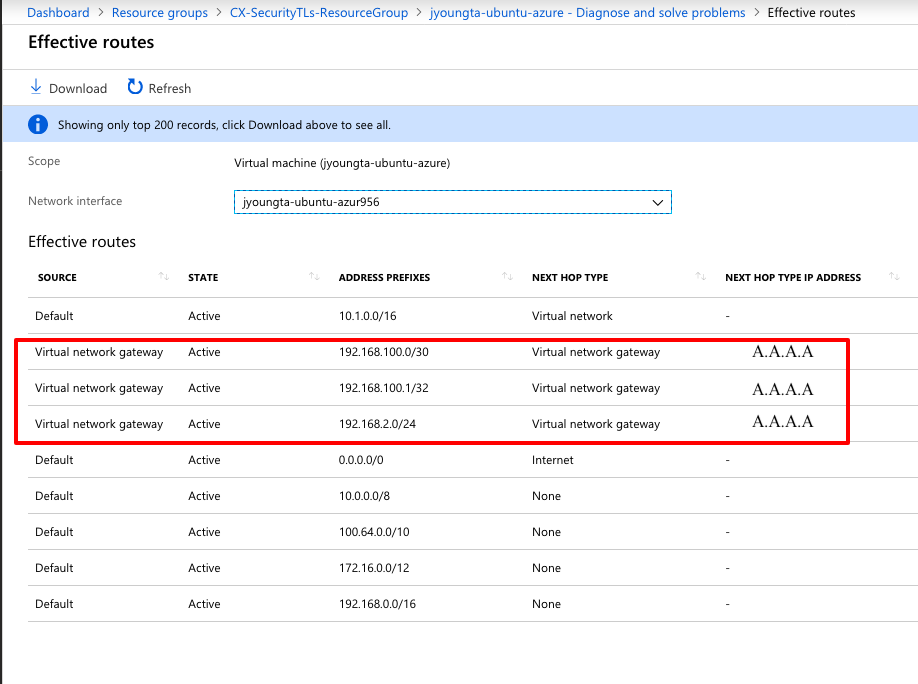
الخطوة 6. عرض المسارات الفعالة على الجهاز الظاهري عن بعد الآن. ويجب أن تعرض الموجهات التي أعلن عنها ASA للسحابة، كما هو موضح في الصورة.
استكشاف الأخطاء وإصلاحها
لا تتوفر حاليًا معلومات محددة لاستكشاف الأخطاء وإصلاحها لهذا التكوين.
محفوظات المراجعة
| المراجعة | تاريخ النشر | التعليقات |
|---|---|---|
5.0 |
02-Jul-2026
|
تحديث التدقيق الإملائي والنحوي وتنبيهات CCW وهيكل الجملة والتباعد. |
4.0 |
24-Sep-2024
|
تنسيق محدث. |
3.0 |
19-Mar-2024
|
المحتوى الفني المحدث والترجمة الآلية والنص البديل والتنسيق. |
2.0 |
11-Jul-2022
|
مازال محتوى هذه المقالة الأخيرة صالحا.
إزالة PII.
التحديثات التي تم إجراؤها على التنسيق ومتطلبات النمط ونقل الجهاز والجراثيم. |
1.0 |
18-Feb-2019
|
الإصدار الأولي |
 التعليقات