تكوين SSH على الموجهات

المحتويات
المقدمة
يصف هذا المستند كيفية تكوين طبقة الأمان (SSH) وتصحيح أخطائها على موجهات Cisco.
المتطلبات الأساسية
المتطلبات
يجب أن تتضمن صورة Cisco أو حزمة البرنامج دعم التشفير ل SSH. تختلف المتطلبات باختلاف النظام الأساسي وإصدار البرامج وطراز الترخيص.
المكونات المستخدمة
تستند المعلومات الواردة في هذا المستند إلى برنامج Cisco IOS و Cisco IOS XE.
تم إنشاء المعلومات الواردة في هذا المستند من الأجهزة الموجودة في بيئة معملية خاصة. بدأت جميع الأجهزة المُستخدمة في هذا المستند بتكوين ممسوح (افتراضي). إذا كانت شبكتك قيد التشغيل، فتأكد من فهمك للتأثير المحتمل لأي أمر.
الرسم التخطيطي للشبكة
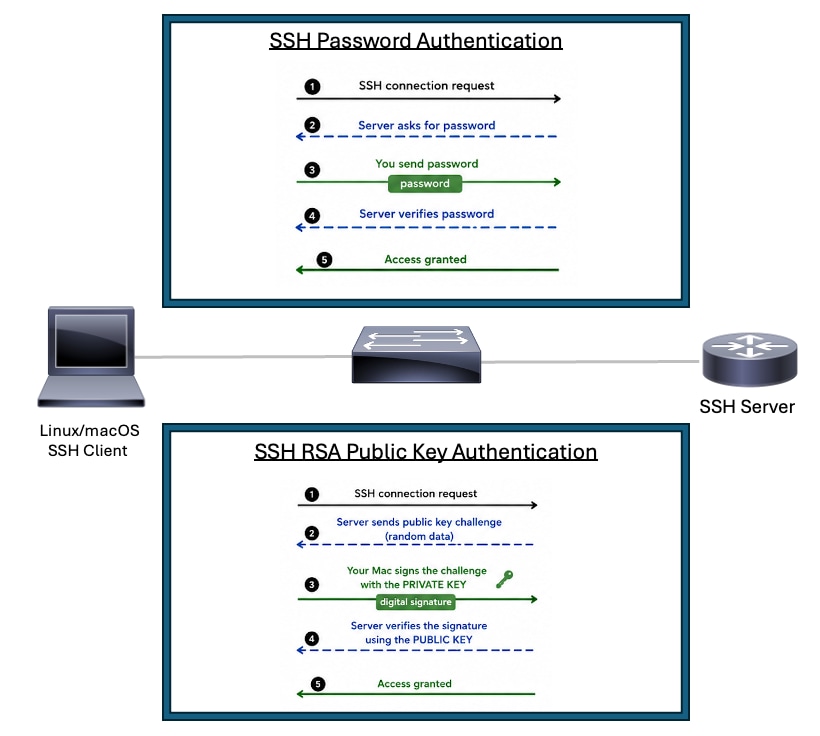 مخطط SSH
تكوين SSH على موجه Cisco باستخدام مصادقة كلمة المرور
هناك بعض الخطوات المطلوبة لتمكين دعم SSH الأساسي على موجه Cisco:
1. قم بتكوين اسم مضيف الموجه.
2. قم بإنشاء حساب مستخدم محلي لمصادقة SSH.
3. قم بتكوين اسم مجال DNS.
4. قم بتمكين أعلى إصدار SSH الذي يدعمه النظام الأساسي. أستخدم الإصدار 2 من SSH عند دعمه.
5. قم بإنشاء زوج مفاتيح RSA ل SSH. أستخدم أكبر معدلات RSA التي يدعمها النظام الأساسي وتتماشى مع سياسة الأمان الخاصة بك.
6. أدخل وضع تكوين سطر VTY.
7. قم بتكوين خطوط VTY لاستخدام قاعدة بيانات المستخدم المحلية أو AAA للمصادقة.
8. تقييد وصول VTY إلى نقل SSH فقط.
يتطلب جهاز Cisco الذي يعمل كخادم SSH اسم المضيف واسم المجال ومفاتيح RSA والمصادقة وتكوين VTY. يتطلب الجهاز الذي يقوم بتهيئة جلسات SSH فقط دعم عميل SSH وتوجه صالح إلى خادم SSH.
Routert#configure terminal
Router(config)#hostname R2
R2(config)#username cisco privilege 15 secret C1sc0
R2(config)#ip domain name rtp.cisco.com
R2(config)#ip ssh version 2
R2(config)#crypto key generate rsa general-keys modulus 4096
R2(config)#line vty 0 4
R2(config-line)#login local
R2(config-line)#transport input ssh
R2(config-line)#end
ملاحظة: إذا لم يتم إستخدام تسجيل الدخول المحلي، فإن الأمر AAA new-model يتسبب في إستخدام اسم المستخدم المحلي والسر على الموجه في غياب عبارات AAA الأخرى.
أستخدم هذا كمثال على أمر عميل SSH عند الاختبار من موجه آخر. يمكن أن تختلف المشفعات وخوارزميات HMAC المدعومة حسب إصدار البرنامج ونهج SSH:
R3#ssh -v 2 -l cisco 10.20.20.20
Password:
R2>
تكوين SSH على موجه Cisco باستخدام مصادقة مفتاح RSA العام
تسمح مصادقة مفتاح RSA العام لعميل SSH بالمصادقة على موجه أو محول Cisco دون إرسال كلمة مرور أو الاعتماد عليها. يقوم خادم بروتوكول SSH بتخزين المفتاح العام. يحتفظ عميل SSH بالمفتاح الخاص المطابق. أثناء تسجيل الدخول، يثبت العميل أنه يمتلك المفتاح الخاص من خلال توقيع بيانات المصادقة رقميا. يتحقق الخادم من هذا التوقيع باستخدام المفتاح العام الذي تم تكوينه على الجهاز. يبقى المفتاح الخاص على العميل ولا يتم إرساله عبر الشبكة.
الفوائد
- يحذف مصادقة SSH المستندة إلى كلمة المرور للمستخدم الذي تم تكوينه.
- يقلل التعرض لأخطاء التخمين باستخدام كلمة المرور والهجمات العنيفة.
- يحافظ على المفتاح الخاص على عميل SSH بدلا من تخزين كلمات المرور القابلة لإعادة الاستخدام على أجهزة الشبكة أو أنظمة التشغيل التلقائي.
- يعمل بشكل جيد لأدوات التشغيل التلقائي والبرامج النصية وأنظمة CI/CD التي تحتاج إلى وصول آمن إلى أجهزة Cisco.
- يحسن تناسق التشغيل لأن الخادم يتحقق من صحة مفتاح عام موثوق به بدلا من كلمة مرور مكتوبة.
- يدعم نماذج مصادقة أقوى لمحطات عمل المسؤول والأجهزة المضيفة السريعة وخوادم التشغيل التلقائي.
أكمل هذه الخطوات لتكوين خادم SSH لتنفيذ المصادقة المستندة إلى مفتاح RSA العام:
1. قم بتكوين اسم مضيف الموجه.
2. قم بتكوين اسم مجال DNS.
3. تمكين المصادقة والتفويض والمحاسبة (AAA) أو تكوين تسجيل الدخول المحلي تحت خط vty.
4. قم بإنشاء زوج مفاتيح RSA الذي يستخدمه خادم SSH.
5. أستخدم أعلى إصدار SSH الذي يدعمه النظام الأساسي. أستخدم SSHv2 عند دعمه.
6. أستخدم أقوى معدلات بدل الإقامة اليومي المدعومة من المنبر والسياسة الأمنية. يفضل إستخدام معامل 4096-بت عندما يكون مدعوما وعندما يكون تأثير الأداء مقبولا.
7. أدخل وضع تكوين سلسلة مفاتيح SSH العامة.
8. قم بتكوين اسم مستخدم SSH الذي يتم السماح له بالمصادقة باستخدام مصادقة مفتاح RSA العام.
9. أضف مفتاح RSA العام من عميل SSH لاسم المستخدم هذا.
ملاحظة: يمكنك إنشاء مفتاح SSH العام من جهاز Linux/MacOS لديك باستخدام الأمر ssh-keygen، على سبيل المثال، ssh-keygen -m PEM -t rsa -b 1024 -f ~/.ssh/cisco1024 بعد ذلك يمكنك قراءة المفتاح باستخدام الأمر cat ~/.ssh/cisco1024.pub.
Router#configure terminal
Router(config)#hostname RSA-PublicKey
RSA-PublicKey(config)#ip domain name rtp.cisco.com
RSA-PublicKey(config)#aaa new-model
RSA-PublicKey(config)#crypto key generate rsa modulus 4096
The name for the keys will be: RSA-PublicKey.rtp.cisco.com

% The key modulus size is 4096 bits
% Generating 4096 bit RSA keys, keys will be non-exportable...
[OK] (elapsed time was 4 seconds)

RSA-PublicKey(config)#ip ssh version 2
RSA-PublicKey(config)#ip ssh pubkey-chain
RSA-PublicKey(conf-ssh-pubkey)#username ciscoadmin
RSA-PublicKey(conf-ssh-pubkey-user)#key-string
RSA-PublicKey(conf-ssh-pubkey-data)#$QaVSyuVNw== user@MacBook-Pro
RSA-PublicKey(conf-ssh-pubkey-data)#end
RSA-PublicKey#
مجموعات التكوين الإضافية
تكوين SSH الإصدار 2
عند تكوين بروتوكول SSH، تأكد من تمكين SSHv2، لأنه يوفر تشفيرا أقوى وأمانا أفضل بكثير من SSHv1.
Router(config)#ip ssh version 2منع الاتصالات بخلاف SSH
إذا كنت ترغب في منع الاتصالات بخلاف SSH، فقم بإضافة الأمر transport input ssh أسفل الأسطر لتحديد الموجّه إلى اتصالات SSH فقط. يتم رفض برامج Telnet (بخلاف SSH) المباشرة.
Router(config)#line vty 0 15
Router(config-line)#transport input ssh
تقييد وصول SSH إلى شبكة فرعية
ستحتاج إلى تقييد اتصال SSH بشبكة فرعية معينة حيث يتم إسقاط جميع محاولات SSH الأخرى من بروتوكولات IP خارج الشبكة الفرعية.
يمكنك استخدام هذه الخطوات للقيام بالأمر نفسه:
- تحديد قائمة وصول تسمح بحركة المرور من هذه الشبكة الفرعية المعينة.
- تقييد الوصول إلى واجهة سطر VTY باستخدام فئة الوصول.
هذا مثال على التكوين. في هذا المثال، مسموح بوصول SSH فقط من 10.10.10.0/24؛ يتم رفض جميع عناوين IP المصدر الأخرى بواسطة الرفض الضمني في نهاية قائمة التحكم في الوصول (ACL).
Router(config)#access-list 23 permit 10.10.10.0 0.0.0.255
Router(config)#line vty 0 15
Router(config-line)#transport input ssh
Router(config-line)#access-class 23 in
Router(config-line)#exitالاختلافات على إخراج أمر الشعار
يختلف إخراج أمر banner بين Telnet والإصدارات المختلفة من اتصالات SSH. يوضح هذا الجدول مدى اختلاف عمل خيارات أمر banner مع أنواع مختلفة من الاتصالات.
| خيار أمر الشعار |
Telnet |
SSH v2 |
| تسجيل دخول الشعار |
عرض قبل تسجيل الدخول إلى الجهاز. |
عرض قبل تسجيل الدخول إلى الجهاز. |
| banner motd |
عرض قبل تسجيل الدخول إلى الجهاز. |
عرض بعد تسجيل الدخول إلى جهاز. |
| banner exec |
عرض بعد تسجيل الدخول إلى جهاز. |
عرض بعد تسجيل الدخول إلى جهاز. |
أوامر show وdebug
قبل إصدار أوامر تصحيح الأخطاء المبينة هنا، راجع فهم المعلومات المهمة في أوامر تصحيح الأخطاء.
debug ip ssh - تمكين رسائل تصحيح الأخطاء ل SSH.
show ssh - عرض حالة إتصالات خادم SSH.
RSA-PublicKey#show ssh
Connection Version Mode  Encryption  Hmac                          State                Username
0          2.0     IN   aes128-gcm@ohmac-sha2-256-etm@openssh.com Session started       ciscoadmin
0          2.0     OUT  aes128-gcm@ohmac-sha2-256-etm@openssh.com Session started       ciscoadmin
show ip ssh - عرض الإصدار وبيانات التكوين ل SSH.
RSA-PublicKey#show ip ssh
SSH Enabled - version 2.0
Authentication methods:publickey,keyboard-interactive,password
Authentication Publickey Algorithms:ssh-rsa,ecdsa-sha2-nistp256,ecdsa-sha2-nistp384,ecdsa-sha2-nistp521,ssh-ed25519,x509v3-ecdsa-sha2-nistp256,x509v3-ecdsa-sha2-nistp384,x509v3-ecdsa-sha2-nistp521,rsa-sha2-256,rsa-sha2-512,x509v3-rsa2048-sha256
Hostkey Algorithms:rsa-sha2-512,rsa-sha2-256,ssh-rsa
Encryption Algorithms:chacha20-poly1305@openssh.com,aes128-gcm@openssh.com,aes256-gcm@openssh.com,aes128-gcm,aes256-gcm,aes128-ctr,aes192-ctr,aes256-ctr
MAC Algorithms:hmac-sha2-256-etm@openssh.com,hmac-sha2-512-etm@openssh.com
KEX Algorithms:curve25519-sha256,curve25519-sha256@libssh.org,ecdh-sha2-nistp256,ecdh-sha2-nistp384,ecdh-sha2-nistp521,diffie-hellman-group14-sha256,diffie-hellman-group16-sha512
Authentication timeout: 120 secs; Authentication retries: 3
مصادقة RSA العامة ل Debug
تصحيح أخطاء عميل SSH (Linux/MacOS)
ciscouser@CISCOUSER-M-R Desktop % ssh -i ~/.ssh/cisco1024 -v ciscoadmin@10.82.139.71
debug1: OpenSSH_10.2p1, LibreSSL 3.3.6
debug1: Reading configuration data /etc/ssh/ssh_config
debug1: Reading configuration data /etc/ssh/ssh_config.d/100-macos.conf
debug1: /etc/ssh/ssh_config.d/100-macos.conf line 1: Applying options for *
debug1: Reading configuration data /etc/ssh/crypto.conf
debug1: Authenticator provider $SSH_SK_PROVIDER did not resolve; disabling
debug1: Connecting to 10.82.139.71 [10.82.139.71] port 22.
debug1: Connection established.
debug1: loaded pubkey from /Users/ciscouser/.ssh/cisco1024: RSA SHA256:w5wW3BqX15fO5Qm+BP75tJ1YzaXNsDNeHLLNZTW+Roo
debug1: identity file /Users/ciscouser/.ssh/cisco1024 type 0
debug1: no identity pubkey loaded from /Users/ciscouser/.ssh/cisco1024
debug1: Local version string SSH-2.0-OpenSSH_10.2
debug1: Remote protocol version 2.0, remote software version Cisco-1.25
debug1: compat_banner: match: Cisco-1.25 pat Cisco-1.* compat 0x60000000
debug1: Authenticating to 10.82.139.71:22 as 'ciscoadmin'
debug1: load_hostkeys: fopen /Users/ciscouser/.ssh/known_hosts2: No such file or directory
debug1: load_hostkeys: fopen /etc/ssh/ssh_known_hosts: No such file or directory
debug1: load_hostkeys: fopen /etc/ssh/ssh_known_hosts2: No such file or directory
debug1: SSH2_MSG_KEXINIT sent
debug1: SSH2_MSG_KEXINIT received
debug1: kex: algorithm: ecdh-sha2-nistp256
debug1: kex: host key algorithm: rsa-sha2-512
debug1: kex: server->client cipher: aes128-gcm@openssh.com MAC:  compression: none
debug1: kex: client->server cipher: aes128-gcm@openssh.com MAC:  compression: none
debug1: expecting SSH2_MSG_KEX_ECDH_REPLY
debug1: SSH2_MSG_KEX_ECDH_REPLY received
debug1: Server host key: ssh-rsa SHA256:5wvYU0FIJQmz+eHACVJMvoaX3WSgXkyem/3tOgyOYuQ
debug1: load_hostkeys: fopen /Users/ciscouser/.ssh/known_hosts2: No such file or directory
debug1: load_hostkeys: fopen /etc/ssh/ssh_known_hosts: No such file or directory
debug1: load_hostkeys: fopen /etc/ssh/ssh_known_hosts2: No such file or directory
debug1: Host '10.82.139.71' is known and matches the RSA host key.
debug1: Found key in /Users/ciscouser/.ssh/known_hosts:2
debug1: rekey out after 4294967296 blocks
debug1: SSH2_MSG_NEWKEYS sent
debug1: expecting SSH2_MSG_NEWKEYS
debug1: SSH2_MSG_NEWKEYS received
debug1: rekey in after 4294967296 blocks
debug1: SSH2_MSG_EXT_INFO received
debug1: kex_ext_info_client_parse: server-sig-algs=
debug1: SSH2_MSG_SERVICE_ACCEPT received debug1: Authentications that can continue: publickey,keyboard-interactive,password
debug1: Next authentication method: publickey
debug1: get_agent_identities: bound agent to hostkey
debug1: get_agent_identities: ssh_fetch_identitylist: agent contains no identities
debug1: Will attempt key: /Users/ciscouser/.ssh/cisco1024 RSA SHA256:w5wW3BqX15fO5Qm+BP75tJ1YzaXNsDNeHLLNZTW+Roo explicit debug1: Offering public key: /Users/ciscouser/.ssh/cisco1024 RSA SHA256:w5wW3BqX15fO5Qm+BP75tJ1YzaXNsDNeHLLNZTW+Roo explicit debug1: Server accepts key: /Users/ciscouser/.ssh/cisco1024 RSA SHA256:w5wW3BqX15fO5Qm+BP75tJ1YzaXNsDNeHLLNZTW+Roo explicit Enter passphrase for key '/Users/ciscouser/.ssh/cisco1024': Authenticated to 10.82.139.71 ([10.82.139.71]:22) using "publickey".
debug1: channel 0: new session [client-session] (inactive timeout: 0)
debug1: Entering interactive session.
debug1: pledge: filesystem
debug1: Sending environment.
debug1: channel 0: setting env LANG = "C.UTF-8"
debug1: channel 0: setting env LC_CTYPE = "UTF-8"
RSA-PublicKey>en Password:
RSA-PublicKey#show version
Cisco IOS XE Software, Version 17.12.04
Cisco IOS Software [Dublin], ASR1000 Software (X86_64_LINUX_IOSD-UNIVERSALK9-M), Version 17.12.4, RELEASE SOFTWARE (fc3)
Technical Support: http://www.cisco.com/techsupport
Copyright (c) 1986-2024 by Cisco Systems, Inc.
Compiled Tue 23-Jul-24 09:43 by mcpre


Cisco IOS-XE software, Copyright (c) 2005-2024 by cisco Systems, Inc.
All rights reserved.  Certain components of Cisco IOS-XE software are
licensed under the GNU General Public License ("GPL") Version 2.0.  The
software code licensed under GPL Version 2.0 is free software that comes
with ABSOLUTELY NO WARRANTY.  You can redistribute and/or modify such
GPL code under the terms of GPL Version 2.0.  For more details, see the
documentation or "License Notice" file accompanying the IOS-XE software,
or the applicable URL provided on the flyer accompanying the IOS-XE
software.


ROM: 17.3(1r)

RSA-PublicKey uptime is 2 weeks, 2 days, 10 hours, 28 minutes
Uptime for this control processor is 2 weeks, 2 days, 10 hours, 30 minutes
System returned to ROM by Reload Command
System image file is "bootflash:asr1000-universalk9.17.12.04.SPA.bin"
Last reload reason: Reload Command


This product contains cryptographic features and is subject to United
States and local country laws governing import, export, transfer and
use. Delivery of Cisco cryptographic products does not imply
third-party authority to import, export, distribute or use encryption.
Importers, exporters, distributors and users are responsible for
compliance with U.S. and local country laws. By using this product you
agree to comply with applicable laws and regulations. If you are unable
to comply with U.S. and local laws, return this product immediately.

A summary of U.S. laws governing Cisco cryptographic products may be found at:
http://www.cisco.com/wwl/export/crypto/tool/stqrg.html

If you require further assistance please contact us by sending email to
export@cisco.com.

License Type: Smart License is permanent
License Suite: AdvUCSuiteK9
Next reload License Suite: AdvUCSuiteK9

The current crypto throughput level is 20000000 kbps


Smart Licensing Status: Smart Licensing Using Policy

cisco ASR1001-HX (1SR) processor (revision 1SR) with 3684784K/6147K bytes of memory.
Processor board ID TKM20160032
Router operating mode: Autonomous
Crypto Hardware Module present
8 Gigabit Ethernet interfaces
8 Ten Gigabit Ethernet interfaces
32768K bytes of non-volatile configuration memory.
8388608K bytes of physical memory.
29401087K bytes of eUSB flash at bootflash:.

Configuration register is 0x2102

RSA-PublicKey#exit debug1: client_input_channel_req: channel 0 rtype exit-status reply 0 debug1: channel 0: free: client-session, nchannels 1 Connection to 10.82.139.71 closed by remote host. Connection to 10.82.139.71 closed.
Transferred: sent 3640, received 6336 bytes, in 114.1 seconds
Bytes per second: sent 31.9, received 55.5
debug1: Exit status 0
تصحيح أخطاء خادم SSH (موجه Cisco)
RSA-PublicKey#show logging
Syslog logging: enabled (0 messages dropped, 3 messages rate-limited, 0 flushes, 0 overruns, xml disabled, filtering disabled)

No Active Message Discriminator.


No Inactive Message Discriminator.


    Console logging: disabled
    Monitor logging: level debugging, 0 messages logged, xml disabled,
                     filtering disabled
    Buffer logging:  level debugging, 617 messages logged, xml disabled,
                    filtering disabled
    Exception Logging: size (4096 bytes)
    Count and timestamp logging messages: disabled
    Persistent logging: disabled

No active filter modules.

    Trap logging: level informational, 161 message lines logged
        Logging Source-Interface:       VRF Name:
    TLS Profiles:

Log Buffer (102400 bytes):

*Aug 22 06:05:51.736: SSH2 0: ssh_receive: 36 bytes received
*Aug 22 06:05:58.163: SSH0: starting SSH control process
*Aug 22 06:05:58.163: SSH0: sent protocol version id SSH-2.0-Cisco-1.25
*Aug 22 06:05:58.165: SSH0: protocol version id is - SSH-2.0-OpenSSH_10.2
*Aug 22 06:05:58.165: SSH2 0:
ssh2_server_key_exchange: kexinit sent: kex algo = curve25519-sha256,curve25519-sha256@libssh.org,ecdh-sha2-nistp256,ecdh-sha2-nistp384,ecdh-sha2-nistp521,diffie-hellman-group14-sha256,diffie-hellman-group16-sha512
*Aug 22 06:05:58.165: SSH2 0: kexinit sent: hostkey algo = rsa-sha2-512,rsa-sha2-256,ssh-rsa
*Aug 22 06:05:58.165: SSH2 0: kexinit sent: encryption algo = chacha20-poly1305@openssh.com,aes128-gcm@openssh.com,aes256-gcm@openssh.com,aes128-gcm,aes256-gcm,aes128-ctr,aes192-ctr,aes256-ctr
*Aug 22 06:05:58.165: SSH2 0: kexinit sent: mac algo = hmac-sha2-256-etm@openssh.com,hmac-sha2-512-etm@openssh.com
*Aug 22 06:05:58.165: SSH2 0: send:packet of  length 656 (length also includes padlen of 7)
*Aug 22 06:05:58.165: SSH2 0: SSH2_MSG_KEXINIT sent
*Aug 22 06:05:58.239: SSH2 0: ssh_receive: 1300 bytes received
*Aug 22 06:05:58.239: SSH2 0: input: total packet length of 1568 bytes
*Aug 22 06:05:58.239: SSH2 0: partial packet length(block_size)8 bytes,
            needed 1560 bytes, maclen 0
*Aug 22 06:05:58.239: SSH2 0: input: padlength 4 bytes
*Aug 22 06:05:58.239: SSH2 0: SSH2_MSG_KEXINIT received
*Aug 22 06:05:58.239: SSH2 0: kex: client->server enc:aes128-gcm@openssh.com mac:hmac-sha2-256-etm@openssh.com
*Aug 22 06:05:58.239: SSH2 0: kex: server->client enc:aes128-gcm@openssh.com mac:hmac-sha2-256-etm@openssh.com
*Aug 22 06:05:58.239: SSH2 0: Using kex_algo = ecdh-sha2-nistp256
*Aug 22 06:05:58.242: SSH2 0: kexecdh_server: expecting SSH2_MSG_KEX_ECDH_INIT
*Aug 22 06:05:58.312: SSH2 0: ssh_receive: 80 bytes received
*Aug 22 06:05:58.312: SSH2 0: input: total packet length of 80 bytes
*Aug 22 06:05:58.312: SSH2 0: partial packet length(block_size)8 bytes,
            needed 72 bytes, maclen 0
*Aug 22 06:05:58.312: SSH2 0: input: padlength 5 bytes
*Aug 22 06:05:58.312: ssh2_calculate_modulus_length: modulus len 32
*Aug 22 06:05:58.312: SSH2 0: kexecdh_server: Calculated shared secret len 32
*Aug 22 06:05:58.333: SSH2 0: send:packet of  length 1160 (length also includes padlen of 10)
*Aug 22 06:05:58.333: SSH2: kex_derive_keys complete
*Aug 22 06:05:58.333: SSH2 0: send:packet of  length 16 (length also includes padlen of 10)
*Aug 22 06:05:58.333: SSH2 0: newkeys: mode 1
*Aug 22 06:05:58.333: SSH2: AES-GCM key initialized
*Aug 22 06:05:58.333: SSH2 0: SSH2_MSG_NEWKEYS sent
*Aug 22 06:05:58.333: SSH2 0: Preparing SSH2_MSG_EXT_INFO server-sig-algs
*Aug 22 06:05:58.333: SSH2 0: send:packet of  length 260 (length also includes padlen of 19)
*Aug 22 06:05:58.333: SSH2 0: SSH2_MSG_EXT_INFO sent
*Aug 22 06:05:58.333: SSH2 0: waiting for SSH2_MSG_NEWKEYS
*Aug 22 06:05:58.411: SSH2 0: ssh_receive: 16 bytes received
*Aug 22 06:05:58.411: SSH2 0: input: total packet length of 16 bytes
*Aug 22 06:05:58.411: SSH2 0: partial packet length(block_size)8 bytes,
            needed 8 bytes, maclen 0
*Aug 22 06:05:58.411: SSH2 0: input: padlength 10 bytes
*Aug 22 06:05:58.411: SSH2 0: newkeys: mode 0
*Aug 22 06:05:58.411: SSH2: AES-GCM key initialized
*Aug 22 06:05:58.411: SSH2 0: SSH2_MSG_NEWKEYS received
*Aug 22 06:05:58.411: %SSH-5-SSH2_SESSION: SSH2 Session request from 10.189.3.9 (tty = 0) using crypto cipher 'aes128-gcm@openssh.com', hmac 'hmac-sha2-256-etm@openssh.com' Succeeded
*Aug 22 06:05:58.604: SSH2 0: ssh_receive: 52 bytes received
*Aug 22 06:05:58.604: SSH2 0: input: total packet length of 36 bytes
*Aug 22 06:05:58.604: SSH2 0: partial packet length(block_size)16 bytes,
            needed 32 bytes, maclen 0
*Aug 22 06:05:58.604: SSH2 0: input: padlength 14 bytes
*Aug 22 06:05:58.604: SSH2 0: send:packet of  length 36 (length also includes padlen of 14)
*Aug 22 06:05:58.604: SSH2 0: Authentications that can continue = publickey,keyboard-interactive,password
*Aug 22 06:05:58.677: SSH2 0: ssh_receive: 68 bytes received
*Aug 22 06:05:58.677: SSH2 0: input: total packet length of 52 bytes
*Aug 22 06:05:58.677: SSH2 0: partial packet length(block_size)16 bytes,
            needed 48 bytes, maclen 0
*Aug 22 06:05:58.677: SSH2 0: input: padlength 6 bytes
*Aug 22 06:05:58.677: SSH2 0: Using method = none
*Aug 22 06:05:58.677: SSH2 0: Authentications that can continue = publickey,keyboard-interactive,password
*Aug 22 06:05:58.677: SSH2 0: send:packet of  length 68 (length also includes padlen of 18)
*Aug 22 06:05:58.755: SSH2 0: ssh_receive: 244 bytes received
*Aug 22 06:05:58.755: SSH2 0: input: total packet length of 228 bytes
*Aug 22 06:05:58.755: SSH2 0: partial packet length(block_size)16 bytes,
            needed 224 bytes, maclen 0
*Aug 22 06:05:58.755: SSH2 0: input: padlength 5 bytes
*Aug 22 06:05:58.755: SSH2 0: Using method = publickey *Aug 22 06:05:58.755: SSH2 0: Received publickey algo = rsa-sha2-512 *Aug 22 06:05:58.755: SSH2 0: Got Publickey algo = 9 *Aug 22 06:05:58.755: SSH2 0: ssh2_validate_pubkey: Verifying pubkey blob is acceptable for 'ciscoadmin' in SSH2_MSG_USERAUTH_REQUEST
*Aug 22 06:05:58.755: SSH2 0: send:packet of  length 196 (length also includes padlen of 19)
*Aug 22 06:05:58.755: SSH2 0: ssh2_validate_pubkey: Authenticating 'ciscoadmin' with method: publickey
*Aug 22 06:06:02.615: SSH2 0: ssh_receive: 404 bytes received
*Aug 22 06:06:02.615: SSH2 0: input: total packet length of 388 bytes
*Aug 22 06:06:02.615: SSH2 0: partial packet length(block_size)16 bytes,
            needed 384 bytes, maclen 0
*Aug 22 06:06:02.615: SSH2 0: input: padlength 13 bytes
*Aug 22 06:06:02.615: SSH2 0: ssh2_verify_pubkey_sign: Verifying signature for user 'ciscoadmin' in SSH2_MSG_USERAUTH_REQUEST *Aug 22 06:06:02.615: SSH2 0: ssh2_blob_to_key: Got blob_public key ssh-rsa, blob_key_type 1, publickey_algo_type 9 *Aug 22 06:06:02.616: SSH2 0: ssh2_verify_pubkey_sign: Client Signature Verification PASSED
*Aug 22 06:06:02.616: SSH2 0: passed: Pubkey Authentication ssh2_authenticate_pubkey for user 'ciscoadmin'
*Aug 22 06:06:02.616: SSH2 0: send:packet of  length 20 (length also includes padlen of 14)
*Aug 22 06:06:02.617: SSH2 0: authentication successful for ciscoadmin
*Aug 22 06:06:02.617: %SEC_LOGIN-5-LOGIN_SUCCESS: Login Success [user: ciscoadmin] [Source: 10.189.3.9] [localport: 22] at 06:06:02 UTC Fri Aug 22 2014 *Aug 22 06:06:02.617: %SSH-5-SSH2_USERAUTH: User 'ciscoadmin' authentication for SSH2 Session from 10.189.3.9 (tty = 0) using crypto cipher 'aes128-gcm@openssh.com', hmac 'hmac-sha2-256-etm@openssh.com' Succeeded
*Aug 22 06:06:02.617:  SSH: bulk-mode applying server configs
*Aug 22 06:06:02.617:  SSH: bulk_mode applied server configs
التكوين غير الصحيح
تحتوي هذه الأقسام على إخراج تصحيح الأخطاء للعينة من العديد من التكوينات غير الصحيحة.
كلمة المرور غير صحيحة
تصحيح أخطاء الموجّه
*Jul 29 23:45:34.428: SSH2 0: input: padlength 9 bytes
*Jul 29 23:45:34.465: SSH0: password authentication failed for cisco
*Jul 29 23:45:36.465: SSH2 0: Authentications that can continue = publickey,keyboard-interactive,password
*Jul 29 23:45:36.465: SSH2 0: send:packet of  length 60 (length also includes padlen of 10)
*Jul 29 23:45:39.444: SSH2 0: ssh_receive: 64 bytes received
*Jul 29 23:45:39.444: SSH2 0: input: total packet length of 60 bytes
*Jul 29 23:45:39.444: SSH2 0: partial packet length(block_size)8 bytes,
            needed 56 bytes, maclen 0
*Jul 29 23:45:39.444: SSH2 0: input: padlength 5 bytes
*Jul 29 23:45:39.444: SSH2 0: Using method = password
*Jul 29 23:45:39.482: SSH0: password authentication failed for cisco *Jul 29 23:45:39.483: SSH0: AAA authentication fail reason: Password: *Jul 29 23:45:41.483: SSH2 0: authentication failed for userid (code=1) *Jul 29 23:45:41.484: %SSH-5-SSH2_USERAUTH: User '' authentication for SSH2 Session from 192.168.1.2 (tty = 0) using crypto cipher 'chacha20-poly1305@openssh.com', hmac 'hmac-sha2-512' Failed *Jul 29 23:45:41.484: %SSH-5-SSH2_CLOSE: SSH2 Session from 192.168.1.2 (tty = 0) for user '' using crypto cipher 'chacha20-poly1305@openssh.com', hmac 'hmac-sha2-512' closed *Jul 29 23:45:41.584: SSH0: Session disconnected - error 0x09
يرسل عميل SSH شفرة غير مدعومة
تصحيح أخطاء الموجّه
R2#
*Jul 29 23:43:00.126: SSH0: starting SSH control process
*Jul 29 23:43:00.126: SSH0: sent protocol version id SSH-2.0-Cisco-1.25
*Jul 29 23:43:00.129: SSH0: protocol version id is - SSH-2.0-Cisco-1.25
*Jul 29 23:43:00.129: SSH2 0:
ssh2_server_key_exchange: kexinit sent: kex algo = curve25519-sha256,curve25519-sha256@libssh.org,ecdh-sha2-nistp256,ecdh-sha2-nistp384,ecdh-sha2-nistp521,diffie-hellman-group14-sha256,diffie-hellman-group16-sha512,kex-strict-s-v00@openssh.com
*Jul 29 23:43:00.129: SSH2 0: Host-Key not configured. Skipping algo = ecdsa-sha2-nistp256
*Jul 29 23:43:00.129: SSH2 0: Host-Key not configured. Skipping algo = ecdsa-sha2-nistp384
*Jul 29 23:43:00.129: SSH2 0: Host-Key not configured. Skipping algo = ecdsa-sha2-nistp521
*Jul 29 23:43:00.129: SSH2 0: kexinit sent: hostkey algo = rsa-sha2-512,rsa-sha2-256
*Jul 29 23:43:00.129: SSH2 0: kexinit sent: encryption algo = chacha20-poly1305@openssh.com,aes128-gcm@openssh.com,aes256-gcm@openssh.com,aes128-gcm,aes256-gcm,aes128-ctr,aes192-ctr,aes256-ctr
*Jul 29 23:43:00.130: SSH2 0: kexinit sent: mac algo = hmac-sha2-256-etm@openssh.com,hmac-sha2-512-etm@openssh.com,hmac-sha2-256,hmac-sha2-512
*Jul 29 23:43:00.130: SSH2 0: send:packet of  length 736 (length also includes padlen of 10)
*Jul 29 23:43:00.130: SSH2 0: SSH2_MSG_KEXINIT sent
*Jul 29 23:43:00.131: SSH2 0: ssh_receive: 64 bytes received
*Jul 29 23:43:00.131: SSH2 0: input: total packet length of 424 bytes
*Jul 29 23:43:00.131: SSH2 0: partial packet length(block_size)8 bytes,
            needed 416 bytes, maclen 0
*Jul 29 23:43:00.131: SSH2 0: input: padlength 10 bytes
*Jul 29 23:43:00.131: SSH2 0: SSH2_MSG_KEXINIT received
*Jul 29 23:43:00.131: SSH2 0: strict kex is enabled
*Jul 29 23:43:00.131: %SSH-3-NO_MATCH: No matching cipher found: client 3des-cbc server chacha20-poly1305@openssh.com,aes128-gcm@openssh.com,aes256-gcm@openssh.com,aes128-gcm,aes256-gcm,aes128-ctr,aes192-ctr,aes256-ctr *Jul 29 23:43:00.131: %SSH-5-SSH2_SESSION: SSH2 Session request from 192.168.1.2 (tty = 0) using crypto cipher '', hmac '' Failed *Jul 29 23:43:00.131: %SSH-5-SSH2_CLOSE: SSH2 Session from 192.168.1.2 (tty = 0) for user '' using crypto cipher '', hmac '' closed *Jul 29 23:43:00.232: SSH0: Session disconnected - error 0x07
يرسل عميل SSH HMAC غير مدعوم
تصحيح أخطاء الموجّه
R2#
*Jul 29 23:36:06.824: %SYS-4-LOG_CLEARED: Logging buffer was cleared by user Unknown
*Jul 29 23:36:11.418: SSH0: starting SSH control process
*Jul 29 23:36:11.418: SSH0: sent protocol version id SSH-2.0-Cisco-1.25
*Jul 29 23:36:11.421: SSH0: protocol version id is - SSH-2.0-Cisco-1.25
*Jul 29 23:36:11.421: SSH2 0:
ssh2_server_key_exchange: kexinit sent: kex algo = curve25519-sha256,curve25519-sha256@libssh.org,ecdh-sha2-nistp256,ecdh-sha2-nistp384,ecdh-sha2-nistp521,diffie-hellman-group14-sha256,diffie-hellman-group16-sha512,kex-strict-s-v00@openssh.com
*Jul 29 23:36:11.421: SSH2 0: Host-Key not configured. Skipping algo = ecdsa-sha2-nistp256
*Jul 29 23:36:11.421: SSH2 0: Host-Key not configured. Skipping algo = ecdsa-sha2-nistp384
*Jul 29 23:36:11.421: SSH2 0: Host-Key not configured. Skipping algo = ecdsa-sha2-nistp521
*Jul 29 23:36:11.421: SSH2 0: kexinit sent: hostkey algo = rsa-sha2-512,rsa-sha2-256
*Jul 29 23:36:11.421: SSH2 0: kexinit sent: encryption algo = chacha20-poly1305@openssh.com,aes128-gcm@openssh.com,aes256-gcm@openssh.com,aes128-gcm,aes256-gcm,aes128-ctr,aes192-ctr,aes256-ctr
*Jul 29 23:36:11.421: SSH2 0: kexinit sent: mac algo = hmac-sha2-256-etm@openssh.com,hmac-sha2-512-etm@openssh.com,hmac-sha2-256,hmac-sha2-512
*Jul 29 23:36:11.421: SSH2 0: send:packet of  length 736 (length also includes padlen of 10)
*Jul 29 23:36:11.421: SSH2 0: SSH2_MSG_KEXINIT sent
*Jul 29 23:36:11.421: SSH2 0: ssh_receive: 64 bytes received
*Jul 29 23:36:11.421: SSH2 0: input: total packet length of 416 bytes
*Jul 29 23:36:11.421: SSH2 0: partial packet length(block_size)8 bytes,
            needed 408 bytes, maclen 0
*Jul 29 23:36:11.422: SSH2 0: ssh_receive: 64 bytes received
*Jul 29 23:36:11.422: SSH2 0: partial packet length(block_size)8 bytes,
            needed 408 bytes, maclen 0
*Jul 29 23:36:11.422: SSH2 0: input: padlength 6 bytes
*Jul 29 23:36:11.422: SSH2 0: SSH2_MSG_KEXINIT received
*Jul 29 23:36:11.423: SSH2 0: strict kex is enabled
*Jul 29 23:36:11.423: %SSH-3-NO_MATCH: No matching mac found: client hmac-sha1 server hmac-sha2-256-etm@openssh.com,hmac-sha2-512-etm@openssh.com,hmac-sha2-256,hmac-sha2-512 *Jul 29 23:36:11.423: %SSH-5-SSH2_SESSION: SSH2 Session request from 192.168.1.2 (tty = 0) using crypto cipher '', hmac '' Failed *Jul 29 23:36:11.423: %SSH-5-SSH2_CLOSE: SSH2 Session from 192.168.1.2 (tty = 0) for user '' using crypto cipher '', hmac '' closed *Jul 29 23:36:11.523: SSH0: Session disconnected - error 0x07
خطأ ٪SSH-3-PRIVATEKEY: يتعذر إسترداد مفتاح RSA الخاص
يمكن أن يؤدي التغيير في اسم المجال أو اسم المضيف إلى تشغيل رسالة الخطأ هذه. جرب هذه الحلول البديلة:
-
املأ مفاتيح RSA بالأصفار وأعِد إنشاء المفاتيح.
crypto key zeroize rsa label crypto key generate rsa label modulus -
إذا لم ينجح الحل السابق، فجرّب الخطوات التالية:
- املأ جميع مفاتيح RSA بالأصفار.
- أعِد تحميل الجهاز.
- قم بإنشاء مفاتيح جديدة مسماة لـ SSH.
توصيات
- أستخدم أعلى إصدار بروتوكول SSH الذي يدعمه النظام الأساسي. يفضل SSHv2 على SSHv1.
- أستخدم أقوى معدلات RSA التي يدعمها النظام الأساسي. يوصى بمعامل 2048 بت أو أعلى عند دعمه.
- أستخدم معامل 4096 بت عندما يدعمه النظام الأساسي ويكون تأثير الأداء مقبولا.
- قم بتطبيق تكوين SSH فقط على جميع خطوط vty المتاحة، وليس فقط النطاق الافتراضي.
- أستخدم بيانات الاعتماد السرية المحلية أو مصادقة AAA بدلا من كلمات مرور النصوص غير المشفرة.
-
إذا تم رفض أوامر تكوين SSH الخاصة بك كأوامر غير قانونية، فأنت لم تقم بإنشاء زوج مفاتيح RSA بنجاح للموجّه الخاص بك. تأكد من تحديد اسم مضيف ومجال. ثم استخدم الأمر crypto key generate rsa لإنشاء أزواج من مفاتيح RSA وتمكين خادم SSH.
-
عند تكوين أزواج من مفاتيح RSA، يمكنك الحصول على رسائل الخطأ هذه:
- "لم يتم تحديد اسم المضيف". أستخدم أمر التكوين العام hostname لتكوين اسم مضيف للموجه.
- "لم يتم تحديد مجال". أستخدم أمر التكوين العام ip domain name لتكوين مجال مضيف للموجه.
-
يقتصر عدد إتصالات SSH المسموح بها على الحد الأقصي لعدد الاتصالات التي
vtyتم تكوينها للموجه. يستخدم كل اتصال SSHvtyموردا. -
يستخدم SSH إما أمانًا محليًا أو بروتوكول الأمان الذي تم تكوينه من خلال AAA على الموجّه لمصادقه المستخدم. عند تكوين AAA، يجب التأكد من عدم تشغيل وحدة التحكم وفقًا لـ AAA. قم بتطبيق كلمة أساسية في وضع التكوين العام لتعطيل AAA على وحدة التحكم.
-
يعرض الأمر show ssh جلسات SSH النشطة. تعني الرسالة ٪No من إتصالات خادم SSHv2 قيد التشغيل عدم وجود جلسات عمل SSHv2 نشطة حاليا. أستخدم show ip ssh للتحقق من حالة خادم SSH وتكوينه. إذا قمت بتكوين SSH بالفعل، فيوصى بإعادة تكوين خادم SSH في الجهاز. أكمِل هذه الخطوات لإعادة تكوين خادم SSH على الجهاز.
1. احذف أزواج مفاتيح RSA باستخدام الأمر crypto key zeroize rsa. بعد حذف أزواج مفاتيح RSA، يتم تعطيل خادم SSH تلقائيًا.
2. إعادة تكوين اسم المضيف واسم المجال للجهاز باستخدام أوامر hostname <name> وip domain name <domain> على التوالي.
3. قم بإنشاء أزواج مفاتيح RSA للموجه الخاص بك باستخدام الأمر crypto key generate rsa. يؤدي هذا إلى تمكين SSH تلقائيًا.
4. قم بتمكين الإصدار 2 من SSH، باستخدام الأمر ip ssh version 2. إذا لم تحدد معلمات SSH الأخرى، سيتم إستخدام القيم الافتراضية.
معلومات ذات صلة
محفوظات المراجعة
| المراجعة | تاريخ النشر | التعليقات |
|---|---|---|
6.0 |
30-Jul-2026
|
تقويم |
4.0 |
06-Dec-2024
|
تحديث متطلبات العلامة التجارية والتنسيق. |
3.0 |
09-Aug-2023
|
إخلاء المسؤولية القانوني المحدث والنص البديل والتنسيق. |
1.0 |
10-Sep-2001
|
الإصدار الأولي |
 التعليقات