Idle URL Logo Does Not Display on the Cisco 7960/7940 IP Phone LCD
Available Languages
Contents
Introduction
This document shows how to display an idle URL logo after a preselected time of inactivity on the Cisco IP Phone 7960/7940 liquid crystal display (LCD).
Prerequisites
Requirements
Cisco recommends that you have knowledge of Cisco CallManager administration before you use the information in this document.
Components Used
The information in this document is based on Cisco CallManager version 3.1 or later.
The information in this document was created from the devices in a specific lab environment. All of the devices used in this document started with a cleared (default) configuration. If your network is live, make sure that you understand the potential impact of any command.
Conventions
Refer to Cisco Technical Tips Conventions for more information on document conventions.
Problem
The idle URL logo does not display on the phone.
Solution
Ensure that you have set up the configuration to correctly display idle URL logos. Complete these steps:
-
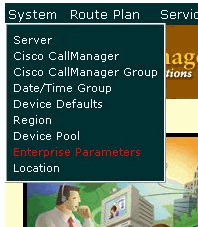
Choose System > Enterprise Parameters from the Cisco CallManager Administration window.
-
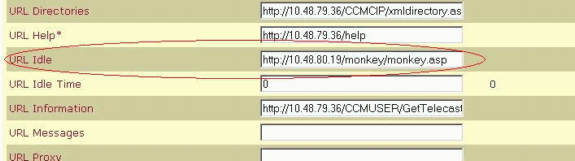
Enter the URL of the logo that you want to display in the URL Idle field.
-
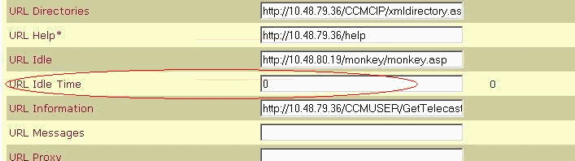
Enter a value that is greater than zero (0) in the URL Idle Time field.
This value indicates the amount of idle time that passes before activation of the logo that you selected in Step 2. If you set this value to zero, the idle URL logo never displays.
Note: The parameters that display in this window are global parameters. In order to set a different value for a particular phone, change the value of the URL Idle field and the URL Idle Time field under the phone configuration. Otherwise, the Idle Timer field in the phone configuration is empty, as this example shows:
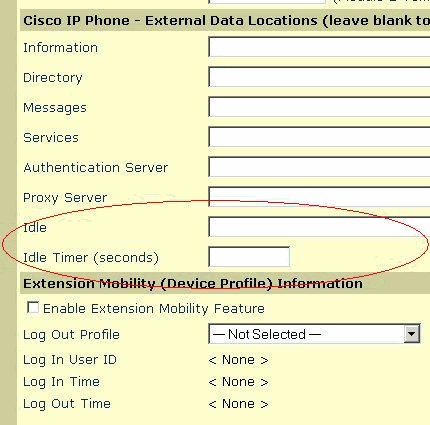
Note: Choose Device > IP phone > search for your phone in order to find this phone configuration.




Related Information

Revision History
| Revision | Publish Date | Comments |
|---|---|---|
1.0 |
03-Feb-2006 |
Initial Release |
 Feedback
Contact Cisco
- Open a Support Case

- (Requires a Cisco Service Contract)