Table Of Contents
Cisco Unified SCCP and SIP SRST Feature Overview
Contents
Cisco Unified SCCP SRST
Information About SCCP SRST
Prerequisites for Configuring Cisco Unified SCCP SRST
Installing Cisco Unified Communications Manager
Installing Cisco Unified SCCP SRST
Integrating Cisco Unified SCCP SRST with Cisco Unified Communications Manager
Restrictions for Configuring Cisco Unified SCCP SRST
Cisco Unified SIP SRST
Information About SIP SRST
Prerequisites for Configuring Cisco Unified SIP SRST
Restrictions for Configuring Cisco Unified SIP SRST
MGCP Gateways and SRST
Support for Cisco Unified IP Phones and Platforms
Finding Cisco IOS Software Releases That Support Cisco Unified SRST
Cisco Unified IP Phone Support
Platform and Memory Support
Determining Platform Support Through Cisco Feature Navigator
Availability of Cisco IOS Software Images
Cisco Unified Communications Manager Compatibility
Signal Support
Language Support
Switch Support
Where to Go Next
Additional References
Related Documents
Standards
MIBs
RFCs
Technical Assistance
Obtaining Documentation, Obtaining Support, and Security Guidelines
Cisco Unified SCCP and SIP SRST Feature Overview
Revised: July 23, 2012
This chapter describes Cisco Unified Survivable Remote Site Telephony (Cisco Unified SRST) and what it does. It also includes information about support for Cisco Unified IP Phones and Platforms, specifications, features, prerequisites, restrictions and where to find additional reference documents.
For the most up-to-date information about Cisco Unified IP Phone support, the maximum number of Cisco Unified IP Phones, the maximum number of directory numbers (DNs) or virtual voice ports, and memory requirements for Cisco Unified SRST and Cisco Unified SIP SRST, see Cisco Unified SRST 4.0 Supported Firmware, Platforms, Memory, and Voice Products.
Contents
•
Cisco Unified SCCP SRST
•
Cisco Unified SIP SRST
•
MGCP Gateways and SRST
•
Support for Cisco Unified IP Phones and Platforms
•
Where to Go Next
•
Additional References
•
Obtaining Documentation, Obtaining Support, and Security Guidelines
Cisco Unified SCCP SRST
•
Information About SCCP SRST
•
Prerequisites for Configuring Cisco Unified SCCP SRST
•
Restrictions for Configuring Cisco Unified SCCP SRST
Information About SCCP SRST
Cisco Unified SRST provides Cisco Unified CM with fallback support for Cisco Unified IP phones that are attached to a Cisco router on your local network. Cisco Unified SRST enables routers to provide call-handling support for Cisco Unified IP phones when they lose connection to remote primary, secondary, or tertiary Cisco Unified CM installations or when the WAN connection is down.
Cisco Unified CM supports Cisco Unified IP phones at remote sites attached to Cisco multiservice routers across the WAN. Prior to Cisco Unified SRST, when the WAN connection between a router and the Cisco Unified CM failed or when connectivity with Cisco Unified CM was lost for some reason, Cisco Unified IP phones on the network became unusable for the duration of the failure. Cisco Unified SRST overcomes this problem and ensures that the Cisco Unified IP phones offer continuous (although minimal) service by providing call-handling support for Cisco Unified IP phones directly from the Cisco Unified SRST router. The system automatically detects a failure and uses Simple Network Auto Provisioning (SNAP) technology to autoconfigure the branch office router to provide call processing for Cisco Unified IP phones that are registered with the router. When the WAN link or connection to the primary Cisco Unified CM is restored, call handling reverts back to the primary Cisco Unified CM.
When Cisco Unified IP phones lose contact with primary, secondary, and tertiary Cisco Unified CM, they must establish a connection to a local Cisco Unified SRST router to sustain the call-processing capability necessary to place and receive calls. The Cisco Unified IP phone retains the IP address of the local Cisco Unified SRST router as a default router in the Network Configuration area of the Settings menu. The Settings menu supports a maximum of five default router entries; however, Cisco Unified CM accommodates a maximum of three entries. When a secondary Cisco Unified CM is not available on the network, the local Cisco Unified SRST Router's IP address is retained as the standby connection for Cisco Unified CM during normal operation.

Note
Cisco Unified CM fallback mode telephone service is available only to those Cisco Unified IP phones that are supported by a Cisco Unified SRST router. Other Cisco Unified IP phones on the network remain out of service until they re-establish a connection with their primary, secondary, or tertiary Cisco Unified CM.
Typically, it takes three times the keepalive period for a phone to discover that its connection to Cisco Unified CM has failed. The default keepalive period is 30 seconds. If the phone has an active standby connection established with a Cisco Unified SRST router, the fallback process takes 10 to 20 seconds after connection with Cisco Unified CM is lost. An active standby connection to a Cisco Unified SRST router exists only if the phone has the location of a single Cisco Unified CM in its Unified Communications Manager list. Otherwise, the phone activates a standby connection to its secondary Cisco Unified CM.
Note
The time it takes for a Cisco Unified IP Phone to fallback to the SRST router can vary depending on the phone type. Phones such as the Cisco 7902, Cisco 7905, and Cisco 7912 can take approximately 2.5 minutes to fallback to SRST mode.
If a Cisco Unified IP phone has multiple Cisco Unified CM in its Cisco Unified CM list, it progresses through its list of secondary and tertiary Cisco Unified CM before attempting to connect with its local Cisco Unified SRST router. Therefore, the time that passes before the Cisco Unified IP phone eventually establishes a connection with the Cisco Unified SRST router increases with each attempt to contact to a Cisco Unified CM. Assuming that each attempt to connect to a Cisco Unified CM takes about 1 minute, the Cisco Unified IP phone in question could remain offline for 3 minutes or more following a WAN link failure.

Note
During a WAN connection failure, when Cisco Unified SRST is enabled, Cisco Unified IP phones display a message informing you that they are operating in Cisco Unified CM fallback mode. For example, the Cisco Unified IP Phone 7960G and Cisco Unified IP Phone 7940G display a "CM Fallback Service Operating" message, and the Cisco Unified IP Phone 7910 displays a "CM Fallback Service" message when operating in Cisco Unified CM fallback mode. When the Cisco Unified CM is restored, the message goes away and full Cisco Unified IP phone functionality is restored.
While in Cisco Unified CM fallback mode, Cisco Unified IP phones periodically attempt to re-establish a connection with Cisco Unified CM at the central office. Generally, the default time that Cisco Unified IP phones wait before attempting to re-establish a connection to a remote Cisco Unified CM is 120 seconds. The time can be changed in Cisco Unified CM; see the "Device Pool Configuration Settings" chapter in the appropriate Cisco Unified CM Administration Guide. A manual reboot can immediately reconnect Cisco Unified IP phones to Cisco Unified CM.
When a connection is re-established with Cisco Unified CM, Cisco Unified IP phones automatically cancel their registration with the Cisco Unified SRST Router. However, if a WAN link is unstable, Cisco Unified IP phones can bounce between Cisco Unified CM and Cisco Unified SRST. A Cisco Unified IP phone cannot re-establish a connection with the primary Cisco Unified CM at the central office if it is currently engaged in an active call.
Cisco Unified SRST supports the following call combinations:
•
SCCP phone to SCCP phone
•
SCCP phone to PSTN/router voice-port
•
SCCP phone to WAN VoIP using SIP or H.323
•
SIP phone to SIP phone
•
SIP phone to PSTN / router voice-port
•
SIP phone to Skinny Client Control Protocol (SCCP) phone
•
SIP phone to WAN VoIP using SIP
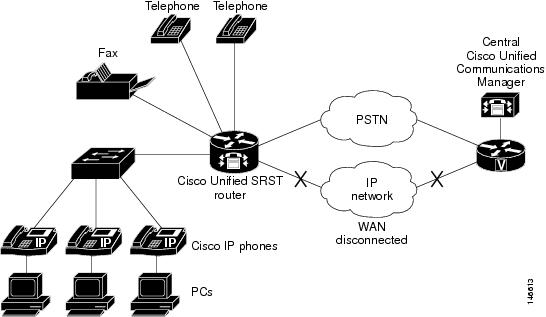
Figure 1 shows a branch office with several Cisco Unified IP phones connected to a Cisco Unified SRST router. The router provides connections to both a WAN link and the PSTN. Typically, the Cisco Unified IP phones connect to their primary Cisco Unified Communications Manager at the central office via the WAN link. When the WAN connection is down, the Cisco Unified IP phones use the Cisco Unified SRST router as a fallback for their primary Cisco Unified Communications Manager. The branch office Cisco Unified IP phones are connected to the PSTN through the Cisco Unified SRST router and are able to make and receive off-net calls.
Figure 1 Branch Office Cisco Unifed IP Phones Connected to a Remote Central Cisco Unified Communications Manage Operating in SRST Mode
On H.323 gateways for SCCP SRST, when the WAN link fails, active calls from Cisco Unified IP phones to the PSTN are not maintained by default. Call preservation may work with the no h225 timeout keepalive command.
Under default configuration, the H.323 gateway maintains a keepalive signal with Cisco Unified Communications Manager and terminates H.323-to-PSTN calls if the keepalive signal fails, for example, if the WAN link fails. To disable this behavior and help preserve existing calls from local Cisco Unified IP phones, you can use the no h225 timeout keepalive command. Disabling the keepalive mechanism only affects calls that will be torn down as a result of the loss of the H.225 keepalive signal. For information regarding disconnecting a call when an inactive condition is detected, see the Media Inactive Call Detection document.
Prerequisites for Configuring Cisco Unified SCCP SRST
Before configuring Cisco Unified SRST, you must do the following:
•
You have an account on Cisco.com to download software.
To obtain an account on Cisco.com, go to www.cisco.com and click Register at the top of the screen.
•
You have purchased a Cisco Unified SRST license.
–
To purchase a license, go to http://www.cisco.com/pcgi-bin/tablebuild.pl/ip-key.
–
To activate cme-srst feature license, see the Activating CME-SRST Feature License document.
•
Choose an appropriate Cisco Unified SRST version. Each SRST version supports a specific set of IP phones, memory requirements, features, and DNs. See the "Platform and Memory Support" section and the "Restrictions for Configuring Cisco Unified SCCP SRST" section.
•
Choose an appropriate phoneload. SRST only supports certain phoneloads that have been tested with the various Cisco Unified Communications Manager versions. For the most up-to-date phoneloads, see the
Cisco Unified SRST 4.3 Supported Firmware, Platforms, Memory, and Voice Products.
•
If you have Cisco Unified Communications Manager already installed, verify that your version of
Cisco Unified Communications Manager is compatible with your Cisco Unified SRST release. See the "Cisco Unified Communications Manager Compatibility" section.
Installing Cisco Unified Communications Manager
When installing Cisco Unified Communications Manager, consider the following:
•
See the installation instructions for your version in the Cisco Unified Communications Manager Install and Upgrade Guides.
•
Integrate Cisco Unified SRST with Cisco Unified Communications Manager. Integration is performed from Cisco Unified Communications Manager. See the "Integrating Cisco Unified SCCP SRST with Cisco Unified Communications Manager" section.
Installing Cisco Unified SCCP SRST
Cisco Unified SRST versions have different installation instructions:
•
Installing Cisco Unified SRST V3.0 and Later Versions
•
Installing Cisco Unified SRST V2.0 and V2.1
•
Installing Cisco Unified SRST V1.0
To update Cisco Unified SRST, follow the installation instructions described in this section.
Installing Cisco Unified SRST V3.0 and Later Versions
Install the Cisco IOS software release image containing the Cisco SRST or Cisco Unified SRST version that is compatible with your Cisco Unified Communications Manager version. See the "Cisco Unified Communications Manager Compatibility" section. Cisco IOS software can be downloaded from the Cisco Software Center at http://www.cisco.com/public/sw-center/.
Cisco SRST and Cisco Unified SRST can be configured to support continuous multicast output of music- on-hold (MOH) from a flash MOH file in flash memory. For more information, see the "Defining XML API Schema" section. If you plan to use MOH, go to the Technical Support Software Download site at http://www.cisco.com/pcgi-bin/tablebuild.pl/ip-iostsp and copy the music-on-hold.au file to the flash memory on your Cisco SRST or Cisco Unified SRST router.
Installing Cisco Unified SRST V2.0 and V2.1
Download and install Cisco SRST V2.0 or Cisco SRST V2.1 from the Cisco Software Center at http://www.cisco.com/public/sw-center/.
Installing Cisco Unified SRST V1.0
Cisco SRST V1.0 runs with Cisco Communications Manager V3.0.5 only. It is recommended that you upgrade to the latest Cisco Unified Communications Manager and Cisco Unified SRST versions.
Integrating Cisco Unified SCCP SRST with Cisco Unified Communications Manager
There are two procedures for integrating Cisco Unified SRST with Cisco Unified Communications Manager. Procedure selection depends on the Cisco Unified Communications Manager version that you have.
If You Have Cisco Communications Manager V3.3 or Later Versions
If you have Cisco Communications Manager V3.3 or later versions, you must create an SRST reference and apply it to a device pool. An SRST reference is the IP address of the Cisco Unified SRST Router.
Step 1
Create an SRST reference.
a.
From any page in Cisco Unified Communications Manager, click System and SRST.
b.
On the Find and List SRST References page, click Add a New SRST Reference.
c.
On the SRST Reference Configuration page, enter a name in the SRST Reference Name field and the IP address of the Cisco SRST router in the IP Address field.
d.
Click Insert.
Step 2
Apply the SRST reference or the default gateway to one or more device pools.
a.
From any page in Cisco Unified Communications Manager, click System and Device Pool.
b.
On the Device Pool Configuration page, click on the required device pool icon.
c.
On the Device Pool Configuration page, choose an SRST reference or "Use Default Gateway" from the SRST Reference field's menu.
If You Have Cisco Unified Communications Manager Version Prior to V3.3
If you have firmware versions that enable Cisco Unified SRST by default, no additional configuration is required on Cisco Unified Communications Manager to support Cisco Unified SRST. If your firmware versions disable Cisco Unified SRST by default, you must enable Cisco Unified SRST for each phone configuration.
Step 1
Go to the Cisco Unified Communications Manager Phone Configuration page.
a.
From any page in Cisco Unified Communications Manager, click Device and Phone.
b.
In the Find and List Phones page, click Find.
c.
After a list of phones appears, click on the required device name.
d.
The Phone Configuration appears.
Step 2
In the Phone Configuration page, go to the Product Specific Configuration section at the end of the page, choose Enabled from the Cisco Unified SRST field's menu, and click Update.
Step 3
Go to the Phone Configuration page for the next phone and choose Enabled from the Cisco Unified SRST field's menu by repeating Step 1 and Step 2.
Restrictions for Configuring Cisco Unified SCCP SRST
Table 1 provides a history of restrictions from Cisco SCCP SRST Version 1.0 to the present version of Cisco Unified SCCP SRST.
Table 1 Restrictions from Cisco SCCP SRST from the Present Version to Version 1.0
Cisco Unified SRST Version
|
Cisco IOS Release
|
Restrictions
|
Version 4.1
|
12.4.(15)T
|
• Enhanced 911 Services for Cisco Unified SRST does not interface with the Cisco Emergency Responder.
• The information about the most recent phone that called 911 is not preserved after a reboot of Cisco Unified SRST.
• Cisco Emergency Responder does not have access to any updates made to the emergency call history table when remote IP phones are in Cisco Unified SRST fallback mode. Therefore, if the PSAP calls back after the Cisco Unified IP phones register back to Cisco Unified Communications Manager, Cisco Emergency Responder will not have any history of those calls. As a result, those calls will not get routed to the original 911 caller. Instead, the calls are routed to the default destination that is configured on Cisco Emergency Responder for the corresponding ELIN.
• For Cisco Unified Wireless IP Phone 7920 and 7921, a caller's location can only be determined by the static information configured by the system administrator. For more information, see the Precautions for Mobile Phones in Configuring Enhanced 911 Services.
• The extension numbers of 911 callers can be translated to only two emergency location identification numbers (ELINs) for each emergency response location (ERL).
• Using ELINs for multiple purposes can result in unexpected interactions with existing Cisco Unified SRST features. These multiple uses of an ELIN can include configuring an ELIN for use as an actual phone number (ephone-dn, voice register dn, or FXS destination-pattern), a Call Pickup number, or an alias rerouting number. For more information, see the Multiple Usages of an ELIN in Configuring Enhanced 911 Services.
• There are a number of other ways that your configuration of Enhanced 911 Services can interact with existing Cisco Unified SRST features and cause unexpected behavior. For a complete description of interactions between Enhanced 911 Services and existing Cisco Unified SRST features, see the "Interactions with Existing Cisco Unified SIP SRST Features" section on page 106.
|
| |
|
Version 4.0
Version 3.4
Version 3.2
Version 3.1
Version 3.0
Version 2.1
Version 2.02
Version 2.01
Version 2.0
|
12.4(4)XC
12.4(4)T
12.3(11)T
12.3(7)T
12.2(15)ZJ
12.3(4)T
12.2(15)T
12.2(13)T
12.2(11)T
12.2(8)T1
12.2(8)T
12.2(2)XT
|
• All of the restrictions in Cisco SRST Version 1.0.
• Caller-id display on supported Cisco Unified IP phones: SIP phones in fallback mode displays the name and number of the caller. SCCP phones in fallback mode display only the caller-id number assigned to the line; the caller-ID name configuration for SCCP phones is not preserved during SRST fallback.
• Call transfer is supported only on the following:
– VoIP H.323, VoFR, and VoATM between Cisco gateways running Cisco IOS Release 12.2(11)T and using the H.323 nonstandard information element
– FXO and FXS loop-start (analog)
– FXO and FXS ground-start (analog)
– Ear and mouth (E&M) (analog) and DID (analog)
– T1 channel-associated signaling (CAS) with FXO and FXS ground-start signaling
– T1 CAS with E&M signaling
– All PRI and BRI switch types
• The following Cisco Unified IP Phone function keys are dimmed because they are not supported during SRST operation:
– MeetMe
– GPickUp (group pickup)
– Park
– Confrn (conference)
• Although the Cisco IAD2420 series integrated access devices (IADs) support the Cisco Unified SRST feature, this feature is not recommended as a solution for enterprise branch offices.
|
Version 1.0
|
12.2(2)XB
12.2(2)XG
12.1(5)YD
|
• Does not support first generation Cisco Unified IP phones, such as Cisco IP Phone 30 VIP and Cisco IP Phone 12 SP+.
• Does not support other Cisco Unified Communications Manager applications or services: Cisco IP SoftPhone, Cisco One: Voice and Unified Messaging Application, or Cisco IP Contact Center.
• Does not support Centralized Automatic Message Accounting (CAMA) trunks on the Cisco 3660 routers.
Note If you are in one of the states in the United States of America where there is a regulatory requirement for CAMA trunks to interface to 911 emergency services, and you would like to connect more than 48 Cisco Unified IP phones to the Cisco 3660 multiservice routers in your network, contact your local Cisco account team for help in understanding and meeting the CAMA regulatory requirements.
|
Cisco Unified SIP SRST
•
Information About SIP SRST
•
Prerequisites for Configuring Cisco Unified SIP SRST
•
Restrictions for Configuring Cisco Unified SIP SRST
Information About SIP SRST
This guide describes Cisco Unified SRST functionality for SIP networks. Cisco Unified SIP SRST provides backup to an external SIP proxy server by providing basic registrar and redirect server or back-to-back user agent (B2BUA) services. These services are used by a SIP IP phone in the event of a WAN connection outage when the SIP phone is unable to communicate with its primary SIP proxy.
Cisco Unified SIP SRST can support SIP phones with standard RFC 3261 feature support locally and across SIP WAN networks. With Cisco Unified SIP SRST, SIP phones can place calls across SIP networks in the same way as SCCP phones.
Cisco Unified SIP SRST supports the following call combinations:
•
SIP phone to SIP phone
•
SIP phone to PSTN / router voice-port
•
SIP phone to Skinny Client Control Protocol (SCCP) phone
•
SIP phone to WAN VoIP using SIP
SIP proxy, registrar, and B2BUA servers are key components of a SIP VoIP network. These servers are usually located in the core of a VoIP network. If SIP phones located at remote sites at the edge of the VoIP network lose connectivity to the network core (because of a WAN outage), they may be unable to make or receive calls. Cisco Unified SIP SRST functionality on a SIP PSTN gateway provides service reliability for SIP-based IP phones in the event of a WAN outage. Cisco Unified SIP SRST enables the SIP IP phones to continue to make and receive calls to and from the PSTN and also to make and receive calls to and from other SIP IP phones.
To see a branch office Cisco Unifed IP Phones connected to a remote central Cisco Unified CM Operating in SRST mode, see Figure 1.
Note
Cisco Unity Express (CUE) interworking is not supported with secure SIP SRST.
Prerequisites for Configuring Cisco Unified SIP SRST
Before configuring Cisco Unified SIP SRST, you must do the following:
•
An SRST feature license is required to enable the Cisco Unified SIP SRST feature. Contact your account representative if you have further questions.
Restrictions for Configuring Cisco Unified SIP SRST
Table 2 provides a history of restrictions from Cisco SIP SRST Version 3.0 to the present version of Cisco Unified SIP SRST.
Table 2 Restrictions from Cisco SIP SRST from the Present Version to Version 3.0
Cisco Unified SRST Version
|
Cisco IOS Release
|
Restrictions
|
Version 8.0
|
15.1(1)T
|
• SIP phones may be configured on the Cisco Unified CM with an Authenticated device security mode. The Cisco Unified CM ensures integrity and authentication for the phone using a TLS connection with NULL-SHA cipher for signaling. If such an Authenticated SIP phone fails over to the Cisco Unified SRST device, and if the Cisco Unified CM and SRST device are configured to support secure SIP SRST, it will register using TCP instead of TLS/TCP, thus disabling the Authenticated mode until the phone fails back to the Cisco Unified CM.
|
Version 4.1
|
12.4.(15)T
|
• Cisco Unified SRST does not support BLF speed-dial notification, call forward all synchronization, dial plans, directory services, or music-on-hold (MOH).
• Prior to SIP phone load 8.0, SIP phones maintained dual registration with both Cisco Unified Communications Manager and Cisco Unified SRST simultaneously. In SIP phone load 8.0 and later versions, SIP phones use keepalive to maintain a connection with Cisco Unified SRST during active registration with Cisco Unified Communications Manager. Every two minutes, a SIP phone sends a keepalive message to Cisco Unified SRST. Cisco Unified SRST responds to this keepalive with a 404 message. This process repeats until fallback to Cisco Unified SRST occurs. After fallback, SIP phones send a keepalive message every two minutes to Cisco Unified Communications Manager while the phones are registered with Cisco Unified SRST. Cisco Unified SRST continues to support dual registration for SIP phone loads older than 8.0.
• Enhanced 911 Services for Cisco Unified SRST does not interface with the Cisco Emergency Responder.
• The information about the most recent phone that called 911 is not preserved after a reboot of Cisco Unified SRST.
• Cisco Emergency Responder does not have access to any updates made to the emergency call history table when remote IP Phones are in Cisco Unified SRST fallback mode. Therefore, if the PSAP calls back after the Cisco Unified IP Phones register back to Cisco Unified Communications Manager, Cisco Emergency Responder will not have any history of those calls. As a result, those calls will not get routed to the original 911 caller. Instead, the calls are routed to the default destination that is configured on Cisco Emergency Responder for the corresponding ELIN.
• For Cisco Unified Wireless 7920 and 7921 IP Phones, a caller's location can only be determined by the static information configured by the system administrator. For more information, see Precautions for Mobile Phones in Configuring Enhanced 911 Services.
• The extension numbers of 911 callers can be translated to only two emergency location identification numbers (ELINs) for each emergency response location (ERL).
• Using ELINs for multiple purposes can result in unexpected interactions with existing Cisco Unified SRST features. These multiple uses of an ELIN can include configuring an ELIN for use as an actual phone number (ephone-dn, voice register dn, or FXS destination-pattern), a Call Pickup number, or an alias rerouting number. For more information, see Multiple Usages of an ELIN in Configuring Enhanced 911 Services.
• There are a number of other ways that your configuration of Enhanced 911 Services can interact with existing Cisco Unified SRST features and cause unexpected behavior. For a complete description of interactions between Enhanced 911 Services and existing Cisco Unified SRST features, see the "Interactions with Existing Cisco Unified SIP SRST Features" section on page 106.
|
Version 4.0
Version 3.4
Version 3.2
Version 3.1
Version 3.0
|
12.4(4)XC
12.4(4)T
12.3(11)T
12.3(7)T
12.2(15)ZJ 12.3(4)T
|
Not Supported
• MOH is not supported for a call hold invoked from a SIP phone. A caller hears only silence when placed on hold by a SIP phone.
• As of Cisco IOS Release 12.4(4)T, bridged call appearance, find-me, incoming call screening, paging, SIP presence, call park, call pickup, and SIP location are not supported.
• SIP-NAT is not supported.
• Cisco Unity Express is not supported.
• Transcoding is not supported.
Phone Features
• For call waiting to work on the Cisco ATA and Cisco IP Phone 7912 and Cisco Unified IP Phone 7905G with a 1.0(2) build, the incoming call leg should be configured with the G.711 codec.
Note Cisco Unified IP Phone 7905G, Cisco Unified IP Phone 7912G, and Cisco Analog Telephone Adaptor (ATA) 186 are not capable of dual registration; thus they are not supported and have limited functionality with Cisco Unified SIP SRST.
General
• Call detail records (CDRs) are only supported by standard IOS RADIUS support; CDRs are not supported otherwise.
• All calls must use the same codec, either G.729r8 or G.711.
• Calls that have been transferred cannot be transferred a second time.
• URL dialing is not supported. Only number dialing is supported.
• The SIP registrar functionality provided by Cisco Unified SIP SRST provides no security or authentication services.
• SIP IP phones that do not support dual concurrent registration with both their primary and their backup SIP proxy or registrar may be unable to receive incoming calls from the Cisco Unified SIP SRST gateway during a WAN outage. These phones may take a significant amount of time to discover that their primary SIP proxy or registrar is unreachable before they initiate a fallback registration to their backup proxy or registrar (the SIP SRST gateway).
• SIP-phone-to-SIP-trunk support requires Refer and 302/300 Redirection to be supported by the SIP trunk (Version 3.0).
|
MGCP Gateways and SRST
MGCP fallback is a different feature than SRST and, when configured as an individual feature, can be used by a PSTN gateway. To use SRST as your fallback mode on an MGCP gateway, SRST and MGCP fallback must both be configured on the same gateway. MGCP and SRST have had the capability to be configured on the same gateway since Cisco IOS Release 12.2(11)T.
To make outbound calls while in SRST mode on your MGCP gateway, two fallback commands must be configured on the MGCP gateway. These two commands allow SRST to assume control over the voice port and over call processing on the MGCP gateway. With Cisco IOS earlier than 12.3(14)T, the two commands are the ccm-manager fallback-mgcp and call application alternate commands. With Cisco IOS releases after 12.3(14)T, the ccm-manager fallback-mgcp and service commands must be configured. A complete configuration for these commands is shown in the section the "Enabling Cisco Unified SRST on an MGCP Gateway" section.
Note
The commands listed above are ineffective unless both commands are configured. For instance, your configuration will not work if you only configure the ccm-manager fallback-mgcp command.
For more information on the fallback methods for MGCP gateways, see the Configuring MGCP Gateway Support for Cisco Unified Communications Manager document or the MGCP Gateway Fallback Transition to Default H.323 Session Application document.
Support for Cisco Unified IP Phones and Platforms
The following sections provide information about Cisco Feature Navigator and the histories of
Cisco Unified IP Phone, platform, and Cisco Unified CM support from Cisco SRST Version 1.0 to the present version of Cisco Unified SRST.
•
Finding Cisco IOS Software Releases That Support Cisco Unified SRST
•
Cisco Unified IP Phone Support
•
Platform and Memory Support
•
Cisco Unified Communications Manager Compatibility
•
Signal Support
•
Language Support
•
Switch Support
Finding Cisco IOS Software Releases That Support Cisco Unified SRST
Note
With Cisco IOS Release 12.4(15)T, the number of SIP phones supported on each platform is now equivalent to the number of SCCP phones supported. For example, 3845 now supports 720 phones regardless of whether these are SIP or SCCP.
To access Cisco Feature Navigator, go to http://www.cisco.com/go/cfn. An account on Cisco.com is not required.
See Cisco Unified CME and Cisco IOS Software Version Compatibility Matrix for related compatibility information.
Cisco Unified IP Phone Support
For the most up-to-date information about Cisco Unified IP Phone support, see Compatibility Information.
For ATAs that are registered to a Cisco Unified SRST system to participate in FAX calls, they must have their ConnectMode parameter set to use the "standard payload type 0/8" as the RTP payload type in FAX passthrough mode. For ATAs used with Cisco Unified SRST 4.0 and higher versions, this is done by setting bit 2 of the ConnectMode parameter to 1 on the ATA. For more information, see the Parameters and Defaults chapter in Cisco ATA 186 and Cisco ATA 188 Analog Telephone Adaptor Administrator's Guide for SCCP.
During Cisco Unified CM fallback, Cisco Unified SRST considers the Cisco VG248 to be a group of Cisco Unified IP phones. Cisco Unified SRST counts each of the 48 ports on the Cisco VG248 as a separate Cisco Unified IP phone. Support for Cisco VG248 Version 1.2(1) and higher versions is available as of Cisco SRST Version 2.1. For more information, see Cisco VG248 Analog Phone Gateway Data Sheet and Cisco VG248 Analog Phone Gateway Version 1.2(1) Release Notes.
Platform and Memory Support
For the most up-to-date information about Platform and Memory Support, see Compatibility Information.
Determining Platform Support Through Cisco Feature Navigator
Cisco IOS software is packaged in feature sets that are supported on specific platforms. To get updated information regarding platform support for this feature, access Cisco Feature Navigator. Cisco Feature Navigator dynamically updates the list of supported platforms as new platform support is added for the feature.
Availability of Cisco IOS Software Images
Platform support for particular Cisco IOS software releases is dependent on the availability of the software images for those platforms. Software images for some platforms may be deferred, delayed, or changed without prior notice. For updated information about platform support and availability of software images for each Cisco IOS software release, see the online release notes or, if supported, Cisco Feature Navigator.
For the most up-to-date information about Cisco IOS software images, see Compatibility Information .
Cisco Unified Communications Manager Compatibility
See Cisco Unified Communications Manager Compatibility Matrix.
Signal Support
Cisco Unified SRST supports FXS, FXO, T1, E1, and E1 R2 signals.
Language Support
See Cisco Unified Communications Manager Express Cisco Unified CME Localization Matrix.
Switch Support
Cisco SRST 3.2 and later versions support all PRI and BRI switches including the following:
•
basic-1tr6
•
basic-5ess
•
basic-dms100
•
basic-net3
•
basic-ni
•
basic-ntt NTT switch type for Japan
•
basic-ts013
•
primary-4ess Lucent 4ESS switch type for the United States
•
primary-5ess Lucent 5ESS switch type for the United States
•
primary-dms100 Northern Telecom DMS-100 switch type for the United States
•
primary-net5 NET5 switch type for the United Kingdom, Europe, Asia, and Australia
•
primary-ni National ISDN switch type for the United States
•
primary-ntt NTT switch type for Japan
•
primary-qsig QSIG switch type
•
primary-ts014 TS014 switch type for Australia (obsolete)
Where to Go Next
The next chapters of this book describe how to configure Cisco Unified SIP SRST. As shown in Table 3, each chapter takes you through tasks in the order in which they need to be performed. The first task for configuring Cisco Unified SRST is to ensure that the basic software and hardware in your system are configured correctly for Cisco Unified SRST.
Additional References
The following sections provide additional references related to Cisco Unified SIP SRST:
•
Related Documents
•
Standards
•
MIBs
•
RFCs
•
Technical Assistance
Related Documents
Standards
Standard
|
Title
|
ITU X. 509 Version 3
|
Public-Key and Attribute Certificate Frameworks
|
MIBs
MIB
|
MIBs Link
|
No new or modified MIBs are supported by this feature, and support for existing MIBs has not been modified by this feature.
|
To locate and download MIBs for selected platforms, Cisco IOS releases, and feature sets, use Cisco MIB Locator found at the following URL:
http://www.cisco.com/go/mibs
|
RFCs
RFC
|
Title
|
RFC 2246
|
The Transport Layer Security (TLS) Protocol Version 1.0
|
RFC 2543
|
SIP: Session Initiation Protocol
|
RFC 3261
|
SIP: Session Initiation Protocol
|
RFC 3711
|
The Secure Real-Time Transport Protocol (SRTP)
|
Technical Assistance
Description
|
Link
|
The Cisco Technical Support & Documentation website contains thousands of pages of searchable technical content, including links to products, technologies, solutions, technical tips, and tools. Registered Cisco.com users can log in from this page to access even more content.
|
http://www.cisco.com/techsupport
|
Obtaining Documentation, Obtaining Support, and Security Guidelines
For information on obtaining documentation, obtaining support, providing documentation feedback, security guidelines, and also recommended aliases and general Cisco documents, see the monthly What's New in Cisco Product Documentation, which also lists all new and revised Cisco technical documentation, at
http://www.cisco.com/en/US/docs/general/whatsnew/whatsnew.html.