-
Cisco MDS 9000 Family NX-OS Fundamentals Configuration Guide, Release 6.x
-
Preface
-
Overview
-
Using the Cisco NX-OS Setup Utility
-
Understanding the Command-Line Interface
-
Configuring Terminal Settings and Sessions
-
Basic Device Management
-
Using the Device File Systems, Directories, and Files
-
Working with Configuration Files
-
Configuring CDP
-
Configuring NTP
-
Managing System Hardware
-
Managing Modules
-
Index
-

 Feedback
Contents
- Basic Device Management
- Information About Basic Device Management
- Device Hostname
- Management Interface
- Default Gateway
- Message-of-the-Day Banner
- Device Clock
- Time Zone and Summer Time (Daylight Saving Time)
- User Sessions
- Telnet Server Connection
- Changing the Device Hostname
- Configuring the Management Interface
- Configuirng the Default Gateway
- Configuring the MOTD Banner
- Configuring the Time Zone
- Configuring Summer Time (Daylight Saving Time)
- Manually Setting the Device Clock
- Managing Users
- Displaying Information about the User Sessions
- Sending a Message to Users
- Enabling or Disabling a Telnet Server Connection
- Verifying the Device Configuration
- Default Settings for Basic Device Parameters
Basic Device Management
This chapter contains the following sections:
- Information About Basic Device Management
- Changing the Device Hostname
- Configuring the Management Interface
- Configuirng the Default Gateway
- Configuring the MOTD Banner
- Configuring the Time Zone
- Configuring Summer Time (Daylight Saving Time)
- Manually Setting the Device Clock
- Managing Users
- Enabling or Disabling a Telnet Server Connection
- Verifying the Device Configuration
- Default Settings for Basic Device Parameters
Information About Basic Device Management
- Device Hostname
- Management Interface
- Default Gateway
- Message-of-the-Day Banner
- Device Clock
- Time Zone and Summer Time (Daylight Saving Time)
- User Sessions
- Telnet Server Connection
Management Interface
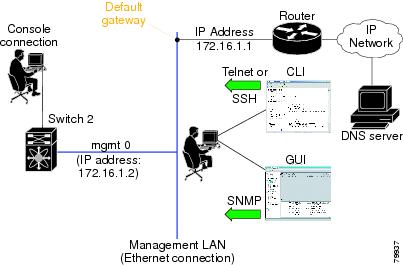
The management interface allows multiple simultaneous Telnet or SNMP sessions. You can remotely configure the device through the management interface (mgmt0), but first you must configure some IP parameters so that the switch is reachable. You can manually configure the management interface from the CLI. You can configure the mgmt 0 interface with either IPv4 address parameters or an IPv6 address.
On devices with dual supervisor modules, a single IP address is used to manage the switch. The active supervisor module's mgmt0 interface uses this IP address. The mgmt0 interface on the standby supervisor module remains in an inactive state and cannot be accessed until a switchover happens. After a switchover, the mgmt0 interface on the standby supervisor module becomes active and assumes the same IP address as the previously active supervisor module.
The management port (mgmt0) is autosensing and operates in full duplex mode at a speed of 10/100/1000 Mbps (1000 Mbps is only available on the Supervisor-2 module). Autosensing supports both the speed and the duplex mode. On a Supervisor-1 module, the default speed is 100 Mbps and the default duplex mode is auto. On a Supervisor-2 module, the default speed is auto and the default duplex mode is auto.
Time Zone and Summer Time (Daylight Saving Time)
You can configure the time zone and summer time (daylight saving time) setting for your device. These values offset the clock time from Coordinated Universal Time (UTC). UTC is International Atomic Time (TAI) with leap seconds added periodically to compensate for the Earth's slowing rotation. UTC was formerly called Greenwich Mean Time (GMT).
Telnet Server Connection
The Telnet server is disabled by default on all switches in the Cisco MDS 9000 Family. You can enable the Telnet server if you do not require a secure SSH connection. However, if you require a secure SSH connection, you need to disable the default Telnet connection and then enable the SSH connection.
Note
For information on connecting a terminal to the supervisor module console port, refer to the Cisco MDS 9200 Series Hardware Installation Guide or the Cisco MDS 9500 Series Hardware Installation Guide.
Note
The Cisco NX-OS software allows a maximum of 16 sessions on any switch in the Cisco MDS 9500 Series or the Cisco MDS 9200 Series.
Changing the Device Hostname
SUMMARY STEPSYou can change the device hostname displayed in the command prompt from the default (switch) to another character string.
1. configure terminal
2. {hostname | switchname} name
3. exit
4. (Optional) copy running-config startup-config
DETAILED STEPSConfiguring the Management Interface
SUMMARY STEPSYou can manually configure the management interface from the CLI. You can configure the mgmt 0 interface with either IPv4 address parameters or an IPv6 address.
NoteYou only need to configure the mgmt0 interface on the active supervisor module. When a supervisor module switchover occurs, the new active supervisor module uses the same configuration for the mgmt0 interface.
1. configure terminal
2. interface mgmt 0
3. ip address {ipv4-address subnet-mask | ipv6-address}
4. exit
5. (Optional) show interface mgmt 0
6. (Optional) copy running-config startup-config
DETAILED STEPS
Command or Action Purpose
Step 1 configure terminal
Example:switch# configure terminal switch(config)#Enters global configuration mode.
Step 2 interface mgmt 0
Example:switch(config)# interface mgmt 0 switch(config-if)#Specifies the mgmt0 inteface and enters the interface configuration mode.
Step 3 ip address {ipv4-address subnet-mask | ipv6-address}
Example:switch(config-if)# ip address 1.1.1.0 255.255.255.0Configures the IPv4 or IPv6 address on the mgmt 0 interface.
Step 4 exit
Example:switch(config-if)# exit switch(config)#Returns to global configuration mode.
Step 5 show interface mgmt 0
Example:switch(config)# show interface mgmt 0(Optional) Dispalys the mgmt 0 interface information.
Step 6 copy running-config startup-config
Example:switch(config)# copy running-config startup-config(Optional) Copies the running configuration to the startup configuration.
Configuirng the Default Gateway
SUMMARY STEPSYou can manually configure the management interface from the CLI. You can configure the mgmt 0 interface with either IPv4 address parameters or an IPv6 address.
1. configure terminal
2. ip default gateway ipv4-address
3. (Optional) show ip route
4. (Optional) copy running-config startup-config
DETAILED STEPS
Command or Action Purpose
Step 1 configure terminal
Example:switch# configure terminal switch(config)#Enters global configuration mode.
Step 2 ip default gateway ipv4-address
Example:switch(config)# ip default-gateway 172.16.1.1Configures the IPv4 address for the default gateway.
Step 3 show ip route
Example:switch(config)# show ip route(Optional) Displays the default gataeway configuration.
Step 4 copy running-config startup-config
Example:switch(config)# copy running-config startup-config(Optional) Configures the IPv4 or IPv6 address on the mgmt 0 interface.
Configuring the MOTD Banner
SUMMARY STEPSYou can configure the MOTD to display before the login prompt on the terminal when a user logs in. The MOTD banner has the following characteristics:
1. configure terminal
2. banner motd delimiting-character message delimiting-character
3. exit
4. (Optional) show banner motd
5. (Optional) copy running-config startup-config
DETAILED STEPS
Command or Action Purpose
Step 1 configure terminal
Example:switch# configure terminal switch(config)#Enters global configuration mode.
Step 2 banner motd delimiting-character message delimiting-character
Example:switch(config)# banner motd #Welcome to the Switch# switch(config)#Configures the MOTD banner. Do not use the delimiting-character in the message text.
Note Do not use " or % as a delimiting character.
Step 3 exit
Example:switch(config)# exit switch#Exits global configuration mode.
Step 4 show banner motd
Example:switch# show banner motd(Optional) Displays the configured MOTD banner.
Step 5 copy running-config startup-config
Example:switch# copy running-config startup-config(Optional) Copies the running configuration to the startup configuration.
Configuring the Time Zone
SUMMARY STEPS
1. configure terminal
2. clock timezone zone-name offset-hours offset-minutes
3. exit
4. (Optional) show clock
5. (Optional) copy running-config startup-config
DETAILED STEPS
Command or Action Purpose
Step 1 configure terminal
Example:switch# configure terminal switch(config)#Enters global configuration mode.
Step 2 clock timezone zone-name offset-hours offset-minutes
Example:switch(config)# clock timezone EST -5 0Configures the time zone. The zone-name argument is a 3-character string for the time zone acronym (for example, PST or EST). The offset-hours argument is the offset from the UTC and the range is from –23 to 23 hours. The range for the offset-minutes argument is from 0 to 59 minutes.
Step 3 exit
Example:switch(config)# exit switch#Exits global configuration mode.
Step 4 show clock
Example:switch# show clock(Optional) Displays the time and time zone.
Step 5 copy running-config startup-config
Example:switch# copy running-config startup-config(Optional) Copies the running configuration to the startup configuration.
Configuring Summer Time (Daylight Saving Time)
SUMMARY STEPSYou can configure when summer time, or daylight saving time, is in effect for the device and the offset in minutes.
1. configure terminal
2. clock summer-time zone-name start-week start-day start-month start-time end-week end-day end-month end-time offset-minutes
3. exit
4. (Optional) show clock detail
5. (Optional) copy running-config startup-config
DETAILED STEPS
Command or Action Purpose
Step 1 configure terminal
Example:switch# configure terminal switch(config)#Enters global configuration mode.
Step 2 clock summer-time zone-name start-week start-day start-month start-time end-week end-day end-month end-time offset-minutes
Example:switch(config)# clock summer-time PDT 1 Sunday March 02:00 1 Sunday November 02:00 60Configures summer time or daylight saving time.
The zone-name argument is a three character string for the time zone acronym (for example, PST and EST).
The values for the start-day and end-day arguments are Monday, Tuesday, Wednesday, Thursday, Friday, Saturday, and Sunday.
The values for the start-month and end-month arguments are January, February, March, April, May, June, July, August, September, October, November, and December.
The value for the start-time and end-time arguments are in the format hh:mm.
The range for the offset-minutes argument is from 0 to 1440 minutes.
Step 3 exit
Example:switch(config)# exit switch#Exits global configuration mode.
Step 4 show clock detail
Example:switch(config)# show clock detail(Optional) Displays the configured MOTD banner.
Step 5 copy running-config startup-config
Example:switch# copy running-config startup-config(Optional) Copies the running configuration to the startup configuration.
Manually Setting the Device Clock
SUMMARY STEPS
1. clock set time day month year
2. (Optional) show clock
DETAILED STEPS
Command or Action Purpose
Step 1 clock set time day month year
Example:switch# clock set 15:00:00 30 May 2008 Fri May 30 15:14:00 PDT 2008Configures the device clock.
The format for the time argument is hh:mm:ss.
The range for the day argument is from 1 to 31.
The values for the month argument are January, February, March, April, May, June, July, August, September, October, November, and December.
The range for the year argument is from 2000 to 2030.
Step 2 show clock
Example:switch(config)# show clock(Optional) Displays the current clock value.
Related Tasks
Managing Users
Sending a Message to Users
SUMMARY STEPS
1. (Optional) show users
2. send [session line] message-text
DETAILED STEPS
Command or Action Purpose
Step 1 show users
Example:switch# show users(Optional) Displays the active user sessions.
Step 2 send [session line] message-text
Example:switch# send Reloading the device is 10 minutes!Sends a message to all active users or to a specific user. The message can be up to 80 alphanumeric characters and is case sensitive.
Enabling or Disabling a Telnet Server Connection
SUMMARY STEPS
1. configure terminal
2. [no] feature telnet
3. (Optional) show telnet server
4. (Optional) copy running-config startup-config
DETAILED STEPS
Command or Action Purpose
Step 1 configure terminal
Example:switch# configure terminal switch(config)#Enters global configuration mode.
Step 2 [no] feature telnet
Example:switch(config)# feature telnetEnables the Telnet server connection. Use the no form of the command to disable the Telnet server connection. The default is disabled.
Step 3 show telnet server
Example:switch(config)# show telnet server(Optional) Displays the Telnet server configuration.
Step 4 copy running-config startup-config
Example:switch(config)# copy running-config startup-config(Optional) Copies the running configuration to the starutup configuration.
Verifying the Device Configuration
To verify the configuration after bootstrapping the device using POAP, use one of the following commands:
Command
Purpose
show running-config
Displays the running configuration.
show startup-config
Displays the startup configuration.
For detailed information about the fields in the output from these commands, see the Cisco Nexus Command Reference for your device.