- RADIUS Attributes Overview and RADIUS IETF Attributes
- RADIUS Vendor-Proprietary Attributes
- Vendor-Specific Attributes (VSA) and RADIUS Disconnect-Cause Attribute Values
- Connect-Info RADIUS Attribute 77
- Encrypted Vendor Specific Attributes
- RADIUS Attribute 8 (Framed-IP-Address) in Access Requests
- RADIUS Attribute 82: Tunnel Assignment ID
- RADIUS Tunnel Attribute Extensions
- RADIUS Attribute 66 (Tunnel-Client-Endpoint) Enhancements
- RADIUS Attribute Value Screening
RADIUS Attributes Configuration Guide Cisco IOS XE Release 3S
Bias-Free Language
The documentation set for this product strives to use bias-free language. For the purposes of this documentation set, bias-free is defined as language that does not imply discrimination based on age, disability, gender, racial identity, ethnic identity, sexual orientation, socioeconomic status, and intersectionality. Exceptions may be present in the documentation due to language that is hardcoded in the user interfaces of the product software, language used based on RFP documentation, or language that is used by a referenced third-party product. Learn more about how Cisco is using Inclusive Language.
- Updated:
- May 11, 2009
Chapter: RADIUS Attributes Overview and RADIUS IETF Attributes
RADIUS Attributes Overview and RADIUS IETF Attributes
Remote Authentication Dial-In User Service (RADIUS) attributes are used to define specific authentication, authorization, and accounting (AAA) elements in a user profile, which is stored on the RADIUS daemon. This chapter lists the RADIUS attributes currently supported.
Finding Feature Information
For the latest feature information and caveats, see the release notes for your platform and software release. To find information about the features documented in this module, and to see a list of the releases in which each feature is supported, see the "Feature Information for RADIUS Attributes Overview and RADIUS IETF Attributes" section.
Use Cisco Feature Navigator to find information about platform support and Cisco IOS XE software image support. To access Cisco Feature Navigator, go to http://tools.cisco.com/ITDIT/CFN/jsp/index.jsp. An account on Cisco.com is not required.
Contents
This chapter contains the following sections:
• Feature Information for RADIUS Attributes Overview and RADIUS IETF Attributes
RADIUS Attributes Overview
This section contains information important to understanding how RADIUS attributes exchange AAA information between a client and server and includes the following sections:
IETF Attributes Versus VSAs
RADIUS Internet Engineering Task Force (IETF) attributes are the original set of 255 standard attributes that are used to communicate AAA information between a client and a server. Because IETF attributes are standard, the attribute data is predefined and well known; thus all clients and servers who exchange AAA information via IETF attributes must agree on attribute data such as the exact meaning of the attributes and the general bounds of the values for each attribute.
RADIUS vendor-specific attributes (VSAs) derived from one IETF attribute—vendor-specific (attribute 26). Attribute 26 allows a vendor to create an additional 255 attributes however they wish. That is, a vendor can create an attribute that does not match the data of any IETF attribute and encapsulate it behind attribute 26; thus, the newly created attribute is accepted if the user accepts attribute 26.
For more information on VSAs, refer to "Chapter 1, "RADIUS Vendor-Specific Attributes (VSA) and RADIUS Disconnect-Cause Attribute Values."
RADIUS Packet Format
The data between a RADIUS server and a RADIUS client is exchanged in RADIUS packets. The data fields are transmitted from left to right.
Figure 1 shows the fields within a RADIUS packet.

Note For a diagram of VSAs, which is an extension of Figure 1, refer to Figure 1 in Chapter 1, "RADIUS Vendor-Specific Attributes (VSA) and RADIUS Disconnect-Cause Attribute Values."
Figure 1 RADIUS Packet Diagram
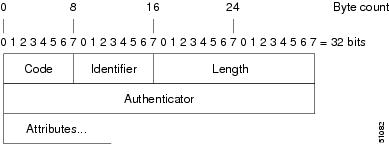
Each RADIUS packet contains the following information:
•Code—The code field is one octet; it identifies one of the following types of RADIUS packets:
–Access-Request (1)
–Access-Accept (2)
–Access-Reject (3)
–Accounting-Request (4)
–Accounting-Response (5)
•Identifier—The identifier field is one octet; it helps the RADIUS server match requests and responses and detect duplicate requests.
•Length—The length field is two octets; it specifies the length of the entire packet.
•Authenticator—The authenticator field is 16 octets. The most significant octet is transmitted first; it is used to authenticate the reply from the RADIUS server. Two types of authenticators are as follows:
–Request-Authentication: Available in Access-Request and Accounting-Request packets
–Response-Authenticator: Available in Access-Accept, Access-Reject, Access-Challenge, and Accounting-Response packets
RADIUS Packet Types
The following list defines the various types of RADIUS packet types that can contain attribute information:
Access-Request—Sent from a client to a RADIUS server. The packet contains information that allows the RADIUS server to determine whether to allow access to a specific network access server (NAS), which will allow access to the user. Any user performing authentication must submit an Access-Request packet. Once an Access-Request packet is received, the RADIUS server must forward a reply.
Access-Accept—Once a RADIUS server receives an Access-Request packet, it must send an Access-Accept packet if all attribute values in the Access-Request packet are acceptable. Access-Accept packets provide the configuration information necessary for the client to provide service to the user.
Access-Reject—Once a RADIUS server receives an Access-Request packet, it must send an Access-Reject packet if any of the attribute values are not acceptable.
Access-Challenge—Once the RADIUS server receives an Access-Accept packet, it can send the client an Access-Challenge packet, which requires a response. If the client does not know how to respond or if the packets are invalid, the RADIUS server discards the packets. If the client responds to the packet, a new Access-Request packet should be sent with the original Access-Request packet.
Accounting-Request—Sent from a client to a RADIUS accounting server, which provides accounting information. If the RADIUS server successfully records the Accounting-Request packet, it must submit an Accounting Response packet.
Accounting-Response—Sent by the RADIUS accounting server to the client to acknowledge that the Accounting-Request has been received and recorded successfully.
RADIUS Files
Understanding the types of files used by RADIUS is important for communicating AAA information from a client to a server. Each file defines a level of authentication or authorization for the user: The dictionary file defines which attributes the user's NAS can implement; the clients file defines which users are allowed to make requests to the RADIUS server; the users files defines which user requests the RADIUS server will authenticate based on security and configuration data.
Dictionary File
A dictionary file provides a list of attributes that are dependent upon which attributes your NAS supports. However, you can add your own set of attributes to your dictionary for custom solutions. It defines attribute values, thereby allowing you to interpret attribute output such as parsing requests. A dictionary file contains the following information:
•Name—The ASCII string "name" of the attribute, such as User-Name.
•ID—The numerical "name" of the attribute; for example, User-Name attribute is attribute 1.
•Value type—Each attribute can be specified as one of the following five value types:
–abinary—0 to 254 octets.
–date—32-bit value in big endian order. For example, seconds since 00:00:00 GMT, JAN. 1, 1970.
–ipaddr—4 octets in network byte order.
–integer—32-bit value in big endian order (high byte first).
–string—0 to 253 octets.
When the data type for a particular attribute is an integer, you can optionally expand the integer to equate to some string. The follow sample dictionary includes an integer-based attribute and its corresponding values:
# dictionary sample of integer entry
#
ATTRIBUTE Service-Type 6 integer
VALUE Service-Type Login 1
VALUE Service-Type Framed 2
VALUE Service-Type Callback-Login 3
VALUE Service-Type Callback-Framed 4
VALUE Service-Type Outbound 5
VALUE Service-Type Administrative 6
VALUE Service-Type NAS-Prompt 7
VALUE Service-Type Authenticate-Only 8
VALUE Service-Type Callback-NAS-Prompt 9
VALUE Service-Type Call-Check 10
VALUE Service-Type Callback-Administrative 11
Clients File
A clients file is important because it contains a list of RADIUS clients that are allowed to send authentication and accounting requests to the RADIUS server. To receive authentication, the name and authentication key the client sends the server must be an exact match with the data contained in clients file.
The following is an example of a clients file. The key, as shown in this example, must be the same as the radius-server key SomeSecret command.
#Client Name Key
#---------------- ---------------
10.1.2.3:256 test
nas01 bananas
nas02 MoNkEys
nas07.foo.com SomeSecret
Users File
A RADIUS users file contains an entry for each user that the RADIUS server will authenticate; each entry, which is also referred to as a user profile, establishes an attribute the user can access.
The first line in any user profile is always a "user access" line; that is, the server must check the attributes on the first line before it can grant access to the user. The first line contains the name of the user, which can be up to 252 characters, followed by authentication information such as the password of the user.
Additional lines, which are associated with the user access line, indicate the attribute reply that is sent to the requesting client or server. The attributes sent in the reply must be defined in the dictionary file. When looking at a user file, please note the the data to the left of the equal (=) character is an attribute defined in the dictionary file, and the data to the right of the equal character is the configuration data.
Note A blank line cannot appear anywhere within a user profile.
The following is an example of a RADIUS user profile (Merit Daemon format). In this example, the user name is cisco.com, the password is cisco, and the user can access five tunnel attributes.
# This user profile includes RADIUS tunneling attributes
cisco.com Password="cisco" Service-Type=Outbound
Tunnel-Type = :1:L2TP
Tunnel-Medium-Type = :1:IP
Tunnel-Server-Endpoint = :1:10.0.0.1
Tunnel-Password = :1:"welcome"
Tunnel-Assignment-ID = :1:"nas"
RADIUS IETF Attributes
Note In Cisco IOS XE Release 2.1 for RADIUS tunnel attributes, 32 tagged tunnel sets are supported for L2TP.
This section contains the following sections:
•Supported RADIUS IETF Attributes
•Comprehensive List of RADIUS Attribute Descriptions
Supported RADIUS IETF Attributes
Table 1 lists Cisco-supported IETF RADIUS attributes and the Cisco IOS XE release in which they are implemented. In cases where the attribute has a security server-specific format, the format is specified.
Refer to Table 2 for a description of each listed attribute.
|
|
|
|
|
|---|---|---|---|
1 |
User-Name |
yes |
— |
2 |
User-Password |
yes |
— |
3 |
CHAP-Password |
yes |
— |
4 |
NAS-IP Address |
yes |
— |
5 |
NAS-Port |
yes |
— |
6 |
Service-Type |
yes |
— |
7 |
Framed-Protocol |
yes |
— |
8 |
Framed-IP-Address |
yes |
— |
9 |
Framed-IP-Netmask |
yes |
— |
10 |
Framed-Routing |
yes |
— |
11 |
Filter-Id |
yes |
— |
12 |
Framed-MTU |
yes |
— |
13 |
Framed-Compression |
yes |
— |
14 |
Login-IP-Host |
yes |
— |
15 |
Login-Service |
yes |
— |
16 |
Login-TCP-Port |
yes |
— |
18 |
Reply-Message |
yes |
— |
19 |
Callback-Number |
yes |
— |
20 |
Callback-ID |
no |
— |
22 |
Framed-Route |
yes |
— |
23 |
Framed-IPX-Network |
no |
— |
24 |
State |
yes |
— |
25 |
Class |
yes |
— |
26 |
Vendor-Specific |
yes |
— |
27 |
Session-Timeout |
yes |
— |
28 |
Idle-Timeout |
yes |
— |
29 |
Termination-Action |
no |
— |
30 |
Called-Station-Id |
yes |
— |
31 |
Calling-Station-Id |
yes |
— |
32 |
NAS-Identifier |
yes |
— |
33 |
Proxy-State |
no |
— |
34 |
Login-LAT-Service |
yes |
— |
35 |
Login-LAT-Node |
yes |
— |
36 |
Login-LAT-Group |
no |
— |
37 |
Framed-AppleTalk-Link |
no |
— |
38 |
Framed-AppleTalk- Network |
no |
— |
39 |
Framed-AppleTalk-Zone |
no |
— |
40 |
Acct-Status-Type |
yes |
— |
41 |
Acct-Delay-Time |
yes |
— |
42 |
Acct-Input-Octets |
yes |
— |
43 |
Acct-Output-Octets |
yes |
— |
44 |
Acct-Session-Id |
yes |
— |
45 |
Acct-Authentic |
yes |
— |
46 |
Acct-Session-Time |
yes |
— |
47 |
Acct-Input-Packets |
yes |
— |
48 |
Acct-Output-Packets |
yes |
— |
49 |
Acct-Terminate-Cause |
yes |
— |
50 |
Acct-Multi-Session-Id |
yes |
— |
51 |
Acct-Link-Count |
yes |
— |
52 |
Acct-Input-Gigawords |
yes |
— |
53 |
Acct-Output-Gigawords |
yes |
— |
55 |
Event-Timestamp |
yes |
— |
60 |
CHAP-Challenge |
yes |
— |
61 |
NAS-Port-Type |
yes |
— |
62 |
Port-Limit |
yes |
— |
63 |
Login-LAT-Port |
no |
— |
64 |
Tunnel-Type1 |
yes |
— |
65 |
Tunnel-Medium-Type1 |
yes |
— |
66 |
Tunnel-Client-Endpoint |
no |
yes |
67 |
Tunnel-Server-Endpoint1 |
yes |
— |
68 |
Acct-Tunnel-Connection-ID |
yes |
— |
69 |
Tunnel-Password1 |
yes |
— |
70 |
ARAP-Password |
no |
— |
71 |
ARAP-Features |
no |
— |
72 |
ARAP-Zone-Access |
no |
— |
73 |
ARAP-Security |
no |
— |
74 |
ARAP-Security-Data |
no |
— |
75 |
Password-Retry |
no |
— |
76 |
Prompt |
yes |
— |
77 |
Connect-Info |
yes |
— |
78 |
Configuration-Token |
no |
— |
79 |
EAP-Message |
no |
— |
80 |
Message-Authenticator |
no |
— |
81 |
Tunnel-Private-Group-ID |
no |
— |
82 |
Tunnel-Assignment-ID1 |
yes |
— |
83 |
Tunnel-Preference |
yes |
— |
84 |
ARAP-Challenge-Response |
no |
— |
85 |
Acct-Interim-Interval |
yes |
— |
86 |
Acct-Tunnel-Packets-Lost |
no |
— |
87 |
NAS-Port-ID |
no |
— |
88 |
Framed-Pool |
no |
— |
90 |
Tunnel-Client-Auth-ID2 |
yes |
— |
91 |
Tunnel-Server-Auth-ID |
yes |
— |
200 |
IETF-Token-Immediate |
no |
— |
1 This RADIUS attribute complies with the following two draft IETF documents: RFC 2868 RADIUS Attributes for Tunnel Protocol Support and RFC 2867 RADIUS Accounting Modifications for Tunnel Protocol Support. 2 This RADIUS attribute complies with RFC 2865 and RFC 2868. |
Comprehensive List of RADIUS Attribute Descriptions
Table 2 lists and describes IETF RADIUS attributes. In cases where the attribute has a security server-specific format, the format is specified.
|
|
|
|
|---|---|---|
1 |
User-Name |
Indicates the name of the user being authenticated by the RADIUS server. |
2 |
User-Password |
Indicates the user's password or the user's input following an Access-Challenge. Passwords longer than 16 characters are encrypted using RFC 2865 specifications. |
3 |
CHAP-Password |
Indicates the response value provided by a PPP Challenge-Handshake Authentication Protocol (CHAP) user in response to an Access-Challenge. |
4 |
NAS-IP Address |
Specifies the IP address of the network access server that is requesting authentication. The default value is 0.0.0.0/0. |
5 |
NAS-Port |
Indicates the physical port number of the network access server that is authenticating the user. The NAS-Port value (32 bits) consists of one or two 16-bit values (depending on the setting of the radius-server extended-portnames command). Each 16-bit number should be viewed as a 5-digit decimal integer for interpretation as follows: For asynchronous terminal lines, async network interfaces, and virtual async interfaces, the value is 00ttt, where ttt is the line number or async interface unit number. For ordinary synchronous network interface, the value is 10xxx. For channels on a primary rate ISDN interface, the value is 2ppcc. For channels on a basic rate ISDN interface, the value is 3bb0c. For other types of interfaces, the value is 6nnss. |
6 |
Service-Type |
Indicates the type of service requested or the type of service to be provided. • Framed for known PPP or SLIP connection. • Login—Make a connection. Exec User—Start an EXEC session. Service type is indicated by a particular numeric value as follows: • • • • • • • • • |
7 |
Framed-Protocol |
Indicates the framing to be used for framed access. No other framing is allowed. Framing is indicated by a numeric value as follows: • • • • • |
8 |
Framed-IP-Address |
Indicates the IP address to be configured for the user, by sending the IP address of a user to the RADIUS server in the access-request. To enable this command, use the radius-server attribute 8 include-in-access-req command in global configuration mode. |
9 |
Framed-IP-Netmask |
Indicates the IP netmask to be configured for the user when the user is a router to a network. This attribute value results in a static route being added for Framed-IP-Address with the mask specified. |
10 |
Framed-Routing |
Indicates the routing method for the user when the user is a router to a network. Only "None" and "Send and Listen" values are supported for this attribute. Routing method is indicated by a numeric value as follows: • • • • |
11 |
Filter-Id |
Indicates the name of the filter list for the user and is formatted as follows: %d, %d.in, or %d.out. This attribute is associated with the most recent service-type command. For login and EXEC, use %d or %d.out as the line access list value from 0 to 199. For Framed service, use %d or %d.out as interface output access list, and %d.in for input access list. The numbers are self-encoding to the protocol to which they refer. |
12 |
Framed-MTU |
Indicates the maximum transmission unit (MTU) that can be configured for the user when the MTU is not negotiated by PPP or some other means. |
13 |
Framed-Compression |
Indicates a compression protocol used for the link. This attribute results in a "/compress" being added to the PPP or SLIP autocommand generated during EXEC authorization. Not currently implemented for non-EXEC authorization. Compression protocol is indicated by a numeric value as follows: • • • |
14 |
Login-IP-Host |
Indicates the host to which the user will connect when the Login-Service attribute is included. (This begins immediately after login.) |
15 |
Login-Service |
Indicates the service that should be used to connect the user to the login host. Service is indicated by a numeric value as follows: • • • • • |
16 |
Login-TCP-Port |
Defines the TCP port with which the user is to be connected when the Login-Service attribute is also present. |
18 |
Reply-Message |
Indicates text that might be displayed to the user via the RADIUS server. You can include this attribute in user files; however, you cannot exceed a maximum of 16 Replyp-Message entries per profile. |
19 |
Callback-Number |
Defines a dialing string to be used for callback. |
20 |
Callback-ID |
Defines the name (consisting of one or more octets) of a place to be called, to be interpreted by the network access server. |
22 |
Framed-Route |
Provides routing information to be configured for the user on this network access server. The RADIUS RFC format (net/bits [router [metric]]) and the old style dotted mask (net mask [router [metric]]) are supported. If the router field is omitted or 0, the peer IP address is used. Metrics are currently ignored. This attribute is access-request packets. |
23 |
Framed-IPX-Network |
Defines the IPX network number configured for the user. |
24 |
State |
Allows state information to be maintained between the network access server and the RADIUS server. This attribute is applicable only to CHAP challenges. |
25 |
Class |
(Accounting) Arbitrary value that the network access server includes in all accounting packets for this user if supplied by the RADIUS server. |
26 |
Vendor-Specific |
Allows vendors to support their own extended attributes not suitable for general use. The Cisco RADIUS implementation supports one vendor-specific option using the format recommended in the specification. Cisco's vendor-ID is 9, and the supported option has vendor-type 1, which is named "cisco-avpair." The value is a string of the format: protocol : attribute sep value "Protocol" is a value of the Cisco "protocol" attribute for a particular type of authorization. "Attribute" and "value" are an appropriate AV pair defined in the Cisco TACACS+ specification, and "sep" is "=" for mandatory attributes and "*" for optional attributes. This allows the full set of features available for TACACS+ authorization to also be used for RADIUS. For example: cisco-avpair= "ip:addr-pool=first" cisco-avpair= "shell:priv-lvl=15" The first example causes Cisco's "multiple named ip address pools" feature to be activated during IP authorization (during PPP's IPCP address assignment). The second example causes a user logging in from a network access server to have immediate access to EXEC commands. Table 1 lists supported vendor-specific RADIUS attributes (IETF attribute 26). The "TACACS+ Attribute-Value Pairs" appendix provides a complete list of supported TACACS+ attribute-value (AV) pairs that can be used with IETF attribute 26. (RFC 2865) |
27 |
Session-Timeout |
Sets the maximum number of seconds of service to be provided to the user before the session terminates. This attribute value becomes the per-user "absolute timeout." |
28 |
Idle-Timeout |
Sets the maximum number of consecutive seconds of idle connection allowed to the user before the session terminates. This attribute value becomes the per-user "session-timeout." |
29 |
Termination-Action |
Termination is indicated by a numeric value as follows: • • |
30 |
Called-Station-Id |
(Accounting) Allows the network access server to send the telephone number the user called as part of the Access-Request packet (using Dialed Number Identification Service [DNIS] or similar technology). This attribute is only supported on ISDN, and modem calls on the Cisco AS5200 if used with PRI. |
31 |
Calling-Station-Id |
(Accounting) Allows the network access server to send the telephone number the call came from as part of the Access-Request packet (using Automatic Number Identification or similar technology). This attribute has the same value as "remote-addr" from TACACS+. This attribute is only supported on ISDN, and modem calls on the Cisco AS5200 if used with PRI. |
32 |
NAS-Identifier |
String identifying the network access server originating the Access-Request. Use the radius-server attribute 32 include-in-access-req global configuration command to send RADIUS attribute 32 in an Access-Request or Accounting-Request. By default, the FQDN is sent in the attribute when the format is not specified. |
33 |
Proxy-State |
Attribute that can be sent by a proxy server to another server when forwarding Access-Requests; this must be returned unmodified in the Access-Accept, Access-Reject or Access-Challenge and removed by the proxy server before sending the response to the network access server. |
34 |
Login-LAT-Service |
Indicates the system with which the user is to be connected by LAT. This attribute is only available in the EXEC mode. |
35 |
Login-LAT-Node |
Indicates the node with which the user is to be automatically connected by LAT. |
36 |
Login-LAT-Group |
Identifies the LAT group codes that this user is authorized to use. |
37 |
Framed-AppleTalk-Link |
Indicates the AppleTalk network number that should be used for serial links to the user, which is another AppleTalk router. |
38 |
Framed-AppleTalk- |
Indicates the AppleTalk network number that the network access server uses to allocate an AppleTalk node for the user. |
39 |
Framed-AppleTalk-Zone |
Indicates the AppleTalk Default Zone to be used for this user. |
40 |
Acct-Status-Type |
(Accounting) Indicates whether this Accounting-Request marks the beginning of the user service (start) or the end (stop). |
41 |
Acct-Delay-Time |
(Accounting) Indicates how many seconds the client has been trying to send a particular record. |
42 |
Acct-Input-Octets |
(Accounting) Indicates how many octets have been received from the port over the course of this service being provided. |
43 |
Acct-Output-Octets |
(Accounting) Indicates how many octets have been sent to the port in the course of delivering this service. |
44 |
Acct-Session-Id |
(Accounting) A unique accounting identifier that makes it easy to match start and stop records in a log file. Acct-Session ID numbers restart at 1 each time the router is power cycled or the software is reloaded. To send this attribute in access-request packets, use the radius-server attribute 44 include-in-access-req command in global configuration mode. |
45 |
Acct-Authentic |
(Accounting) Indicates how the user was authenticated, whether by RADIUS, the network access server itself, or another remote authentication protocol. This attribute is set to "radius" for users authenticated by RADIUS; "remote" for TACACS+ and Kerberos; or "local" for local, enable, line, and if-needed methods. For all other methods, the attribute is omitted. |
46 |
Acct-Session-Time |
(Accounting) Indicates how long (in seconds) the user has received service. |
47 |
Acct-Input-Packets |
(Accounting) Indicates how many packets have been received from the port over the course of this service being provided to a framed user. |
48 |
Acct-Output-Packets |
(Accounting) Indicates how many packets have been sent to the port in the course of delivering this service to a framed user. |
49 |
Acct-Terminate-Cause |
(Accounting) Reports details on why the connection was terminated. Termination causes are indicated by a numeric value as follows: 1. 2. 3. 4. 5. 6. 7. 8. 9. 10. 11. 12. 13. 14. 15. 16. 17. 18. Note |
50 |
Acct-Multi-Session-Id |
(Accounting) A unique accounting identifier used to link multiple related sessions in a log file. Each linked session in a multilink session has a unique Acct-Session-Id value, but shares the same Acct-Multi-Session-Id. |
51 |
Acct-Link-Count |
(Accounting) Indicates the number of links known in a given multilink session at the time an accounting record is generated. The network access server can include this attribute in any accounting request that might have multiple links. |
52 |
Acct-Input-Gigawords |
Indicates how many times the Acct-Input-Octets counter has wrapped around 2^32 over the course of the provided service. |
53 |
Acct-Output-Gigawords |
Indicates how many times the Acct-Output-Octets counter has wrapped around 2^32 while delivering service. |
55 |
Event-Timestamp |
Records the time that the event occurred on the NAS; the timestamp sent in attribute 55 is in seconds since January 1, 1970 00:00 UTC. To send RADIUS attribute 55 in accounting packets, use the radius-server attribute 55 include-in-acct-req command. Note |
60 |
CHAP-Challenge |
Contains the Challenge Handshake Authentication Protocol challenge sent by the network access server to a PPP CHAP user. |
61 |
NAS-Port-Type |
Indicates the type of physical port the network access server is using to authenticate the user. Physical ports are indicated by a numeric value as follows: • • • • • • |
62 |
Port-Limit |
Sets the maximum number of ports provided to the user by the NAS. |
63 |
Login-LAT-Port |
Defines the port with which the user is to be connected by LAT. |
64 |
Tunnel-Type1 |
Indicates the tunneling protocol(s) used. Cisco IOS XE software supports one possible values for this attribute: L2TP. |
65 |
Tunnel-Medium-Type1 |
Indicates the transport medium type to use to create a tunnel. This attribute has only one available value for this release: IP. If no value is set for this attribute, IP is used as the default. |
66 |
Tunnel-Client-Endpoint |
Contains the address of the initiator end of the tunnel. It may be included in both Access-Request and Access-Accept packets to indicate the address from which a new tunnel is to be initiated. If the Tunnel-Client-Endpoint attribute is included in an Access-Request packet, the RADIUS server should take the value as a hint; the server is not obligated to honor the hint, however. This attribute should be included in Accounting-Request packets that contain Acct-Status-Type attributes with values of either Start or Stop, in which case it indicates the address from which the tunnel was initiated. This attribute, along with the Tunnel-Server-Endpoint and Acct-Tunnel-Connection-ID attributes, may be used to provide a globally unique means to identify a tunnel for accounting and auditing purposes. An enhancement has been added for the network access server to accept a value of 127.0.0.X for this attribute such that: 127.0.0.0 would indicate that loopback0 IP address is to be used for the actual tunnel client endpoint IP address. This enhancement adds scalability across multiple network access servers. |
67 |
Tunnel-Server-Endpoint1 |
Indicates the address of the server end of the tunnel. The format of this attribute varies depending on the value of Tunnel-Medium-Type. Because this release only supports IP as a tunnel medium type, the IP address or the host name of LNS is valid for this attribute. |
68 |
Acct-Tunnel-Connection-ID |
Indicates the identifier assigned to the tunnel session. This attribute should be included in Accounting-Request packets that contain an Acct-Status-Type attribute having the value Start, Stop, or any of the values described above. This attribute, along with the Tunnel-Client-Endpoint and Tunnel-Server-Endpoint attributes, may be used to provide a means to uniquely identify a tunnel session for auditing purposes. |
69 |
Tunnel-Password1 |
Defines the password to be used to authenticate to a remote server. This attribute is converted into different AAA attributes based on the value of Tunnel-Type: AAA_ATTR_l2tp_tunnel_pw (L2TP), AAA_ATTR_nas_password (L2F), and AAA_ATTR_gw_password (L2F). By default, all passwords received are encrypted, which can cause authorization failures when a NAS attempts to decrypt a non-encrypted password. To enable attribute 69 to receive non-encrypted passwords, use the radius-server attribute 69 clear global configuration command. |
70 |
ARAP-Password |
Identifies an Access-Request packet containing a Framed-Protocol of ARAP. |
71 |
ARAP-Features |
Includes password information that the NAS should send to the user in an ARAP "feature flags" packet. |
72 |
ARAP-Zone-Access |
Indicates how the ARAP zone list for the user should be used. |
73 |
ARAP-Security |
Identifies the ARAP Security Module to be used in an Access-Challenge packet. |
74 |
ARAP-Security-Data |
Contains the actual security module challenge or response. It can be found in Access-Challenge and Access-Request packets. |
75 |
Password-Retry |
Indicates how many times a user may attempt authentication before being disconnected. |
76 |
Prompt |
Indicates to the NAS whether it should echo the user's response as it is entered or not echo it. (0=no echo, 1=echo) |
77 |
Connect-Info |
Provides additional call information for modem calls. This attribute is generated in start and stop accounting records. |
78 |
Configuration-Token |
Indicates a type of user profile to be used. This attribute should be used in large distributed authentication networks based on proxy. It is sent from a RADIUS Proxy Server to a RADIUS Proxy Client in an Access-Accept; it should not be sent to a NAS. |
79 |
EAP-Message |
Encapsulates Extended Access Protocol (EAP) packets that allow the NAS to authenticate dial-in users via EAP without having to understand the EAP protocol. |
80 |
Message-Authenticator |
Prevents spoofing Access-Requests using CHAP, ARAP, or EAP authentication methods. |
81 |
Tunnel-Private-Group-ID |
Indicates the group ID for a particular tunneled session. |
82 |
Tunnel-Assignment-ID1 |
Indicates to the tunnel initiator the particular tunnel to which a session is assigned. |
83 |
Tunnel-Preference |
Indicates the relative preference assigned to each tunnel. This attribute should be included if more than one set of tunneling attributes is returned by the RADIUS server to the tunnel initiator. |
84 |
ARAP-Challenge-Response |
Contains the response to the challenge of the dial-in client. |
85 |
Acct-Interim-Interval |
Indicates the number of seconds between each interim update in seconds for this specific session. This value can only appear in the Access-Accept message. |
86 |
Acct-Tunnel-Packets-Lost |
Indicates the number of packets lost on a given link. This attribute should be included in Accounting-Request packets that contain an Acct-Status-Type attribute having the value Tunnel-Link-Stop. |
87 |
NAS-Port-ID |
Contains a text string which identifies the port of the NAS that is authenticating the user. |
88 |
Framed-Pool |
Contains the name of an assigned address pool that should be used to assign an address for the user. If a NAS does not support multiple address pools, the NAS should ignore this attribute. |
90 |
Tunnel-Client-Auth-ID |
Specifies the name used by the tunnel initiator (also known as the NAS) when authenticating tunnel setup with the tunnel terminator. Supports L2F and L2TP protocols. |
91 |
Tunnel-Server-Auth-ID |
Specifies the name used by the tunnel terminator (also known as the Home Gateway) when authenticating tunnel setup with the tunnel initiator. Supports L2F and L2TP protocols. |
200 |
IETF-Token-Immediate |
Determines how RADIUS treats passwords received from login-users when their file entry specifies a hand-held security card server. The value for this attribute is indicated by a numeric value as follows: • • |
1 This RADIUS attribute complies with the following two IETF documents: RFC 2868, RADIUS Attributes for Tunnel Protocol Support and RFC 2867, RADIUS Accounting Modifications for Tunnel Protocol Support. |
Additional References
Related Documents
|
|
|
|---|---|
RADIUS IETF and vendor-proprietary attributes |
Cisco AAA Implementation Case Study |
RADIUS with AAA |
The following chapters in the Cisco IOS XE Security Configuration Guide: Securing User Services, Release 2: |
RADIUS attribute implementation |
RADIUS Vendor-Specific Attributes Voice Implementation Guide |
Standards
|
|
|
|---|---|
No new or modified standards are supported by this feature, and support for existing standards has not been modified by this feature. |
— |
MIBs
RFCs
|
|
|
|---|---|
RFC 2865 |
|
RFC 2866 |
|
RFC 2867 |
|
RFC 2868 |
|
RFC 2869 |
Technical Assistance
Feature Information for RADIUS Attributes Overview and RADIUS IETF Attributes
Table 3 lists the features in this module.
Use Cisco Feature Navigator to find information about platform support and software image support. Cisco Feature Navigator enables you to determine which Cisco IOS XE software images support a specific software release, feature set, or platform. To access Cisco Feature Navigator, go to http://tools.cisco.com/ITDIT/CFN/jsp/index.jsp. An account on Cisco.com is not required.
Note Table 3 lists only the Cisco IOS XE software release that introduced support for a given feature in a given Cisco IOS XE software release train. Unless noted otherwise, subsequent releases of that Cisco IOS XE software release train also support that feature.
|
|
|
|
|---|---|---|
RADIUS Attribute 8 (Framed-IP-Address) in Access Requests (also called Sticky IP) |
Cisco IOS XE Release 2.1 |
Indicates the IP address to be configured for the user, by sending the IP address of a user to the RADIUS server in the access-request. In Cisco IOS XE Release 2.1, this feature was introduced on the Cisco ASR 1000 Series Aggregation Services Routers. The following commands were introduced or modified: radius-server attribute 8 include-in-access-req. For more details on this feature, see also "RADIUS Attribute 8 (Framed-IP-Address) in Access Requests". |
RADIUS Attribute 44 (Accounting Session ID) in Access Requests |
Cisco IOS XE Release 2.1 |
A unique accounting identifier that makes it easy to match start and stop records in a log file. In Cisco IOS XE Release 2.1, this feature was introduced on the Cisco ASR 1000 Series Aggregation Services Routers. The following commands were introduced or modified: radius-server attribute 44 include-in-access-req. |
RADIUS Attribute 52 and 53 Gigaword Support |
Cisco IOS XE Release 2.1 |
The RADIUS Attribute 52 and Attribute 53 Gigaword Support feature introduces support for Attribute 52 (Acct-Input-Gigawords) and Attribute 53 (Acct-Output-Gigawords) in accordance with RFC 2869. Attribute 52 keeps track of the number of times the Acct-Input-Octets counter has rolled over the 32-bit integer throughout the course of the provided service; attribute 53 keeps track of the number of times the Acct-Output-Octets counter has rolled over the 32-bit integer throughout the delivery of service. Both attributes can be present only in Accounting-Request records where the Acct-Status-Type is set to "Stop" or "Interim-Update." These attributes can be used to keep accurate track of and bill for usage. In Cisco IOS XE Release 2.1, this feature was introduced on the Cisco ASR 1000 Series Aggregation Services Routers. |
RADIUS Attribute 66 (Tunnel-Client-Endpoint) Enhancements |
Cisco IOS XE Release 2.3 |
The RADIUS Attribute 66 (Tunnel-Client-Endpoint) Enhancements feature allows the hostname of the network access server (NAS) to be specified—rather than the IP address of the NAS—in RADIUS attribute 66 (Tunnel-Client-Endpoint). This feature makes it easier for users to remember a hostname instead of a numerical IP address, and helps disguise the numerical IP address of the NAS. In Cisco IOS XE Release 2.3, this feature was introduced on the Cisco ASR 1000 Series Aggregation Services Routers. For more details on this feature, see also "RADIUS Attribute 66 (Tunnel-Client-Endpoint) Enhancements". |
RADIUS Attribute 77 for DSL |
Cisco IOS XE Release 2.1 |
The RADIUS Attribute 77 for DSL feature introduces support for attribute 77 (Connect-Info) to carry the textual name of the virtual circuit class associated with the given permanent virtual circuit (PVC). (Although attribute 77 does not carry the unspecified bit rate (UBR), the UBR can be inferred from the classname used if one UBR is set up on each class.) Attribute 77 is sent from the network access server (NAS) to the RADIUS server via Accounting-Request and Accounting-Response packets. In Cisco IOS XE Release 2.1, this feature was introduced on the Cisco ASR 1000 Series Aggregation Services Routers. For more details on this feature, see also "Connect-Info RADIUS Attribute 77". |
RADIUS Attribute 82: Tunnel Assignment Id |
Cisco IOS XE Release 2.1 |
The RADIUS Attribute 82: Tunnel Assignment ID feature allows the Layer 2 Transport Protocol access concentrator (LAC) to group users from different per-user or domain RADIUS profiles into the same active tunnel. The RADIUS Attribute 82: Tunnel Assignment ID feature defines a new avpair, Tunnel-Assignment-ID, which allows the LAC to group users from different RADIUS profiles into the same tunnel if the chosen endpoint, tunnel type, and Tunnel-Assignment-ID are identical. This feature introduces new software functionality. No new commands are introduced with this feature. In Cisco IOS XE Release 2.1, this feature was introduced on the Cisco ASR 1000 Series Aggregation Services Routers. For more details on this feature, see also "RADIUS Attribute 82: Tunnel Assignment ID". |
RADIUS Attribute 91 Encrypted and Tagged VSA Support |
Cisco IOS XE Release 2.1 |
The RADIUS attribute 91 feature allows you to specify a name (other than the default) of the tunnel terminator. By allowing the user to specify authentication names for the RADIUS server, attribute 91 supports the provision of compulsory tunneling in virtual private networks (VPNs). Also by specifying a name, you can establish a higher level of security when setting up VPN tunneling. In Cisco IOS XE Release 2.1, this feature was introduced on the Cisco ASR 1000 Series Aggregation Services Routers. |
RADIUS Tunnel Attribute Extensions |
Cisco IOS XE Release 2.1 |
The RADIUS Tunnel Attribute Extensions feature introduces RADIUS attribute 90 (Tunnel-Client-Auth-ID) and RADIUS attribute 91 (Tunnel-Server-Auth-ID). Both attributes help support the provision of compulsory tunneling in virtual private networks (VPNs) by allowing the user to specify authentication names for the network access server (NAS) and the RADIUS server. In Cisco IOS XE Release 2.1, this feature was introduced on the Cisco ASR 1000 Series Aggregation Services Routers. For more details on this feature, see also "RADIUS Tunnel Attribute Extensions". |
 Feedback