Guest

Cisco IOS Software Releases 12.3 T

IPSec Virtual Tunnel Interface

Table Of Contents

IPsec Virtual Tunnel Interface

Contents

Restrictions for IPsec Virtual Tunnel Interface

Information About IPsec Virtual Tunnel Interface

Benefits of Using IPsec Virtual Tunnel Interfaces

Static Virtual Tunnel Interfaces

Dynamic Virtual Tunnel Interfaces

Dynamic Virtual Tunnel Interface Life Cycle

Routing with IPsec Virtual Tunnel Interfaces

Traffic Encryption with the IPsec Virtual Tunnel Interface

Per-User Attribute Support for Easy VPN Servers

Local Easy VPN AAA Server

Remote Easy VPN AAA Server

Per-User Attributes

How to Configure IPsec Virtual Tunnel Interface

Configuring Static IPsec Virtual Tunnel Interfaces

Configuring Dynamic IPsec Virtual Tunnel Interfaces

Configuring Per-User Attributes on a Local Easy VPN AAA Server

Configuration Examples for IPsec Virtual Tunnel Interface

Static Virtual Tunnel Interface with IPsec: Example

Verifying the Results for the IPsec Static Virtual Tunnel Interface: Example

VRF-Aware Static Virtual Tunnel Interface: Example

Static Virtual Tunnel Interface with QoS: Example

Static Virtual Tunnel Interface with Virtual Firewall: Example

Dynamic Virtual Tunnel Interface Easy VPN Server: Example

Verifying the Results for the Dynamic Virtual Tunnel Interface Easy VPN Server: Example

Dynamic Virtual Tunnel Interface Easy VPN Client: Example

Verifying the Results for the Dynamic Virtual Tunnel Interface Easy VPN Client: Example

VRF-Aware IPsec with Dynamic VTI: Example

Dynamic Virtual Tunnel Interface with Virtual Firewall: Example

Dynamic Virtual Tunnel Interface with QoS: Example

Per-User Attributes on an Easy VPN Server: Example

Additional References

Related Documents

Standards

MIBs

RFCs

Technical Assistance

Command Reference

crypto aaa attribute list

crypto isakmp client configuration group

crypto isakmp profile

interface virtual-template

show vtemplate

tunnel mode

virtual-template

Feature Information for IPsec Virtual Tunnel Interface


IPsec Virtual Tunnel Interface


First Published: October 18, 2004
Last Updated: October 25, 2007

IP security (IPsec) virtual tunnel interfaces (VTIs) provide a routable interface type for terminating IPsec tunnels and an easy way to define protection between sites to form an overlay network. IPsec VTIs simplify configuration of IPsec for protection of remote links, support multicast, and simplify network management and load balancing.

Finding Feature Information in This Module

Your Cisco IOS software release may not support all of the features documented in this module. To reach links to specific feature documentation in this module and to see a list of the releases in which each feature is supported, use the "Feature Information for IPsec Virtual Tunnel Interface" section.

Finding Support Information for Platforms and Cisco IOS Software Images

Use Cisco Feature Navigator to find information about platform support and Cisco IOS and Catalyst OS software image support. To access Cisco Feature Navigator, go to http://www.cisco.com/go/cfn. An account on Cisco.com is not required.

Contents

Restrictions for IPsec Virtual Tunnel Interface

Information About IPsec Virtual Tunnel Interface

How to Configure IPsec Virtual Tunnel Interface

Configuration Examples for IPsec Virtual Tunnel Interface

Additional References

Command Reference

Feature Information for IPsec Virtual Tunnel Interface

Restrictions for IPsec Virtual Tunnel Interface

IPsec Transform Set

The IPsec transform set must be configured in tunnel mode only.

IKE Security Association

The Internet Key Exchange (IKE) security association (SA) is bound to the VTI. Because IKE SA is bound to the VTI, the same IKE SA cannot be used for a crypto map.

IPsec SA Traffic Selectors

Static VTIs support only a single IPsec SA that is attached to the VTI interface. The traffic selector for the IPsec SA is always "IP any any."

A dynamic VTI also is a point-point interface that supports only a single IPsec SA, but the dynamic VTI is flexible in that it can accept the IPsec selectors that are proposed by the initiator.

Proxy

Static VTIs support only the "IP any any" proxy.

Dynamic VTIs support only one proxy, which can be "IP any any" or any subset of it.

QoS Traffic Shaping

The shaped traffic is process switched.

Stateful Failover

IPsec stateful failover is not supported with IPsec VTIs.

Tunnel Protection

The shared keyword is not required and must not be configured when using the tunnel mode ipsec ipv4 command for IPsec IPv4 mode.

Static VTIs Versus GRE Tunnels

The IPsec VTI is limited to IP unicast and multicast traffic only, as opposed to GRE tunnels, which have a wider application for IPsec implementation.

VRF-Aware IPsec Configuration

In VRF-aware IPsec configurations with either static or dynamic VTIs (DVTIs), the VRF must not be configured in the Internet Security Association and Key Management Protocol (ISAKMP) profile. Instead, the VRF must be configured on the tunnel interface for static VTIs. For DVTIs, you must apply VRF to the vtemplate using the ip vrf forwarding command.

Information About IPsec Virtual Tunnel Interface

The use of IPsec VTIs both greatly simplifies the configuration process when you need to provide protection for remote access and provides a simpler alternative to using generic routing encapsulation (GRE) or Layer 2 Tunneling Protocol (L2TP) tunnels for encapsulation and crypto maps with IPsec. A major benefit associated with IPsec VTIs is that the configuration does not require a static mapping of IPsec sessions to a physical interface. The IPsec tunnel endpoint is associated with an actual (virtual) interface. Because there is a routable interface at the tunnel endpoint, many common interface capabilities can be applied to the IPsec tunnel.

The IPsec VTI allows for the flexibility of sending and receiving both IP unicast and multicast encrypted traffic on any physical interface, such as in the case of multiple paths. Traffic is encrypted or decrypted when it is forwarded from or to the tunnel interface and is managed by the IP routing table. Using IP routing to forward the traffic to the tunnel interface simplifies the IPsec VPN configuration compared to the more complex process of using access control lists (ACLs) with the crypto map in native IPsec configurations. DVTIs function like any other real interface so that you can apply quality of service (QoS), firewall, and other security services as soon as the tunnel is active.

Without Virtual Private Network (VPN) Acceleration Module2+ (VAM2+) accelerating virtual interfaces, the packet traversing an IPsec virtual interface is directed to the router processor (RP) for encapsulation. This method tends to be slow and has limited scalability. In hardware crypto mode, all the IPsec VTIs are accelerated by the VAM2+ crypto engine, and all traffic going through the tunnel is encrypted and decrypted by the VAM2+.

The following sections provide details about the IPsec VTI:

Benefits of Using IPsec Virtual Tunnel Interfaces

Static Virtual Tunnel Interfaces

Static Virtual Tunnel Interfaces

Dynamic Virtual Tunnel Interfaces

Dynamic Virtual Tunnel Interface Life Cycle

Traffic Encryption with the IPsec Virtual Tunnel Interface

Per-User Attribute Support for Easy VPN Servers

Benefits of Using IPsec Virtual Tunnel Interfaces

IPsec VTIs allow you to configure a virtual interface to which you can apply features. Features for clear-text packets are configured on the VTI. Features for encrypted packets are applied on the physical outside interface.When IPsec VTIs are used, you can separate the application of features such as NAT, ACLs, and QoS and apply them to clear-text or encrypted text, or both. When crypto maps are used, there is no simple way to apply encryption features to the IPsec tunnel.

There are two types of VTI interfaces: static VTIs (SVTIs) and dynamic VTIs (DVTIs).

Static Virtual Tunnel Interfaces

SVTI configurations can be used for site-to-site connectivity in which a tunnel provides always-on access between two sites. The advantage of using SVTIs as opposed to crypto map configurations is that users can enable dynamic routing protocols on the tunnel interface without the extra 4 bytes required for GRE headers, thus reducing the bandwidth for sending encrypted data.

Additionally, multiple Cisco  IOS software features can be configured directly on the tunnel interface and on the physical egress interface of the tunnel interface. This direct configuration allows users to have solid control on the application of the features in the pre- or post-encryption path.

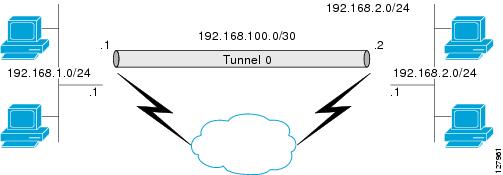
Figure 1 illustrates how a static VTI is used.

Figure 1 IPsec Static VTI

The IPsec VTI supports native IPsec tunneling and exhibits most of the properties of a physical interface.

Dynamic Virtual Tunnel Interfaces

DVTIs can provide highly secure and scalable connectivity for remote-access VPNs. The DVTI technology replaces dynamic crypto maps and the dynamic hub-and-spoke method for establishing tunnels.

Dynamic VTIs can be used for both the server and remote configuration. The tunnels provide an on-demand separate virtual access interface for each VPN session. The configuration of the virtual access interfaces is cloned from a virtual template configuration, which includes the IPsec configuration and any Cisco IOS software feature configured on the virtual template interface, such as QoS, NetFlow, or ACLs.

Dynamic VTIs function like any other real interface so that you can apply QoS, firewall, other security services as soon as the tunnel is active. QoS features can be used to improve the performance of various applications across the network. Any combination of QoS features offered in Cisco IOS software can be used to support voice, video, or data applications.

Dynamic VTIs provide efficiency in the use of IP addresses and provide secure connectivity. Dynamic VTIs allow dynamically downloadable per-group and per-user policies to be configured on a RADIUS server. The per-group or per-user definition can be created using extended authentication (Xauth) User or Unity group, or it can be derived from a certificate. Dynamic VTIs are standards based, so interoperability in a multiple-vendor environment is supported. IPsec DVTIs allow you to create highly secure connectivity for remote access VPNs and can be combined with Cisco Architecture for Voice, Video, and Integrated Data (AVVID) to deliver converged voice, video, and data over IP networks. The DVTI simplifies Virtual Private Network (VRF) routing and forwarding- (VRF-) aware IPsec deployment. The VRF is configured on the interface.

A DVTI requires minimal configuration on the router. A single virtual template can be configured and cloned.

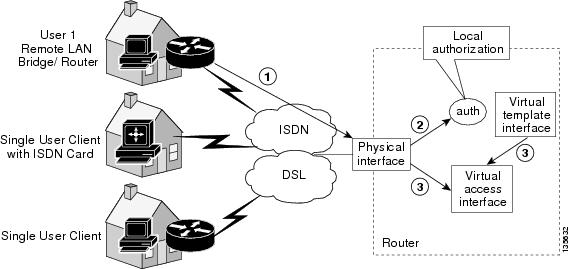
The DVTI creates an interface for IPsec sessions and uses the virtual template infrastructure for dynamic instantiation and management of dynamic IPsec VTIs. The virtual template infrastructure is extended to create dynamic virtual-access tunnel interfaces. Dynamic VTIs are used in hub-and-spoke configurations. A single DVTI can support several static VTIs. Figure 2 illustrates the DVTI authentication path.

Figure 2 Dynamic IPsec VTI

The authentication shown in Figure 2 follows this path:

1. User 1 calls the router.

2. Router 1 authenticates User 1.

3. IPsec clones virtual access interface from virtual template interface.

Dynamic Virtual Tunnel Interface Life Cycle

IPsec profiles define policy for dynamic VTIs. The dynamic interface is created at the end of IKE Phase 1 and IKE Phase 1.5. The interface is deleted when the IPsec session to the peer is closed. The IPsec session is closed when both IKE and IPsec SAs to the peer are deleted.

Routing with IPsec Virtual Tunnel Interfaces

Because VTIs are routable interfaces, routing plays an important role in the encryption process. Traffic is encrypted only if it is forwarded out of the VTI, and traffic arriving on the VTI is decrypted and routed accordingly. VTIs allow you to establish an encryption tunnel using a real interface as the tunnel endpoint. You can route to the interface or apply services such as QoS, firewalls, network address translation, and Netflow statistics as you would to any other interface. You can monitor the interface, route to it, and it has an advantage over crypto maps because it is a real interface and provides the benefits of any other regular Cisco IOS interface.


Note Dynamic routing can be used with SVTIs. Routing with DVTIs is not supported or recommended.


Traffic Encryption with the IPsec Virtual Tunnel Interface

When an IPsec VTI is configured, encryption occurs in the tunnel. Traffic is encrypted when it is forwarded to the tunnel interface. Traffic forwarding is handled by the IP routing table, and dynamic or static routing can be used to route traffic to the SVTI. DVTI uses reverse route injection to further simplify the routing configurations. Using IP routing to forward the traffic to encryption simplifies the IPsec VPN configuration because the use of ACLs with a crypto map in native IPsec configurations is not required. The IPsec virtual tunnel also allows you to encrypt multicast traffic with IPsec.

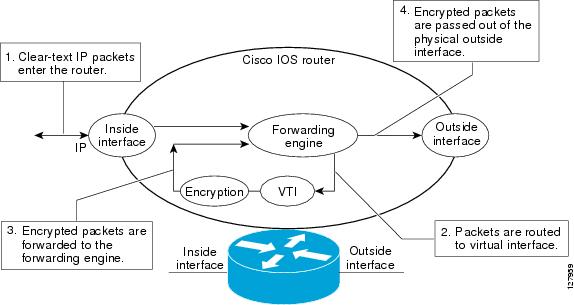
IPsec packet flow into the IPsec tunnel is illustrated in Figure 3.

Figure 3 Packet Flow into the IPsec Tunnel

After packets arrive on the inside interface, the forwarding engine switches the packets to the VTI, where they are encrypted. The encrypted packets are handed back to the forwarding engine, where they are switched through the outside interface.

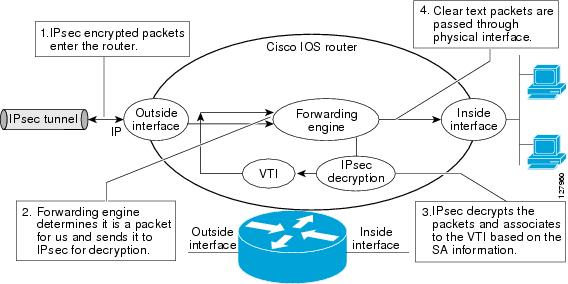
Figure 4 shows the packet flow out of the IPsec tunnel.

Figure 4 Packet Flow out of the IPsec Tunnel

Per-User Attribute Support for Easy VPN Servers

The Per-User Attribute Support for Easy VPN Servers feature provides users with the ability to support per-user atttributes on Easy VPN servers. These attributes are applied on the virtual access interface.

Local Easy VPN AAA Server

For a local Easy VPN AAA server, the per-user attributes can be applied at the group level or at the user level using the command-line interface (CLI).

To configure per-user attributes for a local Easy VPN server, see "Configuring Per-User Attributes on a Local Easy VPN AAA Server."

Remote Easy VPN AAA Server

Attribute value (AV) pairs can be defined on a remote Easy VPN AAA server as shown in this example:

cisco-avpair = "ip:outacl#101=permit tcp any any established

Per-User Attributes

The following per-user attributes are currently defined in the AAA server and are applicable to IPsec:

inacl

interface-config

outacl

route

rte-fltr-in

rte-fltr-out

sub-policy-In

sub-policy-Out

policy-route

prefix

How to Configure IPsec Virtual Tunnel Interface

Configuring Static IPsec Virtual Tunnel Interfaces

Configuring Dynamic IPsec Virtual Tunnel Interfaces

Configuring Per-User Attributes on a Local Easy VPN AAA Server

Configuring Static IPsec Virtual Tunnel Interfaces

This configuration shows how to configure a static IPsec VTI.

SUMMARY STEPS

1. enable

2. configure terminal

3. crypto IPsec profile profile-name

4. set transform-set transform-set-name

5. interface type number

6. ip address address mask

7. tunnel mode ipsec ipv4

8. tunnel source interface

9. tunnel destination ip-address

10. tunnel protection IPsec profile profile-name [shared]

DETAILED STEPS

 
Command or Action
Purpose

Step 1 

enable

Example:

Router> enable

Enables privileged EXEC mode.

Enter your password if prompted.

Step 2 

configure terminal

Example:

Router# configure terminal

Enters global configuration mode.

Step 3 

crypto IPsec profile profile-name

Example:

Router(config)# crypto IPsec profile PROF

Defines the IPsec parameters that are to be used for IPsec encryption between two IPsec routers.

Step 4 

set transform-set transform-set-name [transform-set-name2...transform-set-name6]

Example:

Router(config)# set transform-set tset

Specifies which transform sets can be used with the crypto map entry.

Step 5 

interface type number

Example:

Router(config)# interface tunnel0

Specifies the interface on which the tunnel will be configured and enters interface configuration mode.

Step 6 

ip address address mask

Example:

Router(config-if)# ip address 10.1.1.1 255.255.255.0

Specifies the IP address and mask.

Step 7 

tunnel mode ipsec ipv4

Example:

Router(config-if)# tunnel mode ipsec ipv4

Defines the mode for the tunnel.

Step 8 

tunnel source interface

Example:

Router(config-if)# tunnel source loopback0

Specifies the tunnel source as a loopback interface.

Step 9 

tunnel destination ip-address

Example:

Router(config-if)# tunnel destination 172.16.1.1

Identifies the IP address of the tunnel destination.

Step 10 

tunnel protection IPsec profile profile-name [shared]

Example:

Router(config-if)# tunnel protection IPsec profile PROF

Associates a tunnel interface with an IPsec profile.

Configuring Dynamic IPsec Virtual Tunnel Interfaces

This task shows how to configure a dynamic IPsec VTI.

SUMMARY STEPS

1. enable

2. configure terminal

3. crypto IPsec profile profile-name

4. set transform-set transform-set-name

5. interface virtual-template number

6. tunnel mode mode

7. tunnel protection IPsec profile profile-name [shared]

8. exit

9. crypto isakamp profile profile-name

10. virtual-template template-number

DETAILED STEPS

 
Command or Action
Purpose

Step 1 

enable

Example:

Router> enable

Enables privileged EXEC mode.

Enter your password if prompted.

Step 2 

configure terminal

Example:

Router# configure terminal

Enters global configuration mode.

Step 3 

crypto IPsec profile profile-name

Example:

Router(config)# crypto IPsec profile PROF

Defines the IPsec parameters that are to be used for IPsec encryption between two IPsec routers.

Step 4 

set transform-set transform-set-name [transform-set-name2...transform-set-name6]

Example:

Router(config)# set transform-set tset

Specifies which transform sets can be used with the crypto map entry.

Step 5 

interface virtual-template number

Example:

Router(config)# interface virtual-template 2

Defines a virtual-template tunnel interface and enters interface configuration mode.

Step 6 

tunnel mode ipsec ipv4

Example:

Router(config-if)# tunnel mode ipsec ipv4

Defines the mode for the tunnel.

Step 7 

tunnel protection IPsec profile profile-name [shared]

Example:

Router(config-if)# tunnel protection IPsec profile PROF

Associates a tunnel interface with an IPsec profile.

Step 8 

exit

Example:

Router(config-if)# exit

Exits interface configuration mode.

Step 9 

crypto isakamp profile profile-name

Example:

Router(config)# crypto isakamp profile red

Defines the ISAKAMP profile to be used for the virtual template.

Step 10 

virtual-template template-number

Example:

Router(config)# virtual-template 1

Specifies the virtual template attached to the ISAKAMP profile.

Configuring Per-User Attributes on a Local Easy VPN AAA Server

To configure per-user attributes on a local Easy VPN AAA server, perform the following steps.

SUMMARY STEPS

1. enable

2. configure terminal

3. aaa attribute list list-name

4. attribute type name value [service service] [protocol protocol]

5. exit

6. crypto isakmp client configuration group group-name

7. crypto aaa attribute list list-name

DETAILED STEPS

 
Command or Action
Purpose

Step 1 

enable

Example:

Router> enable

Enables privileged EXEC mode.

Enter your password if prompted.

Step 2 

configure terminal

Example:

Router# configure terminal

Enters global configuration mode.

Step 3 

aaa attribute list list-name

Example:

Router(config)# aaa attribute list list1

Defines a AAA attribute list locally on a router and enters attribute list configuration mode.

Step 4 

attribute type name value [service service] [protocol protocol]

Example:

Router(config-attr-list)# attribute type attribute xxxx service ike protocol ip

Defines an attribute type that is to be added to an attribute list locally on a router.

Step 5 

exit

Example:

Router(config-attr-list)# exit

Exits attribute list configuration mode.

Step 6 

crypto isakmp client configuration group group-name

Example:

Router (config)# crypto isakmp client configuration group group1

Specifies to which group a policy profile will be defined and enters ISAKMP group configuration mode.

Step 7 

crypto aaa attribute list list-name

Example:

Router (config-isakmp-group)# crypto aaa attribute list listname1

Defines a AAA attribute list locally on a router.

Configuration Examples for IPsec Virtual Tunnel Interface

The following examples are provided to illustrate configuration scenarios for IPsec VTIs:

Static Virtual Tunnel Interface with IPsec: Example

VRF-Aware Static Virtual Tunnel Interface: Example

Static Virtual Tunnel Interface with QoS: Example

Static Virtual Tunnel Interface with Virtual Firewall: Example

Dynamic Virtual Tunnel Interface Easy VPN Server: Example

Dynamic Virtual Tunnel Interface Easy VPN Client: Example

VRF-Aware IPsec with Dynamic VTI: Example

Dynamic Virtual Tunnel Interface with Virtual Firewall: Example

Dynamic Virtual Tunnel Interface with QoS: Example

Per-User Attributes on an Easy VPN Server: Example

Static Virtual Tunnel Interface with IPsec: Example

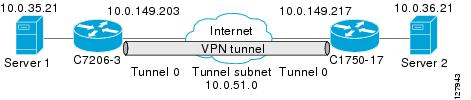
The following example configuration uses a preshared key for authentication between peers. VPN traffic is forwarded to the IPsec VTI for encryption and then sent out the physical interface. The tunnel on subnet 10 checks packets for IPsec policy and passes them to the Crypto Engine (CE) for IPsec encapsulation. Figure 5 illustrates the IPsec VTI configuration.

Figure 5 VTI with IPsec

C7206 Router Configuration

version 12.3

service timestamps debug datetime
service timestamps log datetime
hostname 7200-3
no aaa new-model
ip subnet-zero
ip cef
controller ISA 6/1
!
crypto isakmp policy 1
encr 3des
authentication pre-share
group 2
crypto isakmp key Cisco12345 address 0.0.0.0 0.0.0.0
crypto IPsec transform-set T1 esp-3des esp-sha-hmac
crypto IPsec profile P1
set transform-set T1
!


interface Tunnel0
 ip address 10.0.51.203 255.255.255.0
 ip ospf mtu-ignore
 load-interval 30
 tunnel source 10.0.149.203
 tunnel destination 10.0.149.217
 tunnel mode IPsec ipv4
 tunnel protection IPsec profile P1
!
interface Ethernet3/0
 ip address 10.0.149.203 255.255.255.0
 duplex full
!
interface Ethernet3/3
 ip address 10.0.35.203 255.255.255.0
 duplex full
!
ip classless
ip route 10.0.36.0 255.255.255.0 Tunnel0
line con 0
line aux 0
line vty 0 4
end

C1750 Router Configuration

version 12.3

hostname c1750-17
no aaa new-model
ip subnet-zero
ip cef
crypto isakmp policy 1
encr 3des
authentication pre-share
group 2

crypto isakmp key Cisco12345 address 0.0.0.0 0.0.0.0
crypto IPsec transform-set T1 esp-3des esp-sha-hmac
crypto IPsec profile P1
set transform-set T1
!
interface Tunnel0
 ip address 10.0.51.217 255.255.255.0
 ip ospf mtu-ignore
 tunnel source 10.0.149.217
 tunnel destination 10.0.149.203
 tunnel mode ipsec ipv4
 tunnel protection ipsec profile P1
!
interface FastEthernet0/0
 ip address 10.0.149.217 255.255.255.0
 speed 100
 full-duplex
!
interface Ethernet1/0
 ip address 10.0.36.217 255.255.255.0
 load-interval 30
 full-duplex
!


ip classless
ip route 10.0.35.0 255.255.255.0 Tunnel0
line con 0
line aux 0
line vty 0 4
end

Verifying the Results for the IPsec Static Virtual Tunnel Interface: Example

This section provides information that you can use to confirm that your configuration is working properly. In this display, Tunnel 0 is "up," and the line protocol is "up." If the line protocol is "down," the session is not active.

Verifying the C7206 Status

Router# show interface tunnel 0

Tunnel0 is up, line protocol is up
Hardware is Tunnel
Internet address is 10.0.51.203/24
MTU 1514 bytes, BW 9 Kbit, DLY 500000 usec,
reliability 255/255, txload 103/255, rxload 110/255
Encapsulation TUNNEL, loopback not set
Keepalive not set
Tunnel source 10.0.149.203, destination 10.0.149.217
Tunnel protocol/transport IPsec/IP, key disabled, sequencing disabled
Tunnel TTL 255

Checksumming of packets disabled, fast tunneling enabled
Tunnel transmit bandwidth 8000 (kbps)
Tunnel receive bandwidth 8000 (kbps)
Tunnel protection via IPsec (profile "P1")
Last input never, output never, output hang never
Last clearing of "show interface" counters never
Input queue: 1/75/0/0 (size/max/drops/flushes); Total output drops: 0
Queueing strategy: fifo
Output queue: 0/0 (size/max)
30 second input rate 13000 bits/sec, 34 packets/sec
30 second output rate 36000 bits/sec, 34 packets/sec
191320 packets input, 30129126 bytes, 0 no buffer
Received 0 broadcasts, 0 runts, 0 giants, 0 throttles
0 input errors, 0 CRC, 0 frame, 0 overrun, 0 ignored, 0 abort
59968 packets output, 15369696 bytes, 0 underruns
0 output errors, 0 collisions, 0 interface resets
0 output buffer failures, 0 output buffers swapped out

Router# show crypto session

Crypto session current status
Interface: Tunnel0
Session status: UP-ACTIVE
Peer: 10.0.149.217 port 500
IKE SA: local 10.0.149.203/500 remote 10.0.149.217/500 Active
IPsec FLOW: permit ip 0.0.0.0/0.0.0.0 0.0.0.0/0.0.0.0
Active SAs: 4, origin: crypto map

Router# show ip route

Codes: C - connected, S - static, R - RIP, M - mobile, B - BGP
D - EIGRP, EX - EIGRP external, O - OSPF, IA - OSPF inter area
N1 - OSPF NSSA external type 1, N2 - OSPF NSSA external type 2
E1 - OSPF external type 1, E2 - OSPF external type 2
i - IS-IS, su - IS-IS summary, L1 - IS-IS level-1, L2 - IS-IS level-2
ia - IS-IS inter area, * - candidate default, U - per-user static route
o - ODR, P - periodic downloaded static route
Gateway of last resort is not set
10.0.0.0/8 is variably subnetted, 4 subnets, 2 masks
C 10.0.35.0/24 is directly connected, Ethernet3/3
S 10.0.36.0/24 is directly connected, Tunnel0
C 10.0.51.0/24 is directly connected, Tunnel0
C 10.0.149.0/24 is directly connected, Ethernet3/0

VRF-Aware Static Virtual Tunnel Interface: Example

To add VRF to the static VTI example, include the ipvrf and ip vrf forwarding commands to the configuration as shown in the following example.

C7206 Router Configuration

hostname c7206
.
.
ip vrf sample-vti1
 rd 1:1
 route-target export 1:1
 route-target import 1:1
!
.
.
interface Tunnel0
 ip vrf forwarding sample-vti1
 ip address 10.0.51.217 255.255.255.0
 tunnel source 10.0.149.217
 tunnel destination 10.0.149.203
 tunnel mode ipsec ipv4
 tunnel protection ipsec profile P1
.
.
!
end

Static Virtual Tunnel Interface with QoS: Example

You can apply any QoS policy to the tunnel endpoint by including the service-policy statement under the tunnel interface. The following example is policing traffic out the tunnel interface.

C7206 Router Configuration

hostname c7206
.
.
class-map match-all VTI
 match any 
!
policy-map VTI
  class VTI
  police cir 2000000
    conform-action transmit 
    exceed-action drop 
!
.
.
interface Tunnel0
 ip address 10.0.51.217 255.255.255.0
 tunnel source 10.0.149.217
 tunnel destination 10.0.149.203
 tunnel mode ipsec ipv4
 tunnel protection ipsec profile P1
 service-policy output VTI
!
.
.
!
end

Static Virtual Tunnel Interface with Virtual Firewall: Example

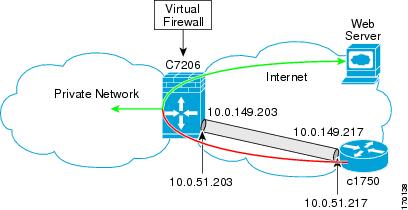
Applying th e virtual firewall to the static VTI tunnel allows traffic from the spoke to pass through the hub to reach the internet. Figure 6 illustrates a static VTI with the spoke protected inherently by the corporate firewall.

Figure 6 Static VTI with Virtual Firewall

The basic static VTI configuration has been modified to include the virtual firewall definition.

C7206 Router Configuration

hostname c7206
.
.
ip inspect max-incomplete high 1000000 
ip inspect max-incomplete low 800000 
ip inspect one-minute high 1000000
ip inspect one-minute low 800000 
ip inspect tcp synwait-time 60 
ip inspect tcp max-incomplete host 100000 block-time 2 
ip inspect name IOSFW1 tcp timeout 300
ip inspect name IOSFW1 udp
!
.
.
interface GigabitEthernet0/1
 description Internet Connection
 ip address 172.18.143.246 255.255.255.0
 ip access-group 100 in
 ip nat outside
!
interface Tunnel0
 ip address 10.0.51.217 255.255.255.0
 ip nat inside
 ip inspect IOSFW1 in
 tunnel source 10.0.149.217
 tunnel destination 10.0.149.203
 tunnel mode ipsec ipv4
 tunnel protection ipsec profile P1
!
ip classless
ip route 0.0.0.0 0.0.0.0 172.18.143.1
!
ip nat translation timeout 120
ip nat translation finrst-timeout 2
ip nat translation max-entries 300000
ip nat pool test1 10.2.100.1 10.2.100.50 netmask 255.255.255.0
ip nat inside source list 110 pool test1 vrf test-vti1 overload
!
access-list 100 permit esp any any
access-list 100 permit udp any eq isakmp any
access-list 100 permit udp any eq non500-isakmp any
access-list 100 permit icmp any any
access-list 110 deny   esp any any
access-list 110 deny   udp any eq isakmp any
access-list 110 permit ip any any
access-list 110 deny   udp any eq non500-isakmp any
!
end

Dynamic Virtual Tunnel Interface Easy VPN Server: Example

The following example illustrates the use of the DVTI Easy VPN server, which serves as an IPsec remote access aggregator. The client can be a home user running a Cisco VPN client or it can be a Cisco IOS router configured as an Easy VPN client.

C7206 Router Configuration

hostname c7206
!
aaa new-model
aaa authentication login local_list local
aaa authorization network local_list local 
aaa session-id common
!         
ip subnet-zero
ip cef
!
username cisco password 0 cisco123
!
controller ISA 1/1
!
crypto isakmp policy 1
 encr 3des
 authentication pre-share
 group 2
!
crypto isakmp client configuration group group1
 key cisco123
 pool group1pool
 save-password
!
crypto isakmp profile vpn1-ra
   match identity group group1
   client authentication list local_list
   isakmp authorization list local_list
   client configuration address respond
   virtual-template 1
!
crypto ipsec transform-set VTI-TS esp-3des esp-sha-hmac 
!
crypto ipsec profile test-vti1
 set transform-set VTI-TS 
!
interface GigabitEthernet0/1
 description Internet Connection
 ip address 172.18.143.246 255.255.255.0
!
interface GigabitEthernet0/2
 description Internal Network
 ip address 10.2.1.1 255.255.255.0
!
interface Virtual-Template1 type tunnel
 ip unnumbered GigabitEthernet0/1
 ip virtual-reassembly
 tunnel mode ipsec ipv4
 tunnel protection ipsec profile test-vti1
!
ip local pool group1pool 192.168.1.1 192.168.1.4
ip classless
ip route 0.0.0.0 0.0.0.0 172.18.143.1
!
end

Verifying the Results for the Dynamic Virtual Tunnel Interface Easy VPN Server: Example

The following examples show that a dynamic VTI has been configured for an Easy VPN server.

Router# show running-config interface Virtual-Access2

Building configuration...

Current configuration : 250 bytes
!
interface Virtual-Access2
 ip unnumbered GigabitEthernet0/1
 ip virtual-reassembly
 tunnel source 172.18.143.246
 tunnel destination 172.18.143.208
 tunnel mode ipsec ipv4
 tunnel protection ipsec profile test-vti1
 no tunnel protection ipsec initiate
end

Router# show ip route

Codes: C - connected, S - static, R - RIP, M - mobile, B - BGP
       D - EIGRP, EX - EIGRP external, O - OSPF, IA - OSPF inter area 
       N1 - OSPF NSSA external type 1, N2 - OSPF NSSA external type 2
       E1 - OSPF external type 1, E2 - OSPF external type 2
       i - IS-IS, su - IS-IS summary, L1 - IS-IS level-1, L2 - IS-IS level-2
       ia - IS-IS inter area, * - candidate default, U - per-user static route
       o - ODR, P - periodic downloaded static route

Gateway of last resort is 10.2.1.10 to network 0.0.0.0

     172.18.0.0/24 is subnetted, 1 subnets
C       172.18.143.0 is directly connected, GigabitEthernet0/1
     192.168.1.0/32 is subnetted, 1 subnets
S       192.168.1.1 [1/0] via 0.0.0.0, Virtual-Access2
     10.0.0.0/24 is subnetted, 1 subnets
C       10.2.1.0 is directly connected, GigabitEthernet0/2
S*   0.0.0.0/0 [1/0] via 172.18.143.1

Dynamic Virtual Tunnel Interface Easy VPN Client: Example

The following example shows how you can set up a router as the Easy VPN client. This example uses basically the same idea as the Easy VPN client that you can run from a PC to connect. In fact, the configuration of the Easy VPN server will work for the software client or the Cisco IOS client.

hostname c1841
!
no aaa new-model
!
ip cef
!
username cisco password 0 cisco123
!
crypto ipsec client ezvpn CLIENT
 connect manual
 group group1 key cisco123
 mode client
 peer 172.18.143.246
 virtual-interface 1
 username cisco password cisco123
 xauth userid mode local
!
interface Loopback0
 ip address 10.1.1.1 255.255.255.255
!
interface FastEthernet0/0
 description Internet Connection
 ip address 172.18.143.208 255.255.255.0
 crypto ipsec client ezvpn CLIENT
!
interface FastEthernet0/1
 ip address 10.1.1.252 255.255.255.0
 crypto ipsec client ezvpn CLIENT inside
!
interface Virtual-Template1 type tunnel
 ip unnumbered Loopback0
!         
ip route 0.0.0.0 0.0.0.0 172.18.143.1
!
end

The client definition can be set up in many different ways. The mode specified with the connect command can be automatic or manual. If the connect mode is set to manual, the IPsec tunnel has to be initiated manually by a user.

Also note use of the mode command. The mode can be client, network-extension, or network-extension-plus. This example indicates client mode, which means that the client is given a private address from the server. Network-extension mode is different from client mode in that the client specifies for the server its attached private subnet. Depending on the mode, the routing table on either end will be slightly different. The basic operation of the IPSec tunnel remains the same, regardless of the specified mode.

Verifying the Results for the Dynamic Virtual Tunnel Interface Easy VPN Client: Example

The following examples illustrate different ways to display the status of the DVTI.

Router# show running-config interface Virtual-Access2

Building configuration...

Current configuration : 148 bytes
!
interface Virtual-Access2
 ip unnumbered Loopback1
 tunnel source FastEthernet0/0
 tunnel destination 172.18.143.246
 tunnel mode ipsec ipv4
end

Router# show running-config interface Loopback1

Building configuration...

Current configuration : 65 bytes
!
interface Loopback1
 ip address 192.168.1.1 255.255.255.255
end

Router# show ip route

Codes: C - connected, S - static, R - RIP, M - mobile, B - BGP
       D - EIGRP, EX - EIGRP external, O - OSPF, IA - OSPF inter area 
       N1 - OSPF NSSA external type 1, N2 - OSPF NSSA external type 2
       E1 - OSPF external type 1, E2 - OSPF external type 2
       i - IS-IS, su - IS-IS summary, L1 - IS-IS level-1, L2 - IS-IS level-2
       ia - IS-IS inter area, * - candidate default, U - per-user static route
       o - ODR, P - periodic downloaded static route

Gateway of last resort is 172.18.143.1 to network 0.0.0.0

     10.0.0.0/32 is subnetted, 1 subnets
C       10.1.1.1 is directly connected, Loopback0
     172.18.0.0/24 is subnetted, 1 subnets
C       172.18.143.0 is directly connected, FastEthernet0/0
     192.168.1.0/32 is subnetted, 1 subnets
C       192.168.1.1 is directly connected, Loopback1
S*   0.0.0.0/0 [1/0] via 172.18.143.1
               [1/0] via 0.0.0.0, Virtual-Access2

Router# show crypto ipsec client ezvpn

Easy VPN Remote Phase: 6

Tunnel name : CLIENT
Inside interface list: FastEthernet0/1
Outside interface: Virtual-Access2 (bound to FastEthernet0/0)
Current State: IPSEC_ACTIVE
Last Event: SOCKET_UP
Address: 192.168.1.1
Mask: 255.255.255.255
Save Password: Allowed
Current EzVPN Peer: 172.18.143.246

VRF-Aware IPsec with Dynamic VTI: Example

This example shows how to configure VRF-Aware IPsec to take advantage of the dynamic VTI:

hostname c7206
.
.
ip vrf test-vti1
 rd 1:1
 route-target export 1:1
 route-target import 1:1
!
.
.
interface Virtual-Template1 type tunnel
 ip vrf forwarding test-vti1
 ip unnumbered Loopback0
 ip virtual-reassembly
 tunnel mode ipsec ipv4
 tunnel protection ipsec profile test-vti1
!
.
.
end

Dynamic Virtual Tunnel Interface with Virtual Firewall: Example

The DVTI Easy VPN server can be configured behind a virtual firewall. Behind-the-firewall configuration allows users to enter the network, while the network firewall is protected from unauthorized access. The virtual firewall uses Context-Based Access Control (CBAC) and NAT applied to the Internet interface as well as to the virtual template.


hostname c7206
.
.
ip inspect max-incomplete high 1000000 
ip inspect max-incomplete low 800000 
ip inspect one-minute high 1000000
ip inspect one-minute low 800000 
ip inspect tcp synwait-time 60 
ip inspect tcp max-incomplete host 100000 block-time 2 
ip inspect name IOSFW1 tcp timeout 300
ip inspect name IOSFW1 udp
!
.
.
interface GigabitEthernet0/1
 description Internet Connection
 ip address 172.18.143.246 255.255.255.0
 ip access-group 100 in
 ip nat outside
!
interface GigabitEthernet0/2
 description Internal Network
 ip address 10.2.1.1 255.255.255.0
!
interface Virtual-Template1 type tunnel
 ip unnumbered Loopback0
 ip nat inside
 ip inspect IOSFW1 in
 tunnel mode ipsec ipv4
 tunnel protection ipsec profile test-vti1
!
ip classless
ip route 0.0.0.0 0.0.0.0 172.18.143.1
!
ip nat translation timeout 120
ip nat translation finrst-timeout 2
ip nat translation max-entries 300000
ip nat pool test1 10.2.100.1 10.2.100.50 netmask 255.255.255.0
ip nat inside source list 110 pool test1 vrf test-vti1 overload
!
access-list 100 permit esp any any
access-list 100 permit udp any eq isakmp any
access-list 100 permit udp any eq non500-isakmp any
access-list 100 permit icmp any any
access-list 110 deny   esp any any
access-list 110 deny   udp any eq isakmp any
access-list 110 permit ip any any
access-list 110 deny   udp any eq non500-isakmp any
!
end

Dynamic Virtual Tunnel Interface with QoS: Example

You can add QoS to the DVTI tunnel by applying the service policy to the virtual template. When the template is cloned to make the virtual-access interface, the service policy will be applied there. The following example shows the basic DVTI configuration with QoS added.

hostname c7206
.
.
class-map match-all VTI
 match any 
!
policy-map VTI
  class VTI
  police cir 2000000
    conform-action transmit 
    exceed-action drop 
!
.
.
interface Virtual-Template1 type tunnel
 ip vrf forwarding test-vti1
 ip unnumbered Loopback0
 ip virtual-reassembly
 tunnel mode ipsec ipv4
 tunnel protection ipsec profile test-vti1
 service-policy output VTI
!
.
.
!
end

Per-User Attributes on an Easy VPN Server: Example

The following example shows that per-user attributes have been configured on an Easy VPN server.

!

aaa new-model
!
!
aaa authentication login default local
aaa authentication login noAAA none
aaa authorization network default local 
!
aaa attribute list per-group
 attribute type inacl "per-group-acl" service ike protocol ip mandatory
!
aaa session-id common
!
resource policy
!
ip subnet-zero
!
!
ip cef
!
!
username example password 0 example
!
!
crypto isakmp policy 3
 authentication pre-share
 group 2
crypto isakmp xauth timeout 90
!
crypto isakmp client configuration group PerUserAAA
 key cisco
 pool dpool
 crypto aaa attribute list per-group
!
crypto isakmp profile vi
 match identity group PerUserAAA
 isakmp authorization list default
 client configuration address respond
 client configuration group PerUserAAA
 virtual-template 1
!
!
crypto ipsec transform-set set esp-3des esp-sha-hmac 
!
crypto ipsec profile vi
 set transform-set set 
 set isakmp-profile vi
!
!
interface GigabitEthernet0/0
 description 'EzVPN Peer'
 ip address 192.168.1.1 255.255.255.128
 duplex full
 speed 100
 media-type rj45
 no negotiation auto
!
interface GigabitEthernet0/1
 no ip address
 shutdown
 duplex auto
 speed auto
 media-type rj45
 no negotiation auto

interface Virtual-Template1 type tunnel
 ip unnumbered GigabitEthernet0/0
 tunnel mode ipsec ipv4
 tunnel protection ipsec profile vi
!
ip local pool dpool 10.5.0.1 10.5.0.10
ip classless
!
no ip http server
no ip http secure-server
!
!
ip access-list extended per-group-acl
 permit tcp any any
 deny   icmp any any
logging alarm informational
logging trap debugging
!
control-plane
!
gatekeeper
 shutdown
!
line con 0
line aux 0
 stopbits 1
line vty 0 4
!
!
end

Additional References

The following sections provide references related to IPsec virtual tunnel interface.

Related Documents

Related Topic
Document Title

IPsec, security issues

Cisco IOS Security Configuration Guide, Release 12.4

QoS, configuring

Quality of Service (QoS) Support for Enhanced Easy VPN

Cisco IOS Quality of Service Solutions Configuration Guide, Release 12.4T

Security commands

Cisco IOS Security Command Reference, Release 12.4T

VPN configuration

Cisco Easy VPN Remote

Easy VPN Server


Standards

Standard
Title

No new or modified standards are supported by this feature, and support for existing standards has not been modified by this feature.


MIBs

MIB
MIBs Link

No new or modified MIBs are supported by this feature, and support for existing MIBs has not been modified by this feature.

To locate and download MIBs for selected platforms, Cisco IOS releases, and feature sets, use Cisco MIB Locator found at the following URL:

http://www.cisco.com/go/mibs


RFCs

RFC
Title

RFC 2401

Security Architecture for the Internet Protocol

RFC 2408

Internet Security Association and Key Management Protocol

RFC 2409

The Internet Key Exchange (IKE)


Technical Assistance

Description
Link

The Cisco Technical Support & Documentation website contains thousands of pages of searchable technical content, including links to products, technologies, solutions, technical tips, tools, and technical documentation. Registered Cisco.com users can log in from this page to access even more content.

http://www.cisco.com/techsupport


Command Reference

This section documents the following new and modified commands only.

crypto aaa attribute list

crypto isakmp client configuration group

crypto isakmp profile

interface virtual-template

show vtemplate

tunnel mode

Feature Information for IPsec Virtual Tunnel Interface

crypto aaa attribute list

To define an authentication, authorization, and accounting (AAA) attribute list of per-user attributes on a local Easy VPN server, use the crypto aaa attribute list command in crypto isakmp group configuration mode. To remove the AAA attribute list, use the no form of this command.

crypto aaa attribute list list-name

no crypto aaa attribute list list-name

Syntax Description

list-name

Name of the local attribute list.


Command Default

A local attribute list is not defined.

Command Modes

Crypto isakmp group configuration

Command History

Release
Modification

12.4(9)T

This command was introduced.


Usage Guidelines

There is no limit to the number of lists that can be defined (except for NVRAM storage limits).

Examples

The following example shows that per-user attributes have been defined on a local Easy VPN AAA server:

!

aaa new-model
!
!
aaa authentication login default local
aaa authentication login noAAA none
aaa authorization network default local 
!
aaa attribute list per-group
 attribute type inacl "per-group-acl" service ike protocol ip mandatory
!
aaa session-id common
!
resource policy
!
ip subnet-zero
!
!
ip cef
!
!
username example password 0 example
!
!
crypto isakmp policy 3
 authentication pre-share
 group 2
crypto isakmp xauth timeout 90
!
crypto isakmp client configuration group PerUserAAA
 key cisco
 pool dpool
 crypto aaa attribute list per-group
!
crypto isakmp profile vi
 match identity group PerUserAAA
 isakmp authorization list default
 client configuration address respond
 client configuration group PerUserAAA
 virtual-template 1
!
!
crypto ipsec transform-set set esp-3des esp-sha-hmac 
!
crypto ipsec profile vi
 set transform-set set 
 set isakmp-profile vi
!
!
interface GigabitEthernet0/0
 description 'EzVPN Peer'
 ip address 192.168.1.1 255.255.255.128
 duplex full
 speed 100
 media-type rj45
 no negotiation auto
!
interface GigabitEthernet0/1
 no ip address
 shutdown
 duplex auto
 speed auto
 media-type rj45
 no negotiation auto

interface Virtual-Template1 type tunnel
 ip unnumbered GigabitEthernet0/0
 tunnel mode ipsec ipv4
 tunnel protection ipsec profile vi
!
ip local pool dpool 10.5.0.1 10.5.0.10
ip classless
!
no ip http server
no ip http secure-server
!
!
ip access-list extended per-group-acl
 permit tcp any any
 deny   icmp any any
logging alarm informational
logging trap debugging
!
control-plane
!
gatekeeper
 shutdown
!
line con 0
line aux 0
 stopbits 1
line vty 0 4
!
!
end

Related Commands

Command
Description

crypto isakmp client configuration group

Specifies to which group a policy profile will be defined.


crypto isakmp client configuration group

To specify to which group a policy profile will be defined and to enter crypto ISAKMP group configuration mode, use the crypto isakmp client configuration group command in global configuration mode. To remove this command and all associated subcommands from your configuration, use the no form of this command.

crypto isakmp client configuration group {group-name | default}

no crypto isakmp client configuration group

Syntax Description

group-name

Group definition that identifies which policy is enforced for users.

default

Policy that is enforced for all users who do not offer a group name that matches a group-name argument. The default keyword can only be configured locally.


Command Defaults

No default behavior or values

Command Modes

Global configuration

Command History

Release
Modification

12.2(8)T

This command was introduced.

12.3(2)T

The access-restrict, firewall are-u-there, group-lock, include-local-lan, and save-password commands were added. These commands are added during Mode Configuration. In addition, this command was modified so that output for this command will show that the preshared key is either encrypted or unencrypted.

12.3(4)T

The backup-gateway, max-logins, max-users, and pfs commands were added.

12.2(18)SXD

This command was integrated into Cisco IOS Release 12.2(18)SXD.

12.4(2)T

The browser-proxy command was added.

12.4(6)T

The firewall policy command was added.

12.2(33)SRA

This command was integrated into Cisco IOS Release 12.2(33)SRA.

12.4(9)T

The crypto aaa attribute list, dhcp-server and dhcp-timeout commands were added.


Usage Guidelines

Use the crypto isakmp client configuration group command to specify group policy information that needs to be defined or changed. You may wish to change the group policy on your router if you decide to connect to the client using a group ID that does not match the group-name argument.

After enabling this command, which puts you in Internet Security Association Key Management Protocol (ISAKMP) group configuration mode, you can specify characteristics for the group policy using the following commands:

access-restrict—Ties a particular Virtual Private Network (VPN) group to a specific interface for access to the Cisco IOS gateway and the services it protects.

acl—Configures split tunneling.

auto-update-client—Configures auto upgrade.

backup-gateway—Configures a server to "push down" a list of backup gateways to the client. These gateways are tried in order in the case of a failure of the previous gateway. The gateways may be specified using IP addresses or host names.

banner—Specifies a mode configuration banner.

browser-proxy—Applies a browser-proxy map to a group.

configuration url—Specifies on a server the URL an Easy VPN remote device must use to get a configuration in a Mode Configuration Exchange.

configuration version—Specifies on a server the version a Cisco Easy VPN remote device must use to get a particular configuration in a Mode Configuration Exchange.

crypto aaa attribute list—Defines a AAA attribute list of per-user attributes on a local Easy VPN server.

dhcp server—Configures multiple DHCP server entries.

dhcp timeout—Controls the wait time before the next DHCP server on the list is tried.

dns—Specifies the primary and secondary Domain Name Service (DNS) servers for the group.

domain—Specifies group domain membership.

firewall are-u-there—Adds the Firewall-Are-U-There attribute to the server group if your PC is running the Black Ice or Zone Alarm personal firewalls.

firewall policy—Specifies the CPP firewall policy push name for the crypto ISAKMP client configuration group on a local AAA server.

group-lock—Use if preshared key authentication is used with Internet Key Exchange (IKE). Allows you to enter your extended authentication (Xauth) username. The group delimiter is compared against the group identifier sent during IKE aggressive mode.

include-local-lanConfigures the Include-Local-LAN attribute to allow a nonsplit-tunneling connection to access the local subnetwork at the same time as the client.

key—Specifies the IKE preshared key when defining group policy information for Mode Configuration push.

max-logins—Limits the number of simultaneous logins for users in a specific user group.

max-users—Limits the number of connections to a specific server group.

netmask—Subnet mask to be used by the client for local connectivity.

pfs—Configures a server to notify the client of the central-site policy regarding whether PFS is required for any IPsec SA. Because the client device does not have a user interface option to enable or disable PFS negotiation, the server will notify the client device of the central site policy via this parameter. The Diffie-Hellman (D-H) group that is proposed for PFS will be the same that was negotiated in Phase 1 of the IKE negotiation.

pool—Refers to the IP local pool address used to allocate internal IP addresses to clients.

save-password—Saves your Xauth password locally on your PC.

split-dns—Specifies a list of domain names that must be tunneled or resolved to the private network.

wins—Specifies the primary and secondary Windows Internet Naming Service (WINS) servers for the group.

Output for the crypto isakmp client configuration group command (using the key subcommand) will show that the preshared key is either encrypted or unencrypted. An output example for an unencrypted preshared key would be as follows:

crypto isakmp client configuration group key test

An output example for a type 6 encrypted preshared key would be as follows:

crypto isakmp client configuration group

 key 6 JK_JHZPeJV_XFZTKCQFYAAB

Session Monitoring and Limiting for Easy VPN Clients

It is possible to mimic the functionality provided by some RADIUS servers for limiting the number of connections to a specific server group and also for limiting the number of simultaneous logins for users in that group.

To limit the number of connections to a specific server group, use the max-users subcommand. To limit the number of simultaneous logins for users in the server group, use the max-logins subcommand.

The following example shows the RADIUS attribute-value (AV) pairs for the maximum users and maximum logins parameters:

ipsec:max-users=1000
ipsec:max-logins=1

The max-users and max-logins commands can be enabled together or individually to control the usage of resources by any groups or individuals.

If you use a RADIUS server, such as a CiscoSecure access control server (ACS), it is recommended that you enable this session control on the RADIUS server if the functionality is provided. In this way, usage can be controlled across a number of servers by one central repository. When enabling this feature on the router itself, only connections to groups on that specific device are monitored, and load-sharing scenarios are not accurately accounted for.

Examples

The following example shows how to define group policy information for Mode Configuration push. In this example, the first group name is "cisco" and the second group name is "default." Thus, the default policy will be enforced for all users who do not offer a group name that matches "cisco."

crypto isakmp client configuration group cisco
 key cisco
 dns 10.2.2.2 10.2.2.3
 wins 10.6.6.6
 domain cisco.com
 pool fred
 acl 199
!
crypto isakmp client configuration group default
 key cisco
 dns 10.2.2.2 10.3.2.3
 pool fred
 acl 199

Related Commands

Command
Description

access-restrict

Ties a particular VPN group to a specific interface for access to the Cisco IOS gateway and the services it protects.

acl

Configures split tunneling.

backup-gateway

Configures a server to "push down" a list of backup gateways to the client.

browser-proxy

Applies browser-proxy parameter settings to a group.

crypto isakmp keepalive

Adds the Firewall-Are-U-There attribute to the server group if your PC is running the Black Ice or Zone Alarm personal firewalls.

dns

Specifies the primary and secondary DNS servers.

domain (isakmp-group)

Specifies the DNS domain to which a group belongs.

firewall are-u-there

Adds the Firewall-Are-U-There attribute to the server group if your PC is running the Black Ice or Zone Alarm personal firewalls.

firewall policy

Specifies the CPP firewall policy push name for the crypto ISAKMP client configuration group on a local AAA server.

group-lock

Allows you to enter your Xauth username, including the group name, when preshared key authentication is used with IKE.

include-local-lan

Configures the Include-Local-LAN attribute to allow a nonsplit-tunneling connection to access the local subnetwork at the same time as the client.

key (isakmp-group)

Specifies the IKE preshared key for Group-Policy attribute definition.

max-logins

Limits the number of simultaneous logins for users in a specific server group.

max-users

Limits the number of connections to a specific server group.

pool (isakmp-group)

Defines a local pool address.

save-password

Saves your Xauth password locally on your PC.

set aggressive-mode client-endpoint

Specifies the Tunnel-Client-Endpoint attribute within an ISAKMP peer configuration.


crypto isakmp profile

To define an Internet Security Association and Key Management Protocol (ISAKMP) profile and to audit IP security (IPsec) user sessions, use the crypto isakmp profile command in global configuration mode. To delete a crypto ISAKMP profile, use the no form of this command.

crypto isakmp profile profile-name [accounting aaa-list]

no crypto isakmp profile profile-name [accounting aaa-list]

Syntax Description

profile-name

Name of the user profile. To associate a user profile with the RADIUS server, the user profile name must be identified.

accounting aaa-list

(Optional) Name of a client accounting list.


Command Defaults

No profile exists if the command is not used.

Command Modes

Global configuration

Command History

Release
Modification

12.2(15)T

This command was introduced.

12.2(18)SXD

This command was integrated into Cisco IOS Release 12.2(18)SXD.

12.4(2)T

Support for dynamic virtual tunnel interfaces was added.

12.4(4)T

Support for IPv6 was added.

12.2(33)SRA

This command was integrated into Cisco IOS Release 12.2(33)SRA.


Usage Guidelines

Defining an ISAKMP Profile

An ISAKMP profile can be viewed as a repository of Phase 1 and Phase 1.5 commands for a set of peers. The Phase 1 configuration includes commands to configure such things as keepalive, identity matching, and the authorization list. The Phase 1.5 configuration includes commands to configure such things as extended authentication (Xauth) and mode configuration.

The peers are mapped to an ISAKMP profile when their identities are matched (as given in the identification [ID] payload of the Internet Key Exchange [IKE]) against the identities defined in the ISAKMP profile. To uniquely map to an ISAKMP profile, no two ISAKMP profiles should match the same identity. If the peer identity is matched in two ISAKMP profiles, the configuration is invalid. Also, there must be at least one match identity command defined in the ISAKMP profile for it to be complete.

After enabling this command and entering ISAKMP profile configuration mode, you can configure the following commands:

accounting—Enables authentication, authorization, and accounting (AAA) accounting.

ca trust-point—Specifies certificate authorities.

client—Specifies client configuration settings.

default—Lists subcommands for the crypto isakmp profile command.

description—Specifies a description of this profile.

initiate mode—Initiates a mode.

isakmp authorization—ISAKMP authorization parameters.

keepalive—Sets a keepalive interval.

keyring—Specifies a keyring.

local-address—Specifies the interface to use as the local address of this ISAKMP profile.

match—Matches the values of the peer.

qos-group—Applies a quality of service (QoS) policy class map for this profile.

self-identity—Specifies the identity.

virtual-template—Specifies the virtual template for the dynamic interface.

vrf—Specifies the Virtual Private Network routing and forwarding (VRF) instance to which the profile is related.

Auditing IPSec User Sessions

Use this command to audit multiple user sessions that are terminating on the IPSec gateway.


Note The crypto isakmp profile command and the crypto map (global IPSec) command are mutually exclusive. If a profile is present (the crypto isakmp profile command has been used), with no accounting configured but with the global command present (the crypto isakmp profile command without the accounting keyword), accounting will occur using the attributes in the global command.


Dynamic Virtual Tunnel Interfaces

Support for dynamic virtual tunnel interfaces allows for the virtual profile to be mapped into a specified virtual template.

Examples

ISAKAMP Profile Matching Peer Identities Example

The following example shows how to define an ISAKMP profile and match the peer identities:

crypto isakmp profile vpnprofile
 match identity address 10.76.11.53

ISAKAMP Profile with Accounting Example

The following accounting example shows that an ISAKMP profile is configured:

aaa new-model
!
!
aaa authentication login cisco-client group radius
aaa authorization network cisco-client group radius 
aaa accounting network acc start-stop broadcast group radius
aaa session-id common
!
crypto isakmp profile cisco
vrf cisco
match identity group cclient
 client authentication list cisco-client
 isakmp authorization list cisco-client
 client configuration address respond
 accounting acc
!
crypto dynamic-map dynamic 1
 set transform-set aswan 
 set isakmp-profile cisco
 reverse-route
!
!
radius-server host 172.16.1.4 auth-port 1645 acct-port 1646
radius-server key nsite

Related Commands

Command
Description

crypto map (global IPsec)

Enters crypto map configuration mode and creates or modifies a crypto map entry, creates a crypto profile that provides a template for configuration of dynamically created crypto maps, or configures a client accounting list.

debug crypto isakmp

Displays messages about IKE events.

match identity

Matches an identity from a peer in an ISAKMP profile.

tunnel protection

Associates a tunnel interface with an IP Security (IPsec) profile.

virtual template

Specifies which virtual template to be used to clone virtual access interfaces.


interface virtual-template

To create a virtual template interface that can be configured and applied dynamically in creating virtual access interfaces, use the interface virtual-template command in global configuration mode. To remove a virtual template interface, use the no form of this command.

interface virtual-template number

no interface virtual-template number

Syntax Description

number

Number used to identify the virtual template interface. Up to 200 virtual template interfaces can be configured. On the Cisco 10000 series router, up to 4095 virtual template interfaces can be configured.


Command Default

No virtual template interface is defined.

Command Modes

Global configuration

Command History

Release
Modification

11.2F

This command was introduced.

12.2(4)T

This command was enhanced to increase the maximum number of virtual template interfaces from 25 to 200.

12.2(28)SB

This command was integrated into Cisco IOS Release 12.2(28)SB.

12.2(33)SRA

This command was integrated into Cisco IOS Release 12.2(33)SRA.

12.2(31)SB2

This command was integrated into Cisco IOS Release 12.2(31)SB2.

12.2SX

This command is supported in the Cisco IOS 12.2SX family of releases. Support in a specific 12.2SX release is dependent on your feature set, platform, and platform hardware.


Usage Guidelines

A virtual template interface is used to provide the configuration for dynamically created virtual access interfaces. It is created by users and can be saved in NVRAM.

After the virtual template interface is created, it can be configured in the same way as a serial interface.

Virtual template interfaces can be created and applied by various applications such as virtual profiles, virtual private dialup networks (VPDNs), PPP over ATM, protocol translation, and Multichassis Multilink PPP (MMP).

Cisco 10000 Series Router

You can configure up to 4095 total virtual template interfaces on the Cisco 10000 series router.

To ensure proper scaling and to minimize CPU utilization, we recommend the following virtual template interface settings:

A keepalive timer of 30 seconds or greater using the keepalive command. The default is 10 seconds.

Do not enable the Cisco Discovery Protocol (CDP). CDP is disabled by default. Use the no cdp enable command to disable CDP, if necessary.

Disable link-status event messaging using the no logging event link-status command.

To prevent the virtual-access subinterfaces from being registered with the SNMP functionality of the router and using memory, do not use the router's SNMP management tools to monitor PPP sessions. Use the no virtual-template snmp command to disable the SNMP management tools.

When a virtual template interface is applied dynamically to an incoming user session, a virtual access interface (VAI) is created.

If you configure a virtual template interface with interface-specific commands, the Cisco 10000 series router does not achieve the highest possible scaling. To verify that the router does not have interface-specific commands within the virtual template interface configuration, use the test virtual-template <number> subinterface command.

Examples

Cisco 10000 Series Router

The following example creates a virtual template interface called Virtual-Template1:

Router(config)# interface Virtual-Template1
Router(config-if)# ip unnumbered Loopback1
Router(config-if)# keepalive 60
Router(config-if)# no peer default ip address
Router(config-if)# ppp authentication pap
Router(config-if)# ppp authorization vpn1
Router(config-if)# ppp accounting vpn1
Router(config-if)# no logging event link-status 
Router(config-if)# no virtual-template snmp 

Virtual Template with PPP Authentication Example

The following example creates and configures virtual template interface 1:

interface virtual-template 1 type ethernet
 ip unnumbered ethernet 0
 ppp multilink
 ppp authentication chap 

IPsec Virtual Template Example

The following example shows how to configure a virtual template for an IPsec virtual tunnel interface.

interface virtual-template1 type tunnel 
 ip unnumbered Loopback1 
 tunnel mode ipsec ipv4 
 tunnel protection ipsec profile virtualtunnelinterface

Related Commands

Command
Description

cdp enable

Enables Cisco Discovery Protocol (CDP) on an interface.

clear interface virtual-access

Tears down the live sessions and frees the memory for other client uses.

keepalive

Enables keepalive packets and to specify the number of times that the Cisco IOS software tries to send keepalive packets without a response before bringing down the interface.

show interface virtual-access

Displays the configuration of the active VAI that was created using a virtual template interface.

tunnel protection

Associates a tunnel interface with an IPsec profile.

virtual interface

Sets the zone name for the connected AppleTalk network.

virtual-profile

Enables virtual profiles.

virtual template

Specifies the destination for a tunnel interface.


show vtemplate

To display information about all configured virtual templates, use the show vtemplate command in privileged EXEC mode.

show vtemplate

Syntax Description

This command has no arguments or keywords.

Command Modes

Privileged EXEC

Command History

Release
Modification

12.0(7)DC

This command was introduced on the Cisco 6400 NRP.

12.2(13)T

This command was integrated into Cisco IOS Release 12.2(13)T.

12.3(14)T

The show display was modified to display the interface type of the virtual template and to provide counters on a per-interface-type basis for IPsec virtual tunnel interfaces.

12.2(33)SRA

This comand was integrated into Cisco IOS Release 12.2(33)SRA.

12.2SX

This command is supported in the Cisco IOS 12.2SX family of releases. Support in a specific 12.2SX release is dependent on your feature set, platform, and platform hardware.


Examples

The following is sample output from the show vtemplate command:

Router# show vtemplate

Virtual access subinterface creation is globally enabled

         Active     Active    Subint  Pre-clone Pre-clone Interface
       Interface Subinterface Capable Available   Limit     Type
       --------- ------------ ------- --------- --------- ---------
Vt1            0            0   Yes          --        --   Serial 
Vt2            0            0   Yes          --        --   Serial 
Vt4            0            0   Yes          --        --   Serial 
Vt21           0            0    No          --        --   Tunnel 
Vt22           0            0   Yes          --        --   Ether  
Vt23           0            0   Yes          --        --   Serial 
Vt24           0            0   Yes          --        --   Serial 

Usage Summary
                              Interface   Subinterface
                              ---------   ------------
Current Serial  in use                1              0
Current Serial  free                  0              3
Current Ether   in use                0              0
Current Ether   free                  0              0
Current Tunnel  in use                0              0
Current Tunnel  free                  0              0
Total                                 1              3

Cumulative created                    8              4
Cumulative freed                      0              4

Base virtual access interfaces: 1
Total create or clone requests: 0
Current request queue size: 0
Current free pending: 0

Maximum request duration: 0 msec
Average request duration: 0 msec
Last request duration: 0 msec

Maximum processing duration: 0 msec
Average processing duration: 0 msec
Last processing duration: 0 msec
Last processing duration:0 msec

Table 1 describes the significant fields shown in the example.

Table 1 show vtemplate Field Descriptions 

Field
Description

Virtual access subinterface creation is globally...

The configured setting of the virtual-template command. Virtual access subinterface creation may be enabled or disabled.

Active Interface

The number of virtual access interfaces that are cloned from the specified virtual template.

Active Subinterface

The number of virtual access subinterfaces that are cloned from the specified virtual template.

Subint Capable

Specifies if the configuration of the virtual template is supported on the virtual access subinterface.

Pre-clone Available

The number of precloned virtual access interfaces currently available for use for the particular virtual template.

Pre-clone Limit

The number of precloned virtual access interfaces available for that particular virtual template.

Current in use

The number of virtual access interfaces and subinterfaces that are currently in use.

Current free

The number of virtual access interfaces and subinterfaces that are no longer in use.

Total

The total number of virtual access interfaces and subinterfaces that exist.

Cumulative created

The number of requests for a virtual access interface or subinterface that have been satisfied.

Cumulative freed

The number of times that the application using the virtual access interface or subinterface has been freed.

Base virtual-access interfaces

This field specifies the number of base virtual access interfaces. The base virtual access interface is used to create virtual access subinterfaces. There is one base virtual access interface per application that supports subinterfaces. A base virtual access interface can be identified from the output of the show interfaces virtual-access command.

Total create or clone requests

The number of requests that have been made through the asynchronous request API of the virtual template manager.

Current request queue size

The number of items in the virtual template manager work queue.

Current free pending

The number of virtual access interfaces whose final freeing is pending. These virtual access interfaces cannot currently be freed because they are still in use.

Maximum request duration

The maximum time that it took from the time that the asynchronous request was made until the application was notified that the request was done.

Average request duration

The average time that it took from the time that the asynchronous request was made until the application was notified that the request was done.

Last request duration

The time that it took from the time that the asynchronous request was made until the application was notified that the request was done for the most recent request.

Maximum processing duration

The maximum time that the virtual template manager spent satisfying the request.

Average processing duration

The average time that the virtual template manager spent satisfying the request.

Last processing duration

The time that the virtual template manager spent satisfying the request for the most recent request.


Related Commands

Command
Description

clear counters

Clears interface counters.

show interfaces virtual-access

Displays status, traffic data, and configuration information about a specified virtual access interface.

virtual-template

Specifies which virtual template will be used to clone virtual access interfaces.


tunnel mode

To set the encapsulation mode for the tunnel interface, use the tunnel mode command in interface configuration mode. To restore the default mode, use the no form of this command.

tunnel mode {aurp | cayman | dvmrp | eon | gre | gre multipoint | gre ipv6 | ipip [decapsulate-any] | ipsec ipv4 | iptalk | ipv6 | ipsec ipv6 | mpls | nos | rbscp}

no tunnel mode

Syntax Description

aurp

AppleTalk Update-Based Routing Protocol.

cayman

Cayman TunnelTalk AppleTalk encapsulation.

dvmrp

Distance Vector Multicast Routing Protocol.

eon

EON compatible Connectionless Network Protocol (CLNS) tunnel.

gre

Generic routing encapsulation (GRE) protocol. This is the default.

gre multipoint

Multipoint GRE (mGRE).

gre ipv6

GRE tunneling using IPv6 as the delivery protocol.

ipip

IP-over-IP encapsulation.

decapsulate-any

(Optional) Terminates any number of IP-in-IP tunnels at one tunnel interface.

This tunnel will not carry any outbound traffic; however, any number of remote tunnel endpoints can use a tunnel configured this way as their destination.

ipsec ipv4

Tunnel mode is IPSec, and the transport is IPv4.

iptalk

Apple IPTalk encapsulation.

ipv6

Static tunnel interface configured to encapsulate IPv6 or IPv4 packets in IPv6.

ipsec ipv6

Tunnel mode is IPSec, and the transport is IPv6.

mpls

Multiprotocol Label Switching (MPLS) encapsulation.

nos

KA9Q/NOS compatible IP over IP.

rbscp

Rate Based Satellite Control Protocol (RBSCP).


Command Default

GRE tunneling

Command Modes

Interface configuration

Command History

Release
Modification

10.0

This command was introduced.

10.3

The aurp, dvmrp, and ipip keywords were added.

11.2

The optional decapsulate-any keyword was added.

12.2(13)T

The gre multipoint keyword was added.

12.3(7)T

The following keywords were added:

gre ipv6 to support GRE tunneling using IPv6 as the delivery protocol.

ipv6 to allow a static tunnel interface to be configured to encapsulate IPv6 or IPv4 packets in IPv6.

rbscp to support RBSCP.

12.3(14)T

The ipsec ipv4 keyword was added.

12.2(18)SXE

The gre multipoint keyword added.

12.2(30)S

This command was integrated into Cisco IOS Release 12.2(30)S.

12.2(25)SG

This command was integrated into Cisco IOS Release 12.2(25)SG.

12.4(4)T

The ipsec ipv6 keyword was added.

12.2(33)SRA

This command was integrated into Cisco IOS Release 12.2(33)SRA.

12.2SX

This command is supported in the Cisco IOS 12.2SX family of releases. Support in a specific 12.2SX release is dependent on your feature set, platform, and platform hardware.


Usage Guidelines

Source and Destination Address

You cannot have two tunnels that use the same encapsulation mode with exactly the same source and destination address. The workaround is to create a loopback interface and source packets off of the loopback interface.

Cayman Tunneling

Designed by Cayman Systems, Cayman tunneling implements tunneling to enable Cisco routers to interoperate with Cayman GatorBoxes. With Cayman tunneling, you can establish tunnels between two routers or between a Cisco router and a GatorBox. When using Cayman tunneling, you must not configure the tunnel with an AppleTalk network address.

DVMRP

Use DVMRP when a router connects to an mrouted (multicast) router to run DVMRP over a tunnel. You must configure Protocol Independent Multicast (PIM) and an IP address on a DVMRP tunnel.

GRE with AppleTalk

GRE tunneling can be done between Cisco routers only. When using GRE tunneling for AppleTalk, you configure the tunnel with an AppleTalk network address. Using the AppleTalk network address, you can ping the other end of the tunnel to check the connection.

Multipoint GRE

After enabling mGRE tunneling, you can enable the tunnel protection command, which allows you to associate the mGRE tunnel with an IPSec profile. Combining mGRE tunnels and IPSec encryption allows a single mGRE interface to support multiple IPSec tunnels, thereby simplifying the size and complexity of the configuration.


Note GRE tunnel keepalives configured using the keepalive command under a GRE interface are supported only on point-to-point GRE tunnels.


RBSCP

RBSCP tunneling is designed for wireless or long-distance delay links with high error rates, such as satellite links. Using tunnels, RBSCP can improve the performance of certain IP protocols, such as TCP and IPSec, over satellite links without breaking the end-to-end model.

IPSec in IPv6 Transport

IPv6 IPSec encapsulation provides site-to-site IPSec protection of IPv6 unicast and multicast traffic. This feature allows IPv6 routers to work as a security gateway, establishes IPSec tunnels between another security gateway router, and provides crypto IPSec protection for traffic from an internal network when being transmitting across the public IPv6 Internet. IPv6 IPSec is very similar to the security gateway model using IPv4 IPsec protection.

Examples

Cayman Tunneling

The following example shows how to enable Cayman tunneling:

Router(config)# interface tunnel 0
Router(config-if)# tunnel source ethernet 0
Router(config-if)# tunnel destination 10.108.164.19
Router(config-if)# tunnel mode cayman

GRE Tunneling

The following example shows how to enable GRE tunneling:

Router(config)# interface tunnel 0
Router(config-if)# appletalk cable-range 4160-4160 4160.19
Router(config-if)# appletalk zone Engineering
Router(config-if)# tunnel source ethernet0
Router(config-if)# tunnel destination 10.108.164.19
Router(config-if)# tunnel mode gre

IPSec in IPv4 Transport

The following example shows how to configure a tunnel using IPSec encapsulation with IPv4 as the transport mechanism:

Router(config)# crypto ipsec profile PROF

Router(config)#  set transform tset

Router(config)# interface Tunnel0

Router(config-if)# ip address 10.1.1.1 255.255.255.0

Router(config-if)# tunnel mode ipsec ipv4

Router(config-if)# tunnel source Loopback0

Router(config-if)# tunnel destination 172.16.1.1

Router(config-if)# tunnel protection ipsec profile PROF

IPSec in IPv6 Transport

The following example shows how to configure an IPv6 IPSec tunnel interface:

Router(config)# interface tunnel 0 
Router(config-if)# ipv6 address 2001:0DB8:1111:2222::2/64 
Router(config-if)# tunnel destination 10.0.0.1
Router(config-if)# tunnel source Ethernet 0/0
Router(config-if)# tunnel mode ipsec ipv6 
Router(config-if)# tunnel protection ipsec profile profile1

Multipoint GRE Tunneling

The following example shows how to enable mGRE tunneling:

interface Tunnel0
 bandwidth 1000
 ip address 10.0.0.1 255.255.255.0
! Ensures longer packets are fragmented before they are encrypted; otherwise, the 
! receiving router would have to do the reassembly.
 ip mtu 1416
! Turns off split horizon on the mGRE tunnel interface; otherwise, EIGRP will not 
! advertise routes that are learned via the mGRE interface back out that interface.
 no ip split-horizon eigrp 1
 no ip next-hop-self eigrp 1
 delay 1000
! Sets IPSec peer address to Ethernet interface's public address.
 tunnel source Ethernet0
 tunnel mode gre multipoint
! The following line must match on all nodes that want to use this mGRE tunnel.
 tunnel key 100000
 tunnel protection ipsec profile vpnprof

RBSCP Tunneling

The following example shows how to enable RBSCP tunneling:

Router(config)# interface tunnel 0
Router(config-if)# tunnel source ethernet 0
Router(config-if)# tunnel destination 10.108.164.19
Router(config-if)# tunnel mode rbscp

Related Commands

Command
Description

appletalk cable-range

Enables an extended AppleTalk network.

appletalk zone

Sets the zone name for the connected AppleTalk network.

tunnel destination

Specifies the destination for a tunnel interface.

tunnel protection

Associates a tunnel interface with an IPSec profile.

tunnel source

Sets the source address of a tunnel interface.


virtual-template

To specify which virtual template will be used to clone virtual access interfaces, use the virtual-template command in VPDN group configuration mode. To remove the virtual template from a virtual private dial-up network (VPDN) group, use the no form of this command.

virtual-template template-number

no virtual-template

Syntax Description

template-number

Number of the virtual template that will be used to clone virtual access interfaces.


Command Defaults

No virtual template is enabled.

Command Modes

VPDN group configuration

Command History

Release
Modification

12.0(5)T

This command was introduced.

12.1(1)T

This command was enhanced to enable PPPoE on ATM to accept dial-in PPP over Ethernet (PPPoE) sessions.

12.2(15)T

This command was enhanced to allow IP per-user attributes to be applied to a Layer 2 Tunneling Protocol (L2TP) dial-out session.

12.2SX

This command is supported in the Cisco IOS 12.2SX family of releases. Support in a specific 12.2SX release is dependent on your feature set, platform, and platform hardware.


Usage Guidelines

You must first enable a tunneling protocol on the VPDN group using the protocol (VPDN) command before you can enable the virtual-template command. Removing or modifying the protocol command will remove the virtual-template command from the VPDN group.

Each VPDN group can clone only virtual access interfaces using one virtual template. If you enter a second virtual-template command on a VPDN group, it will replace the first virtual-template command.

Table 2 lists the VPDN group commands under which the virtual-template command can be entered. Entering the VPDN group command starts VPDN group configuration mode. The table includes the command-line prompt for the VPDN group configuration mode and the type of service configured.

Table 2 VPDN Subgroups

VPDN Group Command
Command Mode Prompt
Type of Service

accept-dialin

router(config-vpdn-acc-in)#

Tunnel server

request-dialout

router(config-vpdn-req-ou)#

L2TP network server (LNS)


When the virtual-template command is entered under a request-dialout VPDN subgroup, IP and other per-user attributes can be applied to an L2TP dial-out session from an LNS. Before this command was enhanced, IP per-user configurations from authentication, authorization, and accounting (AAA) servers were not supported; the IP configuration would come from the dialer interface defined on the router.

The enhanced virtual-template command works in a way similar to configuring virtual profiles and L2TP dial-in. The L2TP virtual access interface is first cloned from the virtual template, which means that configurations from the virtual template interface will be applied to the L2TP virtual access interface. After authentication, the AAA per-user configuration is applied to the virtual access interface. Because AAA per-user attributes are applied only after the user has been authenticated, the LNS must be configured to authenticate the dial-out user (configuration authentication is needed for this command).

With the enhanced virtual-template command, all software components can now use the configuration present on the virtual access interface rather than what is present on the dialer interface. For example, IP Control Protocol (IPCP) address negotiation uses the local address of the virtual access interface as the router address while negotiating with the peer.

Examples

The following example enables the LNS to accept an L2TP tunnel from an L2TP access concentrator (LAC) named LAC2. A virtual access interface will be cloned from virtual template 1.

vpdn-group 1
 accept-dialin 
  protocol l2tp 
  virtual-template 1 
 terminate-from hostname LAC2

The following example enables PPPoE on ATM to accept dial-in PPPoE sessions. A virtual access interface for the PPP session is cloned from virtual template 1.

vpdn-group 1
 accept-dialin
  protocol pppoe
  virtual-template 1

The following partial example shows how to configure an LNS to support IP per-user configurations from a AAA server:

!
vpdn enable
vpdn search-order domain
!
vpdn-group 1
.
.
.
 request-dialout
  protocol l2tp
  rotary-group 1
  virtual-template 1
 initiate-to ip 10.0.1.194.2
 local name lns
 l2tp tunnel password 7094F3$!5^3
 source-ip 10.0.194.53
!

The previous configuration requires a AAA profile such as the following example to specify the per-user attributes:

5300-Router1-out  Password = "cisco"
     Service-Type = Outbound
     cisco-avpair = "outbound:dial-number=5550121"
7200-Router1-1  Password = "cisco"
     Service-Type = Outbound
     cisco-avpair = "ip:route=10.17.17.1 255.255.255.255 Dialer1 100 name 5300-Router1"
5300-Router1 Password = "cisco"
     Service-Type = Framed
     Framed-Protocol = PPP
     cisco-avpair = "lcp:interface-config=ip unnumbered loopback 0"
     cisco-avpair = "ip:outacl#1=deny ip host 10.5.5.5 any log"
     cisco-avpair = "ip:outacl#2=permit ip any any"
     cisco-avpair = "ip:inacl#1=deny ip host 10.5.5.5 any log"
     cisco-avpair = "ip:inacl#2=permit ip any any"
     cisco-avpair = "multilink:min-links=2"
     Framed-Route = "10.5.5.6/32 Ethernet4/0"
     Framed-Route = "10.5.5.5/32 Ethernet4/0"
     Idle-Timeout = 100

Related Commands

Command
Description

accept-dialin

Configures an LNS to accept tunneled PPP connections from a LAC and to create an accept-dialin VPDN subgroup.

protocol (VPDN)

Specifies the Layer 2 Tunneling Protocol that the VPDN subgroup will use.

request-dialout

Enables an LNS to request VPDN dial-out calls by using L2TP and to create a request-dialout VPDN subgroup.

show vtemplate

Displays information about all configured virtual templates.

vpdn-group

Defines a local, unique group number identifier.


Feature Information for IPsec Virtual Tunnel Interface

Table 3 lists the release history for this feature.

Not all commands may be available in your Cisco IOS software release. For release information about a specific command, see the command reference documentation.

Cisco IOS software images are specific to a Cisco IOS software release, a feature set, and a platform. Use Cisco Feature Navigator to find information about platform support and Cisco IOS software image support. Access Cisco Feature Navigator at http://www.cisco.com/go/fn. You must have an account on Cisco.com. If you do not have an account or have forgotten your username or password, click Cancel at the login dialog box and follow the instructions that appear.


Note Table 3 lists only the Cisco IOS software release that introduced support for a given feature in a given Cisco IOS software release train. Unless noted otherwise, subsequent releases of that Cisco IOS software release train also support that feature.


Table 3 Feature Information for IPsec Virtual Tunnel InterfaceI

Feature Name
Releases
Feature Configuration Information

Static IPsec VTIs

12.3(7)T
12.3(14)T
12.2(33)SRA
12.2(33)SXH

IPsec VTIs (VTIs) provide a routable interface type for terminating IPsec tunnels and an easy way to define protection between sites to form an overlay network. IPsec VTIs simplify configuration of IPsec for protection of remote links, support multicast, and simplify network management and load balancing.

Static tunnel interfaces can be configured to encapsulate IPv6 or IPv4 packets in IPv6.

Dynamic IPsec VTIs

12.3(7)T
12.3(14)T

Dynamic VTIs provide efficiency in the use of IP addresses and provide secure connectivity. Dynamic VTIs allow dynamically downloadable per-group and per-user policies to be configured on a RADIUS server. The per-group or per-user definition can be created using Xauth User or Unity group, or it can be derived from a certificate. Dynamic VTIs are standards based, so interoperability in a multiple-vendor environment is supported. IPsec dynamic VTIs allow you to create highly secure connectivity for remote access VPNs and can be combined with Cisco Architecture for Voice, Video, and Integrated Data (AVVID) to deliver converged voice, video, and data over IP networks. The dynamic VTI simplifies VRF-aware IPsec deployment. The VRF is configured on the interface.

Per-User Attribute Support for Easy VPN Servers

12.4(9)T

This feature provides per-user attribute support on an Easy VPN server.

The following sections provide information about this feature:

"Per-User Attribute Support for Easy VPN Servers" section

The following commands were added or modified by this feature: crypto aaa attribute list and crypto isakmp client configuration group.