


-
Cisco UBE Protocol-Independant Features and Setup Cisco IOS Release 15.2MT
-
Interworking Between RSVP Capable and RSVP Incapable Networks
-
SIP INFO Method for DTMF Tone Generation
-
DTMF Events through SIP Signaling
-
Negotiation of an Audio Codec from a List of Codecs
-
Multicast Music-on-Hold Support on Cisco UBE
-
Network-Based Recording Using Cisco UBE
-
Dynamic Payload Type Interworking for DTMF and Codec Packets for SIP-to-SIP Calls
-
iLBC Support for SIP and H.323
-
Configuring RTP Media Loopback for SIP Calls
-
Support for Media Flow- Around with SIP Signaling control on CUBE
-
Configuring Media Antitrombone
-
SIP Ability to Send a SIP Registration Message on a Border Element
-
SIP Parameter Modification
-
Session Refresh with Reinvites
-
SIP Stack Portability
-
Interworking of Secure RTP calls for SIP and H.323
-
CUBE Support for SRTP-RTP Internetworking
-
Configuring RTCP Report Generation
-
SIP SRTP Fallback to Nonsecure RTP
-
Configuring Support for Interworking Between RSVP Capable and RSVP Incapable Networks
-
VoIP for IPv6
-
Cisco UBE Mid-call Re-INVITE Consumption
-
Interworking Between RSVP Capable and RSVP Incapable Networks
-
Support for Software Media Termination Point
-
Cisco Unified Communication Trusted Firewall Control
-
Cisco Unified Communication Trusted Firewall Control-Version II
-
Domain-Based Routing Support on the Cisco UBE
-
 Feedback
Contents
SIP Stack Portability
Implements capabilities to the SIP gateway Cisco IOS stack involving user-agent handling of messages, handling of unsolicited messages, support for outbound delayed media, and SIP headers and content in requests and responses.
Finding Feature Information
Your software release may not support all the features documented in this module. For the latest feature information and caveats, see the release notes for your platform and software release. To find information about the features documented in this module, and to see a list of the releases in which each feature is supported, see the Feature Information Table at the end of this document.
Use Cisco Feature Navigator to find information about platform support and Cisco software image support. To access Cisco Feature Navigator, go to www.cisco.com/go/cfn. An account on Cisco.com is not required.
Prerequisites for SIP Stack Portability
Information About SIP Stack Portability
The SIP Stack Portability feature implements the following capabilities to the Cisco IOS SIP gateway stack:
- It receives inbound Refer message requests both within a dialog and outside of an existing dialog from the user agents (UAs).
- It sends and receives SUBSCRIBE or NOTIFY message requests via UAs.
- It receives unsolicited NOTIFY message requests without having to subscribe to the event that was generated by the NOTIFY message request.
- It supports outbound delayed media.
It sends an INVITE message request without Session Description Protocol (SDP) and provides SDP information in either the PRACK or ACK message request for both initial call establishment and mid-call re-INVITE message requests.
- It sets SIP headers and content body in requests and responses.
The stack applies certain rules and restrictions for a subset of headers and for some content types (such as SDP) to protect the integrity of the stackâs functionality and to maintain backward compatibility. When receiving SIP message requests, it reads the SIP header and any attached body without any restrictions.
To make the best use of SIP call-transfer features, you should understand the following concepts:
SIP Call-Transfer Basics
Basic Terminology of SIP Call Transfer
Call transfer allows a wide variety of decentralized multiparty call operations. These decentralized call operations form the basis for third-party call control, and thus are important features for VoIP and SIP. Call transfer is also critical for conference calling, where calls can transition smoothly between multiple point-to-point links and IP-level multicasting.
Refer Message Request
The SIP Refer message request provides call-transfer capabilities to supplement the SIP BYE and ALSO message requests already implemented on Cisco IOS SIP gateways. The Refer message request has three main roles:
- Originator--User agent that initiates the transfer or Refer request.
- Recipient--User agent that receives the Refer request and is transferred to the final-recipient.
- Final-Recipient--User agent introduced into a call with the recipient.
 Note | A gateway can be a recipient or final recipient, but not an originator. |
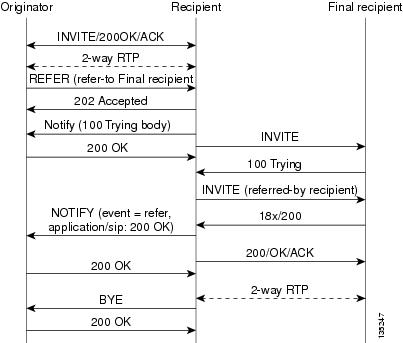
The Refer message request always begins within the context of an existing call and starts with the originator . The originator sends a Refer request to the recipient (user agent receiving the Refer request) to initiate a triggered INVITE request. The triggered INVITE request uses the SIP URL contained in the Refer-To header as the destination of the INVITE request. The recipient then contacts the resource in the Refer-To header (final recipient ), and returns a SIP 202 (Accepted) response to the originator. The recipient also must notify the originator of the outcome of the Refer transaction--whether the final recipient was successfully contacted or not. The notification is accomplished using the SIP NOTIFY message request, SIPâs event notification mechanism. A NOTIFY message with a message body of SIP 200 OK indicates a successful transfer, and a message body of SIP 503 Service Unavailable indicates an unsuccessful transfer. If the call was successful, a call between the recipient and the final recipient results.
The figure below represents the call flow of a successful Refer transaction initiated within the context of an existing call.

Refer-To Header
The recipient receives from the originator a Refer request that always contains a single Refer-To header. The Refer-To header includes a SIP URL that indicates the party to be invited and must be in SIP URL format.
Note | The TEL URL format cannot be used in a Refer-To header, because it does not provide a host portion, and without one, the triggered INVITE request cannot be routed. |
The Refer-To header may contain three additional overloaded headers to form the triggered INVITE request. If any of these three headers are present, they are included in the triggered INVITE request. The three headers are:
- Accept-Contact--Optional in a Refer request. A SIP Cisco IOS gateway that receives an INVITE request with an Accept-Contact does not act upon this header. This header is defined in draft-ietf-sip-callerprefs-03.txt and may be used by user agents that support caller preferences.
- Proxy-Authorization--Nonstandard header that SIP gateways do not act on. It is echoed in the triggered INVITE request because proxies occasionally require it for billing purposes.
- Replaces--Header used by SIP gateways to indicate whether the originator of the Refer request is requesting a blind or attended transfer. It is required if the originator is performing an attended transfer, and not required for a blind transfer.
All other headers present in the Refer-To are ignored, and are not sent in the triggered INVITE.
Referred-By Header
The Referred-By header is required in a Refer request. It identifies the originator and may also contain a signature (included for security purposes). SIP gateways echo the contents of the Referred-By header in the triggered INVITE request, but on receiving an INVITE request with this header, gateways do not act on it.
NOTIFY Message Request
Once the outcome of the Refer transaction is known, the recipient of the Refer request must notify the originator of the outcome of the Refer transaction--whether the final-recipient was successfully contacted or not. The notification is accomplished using the NOTIFY message request, SIPâs event notification mechanism. The notification contains a message body with a SIP response status line and the response class in the status line indicates the success or failure of the Refer transaction.
The NOTIFY message must do the following:
- Reflect the same To, From, and Call-ID headers that were received in the Refer request.
- Contain an Event header refer.
- Contain a message body with a SIP response line. For example: SIP/2.0 200 OK to report a successful Refer transaction, or SIP/2.0 503 Service Unavailable to report a failure. To report that the recipient disconnected before the transfer finished, it must use SIP/2.0 487 Request Canceled.
Two Cisco IOS commands pertain to the NOTIFY message request:
- The timers notify command sets the amount of time that the recipient should wait before retransmitting a NOTIFY message to the originator.
- The retry notify command configures the number of times a NOTIFY message is retransmitted to the originator.
Note | For information on these commands, see the Cisco IOS Voice Command Reference . |
Types of SIP Call Transfer Using the Refer Message Request
This section discusses how the Refer message request facilitates call transfer.
There are two types of call transfer: blind and attended. The primary difference between the two is that the Replaces header is used in attended call transfers. The Replaces header is interpreted by the final recipient and contains a Call-ID header, indicating that the initial call leg is to be replaced with the incoming INVITE request.
As outlined in the Refer message request, there are three main roles:
- Originator--User agent that initiates the transfer or Refer request.
- Recipient--User agent that receives the Refer request and is transferred to the final recipient.
- Final-Recipient--User agent introduced into a call with the recipient.
A gateway can be a recipient or final recipient, but not an originator.
Blind Call-Transfer Process
A blind, or unattended, transfer is one in which the transferring phone connects the caller to a destination line before ringback begins. This is different from a consultative, or attended, transfer in which one of the transferring parties either connects the caller to a ringing phone (ringback heard) or speaks with the third party before connecting the caller to the third party. Blind transfers are often preferred by automated devices that do not have the capability to make consultation calls.
Blind transfer works as described in the Types of SIP Call Transfer Using the Refer Message Request. The process is as follows:
- Originator (user agent that initiates the transfer or Refer request) does the following:
- Recipient does the following:
- Sends an INVITE request to final recipient (user agent introduced into a call with the recipient)
- Returns a SIP 202 (Accepted) response to originator
- Notifies originator of the outcome of the Refer transaction--whether final recipient was successfully (SIP 200 OK) contacted or not (SIP 503 Service Unavailable)
- If successful, a call is established between recipient and final recipient.
- The original signaling relationship between originator and recipient terminates when either of the following occurs:
- One of the parties sends a Bye request.
- Recipient sends a Bye request after successful transfer (if originator does not first send a Bye request after receiving an acknowledgment for the NOTIFY message).
The figure below shows a successful blind or unattended call transfer in which the originator initiates a Bye request to terminate signaling with the recipient.

The figure below shows a successful blind or unattended call transfer in which the recipient initiates a Bye request to terminate signaling with the originator. A NOTIFY message is always sent by the recipient to the originator after the final outcome of the call is known.
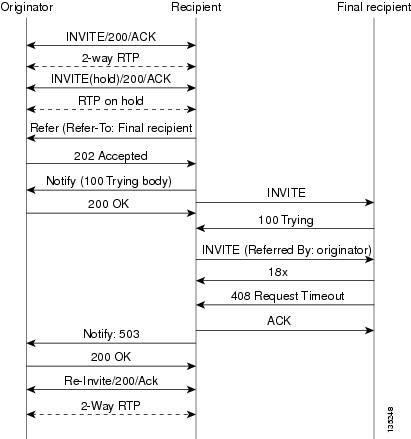
If a failure occurs with the triggered INVITE to the final recipient, the call between originator and recipient is not disconnected. Rather, with blind transfer the process is as follows:
- Originator sends a re-INVITE that takes the call off hold and returns to the original call with recipient.
- Final recipient sends an 18x informational response to recipient.
- The call fails; the originator cannot recover the call with recipient. Failure can be caused by an error condition or timeout.
- The call leg between originator and recipient remains active (see the figure below).
- If the INVITE to final recipient fails (408 Request Timeout), the following occurs:
Attended Transfer
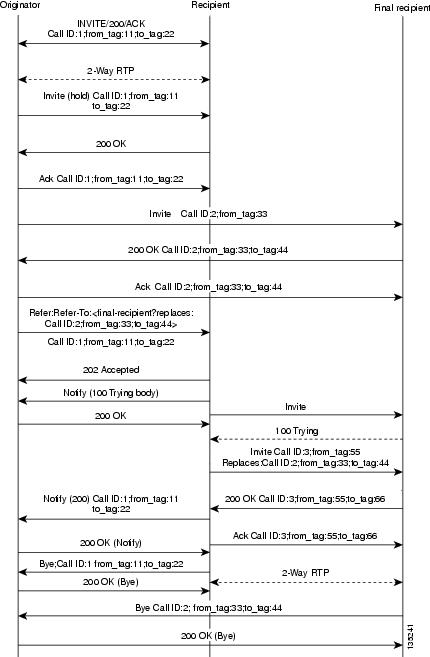
In attended transfers, the Replaces header is inserted by the initiator of the Refer message request as an overloaded header in the Refer-To and is copied into the triggered INVITE request sent to the final recipient. The header has no effect on the recipient, but is interpreted by the final recipient as a way to distinguish between blind transfer and attended transfer. The attended transfer process is as follows:
- Originator does the following:
- Recipient does the following:
- Final recipient establishes a direct signaling relationship with recipient. (Replaces header indicates that the initial call leg is to be shut down and replaced by the incoming INVITE request.)
- Recipient notifies originator of the outcome of the Refer transaction. (Outcome indicates whether or not the final recipient was successfully contacted.)
- Recipient terminates the session with originator by sending a Bye request.
Replaces Header
The Replaces header is required in attended transfers. It indicates to the final recipient that the initial call leg (identified by the Call-ID header and tags) is to be shut down and replaced by the incoming INVITE request. The final recipient sends a Bye request to the originator to terminate its session.
If the information provided by the Replaces header does not match an existing call leg, or if the information provided by the Replaces header matches a call leg but the call leg is not active (a Connect, 200 OK to the INVITE request has not been sent by the final-recipient), the triggered INVITE does not replace the initial call leg and the triggered INVITE request is processed normally.
Any failure resulting from the triggered INVITE request from the recipient to the final recipient does not drop the call between the originator and the final recipient. In these scenarios, all calls that are active (originator to recipient and originator to final recipient) remain active after the failed attended transfer attempt
The figure below shows a call flow for a successful attended transfer.
Attended Transfer with Early Completion
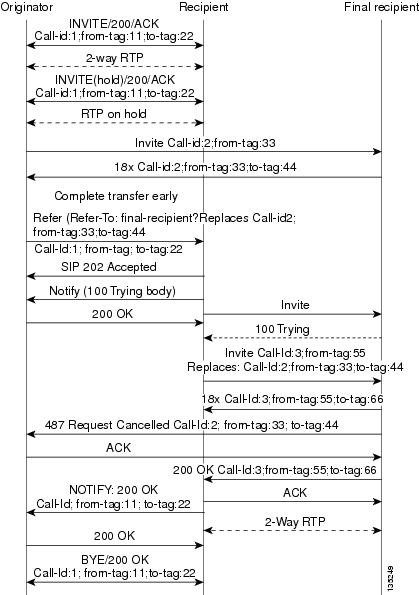
Attended transfers allow the originator to have a call established between both the recipient and the final recipient. With attended transfer with early completion, the call between the originator and the final recipient does not have to be active, or in the talking state, before the originator can transfer it to the recipient. The originator establishes a call with the recipient and only needs to be setting up a call with the final recipient. The final recipient may be ringing, but has not answered the call from the originator when it receives a re-INVITE to replace the call with the originator and the recipient.
The process for attended transfer with early completion is as follows (see the figure below):
- Originator does the following:
- Sets up a call with recipient.
- Places the recipient on hold.
- Contacts the final recipient.
- After receiving an indication that the final recipient is ringing, sends recipient a Refer message request with an overloaded Replaces header in the Refer-To header. (The Replaces header is required in attended transfers and distinguishes between blind transfer and attended transfers.)
- Recipient does the following:
- Returns a SIP 202 (Accepted) response to the originator. (to acknowledge that the INVITE has been sent.)
- Upon receipt of the Refer message request, sends a triggered INVITE request to final recipient. (The request includes the Replaces header, which indicates that the initial call leg, as identified by the Call-ID header and tags, is to be shut down and replaced by the incoming INVITE request.)
- Final recipient establishes a direct signaling relationship with recipient.
- Final recipient tries to match the Call-ID header and the To or From tag in the Replaces header of the incoming INVITE with an active call leg in its call control block. If a matching active call leg is found, final recipient replies with the same status as the found call leg. However, it then terminates the found call leg with a 487 Request Cancelled response.
Referred-By Header
For consistency with existing billing models, Referred-By and Requested-By headers are populated in call history tables as a VSA. Cisco VSAs are used for VoIP call authorization. The new VSA tag supp-svc-xfer-byhelps to associate the call legs for call-detail-record (CDR) generation. The call legs can be originator-to-recipient or recipient-to-final-recipient.
The VSA tag supp-svc-xfer-by contains the user@host portion of the SIP URL of the Referred-By header for transfers performed with the Refer message request. For transfers performed with the Bye/Also message request, the tag contains user@host portion of the SIP URL of the Requested-By header. For each call on the gateway, two RADIUS records are generated: start and stop. The supp-svc-xfer-byVSA is generated only for stop records and is generated only on the recipient gateway--the gateway receiving the Refer or Bye/Also message.
The VSA is generated when a gateway that acts as a recipient receives a Refer or Bye/Also message with the Referred-By or Requested-By headers. There are usually two pairs of start and stop records. There is a start and stop record between the recipient and the originator and also between the recipient to final recipient. In the latter case, the VSA is generated between the recipient to the final recipient only.
Business Group Field
A new business group VSA field has been added that assists service providers with billing. The field allows service providers to add a proprietary header to call records. The VSA tag for business group ID is cust-biz-grp-id and is generated only for stop records. It is generated when the gateway receives an initial INVITE with a vendor dial-plan header to be used in call records. In cases when the gateway acts as a recipient, the VSA is populated in the stop records between the recipient and originator and the final recipient.
Note | For information on VSAs, see the RADIUS VSA Voice Implementation Guide . |
Feature Information for SIP Stack Portability
The following table provides release information about the feature or features described in this module. This table lists only the software release that introduced support for a given feature in a given software release train. Unless noted otherwise, subsequent releases of that software release train also support that feature.
Use Cisco Feature Navigator to find information about platform support and Cisco software image support. To access Cisco Feature Navigator, go to www.cisco.com/go/cfn. An account on Cisco.com is not required.
Feature History Table for the ASR
| Table 1 | Feature Information for SIP Stack Portability |
|
Feature Name |
Releases |
Feature Information |
|---|---|---|
|
SIP Stack Portability |
Cisco IOS XE Release 2.5 |
Implements capabilities to the SIP gateway Cisco IOS stack involving user-agent handling of messages, handling of unsolicited messages, support for outbound delayed media, and SIP headers and content in requests and responses The following commands were introduced or modified: None |
Feature History Table for the ISR
| Table 2 | Feature Information for SIP--SIP Stack Portability |
|
Feature Name |
Releases |
Feature Information |
|---|---|---|
|
SIP Stack Portability |
12.4(2)T |
Implements capabilities to the SIP gateway Cisco IOS stack involving user-agent handling of messages, handling of unsolicited messages, support for outbound delayed media, and SIP headers and content in requests and responses The following commands were introduced or modified: None |
Cisco and the Cisco Logo are trademarks of Cisco Systems, Inc. and/or its affiliates in the U.S. and other countries. A listing of Cisco's trademarks can be found at www.cisco.com/go/trademarks. Third party trademarks mentioned are the property of their respective owners. The use of the word partner does not imply a partnership relationship between Cisco and any other company. (1005R)
Any Internet Protocol (IP) addresses and phone numbers used in this document are not intended to be actual addresses and phone numbers. Any examples, command display output, network topology diagrams, and other figures included in the document are shown for illustrative purposes only. Any use of actual IP addresses or phone numbers in illustrative content is unintentional and coincidental.