802.11k Assisted Roaming
The main goal of introducing this feature in IOS XE 3.3 release is to deliver an intelligent and optimized Neighbor List Element to 802.11k supported (Apple) clients to optimize their channel scanning, roaming, and battery usage. 802.11k allows 11k capable clients to request for a neighbor report containing information about known neighbor APs that are candidates for roaming.
To facilitate roaming, an 11k capable client associated with an AP sends a request for a list of neighbor APs. The request is in the form of an 802.11 management frame known as an action packet. The AP responds with a list of neighbor APs on the same WLAN with their Wi-Fi channel numbers. The AP response is also an action packet. From the response frame, the client knows which APs are candidates for the next roam. The use of 802.11k radio resource management (RRM) processes allows the client to roam efficiently and quickly.
With the neighbor list information, the 11k capable client does not need to probe all of the 2.4 GHz and 5 GHz channels to find an AP it can roam to. Not having to probe all of the channels reduces channel utilization on all channels, thereby increasing bandwidth on all channels. It also reduces roam time and improves the decisions made by the client. Additionally, it increases battery life of the device because it is neither changing the radio configuration for each channel nor sending probe requests on each channel. It avoids the device having to process all of the probe response frames.
This chapter includes the following topics:
- Assisted Roaming with 802.11k
- Assembling and Optimizing the Neighbor List
- 802.11k Information Elements (IEs)
- CLI Configuration for Assisted Roaming
Assisted Roaming with 802.11k
The 802.11k standard allows clients to request neighbor reports containing information about known neighbor access points that are candidates for a service set transition. The use of the 802.11k neighbor list can limit the need for active and passive scanning.
The assisted roaming feature is based on an intelligent and client optimized neighbor list.
The 802.11k neighbor list is generated dynamically on-demand and is not maintained on the switch. The 802.11k neighbor list is based on the location of the clients without requiring the mobility services engine (MSE). Two clients on the same switch but different APs can have different neighbor lists delivered depending on their individual relationship with the surrounding APs.
By default, the neighbor list contains only neighbors in the same band with which the client is associated. However, the dual-list configuration allows 802.11k to return neighbors in both bands.
Clients send requests for neighbor lists only after associating with the APs that advertise the RRM capability information element (IE) in the beacon. The neighbor list includes information about BSSID, channel, and operation details of the neighboring radios.
Assembling and Optimizing the Neighbor List
- The switch searches the RRM neighbor table for a list of neighbors on the same band as the AP with which the client is currently associated.
- The switch checks the neighbors according to the RSSI (Received Signal Strength Indication) between the APs, the current location of the present AP, the floor information of the neighboring AP from Cisco Prime Infrastructure, and roaming history information on the switch to reduce the list of neighbors to six per band. The list is optimized for APs on the same floor.
802.11k Information Elements (IEs)
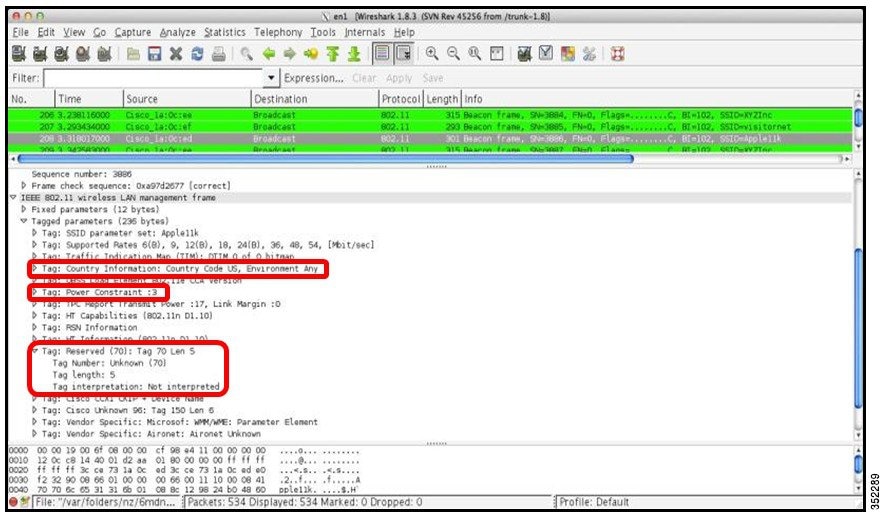
Clients send requests for neighbor lists only after associating with the APs that advertise the RRM capability information element (IE) in the beacon.
- Country Element: The country information element contains the information required to allow a station to identify the regulatory domain in which the station is located and to configure its PHY for operation in that regulatory domain.
- Power Constraint Element
- RRM enabled Capabilities Element: The RRM Capabilities element is 5 octets long and when included in a beacon or probe response uses bit 1 to signal that the AP can provide neighbor list. When used in an association request, bit 1 signifies the client’s request for a neighbor list
CLI Configuration for Assisted Roaming
wireless assisted-roaming floor-bias dBm Controller(config)# wireless assisted-roaming floor-bias 20 |
Configures neighbor floor label bias. The valid range is from 5 to 25 dBm, and the default value is 15 dBm. |
assisted-roaming neighbor-list Controller(wlan)# assisted-roaming neighbor-list |
Configures an 802.11k neighbor list for a WLAN. By default, assisted roaming is enabled on the neighbor list when you create a WLAN. The no form of the command disables assisted roaming neighbor list. |
assisted-roaming dual-list Controller(wlan)# assisted-roaming dual-list |
Configures a dual-band 802.11k dual list for a WLAN. By default, assisted roaming is enabled on the dual list when you create a WLAN. The no form of the command disables assisted roaming dual list. |
 Note | The WLC does not have a GUI configuration for 802.11k. 802.11k assisted roaming is enabled by default. |
Configuration Example
Controller# configure terminal
Controller(config)# wireless assisted-roaming floor-bias 10
Controller(config)# wlan test
Controller(config (wlan)# assisted-roaming neighbor-list
 Feedback