Feedback
Contents
Defining Unified CCX CTI Messages
This chapter includes the following topics that you need to understand in order to correctly define Unified CCX CTI Messages:
- Message structure and syntax
- Alignment of data elements
- Pack and unpack a Unified CCX CTI Message
- Message classification
- Message type definitions
Message structure and syntax
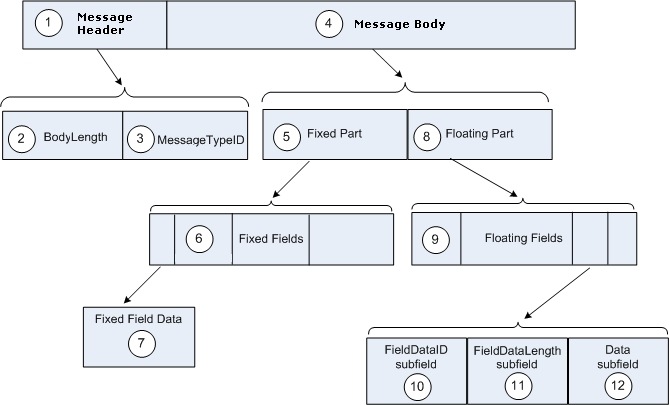
A Unified CCX CTI message is a byte array of fields containing a Message Header and a Message Body. Figure 1 shows its structure.
A Unified CCX CTI message is structured as follows. The numbered items refer to the numbers in Figure 1:
- 1. Message Header
The message header is a required field. It contains a 4-byte MessageTypeID field and a 4-byte BodyLength field. The message header is in what is called the Message HeaDeR (MHDR) data format, which is a common format used for message headers that precede all messages exchanged between a client and a server. Message header data format defines the MHDR format.
- 2. BodyLength
The BodyLength field contains the length of the MessageBody in bytes.
- 3. MessageTypeID
The MessageTypeID field identifies the type of message and has a unique numeric value used to determine the format of the remainder of the message. It also indicates if the message includes a floating part, and if so, what types of floating fields may appear within it.
The MessageTypeID field name usually indicates the purpose of the message. Example message types are OPEN_REQ and HEARTBEAT_REQ.
Table 1 defines all the message types in the message set with a unique MessageTypeID number that identifies each message type. To enter a message type into a message header, enter the MessageTypeID number specified for that message in Table 1.
- 4. Message Body
A message body consists of either a fixed part only or a fixed part and a floating part. The maximum size of a message body is 256 bytes.
- 5. Fixed Part
All the fields in the fixed part of a message are required and have both a fixed order and a fixed size.
- 6. Fixed Fields
Fixed fields begin after the message header. Every field defined in the fixed part of a message is required and must be defined in the order given with the defined size for the field. That is, all the field sizes in the fixed part of a message must be the size specified by the message definition.
For example, if there are 3 fields of 4 bytes in the fixed part of the message and the second field is a reserved one, you need to specify that the third field starts at byte 9, even though you are not using bytes 5 through 8.
A field in the fixed part of a message is identified by its location in the fixed part of the message.
Some messages have only fixed fields.
- 7. Fixed Field Data
Fixed Fields in messages are defined using a special set of data types. These are:
For definitions of these data types, see Message field data types.
Note
All numeric data longer than one byte is transmitted in order of the most significant byte to the least significant byte. This is the canonical network byte order defined by TCP/IP standards.
- 8. Floating Part (Variable in length and sometimes optional)
The message floating part contains floating fields that follow the fixed fields. The floating part is a required part of a message having floating fields.
- 9. Floating Fields
- The length of a floating field is variable. It can be up to or less than that maximum size specified in the message definition.
- Since these fields can be variable in length, the position of a floating field in a message can be said to float, depending on the length of the other floating fields in the message.
- Floating fields are packed together in the floating part of the message. The FieldDataID of one floating field immediately follows the data of the previous field. The message length (in the message header) indicates the end of the message.
- Some floating fields may be optional.
- In general, with one exception, floating fields may appear in any order in the floating part of a message, although, it is better to follow the order defined in the message. The exception is the situation in which a floating field can appear more than once, that is, when the field is a member of a list. In this case, a fixed field in the message indicates the number of list entries present.
- 10. FieldDataID
A floating field begins with a one-byte FieldDataID identifying the field type. Its data type is UCHAR.
Table 1 numerically lists all the available FieldDataID types.
Some floating fields are reserved.
Note
In the Message Type Definitions, the square bracketed subscript number ending the Field Names for the data in the Floating Part of the message descriptions is the FieldDataID for that field. For example AgentID[194] means that 194 is the FieldDataID for the AgentID field.
Note
A field FieldDataID is a global ID not specific to a message. More than one message can use the same DataID.
For example, the AGENT_STATE_EVENT and the SET_AGENT_STATE_REQ messages can both use the AGENT_ID FieldDataID.
- 11. FieldDataLength
Following the FieldDataID is a one-byte FieldDataLength field indicating the number of bytes, n, of data in the data subfield (excluding FieldDataID and FieldDataLength). Its data type is UCHAR.
- 12. Data
The data immediately follows the FieldLength subfield.
The maximum data size listed in each message definition for each floating field is the maximum number of data bytes allowed. This size, however, does not include the FieldDataID and the FieldLength bytes. For STRING data, the maximum size includes the null termination byte.
Any data type listed in Message field data types, (with the exception of the MHDR (Message Header) data type) can appear in the floating part of a message. However, the following four types of data appear only in the floating part:
For the definitions of all the message data types, see Message field data types.
Alignment of data elements
NoteThe messages described in this document are sent as a stream of bytes. If the client application uses data structures to represent the messages, take care that the data structures do not have padding inserted to align elements on particular boundaries, such as aligning 32-bit integers so that they are located on a 4-byte boundary.
Pack and unpack a Unified CCX CTI Message
You may use data structures in your choice of programming languages to represent CTI messages. For example, in C++, you may use a class to represent a message type. The process of converting this data structure to a byte array to be sent to the Unified CCX server is called packing. The reverse process is called unpacking. The following are typical steps to do packing and unpacking.
Pack a CTI message
Procedure
Unpack a CTI message
Procedure
Message classification
The Unified CCX CTI Protocol messages can be classified in different ways:
- As Solicited (initiated by the client) or Unsolicited (initiated by Unified CCX). A bridge mode client can receive all unsolicited messages. In addition to unsolicited messages, a client receives confirmation (solicited) messages only for the requests it makes. A bridge mode client does not receive confirmation messages for other clients’ requests. A client’s request message triggers a solicited message response. In addition a client’s request message may also trigger an unsolicited message. For example, the client’s request could trigger an agent state event (an unsolicited message) as well as a confirmation message for the request (a solicited message).
- By function You can classify messages by function as:
- Session Management Messages Messages for managing a session (for initializing, maintaining, and closing a session)
- Configuration Messages Messages for sharing server configuration data (initial and updated) with the server’s clients.
- Agent State Messages Messages that allow the client to control the agent state, such as, for example, login and logout.
- Call Control Messages Messages that allow the client to control inbound and outbound calls.
- Call Events Messages Messages that describe what is happening to a call; for example, call established and call begun. Also messages that update call data in call context variables while the call is active.
- Miscellaneous Service and Query Status Messages Miscellaneous unsolicited event messages and solicited messages available to all clients. And, messages that query the status of an agent, a queue, or a device.
Message type definitions
All the message types in the Unified CCX Protocol message set are listed and defined in Message type definitions When creating a message, you must use the definition specified for the type of message you are creating.
Note
A version number next to a field name in a message type definition indicates that the field is used in the CTI protocol beginning with the specified version number.