Feedback
Contents
- Configuring DHCP for WLANs
- Finding Feature Information
- Prerequisites for Configuring DHCP for WLANs
- Restrictions for Configuring DHCP for WLANs
- Information About the Dynamic Host Configuration Protocol
- Internal DHCP Servers
- External DHCP Servers
- DHCP Assignments
- Information About DHCP Option 82
- Configuring DHCP Scopes
- Information About DHCP Scopes
- How to Configure DHCP for WLANs
- Configuring DHCP for WLANs (CLI)
- Configuring DHCP Scopes (CLI)
- Additional References
- Feature Information for DHCP for WLANs
Configuring DHCP for WLANs
Finding Feature Information
Your software release may not support all the features documented in this module. For the latest feature information and caveats, see the release notes for your platform and software release. To find information about the features documented in this module, and to see a list of the releases in which each feature is supported, see the Feature Information Table at the end of this document.
Use Cisco Feature Navigator to find information about platform support and Cisco software image support. To access Cisco Feature Navigator, go to http://www.cisco.com/go/cfn. An account on Cisco.com is not required.
Restrictions for Configuring DHCP for WLANs
Related Concepts
Related Information
Information About the Dynamic Host Configuration Protocol
You can configure WLANs to use the same or different Dynamic Host Configuration Protocol (DHCP) servers or no DHCP server. Two types of DHCP servers are available: internal and external.
- Internal DHCP Servers
- External DHCP Servers
- DHCP Assignments
- Information About DHCP Option 82
- Configuring DHCP Scopes
Related References
Internal DHCP Servers
The switches contain an internal DHCP server. This server is typically used in branch offices that do not already have a DHCP server. The wireless network generally contains a maximum of 10 access points or fewer, with the access points on the same IP subnet as the switch. The internal server provides DHCP addresses to wireless clients, direct-connect access points, and DHCP requests that are relayed from access points. Only lightweight access points are supported. When you want to use the internal DHCP server, you must set the management interface IP address of the switch as the DHCP server IP address.
DHCP option 43 is not supported on the internal server. Therefore, the access point must use an alternative method to locate the management interface IP address of the switch, such as local subnet broadcast, Domain Name System (DNS), or priming.
An internal DHCP server pool only serves the wireless clients of that switch, not clients of other switches. Also, an internal DHCP server can serve only wireless clients, not wired clients.
When clients use the internal DHCP server of the switch, IP addresses are not preserved across reboots. As a result, multiple clients can be assigned with the same IP address. To resolve any IP address conflicts, clients must release their existing IP address and request a new one. Wired guest clients are always on a Layer 2 network connected to a local or foreign switch.
NoteDHCPv6 is not supported in the internal DHCP servers.
External DHCP Servers
The operating system is designed to appear as a DHCP Relay to the network and as a DHCP server to clients with industry-standard external DHCP servers that support DHCP Relay, which means that each switch appears as a DHCP Relay agent to the DHCP server and as a DHCP server at the virtual IP address to wireless clients.
Because the switch captures the client IP address that is obtained from a DHCP server, it maintains the same IP address for that client during intra switch, inter switch, and inter-subnet client roaming.
NoteExternal DHCP servers can support DHCPv6.
DHCP Assignments
You can configure DHCP on a per-interface or per-WLAN basis. We recommend that you use the primary DHCP server address that is assigned to a particular interface.
You can assign DHCP servers for individual interfaces. You can configure the management interface, AP-manager interface, and dynamic interface for a primary and secondary DHCP server, and you can configure the service-port interface to enable or disable DHCP servers. You can also define a DHCP server on a WLAN. In this case, the server overrides the DHCP server address on the interface assigned to the WLAN.
Security Considerations
For enhanced security, we recommend that you require all clients to obtain their IP addresses from a DHCP server. To enforce this requirement, you can configure all WLANs with a DHCP Addr. Assignment Required setting, which disallows client static IP addresses. If DHCP Addr. Assignment Required is selected, clients must obtain an IP address via DHCP. Any client with a static IP address is not allowed on the network. The switch monitors DHCP traffic because it acts as a DHCP proxy for the clients.
Note
WLANs that support management over wireless must allow management (device-servicing) clients to obtain an IP address from a DHCP server.If slightly less security is tolerable, you can create WLANs with DHCP Addr. Assignment Required disabled. Clients then have the option of using a static IP address or obtaining an IP address from a designated DHCP server.
NoteDHCP Addr. Assignment Required is not supported for wired guest LANs.
You can create separate WLANs with DHCP Addr. Assignment Required configured as disabled. This is applicable only if DHCP proxy is enabled for the switch. You must not define the primary/secondary configuration DHCP server you should disable the DHCP proxy. These WLANs drop all DHCP requests and force clients to use a static IP address. These WLANs do not support management over wireless connections.
Information About DHCP Option 82
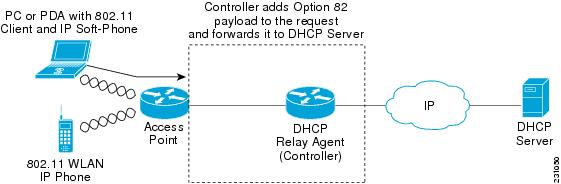
DHCP option 82 provides additional security when DHCP is used to allocate network addresses. It enables the switch to act as a DHCP relay agent to prevent DHCP client requests from untrusted sources. You can configure the switch to add option 82 information to DHCP requests from clients before forwarding the requests to the DHCP server.
The access point forwards all DHCP requests from a client to the switch. The switch adds the DHCP option 82 payload and forwards the request to the DHCP server. The payload can contain the MAC address or the MAC address and SSID of the access point, depending on how you configure this option.
NoteAny DHCP packets that already include a relay agent option are dropped at the switch.
For DHCP option 82 to operate correctly, DHCP proxy must be enabled.
Configuring DHCP Scopes
Related References
Information About DHCP Scopes
Switches have built-in DHCP relay agents. However, when you desire network segments that do not have a separate DHCP server, the switches can have built-in DHCP scopes that assign IP addresses and subnet masks to wireless clients. Typically, one switch can have one or more DHCP scopes that each provide a range of IP addresses.
DHCP scopes are needed for internal DHCP to work. Once DHCP is defined on the switch, you can then point the primary DHCP server IP address on the management, AP-manager, and dynamic interfaces to the switch’s management interface.
Related Tasks
How to Configure DHCP for WLANs
Configuring DHCP for WLANs (CLI)
SUMMARY STEPS
1. configure terminal
2. shutdown
3. wlan profile-name
4. ip dhcp opt82 {ascii | format {add-ssid | ap-ethmac} | rid}
5. ip dhcp required
6. ip dhcp server ip-address
7. no shutdown
8. end
9. show wlan wlan-name
DETAILED STEPSRelated Concepts
Related References
Related Information
Configuring DHCP Scopes (CLI)
SUMMARY STEPS
1. configure terminal
2. ip dhcp pool pool-name
3. network network-name mask-address
4. dns-server hostname
5. end
DETAILED STEPS
Command or Action Purpose
Step 1 configure terminal
Example:Switch# configure terminalEnters global configuration mode.
Step 2 ip dhcp pool pool-name
Example:Switch(config)#ip dhcp pool test-poolConfigures the DHCP pool address.
Step 3 network network-name mask-address
Example:Switch(dhcp-config)#network 209.165.200.224 255.255.255.0Specifies the network number in dotted-decimal notation and the mask address.
Step 4 dns-server hostname
Example:Switch(dhcp-config)#dns-server example.comSpecifies the DNS name server. You can specify an IP address or a hostname.
Step 5 end
Example:Switch(config)# endReturns to privileged EXEC mode. Alternatively, you can also press Ctrl-Z to exit global configuration mode.
Related Concepts
Additional References
Error Message Decoder
Description Link To help you research and resolve system error messages in this release, use the Error Message Decoder tool.
https://www.cisco.com/cgi-bin/Support/Errordecoder/index.cgi
MIBs
Technical Assistance
Description Link The Cisco Support website provides extensive online resources, including documentation and tools for troubleshooting and resolving technical issues with Cisco products and technologies.
To receive security and technical information about your products, you can subscribe to various services, such as the Product Alert Tool (accessed from Field Notices), the Cisco Technical Services Newsletter, and Really Simple Syndication (RSS) Feeds.
Access to most tools on the Cisco Support website requires a Cisco.com user ID and password.