Table Of Contents
IEEE 802.1ah on Provider Backbone Bridges
Finding Feature Information
Contents
Prerequisites for IEEE 802.1ah on Provider Backbone Bridges
Restrictions for IEEE 802.1ah on Provider Backbone Bridges
Information About IEEE 802.1ah on Provider Backbone Bridges
MAC-in-MAC
Backbone Edge Bridges
IB-Bridges
IEEE 802.1ah for L2 Bridging Networks
Unknown Unicast and Customer Multicast Traffic
IEEE 802.1ah for Ethernet Over MPLS
IEEE 802.1ah for Virtual Private LAN Services
How to Configure MAC-in-MAC on Provider Backbone Bridges
Configuring MAC-in-MAC in an L2 Bridging Network
Configuring MAC-in-MAC in an Ethernet over MPLS Network
Configuring MAC-in-MAC in a VPLS Network
Configuration Examples for MAC-in-MAC on Provider Backbone Bridges
Example: MAC-in-MAC Configuration for L2 Bridging Networks
Example: MAC-in-MAC Configuration for Ethernet over MPLS Networks
Example: MAC-in-MAC Configuration for VPLS Networks
Additional References
Related Documents
Standards
MIBs
RFCs
Technical Assistance
Feature Information for IEEE 802.1ah on Provider Backbone Bridges
IEEE 802.1ah on Provider Backbone Bridges
First Published: November 25, 2009
Last Updated: February 8, 2011
The IEEE 802.1ah on Provider Backbone Bridges feature enables MAC-in-MAC tunneling on Ethernet virtual circuits (EVCs).
Finding Feature Information
Your software release may not support all the features documented in this module. For the latest feature information and caveats, see the release notes for your platform and software release. To find information about the features documented in this module, and to see a list of the releases in which each feature is supported, see the "Feature Information for IEEE 802.1ah on Provider Backbone Bridges" section.
Use Cisco Feature Navigator to find information about platform support and Cisco software image support. To access Cisco Feature Navigator, go to http://www.cisco.com/go/cfn. An account on Cisco.com is not required.
Contents
•
Prerequisites for IEEE 802.1ah on Provider Backbone Bridges
•
Restrictions for IEEE 802.1ah on Provider Backbone Bridges
•
Information About IEEE 802.1ah on Provider Backbone Bridges
•
How to Configure MAC-in-MAC on Provider Backbone Bridges
•
Configuration Examples for MAC-in-MAC on Provider Backbone Bridges
•
Additional References
•
Feature Information for IEEE 802.1ah on Provider Backbone Bridges
Prerequisites for IEEE 802.1ah on Provider Backbone Bridges
•
The router configuration must include an ES40 line card, because the Institute of Electrical and Electronic Engineers (IEEE) 802.1ah standard is supported on ES40 line cards only.
•
IEEE 802.1ah is supported on EVC architecture only.
Restrictions for IEEE 802.1ah on Provider Backbone Bridges
•
The following features are not supported:
–
Connectivity Fault Management (CFM) over 802.1ah
–
Internet Group Multicast Protocol (IGMP) snooping or any mulitcast protocol on the customer-bridge (c-bridge) domain
–
Standalone customer-facing backbone edge bridge (I-BEB)
–
Standalone backbone core bridge-facing backbone edge bridge (B-BEB)
•
The following limits apply to this feature:
–
Maximum number of MAC tunnels is 4094.
–
Maximum number of service instances under MAC tunnels is 16,384.
–
Maximum number of Ethernet Flow Points (EFP) is 32,768.
–
Maximum number of EFPs on a single interface is 8000.
–
802.1ah on the port channel is supported for one member link per port channel only.
Information About IEEE 802.1ah on Provider Backbone Bridges
•
MAC-in-MAC
•
Backbone Edge Bridges
•
IB-Bridges
•
IEEE 802.1ah for L2 Bridging Networks
•
IEEE 802.1ah for Ethernet Over MPLS
•
IEEE 802.1ah for Virtual Private LAN Services
MAC-in-MAC
The IEEE 802.1ah on Provider Backbone Bridges feature encapsulates the end users traffic inside the service providers MAC header, enabling the backbone edge bridge (BEB) to support large numbers of service instances. This functionality is also known as MAC-in-MAC or MAC Tunneling Protocol (MTP). It also allows service providers to hide the identity of their equipment vendors by using user-specified MAC address as the tunnel source address. It also separates the user MAC address space from the provider MAC address space which means that only the edge bridges are aware of the customer MAC addresses, and that only the core bridges are aware of the provider addresses.
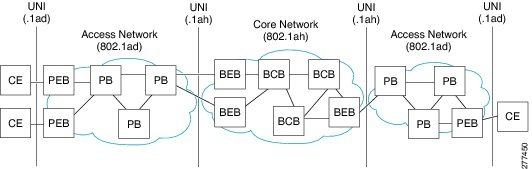
Figure 1 shows a typical 802.1ah PBB network and Table 1 describes the PBB network components.
Table 1 IEEE 802.1ah PBB Components
Component
|
Description
|
BCB
|
Backbone core bridge
|
BEB
|
Backbone edge bridge
|
CE
|
Customer equipment
|
PB
|
Provider bridge
|
PEB
|
Provider edge bridge
|
Figure 1 IEEE 802.1ah Provider Backbone
Bridge
Backbone Edge Bridges
BEBs can contain either an I-Component or a B-Component. The I-Component maps Service VLAN identifiers (S-VIDs) to service instance identifiers (I-SIDs) and adds a PBB header without a B-Tag. The B-Component maps I-SIDs to backbone VIDs (B-VIDs) and adds a PBB header with a B-Tag. The IEEE 802.1ah standard specifies the following three types of BEBs:
•
The B-Bridge (B-BEB) contains the B-Component of the MAC-in-MAC bridge. It validates the I-SIDs and maps the frames onto the backbone VLAN (B-VLAN). It also switches traffic based on the B-VLANS within the core bridge.
•
The I-Bridge (I-BEB) contains the I-Component of the MAC-in-MAC bridge. It performs B-MAC encapsulation and inserts the I-SIDs based on the S-tags, C-tags, or S-tag/C-tag pairs.
•
The IB-Bridge (IB-BEB) contains one or more I-Components and a single B-Component interconnected via a LAN segment.
Note
The Cisco 7600 series routers are designed to work as IB-Bridges.
IB-Bridges
The IB-Bridge contains both the I-Component and the B-Component. The bridge selects the B-MAC and inserts the I-SID based on the provider VLAN tag (S-tag), the customer VLAN tag (C-tag), or both the S-tag and the C-tag. It validates the I-SIDs and it transmits and receives frames on the B-VLAN.
The IB-Bridge has two types of interfaces:
•
Port-based interface: On port-based interfaces all S-tagged frames received from a customer are mapped to an I-SID and the S-tags are preserved.
•
S-tagged interface: S-tagged interfaces support one-to-one mapping of an S-VLAN to an I-SID to provide S-VLAN translation capabilities. They also support many-to-one mapping of S-VLANs to an I-SID to provide S-VLAN bundling capability.
The IEEE 802.1ah on Provider Backbone Bridges feature supports all services mandated by the IEEE 802.1ah standard and extends the services to provide additional functionality as follows:
•
S-Tagged Service:
–
In multiplexed environments each S-tag maps to an I-SID and may be retained or removed.
–
In bundled environments multiple S-tags map to the same I-SID and the S-tags must be retained.
•
C-Tagged Service:
–
In multiplexed environments each C-tag maps to an I-SID and may be retained or removed.
–
In bundled environments multiple C-tags map to the same I-SID and the C-tags must be retained.
•
S/C-Tagged Service:
–
In multiplexed environments each S-tag/C-tag pair maps to an I-SID. The S-tag or the S-tag/C-tag pair may be retained or removed.
–
In bundled environments multiple S-tag/C-tags pairs map to the same I-SID and the S-tag/C-tag pair must be retained.
•
Port-based Service
–
Any frame whether untagged or double tagged is mapped to the same I-SID and all tags are retained.
IEEE 802.1ah for L2 Bridging Networks
When IEEE 802.1ah is configured on PBBs in an L2 bridging network the packets on the ingress EFP are tunneled to the appropriate MAC tunnel using the bridging identifier in the I-Component (specified using the bridge-domain c-mac command). If multiple EFPs use the same I-SID then the C-MAC bridge domain also performs the switching between the EFPs.
Figure 2 shows a typical L2 bridging network configuration.
Figure 2 IEEE 802.1ah L2 Bridging Network
Table 2 describes the components of the L2 bridging network.
Table 2 L2 Bridging Network Components
Component Name
|
Description
|
802.1ad
|
IEEE 802.1ad (provider bridges) network
|
802.1ah
|
IEEE 802.1ah (provider backbone bridge) network
|
BEB
|
Backbone edge bridge
|
CE
|
Customer equipment
|
NNI
|
Network-to-network interface (egress EFP)
|
PE-Agg
|
Provider edge aggregation device
|
UNI
|
User-Network Interface (ingress EFP)
|
Unknown Unicast and Customer Multicast Traffic
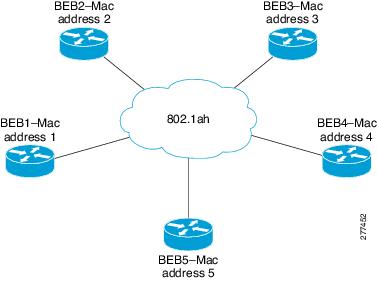
Figure 3 shows an L2 network where all the BEBs are connected to each other through a single Backbone VLAN (B-VLAN). In this scenario any unknown unicast traffic from BEB1 is forwarded to BEB2 through to BEB5 because they all share the same B-VLAN.
Figure 3 BEB B-VLAN Network
In order to reduce network traffic you can configure a BEB to send traffic to specific BEBs on the B-VLAN. For example, if BEB1 needs to send traffic to BEB3 and BEB4 only, you can use the mac tunnel address destination map command to map the customer destination address (C-DA) to a multicast backbone destination address (B-DA). BEB3 and BEB4 are then registered to receive traffic for this B-DA.
All packets within the 802.1ah network must be sent to a specified MAC address. The address is a static entry in the MAC address tables in the backbone core bridges. If a default MAC tunnel address is not specified in the table, then all unknown unicast packets and customer multicast traffic are sent with the default B-DA, which is a combination of IEEE-assigned Organizational Unique Identifier (OUI) and the I-SID values.
IEEE 802.1ah for Ethernet Over MPLS
When IEEE 802.1ah is configured on Ethernet over Multiprotocol Label Switching (EoMPLS) networks, the Ethernet links are transported as pseudowires using MPLS label switched paths (LSPs) inside an MPLS tunnel. To configure MAC-in-MAC on EoMPLS networks you must specify ingress EFP configuration settings at the UNI, specify MAC-in-MAC settings, and specify switch virtual interface (SVI) configuration settings at the egress NNI. The SVI represents a VLAN of switch ports connected to the bridge via a single interface.
Figure 4 shows a typical EoMPLS network configuration.
Figure 4 EEE 802.1ah EoMPLS Network
Note
In EoMPLS networks Cisco 7600 series routers use the bridge domain identifier (set using the bridge-domain command) as the B-tag identifier. Therefore it is not necessary to specify B-VLAN configuration for the MAC-in-MAC tunnel.
IEEE 802.1ah for Virtual Private LAN Services
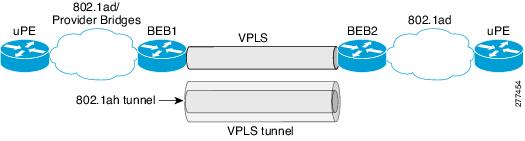
When IEEE 802.1ah is configured on virtual private LAN service (VPLS) networks the 802.1ah packets are encapsulated in the VPLS pseudowire.
To configure MAC-in-MAC on VPLS networks you must specify the ingress EFP configuration settings at the UNI, specify the MAC-in-MAC settings, specify the virtual forwarding interface (VFI) settings, and specify the SVI configuration settings at the egress NNI. The SVI represents a VLAN of switch ports connected to the bridge via a single interface.
Figure 5 shows two 802.1ah networks connected by VPLS.
Figure 5 IEEE 802.1ah VPLS Network
How to Configure MAC-in-MAC on Provider Backbone Bridges
•
Configuring MAC-in-MAC in an L2 Bridging Network (optional)
•
Configuring MAC-in-MAC in an Ethernet over MPLS Network (optional)
•
Configuring MAC-in-MAC in a VPLS Network (optional)
Configuring MAC-in-MAC in an L2 Bridging Network
Perform this task to configure MAC-in-MAC in an L2 bridging network where the NNI has a switchport-based configuration.
SUMMARY STEPS
1.
enable
2.
configure terminal
3.
interface gigabitethernet slot/port
4.
service instance id ethernet
5.
encapsulation dot1q vlan-id
6.
bridge-domain bridge-id c-mac
7.
exit
8.
exit
9.
ethernet mac-tunnel virtual tunnel-id
10.
description description
11.
bridge-domain bridge-id
12.
mac tunnel address destination default mac-addr
13.
service instance id ethernet
14.
encapsulation dot1ah isid isid
15.
mac tunnel address destination map c-mac-addr b-mac-addr
16.
bridge-domain bridge-id c-mac
17.
exit
18.
exit
19.
interface gigabitethernet slot/port
20.
switchport
21.
switchport mode trunk
22.
switchport trunk allowed vlan vlan-id
23.
end
24.
show bridge-domain
25.
show ethernet mac-tunnel engine slot
26.
show ethernet service instance
27.
show ethernet service mac-tunnel
DETAILED STEPS
| |
Command or Action
|
Purpose
|
Step 1
|
enable
Example:
Router> enable
|
Enables privileged EXEC mode.
• Enter your password if prompted.
|
Step 2
|
configure terminal
Example:
Router# configure terminal
|
Enters global configuration mode.
|
Step 3
|
interface gigabitethernet slot/port
Example:
Router(config)# interface gigabitethernet 6/1
|
Specifies the Gigabit Ethernet interface to configure as the customer instance port and enters interface configuration mode.
|
Step 4
|
service instance id ethernet
Example:
Router(config-if)# service instance 101
ethernet
|
Creates an L2 service instance on an interface and enters service instance configuration mode.
|
Step 5
|
encapsulation dot1q vlan-id
Example:
Router(config-if-srv)# encapsulation dot1q 13
|
Defines the matching criteria to be used in order to map ingress dot1q frames on an interface to the appropriate service instance.
|
Step 6
|
bridge-domain bridge-id c-mac
Example:
Router(config-if-srv)# bridge-domain 12 c-mac
|
Specifies the bridging identifier in the I-Component.
|
Step 7
|
exit
Example:
Router(config-if-srv)# exit
|
Exits service instance configuration mode.
|
Step 8
|
exit
Example:
Router(config-if)# exit
|
Exits service interface configuration mode.
|
Step 9
|
ethernet mac-tunnel virtual tunnel-id
Example:
Router(config)# ethernet mac-tunnel virtual 1
|
Configures a virtual MAC-in-MAC tunnel and enters MAC-in-MAC tunnel configuration mode.
|
Step 10
|
description description
Example:
Router(config-tunnel-minm)# description
MAC-Tunnel-1
|
(Optional) Describes the name and purpose of the MAC tunnel.
|
Step 11
|
bridge-domain bridge-id
Example:
Router(config-tunnel-minm)# bridge-domain 100
|
Binds the MAC tunnel to the bridge domain instance.
|
Step 12
|
mac tunnel address destination default mac-addr
Example:
Router(config-tunnel-minm)# mac tunnel address
destination default 4444.1111.1111
|
Specifies a B-DA for a group of service instance IDs (I-SIDs).
|
Step 13
|
service instance id ethernet
Example:
Router(config-tunnel-minm)# service instance 10
ethernet
|
Defines an EFP that corresponds to a specific I-SID encapsulation and enters tunnel service configuration mode.
|
Step 14
|
encapsulation dot1ah isid isid
Example:
Router(config-tunnel-srv)# encapsulation dot1ah
isid 10000
|
Configures dot1ah encapsulation for the specified I-SID.
|
Step 15
|
mac tunnel address destination map c-mac-addr
b-mac-addr
Example:
Router(config-tunnel-srv)# mac tunnel address
destination map 3333.1111.1111 5555.2222.2222
|
Maps the service provider backbone bridge MAC address to a customer MAC address.
|
Step 16
|
bridge-domain bridge-id c-mac
Example:
Router(config-tunnel-srv)# bridge-domain 30
c-mac
|
Configures the bridge domain as a customer domain.
|
Step 17
|
exit
Example:
Router(config-tunnel-srv)# exit
|
Exits tunnel service configuration mode.
|
Step 18
|
exit
Example:
Router(config-tunnel-minm)# exit
|
Exits MAC-in-MAC tunnel configuration mode.
|
Step 19
|
interface gigabitethernet slot/port
Example:
Router(config)# interface gigabitethernet 6/2
|
Specifies the Gigabit Ethernet interface to configure as the bridge instance port and enters interface configuration mode.
|
Step 20
|
switchport
Example:
Router(config-if)# switchport
|
Modifies the switching characteristics of the L2 switched interface.
|
Step 21
|
switchport mode trunk
Example:
Router(config-if)# switchport mode trunk
|
Specifies a trunking VLAN L2 interface.
|
Step 22
|
switchport trunk allowed vlan vlan-id
Example:
Router(config-if)# switchport trunk allowed
vlan 100
|
Sets the list of allowed VLANs that transmit traffic from this interface in tagged format when in trunking mode.
|
Step 23
|
end
Example:
Router(config-if)# end
|
Exits interface configuration mode and enables user EXEC mode.
|
Step 24
|
show bridge-domain
Example:
Router> show bridge-domain
|
(Optional) Displays bridge-domain information.
|
Step 25
|
show ethernet mac-tunnel engine slot
slot-number
Example:
Router> show ethernet mac-tunnel engine slot 2
|
(Optional) Displays Ethernet MAC-in-MAC information.
|
Step 26
|
show ethernet service instance
Example:
Router> show ethernet service instance
|
(Optional) Displays Ethernet service instance information.
|
Step 27
|
show ethernet service mac-tunnel
Example:
Router> show ethernet service mac-tunnel
|
(Optional) Displays Ethernet service MAC-in-MAC information.
|
Configuring MAC-in-MAC in an Ethernet over MPLS Network
Perform this task to configure MAC-in-MAC in an EoMPLS network.
SUMMARY STEPS
1.
enable
2.
configure terminal
3.
interface gigabitethernet slot/port
4.
service instance id ethernet
5.
encapsulation dot1q vlan-id
6.
bridge-domain bridge-id c-mac
7.
exit
8.
exit
9.
ethernet mac-tunnel virtual tunnel-id
10.
bridge-domain bridge-id
11.
service instance id ethernet
12.
encapsulation dot1ah isid isid
13.
bridge-domain bridge-id c-mac
14.
exit
15.
exit
16.
interface vlan vlanid
17.
xconnect ipaddress vc-id encapsulation mpls
18.
exit
DETAILED STEPS
| |
Command or Action
|
Purpose
|
Step 1
|
enable
Example:
Router> enable
|
Enables privileged EXEC mode.
• Enter your password if prompted.
|
Step 2
|
configure terminal
Example:
Router# configure terminal
|
Enters global configuration mode.
|
Step 3
|
interface gigabitethernet slot/port
Example:
Router(config)# interface gigabitethernet 6/1
|
Specifies the Gigabit Ethernet interface to configure as the customer instance port and enters interface configuration mode.
|
Step 4
|
service instance id ethernet
Example:
Router(config-if)# service instance 101
ethernet
|
Creates an L2 service instance on an interface and enters service instance configuration mode.
|
Step 5
|
encapsulation dot1q vlan-id
Example:
Router(config-if-srv)# encapsulation dot1q 13
|
Defines the matching criteria to be used in order to map ingress dot1q frames on an interface to the appropriate service instance.
|
Step 6
|
bridge-domain bridge-id c-mac
Example:
Router(config-if-srv)# bridge-domain 12 c-mac
|
Specifies the bridging identifier in the I-Component.
|
Step 7
|
exit
Example:
Router(config-if-srv)# exit
|
Exits service instance configuration mode.
|
Step 8
|
exit
Example:
Router(config-if)# exit
|
Exits interface configuration mode.
|
Step 9
|
ethernet mac-tunnel virtual tunnel-id
Example:
Router(config)# ethernet mac-tunnel virtual 1
|
Configures a virtual MAC-in-MAC tunnel and enters MAC-in-MAC tunnel configuration mode.
|
Step 10
|
bridge-domain bridge-id
Example:
Router(config-tunnel-minm)# bridge-domain 100
|
Binds the MAC tunnel to the bridge domain instance.
|
Step 11
|
service instance id ethernet
Example:
Router(config-tunnel-minm)# service instance 10
ethernet
|
Defines an EFP that corresponds to a specific I-SID encapsulation and enters tunnel service configuration mode.
|
Step 12
|
encapsulation dot1ah isid isid
Example:
Router(config-tunnel-srv)# encapsulation dot1ah
isid 10000
|
Configures dot1ah encapsulation for the specified I-SID.
|
Step 13
|
bridge-domain bridge-id c-mac
Example:
Router(config-tunnel-srv)# bridge-domain 30
c-mac
|
Configures the bridge domain as a customer domain.
|
Step 14
|
exit
Example:
Router(config-tunnel-srv)# exit
|
Exits tunnel service configuration mode.
|
Step 15
|
exit
Example:
Router(config-tunnel-minm)# exit
|
Exits MAC-in-MAC tunnel configuration mode.
|
Step 16
|
interface vlan vlanid
Example:
Router(config)# interface vlan 1000
|
Creates a dynamic SVI, and enters interface configuration mode.
|
Step 17
|
xconnect ipaddress vc-id encapsulation mpls
Example:
Router(config-if)# xconnect 10.243.245.11 100
encapsulation mpls
|
Binds the attachment circuit to the pseudowire, and configures an Any Transport over MPLS (AToM) static pseudowire.
• Specifies MPLS as the tunneling method to encapsulate the data in the pseudowire.
|
Step 18
|
exit
Example:
Router(config-if)# exit
|
Returns to global configuration mode.
|
Configuring MAC-in-MAC in a VPLS Network
Perform this task to configure MAC-in-MAC in a VPLS network. The following configuration enables the router to work as an IB-Bridge.
Note
On Cisco 7600 series routers the bridge-domain identifier must be the same as the SVI identifier.
SUMMARY STEPS
1.
enable
2.
configure terminal
3.
interface gigabitethernet slot/port
4.
service instance id ethernet
5.
encapsulation dot1q vlan-id
6.
bridge-domain bridge-id c-mac
7.
exit
8.
exit
9.
ethernet mac-tunnel virtual tunnel-id
10.
bridge-domain bridge-id
11.
service instance id ethernet
12.
encapsulation dot1ah isid isid
13.
bridge-domain bridge-id c-mac
14.
exit
15.
service instance id ethernet
16.
encapsulation dot1ah isid isid
17.
bridge-domain bridge-id c-mac
18.
exit
19.
exit
20.
l2 vfi vfi-name manual
21.
vpn id vpn-id
22.
neighbor ipaddress vcid encapsulation mpls
23.
neighbor ipaddress vcid encapsulation mpls
24.
exit
25.
interface vlan vlan-id
26.
xconnect ipaddress vc-id encapsulation mpls
27.
exit
DETAILED STEPS
| |
Command or Action
|
Purpose
|
Step 1
|
enable
Example:
Router> enable
|
Enables privileged EXEC mode.
• Enter your password if prompted.
|
Step 2
|
configure terminal
Example:
Router# configure terminal
|
Enters global configuration mode.
|
Step 3
|
interface gigabitethernet slot/port
Example:
Router(config)# interface gigabitethernet 6/1
|
Specifies the Gigabit Ethernet interface to configure as the customer instance port and enters interface configuration mode.
|
Step 4
|
service instance id ethernet
Example:
Router(config-if)# service instance 101
ethernet
|
Creates an L2 service instance on an interface and enters service instance configuration mode.
|
Step 5
|
encapsulation dot1q vlan-id
Example:
Router(config-if-srv)# encapsulation dot1q 13
|
Defines the matching criteria to be used in order to map ingress dot1q frames on an interface to the appropriate service instance.
|
Step 6
|
bridge-domain bridge-id c-mac
Example:
Router(config-if-srv)# bridge-domain 12
|
Specifies the bridging identifier in the I-Component.
|
Step 7
|
exit
Example:
Router(config-if-srv)# exit
|
Exits service instance configuration mode.
|
Step 8
|
exit
Example:
Router(config-if)# exit
|
Exits interface configuration mode.
|
Step 9
|
ethernet mac-tunnel virtual tunnel-id
Example:
Router(config)# ethernet mac-tunnel virtual 1
|
Configures a virtual MAC-in-MAC tunnel and enters MAC-in-MAC tunnel configuration mode.
|
Step 10
|
bridge-domain bridge-id
Example:
Router(config-tunnel-minm)# bridge-domain 100
|
Binds the MAC tunnel to the bridge domain instance.
|
Step 11
|
service instance id ethernet
Example:
Router(config-tunnel-minm)# service instance 31
ethernet
|
Defines an EFP that corresponds to a specific I-SID encapsulation and enters tunnel service configuration mode.
|
Step 12
|
encapsulation dot1ah isid isid
Example:
Router(config-tunnel-srv)# encapsulation dot1ah
isid 10000
|
Configures dot1ah encapsulation for the specified I-SID.
|
Step 13
|
bridge-domain bridge-id c-mac
Example:
Router(config-tunnel-srv)# bridge-domain 10
c-mac
|
Configures the bridge domain as a customer domain.
|
Step 14
|
exit
Example:
Router(config-tunnel-srv)# exit
|
Exits tunnel service configuration mode.
|
Step 15
|
service instance id ethernet
Example:
Router(config-tunnel-minm)# service instance 41
ethernet
|
Defines an EFP that corresponds to a specific I-SID encapsulation and enters tunnel service configuration mode.
|
Step 16
|
encapsulation dot1ah isid isid
Example:
Router(config-tunnel-srv)# encapsulation dot1ah
isid 20000
|
Configures dot1ah encapsulation for the specified I-SID.
|
Step 17
|
bridge-domain bridge-id c-mac
Example:
Router(config-tunnel-srv)# bridge-domain 20
c-mac
|
Configures the bridge domain as a customer domain.
|
Step 18
|
exit
Example:
Router(config-tunnel-srv)# exit
|
Exits tunnel service configuration mode.
|
Step 19
|
exit
Example:
Router(config-tunnel-minm)# exit
|
Exits MAC-in-MAC tunnel configuration mode.
|
Step 20
|
l2 vfi vfi-name manual
Example:
Router(config)# l2 vfi myvfi manual
|
Configures a virtual forwarding instance and enters L2 VFI point-to-point configuration mode.
|
Step 21
|
vpn id vpn-id
Example:
Router(config-vfi)# vpn id 20
|
Sets a VPN ID on a VPN routing and forwarding (VRF) instance.
|
Step 22
|
neighbor ipaddress vcid encapsulation mpls
Example:
Router(config-vfi)# neighbor 172.16.10.12 2000
encapsulation mpls
|
Specifies the first router that forms a point-to-point Layer 2 VFI connection.
|
Step 23
|
neighbor ipaddress vcid encapsulation mpls
Example:
Router(config-vfi)# neighbor 172.16.200.120
2000 encapsulation mpls
|
Specifies the second router that forms a point-to-point Layer 2 VFI connection.
|
Step 24
|
exit
Example:
Router(config-vfi)# exit
|
Exits L2 VFI point-to-point configuration mode.
|
Step 25
|
interface vlan vlanid
Example:
Router(config)# interface vlan 1000
|
Creates a dynamic SVI, and enters interface configuration mode.
|
Step 26
|
xconnect ipaddress vc-id encapsulation mpls
Example:
Router(config-if)# xconnect 10.243.245.11 100
encapsulation mpls
|
Binds the attachment circuit to the pseudowire, and configures an AToM static pseudowire.
• Specifies MPLS as the tunneling method to encapsulate the data in the pseudowire.
|
Step 27
|
exit
Example:
Router(config-if)# exit
|
Returns to global configuration mode.
|
Configuration Examples for MAC-in-MAC on Provider Backbone Bridges
•
Example: MAC-in-MAC Configuration for L2 Bridging Networks
•
Example: MAC-in-MAC Configuration for Ethernet over MPLS Networks
•
Example: MAC-in-MAC Configuration for VPLS Networks
Example: MAC-in-MAC Configuration for L2 Bridging Networks
In the following example, the UNI configuration is performed on the GigabitEthernet 1/0, GigabitEthernet 2/0, and GigabitEthernet 3/0 interfaces. The MAC-in-MAC tunnel configuration includes commands to configure the default MAC tunnel destination address and the destination map. The NNI configuration is performed on the GigabitEthernet 1/2 interface, and shows the options for a switchport or External Interface (EI)-based NNI.
Note
For switchport NNI configurations the VLAN ID is the same as the bridge domain ID configured under the MAC tunnel. For EI NNI configurations a service instance is configured under the NNI interface and the binding of the MAC tunnel to the service instance is done using the bridge domain.
UNI (Ingress) Configuration
interface gigabitethernet 1/0
service instance 10 ethernet
encapsulation dot1q 10
bridge-domain 20 c-mac
service instance 20 ethernet
encapsulation dot1q 20
bridge-domain 30 c-mac
interface gigabitethernet 2/0
service instance 10 ethernet
encapsulation dot1q 10
bridge-domain 20 c-mac
service instance 30 ethernet
encapsulation dot1q 20
bridge-domain 30 c-mac
interface gigabitethernet 3/0
service instance 10 ethernet
encapsulation dot1q 10
bridge-domain 20 c-mac
MAC-in-MAC Tunnel Configuration
ethernet mac-tunnel virtual 1
bridge-domain 100
mac tunnel address destination default 4444.1111.1111
service instance 10 ethernet
encapsulation dot1ah isid 10000
bridge-domain 20 c-mac
service instance 20 ethernet
encapsulation dot1ah isid 20000
bridge-domain 30 c-mac
mac tunnel address destination map 3333.1111.1111 5555.2222.2222
Switchport NNI (Egress) Configuration
interface gigabitethernet 1/2
switchport trunk allowed vlan 100
EI NNI (Egress) Configuration
interface gigabitethernet 1/2
service instance 20 ethernet
Example: MAC-in-MAC Configuration for Ethernet over MPLS Networks
The following example shows how to configure a BEB where two 802.1ah networks are connected using MPLS:
UNI (Ingress) Configuration
interface gigabitethernet 1/1
service instance 15 ethernet
MAC-in-MAC Tunnel Configuration
ethernet mac-tunnel virtual 1
service instance 500 ethernet
encapsulation dot1ah isid 10000
SVI Configuration
xconnect 10.243.245.11 100 encapsulation mpls
Example: MAC-in-MAC Configuration for VPLS Networks
The following example shows how to configure a BEB where two 802.1ah networks are connected using VPLS. The 802.1ah packets are encapsulated in the VPLS pseudowire.
UNI (Ingress) Configuration
interface gigabitethernet 1/1
service instance 21 ethernet
MAC-in-MAC Tunnel Configuration
ethernet mac-tunnel virtual 1
service instance 31 ethernet
encapsulation dot1ah isid 10000
service instance 41 ethernet
encapsulation dot1ah isid 30000
VFI Configuration
neighbor 172.16.10.12 2000 encapsulation mpls
neighbor 172.16.200.120 2000 encapsulation mpls
SVI Configuration
Additional References
Related Documents
Related Topic
|
Document Title
|
MAC-in-MAC commands: complete command syntax, command mode, command history, defaults, usage guidelines, and examples
|
Cisco IOS Carrier Ethernet Command Reference
|
Cisco IOS commands: master list of commands with complete command syntax, command mode, command history, defaults, usage guidelines, and examples
|
Cisco IOS Master Commands List, All Releases
|
Standards
Standard
|
Title
|
IEEE 802.1ah
|
IEEE 802.1ah - Provider Backbone Bridges
|
MIBs
MIB
|
MIBs Link
|
None
|
To locate and download MIBs for selected platforms, Cisco software releases, and feature sets, use Cisco MIB Locator found at the following URL:
http://www.cisco.com/go/mibs
|
RFCs
RFC
|
Title
|
No new or modified RFCs are supported by this feature, and support for existing RFCs has not been modified by this feature.
|
—
|
Technical Assistance
Description
|
Link
|
The Cisco Support and Documentation website provides online resources to download documentation, software, and tools. Use these resources to install and configure the software and to troubleshoot and resolve technical issues with Cisco products and technologies. Access to most tools on the Cisco Support and Documentation website requires a Cisco.com user ID and password.
|
http://www.cisco.com/cisco/web/support/index.html
|
Feature Information for IEEE 802.1ah on Provider Backbone Bridges
Table 3 lists the release history for this feature.
Use Cisco Feature Navigator to find information about platform support and software image support. Cisco Feature Navigator enables you to determine which software images support a specific software release, feature set, or platform. To access Cisco Feature Navigator, go to http://www.cisco.com/go/cfn. An account on Cisco.com is not required.
Note
Table 3 lists only the software release that introduced support for a given feature in a given software release train. Unless noted otherwise, subsequent releases of that software release train also support that feature.
Table 3 Feature Information for IEEE 802.1ah on Provider Backbone Bridges feature.
Feature Name
|
Releases
|
Feature Information
|
802.1ah/EVC2.0 for 7600 (Infrastructure)
|
12.2(33)SRE
|
The IEEE 802.1ah on Provider Backbone Bridges feature enables MAC-in-MAC on EVCs.
In Cisco IOS Release 12.2(33)SRE, this feature was introduced on the Cisco 7600 series routers.
The following sections provide information about this feature:
• Information About IEEE 802.1ah on Provider Backbone Bridges
• How to Configure MAC-in-MAC on Provider Backbone Bridges
The following commands were introduced or modified: bridge-domain, clear bridge-domain mac table, description, encapsulation dot1ah isid, ethernet mac-tunnel virtual, mac tunnel address destination default, mac tunnel address destination map, service instance ethernet (mac-tunnel), show bridge-domain, show ethernet mac-tunnel engine slot, show ethernet service instance, show ethernet service mac-tunnel.
|
Cisco and the Cisco Logo are trademarks of Cisco Systems, Inc. and/or its affiliates in the U.S. and other countries. A listing of Cisco's trademarks can be found at www.cisco.com/go/trademarks. Third party trademarks mentioned are the property of their respective owners. The use of the word partner does not imply a partnership relationship between Cisco and any other company. (1005R)
Any Internet Protocol (IP) addresses and phone numbers used in this document are not intended to be actual addresses and phone numbers. Any examples, command display output, network topology diagrams, and other figures included in the document are shown for illustrative purposes only. Any use of actual IP addresses or phone numbers in illustrative content is unintentional and coincidental.
© 2009-2011 Cisco Systems, Inc. All rights reserved.