



 Feedback
Contents
- Configuring SIP Registration Proxy on Cisco UBE
- Finding Feature Information
- Registration Pass-Through Modes
- End-to-End Mode
- Peer-to-Peer Mode
- Registration in Different Registrar Modes
- Registration Overload Protection
- Registration Overload Protection--Call Flow
- Registration Rate-limiting
- Registration Rate-limiting Success--Call Flow
- Prerequisites for SIP Registration Proxy on Cisco UBE
- Restrictions
- Configuring Support for SIP Registration Proxy on Cisco UBE
- Enabling Local SIP Registrar
- Configuring SIP Registration at the Global Level
- Configuring SIP Registration at the Dial Peer Level
- Configuring Registration Overload Protection Functionality
- Configuring Cisco UBE to Route a Call to the Registrar Endpoint
- Configuring Cisco UBE to Challenge Incoming Requests
- Verifying the SIP Registration on Cisco UBE
- Example Configuring Support for SIP Registration Proxy on Cisco UBE
- Feature Information for Support for SIP Registration Proxy on Cisco UBE
Configuring SIP Registration Proxy on Cisco UBE
The Support for SIP Registration Proxy on Cisco UBE feature provides support for sending outbound registrations from Cisco Unified Border Element (UBE) based on incoming registrations. This feature enables direct registration of Session Initiation Protocol (SIP) endpoints with the SIP registrar in hosted unified communication (UC) deployments. This feature also provides various benefits for handling Cisco UBE deployments with no IP private branch exchange (PBX) support.
In certain Cisco UBE deployments, managed services are offered without an IPPBX installed locally at the branch office. A PBX located at the service provider (SP) offers managed services to IP phones. A Cisco UBE device located at the branch office provides address translation services. However, the registration back-to-back functionality is required to get the phone registered, so that calls can be routed to the branch or the phones.
In such deployment scenarios, enabling the Support for SIP Registration Proxy on Cisco UBE feature provides the following benefits:
- Support for back-to-back user agent (B2BUA) functionality.
- Options to configure rate-limiting values such as expiry time, fail-count value, and a list of registrars to be used for the registration.
- Registration overload protection facility.
- Option to route calls to the registering endpoint (user or phone).
- Option to send the 401 or 407 message to request for user credentials (this process is known as challenge) from an incoming registration.
- Finding Feature Information
- Registration Pass-Through Modes
- Registration Overload Protection
- Registration Rate-limiting
- Prerequisites for SIP Registration Proxy on Cisco UBE
- Restrictions
- Configuring Support for SIP Registration Proxy on Cisco UBE
- Example Configuring Support for SIP Registration Proxy on Cisco UBE
- Feature Information for Support for SIP Registration Proxy on Cisco UBE
Finding Feature Information
Your software release may not support all the features documented in this module. For the latest caveats and feature information, see Bug Search Tool and the release notes for your platform and software release. To find information about the features documented in this module, and to see a list of the releases in which each feature is supported, see the feature information table at the end of this module.
Use Cisco Feature Navigator to find information about platform support and Cisco software image support. To access Cisco Feature Navigator, go to www.cisco.com/go/cfn. An account on Cisco.com is not required.
Registration Pass-Through Modes
Cisco UBE uses the following two modes for registration pass-through:
End-to-End Mode
In the end-to-end mode, Cisco UBE collects the registrar details from the Uniform Resource Identifier (URI) and passes the registration messages to the registrar. The registration information contains the expiry time for rate-limiting, the challenge information from the registrar, and the challenge response from the user.
Cisco UBE also passes the challenge to the user if the register request is challenged by the registrar. The registrar sends the 401 or 407 message to the user requesting for user credentials. This process is known as challenge.
Cisco UBE ignores the local registrar and authentication configuration in the end-to-end mode. It passes the authorization headers to the registrar without the header configuration.
End-to-End Mode--Call Flows
This section explains the following end-to-end pass-through mode call flows:
Register Success Scenario
The figure below shows an end-to-end registration pass-through scenario where the registration request is successful.
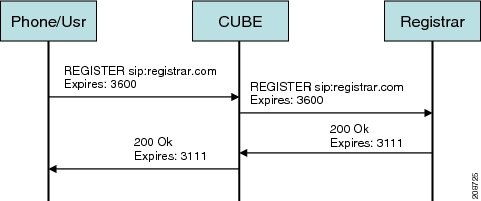
The register success scenario for the end-to end registration pass-through mode is as follows:
- The user sends the register request to Cisco UBE.
- Cisco UBE matches the request with a dial peer and forwards the request to the registrar.
- Cisco UBE receives a success response message (200 OK message) from the registrar and forwards the message to the endpoint (user).
- The registrar details and expiry value are passed to the user.
Registrar Challenging the Register Request Scenario
The figure below shows an end-to end registration pass-through scenario where the registrar challenges the register request.
| Figure 2 | End-to-End Registration Pass-through Mode--Registrar Challenging the Register Request Scenario |
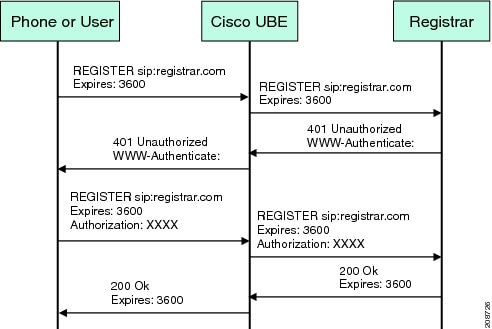
The following scenario explains how the registrar challenges the register request:
- The user sends the register request to Cisco UBE.
- Cisco UBE matches the register request with a dial peer and forwards it to the registrar.
- The registrar challenges the register request.
- Cisco UBE passes the registrar response and the challenge request, only if the registrar challenges the request to the user.
- The user sends the register request and the challenge response to the Cisco UBE.
- Cisco UBE forwards the response to the registrar.
- Cisco UBE receives success message (200 OK message) from the registrar and forwards it to the user.
Peer-to-Peer Mode
In the peer-to-peer registration pass-through mode, the outgoing register request uses the registrar details from the local Cisco UBE configuration. Cisco UBE answers the challenges received from the registrar using the configurable authentication information. Cisco UBE can also challenge the incoming register requests and authenticate the requests before forwarding them to the network.
In this mode, Cisco UBE sends a register request to the registrar and also handles register request challenges. That is, if the registration request is challenged by the registrar (registrar sends 401 or 407 message), Cisco UBE forwards the challenge to the user and then passes the challenge response sent by the user to the registrar. In the peer-to-peer mode, Cisco UBE can use the authentication command to calculate the authorization header and then challenge the user depending on the configuration.
 Note | The registrar command must be configured in peer-to-peer mode. Otherwise, the register request is rejected with the 503 response message. |
Peer-to-Peer Mode--Call Flows
This section explains the following peer-to-peer pass-through mode call flows:
Register Success Scenario
The figure below shows a peer-to-peer registration pass-through scenario where the registration request is successful.
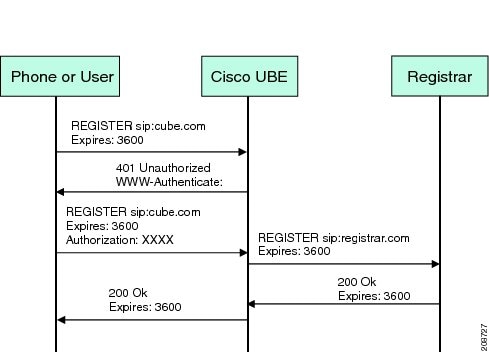
The register success scenario for a peer-to-peer registration pass-through mode is as follows:
- The user sends the register request to Cisco UBE.
- Cisco UBE matches the register request with a dial peer and forwards the register request to the registrar.
- Cisco UBE receives a success message (200 OK message) from the registrar and forwards it to the endpoint (user). The following functions are performed:
Registrar Challenging the Register Request Scenario
The figure below shows a peer-to-peer registration pass-through scenario where the registration request is challenged by the registrar.
| Figure 4 | Peer-to-Peer Registration Pass-through Mode--Registrar Challenging the Register Request Scenario |
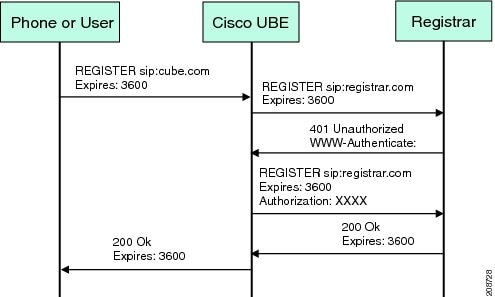
The following scenario explains how the registrar challenges the register request:
- The user sends the register request to Cisco UBE.
- Cisco UBE matches the register request with a dial peer and forwards the register request to the registrar.
- The user responds to the challenge request.
- Cisco UBE validates the challenge response and forwards the register request to the registrar.
- Cisco UBE receives a success message from the registrar and forwards it to the endpoint (user).
Note | You can configure Cisco UBE to challenge the register request and validate the challenge response. |
Registration in Different Registrar Modes
This section explains SIP registration pass-through in the following registrar modes:
Primary-Secondary Mode
In the primary-secondary mode the register message is sent to both the primary and the secondary registrar servers simultaneously.
The register message is processed as follows:
- The first successful response is passed to the phone as a SUCCESS message.
- All challenges to the request are handled by Cisco UBE.
- If the final response received from the primary and the secondary servers is an error response, the error response that arrives later from the primary or the secondary server is passed to the phone.
- If only one registrar is configured, a direct mapping is performed between the primary and the secondary server.
- If no registrar is configured, or if there is a Domain Name System (DNS) failure, the "503 service not available" message is sent to the phone.
Multiple Register Mode
In the multiple register mode, you can configure a dial peer to select and enable the indexed registrars. Register messages must be sent only to the specified index registrars.
The response from the registrar is mapped the same way as in the primary-secondary mode. See the Registration in Different Registrar Modes.
Registration Overload Protection
The registration overload protection functionality enables Cisco UBE to reject the registration requests that exceed the configured threshold value.
To support the registration overload protection functionality, Cisco UBE maintains a global counter to count all the pending outgoing registrations and prevents the overload of the registration requests as follows:
- The registration count is decremented if the registration transaction is terminated.
- The outgoing registrations are rejected if the count goes beyond a configured threshold.
- The incoming register request is rejected with the 503 response if the outgoing registration is activated by the incoming register request.
- A retry timer set for a random value is used for attempting the registration again if the registrations are originated from Cisco UBE or a gateway.
The registration overload protection functionality protects the network from the following:
- Avalanche Restart--All the devices in the network restart at the same time.
- Component Failures--Sudden burst of load is routed through the device due to a device failure.
Registration Overload Protection--Call Flow
The figure below shows the call flow when the register overload protection functionality is configured on Cisco UBE:
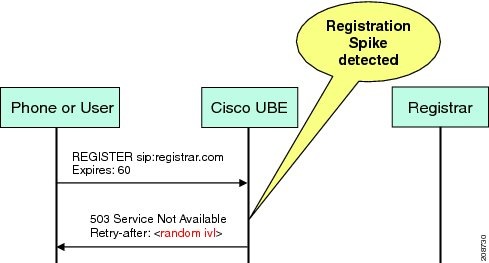
The following steps explain the register overload protection scenario:
- The user sends a register request to Cisco UBE.
- Cisco UBE matches the request with a dial peer and forwards the register request to the registrar.
- The registration is rejected with a random retry value when the registration threshold value is reached.
Note | The call flow for the DNS query on the Out Leg is the same for the end-to-end and peer-to-peer mode. |
Registration Rate-limiting
The registration rate-limiting functionality enables you to configure different SIP registration pass-through rate-limiting options. The rate-limiting options include setting the expiry time and the fail count value for a Cisco UBE. You can configure the expiry time to reduce the load on the registrar and the network. Cisco UBE limits the reregistration rate by maintaining two different timers--in-registration timer and out-registration timer.
The initial registration is triggered based on the incoming register request. The expiry value for the outgoing register is selected based on the Cisco UBE configuration. On receiving the 200 OK message (response to the BYE message) from the registrar, a timer is started using the expiry value available in the 200 OK message. The timer value in the 200 OK message is called the out-registration timer. The success response is forwarded to the user. The expiry value is taken from the register request and the timer is started accordingly. This timer is called the in-registration timer. There must be a significant difference between the in-registration timer and the out-registration timer values for effective rate-limiting.
Registration Rate-limiting Success--Call Flow
The figure below shows the call flow when the rate-limiting functionality is successful:
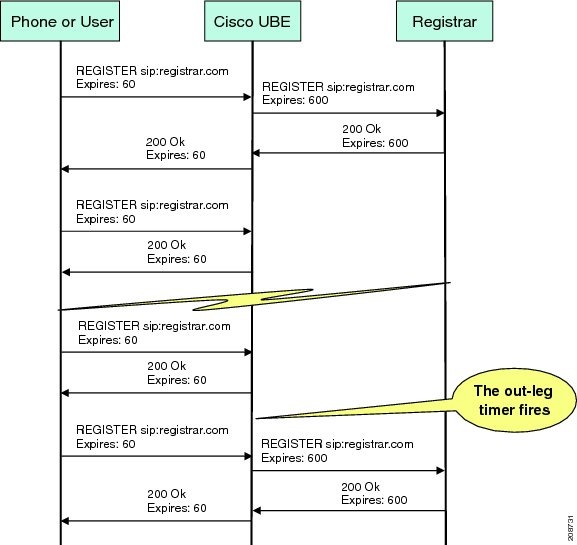
The following steps explain a scenario where the rate-limiting functionality is successful:
- The user sends the register request to Cisco UBE.
- Cisco UBE matches the registration request with a dial peer and forwards it to the registrar. The outgoing register request contains the maximum expiry value if the rate-limiting functionality is configured.
- The registrar accepts the registration.
- Cisco UBE forwards the success response with the proposed expiry timer value.
- The user sends the reregistration requests based on the negotiated value. Cisco UBE resends the register requests until the out-leg expiry timer value is sent.
- Cisco UBE forwards the subsequent register request to the registrar, if the reregister request is received after the out-leg timer is reached.
Prerequisites for SIP Registration Proxy on Cisco UBE
- You must enable the local SIP registrar. See Enabling Local SIP Registrar.
- You must configure dial peers manually for call routing and pattern matching
Configuring Support for SIP Registration Proxy on Cisco UBE
- Enabling Local SIP Registrar
- Configuring SIP Registration at the Global Level
- Configuring SIP Registration at the Dial Peer Level
- Configuring Registration Overload Protection Functionality
- Configuring Cisco UBE to Route a Call to the Registrar Endpoint
- Configuring Cisco UBE to Challenge Incoming Requests
- Verifying the SIP Registration on Cisco UBE
Enabling Local SIP Registrar
DETAILED STEPS
Configuring SIP Registration at the Global Level
Perform this task to configure the support for the SIP registration proxy on the Cisco UBE at the global level.
DETAILED STEPS
| Command or Action | Purpose | |
|---|---|---|
Step 1 |
enable
Example: Router> enable |
Enables privileged EXEC mode.
|
Step 2 |
configure
terminal
Example: Router# configure terminal |
Enters global configuration mode. |
Step 3 |
voice
service
voip
Example: Router(config)# voice service voip |
Enters voice-service configuration mode. |
Step 4 |
sip
Example: Router(conf-voi-serv)# sip |
Enters service SIP configuration mode. |
Step 5 |
registration
passthrough
[static] [rate-limit [expires value] [fail-count value]] [registrar-index [index]] Example: Router(conf-serv-sip)# registration passthrough |
Configures the SIP registration pass-through options.
|
Step 6 |
end
Example: Router(conf-serv-sip)# end |
Exits service SIP configuration mode and returns to privileged EXEC mode. |
Configuring SIP Registration at the Dial Peer Level
DETAILED STEPS
| Command or Action | Purpose | |
|---|---|---|
Step 1 |
enable
Example: Router> enable |
Enables privileged EXEC mode.
|
Step 2 |
configure
terminal
Example: Router# configure terminal |
Enters global configuration mode. |
Step 3 |
dial-peer
voice
tag
{pots | voatm | vofr | voip} Example: Router(config)# dial-peer voice 444 voip |
Enters dial peer voice configuration mode. |
Step 4 |
voice-class
sip
registration
passthrough
static
[rate-limit [expires value] [fail-count value] [registrar-index [index]] | registrar-index [index]] Example: Router(config-dial-peer)# voice-class sip registration passthrough static |
Configure SIP registration pass-through options on a dial peer on a dial peer.
|
Step 5 |
exit
Example: Router(config-dial-peer)# exit |
Exits dial peer voice configuration mode and returns to global configuration mode. |
Configuring Registration Overload Protection Functionality
DETAILED STEPS
| Command or Action | Purpose | |
|---|---|---|
Step 1 |
enable
Example: Router> enable |
Enables privileged EXEC mode.
|
Step 2 |
configure
terminal
Example: Router# configure terminal |
Enters global configuration mode. |
Step 3 |
sip-ua
Example: Router(config)# sip-ua |
Enters SIP user-agent configuration mode. |
Step 4 |
registration
spike
max-number
Example: Router(config-sip-ua)# registration spike 100 |
Configures registration overload protection functionality on Cisco UBE. |
Step 5 |
end
Example: Router(config-sip-ua)# end |
Exits SIP user-agent configuration mode and returns to privileged EXEC mode. |
Configuring Cisco UBE to Route a Call to the Registrar Endpoint
Perform this task to configure Cisco UBE to route a call to the registrar endpoint.
Note | You must perform this configuration on a dial peer that is pointing towards the endpoint. |
DETAILED STEPS
| Command or Action | Purpose | |
|---|---|---|
Step 1 |
enable
Example: Router> enable |
Enables privileged EXEC mode.
|
Step 2 |
configure
terminal
Example: Router# configure terminal |
Enters global configuration mode. |
Step 3 |
dial-peer
voice
tag
{pots | voatm | vofr | voip} Example: Router(config)# dial-peer voice 444 voip |
Enters dial peer voice configuration mode. |
Step 4 |
session
target
registrar
Example: Router(config-dial-peer)# session target registrar |
Configures Cisco UBE to route the call to the registrar endpoint. |
Step 5 |
exit
Example: Router(config-dial-peer)# exit |
Exits dial peer voice configuration mode and returns to global configuration mode. |
Configuring Cisco UBE to Challenge Incoming Requests
Perform this task to configure Cisco UBE to challenge incoming requests.
You can configure Cisco UBE to challenge an incoming request. That is, you can configure Cisco UBE to send the 401 or 407 message to the caller requesting for credentials. Based on the information received, Cisco UBE authenticates the request. The configuration also enables Cisco UBE to pass the credentials provided by the user to the registrar if the registrar has challenged the request.
DETAILED STEPS
| Command or Action | Purpose | |
|---|---|---|
Step 1 |
enable
Example: Router> enable |
Enables privileged EXEC mode.
|
Step 2 |
configure
terminal
Example: Router# configure terminal |
Enters global configuration mode. |
Step 3 |
dial-peer
voice
tag
{pots | voatm | vofr | voip} Example: Router(config)# dial-peer voice 444 voip |
Enters dial peer voice configuration mode. |
Step 4 |
authentication
username
username
password
[0 | 7] password [realm realm [challenge]] Example: Router(config-dial-peer)# authentication username user1 password 7 password1 realm MyRealm.example.com challenge |
Configures Cisco UBE to challenge the incoming registration request. |
Step 5 |
exit
Example: Router(config-dial-peer)# exit |
Exits dial peer voice configuration mode and returns to global configuration mode. |
Verifying the SIP Registration on Cisco UBE
Perform this task to verify the configuration for SIP registration on Cisco UBE. The show commands need not be entered in any specific order.
DETAILED STEPS
| Step 1 |
enable
Enables privileged EXEC mode. Example:
Router> enable
|
| Step 2 |
show
sip-ua
registration
passthrough
status
Displays the SIP user agent (UA) registration pass-through status information. Example:
Router# show sip-ua registration passthrough status

CallId       Line         peer         mode In-Exp       reg-I Out-Exp
============ ============ ============ ==== ============ ===== ============
771          5500550055   1             p2p  64           1     64
=============================================================================
|
| Step 3 |
show
sip-ua
registration
passthrough
status
detail
Displays the SIP UA registration pass-through status information in detail. Example:
Router# show sip-ua registration passthrough status detail
============================================================
Configured Reg Spike Value: 0
Number of Pending Registrations: 0
============================================================
Call-Id: 763
Registering Number: 5500550055
Dial-peer tag: 601
Pass-through Mode: p2p
Negotiated In-Expires: 64 Seconds
Next In-Register Due in: 59 Seconds
In-Register Contact: 9.45.36.5
----------------------------------------
 Registrar Index: 1
 Registrar URL: ipv4:9.45.36.4
 Negotiated Out-Expires: 64 Seconds
 Next Out-Register After: 0 Seconds
============================================================
The following section will be added to the "Examples" section of the SIP to SIP chapter. |
Example Configuring Support for SIP Registration Proxy on Cisco UBE
The following example shows how to configure support for the SIP registration proxy on the Cisco UBE.
!
!
voice service voip
sip
  registrar server expires max 121 min 61
  registration passthrough static challenge rate-limit expires 9000 fail-count 5 registrar-index 1 3 5
!
dial-peer voice 1111 voip
 destination-pattern 1234
 voice-class sip pass-thru content unsupp
 session protocol sipv2
 session target registrar
!
dial-peer voice 1111 voip
 destination-pattern 1234
 voice-class sip pass-thru content unsupp
 voice-class sip registration passthrough static rate-limit expires 9000 fail-count 5 registrar-index 1 3 5
 authentication username 1234 password 7 075E731F1A realm cisco.com challenge
 session protocol sipv2
 session target registrar
!
sip-ua
 registration spike 1000
!
!
Feature Information for Support for SIP Registration Proxy on Cisco UBE
The table below lists the release history for the ISR.
| Table 1 | Feature Information for Support for SIP Registration Proxy on Cisco UBE |
|
Feature Name |
Releases |
Feature Information |
|---|---|---|
|
Support for SIP Registration Proxy on Cisco UBE |
15.1(3)T |
The Support for SIP Registration Proxy on Cisco UBE feature provides support for sending outbound registrations from Cisco UBE based on incoming registrations. This feature enables direct registration of SIP endpoints with the SIP registrar in hosted UC deployments. This feature also provides various benefits for handling Cisco UBE deployments with no IPPBX support. The following commands were introduced or modified: authentication (dial peer), registrar server, registration passthrough, registration spike, show sip-ua registration passthrough status, voice-class sip registration passthrough static rate-limit. |
The table below lists the release history for the ASR.
| Table 2 | Feature Information for Support for SIP Registration Proxy on Cisco UBE |
|
Feature Name |
Releases |
Feature Information |
|---|---|---|
|
Support for SIP Registration Proxy on Cisco UBE |
<TBD> |
The Support for SIP Registration Proxy on Cisco UBE feature provides support for sending outbound registrations from Cisco UBE based on incoming registrations. This feature enables direct registration of SIP endpoints with the SIP registrar in hosted UC deployments. This feature also provides various benefits for handling Cisco UBE deployments with no IPPBX support. The following commands were introduced or modified: authentication (dial peer), registrar server, registration passthrough, registration spike, show sip-ua registration passthrough status, voice-class sip registration passthrough static rate-limit. |
Cisco and the Cisco logo are trademarks or registered trademarks of Cisco and/or its affiliates in the U.S. and other countries. To view a list of Cisco trademarks, go to this URL: www.cisco.com/go/trademarks. Third-party trademarks mentioned are the property of their respective owners. The use of the word partner does not imply a partnership relationship between Cisco and any other company. (1110R)
Any Internet Protocol (IP) addresses and phone numbers used in this document are not intended to be actual addresses and phone numbers. Any examples, command display output, network topology diagrams, and other figures included in the document are shown for illustrative purposes only. Any use of actual IP addresses or phone numbers in illustrative content is unintentional and coincidental.