



 Feedback
Contents
- Cisco TrustSec Support for IOS
- Finding Feature Information
- Prerequisites for Cisco TrustSec Support for IOS
- Restrictions for Cisco TrustSec Support for IOS
- Information About Cisco TrustSec Support for IOS
- Cisco TrustSec Device Enrollment
- Secure RADIUS
- EAP-FAST
- PAC
- PAC Provisioning
- How to Provide Cisco TrustSec Support for IOS
- Installing the Cisco TrustSec Security License
- Configuring Cisco TrustSec Credentials
- Configuring Secure RADIUS Automatic PAC Provisioning
- Configuration Examples for Cisco TrustSec Support for IOS
- Configuring the CTS Device ID and Password: Example
- Configuring AAA for a CTS Seed Device and Automatic PAC Provisioning: Example
- Additional References
- Feature Information for Cisco TrustSec Support for IOS
Cisco TrustSec Support for IOS
Cisco TrustSec (CTS) is a system that provides security for CTS-enabled network devices at each routing hop. In this system, each network device works to authenticate and authorize its neighbor devices and next applies some level of security (group tagging, role-based access control lists (ACLs), encryption, and so on) to traffic between the devices.
The Cisco TrustSec Support for IOS feature involves using Secure RADIUS to prescribe a process of authentication, authorization, session association, encryption, and traffic filtering. Secure RADIUS uses automatic Protected Access Credential (PAC) provisioning as a low overhead method to send PAC metadata and control information to clients. PAC provisioning is used with Extensible Authentication Protocol-Flexible Authentication through Secure Tunneling (EAP-FAST) to establish a Transport Layer Security (TLS) tunnel in which client credentials are verified.
- Finding Feature Information
- Prerequisites for Cisco TrustSec Support for IOS
- Restrictions for Cisco TrustSec Support for IOS
- Information About Cisco TrustSec Support for IOS
- How to Provide Cisco TrustSec Support for IOS
- Configuration Examples for Cisco TrustSec Support for IOS
- Additional References
- Feature Information for Cisco TrustSec Support for IOS
Finding Feature Information
Your software release may not support all the features documented in this module. For the latest feature information and caveats, see the release notes for your platform and software release. To find information about the features documented in this module, and to see a list of the releases in which each feature is supported, see the Feature Information Table at the end of this document.
Use Cisco Feature Navigator to find information about platform support and Cisco software image support. To access Cisco Feature Navigator, go to www.cisco.com/go/cfn. An account on Cisco.com is not required.
Prerequisites for Cisco TrustSec Support for IOS
To use the Cisco TrustSec functionality on your existing router, ensure that you have purchased a Cisco TrustSec security license. If the router is being ordered and needs the Cisco TrustSec functionality, ensure that this license is preinstalled on your router before it is shipped to you.
The Cisco Identity Services Engine 1.0 is required for authentication. The Secure Access Control Server (ACS) Express Appliance server can also be used for authentication; however, not all ACS features are supported by CTS.
Restrictions for Cisco TrustSec Support for IOS
- The Cisco TrustSec Support for IOS feature is supported on the Cisco Integrated Services Router Generation 2 (ISR G2) only.
- EAP-FAST only supports Phase 0 where the PAC is initially distributed to the client. EAP-FAST Phase 1 (the PAC is used to establish a secure tunnel) and Phase 2 (client is authenticated through the secure tunnel) are not supported.
Information About Cisco TrustSec Support for IOS
Cisco TrustSec Device Enrollment
Any device that participates in the CTS network requires it to be authenticated and trusted. New devices that connect to the CTS network use an enrollment process to obtain CTS authentication credentials and receive general information about the CTS environment to facilitate the authentication process. Device enrollment can happen either directly with an Authentication Server (AS) provided the device has L3 connectivity to AS or through a peer Authenticator (AT) device, such as a switch or router that facilitates enrollment with an AS.
Access switches or routers are the authentication points in typical branch access scenarios and have direct connectivity to the AS. They authenticate endpoints through EAP-FAST Phase 0 for dynamic PAC provisioning or RADIUS and EAP exchange. When endpoints are successfully authenticated, they receive user-specific AAA attributes that include the SGT, which in turn is relayed to a router using SXP. The router initiates EAP-FAST Phase 0 exchange with the available AS and obtains a PAC. This is accomplished by a local PAC-provisioning driver, which acts as a pass-through authenticator to the supplicant EAP-FAST engine running on the router.
Secure RADIUS
The RADIUS protocol requires a secret to be shared between a client and a server. Shared secrets are used to verify that RADIUS messages are sent by a RADIUS enabled device that is configured with the same shared secret. Shared secrets also verify that the RADIUS message has not been modified in transit (message integrity). The message integrity is checked by including the Message Authenticator attribute in the RADIUS messages. This attribute is a Hash-based Message Authentication Code-Message Digest 5 (HMAC-MD5) of the entire radius message using the shared secret as the key. The shared secret is also used to encrypt some RADIUS attributes, such as User-Password and Tunnel-Password.
EAP-FAST
EAP-FAST is a publicly accessible IEEE 802.1X extensible authentication protocol type that is used to support customers who cannot enforce a strong password policy. EAP-FAST is used for the following reasons:
- Digital certificates are not required.
- A variety of database types for usernames and passwords are supported.
- Password expiration and change are supported.
- EAP-FAST is flexible, easy to deploy and manage.
 Note | Lightweight Directory Access Protocol (LDAP) users cannot be automatically PAC provisioned and must be manually provisioned. |
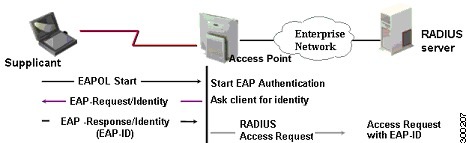
EAP-FAST comprises three basic phases, but only Phase 0 is supported. Phase 0 initially distributes the PAC to the client device.
Note | Unsupported EAP-FAST Phase 1 uses the PAC to establish a secure tunnel and Phase 2 authenticates the client through a secure tunnel. |
Phase 0 or auto-provisioning (also called in-band provisioning) component of EAP-FAST permits the secure distribution of the user PAC to each device. With some other authentication protocols, it is necessary to establish a network connection or manually install a file in order to distribute credentials to the device. Phase 0 in EAP-FAST permits a PAC to be distributed to the device during an encrypted session after the device's credentials are authenticated. This device authentication uses a challenge-handshake protocol to authenticate the device and to validate the server response. This authentication mechanism guards against potential interception and reforwarding of provisioning requests for the purpose of intercepting a user PAC.
The end result of Phase 0 is PAC distribution. After successful PAC distribution, the server issues an authentication failure to the access point and the device is disassociated from the network. Then the device reinitiates an EAP-FAST authentication with the network using the newly provisioned PAC and the device's credentials.
The figure below shows an overview of EAP-FAST authentication.
PAC
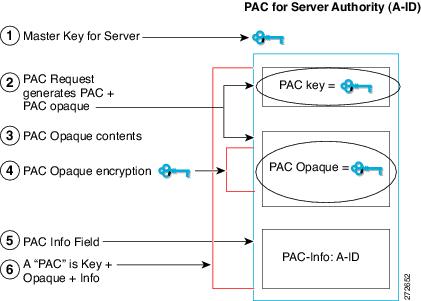
The PAC is a unique shared credential used to mutually authenticate client and server. It is associated with a specific client username and a server authority identifier (A-ID). A PAC removes the need for Public Key Infrastructure (PKI) and digital certificates.
Creating a PAC consists of the following steps:
- Server A-ID maintains a local key (master key) that is only known by the server.
- When a client, which is referred to in this context as an initiator identity (I-ID), requests a PAC from the server, the server generates a randomly unique PAC key and PAC-Opaque field for this client.
- The PAC-Opaque field contains the randomly generated PAC key along with other information such as an I-ID and key lifetime.
- PAC Key, I-ID, and Lifetime in the PAC-Opaque field are encrypted with the master key.
- A PAC-Info field that contains the A-ID is created.
- The PAC is distributed or imported to the client automatically.
Note | The server does not maintain the PAC or the PAC key, enabling the EAP-FAST server to be stateless. |
The figure below describes the PAC's construction. A PAC consists of the PAC-Opaque, PAC Key, and PAC-Info fields. The PAC-Info field contains the A-ID.
PAC Provisioning
In Secure RADIUS, the PAC key is provisioned into each device during authentication to derive the shared secret. Since the RADIUS ACS does not store the PAC key for each device, the clients must also send an additional RADIUS attribute containing the PAC-Opaque field, which is a variable length field that can only be interpreted by the server to recover the required information and validate the peer's identity and authentication. For example, the PAC-Opaque field may include the PAC key and the PAC's peer identity.
The PAC-Opaque field format and contents are specific to the PAC server on which it is issued. The RADIUS server obtains the PAC Key from the PAC-Opaque field and derives the shared secret the same way clients do. Secure RADIUS only modifies the way shared secret is derived and not its usage.
EAP-FAST Phase 0 is used to automatically provision a client with a PAC.
How to Provide Cisco TrustSec Support for IOS
- Installing the Cisco TrustSec Security License
- Configuring Cisco TrustSec Credentials
- Configuring Secure RADIUS Automatic PAC Provisioning
Installing the Cisco TrustSec Security License
To use the Cisco TrustSec functionality on your existing router, ensure that you have purchased a Cisco TrustSec security license. If the router is being ordered and needs the Cisco TrustSec functionality, ensure that this license is preinstalled on your router before it is shipped to you.
Perform this task to manually install the Cisco TrustSec security license:
DETAILED STEPS
See the "Configuring Cisco TrustSec Credentials" section to configure the basic parameters needed to make Cisco TrustSec operational on your router.
Configuring Cisco TrustSec Credentials
DETAILED STEPS
Configuring Secure RADIUS Automatic PAC Provisioning
In seed devices, the PAC-Opaque field has to be provisioned so that all RADIUS exchanges can use the PAC-Opaque field to make the server it communicates with capable of automatic PAC provisioning. All non-seed devices obtain the PAC-Opaque field during the authentication phase of a link initialization.
DETAILED STEPS
Note | Automatic PAC Provisioning can also be triggered by Secure RADIUS when the server has no PAC or when an Access-Reject message is received from the Autonomous System (AS) says "PAC Expired". |
Configuration Examples for Cisco TrustSec Support for IOS
- Configuring the CTS Device ID and Password: Example
- Configuring AAA for a CTS Seed Device and Automatic PAC Provisioning: Example
Configuring the CTS Device ID and Password: Example
The following example configures himalaya and cisco as the CTS device ID and password:
Router# cts credentials id himalaya password cisco

CTS device ID and password have been inserted in the local keystore. Please make sure that the same ID and password are configured in the server database.
The following example changes the CTS device ID and password to atlas and cisco123:
Router# cts credentials id atlas password cisco123
A different device ID is being configured.
This may disrupt connectivity on your CTS links.
Are you sure you want to change the Device ID? [confirm] y
TS device ID and password have been inserted in the local keystore. Please make sure that the same ID and password are configured in the server database.
The following example displays the CTS device ID and password state:
Router# show cts credentials
CTS password is defined in keystore, device-id = atlas
Configuring AAA for a CTS Seed Device and Automatic PAC Provisioning: Example
The following example configures the AAA configuration for a CTS seed device and automatic PAC provisioning on the router:
Router# configure terminal
Router(config)# aaa new-model
Router(config)# aaa authentication dot1x default group radius
Router(config)# aaa authorization network cts-mlist group radius
Router(config)# cts authorization list cts-mlist
Router(config)# aaa accounting dot1x default start-stop group radius
Router(config)# radius-server host 10.20.3.1 auth-port 1812 acct-port 1813 pac key AbCe1234
Router(config)# radius-server vsa send authentication
Router(config)# dot1x system-auth-control
Router(config)# exit
Additional References
Related Documents
|
Related Topic |
Document Title |
|---|---|
|
Cisco IOS commands |
|
|
Security commands |
Cisco IOS Security Command Reference: Commands A to C Cisco IOS Security Command Reference: Commands D to L |
|
EAP Flexible Authentication via Secured Tunnel (EAP-FAST) authentication protocol deployment in wireless networks |
|
|
Cisco TrustSec switches |
MIBs
Technical Assistance
|
Description |
Link |
|---|---|
|
The Cisco Support and Documentation website provides online resources to download documentation, software, and tools. Use these resources to install and configure the software and to troubleshoot and resolve technical issues with Cisco products and technologies. Access to most tools on the Cisco Support and Documentation website requires a Cisco.com user ID and password. |
Feature Information for Cisco TrustSec Support for IOS
The following table provides release information about the feature or features described in this module. This table lists only the software release that introduced support for a given feature in a given software release train. Unless noted otherwise, subsequent releases of that software release train also support that feature.
Use Cisco Feature Navigator to find information about platform support and Cisco software image support. To access Cisco Feature Navigator, go to www.cisco.com/go/cfn. An account on Cisco.com is not required.
| Table 1 | Feature Information for Cisco TrustSec Support for IOS |
|
Feature Name |
Releases |
Feature Information |
|---|---|---|
|
Support for Cisco TrustSec Solution on ISR Platforms. |
12.2(33)SXI 15.2(2)T |
This feature involves using secure RADIUS to prescribe a process of authentication, authorization, session association, encryption, and traffic filtering. Secure RADIUS uses automatic PAC provisioning as a low overhead method to send PAC metadata and control information to clients. PAC provisioning is used with EAP-FAST to establish a TLS tunnel in which client credentials are verified. In Cisco IOS Release 12.2(33)SXI, this feature was introduced on Cisco IOS software. This feature was integrated into Cisco IOS Release 15.2(2)T software. The following commands were introduced or modified: address ipv4 (config-radius-server), cts authorization list network, pac keyradius-server host, show cts credentials, show cts server-list. |
Cisco and the Cisco logo are trademarks or registered trademarks of Cisco and/or its affiliates in the U.S. and other countries. To view a list of Cisco trademarks, go to this URL: www.cisco.com/go/trademarks. Third-party trademarks mentioned are the property of their respective owners. The use of the word partner does not imply a partnership relationship between Cisco and any other company. (1110R)
Any Internet Protocol (IP) addresses and phone numbers used in this document are not intended to be actual addresses and phone numbers. Any examples, command display output, network topology diagrams, and other figures included in the document are shown for illustrative purposes only. Any use of actual IP addresses or phone numbers in illustrative content is unintentional and coincidental.