



 Feedback
Contents
- Consent Feature for Cisco IOS Routers
- Finding Feature Information
- Prerequisites for Consent Feature for Cisco IOS Routers
- Information About Consent Feature for Cisco IOS Routers
- Authentication Proxy Overview
- An Integrated Consent-Authentication Proxy Webpage
- How to Configure Authentication Proxy Consent
- Configuring an IP Admission Rule for Authentication Proxy Consent
- Troubleshooting Tips
- Defining a Parameter Map for Authentication Proxy Consent
- Configuration Examples for Authentication Proxy Consent
- Ingress Interface ACL and Intercept ACL Configuration Example
- Consent Page Policy Configuration Example
- Parameter Map Configuration Example
- IP Admission Consent Rule Configuration Example
- Additional References
- Feature Information for Consent Feature for Cisco IOS Routers
Consent Feature for Cisco IOS Routers
The Consent Feature for Cisco IOS Routers enables organizations to provide temporary Internet and corporate access to end users through their wired and wireless networks by presenting a consent webpage. This webpage lists the terms and conditions in which the organization is willing to grant requested access to an end user. Users can connect to the network only after they accept the terms of use on the consent webpage.
- Finding Feature Information
- Prerequisites for Consent Feature for Cisco IOS Routers
- Information About Consent Feature for Cisco IOS Routers
- How to Configure Authentication Proxy Consent
- Configuration Examples for Authentication Proxy Consent
- Additional References
- Feature Information for Consent Feature for Cisco IOS Routers
Finding Feature Information
Your software release may not support all the features documented in this module. For the latest feature information and caveats, see the release notes for your platform and software release. To find information about the features documented in this module, and to see a list of the releases in which each feature is supported, see the Feature Information Table at the end of this document.
Use Cisco Feature Navigator to find information about platform support and Cisco software image support. To access Cisco Feature Navigator, go to www.cisco.com/go/cfn. An account on Cisco.com is not required.
Prerequisites for Consent Feature for Cisco IOS Routers
To enable a consent webpage, you must be running an Advanced Enterprise image.
Information About Consent Feature for Cisco IOS Routers
Authentication Proxy Overview
Authentication proxy is an ingress authentication feature that grants access to an end user (out an interface) only if the user submits valid username and password credentials for an ingress traffic that is destined for HTTP, Telnet, or FTP protocols. After the submitted authentication credentials have been checked against the credentials that are configured on an Authentication, Authorization, Accounting (AAA) server, access is granted to the requester (source IP address).
When an end user posts an HTTP(S), FTP, or Telnet request on a router's authentication-proxy-enabled ingress interface, the Network Authenticating Device (NAD) verifies whether or not the same host has already been authenticated. If a session is already present, the ingress request is not authenticated again, and it is subjected to the dynamic (Auth-Proxy) ACEs and the ingress interface ACEs. If an entry is not present, the authentication proxy responds to the ingress connection request by prompting the user for a valid username and password. When authenticated, the Network Access Profiles (NAPs) that are to be applied are either downloaded from the AAA server or taken from the locally configured profiles.
An Integrated Consent-Authentication Proxy Webpage
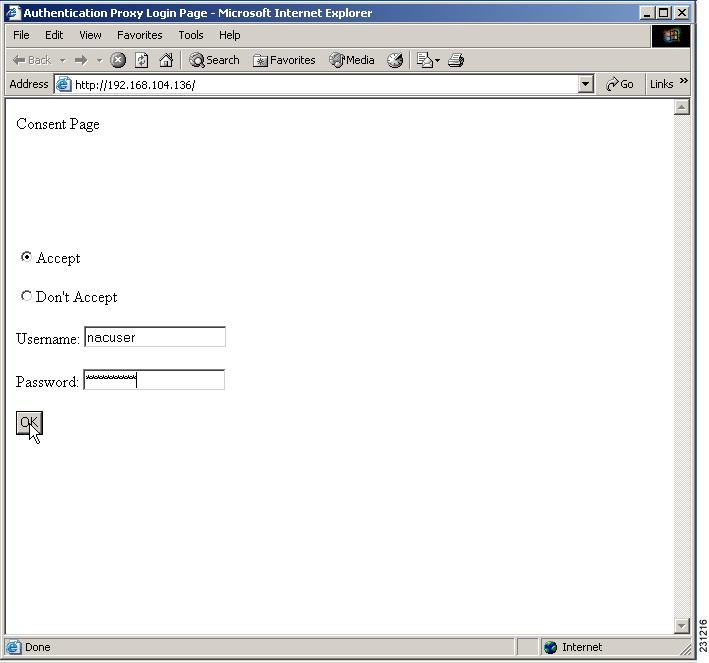
The HTTP authentication proxy webpage has been extended to support radio buttons--"Accept" and "Don't Accept"--for the consent webpage feature. The consent webpage radio buttons are followed by the authentication proxy input fields for a username and a password. (See the figure below.)
The following consent scenarios are possible:
- If consent is declined (that is, the "Don't Accept" radio button is selected), the authentication proxy radio buttons are disabled. The ingress client session's access will be governed by the default ingress interface ACL.
- If consent is accepted (that is, the "Accept" radio button is selected), the authentication proxy radio buttons are enabled. If the wrong username and password credentials are entered, HTTP-Auth-Proxy authentication will fail. The ingress client session's access will again be governed only by the default ingress interface ACL.
- If consent is accepted (that is, the "Accept" radio button is selected) and valid username and password credentials are entered, HTTP-Auth-Proxy authentication is successful. Thus, one of the following possibilities can occur:
- If the ingress client session's access request is HTTP_GET, the destination webpage will open and the ingress client session's access will be governed by the default ingress interface ACL and the dynamic (Auth-Proxy) ACEs.
- If the ingress client session's access request is HTTPS_GET, a "Security Dialogue Box" will be displayed on the client's browser. If the user selects YES on the Security Dialogue Box window, the destination webpage will open and the ingress client session's access will be governed by the default ingress interface ACL and the dynamic (Auth-Proxy) ACEs. If the user selects NO on the Security Dialogue Box window, the destination page will not open and the user will see the message "Page cannot be displayed." However the ingress client session's access will still be governed by the default ingress interface ACL and the dynamic (Auth-Proxy) ACEs.

How to Configure Authentication Proxy Consent
- Configuring an IP Admission Rule for Authentication Proxy Consent
- Defining a Parameter Map for Authentication Proxy Consent
Configuring an IP Admission Rule for Authentication Proxy Consent
Use this task to define the IP admission rule for authentication proxy consent and to associate the rule with an interface.
DETAILED STEPS
Troubleshooting Tips
To display authentication proxy consent page information on the router, you can use the debug ip admission consent command.
Router# debug ip admission consent errors

IP Admission Consent Errors debugging is on
Router# debug ip admission consent events

IP Admission Consent Events debugging is on
Router# debug ip admission consent messages

IP Admission Consent Messages debugging is on
Router#
Router# show debugging

IP Admission Consent:
IP Admission Consent Errors debugging is on
IP Admission Consent Events debugging is on
IP Admission Consent Messages debugging is on
Defining a Parameter Map for Authentication Proxy Consent
DETAILED STEPS
Configuration Examples for Authentication Proxy Consent
- Ingress Interface ACL and Intercept ACL Configuration Example
- Consent Page Policy Configuration Example
- Parameter Map Configuration Example
- IP Admission Consent Rule Configuration Example
Ingress Interface ACL and Intercept ACL Configuration Example
The following example shows how to define the ingress interface ACL (via the ip access-list extended 102 command) to which the consent page policy ACEs will be dynamically appended. This example also shows how to define an intercept ACL (via the ip access-list extended 103 command) to intercept the ingress interesting traffic by the IP admission consent rule.
ip access-list extended 102
 permit ip any 192.168.100.0 0.0.0.255
 permit ip any host 192.168.104.136
 permit udp any any eq bootps
 permit udp any any eq domain
 permit tcp any any eq www
 permit tcp any any eq 443
 permit udp any any eq 443
 exit
!
ip access-list extended 103
 permit ip any host 192.168.104.136
 permit udp any host 192.168.104.132 eq domain
 permit tcp any host 192.168.104.136 eq www
 permit udp any host 192.168.104.136 eq 443
 permit tcp any host 192.168.104.136 eq 443
 exit
!
Consent Page Policy Configuration Example
The following example shows how to configure the consent page policy ACL and the consent page identity policy:
ip access-list extended consent-pg-ip-acc-group
 permit ip any host 192.168.104.128
 permit ip any host 192.168.104.136
 exit
!
identity policy consent_identity_policy
 description ### Consent Page Identity Policy ###
 access-group consent-pg-ip-acc-group
 exit
Parameter Map Configuration Example
The following example shows how to define the consent-specific parameter map "consent_parameter_map" and a default consent parameter map:
parameter-map type consent consent_parameter_map
 copy tftp://192.168.104.136/consent_page.html flash:consent_page.html
 authorize accept identity consent_identity_policy
 timeout file download 35791
 file flash:consent_page.html
 logging enabled
 exit
!
parameter-map type consent default
 copy tftp://192.168.104.136/consent_page.html flash:consent_page.html
 authorize accept identity test_identity_policy
 timeout file download 35791
 file flash:consent_page.html
 logging enabled
 exit
!
IP Admission Consent Rule Configuration Example
The following example shows how to configure an IP admission consent rule, which includes the consent page parameter map as defined the in the Parameter Map Configuration Example section:
ip admission name consent-rule consent inactivity-time 204 absolute-timer 304 param-map
consent_parameter_map list 103
ip admission consent-banner file flash:consent_page.html
ip admission consent-banner text ^C Consen-Page-Banner-Text ^C
ip admission max-login-attempts 5
ip admission init-state-timer 15
ip admission auth-proxy-audit
ip admission inactivity-timer 205
ip admission absolute-timer 305
ip admission ratelimit 100
ip http server
ip http secure-server
!
interface FastEthernet 0/0
 description ### CLIENT-N/W ###
 ip address 192.168.100.170 255.255.255.0
 ip access-group 102 in
 ip admission consent-rule
 no shut
 exit
!
interface FastEthernet 0/1
 description ### AAA-DHCP-AUDIT-SERVER-N/W ###
 ip address 192.168.104.170 255.255.255.0
 no shut
 exit
!
line con 0
 exec-timeout 0 0
 login authentication noAAA
 exit
!
line vty 0 15
 exec-timeout 0 0
 login authentication noAAA
 exit
!
Additional References
The following sections provide references related to the Consent Feature for Cisco IOS Routers feature.
MIBs
Technical Assistance
|
Description |
Link |
|---|---|
|
The Cisco Support website provides extensive online resources, including documentation and tools for troubleshooting and resolving technical issues with Cisco products and technologies. To receive security and technical information about your products, you can subscribe to various services, such as the Product Alert Tool (accessed from Field Notices), the Cisco Technical Services Newsletter, and Really Simple Syndication (RSS) Feeds. Access to most tools on the Cisco Support website requires a Cisco.com user ID and password. |
Feature Information for Consent Feature for Cisco IOS Routers
The following table provides release information about the feature or features described in this module. This table lists only the software release that introduced support for a given feature in a given software release train. Unless noted otherwise, subsequent releases of that software release train also support that feature.
Use Cisco Feature Navigator to find information about platform support and Cisco software image support. To access Cisco Feature Navigator, go to www.cisco.com/go/cfn. An account on Cisco.com is not required.
| Table 1 | Feature Information for Consent Feature for Cisco IOS Routers |
|
Feature Name |
Releases |
Feature Information |
|---|---|---|
|
Consent Feature for Cisco IOS Routers |
12.4(15)T |
The Consent Feature for Cisco IOS Routers enables organizations to provide temporary Internet and corporate access to end users through their wired and wireless networks by presenting a consent webpage. This webpage lists the terms and conditions in which the organization is willing to grant requested access to an end user. Users can connect to the network only after they accept the terms of use on the consent webpage. In Cisco IOS Release 12.4(15)T, this feature was introduced. The following commands were introduced or modified: authorize accept identity, copy (consent-parameter-map), debug ip admission consent, file (consent-parameter-map), ip admission consent banner, ip admission name, logging enabled, parameter-map type, show ip admission, timeout file download |
Cisco and the Cisco logo are trademarks or registered trademarks of Cisco and/or its affiliates in the U.S. and other countries. To view a list of Cisco trademarks, go to this URL: www.cisco.com/go/trademarks. Third-party trademarks mentioned are the property of their respective owners. The use of the word partner does not imply a partnership relationship between Cisco and any other company. (1110R)
Any Internet Protocol (IP) addresses and phone numbers used in this document are not intended to be actual addresses and phone numbers. Any examples, command display output, network topology diagrams, and other figures included in the document are shown for illustrative purposes only. Any use of actual IP addresses or phone numbers in illustrative content is unintentional and coincidental.