



 Feedback
Contents
- Configuring Firewall Stateful Inter-Chassis Redundancy
- Finding Feature Information
- Prerequisites for Firewall Stateful Inter-Chassis Redundancy
- Restrictions for Firewall Stateful Inter-Chassis Redundancy
- Information About Firewall Stateful Inter-Chassis Redundancy
- How Firewall Stateful Inter-Chassis Redundancy Works
- Exclusive Virtual IP and Exclusive Virtual MAC
- Supported Topologies
- LAN-LAN
- How to Configure Firewall Stateful Inter-Chassis Redundancy
- Configuring the Redundancy Application Group
- Configuring the Redundancy Group Protocol
- Configuring Virtual IP Address and Redundant Interface Identifier
- Configuring Control and Data Interface
- Managing and Monitoring Firewall Stateful Inter-Chassis Redundancy
- Configuration Examples for Firewall Stateful Inter-Chassis Redundancy
- Example Configuring the Redundancy Application Group
- Example Configuring the Redundancy Group Protocol
- Example Configuring Virtual IP Address and Redundant Interface Identifier
- Example Configuring Control and Data Interface
- Example Configuring LAN-LAN
- Additional References
- Feature Information for Firewall Stateful Inter-Chassis Redundancy
Configuring Firewall Stateful Inter-Chassis Redundancy
The Firewall Stateful Inter-Chassis Redundancy feature enables you to configure pairs of routers to act as backup for each other. This feature can be configured to determine the active router based on a number of failover conditions. When a failover occurs, the standby router seamlessly takes over and starts performing traffic forwarding services and maintaining a dynamic routing table.
- Finding Feature Information
- Prerequisites for Firewall Stateful Inter-Chassis Redundancy
- Restrictions for Firewall Stateful Inter-Chassis Redundancy
- Information About Firewall Stateful Inter-Chassis Redundancy
- How to Configure Firewall Stateful Inter-Chassis Redundancy
- Configuration Examples for Firewall Stateful Inter-Chassis Redundancy
- Additional References
- Feature Information for Firewall Stateful Inter-Chassis Redundancy
Finding Feature Information
Your software release may not support all the features documented in this module. For the latest feature information and caveats, see the release notes for your platform and software release. To find information about the features documented in this module, and to see a list of the releases in which each feature is supported, see the Feature Information Table at the end of this document.
Use Cisco Feature Navigator to find information about platform support and Cisco software image support. To access Cisco Feature Navigator, go to www.cisco.com/go/cfn. An account on Cisco.com is not required.
Prerequisites for Firewall Stateful Inter-Chassis Redundancy
- The interfaces attached to the firewall must have the same redundant interface identifier (RII).
- The active device and the standby device must have the same Cisco IOS XE Zone-Based Firewall configuration.
- The active device and the standby device must run on an identical version of the Cisco IOS XE software. The active device and the standby device must be connected through a switch.
- Embedded Service Processor (ESP) must match on both active and standby devices.
Restrictions for Firewall Stateful Inter-Chassis Redundancy
- Multiprotocol Label Switching (MPLS) and Virtual Routing and Forwarding (VRF) are not supported.
- LAN and WAN scenarios are not supported.
- LAN and MESH scenarios are not supported.
- Cisco ASR 1006 and Cisco ASR 1013 platforms are not supported. Any device with ESP or dual Route Processor (RP) is not supported, because coexistence of inter-box High-Availability (HA) and intra-box HA is not supported.
- If the dual IOS daemon (IOSd) is configured, the device will not support the Firewall Stateful Inter-Chassis Redundancy configuration.
Information About Firewall Stateful Inter-Chassis Redundancy
- How Firewall Stateful Inter-Chassis Redundancy Works
- Exclusive Virtual IP and Exclusive Virtual MAC
- Supported Topologies
How Firewall Stateful Inter-Chassis Redundancy Works
You can configure pairs of routers to act as hot standbys for each other. This redundancy is configured on an interface basis. Pairs of redundant interfaces are known as redundancy groups. The figure below depicts the active-standby device scenario. It shows how the redundancy group is configured for a pair of routers that has one outgoing interface. The Redundancy Group Configuration--Two Outgoing Interfaces figure depicts the active-active device scenario shows how two redundancy groups are configured for a pair of routers that have two outgoing interfaces.
Note that in both cases, the redundant routers are joined by a configurable control link and a data synchronization link. The control link is used to communicate the status of the routers. The data synchronization link is used to transfer stateful information from Network Address Translation (NAT) and the firewall and to synchronize the stateful database for these applications.
Also, in both cases, the pairs of redundant interfaces are configured with the same unique ID number known as the RII.
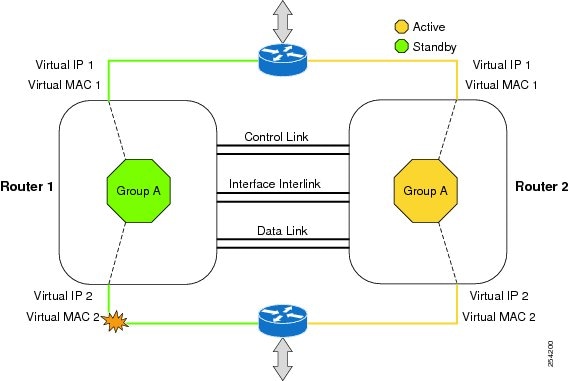
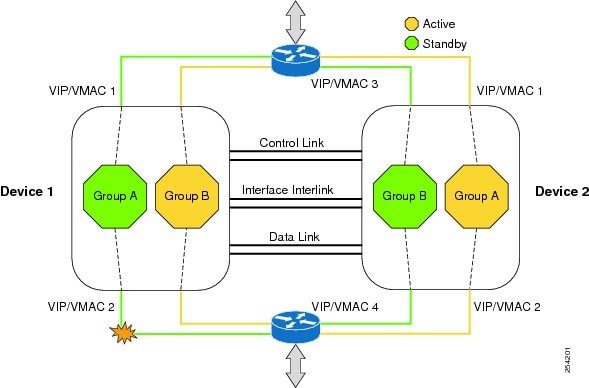
The status of redundancy group members is determined through the use of hello messages sent over the control link. If either of the routers does not respond to a hello message within a configurable amount of time, it is considered that a failure has occurred, and a switchover is initiated. To detect a failure in milliseconds, the control links run the failover protocol integrated with the Bidirectional Forwarding Detection (BFD) protocol. You can configure the following parameters for the hello messages:
- Active timer
- Standby timer
- Hellotime--The interval at which hello messages are sent
- Holdtime--The amount of time before the active or the standby router is declared to be down
The hellotime defaults to 3 seconds to align with Hot Standby Router Protocol (HSRP), and the holdtime defaults to 10 seconds. You can also configure these timers in milliseconds by using the timers hellotime msec command.
To determine which pairs of interfaces are affected by the switchover, you must configure a unique ID number for each pair of redundant interfaces. This ID number is known as the RII associated with the interface.
A switchover to the standby router can also occur under other circumstances. Another factor that can cause a switchover is a priority setting that is configurable for each router. The router with the highest priority value will be the active router. If a fault occurs on either the active or the standby router, the priority of the router is decremented by a configurable amount known as the weight. If the priority of the active router falls below the priority of the standby router, a switchover occurs and the standby router becomes the active router. This default behavior can be overridden by disabling the preemption attribute for the redundancy group. You can also configure each interface to decrease the priority when the L1 state of the interface goes down. This amount overrides the default amount configured for the redundancy group.
Each failure event that causes a modification of a redundancy groupâs priority generates a syslog entry that contains a time stamp, the redundancy group that was affected, previous priority, new priority, and a description of the failure event cause.
Another situation that will cause a switchover to occur is when the priority of a router or interface falls below a configurable threshold level.
In general, a switchover to the standby router occurs under the following circumstances:
- Power loss or reload occurs on the active router (this includes crashes).
- The run-time priority of the active router goes down below that of the standby router.
- The run-time priority of the active router goes down below the configured threshold value.
- The redundancy group on the active router is reloaded manually using the redundancy application reload group rg-number command.
- Two consecutive hello messages missed on any monitored interface forces the interface into testing mode. When this occurs, both units first verify the link status on the interface and then execute the following tests:
In the Firewall Stateful Inter-Chassis Redundancy feature, the redundancy group traffic is routed through the virtual IP address that is associated with the ingress interface of the redundancy group. The traffic sent to the virtual IP address is received by the router that has the redundancy group in the active state. During a redundancy group failover, the traffic to the virtual IP address is automatically routed to the newly active redundancy group.
The firewall drops the traffic that arrives on the standby redundancy group in case the redundancy group traffic is routed through the physical IP address of a standby router and the traffic reaches the standby redundancy group. However, when the traffic arrives on the active redundancy group, the established TCP or UDP sessions are synchronized to the standby redundancy group.
Exclusive Virtual IP and Exclusive Virtual MAC
Virtual IP (VIP) and Virtual MAC (VMAC) are used by security applications to control interfaces that receive traffic. An interface on one device is paired with another, and they are associated with the same redundancy group. The interface that is associated with an active redundancy group exclusively owns the VIP address and VMAC. The Address Resolution Protocol (ARP) process on that device sends ARP replies for any ARP request for the VIP, and the Ethernet controller for the interface is programmed to receive packets destined for the VMAC. When a redundancy group failover occurs, the ownership of the VIP and VMAC changes. The interface associated with the newly active redundancy group sends a gratuitous ARP and programs the interfaceâs Ethernet controller to accept packets destined for the VMAC.
Supported Topologies
The LAN-LAN topology is supported in the Firewall Stateful Inter-Chassis Redundancy architecture:
 Note | Asymmetric routing is not supported. |
LAN-LAN
The figure below shows the LAN-LAN topology. When a dedicated appliance-based firewall solution is used, traffic is often directed to the correct firewall by configuring static routing in the upstream or downstream routers to an appropriate virtual IP address. In addition, the Aggregation Services Routers (ASRs) will participate in dynamic routing with upstream or downstream routers. The dynamic routing configuration supported on LAN facing interfaces must not introduce a dependency on routing protocol convergence; otherwise, fast failover requirements will not be met.
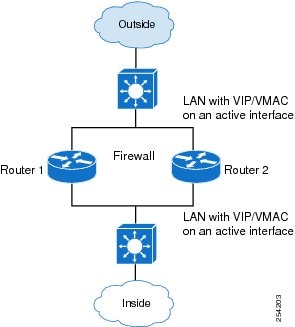
For more information about the LAN-LAN configuration, see the section, Example Configuring LAN-LAN.
How to Configure Firewall Stateful Inter-Chassis Redundancy
- Configuring the Redundancy Application Group
- Configuring the Redundancy Group Protocol
- Configuring Virtual IP Address and Redundant Interface Identifier
- Configuring Control and Data Interface
- Managing and Monitoring Firewall Stateful Inter-Chassis Redundancy
Configuring the Redundancy Application Group
DETAILED STEPS
Configuring the Redundancy Group Protocol
DETAILED STEPS
Configuring Virtual IP Address and Redundant Interface Identifier
DETAILED STEPS
Configuring Control and Data Interface
DETAILED STEPS
Managing and Monitoring Firewall Stateful Inter-Chassis Redundancy
Use the following commands to manage and monitor the Firewall Stateful Inter-Chassis Redundancy feature.
DETAILED STEPS
Configuration Examples for Firewall Stateful Inter-Chassis Redundancy
- Example Configuring the Redundancy Application Group
- Example Configuring the Redundancy Group Protocol
- Example Configuring Virtual IP Address and Redundant Interface Identifier
- Example Configuring Control and Data Interface
- Example Configuring LAN-LAN
Example Configuring the Redundancy Application Group
The following example shows how to configure a redundancy group named grp-1 with priority and preempt attributes:
Router(config)# redundancy
Router(config-red)# application redundancy
Router(config-red-app)# group 1
Router(config-red-app-grp)# name grp-1
Router(config-red-app-grp)# priority 200 failover-threshold 90
Router(config-red--app-grp)# preempt
Example Configuring the Redundancy Group Protocol
The following example shows how to configure a redundancy group with timers set for hellotime and holdtime messages:
Router(config)# redundancy
Router(config-red)# application redundancy
Router(config-red-app)# protocol 1
Router(config-red-app-prtcl)# timers hellotime 100 holdtime 100

Router(config-red-app-prtcl)# authentication md5 key-string 0 n1 100
Router(config-red-app-prtcl)# bfd
Example Configuring Virtual IP Address and Redundant Interface Identifier
The following example shows how to configure the redundancy group virtual IP address for Gigabit Ethernet interface 0/0/0:
Router# configure terminal
Router(config)# interface GigabitEthernet0/1/1
Router(conf-if)# redundancy rii 600
Router(config-if)# redundancy group 2 ip 10.2.3.4 exclusive decrement 200
Router(config)# redundancy
Router(config-red-app-grp)# data GigabitEthernet0/0/0
Router(config-red-app-grp)# control GigabitEthernet0/0/2 protocol 1
Example Configuring Control and Data Interface
The following example shows how to configure the Gigabit Ethernet data interface type and control interface type:
Router# configure terminal
Router(config-red)# application redundancy
Router(config-red-app-grp)# group 1
Router(config-red-app-grp)# data GigabitEthernet 0/0/0
Router(config-red-app-grp)# control GigabitEthernet 0/0/2 protocol 1
Router(config-red-app-grp)# timers delay 100 reload 400
Example Configuring LAN-LAN
The following is a sample LAN-LAN configuration that shows how a pair of ASR routers that have two outgoing interfaces are configured. In this example, GigabitEthernet0/1 is the ingress interface and GigabitEthernet0/2 is the egress interface. Both the interfaces are assigned to zones and a classmap is defined to describe traffic between zones. The interfaces are also configured for redundancy. The âinspectâ action invokes the application-level gateway (ALG) to open a pinhole to allow traffic on other ports. An ALG pinhole is a port that is opened through an ALG to allow a particular application to gain controlled access to a protected network.
! Identifies and defines network zones
  zone security zone1
  zone security zone2
!
! Assigns interfaces to zones
  interface GigabitEthernet0/1
  zone-member security zone1
interface GigabitEthernet0/2
zone-member security zone2
!
! Defines class-maps to describes traffic between zones
  class-map type inspect match-any inter-zone-class-map
  match access-group 1
  access-list 1 permit 10.1.1.1
!
! Associates class-maps with policy-maps to define actions to be applied
  policy-map type inspect inter-zone-policy-map
  class type inspect inter-zone-class-map
  inspect
!
! Sets zone pairs for any policy other than deny all and assign policy-maps to zone-pairs by defining service-policy
  zone-pair inter-zone source zone1 destination zone2
  service-policy type inspect inter-zone-policy-map
!
Additional References
Related Documents
MIBs
Technical Assistance
|
Description |
Link |
|---|---|
|
The Cisco Support and Documentation website provides online resources to download documentation, software, and tools. Use these resources to install and configure the software and to troubleshoot and resolve technical issues with Cisco products and technologies. Access to most tools on the Cisco Support and Documentation website requires a Cisco.com user ID and password. |
Feature Information for Firewall Stateful Inter-Chassis Redundancy
The following table provides release information about the feature or features described in this module. This table lists only the software release that introduced support for a given feature in a given software release train. Unless noted otherwise, subsequent releases of that software release train also support that feature.
Use Cisco Feature Navigator to find information about platform support and Cisco software image support. To access Cisco Feature Navigator, go to www.cisco.com/go/cfn. An account on Cisco.com is not required.
|
Feature Name |
Releases |
Feature Information |
|---|---|---|
|
Firewall Stateful Inter-Chassis Redundancy |
Cisco IOS XE Release 3.1(S) |
Firewall Stateful Inter-Chassis Redundancy feature enables you to configure paris of router to act a backups for each other. The following commands were introduced or modified: application redundancy, authentication, control, data, debug redundancy application group config, debug redundancy application group faults, debug redundancy application group media, debug redundancy application group protocol, debug redundancy application group rii, debug redundancy application group transport, debug redundancy application group vp, group, name, preempt, priority, protocol, redundancy rii, redundancy group, track, timers delay, timers hellotime, show redundancy application group, show redundancy application transport, show redundancy application control-interface, show redundancy application faults, show redundancy application protocol, show redundancy application if-mgr, show redundancy application data-interface. |
Cisco and the Cisco Logo are trademarks of Cisco Systems, Inc. and/or its affiliates in the U.S. and other countries. A listing of Cisco's trademarks can be found at www.cisco.com/go/trademarks. Third party trademarks mentioned are the property of their respective owners. The use of the word partner does not imply a partnership relationship between Cisco and any other company. (1005R)
Any Internet Protocol (IP) addresses and phone numbers used in this document are not intended to be actual addresses and phone numbers. Any examples, command display output, network topology diagrams, and other figures included in the document are shown for illustrative purposes only. Any use of actual IP addresses or phone numbers in illustrative content is unintentional and coincidental.