



 Feedback
Contents
- IPsec Usability Enhancements
- Finding Feature Information
- Prerequisites for IPsec Usability Enhancements
- Information About IPsec Usability Enhancements
- IPsec Overview
- IPsecOperation
- How to Utilize IPsec Usability Enhancements
- Verifying IKE Phase-1 ISAKMP Default Policies
- Default IKE Phase-1 Policies
- User Configured IKE Policies
- EzVPN ISAKMP Policies
- Verifying Default IPsec Transform-Sets
- Default Transform Sets
- Verifying and Troubleshooting IPsec VPNs
- Verifying IKE Phase-1 ISAKMP
- Verifying IKE Phase-2
- Troubleshooting IPsec VPNs
- Configuration Examples for IPsec Usability Enhancements
- IKE Default Policies Example
- Default Transform Sets Example
- Additional References
- Feature Information for IPsec Usability Enhancements
- Glossary
IPsec Usability Enhancements
The IPsec Usability Enhancements feature introduces functionality that eases the configuration and monitoring of your IPsec virtual private network (VPN). Benefits of this feature include intelligent defaults for IPsec and Internet Key Exchange (IKE) and the ability to easily verify and troubleshoot IPsec VPNs.
- Finding Feature Information
- Prerequisites for IPsec Usability Enhancements
- Information About IPsec Usability Enhancements
- How to Utilize IPsec Usability Enhancements
- Configuration Examples for IPsec Usability Enhancements
- Additional References
- Feature Information for IPsec Usability Enhancements
- Glossary
Finding Feature Information
Your software release may not support all the features documented in this module. For the latest feature information and caveats, see the release notes for your platform and software release. To find information about the features documented in this module, and to see a list of the releases in which each feature is supported, see the Feature Information Table at the end of this document.
Use Cisco Feature Navigator to find information about platform support and Cisco software image support. To access Cisco Feature Navigator, go to www.cisco.com/go/cfn. An account on Cisco.com is not required.
Prerequisites for IPsec Usability Enhancements
- You must be familiar with IPsec, IKE, and encryption.
- You must have configured IPsec and enabled IKE on your router.
- You must be running Cisco IOS k9 crypto image on your router.
Information About IPsec Usability Enhancements
IPsec Overview
IPsec is a framework of open standards developed by the Internet Engineering Task Force (IETF), which provides security for transmission of sensitive information over public networks. IPsec acts at the network layer, protecting and authenticating IP packets between participating IPsec devices (peers), such as Cisco routers.
IPsec provides secure tunnels between two peers. You may define which packets are considered sensitive and should be sent through these secure tunnels. You may also define the parameters that should be used to protect these sensitive packets by specifying characteristics of the tunnels. When an IPsec peer detects a sensitive packet, it sets up the appropriate secure tunnel and sends the packet through the tunnel to the remote peer.
IPsecOperation
An IPsec operation involves five basic steps: identifying interesting traffic, IKE phase-1, IKE phase-2, establishing the tunnel or IPsec session, and finally tearing down the tunnel.
Step 1: Identifying Interesting Traffic
The VPN devices recognize the traffic, or sensitive packets, to detect. IPsec is either applied to the sensitive packet, the packet is bypassed, or the packet is dropped. Based on the traffic type, if IPsec is applied then IKE phase-1 is initiated.
Step 2: IKE Phase-1
There are three exchanges between the VPN devices to negotiate an IKE security policy and establish a secure channel.
During the first exchange, the VPN devices negotiate matching IKE transform sets to protect the IKE exchange resulting in establishing an Internet Security Association and Key Management Protocol (ISAKMP) policy to utilize. The ISAKMP policy consists of an encryption algorithm, a hash algorithm, an authentication algorithm, a Diffie-Hellman (DH) group, and a lifetime parameter.
There are eight default ISAKMP policies supported. For more information on default ISAKMP policies, see the section "Verifying IKE Phase-1 ISAKMP Default Policies."
The second exchange consists of a Diffie-Hellman exchange, which establishes a shared secret.
The third exchange authenticates peer identity. After the peers are authenticated, IKE phase-2 begins.
Step 3: IKE Phase-2
The VPN devices negotiate the IPsec security policy used to protect the IPsec data. IPsec transform sets are negotiated.
A transform set is a combination of algorithms and protocols that enact a security policy for network traffic. For more information on default transform sets, see the section "Verifying Default IPsec Transform-Sets." A VPN tunnel is ready to be established.
How to Utilize IPsec Usability Enhancements
- Verifying IKE Phase-1 ISAKMP Default Policies
- Verifying Default IPsec Transform-Sets
- Verifying and Troubleshooting IPsec VPNs
Verifying IKE Phase-1 ISAKMP Default Policies
When IKE negotiation begins, the peers try to find a common policy, starting with the highest priority policy as specified on the remote peer. The peers negotiate the policy sets until there is a match. If peers have more than one policy set in common, the lowest priority number is used.
There are three groups of IKE phase-1, ISAKMP, policies as defined by policy priority ranges and behavior:
- Default ISAKMP policies, which are automatically enabled.
- User configured ISAKMP policies, which you may configure with the crypto isakmp policy command.
- Easy VPN (EzVPN) ISAKMP policies, which are made available during EzVPN configuration.
This section describes the three groups of ISAKMP policies, how they behave in relationship to one another, how to determine which policies are in use with the appropriate show command, and how to disable the default ISAKMP policies.
Default IKE Phase-1 Policies
There are eight default IKE phase-1, ISAKMP, policies supported (see the table below) that are enabled automatically. If you have neither manually configured IKE policies with the crypto isakmp policy command nor disabled the default IKE policies with the no crypto isakmp default policy command, the default IKE policies will be used during peer IKE negotiations. You can verify that the default IKE policies are in use by issuing either the show crypto isakmp policy command or the show crypto isakmp default policy command.
The default IKE policies define the following policy set parameters:
- The priority, 65507-65514, where 65507 is the highest priority and 65514 is the lowest priority.
- The authentication method, Rivest, Shamir, and Adelman (RSA) or preshared keys (PSK).
- The encryption method, Advanced Encryption Standard (AES) or Triple Data Encryption Standard (3DES).
- The hash function, Secure Hash Algorithm (SHA-1) or Message-Digest algorithm 5 (MD5).
- The DH group specification DH2 or DH5
User Configured IKE Policies
You may configure IKE policies with the crypto isakmp policy command. User configured IKE policies are uniquely identified and configured with a priority number ranging from 1-10000, where 1 is the highest priority and 10000 the lowest priority.
Once you have configured one or more IKE policies with a priority of 1-10000:
- The user configured policies will be used during peer IKE negotiations.
- The default IKE policies will no longer used during peer IKE negotiations.
- The user configured policies may be displayed by issuing the show crypto isakmp policy command.
EzVPN ISAKMP Policies
If you have configured EzVPN (see EzVPN ISAKMP Policies), the default EzVPN ISAKMP policies in use are uniquely identified with a priority number ranging from 65515-65535, where 65515 is the highest priority and 65535 is the lowest priority.
Once a user has configured EzVPN:
- The default EzVPN ISAKMP policies and the default IKE policies will be used during peer IKE negotiations.
- The EzVPN IKAKMP policies and the default IKE policies will be displayed by issuing the show crypto isakmp policy command.
- Default ISAKMP policies will be displayed by issuing the show crypto isakmp default policy command unless they have been disabled by issuing the no crypto isakmp default policy command.
DETAILED STEPS
Examples
The following is sample output of the show crypto isakmp default policy command. The default policies are displayed because the default policies have not been disabled.
Router# show crypto isakmp default policy

Default IKE policy
Default protection suite of priority 65507
        encryption algorithm:   AES - Advanced Encryption Standard (128 bit key.
        hash algorithm:         Secure Hash Standard
        authentication method:  Rivest-Shamir-Adleman Signature
        Diffie-Hellman group:   #5 (1536 bit)
        lifetime:               86400 seconds, no volume limit
Default protection suite of priority 65508
        encryption algorithm:   AES - Advanced Encryption Standard (128 bit key.
        hash algorithm:         Secure Hash Standard
        authentication method:  Pre-Shared Key
        Diffie-Hellman group:   #5 (1536 bit)
        lifetime:               86400 seconds, no volume limit
Default protection suite of priority 65509
        encryption algorithm:   AES - Advanced Encryption Standard (128 bit key.
        hash algorithm:         Message Digest 5
        authentication method:  Rivest-Shamir-Adleman Signature
        Diffie-Hellman group:   #5 (1536 bit)
        lifetime:               86400 seconds, no volume limit
Default protection suite of priority 65510
        encryption algorithm:   AES - Advanced Encryption Standard (128 bit key.
        hash algorithm:         Message Digest 5
        authentication method:  Pre-Shared Key
        Diffie-Hellman group:   #5 (1536 bit)
        lifetime:               86400 seconds, no volume limit
Default protection suite of priority 65511
        encryption algorithm:   Three key triple DES
        hash algorithm:         Secure Hash Standard
        authentication method:  Rivest-Shamir-Adleman Signature
        Diffie-Hellman group:   #2 (1024 bit)
        lifetime:               86400 seconds, no volume limit
Default protection suite of priority 65512
        encryption algorithm:   Three key triple DES
        hash algorithm:         Secure Hash Standard
        authentication method:  Pre-Shared Key
        Diffie-Hellman group:   #2 (1024 bit)
        lifetime:               86400 seconds, no volume limit
Default protection suite of priority 65513
        encryption algorithm:   Three key triple DES
        hash algorithm:         Message Digest 5
        authentication method:  Rivest-Shamir-Adleman Signature
        Diffie-Hellman group:   #2 (1024 bit)
        lifetime:               86400 seconds, no volume limit
Default protection suite of priority 65514
        encryption algorithm:   Three key triple DES
        hash algorithm:         Message Digest 5
        authentication method:  Pre-Shared Key
        Diffie-Hellman group:   #2 (1024 bit)
        lifetime:               86400 seconds, no volume limit
The following example disables the default IKE policies then shows the resulting output of the show crypto isakmp default policy command, which is blank:
Router# configure terminal
Router(config)# no crypto isakmp default policy
Router(config)# exit
Router# show crypto isakmp default policy
Router#
!There is no output since the default IKE policies have been disabled.
The following is an example system log message that is generated whenever the default ISAKMP policies are in use:
%CRYPTO-6-IKMP_POLICY_DEFAULT: Using ISAKMP Default policies
Verifying Default IPsec Transform-Sets
A transform set represents a certain combination of security protocols and algorithms. During the IPsec SA negotiation, the peers agree to use a particular transform set for protecting a particular data flow.
During IPsec SA negotiations with IKE, the peers search for a transform set that is the same at both peers. When such a transform set is found, it is selected and is applied to the protected traffic as part of the IPsec SAs of both peers.
Default Transform Sets
A default transform set will be used by any crypto map or IPsec profile where no other transform set has been configured and if the following is true:
- The default transform sets have not been disabled with the no crypto ipsec default transform-set command.
- The crypto engine in use supports the encryption algorithm.
The two default transform sets each define an Encapsulation Security Protocol (ESP) encryption transform type and an ESP authentication transform type as shown in the table below.
| Table 2 | Default Transform Sets and Parameters |
|
Default Transform Name |
ESP Encryption Transform and Description |
ESP Authentication Transform and Description |
|---|---|---|
|
#$!default_transform_set_0 |
esp-3des (ESP with the 168-bit 3DES or Triple DES encryption algorithm) |
esp-sha-hmac |
|
#$!default_transform_set_1 |
esp-aes (ESP with the 128-bit AES encryption algorithm) |
esp-sha-hmac (ESP with the SHA-1, hash message authentication code [HMAC] variant authentication algorithm) |
DETAILED STEPS
Examples
The following example displays output from the show crypto ipsec default transform-set
 command when the default transform sets are enabled, the default setting:
Router# show crypto ipsec default transform-set
Transform set #$!default_transform_set_1: { esp-aes esp-sha-hmac  }
   will negotiate = { Transport,  },

Transform set #$!default_transform_set_0: { esp-3des esp-sha-hmac  }
   will negotiate = { Transport,  },
The following example displays output from the show crypto ipsec default transform-set command when the default transform sets have been disabled with the no crypto ipsec default transform-setcommand.
Router(config)# no crypto ipsec default transform-set
Router(config)# exit
Router#
Router# show crypto ipsec default transform-set
! There is no output.
Router#
The following is an example system log message that is generated whenever IPsec SAs have negotiated with a default transform set:
%CRYPTO-5-IPSEC_DEFAULT_TRANSFORM: Using Default IPsec transform-set
Verifying and Troubleshooting IPsec VPNs
Perform one of the following optional tasks in this section, depending on whether you want to verify IKE phase-1 or IKE phase-2 tunnels or troubleshoot your IPsec VPN:
Verifying IKE Phase-1 ISAKMP
DETAILED STEPS
| Step 1 |
show
crypto
mib
isakmp
flowmib
failure
[
vrf
vrf-name
]
For ISAKMP tunnel failures, this command displays event information. The following is sample output for this command: Example:
Router# show crypto mib isakmp flowmib failure
 vrf Global
  Index:                       1
  Reason:                      peer lost
  Failure time since reset:    00:07:27
  Local type:                  ID_IPV4_ADDR
  Local value:                192.0.2.1
  Remote type:                 ID_IPV4_ADDR
  Remote Value:                192.0.2.2
  Local Address:               192.0.2.1
  Remote Address:              192.0.2.2
  Index:                       2
  Reason:                      peer lost
  Failure time since reset:    00:07:27
  Local type:                  ID_IPV4_ADDR
  Local value:                192.0.3.1
  Remote type:                 ID_IPV4_ADDR
  Remote Value:                192.0.3.2
  Local Address:               192.0.3.1
  Remote Address:              192.0.3.2
  Index:                       3
  Reason:                      peer lost
  Failure time since reset:    00:07:32
  Local type:                  ID_IPV4_ADDR
  Remote type:                 ID_IPV4_ADDR
  Remote Value:                192.0.2.2
  Local Address:               192.0.2.1
  Remote Address:              192.0.2.2
|
| Step 2 |
show
crypto
mib
isakmp
flowmib
global
[
vrf
vrf-name
]
Global ISAKMP tunnel statistics are displayed by issuing this command. The following is sample output for this command: Example:
Router# show crypto mib isakmp flowmib global
vrf Global
  Active Tunnels:                          3
  Previous Tunnels:                        0
  In octets:                               2856
  Out octets:                              3396
  In packets:                              16
  Out packets:                             19
  In packets drop:                         0
  Out packets drop:                        0
  In notifys:                              4
  Out notifys:                             7
  In P2 exchg:                             3
  Out P2 exchg:                            6
  In P2 exchg invalids:                    0
  Out P2 exchg invalids:                   0
  In P2 exchg rejects:                     0
  Out P2 exchg rejects:                    0
  In IPSEC delete:                         0
  Out IPSEC delete:                        0
  SAs locally initiated:                   3
  SAs locally initiated failed:            0
  SAs remotely initiated failed:           0
  System capacity failures:                0
  Authentication failures:                 0
  Decrypt failures:                        0
  Hash failures:                           0
  Invalid SPI:                             0
|
| Step 3 |
show
crypto
mib
isakmp
flowmib
history
[
vrf
vrf-name
]
For information about ISAKMP tunnels that are no longer active, this command displays event information including the reason that the tunnel was terminated. The following is sample output for this command: Example:
Router# show crypto mib isakmp flowmib history
vrf Global
  Reason:                             peer lost
  Index:                              2
  Local type:                         ID_IPV4_ADDR
  Local address:                      192.0.2.1
  Remote type:                        ID_IPV4_ADDR
  Remote address:                     192.0.2.2
  Negotiation mode:                   Main Mode
  Diffie Hellman Grp:                 2
  Encryption algo:                    des
  Hash algo:                          sha
  Auth method:                        psk
  Lifetime:                           86400
  Active time:                        00:06:30
  Policy priority:                    1
  Keepalive enabled:                  Yes
  In octets:                          3024
  In packets:                         22
  In drops:                           0
  In notifys:                         18
  In P2 exchanges:                    1
  In P2 exchg invalids:               0
  In P2 exchg rejected:                 0
  In P2 SA delete reqs:                 0
  Out octets:                           4188
  Out packets:                          33
  Out drops:                            0
  Out notifys:                          28
  Out P2 exchgs:                        2
  Out P2 exchg invalids:                0
  Out P2 exchg rejects:                 0
  Out P2 Sa delete requests:            0
  Reason:                               peer lost
  Index:                                3
  Local type:                           ID_IPV4_ADDR
  Local address:                        192.0.3.1
  Remote type:                          ID_IPV4_ADDR
  Remote address:                       192.0.3.2
  Negotiation mode:                     Main Mode
  Diffie Hellman Grp:                   2
  Encryption algo:                      des
  Hash algo:                            sha
  Auth method:                          psk
  Lifetime:                             86400
  Active time:                          00:06:25
  Policy priority:                      1
  Keepalive enabled:                    Yes
  In octets:                            3140
  In packets:                           23
  In drops:                             0
  In notifys:                           19
  In P2 exchanges:                      1
  In P2 exchg invalids:                 0
  In P2 exchg rejected:                 0
  In P2 SA delete reqs:                 0
  Out octets:                           4304
  Out packets:                          34
  Out drops:                            0
  Out notifys:                          29
  Out P2 exchgs:                        2
  Out P2 exchg invalids:                0
  Out P2 exchg rejects:                 0
  Out P2 Sa delete requests:            0
|
| Step 4 |
show
crypto
mib
isakmp
flowmib
peer
[
index
peer-mib-index
]
[
vrf
vrf-name
]
For active ISAKMP peer associations, this command displays information including indexes, type of connection, and IP addresses. The following is sample output for this command: Example:
Router# show crypto mib isakmp flowmib peer
vrf Global
  Index:              1
  Local type:         ID_IPV4_ADDR
  Local address:      192.0.2.1
  Remote type:        ID_IPV4_ADDR
  Remote address:     192.0.2.2
  Index:              2
  Local type:         ID_IPV4_ADDR
  Local address:      192.0.3.1
  Remote type:        ID_IPV4_ADDR
  Remote address:     192.0.3.1
  Index:              3
  Local type:         ID_IPV4_ADDR
  Local address:      192.0.4.1
  Remote type:        ID_IPV4_ADDR
  Remote address:     192.0.4.1
|
| Step 5 |
show
crypto
mib
isakmp
flowmib
tunnel
[
index
tunnel-mib-index
]
[
vrf
vrf-name
]
For active ISAKMP tunnels, this command displays tunnel statistics. The following is sample output for this command: Example:
Router# show crypto mib isakmp flowmib tunnel
vrf Global
  Index:                      1
  Local type:                 ID_IPV4_ADDR
  Local address:              192.0.2.1
  Remote type:                ID_IPV4_ADDR
  Remote address:             192.0.2.2
  Negotiation mode:           Main Mode
  Diffie Hellman Grp:         2
  Encryption algo:            des
  Hash algo:                  sha
  Auth method:                psk
  Lifetime:                   86400
  Active time:                00:03:08
  Policy priority:            1
  Keepalive enabled:          Yes
  In octets:                  2148
  In packets:                 15
  In drops:                   0
  In notifys:                 11
  In P2 exchanges:            1
  In P2 exchg invalids:       0
  In P2 exchg rejected:       0
  In P2 SA delete reqs:       0
  Out octets:                 2328
  Out packets:                16
  Out drops:                  0
  Out notifys:                12
  Out P2 exchgs:              2
  Out P2 exchg invalids:      0
  Out P2 exchg rejects:       0
  Out P2 Sa delete requests:  0
|
What to Do Next
Verifying IKE Phase-2
DETAILED STEPS
| Step 1 |
show
crypto
mib
ipsec
flowmib
endpoint
[
vrf
vrf-name
]
Information for each active endpoint, local or remote device, associated with an IPsec phase-2 tunnel is displayed by issuing this command. The following is sample output for this command: Example:
Router#  show crypto mib ipsec flowmib endpoint
vrf Global
  Index:               1
  Local type:          Single IP address
  Local address:       192.1.2.1
  Protocol:            0
  Local port:          0
  Remote type:         Single IP address
  Remote address:      192.1.2.2
  Remote port:         0
  Index:               2
  Local type:          Subnet
  Local address:       192.1.3.0 255.255.255.0
  Protocol:            0
  Local port:          0
  Remote type:         Subnet
  Remote address:      192.1.3.0 255.255.255.0
  Remote port:         0
|
| Step 2 |
show
crypto
mib
ipsec
flowmib
failure
[
vrf
vrf-name
]
For ISAKMP tunnel failures, this command displays event information. The following is sample output for this command: Example:
Router# show crypto mib ipsec flowmib failure
vrf Global
  Index:                        1
  Reason:                       Operation request
  Failure time since reset:     00:25:18
  Src address:                  192.1.2.1
  Destination address:          192.1.2.2
  SPI:                          0
|
| Step 3 |
show
crypto
mib
ipsec
flowmib
global
[
vrf
vrf-name
]
Global IKE phase-2 tunnel statistics are displayed by issuing this command. The following is sample output for this command: Example:
Router# show crypto mib ipsec flowmib global
 vrf Global
  Active Tunnels:                     2
  Previous Tunnels:                   0
  In octets:                          800
  Out octets:                         1408
  In packets:                         8
  Out packets:                        8
  Uncompressed encrypted bytes:    1408
  In packets drops:                   0
  Out packets drops:                  2
  In replay drops:                    0
  In authentications:                 8
  Out authentications:                8
  In decrypts:                        8
  Out encrypts:                       8
  Compressed bytes:                   0
  Uncompressed bytes:                 0
  In uncompressed bytes:              0
  Out uncompressed bytes:             0
  In decrypt failures:                0
  Out encrypt failures:               0
  No SA failures:                     0
! Number of SA Failures.
  Protocol use failures:              0
  System capacity failures:           0
  In authentication failures:         0
  Out authentication failures:        0
|
| Step 4 |
show
crypto
mib
ipsec
flowmib
history
[
vrf
vrf-name
]
For information about IKE phase-2 tunnels that are no longer active, this command displays event information including the reason that the tunnel was terminated. The following is sample output for this command: Example:
Router# show crypto mib ipsec flowmib history
vrf Global
  Reason:                      Operation request
  Index:                       1
  Local address:               192.1.2.1
  Remote address:              192.1.2.2
  IPSEC keying:                IKE
  Encapsulation mode:          1
  Lifetime (KB):               4608000
  Lifetime (Sec):              3600
  Active time:                 00:24:32
  Lifetime threshold (KB):     423559168
  Lifetime threshold (Sec):    3590000
  Total number of refreshes:   0
  Expired SA instances:        4
  Current SA instances:        4
  In SA DH group:              1
  In sa encrypt algorithm      des
  In SA auth algorithm:        rsig
  In SA ESP auth algo:         ESP_HMAC_SHA
  In SA uncompress algorithm:  None
  Out SA DH group:             1
  Out SA encryption algorithm: des
  Out SA auth algorithm:       ESP_HMAC_SHA
  Out SA ESP auth algorithm:   ESP_HMAC_SHA
  Out SA uncompress algorithm: None
  In octets:                   400
  Decompressed octets:         400
  In packets:                  4
  In drops:                        0
  In replay drops:                 0
  In authentications:              4
  In authentication failures:      0
  In decrypts:                     4
  In decrypt failures:             0
  Out octets:                      704
  Out uncompressed octets:         704
  Out packets:                     4
  Out drops:                       1
  Out authentications:             4
  Out authentication failures:     0
  Out encryptions:                 4
  Out encryption failures:         0
  Compressed octets:               0
  Decompressed octets:             0
  Out uncompressed octets:         704
|
| Step 5 |
show
crypto
mib
ipsec
flowmib
spi
[
vrf
vrf-name
]
The security protection index (SPI) table contains an entry for each active and expiring security IKE phase-2 association. The following is sample output for this command, which displays the SPI table: Example:
Router# show crypto mib ipsec flowmib spi
vrf Global
  Tunnel Index:          1
  SPI Index:            1
  SPI Value:            0xCC57D053
  SPI Direction:        In
  SPI Protocol:         AH
  SPI Status:           Active
  SPI Index:            2
  SPI Value:            0x68612DF
  SPI Direction:        Out
  SPI Protocol:         AH
  SPI Status:           Active
  SPI Index:            3
  SPI Value:            0x56947526
  SPI Direction:        In
  SPI Protocol:         ESP
  SPI Status:           Active
  SPI Index:            4
  SPI Value:            0x8D7C2204
  SPI Direction:        Out
  SPI Protocol:         ESP
  SPI Status:           Active
|
| Step 6 |
show
crypto
mib
ipsec
flowmib
tunnel
[index tunnel-mib-index] [ vrf vrf-name ] For active IKE phase-2 tunnels, this command displays tunnel statistics. The following is sample output for this command: Example:
Router# show crypto mib ipsec flowmib tunnel
vrf Global
  Index:                              1
  Local address:                      192.0.2.1
  Remote address:                     192.0.2.2
  IPSEC keying:                       IKE
  Encapsulation mode:                 1
  Lifetime (KB):                      4608000
  Lifetime (Sec):                     3600
  Active time:                        00:05:46
  Lifetime threshold (KB):            64
  Lifetime threshold (Sec):           10
  Total number of refreshes:          0
  Expired SA instances:               0
  Current SA instances:               4
  In SA DH group:                     1
  In sa encrypt algorithm:            des
  In SA auth algorithm:               rsig
  In SA ESP auth algo:                ESP_HMAC_SHA
  In SA uncompress algorithm:         None
  Out SA DH group:                    1
  Out SA encryption algorithm:        des
  Out SA auth algorithm:              ESP_HMAC_SHA
  Out SA ESP auth algorithm:          ESP_HMAC_SHA
  Out SA uncompress algorithm:        None
  In octets:                             400
  Decompressed octets:                   400
  In packets:                            4
  In drops:                              0
  In replay drops:                       0
  In authentications:                    4
  In authentication failures:            0
  In decrypts:                           4
  In decrypt failures:                   0
  Out octets:                            704
  Out uncompressed octets:               704
  Out packets:                           4
  Out drops:                             1
  Out authentications:                   4
  Out authentication failures:           0
  Out encryptions:                       4
  Out encryption failures:               0
  Compressed octets:                     0
  Decompressed octets:                   0
  Out uncompressed octets:               704
|
Troubleshooting IPsec VPNs
The show tech-support ipsec command simplifies the collection of the IPsec related information if you are troubleshooting a problem.
DETAILED STEPS
|
show
tech-support
ipsec
There are three variations of the show tech-support ipseccommand:
For a sample display of the output from the show tech-support ipsec command for the individual show commands listed below for each variation see the "Troubleshooting IPsec VPNs" section. Output of the show tech-support ipsec Command If you enter the show tech-support ipseccommand without any keywords, the command output displays the following show commands, in order of output:
Output of the show tech-support ipsec peer Command If you enter the show tech-support ipseccommand with the peer keyword and the ipv4address argument, the output displays the following show commands, in order of output for the specified peer:
Output of the show tech-support ipsec vrf Command If you enter the show tech-support ipseccommand with the vrf keyword and the vrf-nameargument, the output displays the following show commands, in order of output for the specified Virtual Routing and Forwarding (VRF):
Example: |
Configuration Examples for IPsec Usability Enhancements
IKE Default Policies Example
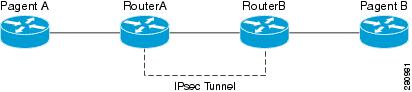
In the following example, crypto maps are configured on RouterA and RouterB and default IKE policies are in use. Traffic is routed from Pagent A to Pagent B. Checking the system log on Peer A and Peer B confirms that the default IKE policies are in use on both peers (see the figure below).
! Configuring RouterA.
RouterA(config)# crypto isakmp key identity address 209.165.200.226
RouterA(config)# crypto map testmap 10 ipsec-isakmp
% NOTE: This new crypto map will remain disabled until a peer
	and a valid access list have been configured.
RouterA(config-crypto-map)# set peer 209.165.200.226
RouterA(config-crypto-map)# match address 101
RouterA(config-crypto-map)# exit
RouterA(config)# ip route 209.165.200.225 255.255.255.224 209.165.200.226
RouterA(config)# access-list 101 permit ip host 209.165.200.227 host 209.165.200.225
RouterA(config)# end
RouterA(config)# interface Ethernet1/2
RouterA(config-if)# crypto map testmap
RouterA(config-if)# end
RouterA(config)# crypto ipsec transform test_transf esp-aes esp-sha-hmac
RouterA(cfg-crypto-trans)# mode tunnel
RouterA(cfg-crypto-trans)# end
RouterA(config)# crypto map testmap 10
RouterA(config-crypto-map)# set transform-set test_transf
RouterA(config-crypto-map)# end
! Configuring RouterB.
RouterB(config)# crypto isakmp key identity address 209.165.200.228
RouterB(config)# crypto dynamic-map dyn_testmap 10
RouterB(config-crypto-map)# crypto map testmap 10 ipsec-isakmp dynamic dyn_testmap
RouterB(config)# ip route 209.165.200.227 255.255.255.224 209.165.200.228
RouterB(config)# end
RouterB(config)# interface GigabitEthernet0/1
RouterB(config-if)# crypto map testmap
RouterB(config-if)# end
RouterB(config)# crypto ipsec transform test_transf esp-aes esp-sha-hmac
RouterB(cfg-crypto-trans)# mode tunnel
RouterB(cfg-crypto-trans)# end
RouterB(config)# crypto dynamic-map dyn_testmap 10
RouterB(config-crypto-map)# set transform-set test_transf
RouterB(config-crypto-map)# end
! Routing traffic from PagentA to PagentB.
PagentA(config)# ip route 209.165.200.225 255.255.255.224 209.165.200.229
PagentA(config)# end
! Routing traffic from PagentB to PagentA.
PagentB(config)# ip route 209.165.200.227 255.255.255.224 209.165.200.230
PagentB(config)# end
! Checking the system log on RouterA confirms that the default IKE policies are in use.
RouterA# show log | include %CRYPTO-6-IKMP_POLICY_DEFAULT*
Jun  5 09:17:59.251 PDT: %CRYPTO-6-IKMP_POLICY_DEFAULT: Using ISAKMP Default policies
! Checking the system log on RouterB confirms that the default IKE policies are in use.
RouterB# show log | include %CRYPTO-6-IKMP_POLICY_DEFAULT*
Jun  5 09:17:59.979 PDT: %CRYPTO-6-IKMP_POLICY_DEFAULT: Using ISAKMP Default policies
Default Transform Sets Example
In the following example, static crypto maps are configured on RouterA and dynamic crypto maps are configured on RouterB. Traffic is routed from Pagent A to Pagent B. The IPsec SAs negotiate with default transform sets and the traffic is encrypted. Executing the show crypto map command on both peers verifies that the default transform sets are in use (see Default Transform Sets Example).
! Configuring RouterA.
RouterA(config)# crypto isakmp key identify address 209.165.200.225
RouterA(config)# crypto map testmap 10 ipsec-isakmp
% NOTE: This new crypto map will remain disabled until a peer
	and a valid access list have been configured.
RouterA(config-crypto-map)# set peer 209.165.200.225
RouterA(config-crypto-map)# match address 101
RouterA(config-crypto-map)# exit
RouterA(config)# ip route 209.165.200.226 255.255.255.255 209.165.200.225
RouterA(config)# access-list 101 permit ip host 209.165.200.227 host 209.165.200.226
RouterA(config)# end
RouterA(config)# interface Ethernet1/2
RouterA(config-if)# crypto map testmap
RouterA(config-if)# end
RouterA(config)# crypto isakmp policy 10
RouterA(config-isakmp)# encryption aes
RouterA(config-isakmp)# authentication pre-share
RouterA(config-isakmp)# hash sha
RouterA(config-isakmp)# group 5
RouterA(config-isakmp)# end
! Configuring RouterB.
RouterB(config)# crypto isakmp key identity address 209.165.200.229
RouterB(config)# crypto dynamic-map dyn_testmap 10
RouterB(config-crypto-map)# crypto map testmap 10 ipsec-isakmp dynamic dyn_testmap
RouterB(config)# ip route 209.165.200.227 255.255.255.255 209.165.200.229
RouterB(config)# end
RouterB(config)# interface GigabitEthernet0/1
RouterB(config-if)# crypto map testmap
RouterB(config-if)# end
RouterB(config)# crypto isakmp policy 10
RouterB(config-isakmp)# encryption aes
RouterB(config-isakmp)# authentication pre-share
RouterB(config-isakmp)# hash sha
RouterB(config-isakmp)# group 5
RouterB(config-isakmp)# end
! The SA is using the default transform set and traffic is encrypted on RouterA.
RouterA# show crypto isakmp sa detail | include 209.165.200.229.*209.165.200.225.*ACTIVE
13007  209.165.200.229     209.165.200.225     ACTIVE aes  sha  psk  5  23:59:56
13006  209.165.200.229     209.165.200.225     ACTIVE aes  sha  psk  5  0
13005  209.165.200.229     209.165.200.225     ACTIVE aes  sha  psk  5  0
! The SA is using the default transform set and traffic is encrypted on RouterB.
RouterB# show crypto isakmp sa detail | include 209.165.200.225.*209.165.200.229.*ACTIVE
7007  209.165.200.225      209.165.200.229      ACTIVE aes  sha  psk  5  23:59:55
7006  209.165.200.225      209.165.200.229      ACTIVE aes  sha  psk  5  0
7005  209.165.200.225      209.165.200.229      ACTIVE aes  sha  psk  5  0
! Verifying that the default transform sets are in use on RouterA.
RouterA# show crypto map
Crypto Map "testmap" 10 ipsec-isakmp
	Peer = 209.165.200.225
	Extended IP access list 101
	    access-list 101 permit ip host 209.165.200.227 host 209.165.200.226
	Current peer: 209.165.200.225
	Security association lifetime: 4608000 kilobytes/3600 seconds
	PFS (Y/N): N
	Transform sets={
		#$!default_transform_set_1:  { esp-aes esp-sha-hmac  } ,
		#$!default_transform_set_0:  { esp-3des esp-sha-hmac  } ,
	}
	Interfaces using crypto map testmap:
		Ethernet1/2
! Verifying that the default transform sets are in use on RouterB.
RouterB# show crypto map
Crypto Map "testmap" 10 ipsec-isakmp
	Dynamic map template tag: dyn_testmap
Crypto Map "testmap" 65536 ipsec-isakmp
	Peer = 209.165.200.229
	Extended IP access list
	    access-list permit ip host 209.165.200.226 host 209.165.200.227
	    dynamic (created from dynamic map dyn_testmap/10)
	Current peer: 209.165.200.229
	Security association lifetime: 4608000 kilobytes/3600 seconds
	PFS (Y/N): N
	Transform sets={
		#$!default_transform_set_1:  { esp-aes esp-sha-hmac  } ,
	}
	Interfaces using crypto map testmap:
		GigabitEthernet0/1
Additional References
MIBs
Technical Assistance
|
Description |
Link |
|---|---|
|
The Cisco Support and Documentation website provides online resources to download documentation, software, and tools. Use these resources to install and configure the software and to troubleshoot and resolve technical issues with Cisco products and technologies. Access to most tools on the Cisco Support and Documentation website requires a Cisco.com user ID and password. |
Feature Information for IPsec Usability Enhancements
The following table provides release information about the feature or features described in this module. This table lists only the software release that introduced support for a given feature in a given software release train. Unless noted otherwise, subsequent releases of that software release train also support that feature.
Use Cisco Feature Navigator to find information about platform support and Cisco software image support. To access Cisco Feature Navigator, go to www.cisco.com/go/cfn. An account on Cisco.com is not required.
| Table 3 | Feature Information for IPsec Usability Enhancements |
|
Feature Name |
Releases |
Feature Information |
|---|---|---|
|
IPsec Usability Enhancements |
12.4(20)T Cisco IOS XE Release 2.4 |
The IPsec Usability Enhancements feature introduces functionality that eases the configuration and monitoring of your IPsec virtual private network (VPN). Benefits of this feature include intelligent defaults for IPsec and Internet Key Exchange (IKE) and the ability to easily verify and troubleshoot IPsec VPNs. In Cisco IOS Release XE 2.4, this feature was implemented on the Cisco ASR 1000 series routers. The following commands were introduced or modified: crypto ipsec default transform-set, crypto isakmp default policy, crypto isakmp policy, show crypto ipsec default transform-set, show crypto ipsec transform-set, show crypto isakmp default policy, show crypto isakmp policy, show crypto map (IPsec), show crypto mib ipsec flowmib endpoint, show crypto mib ipsec flowmib failure, show crypto mib ipsec flowmib global, show crypto mib ipsec flowmib history, show crypto mib ipsec flowmib spi, show crypto mib ipsec flowmib tunnel, show crypto mib isakmp flowmib failure, show crypto mib isakmp flowmib global, show crypto mib isakmp flowmib history, show crypto mib isakmp flowmib peer, show crypto mib isakmp flowmib tunnel, show tech-support ipsec. |
Glossary
peer--In the context of this module, a router or other device that participates in IPsec.
SA --security association. Description of how two or more entities use security services in the context of a particular security protocol (AH or ESP) to communicate securely on behalf of a particular data flow. The transform and the shared secret keys are used for protecting the traffic.
transform --List of operations performed on a dataflow to provide data authentication, data confidentiality, and data compression. For example, one transform is the ESP protocol with the HMAC-MD5 authentication algorithm; another transform is the AH protocol with the 56-bit DES encryption algorithm and the ESP protocol with the HMAC-SHA authentication algorithm.
tunnel --In the context of this module, a secure communication path between two peers, such as two routers. It does not refer to using IPsec in tunnel mode.
Cisco and the Cisco logo are trademarks or registered trademarks of Cisco and/or its affiliates in the U.S. and other countries. To view a list of Cisco trademarks, go to this URL: www.cisco.com/go/trademarks. Third-party trademarks mentioned are the property of their respective owners. The use of the word partner does not imply a partnership relationship between Cisco and any other company. (1110R)
Any Internet Protocol (IP) addresses and phone numbers used in this document are not intended to be actual addresses and phone numbers. Any examples, command display output, network topology diagrams, and other figures included in the document are shown for illustrative purposes only. Any use of actual IP addresses or phone numbers in illustrative content is unintentional and coincidental.