



 Feedback
Contents
- RSVP Application ID Support
- Finding Feature Information
- Prerequisites for RSVP Application ID Support
- Restrictions for RSVP Application ID Support
- Information About RSVP Application ID Support
- Feature Overview of RSVP Application ID Support
- How RSVP Functions
- Sample Solution
- Global and Per-Interface RSVP Policies
- How RSVP Policies Are Applied
- Preemption
- How Preemption Priorities Are Assigned and Signaled
- Controling Preemption
- Benefits of RSVP Application ID Support
- How to Configure RSVP Application ID Support
- Configuring RSVP Application IDs and Local Policies for RSVP-Aware Software Programs
- Configuring an Application ID
- What to Do Next
- Configuring a Local Policy Globally
- Configuring a Local Policy on an Interface
- Configuring RSVP Application IDs with Static Senders and Receivers for Non-RSVP-Aware Software Programs
- Configuring an Application ID
- Configuring a Static Sender with an Application ID
- Configuring a Static Receiver with an Application ID
- Verifying the RSVP Application ID Support Configuration
- Configuration Examples for RSVP Application ID Support
- Example Configuring RSVP Application ID Support
- Configuring a Proxy Receiver on R4
- Configuring an Application ID and a Global Local Policy on R3
- Configuring an Application ID and Separate Bandwidth Pools on R2 for Per-Interface Local Policies
- Configuring an Application ID and a Static Reservation from R1 to R4
- Example Verifying RSVP Application ID Support
- Verifying the Application ID and the Global Local Policy on R3
- Verifying the Application ID and the Per-Interface Local Policies on R2
- Verifying the Application ID and the Reservation on R1
- Additional References
- Feature Information for RSVP Application ID Support
- Glossary
RSVP Application ID Support
The RSVP Application ID Support feature introduces application-specific reservations, which enhance the granularity for local policy match criteria so that you can manage quality of service (QoS) on the basis of application type.
- Finding Feature Information
- Prerequisites for RSVP Application ID Support
- Restrictions for RSVP Application ID Support
- Information About RSVP Application ID Support
- How to Configure RSVP Application ID Support
- Configuration Examples for RSVP Application ID Support
- Additional References
- Feature Information for RSVP Application ID Support
- Glossary
Finding Feature Information
Your software release may not support all the features documented in this module. For the latest caveats and feature information, see Bug Search Tool and the release notes for your platform and software release. To find information about the features documented in this module, and to see a list of the releases in which each feature is supported, see the feature information table at the end of this module.
Use Cisco Feature Navigator to find information about platform support and Cisco software image support. To access Cisco Feature Navigator, go to www.cisco.com/go/cfn. An account on Cisco.com is not required.
Prerequisites for RSVP Application ID Support
You must configure RSVP on one or more interfaces on at least two neighboring routers that share a link within the network.
Restrictions for RSVP Application ID Support
- RSVP policies apply only to PATH, RESV, PATHERROR, and RESVERROR messages.
- Merging of global and interface-based local policies is not supported; therefore, you cannot match on multiple policies.
Information About RSVP Application ID Support
Feature Overview of RSVP Application ID Support
- How RSVP Functions
- Sample Solution
- Global and Per-Interface RSVP Policies
- How RSVP Policies Are Applied
- Preemption
How RSVP Functions
Multiple applications such as voice and video need RSVP support. RSVP admits requests until the bandwidth limit is reached. RSVP does not differentiate between the requests and is not aware of the type of application for which the bandwidth is requested.
As a result, RSVP can exhaust the allowed bandwidth by admitting requests that represent just one type of application, causing all subsequent requests to be rejected because of unavailable bandwidth. For example, a few video calls could prevent all or most of the voice calls from being admitted because the video calls require a large amount of bandwidth and not enough bandwidth remains to accommodate the voice calls. With this limitation, you would probably not deploy RSVP for multiple applications especially if voice happens to be one of the applications for which RSVP is required.
The solution is to allow configuration of separate bandwidth limits for individual applications or classes of traffic. Limiting bandwidth per application requires configuring a bandwidth limit per application and having each reservation flag the application to which the reservation belongs so that it can be admitted against the appropriate bandwidth limit.
Application and Sub Application Identity Policy Element for Use with RSVP (IETF RFC 2872) allows for creation of separate bandwidth reservation pools. For example, an RSVP reservation pool can be created for voice traffic, and a separate RSVP reservation pool can be created for video traffic. This prevents video traffic from overwhelming voice traffic.
Sample Solution
The figure below shows a sample solution in which application ID is used. In this example, bandwidth is allocated between the voice and video sessions that are being created by Cisco CallManager (CCM). Video requires much more bandwidth than voice, and if you do not separate the reservations, the video traffic could overwhelm the voice traffic.
CCM has been enhanced to use the RSVP Application ID Support feature. In this example, when CCM makes the RSVP reservation, CCM has the ability to specify whether the reservation should be made against a video RSVP bandwidth pool or a voice RSVP bandwidth pool. If there is not enough bandwidth remaining in the requested pool, even though there is enough bandwidth in the total RSVP allocation, RSVP signals CCM that there is a problem with the reservation. The figure shows some of the signaling and data traffic that is sent during the session setup.
IMAGE MISSING; embedded not referenced
In this scenario, the IP phones and IP video devices do not directly support RSVP. In order to allow RSVP to reserve the bandwidth for these devices, the RSVP agent component in the Cisco IOS router creates the reservation. During the setup of the voice or video session, CCM communicates with the RSVP agent and sends the parameters to reserve the necessary bandwidth.
When you want to make a voice or video call, the device signals CCM. CCM signals the RSVP agent, specifying the RSVP application ID that corresponds to the type of call, which is voice or video in this example. The RSVP agents establish the RSVP reservation across the network and tell CCM that the reservation has been made. CCM then completes the session establishment, and the Real-Time Transport Protocol (RTP) traffic streams flow between the phones (or video devices). If the RSVP agents are unable to create the bandwidth reservations for the requested application ID, they communicate that information back to CCM, which signals this information back to you.
Global and Per-Interface RSVP Policies
You can configure RSVP policies globally and on a per-interface basis. You can also configure multiple global policies and multiple policies per interface.
Global RSVP policies restrict how much RSVP bandwidth a router uses regardless of the number of interfaces. You should configure a global policy if your router has CPU restrictions, one interface, or multiple interfaces that do not require different bandwidth limits.
Per-interface RSVP policies allow you to configure separate bandwidth pools with varying limits so that no one application, such as video, can consume all the RSVP bandwidth on a specified interface at the expense of other applications, such as voice, which would be dropped. You should configure a per-interface policy when you need greater control of the available bandwidth.
How RSVP Policies Are Applied
RSVP searches for policies whenever an RSVP message is processed. The policy tells RSVP if any special handling is required for that message.
If your network configuration has global and per-interface RSVP policies, the per-interface policies are applied first meaning that RSVP looks for policy-match criteria in the order in which the policies were configured. RSVP searches for policy-match criteria in the following order:
- Nondefault interface policies
- Default interface policy
- Nondefault global policies
- Global default policy
If RSVP finds no policy-match criteria, it accepts all incoming messages. To change this decision from accept to reject, issue the ip rsvp policy default-reject command.
Preemption
Preemption happens when one reservation receives priority over another because there is insufficient bandwidth in an RSVP pool. There are two types of RSVP bandwidth pools: local policy pools and interface pools. Local policies can be global or interface-specific. RSVP performs admission control against these pools when a RESV message arrives.
If an incoming reservation request matches an RSVP local policy that has an RSVP bandwidth limit (as configured with the maximum bandwidth group submode command) and that limit has been reached, RSVP tries to preempt other lower-priority reservations admitted by that policy. When there are too few of these lower-priority reservations, RSVP rejects the incoming reservation request. Then RSVP looks at the interface bandwidth pool that you configured by using the ip rsvp bandwidth command. If that bandwidth limit has been reached, RSVP tries to preempt other lower-priority reservations on that interface to accommodate the new reservation request. At this point, RSVP does not consider which local policies admitted the reservations. When not enough bandwidth on that interface pool can be preempted, RSVP rejects the new reservation even though the new reservation was able to obtain bandwidth from the local policy pool.
Preemption can also happen when you manually reconfigure an RSVP bandwidth pool of any type to a lower value such that the existing reservations using that pool no longer fit in the pool.
How Preemption Priorities Are Assigned and Signaled
If a received RSVP PATH or RESV message contains preemption priorities (signaled with an IETF RFC 3181 preemption priority policy element inside an IETF RFC 2750 POLICY_DATA object) and the priorities are higher than those contained in the matching local policy (if any), the offending message is rejected and a PATHERROR or RESVERROR message is sent in response. If the priorities are approved by the local policy, they are stored with the RSVP state in the router and forwarded to its neighbors.
If a received RSVP PATH or RESV message does not contain preemption priorities (as previously described) and you issued a global ip rsvp policy preempt command, and the message matches a local policy that contains a preempt-priority command, a POLICY_DATA object with a preemption priority element that contains the local policy's priorities is added to the message as part of the policy decision. These priorities are then stored with the RSVP state in the router and forwarded to neighbors.
Controling Preemption
The ip rsvp policy preempt command controls whether or not a router preempts any reservations when required. When you issue this command, a RESV message that subsequently arrives on an interface can preempt the bandwidth of one or more reservations on that interface if the assigned setup priority of the new reservation is higher than the assigned hold priorities of the installed reservations.
Benefits of RSVP Application ID Support
The RSVP Application ID Support feature provides the following benefits:
- Allows RSVP to identify applications uniquely and to separate bandwidth pools to be created for different applications so that one application cannot consume all the available bandwidth, thereby forcing others to be dropped.
- Integrates with the RSVP agent and CCM to provide a solution for call admission control (CAC) and QoS for Voice over IP (VoIP) and video conferencing applications in networks with multitiered, meshed topologies using signaling protocols such as SCCP to ensure that a single application does not overwhelm the available reserved bandwidth.
- Functions with any endpoint that complies with RFC 2872 or RFC 2205.
How to Configure RSVP Application ID Support
You can configure application IDs and local policies to use with RSVP-aware software programs such as CCM or to use with non-RSVP-aware applications such as static PATH and RESV messages.
- Configuring RSVP Application IDs and Local Policies for RSVP-Aware Software Programs
- Configuring RSVP Application IDs with Static Senders and Receivers for Non-RSVP-Aware Software Programs
- Verifying the RSVP Application ID Support Configuration
Configuring RSVP Application IDs and Local Policies for RSVP-Aware Software Programs
This section contains the following procedures:
 Note | The following two local policy configuration procedures are optional; however, you must choose one or both. |
- Configuring an Application ID
- Configuring a Local Policy Globally
- Configuring a Local Policy on an Interface
Configuring an Application ID
DETAILED STEPS
| Command or Action | Purpose | |
|---|---|---|
Step 1 |
enable
Example: Router> enable |
Enables privileged EXEC mode.
|
Step 2 |
configure
terminal
Example: Router# configure terminal |
Enters global configuration mode. |
Step 3 |
ip
rsvp
policy
identity
alias
policy-locator
locator
Example: Router(config)# ip rsvp policy identity rsvp-voice policy-locator APP=Voice |
Defines RSVP application IDs to use as match criteria for local policies.
|
Step 4 |
Repeat Step 3 as needed to configure additional application IDs. |
Defines additional application IDs. |
Step 5 |
end
Example: Router(config)# end |
Exits global configuration mode and returns to privileged EXEC mode. |
Configuring a Local Policy Globally
DETAILED STEPS
Configuring a Local Policy on an Interface
DETAILED STEPS
| Command or Action | Purpose | |||
|---|---|---|---|---|
Step 1 |
enable
Example: Router> enable |
Enables privileged EXEC mode.
| ||
Step 2 |
configure
terminal
Example: Router# configure terminal |
Enters global configuration mode. | ||
Step 3 |
interface
type
number
Example: Router(config)# interface Ethernet0/0 |
Configures the interface type and number and enters interface configuration mode. | ||
Step 4 |
Repeat Step 3 as needed to configure additional interfaces. |
(Optional) Configures additional interfaces. | ||
Step 5 |
ip rsvp bandwidth [interface-kbps] [single-flow-kbps] Example: Router(config-if)# ip rsvp bandwidth 500 500 |
Enables RSVP on an interface.
| ||
Step 6 |
Repeat Step 5 as needed to configure bandwidth for additional interfaces. |
(Optional) Configures bandwidth for additional interfaces. | ||
Step 7 |
ip
rsvp
policy
local
{ac l acl1 [acl2...acl8] | default | identity alias1 [alias2...alias4] | origin-as as1 [as2...as8]} Example: Router(config-if)# ip rsvp policy local identity rsvp-voice |
Creates a local policy to determine how RSVP resources are used in a network.
| ||
Step 8 |
Repeat Step 7 as needed to configure additional local policies. |
(Optional) Configures additional local policies. | ||
Step 9 |
{accept | forward [all | path| path-error | resv| resv-error] | default | exit | fast-reroute | local-override | maximum [bandwidth [group x] [single y] | senders n] | preempt-priority [traffic-eng x] setup-priority [hold-priority]} Example: Router(config-rsvp-policy-local)# forward all |
(Optional) Defines the properties of the local policy that you are creating and enters local policy configuration mode. (These are the submode commands.)
See the ip rsvp policy localcommand for more detailed information on submode commands. | ||
Step 10 |
Repeat Step 9 as needed to configure additional submode commands. |
(Optional) Configures additional submode commands. | ||
Step 11 |
end
Example: Router(config-rsvp-policy-local)# end |
Exits local policy configuration mode and returns to privileged EXEC mode. |
Configuring RSVP Application IDs with Static Senders and Receivers for Non-RSVP-Aware Software Programs
- Configuring an Application ID
- Configuring a Static Sender with an Application ID
- Configuring a Static Receiver with an Application ID
Configuring an Application ID
DETAILED STEPS
| Command or Action | Purpose | |||||
|---|---|---|---|---|---|---|
Step 1 |
enable
Example: Router> enable |
Enables privileged EXEC mode.
| ||||
Step 2 |
configure
terminal
Example: Router# configure terminal |
Enters global configuration mode. | ||||
Step 3 |
ip
rsvp
policy
identity
alias
policy-locator
locator
Example: Router(config)# ip rsvp policy identity rsvp-voice policy-locator "APP=Voice" |
Defines RSVP application IDs to use as match criteria for local policies.
| ||||
Step 4 |
Repeat step 3 to configure additional application IDs. |
Configures additional application IDs. | ||||
Step 5 |
end
Example: Router(config)# end |
Exits global configuration mode and returns to privileged EXEC mode. |
Configuring a Static Sender with an Application ID
Perform this task to configure a static RSVP sender with an application ID to make the router proxy an RSVP PATH message containing an application ID on behalf of an RSVP-unaware sender application.
DETAILED STEPS
| Command or Action | Purpose | |||
|---|---|---|---|---|
Step 1 |
enable
Example: Router> enable |
Enables privileged EXEC mode.
| ||
Step 2 |
configure
terminal
Example: Router# configure terminal |
Enters global configuration mode. | ||
Step 3 |
ip
rsvp
sender-host
session-ip-address
sender-ip-address
{tcp | udp | ip-protocol} session-d-port sender-s-port bandwidth burst-size [identity alias] Example: Router(config)# ip rsvp sender-host 10.0.0.7 10.0.0.1 udp 1 1 10 10 identity rsvp-voice |
Enables a router to simulate a host generating RSVP PATH messages.
| ||
Step 4 |
end
Example: Router(config)# end |
Exits global configuration mode and returns to privileged EXEC mode. |
Configuring a Static Receiver with an Application ID
Perform this task to configure a static RSVP receiver with an application ID to make the router proxy an RSVP RESV message containing an application ID on behalf of an RSVP-unaware receiver application.
Note | You can also configure a static listener to use with an application ID. If an incoming PATH message contains an application ID and/or a preemption priority value, the listener includes them in the RESV message sent in reply. See the Feature Information for RSVP Application ID Supportfor more information. |
- ip rsvp reservation-host session-ip-address sender-ip-address {tcp | udp | ip-protocol} session-d-port sender-s-port{ff | se | wf} {rate | load} bandwidth burst-size [identity alias]
- ip rsvp reservation session-ip-address sender-ip-address {tcp | udp | ip-protocol} session-d-port sender-s-port next-hop-ip-address next-hop-interface {ff | se | wf} {rate | load} bandwidth burst-size[identity alias]
DETAILED STEPS
| Command or Action | Purpose | |||||
|---|---|---|---|---|---|---|
Step 1 |
enable
Example: Router> enable |
Enables privileged EXEC mode.
| ||||
Step 2 |
configure
terminal
Example: Router# configure terminal |
Enters global configuration mode. | ||||
Step 3 | Do one of the following:
Example: Router(config)# ip rsvp reservation-host 10.1.1.1 10.30.1.4 udp 20 30 se load 100 60 identity rsvp-voice Example:
Example: Router(config)# ip rsvp reservation 10.1.1.1 0.0.0.0 udp 20 0 172.16.4.1 Ethernet1 wf rate 350 65 identity xyz |
Enables a router to simulate a host generating RSVP RESV messages.
| ||||
Step 4 |
end
Example: Router(config)# end |
Exits global configuration mode and returns to privileged EXEC mode. |
Verifying the RSVP Application ID Support Configuration
DETAILED STEPS
| Command or Action | Purpose | |||
|---|---|---|---|---|
Step 1 |
enable
Example: Router> enable |
(Optional) Enables privileged EXEC mode.
| ||
Step 2 |
show
ip
rsvp
host
{senders | receivers} [group-name | group-address] Example: Router# show ip rsvp host senders |
Displays specific information for an RSVP host.
| ||
Step 3 |
show
ip
rsvp
policy
identity
[regular-expression] Example: Router# show ip rsvp policy identity voice100 |
Displays selected RSVP identities in a router configuration.
| ||
Step 4 |
show
ip
rsvp
policy
local
[detail] [interface name] [default| acl acl| origin-as as | identity alias] Example: Router# show ip rsvp policy local identity voice100 |
Displays the local policies currently configured.
| ||
Step 5 |
show
ip
rsvp
reservation
[detail] [filter [destination ip-addr| hostname] [source ip-addr| hostname] [dst-port port] [src-port port]] Example: Router# show ip rsvp reservation detail |
Displays RSVP-related receiver information currently in the database.
| ||
Step 6 |
show
ip
rsvp
sender
[detail] [filter [destination ip-addr| hostname] [source ip-addr| hostname] [dst-port port] [src-port port]] Example: Router# show ip rsvp sender detail |
Displays RSVP PATH-related sender information currently in the database.
| ||
Step 7 |
exit
Example: Router# exit |
Exits privileged EXEC mode and returns to user EXEC mode. |
Configuration Examples for RSVP Application ID Support
Example Configuring RSVP Application ID Support
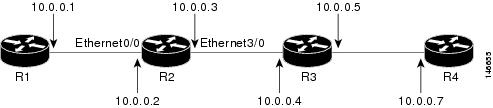
- Configuring a Proxy Receiver on R4
- Configuring an Application ID and a Global Local Policy on R3
- Configuring an Application ID and Separate Bandwidth Pools on R2 for Per-Interface Local Policies
- Configuring an Application ID and a Static Reservation from R1 to R4
Configuring a Proxy Receiver on R4
The following example configures R4 with a proxy receiver to create an RESV message to match the PATH message for the destination 10.0.0.7:
Router# configure terminal
Enter configuration commands, one per line.  End with CNTL/Z.
Router(config)# ip rsvp listener 10.0.0.7 any any reply

Router(config)# end
Configuring an Application ID and a Global Local Policy on R3
The following example configures R3 with an application ID called video and a global local policy in which all RSVP messages are being accepted and forwarded:
Router# configure terminal
Enter configuration commands, one per line.  End with CNTL/Z.
Router(config)# ip rsvp policy identity video policy-locator video
Router(config)# ip rsvp policy local identity video
Router(config-rsvp-policy-local)# forward all
Router(config-rsvp-policy-local)# end
Configuring an Application ID and Separate Bandwidth Pools on R2 for Per-Interface Local Policies
The following example configures R2 with an application ID called video, which is a wildcard regular expression to match any application ID that contains the substring video:
Router# configure terminal
Enter configuration commands, one per line.  End with CNTL/Z.
Router(config)# ip rsvp policy identity video policy-locator .*Video.*
Router(config-rsvp-id)# end
The following example configures R2 with a local policy on ingress Ethernet interface 0/0:
Router# configure terminal
Enter configuration commands, one per line.  End with CNTL/Z.
Router(config)# interface Ethernet0/0
Router(config-if)# ip address 10.0.0.2 255.0.0.0
Router(config-if)# no cdp enable
Router(config-if)# ip rsvp bandwidth 200
Router(config-if)# ip rsvp policy local identity video
Router(config-rsvp-policy-local)# maximum senders 10
Router(config-rsvp-policy-local)# maximum bandwidth group 100
Router(config-rsvp-policy-local)# maximum bandwidth single 10
Router(config-rsvp-policy-local)# forward all
Router(config-rsvp-policy-local)# end
The following example configures R2 with a local policy on egress Ethernet interface 3/0:
Router# configure terminal
Enter configuration commands, one per line.  End with CNTL/Z.
Router(config)# interface Ethernet3/0
Router(config-if)# ip address 10.0.0.3 255.0.0.0
Router(config-if)# no cdp enable
Router(config-if)# ip rsvp bandwidth 200
Router(config-if)# ip rsvp policy local identity video
Router(config-rsvp-policy-local)# maximum senders 10
Router(config-rsvp-policy-local)# maximum bandwidth group 100
Router(config-rsvp-policy-local)# maximum bandwidth single 10
Router(config-rsvp-policy-local)# forward all
Router(config-rsvp-policy-local)# end
Note | PATH messages arrive on ingress Ethernet interface 0/0 and RESV messages arrive on egress Ethernet interface 3/0. |
Configuring an Application ID and a Static Reservation from R1 to R4
The following example configures R1 with an application ID called video and initiates a host generating a PATH message with that application ID:
Router# configure terminal
Enter configuration commands, one per line.  End with CNTL/Z.
Router(config)# ip rsvp policy identity video policy-locator "GUID=www.cisco.com, APP=Video, VER=1.0"
Router(config)# ip rsvp sender-host 10.0.0.7 10.0.0.1 udp 1 1 10 10 identity video
Router(config)# end
Example Verifying RSVP Application ID Support
- Verifying the Application ID and the Global Local Policy on R3
- Verifying the Application ID and the Per-Interface Local Policies on R2
- Verifying the Application ID and the Reservation on R1
Verifying the Application ID and the Global Local Policy on R3
The following example verifies that a global local policy has been configured on R3 with an application ID called Video:
Router# show ip rsvp policy local detail
Global:
  Policy for ID(s): Video
    Preemption Scope: Unrestricted.
    Local Override:   Disabled.
    Fast ReRoute:     Accept.
    Handle:           23000404.
                           Accept               Forward
    Path:                  Yes                  Yes
    Resv:                  Yes                  Yes
    PathError:             Yes                  Yes
    ResvError:             Yes                  Yes
                           Setup Priority       Hold Priority
    TE:                    N/A                  N/A
    Non-TE:                N/A                  N/A
                           Current              Limit
    Senders:               1                    N/A
    Receivers:             1                    N/A
    Conversations:         1                    N/A
    Group bandwidth (bps): 10K                  N/A
    Per-flow b/w (bps):    N/A                  N/A


Generic policy settings:
    Default policy: Accept all
    Preemption:     Disabled
Verifying the Application ID and the Per-Interface Local Policies on R2
The following example verifies that an application ID called Video has been created on R2:
Router# show ip rsvp policy identity
Alias: Video
  Type:    Application ID
  Locator: .*Video.*
The following example verifies that per-interface local policies have been created on Ethernet interface 0/0 and Ethernet interface 3/0 on R2:
Router# show ip rsvp policy local detail
Ethernet0/0:
  Policy for ID(s): Video
    Preemption Scope: Unrestricted.
    Local Override:   Disabled.
    Fast ReRoute:     Accept.
    Handle:           26000404.
                           Accept               Forward
    Path:                  Yes                  Yes
    Resv:                  Yes                  Yes
    PathError:             Yes                  Yes
    ResvError:             Yes                  Yes
                           Setup Priority       Hold Priority
    TE:                    N/A                  N/A
    Non-TE:                N/A                  N/A
                           Current              Limit
    Senders:               1                    10
    Receivers:             0                    N/A
    Conversations:         0                    N/A
    Group bandwidth (bps): 0                    100K
    Per-flow b/w (bps):    N/A                  10K

Ethernet3/0:
  Policy for ID(s): Video
    Preemption Scope: Unrestricted.
    Local Override:   Disabled.
    Fast ReRoute:     Accept.
    Handle:           5A00040A.
                           Accept               Forward
    Path:                  Yes                  Yes
    Resv:                  Yes                  Yes
    PathError:             Yes                  Yes
    ResvError:             Yes                  Yes
                           Setup Priority       Hold Priority
    TE:                    N/A                  N/A
    Non-TE:                N/A                  N/A
                           Current              Limit
    Senders:               0                    10
    Receivers:             1                    N/A
    Conversations:         1                    N/A
    Group bandwidth (bps): 10K                  100K
    Per-flow b/w (bps):    N/A                  10K
Generic policy settings:
    Default policy: Accept all
    Preemption:     Disabled
Note | Notice in the above display that the ingress interface has only its senders counter incremented because the PATH message is checked there. However, the egress interface has its receivers, conversations, and group bandwidth counters incremented because the reservation is checked on the incoming interface, which is the egress interface on R2. |
Verifying the Application ID and the Reservation on R1
The following example verifies that a PATH message containing the application ID called Video has been created on R1:
Router# show ip rsvp sender detail
PATH Session address: 10.0.0.7, port: 1. Protocol: UDP
  Sender address: 10.0.0.1, port: 1
     Inbound from: 10.0.0.1
 on interface:
  Traffic params - Rate: 10K bits/sec, Max. burst: 10K bytes
                   Min Policed Unit: 0 bytes, Max Pkt Size 4294967295 bytes
  Path ID handle: 02000402.
  Incoming policy: Accepted. Policy source(s): Default
    Application ID: 'GUID=www.cisco.com, APP=Video, VER=1.0'
  Status: Proxied
  Output on Ethernet0/0. Policy status: Forwarding. Handle: 01000403
    Policy source(s): Default
Note | You can issue the debug ip rsvp dump path and the debug ip rsvp dump resv commands to get more information about a sender and the application ID that it is using. |
The following example verifies that a reservation with the application ID called Video has been created on R1:
Router# show ip rsvp reservation detail

RSVP Reservation. Destination is 10.0.0.7, Source is 10.0.0.1,
  Protocol is UDP, Destination port is 1, Source port is 1
  Next Hop is 10.0.0.2, Interface is Ethernet0/0
  Reservation Style is Fixed-Filter, QoS Service is Guaranteed-Rate
  Resv ID handle: 01000405.
  Created: 10:07:35 EST Thu Jan 12 2006
  Average Bitrate is 10K bits/sec, Maximum Burst is 10K bytes
  Min Policed Unit: 0 bytes, Max Pkt Size: 0 bytes
  Status:
  Policy: Forwarding. Policy source(s): Default
    Application ID: 'GUID=www.cisco.com, APP=Video, VER=1.0'
Additional References
Related Documents
|
Related Topic |
Document Title |
|---|---|
|
QoS commands: complete command syntax, command modes, command history, defaults, usage guidelines, and examples |
Cisco IOS Quality of Service Solutions Command Reference |
|
QoS configuration tasks related to RSVP |
"Configuring RSVP" module |
|
Cisco United Communications Manager (CallManager) and related features |
"Overview of Cisco Unified Communications Manager and Cisco IOS Interoperability" module |
|
Regular expressions |
"Using the Cisco IOS Command-Line Interface" module |
|
Cisco IOS commands |
MIBs
Technical Assistance
|
Description |
Link |
|---|---|
|
The Cisco Support and Documentation website provides online resources to download documentation, software, and tools. Use these resources to install and configure the software and to troubleshoot and resolve technical issues with Cisco products and technologies. Access to most tools on the Cisco Support and Documentation website requires a Cisco.com user ID and password. |
Feature Information for RSVP Application ID Support
The following table provides release information about the feature or features described in this module. This table lists only the software release that introduced support for a given feature in a given software release train. Unless noted otherwise, subsequent releases of that software release train also support that feature.
Use Cisco Feature Navigator to find information about platform support and Cisco software image support. To access Cisco Feature Navigator, go to www.cisco.com/go/cfn. An account on Cisco.com is not required.
| Table 1 | Feature Information for RSVP Application ID Support |
|
Feature Name |
Releases |
Feature Information |
|---|---|---|
|
RSVP Application ID Support |
12.4(6)T, 12.2(33)SRB |
The RSVP Application ID Support feature introduces application-specific reservations, which enhance the granularity for local policy-match criteria so that you can manage quality of service (QoS) on the basis of application type. |
Glossary
ACL-- access control list. An ACL consists of individual filtering rules grouped together in a single list. It is generally used to provide security filtering, although it may be used to provide a generic packet classification facility.
admission control --The process in which an RSVP reservation is accepted or rejected on the basis of end-to-end available network resources.
application identity (ID) --A string that can be inserted in a policy element in a POLICY_DATA object of an RSVP message to identify the application and associate it with the RSVP reservation request, thus allowing routers along the path to make appropriate decisions based on the application information.
autonomous system --A collection of networks that share the same routing protocol and that are under the same system administration.
bandwidth --The difference between the highest and lowest frequencies available for network signals. The term also is used to describe the rated throughput capacity of a given network medium or protocol.
CCM --Cisco CallManager. The software-based, call-processing component of the Cisco IP telephony solution. The software extends enterprise telephony features and functions to packet telephony network devices such as IP phones, media processing devices, Voice-over-IP (VoIP) gateways, and multimedia applications.
DSCP --differentiated services code point. The six most significant bits of the 1-byte IP type of service (ToS) field. The per-hop behavior represented by a particular DSCP value is configurable. DSCP values range between 0 and 63.
policy --Any defined rule that determines the use of resources within the network. A policy can be based on a user, a device, a subnetwork, a network, or an application.
QoS --quality of service. A measure of performance for a transmission system that reflects its transmission quality and service availability.
RSVP --Resource Reservation Protocol. A protocol for reserving network resources to provide quality of service guarantees to application flows.
RSVP agent --Implements a Resource Reservation Protocol (RSVP) agent on Cisco IOS voice gateways that support Cisco CallManager 5.0.
RTP --Real-Time Transport Protocol. An Internet protocol for transmitting real-time data such as voice and video.
router --A network layer device that uses one or more metrics to determine the optimal path along which network traffic should be forwarded. Routers forward packets from one network to another on the basis of network layer information.
TE --traffic engineering. The techniques and processes used to cause routed traffic to travel through the network on a path other than the one that would have been chosen if standard routing methods had been used.
Cisco and the Cisco logo are trademarks or registered trademarks of Cisco and/or its affiliates in the U.S. and other countries. To view a list of Cisco trademarks, go to this URL: www.cisco.com/go/trademarks. Third-party trademarks mentioned are the property of their respective owners. The use of the word partner does not imply a partnership relationship between Cisco and any other company. (1110R)
Any Internet Protocol (IP) addresses and phone numbers used in this document are not intended to be actual addresses and phone numbers. Any examples, command display output, network topology diagrams, and other figures included in the document are shown for illustrative purposes only. Any use of actual IP addresses or phone numbers in illustrative content is unintentional and coincidental.