



 Feedback
Contents
- Quality of Service Policies Aggregation
- Finding Feature Information
- Prerequisites for QoS Policies Aggregation
- Restrictions for QoS Policies Aggregation
- Information About QoS Policies Aggregation
- Understanding Fragments in Class Definition Statements
- Understanding Fragments for Gigabit Etherchannel Bundles
- How to Configure QoS Policies Aggregation
- How to Configure QoS Policies Aggregation for an Interface
- Configuring a Fragment Traffic Class in a Policy Map
- What to Do Next
- Configuring a Service Fragment Traffic Class
- Troubleshooting Tips
- What to Do Next
- How to Configure QoS Policies Aggregation on Gigabit Etherchannels
- Configuring Fragments on Gigabit Etherchannel Member Link Subinterfaces
- Troubleshooting Tips
- What to Do Next
- Configuring Service Fragments on Physical Interface Supporting a Gigabit Etherchannel Bundle
- Troubleshooting Tips
- What to Do Next
- Configuration Examples for QoS Policies Aggregation
- Example QoS Policies Aggregation
- Example Gigabit Etherchannel QoS Policies Aggregation
- Additional References
- Command Reference
- Feature Information for QoS Policies Aggregation
Quality of Service Policies Aggregation
The Quality of Service Policies Aggregation (QoS Policies Aggregation) feature allows the default traffic classes of different policy maps on the same physical interface to be configured as a single traffic class within the Modular QoS CLI.
Finding Feature Information in This Module
Your Cisco IOS software release may not support all of the features documented in this module. For the latest feature information and caveats, see the release notes for your platform and software release. To reach links to specific feature documentation in this module and to see a list of the releases in which each feature is supported, use the Feature Information for QoS Policies Aggregation.
Finding Support Information for Platforms and Cisco IOS and Catalyst OS Software Images
Use Cisco Feature Navigator to find information about platform support and Cisco IOS and Catalyst OS software image support. To access Cisco Feature Navigator, go to http://www.cisco.com/go/cfn . An account on Cisco.com is not required.
- Finding Feature Information
- Prerequisites for QoS Policies Aggregation
- Restrictions for QoS Policies Aggregation
- Information About QoS Policies Aggregation
- How to Configure QoS Policies Aggregation
- Configuration Examples for QoS Policies Aggregation
- Additional References
- Command Reference
- Feature Information for QoS Policies Aggregation
Finding Feature Information
Your software release may not support all the features documented in this module. For the latest feature information and caveats, see the release notes for your platform and software release. To find information about the features documented in this module, and to see a list of the releases in which each feature is supported, see the Feature Information Table at the end of this document.
Use Cisco Feature Navigator to find information about platform support and Cisco software image support. To access Cisco Feature Navigator, go to www.cisco.com/go/cfn. An account on Cisco.com is not required.
Prerequisites for QoS Policies Aggregation
This feature is configured using the Modular Quality of Service (QoS) Command-Line Interface (CLI) (MQC). It is most useful in QoS configurations where several policy maps attached to the same physical interface want identical treatment of multiple default traffic classes in different policy maps.
Restrictions for QoS Policies Aggregation
This feature only works when multiple policy maps are attached to the same physical interface. This feature cannot be used to collectively classify default traffic classes of policy maps on different physical interfaces.
Information About QoS Policies Aggregation
- Understanding Fragments in Class Definition Statements
- Understanding Fragments for Gigabit Etherchannel Bundles
Understanding Fragments in Class Definition Statements
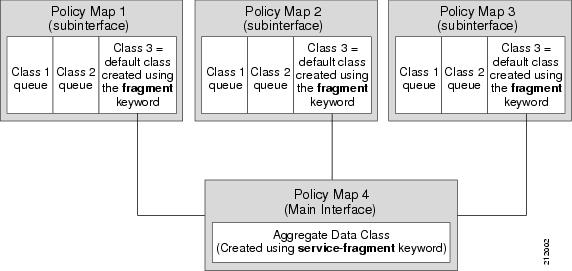
QoS Policies Aggregation introduces the idea of fragments in class definition statements. A default traffic class definition statement can be marked as a fragment within a policy map. Other policy maps on the same interface can also define their default traffic class statements as fragments, if desired. A separate policy map can then be created with a service fragment class definition statement that will be used to apply QoS to all of the fragments as a single group.
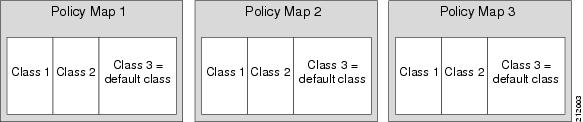
The figure below provides an example of one physical interface with three attached policy maps that is not using fragments. Note that each policy map has a default traffic class that can only classify traffic for the default traffic within its own policy map.
The figure below shows the same configuration configured with fragments, and adds a fourth policy map with a class definition statement that classifies the fragments collectively. The default traffic classes are now classified as one service fragment group rather than three separate default traffic classes within the individual policy maps.
Understanding Fragments for Gigabit Etherchannel Bundles
Fragments can be configured for Gigabit Etherchannels when all of the member links of the Gigabit Etherchannel (GEC) bundle are on the same physical interface. Notably, if VLANs on the same physical interface are bundled, fragments can be used to define the collective treatment of all default traffic for the GEC bundle of VLAN subinterface member links.
When fragments are configured for Gigabit Etherchannel bundles, the policy maps that have a default traffic class configured using the fragment keyword are attached to the member subinterface links, and the policy maps that have a traffic class configured with the service-fragment keyword to collectively classify the fragments is attached to the physical interface.
How to Configure QoS Policies Aggregation
- How to Configure QoS Policies Aggregation for an Interface
- How to Configure QoS Policies Aggregation on Gigabit Etherchannels
How to Configure QoS Policies Aggregation for an Interface
Configuring a Fragment Traffic Class in a Policy Map
This procedure only shows how to configure the default traffic class as a fragment within a policy map. It does not include steps on configuring other classes within the policy map, or other policy maps on the router.
Like any policy map, the configuration is not managing network traffic until it has been attached to an interface. This procedure does not cover the process of attaching a policy map to an interface.
Note the following points about attaching and removing a policy map:
- To configure QoS Policies Aggregation, you must attach the policy map that contains the service-fragment keyword to the main interface first, and then you must attach the policy map that contains the fragment keyword to the main interface.
- To disable QoS Policies Aggregation, you must remove the policy map that contains the fragment keyword from the subinterface first, and then you must remove the policy map that contains the service-fragment keyword from the subinterface.
DETAILED STEPS
Example
In the following example, a fragment named BestEffort is created in policy map subscriber1 and policy map subscriber 2.
policy-map subscriber1
class voice
set cos 5
priority level 1
class video
set cos 4
priority level 2
class class-default fragment BestEffort
shape average 200000000
bandwidth remaining ratio 10
policy-map subscriber 2
class voice
set cos 5
priority level 1
class video
set cos 4
priority level 2
class class-default fragment BestEffort
shape average 200000000
bandwidth remaining ratio 10
What to Do Next
After configuring multiple default class statements as fragments in a policy map, a separate policy map with a class statement using the service-fragment keyword must be configured to apply QoS to the class statements configured as fragments.
This process is documented in the Configuring a Service Fragment Traffic Class.
Configuring a Service Fragment Traffic Class
This task describes how to configure a service fragment traffic class statement within a policy map. A service fragment traffic class is used to apply QoS to a collection of default class statements that have been configured previously in other policy maps as fragments.
This procedure assumes that fragment default traffic classes were already created. The procedure for creating fragment default traffic classes is documented in the Configuring a Fragment Traffic Class in a Policy Map.
Like any policy map, the configuration is not managing network traffic until it has been attached to an interface. This procedure does not cover the process of attaching a policy map to an interface.
DETAILED STEPS
Example
In the following example, a policy map is created to apply QoS to all fragments named BestEffort.
policy-map main-interface
class data service-fragment BestEffort
shape average 400000000
In the following example, two fragments are created and then classified collectively using a service fragment.
policy-map subscriber1
class voice
set cos 5
priority level 1
class video
set cos 4
priority level 2
class class-default fragment BestEffort
shape average 200000000
bandwidth remaining ratio 10
policy-map subscriber 2
class voice
set cos 5
priority level 1
class video
set cos 4
priority level 2
class class-default fragment BestEffort
shape average 200000000
bandwidth remaining ratio 10
policy-map main-interface
class data service-fragment BestEffort
shape average 200000000
shape average 200000000
bandwidth remaining ratio 10
How to Configure QoS Policies Aggregation on Gigabit Etherchannels
To properly configure QoS Policies Aggregation on a Gigabit Etherchannel bundle, the following actions must be executed:
- fragment traffic classes have to be configured and attached to the member link subinterfaces
- service fragment traffic classes have to be configured and attached to the main physical interfaces
- Configuring Fragments on Gigabit Etherchannel Member Link Subinterfaces
- Configuring Service Fragments on Physical Interface Supporting a Gigabit Etherchannel Bundle
Configuring Fragments on Gigabit Etherchannel Member Link Subinterfaces
This procedure assumes that a service fragment traffic class has already been created. A service fragment traffic class cannot be configured without configuring a fragment class. The procedure for creating a fragment class is documented in the Configuring a Fragment Traffic Class in a Policy Map. The procedure for creating a service fragment traffic classes is documented in the Configuring a Service Fragment Traffic Class.
These instructions do not provide any details about the options that can be configured for Gigabit Etherchannel member link subinterfaces. These instructions only document the procedure for attaching a policy map that already has a fragment traffic class to a member link subinterface.
 Note | Fragments cannot be used for traffic on two or more physical interfaces. The GEC must all be on the same physical interface for this configuration to work properly. > |
DETAILED STEPS
Example
In the following example, the service policy named subscriber has a fragment default traffic class and is attached to the member link subinterface of a Gigabit Etherchannel bundle.
policy-map subscriber
  class voice
    priority level 1
  class video
    priority level 2
  class class-default fragment BE
    shape average 100000000
    bandwidth remaining ratios 80
policy-map aggregate-member-link
    class BestEffort service-fragment BE
    shape average 100000000
!
interface Port-channel1
 ip address 172.1.2.3 255.255.0.0
!
interface Port-channel1.100
 encapsulation dot1Q 100
 ip address 173.1.2.100 255.255.255.0
 service-policy output subscriber
!
Troubleshooting Tips
This configuration will not work until a service fragment default traffic class is created to classify the default traffic classes marked as fragments. This service fragment traffic class must be configured for this configuration to have any affect on network traffic.
What to Do Next
This configuration will not work until a service fragment default traffic class is created to classify the default traffic classes marked as fragments.
Follow the instructions in the Configuring Service Fragments on Physical Interface Supporting a Gigabit Etherchannel Bundle to complete this configuration.
Configuring Service Fragments on Physical Interface Supporting a Gigabit Etherchannel Bundle
This procedure assumes that a service fragment traffic class has already been created. A service fragment traffic class cannot be configured without configuring a fragment class. The procedure for creating a fragment class is documented in the Configuring a Fragment Traffic Class in a Policy Map. The procedure for creating a service fragment traffic classes is documented in the Configuring a Service Fragment Traffic Class.
These instructions do not provide any details about the options that can be configured for Gigabit Etherchannel member link subinterfaces. These instructions only document the procedure for attaching a policy map that already has a fragment traffic class to a member link subinterface.
Note | This process only works if all of the links of the GEC bundle are on the same physical interface. > |
DETAILED STEPS
Example
In the following example, policy map subscriber is configured with a fragment class named BE. The fragment is then configured as part of a policy map named aggregate-member-link. Policy map subscriber is then attached to the bundle subinterfaces while policy map aggregate-member-link is attached to the physical interface.
port-channel load-balancing vlan-manual
class-map match-all BestEffort
!
class-map match-all video
!
class-map match-all voice
!
policy-map subscriber
  class voice
    priority level 1
  class video
    priority level 2
  class class-default fragment BE
    shape average 100000000
    bandwidth remaining ratios 80
policy-map aggregate-member-link
    class BestEffort service-fragment BE
    shape average 100000000
!
interface Port-channel1
 ip address 172.1.2.3 255.255.0.0
!
interface Port-channel1.100
 encapsulation dot1Q 100
 ip address 173.1.2.100 255.255.255.0
 service-policy output subscriber
!
interface Port-channel1.200
 encapsulation dot1Q 200
 ip address 173.1.2.200 255.255.255.0
 service-policy output subscriber
!
interface Port-channel1.300
 encapsulation dot1Q 300
 ip address 173.1.2.300 255.255.255.0
 service-policy output subscriber
!
interface GigabitEthernet1/1/1
 no ip address
 channel-group 1 mode on
 service-policy output aggregate-member-link
!
interface GigabitEthernet1/1/2
 no ip address
 channel-group 1 mode on
 service-policy output aggregate-member-link
Configuration Examples for QoS Policies Aggregation
Example QoS Policies Aggregation
In the following example, QoS Policies Aggregation is used to define a fragment class of traffic to classify default traffic using the default traffic class named BestEffort. All default traffic from the policy maps named subscriber1 and subscriber2 is part of the fragment default traffic class named BestEffort. This default traffic is then shaped collectively by creating a class called data that uses the service-fragment keyword and the shape command.
Note the following about this example:
- The class-name for each fragment default traffic class is "BestEffort."
- The class-name of "BestEffort" is also used to define the class where the service-fragment keyword is entered. This class applies a shaping policy to all traffic forwarded using the fragment default traffic classes named "BestEffort."
policy-map subscriber1
class voice
set cos 5
priority level 1
class video
set cos 4
priority level 2
class class-default fragment BestEffort
shape average 200000000
bandwidth remaining ratio 10
policy-map subscriber 2
class voice
set cos 5
priority level 1
class video
set cos 4
priority level 2
class class-default fragment BestEffort
shape average 200000000
bandwidth remaining ratio 10
policy-map input_policy
class class-default
set dscp default
policy-map main-interface
class data service-fragment BestEffort
shape average 400000000
interface portchannel1.1001
encapsulation dot1q 1001
service-policy output subscriber1
service-policy input input_policy
interface portchannel1.1002
encapsulation dot1q 1002
service-policy output subscriber2
service-policy input input_policy
interface gigabitethernet 0/1
description member-link1
port channel 1
service-policy output main-interface
interface gigabitethernet 0/2
description member-link2
port channel 1
service-policy output main-interface
Example Gigabit Etherchannel QoS Policies Aggregation
In the following example, policy map subscriber is configured with a fragment class named BE. The fragment is then configured as part of a policy map named aggregate-member-link. Policy map subscriber is then attached to the bundle subinterfaces while policy map aggregate-member-link is attached to the physical interface.
port-channel load-balancing vlan-manual
class-map match-all BestEffort
!
class-map match-all video
!
class-map match-all voice
!
policy-map subscriber
  class voice
    priority level 1
  class video
    priority level 2
  class class-default fragment BE
    shape average 100000000
    bandwidth remaining ratios 80
policy-map aggregate-member-link
    class BestEffort service-fragment BE
    shape average 100000000
!
interface Port-channel1
 ip address 172.1.2.3 255.255.0.0
!
interface Port-channel1.100
 encapsulation dot1Q 100
 ip address 173.1.2.100 255.255.255.0
 service-policy output subscriber
!
interface Port-channel1.200
 encapsulation dot1Q 200
 ip address 173.1.2.200 255.255.255.0
 service-policy output subscriber
!
interface Port-channel1.300
 encapsulation dot1Q 300
 ip address 173.1.2.300 255.255.255.0
 service-policy output subscriber
!
interface GigabitEthernet1/1/1
 no ip address
 channel-group 1 mode on
 service-policy output aggregate-member-link
!
interface GigabitEthernet1/1/2
 no ip address
 channel-group 1 mode on
 service-policy output aggregate-member-link
Additional References
Related Documents
|
Related Topic |
Document Title |
|---|---|
|
Modular Quality of Service Command-Line Interface |
Applying QoS Features Using the MQC |
|
Distribution of Remaining Bandwidth Using Ratio |
Distribution of Remaining Bandwidth Using Ratio |
|
Class-Based Shaping |
Regulating Packet Flow on a Per-Class Basis -- Using Class-Based Traffic Shaping |
MIBs
Technical Assistance
|
Description |
Link |
|---|---|
|
The Cisco Support website provides extensive online resources, including documentation and tools for troubleshooting and resolving technical issues with Cisco products and technologies. To receive security and technical information about your products, you can subscribe to various services, such as the Product Alert Tool (accessed from Field Notices), the Cisco Technical Services Newsletter, and Really Simple Syndication (RSS) Feeds. Access to most tools on the Cisco Support website requires a Cisco.com user ID and password. |
Command Reference
The following command is modified in the feature documented in this module. For information about these commands, see the Cisco IOS Quality of Service Command Reference at http://www.cisco.com/en/US/docs/ios/qos/command/reference/qos_book.html . For information about all Cisco IOS commands, use the Command Lookup Tool at http://tools.cisco.com/Support/CLILookup or the Cisco IOS Master Command List, All Releases , at http://www.cisco.com/en/US/docs/ios/mcl/allreleasemcl/all_book.html .
- class (policy-map)
Feature Information for QoS Policies Aggregation
The following table provides release information about the feature or features described in this module. This table lists only the software release that introduced support for a given feature in a given software release train. Unless noted otherwise, subsequent releases of that software release train also support that feature.
Use Cisco Feature Navigator to find information about platform support and Cisco software image support. To access Cisco Feature Navigator, go to www.cisco.com/go/cfn. An account on Cisco.com is not required.
| Table 1 | Feature Information for QoS Policies Aggregation |
|
Feature Name |
Releases |
Feature Information |
|---|---|---|
|
QoS Policies Aggregation |
12.2(33)SRA |
The Quality of Service Policies Aggregation (QoS Policies Aggregation) feature allows the default traffic classes of different policy maps on the same physical interface to be configured as a single traffic class within the Modular QoS CLI. |
Cisco and the Cisco Logo are trademarks of Cisco Systems, Inc. and/or its affiliates in the U.S. and other countries. A listing of Cisco's trademarks can be found at www.cisco.com/go/trademarks. Third party trademarks mentioned are the property of their respective owners. The use of the word partner does not imply a partnership relationship between Cisco and any other company. (1005R)
Any Internet Protocol (IP) addresses and phone numbers used in this document are not intended to be actual addresses and phone numbers. Any examples, command display output, network topology diagrams, and other figures included in the document are shown for illustrative purposes only. Any use of actual IP addresses or phone numbers in illustrative content is unintentional and coincidental.