



 Feedback
Contents
- Configuring NetFlow v9 for IPv6
- Finding Feature Information
- Prerequisites for NetFlow v9 for IPv6
- Restrictions for NetFlow v9 for IPv6
- Information About NetFlow v9 for IPv6
- NetFlow and NDE on the PFC
- NetFlow Export Format Version 9
- How to Configure NetFlow v9 for IPv6
- Configuring the NDE for VRF Interface
- Configuration Examples for NetFlow v9 for IPv6
- Example Configuring the NetFlow v9 for IPv6 Feature
- Additional References
- Feature Information for NetFlow v9 for IPv6
Configuring NetFlow v9 for IPv6
This module contains information about and instructions for configuring NetFlow and NetFlow Data Export (NDE) for capturing and exporting data from IP version 6 (IPv6) traffic flows using the NetFlow version 9 (v9) export format.
Finding Feature Information
Your software release may not support all the features documented in this module. For the latest feature information and caveats, see the release notes for your platform and software release. To find information about the features documented in this module, and to see a list of the releases in which each feature is supported, see the Feature Information Table at the end of this document.
Use Cisco Feature Navigator to find information about platform support and Cisco software image support. To access Cisco Feature Navigator, go to www.cisco.com/go/cfn. An account on Cisco.com is not required.
Prerequisites for NetFlow v9 for IPv6
Your router must be configured with Cisco IOS Release 12.2(33)SRB or later releases to configure the NetFlow v9 for IPv6 feature.
Restrictions for NetFlow v9 for IPv6
NDE v9 records for IPv6 do not contain Autonomous System (AS) numbers and prefix length information.
Information About NetFlow v9 for IPv6
NetFlow and NDE on the PFC
The NetFlow cache on the Policy Feature Card (PFC) captures statistics for flows that are routed in hardware.
The PFC uses one of these flow masks to create NetFlow entries:
- source-only --The cache contains one entry for each source IP address. All flows from a given source IP address use this entry.
- destination --The cache contains one entry for each destination IP address. All flows to a given destination IP address use this entry.
- destination-source --The cache contains one entry for each source and destination IP address pair. All flows between the same source and destination IP addresses use this entry.
- destination-source-interface --Adds the source VLAN SNMP ifIndex to the information in the destination-source flow mask.
- full --A separate cache entry is created for each IP flow. A full entry includes the source IP address, destination IP address, protocol, and protocol interfaces.
- full-interface --Adds the source VLAN SNMP ifIndex to the information in the full flow mask.
NetFlow Export Format Version 9
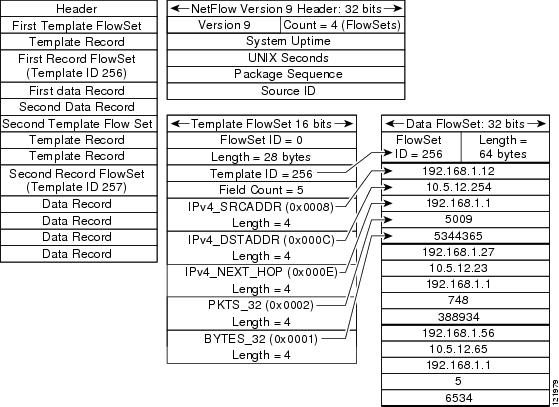
For all NetFlow export versions, the NetFlow export datagram consists of a header and a sequence of flow records. The header contains information such as sequence number, record count, and system uptime. The flow record contains flow information, such as IP addresses, ports, and routing information.
NetFlow version 9 export format is the newest NetFlow export format. The distinguishing feature of the NetFlow version 9 export format is that it is template based. Templates make the record format extensible. NetFlow version 9 export format allows future enhancements to NetFlow without requiring concurrent changes to the basic flow-record format.
The NetFlow version 9 export record format is different from the traditional NetFlow fixed format export record. In NetFlow version 9, a template describes the NetFlow data, and the flow set contains the actual data. This arrangement allows for flexible export.
The use of templates with the NetFlow version 9 export format provides several other key benefits:
- You can export almost any information from a router or switch, including Layer 2 through 7 information, routing information, IP version 6 (IPv6), IP version 4 (IPv4), multicast, and Multiprotocol Label Switching (MPLS) information. This new information allows new applications for export data and new views of network behavior.
- Third-party business partners who produce applications that provide NetFlow collector or display services for NetFlow are not required to recompile their applications each time a new NetFlow export field is added. Instead, they can use an external data file that documents the known template formats.
- New features can be added to NetFlow more quickly, without breaking current implementations.
- NetFlow is "future-proofed" against new or developing protocols, because the version 9 export format can be adapted to provide support for them and for other non-NetFlow-based approaches to data collection.
Table 1 shows the NetFlow version 9 export packet header format.
| Table 1 | Field Names and Descriptions for the NetFlow Version 9 Export Packet Header |
|
Field Name |
Bytes |
Description |
|---|---|---|
|
Version |
0-1 |
The version of NetFlow records exported in this packet; for version 9, this value is 0x0009. |
|
Count |
2-3 |
Number of FlowSet records (both template and data) that are contained within this packet. |
|
System Uptime |
4-7 |
Time, in milliseconds, since this device was first booted. |
|
UNIX Seconds |
8-11 |
Seconds since 0000 Coordinated Universal Time (UTC) 1970. |
|
Sequence Number |
12-15 |
Incremental sequence counter of all export packets sent by this export device; this value is cumulative, and it can be used to find out whether any export packets have been missed. This is a change from the NetFlow version 5 and version 8 headers, where this number represented "total flows." |
|
Source ID |
16-19 |
The Source ID field is a 32-bit value that is used to guarantee uniqueness for each flow exported from a particular device. (The Source ID field is the equivalent of the engine type and engine ID fields found in the NetFlow version 5 and version 8 headers.) The format of this field is vendor specific. In Ciscoâs implementation, the first two bytes are reserved for future expansion and are always zero. Byte 3 provides uniqueness with respect to the routing engine on the exporting device. Byte 4 provides uniqueness with respect to the particular line card or Versatile Interface Processor on the exporting device. Collector devices should use the combination of the source IP address and the Source ID field to associate an incoming NetFlow export packet with a unique instance of NetFlow on a particular device. |
The figure below shows a typical example of exporting data using the NetFlow version 9 export format.
How to Configure NetFlow v9 for IPv6
Configuring the NDE for VRF Interface
DETAILED STEPS
Examples
The following output of the show mls nde command verifies that NDE is enabled on the router.
Router#
show mls nde
 NetFlow Data Export enabled
 Exporting flows to 10.30.30.2 (12345)  172.16.10.2 (88)
 Exporting flows from 10.4.9.149 (58970)
 Version: 9
 Layer2 flow creation is disabled
 Layer2 flow export is disabled
 Include Filter not configured
 Exclude Filter not configured
 Total NetFlow Data Export Packets are:
    0 packets, 0 no packets, 0 records
 Total NetFlow Data Export Send Errors:
        IPWRITE_NO_FIB = 0
        IPWRITE_ADJ_FAILED = 0
        IPWRITE_PROCESS = 0
        IPWRITE_ENQUEUE_FAILED = 0
        IPWRITE_IPC_FAILED = 0
        IPWRITE_OUTPUT_FAILED = 0
        IPWRITE_MTU_FAILED = 0
        IPWRITE_ENCAPFIX_FAILED = 0
 NetFlow Aggregation Disabled
Configuration Examples for NetFlow v9 for IPv6
Example Configuring the NetFlow v9 for IPv6 Feature
The following example shows how to configure the router for NetFlow and NDE for IPv6 traffic using NetFlow export format version 9.
ipv6 unicast-routing
mls flow ipv6 interface-full
mls nde sender
ip flow-export version 9
ip flow-export destination 172.16.10.2 88
interface FastEthernet1/1
ipv6 address
2001:0DB8::1/64
Additional References
Related Documents
MIBs
Technical Assistance
|
Description |
Link |
|---|---|
|
The Cisco Support and Documentation website provides online resources to download documentation, software, and tools. Use these resources to install and configure the software and to troubleshoot and resolve technical issues with Cisco products and technologies. Access to most tools on the Cisco Support and Documentation website requires a Cisco.com user ID and password. |
Feature Information for NetFlow v9 for IPv6
The following table provides release information about the feature or features described in this module. This table lists only the software release that introduced support for a given feature in a given software release train. Unless noted otherwise, subsequent releases of that software release train also support that feature.
Use Cisco Feature Navigator to find information about platform support and Cisco software image support. To access Cisco Feature Navigator, go to www.cisco.com/go/cfn. An account on Cisco.com is not required.
| Table 2 | Feature Information for NetFlow v9 for IPv6 |
|
Feature Name |
Releases |
Feature Information |
|---|---|---|
|
NetFlow v9 for IPv6 |
12.2(33)SRB |
The NetFlow v9 for IPv6 feature enables the export of NetFlow flow information for IPv6 traffic. In Cisco IOS Release 12.2(33)SRB, support for this feature was introduced on the Cisco 7600 series routers. The following commands were introduced or modified: mls flow, mls nde sender. |
Cisco and the Cisco Logo are trademarks of Cisco Systems, Inc. and/or its affiliates in the U.S. and other countries. A listing of Cisco's trademarks can be found at www.cisco.com/go/trademarks. Third party trademarks mentioned are the property of their respective owners. The use of the word partner does not imply a partnership relationship between Cisco and any other company. (1005R)
Any Internet Protocol (IP) addresses and phone numbers used in this document are not intended to be actual addresses and phone numbers. Any examples, command display output, network topology diagrams, and other figures included in the document are shown for illustrative purposes only. Any use of actual IP addresses or phone numbers in illustrative content is unintentional and coincidental.