



 Feedback
Contents
- NetFlow Layer 2 and Security Monitoring Exports
- Finding Feature Information
- Prerequisites for NetFlow Layer 2 and Security Monitoring Exports
- Restrictions for NetFlow Layer 2 and Security Monitoring Exports
- Information About NetFlow Layer 2 and Security Monitoring Exports
- NetFlow Layer 2 and Security Monitoring
- Layer 3 Information Capture Using NetFlow Layer 2 and Security Monitoring Exports
- Layer 2 Information Capture Using NetFlow Layer 2 and Security Monitoring Exports
- Understanding Layer 2 MAC Address Fields
- Understanding Layer 2 VLAN ID Fields
- NBAR Data Export
- Benefits of NBAR NetFlow Integration
- How to Configure NetFlow Layer 2 and Security Monitoring Exports
- Configuring NetFlow Layer 2 and Security Monitoring Exports
- Verifying NetFlow Layer 2 and Security Monitoring Exports
- Restrictions
- Configuring NBAR Support for NetFlow Exports
- Configuration Examples for NetFlow Layer 2 and Security Monitoring Exports
- Analyzing a Simulated FTP Attack Example
- Analyzing a Simulated ICMP Ping Attack Example
- Configuring NBAR Support for NetFlow Exports Example
- Additional References
- Feature Information for NetFlow Layer 2 and Security Monitoring Exports
- Glossary
NetFlow Layer 2 and Security Monitoring Exports
The NetFlow Layer 2 and Security Monitoring Exports feature improves your ability to detect and analyze network threats such as denial of service (DoS) attacks by increasing the number of fields from which NetFlow can capture values.
NetFlow is a Cisco IOS technology that provides statistics on packets flowing through a router. NetFlow is the standard for acquiring IP operational data from IP networks. NetFlow provides network and security monitoring, network planning, traffic analysis, and IP accounting.
- Finding Feature Information
- Prerequisites for NetFlow Layer 2 and Security Monitoring Exports
- Restrictions for NetFlow Layer 2 and Security Monitoring Exports
- Information About NetFlow Layer 2 and Security Monitoring Exports
- How to Configure NetFlow Layer 2 and Security Monitoring Exports
- Configuration Examples for NetFlow Layer 2 and Security Monitoring Exports
- Additional References
- Feature Information for NetFlow Layer 2 and Security Monitoring Exports
- Glossary
Finding Feature Information
Your software release may not support all the features documented in this module. For the latest feature information and caveats, see the release notes for your platform and software release. To find information about the features documented in this module, and to see a list of the releases in which each feature is supported, see the Feature Information Table at the end of this document.
Use Cisco Feature Navigator to find information about platform support and Cisco software image support. To access Cisco Feature Navigator, go to www.cisco.com/go/cfn. An account on Cisco.com is not required.
Prerequisites for NetFlow Layer 2 and Security Monitoring Exports
Before you configure NetFlow Layer 2 and Security Monitoring Exports, you should understand NetFlow accounting and how to configure your router to capture IP traffic accounting statistics using NetFlow. See the " Cisco IOS NetFlow Overview " and " Configuring NetFlow and NetFlow Data Export " modules for more details.
NetFlow and Cisco Express Forwarding (CEF), distributed CEF (dCEF), or fast switching must be configured on your system.
Restrictions for NetFlow Layer 2 and Security Monitoring Exports
If you want to export the data captured with the NetFlow Layer 2 and Security Monitoring feature, you must configure NetFlow to use the NetFlow Version 9 data export format.
Information About NetFlow Layer 2 and Security Monitoring Exports
NetFlow Layer 2 and Security Monitoring
The Layer 2 and Layer 3 fields supported by the NetFlow Layer 2 and Security Monitoring Exports feature increase the amount of information that can be obtained by NetFlow about the traffic in your network. You can use this new information for applications such as traffic engineering and usage-based billing.
The Layer 3 IP header fields for which the NetFlow Layer 2 and Security Monitoring Exports feature captures the values are as follows:
The Layer 2 fields for which NetFlow Layer 2 and Security Monitoring Exports feature captures the values are as follows:
- Source MAC address field from frames that are received by the NetFlow router
- Destination MAC address field from frames that are transmitted by the NetFlow router
- VLAN ID field from frames that are received by the NetFlow router
- VLAN ID field from frames that are transmitted by the NetFlow router
The Layer 3 fields captured by the NetFlow Layer 2 and Security Monitoring Exports feature improve the capabilities of NetFlow for identifying DoS attacks. The Layer 2 fields captured by the NetFlow Layer 2 and Security Monitoring Exports feature can help you identify the path that the DoS attack is taking through the network.
The Layer 2 and Layer 3 fields captured by the NetFlow Layer 2 and Security Monitoring Exports feature are not key fields. They provide additional information about the traffic in an existing flow. Changes in the values of NetFlow key fields such as the source IP address from one packet to the next packet result in the creation of a new flow. For example, if the first packet captured by NetFlow has a source IP address of 10.34.0.2 and the second packet captured has a source IP address of 172.16.213.65, then NetFlow will create two separate flows.
Many DoS attacks consist of an attacker sending the same type of IP datagram again and again in an attempt to overwhelm the target systems. In such cases the incoming traffic often has similar characteristics, such as the same values in each datagram for one or more of the fields that the NetFlow Layer 2 and Security Monitoring Exports feature can capture.
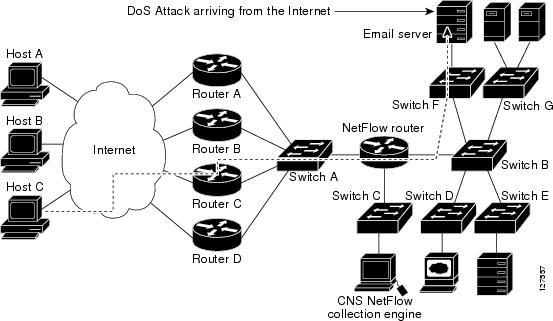
There is no easy way to identify the originator of many DoS attacks because the IP source address of the device sending the traffic is usually forged. However, you can easily trace the traffic back through the network to the router on which it is arriving by capturing the MAC address and VLAN-ID fields using the NetFlow Layer 2 and Security Monitoring Exports feature. If the router on which the traffic is arriving supports NetFlow, you can configure the NetFlow Layer 2 and Security Monitoring Exports feature on it to identify the interface where the traffic is arriving. The figure below shows an example of an attack in progress.
 Note | You can analyze the data captured by NetFlow directly from the router using the show ip cache verbose flow command or the CNS NetFlow Collector Engine. |
Once you have concluded that a DoS attack is taking place by analyzing the Layer 3 fields in the NetFlow flows, you can analyze the Layer 2 fields in the flows to discover the path that the DoS attack is taking through the network.
An analysis of the data captured by the NetFlow Layer 2 and Security Monitoring Exports feature for the scenario shown in Figure 1 indicates that the DoS attack is arriving on Router C because the upstream MAC address is from the interface that connects Router C to Switch A. It is also evident that there are no routers between the target host (the e-mail server) and the NetFlow router because the destination MAC address of the DoS traffic that the NetFlow router is forwarding to the email server is the MAC address of the e-mail server.
You can find out the MAC address that Host C is using to send the traffic to Router C by configuring the NetFlow Layer 2 and Security Monitoring Exports feature on Router C. The source MAC address will be from Host C. The destination MAC address will be for the interface on the NetFlow router.
Once you know the MAC address that Host C is using and the interface on Router C on which Host Câs DoS attack is arriving, you can mitigate the attack by reconfiguring Router C to block Host Câs traffic. If Host C is on a dedicated interface, you disable the interface. If Host C is using an interface that carries traffic from other users, you must configure your firewall to block Host Câs traffic but still allow the traffic from the other users to flow through Router C.
- Layer 3 Information Capture Using NetFlow Layer 2 and Security Monitoring Exports
- Layer 2 Information Capture Using NetFlow Layer 2 and Security Monitoring Exports
- Layer 3 Information Capture Using NetFlow Layer 2 and Security Monitoring Exports
- Layer 2 Information Capture Using NetFlow Layer 2 and Security Monitoring Exports
Layer 3 Information Capture Using NetFlow Layer 2 and Security Monitoring Exports
The NetFlow Layer 2 and Security Monitoring Exports feature has support for capturing five fields from Layer 3 IP traffic in a flow:
The figure below shows the fields in an IP packet header.

The table below describes the header fields in Figure 2.
| Table 1 | IP Packet Header Fields |
The figure below shows the fields in an ICMP datagram.

The table below interprets the packet format in Figure 3. ICMP datagrams are carried in the data area of an IP datagram, after the IP header.
| Table 2 | ICMP Packet Format |
|
Type |
Name |
Codes |
|---|---|---|
|
0 |
Echo reply |
0--None |
|
1 |
Unassigned |
-- |
|
2 |
Unassigned |
-- |
|
3 |
Destination unreachable |
0--Net unreachable. 1--Host unreachable. 2--Protocol unreachable. 3--Port unreachable. 4--Fragmentation needed and DF bit set. 5--Source route failed. 6--Destination network unknown. 7--Destination host unknown. 8--Source host isolated. 9--Communication with destination network is administratively prohibited. 10--Communication with destination host is administratively prohibited. 11--Destination network unreachable for ToS. 12--Destination host unreachable for ToS. |
|
4 |
Source quench |
0--None. |
|
5 |
Redirect |
0--None. 0--Redirect datagram for the network. 1--Redirect datagram for the host. 2--Redirect datagram for the ToS and network. 3--Redirect datagram for the ToS and host. |
|
6 |
Alternate host address |
0--Alternate address for host. |
|
7 |
Unassigned |
-- |
|
8 |
Echo |
0--None. |
|
9 |
Router advertisement |
0--None. |
|
10 |
Router selection |
0--None. |
|
11 |
Time Exceeded |
0--Time to live exceeded in transit. |
|
12 |
Parameter problem |
0--Pointer indicates the error. 1--Missing a required option. 2--Bad length. |
|
13 |
Timestamp |
0--None. |
|
14 |
Timestamp reply |
0--None. |
|
15 |
Information request |
0--None. |
|
16 |
Information reply |
0--None. |
|
17 |
Address mask request |
0--None. |
|
18 |
Address mask reply |
0--None. |
|
19 |
Reserved (for security) |
-- |
|
20-29 |
Reserved (for robustness experiment) |
-- |
|
30 |
Trace route |
-- |
|
31 |
Datagram conversion error |
-- |
|
32 |
Mobile host redirect |
-- |
|
33 |
IPv6 where-are-you |
-- |
|
34 |
IPv6 I-am-here |
-- |
|
35 |
Mobile registration request |
-- |
|
36 |
Mobile registration reply |
-- |
|
37-255 |
Reserved |
-- |
Layer 2 Information Capture Using NetFlow Layer 2 and Security Monitoring Exports
The NetFlow Layer 2 and Security Monitoring Exports feature has the ability to capture the values of the MAC address and VLAN ID fields from flows. The two supported VLAN types are 802.1q and the Cisco Inter-Switch Link (ISL) protocol.
- Understanding Layer 2 MAC Address Fields
- Understanding Layer 2 VLAN ID Fields
- Understanding Layer 2 MAC Address Fields
- Understanding Layer 2 VLAN ID Fields
Understanding Layer 2 MAC Address Fields
The new Layer 2 fields for which the NetFlow Layer 2 and Security Monitoring Exports feature captures the values are as follows:
- The source MAC address field from frames that are received by the NetFlow router
- The destination MAC address field from frames that are transmitted by the NetFlow router
- The VLAN ID field from frames that are received by the NetFlow router
- The VLAN ID field from frames that are transmitted by the NetFlow router
The figure below shows the Ethernet Type II and Ethernet 802.3 frame formats. The destination address field and the source address field in the frame formats are the MAC addresses values that are captured by NetFlow.
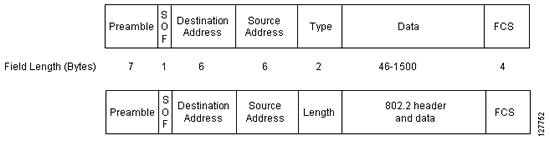
The table below explains the fields for the Ethernet frame formats.
| Table 3 | Ethernet Type II and 802.3 Frame Fields |
|
Field |
Description |
|---|---|
|
Preamble |
The entry in the Preamble field is an alternating pattern of 1s and 0s that tells receiving stations that a frame is coming. It also provides a means for the receiving stations to synchronize their clocks with the incoming bit stream. |
|
SOF (Start of frame) |
The SOF field holds an alternating pattern of 1s and 0s, ending with two consecutive 1-bits indicating that the next bit is the first bit of the first byte of the destination MAC address. |
|
Destination Address |
The 48-bit destination address identifies which station(s) on the LAN should receive the frame. The first two bits of the destination MAC address are reserved for special functions:
The remaining 46 bits are a uniquely assigned value that identifies a single station, a defined group of stations, or all stations on the network. |
|
Source Address |
The 48-bit source address identifies which station transmitted the frame. The source address is always an individual address, and the leftmost bit in the SA field is always 0. |
|
Type or Length |
Type--In an Ethernet Type II frame, this part of the frame is used for the Type field. The Type field is used to identify the next layer protocol in the frame. Length--In an 802.3 Ethernet frame, this part of the frame is used for the Length field. The Length field is used to indicate the length of the Ethernet frame. The value can be from 46 to 1500 bytes. |
|
Data or 802.2 header and data |
(Ethernet type II) 46 to 1500 bytes of data or (802.3/802.2) 8 bytes of header and 38 to 1492 bytes of data. |
|
FCS (Frame Check Sequence) |
This field contains a 32-bit cyclic redundancy check (CRC) value, which is created by the sending station and is recalculated by the receiving station to check for damaged frames. The FCS is generated for the DA, SA, Type, and Data fields of the frame. The FCS does not include the data portion of the frame. |
Understanding Layer 2 VLAN ID Fields
NetFlow can capture the value in the VLAN ID field for 802.1q tagged VLANs and Cisco ISL encapsulated VLANs. This section describes the two types of VLANs; 802.1q and ISL.
Note | ISL and 802.1q are commonly called VLAN encapsulation protocols. |
Understanding 802.1q VLANs
Devices that use 802.1q insert a four-byte tag into the original frame before it is transmitted. The figure below shows the format of an 802.1q tagged Ethernet frame.
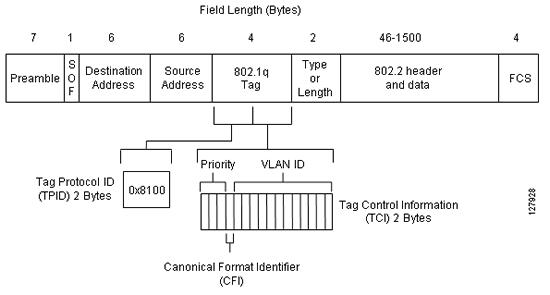
The table below describes the fields for 802.1q VLANs.
| Table 4 | 802.1q VLAN Encapsulation Fields |
|
Field |
Description |
|---|---|
|
DA, SA, Type or Length, Data, and FCS |
The table below describes these fields. |
|
Tag Protocol ID (TPID) |
This 16-bit field is set to a value of 0x8100 to identify the frame as an IEEE 802.1q tagged frame. |
|
Priority |
Also known as user priority, this 3-bit field refers to the 802.1p priority. It indicates the frame priority level used for prioritizing traffic and is capable of representing 8 levels (0-7). |
|
Tag Control Information |
The 2-byte Tag Control Information field consists of two subfields:
|
Understanding Cisco ISL VLANs
ISL is a Cisco-proprietary protocol for encapsulating frames on a VLAN trunk. Devices that use ISL add an ISL header to the frame. This process is known as VLAN encapsulation. 802.1Q is the IEEE standard for tagging frames on a VLAN trunk. The figure below shows the format of a Cisco ISL-encapsulated Ethernet frame.

The table below describes The fields for 802.1q VLANs.
| Table 5 | ISL VLAN Encapsulation |
|
Field |
Description |
||
|---|---|---|---|
|
DA (destination address) |
This 40-bit field is a multicast address and is set at 0x01-00-0C-00-00 or 0x03-00-0c-00-00. The receiving host determines that the frame is encapsulated in ISL by reading the 40-bit DA field and matching it to one of the two ISL multicast addresses. |
||
|
TYPE |
This 4-bit field indicates the type of frame that is encapsulated and could be used in the future to indicate alternative encapsulations. TYPE codes: |
||
|
USER |
This 4-bit field is used to extend the meaning of the Frame TYPE field. The default USER field value is 0000. For Ethernet frames, the USER field bits 0 and 1 indicate the priority of the packet as it passes through the switch. Whenever traffic can be handled more quickly, the packets with this bit set should take advantage of the quicker path. However, such paths are not required. USER codes: |
||
|
SA |
This 48-bit field is the source address field of the ISL packet. It should be set to the 802.3 MAC address of the switch port transmitting the frame. The receiving device can ignore the SA field of the frame. |
||
|
LEN |
This 16-bit value field stores the actual packet size of the original packet. The LEN field represents the length of the packet in bytes, excluding the DA, TYPE, USER, SA, LEN, and FCS fields. The total length of the excluded fields is 18 bytes, so the LEN field represents the total length minus 18 bytes. |
||
|
AAAA03(SNAP) |
The AAAA03 SNAP field is a 24-bit constant value of 0xAAAA03. |
||
|
HSA |
This 24-bit field represents the upper three bytes (the manufacturerâs ID portion) of the SA field. It must contain the value 0x00-00-0C. |
||
|
VLAN |
This 15-bit field is the virtual LAN ID of the packet. This value is used to mark frames on different VLANs. |
||
|
BPDU |
The bit in the BPDU field is set for all BPDU packets that are encapsulated by the ISL frame. The BPDUs are used by the spanning tree algorithm to find out information about the topology of the network. This bit is also set for CDP and VTP frames that are encapsulated. |
||
|
INDEX |
This 16-bit field indicates the port index of the source of the packet as it exits the switch. It is used for diagnostic purposes only, and may be set to any value by other devices. It is ignored in received packets. |
||
|
RES |
This 16-bit field is used when Token Ring or FDDI packets are encapsulated with an ISL frame. |
||
|
Encapsulated FRAME |
This field contains the encapsulated Layer 2 frame. |
||
|
FCS |
The FCS field consists of 4 bytes. It includes a 32-bit CRC value, which is created by the sending station and is recalculated by the receiving station to check for damaged frames. The FCS covers the DA, SA, Length/Type, and Data fields. When an ISL header is attached to a Layer 2 frame, a new FCS is calculated over the entire ISL packet and added to the end of the frame.
|
NBAR Data Export
Network Based Application Recognition (NBAR) is a classification engine that recognizes and classifies a wide variety of protocols and applications, including web-based and other difficult-to-classify applications and protocols that use dynamic TCP/UDP port assignments.
When NBAR recognizes and classifies a protocol or application, the network can be configured to apply the appropriate application mapping with that protocol.
With Cisco IOS Release 12.2(18)ZYA2 on the Catalyst 6500 series switch equipped with a Supervisor 32/programmable intelligent services accelerator (PISA), the NBAR flow can be exported along with NetFlow export records.
The application-aware NetFlow feature integrates NBAR with NetFlow to provide the ability to export application information collected by NBAR using NetFlow. The application IDs created for the NetFlow Version 9 attribute export application names along with the standard attributes such as IP address and TCP/UDP port information. The NetFlow collector collects these flows based on source IP address and ID. The source ID refers to the unique identification for flows exported from a particular device.
The NBAR data exported to the NetFlow collector contains application mapping information. Using the NetFlow Data export options, the table containing the application IDs mapped to their application names is exported to the NetFlow collector. The mapping table is sent using the ip flow-export template options nbarcommand. The mapping information is refreshed every 30 minutes by default. You can configure the refresh interval by using the ip flow-export template options timeout-rate command.
Netflow export uses several aging mechanisms to manage the NetFlow cache. However, the NBAR data export intervals do not use NetFlow aging parameters.
Benefits of NBAR NetFlow Integration
NBAR enables network administrators to track variety of protocols and the amount of traffic generated by each protocol. NBAR also allows them to organize traffic into classes. These classes can then be used to provide different levels of service for network traffic, thereby allowing better network management by providing the right level of network resources for network traffic.
How to Configure NetFlow Layer 2 and Security Monitoring Exports
- Configuring NetFlow Layer 2 and Security Monitoring Exports
- Verifying NetFlow Layer 2 and Security Monitoring Exports
- Configuring NBAR Support for NetFlow Exports
Configuring NetFlow Layer 2 and Security Monitoring Exports
CEF, dCEF, or fast switching for IP must be configured on your system before you configure the NetFlow Layer 2 and Security Monitoring Exports feature.
The optional Verifying NetFlow Layer 2 and Security Monitoring Exports task uses the show ip cache verbose flowcommand to display the values of the fields that you have configured the NetFlow Layer 2 and Security Monitoring Exports feature to capture. In order for you to view the values of the fields that you configured the NetFlow Layer 2 and Security Monitoring Exports feature to capture, your router must forward the IP traffic that meets the criteria for these fields. For example, if you configure the ip flow-capture ipid command, your router must be forwarding IP datagrams to capture the IP ID values from the IP datagrams in the flow.
If you want to capture the values of the Layer 3 IP fragment offset field from the IP headers in your IP traffic using the ip flow-capture fragment-offset command, your router must be running Cisco IOS 12.4(2)T or later release.
DETAILED STEPS
| Command or Action | Purpose | |
|---|---|---|
Step 1 |
enable
Example: Router> enable |
Enables privileged EXEC mode.
|
Step 2 |
configure
terminal
Example: Router# configure terminal |
Enters global configuration mode. |
Step 3 |
ip
flow-capture
fragment-offset
Example: Router(config)# ip flow-capture fragment-offset |
(Optional) Enables capturing the value of the IP fragment offset field from the first fragmented IP datagram in a flow. |
Step 4 |
ip
flow-capture
icmp
Example: Router(config)# ip flow-capture icmp |
(Optional) Enables you to capture the value of the ICMP type and code fields from ICMP datagrams in a flow. |
Step 5 |
ip
flow-capture
ip-id
Example: Router(config)# ip flow-capture ip-id |
(Optional) Enables you to capture the value of the IP-ID field from the first IP datagram in a flow. |
Step 6 |
ip
flow-capture
mac-addresses
Example: Router(config)# ip flow-capture mac-addresses |
(Optional) Enables you to capture the values of the source and destination MAC addresses from the traffic in a flow. |
Step 7 |
ip
flow-capture
packet-length
Example: Router(config)# ip flow-capture packet-length |
(Optional) Enables you to capture the minimum and maximum values of the packet length field from IP datagrams in a flow. |
Step 8 |
ip
flow-capture
ttl
Example: Router(config)# ip flow-capture ttl |
(Optional) Enables you to capture the minimum and maximum values of the time-to-live (TTL) field from IP datagrams in a flow. |
Step 9 |
ip
flow-capture
vlan-id
Example: Router(config)# ip flow-capture vlan-id |
(Optional) Enables you to capture the 802.1q or ISL VLAN-ID field from VLAN encapsulated frames in a flow that are received or transmitted on trunk ports. |
Step 10 |
interface
type
[number | slot/port] Example: Router(config)# interface ethernet 0/0 |
Enters interface configuration mode for the type of interface specified in the command. |
Step 11 |
ip
flow
ingress
Example:
Example: and/or Example: ip flow egress Example: Router(config-if)# ip flow ingress Example: and/or Example: Router(config-if)# ip flow egress |
Enables ingress NetFlow data collection on the interface. and/or Enables egress NetFlow data collection on the interface. |
Step 12 |
exit
Example: Router(config)# exit |
Exits global configuration mode. |
Verifying NetFlow Layer 2 and Security Monitoring Exports
Perform this task to verify the configuration of NetFlow Layer 2 and Security Monitoring Exports.
Restrictions
The "Verifying NetFlow Layer 2 and Security Monitoring Exports" uses the show ip cache verbose flow command. The following restrictions apply to using the show ip cache verbose flowcommand.
Displaying Detailed NetFlow Cache Information on Platforms Running Distributed Cisco Express Forwarding
On platforms running dCEF, NetFlow cache information is maintained on each line card or Versatile Interface Processor. If you want to use the show ip cache verbose flow command to display this information on a distributed platform, you must enter the command at a line card prompt.
Cisco 7500 Series Platform
To display detailed NetFlow cache information on a Cisco 7500 series router that is running distributed dCEF, enter the following sequence of commands:
Router# if-con

slot-number
LC-
slot-number
# show ip cache verbose
 flow
For Cisco IOS Releases 12.3(4)T, 12.3(6), and 12.2(20)S and later, enter the following command to display detailed NetFlow cache information:
Router# execute-on
slot-number
show ip cache verbose
 flow
Cisco 12000 Series Platform
To display detailed NetFlow cache information on a Cisco 12000 Series Internet Router, enter the following sequence of commands:
Router# attach

slot-number
LC-
slot-number
# show ip cache verbose
 flow
For Cisco IOS Releases 12.3(4)T, 12.3(6), and 12.2(20)S and later, enter the following command to display detailed NetFlow cache information:
Router# execute-on slot-number show ip cache verbose flow.
DETAILED STEPS
|
show
ip
cache
verbose
flow
The following output shows the working of NetFlow Layer 2 and Security Monitoring Exports feature by capturing the values from the Layer 2 and Layer 3 fields in the flows. Example: Router# show ip cache verbose flow IP packet size distribution (25229 total packets): 1-32 64 96 128 160 192 224 256 288 320 352 384 416 448 480 .000 .000 .000 .000 .000 .000 .000 .000 .000 .000 .000 .000 .000 .000 .000 512 544 576 1024 1536 2048 2560 3072 3584 4096 4608 .000 .000 .000 .206 .793 .000 .000 .000 .000 .000 .000 IP Flow Switching Cache, 278544 bytes 6 active, 4090 inactive, 17 added 505 ager polls, 0 flow alloc failures Active flows timeout in 1 minutes Inactive flows timeout in 10 seconds IP Sub Flow Cache, 25736 bytes 12 active, 1012 inactive, 39 added, 17 added to flow 0 alloc failures, 0 force free 1 chunk, 1 chunk added last clearing of statistics never Protocol Total Flows Packets Bytes Packets Active(Sec) Idle(Sec) -------- Flows /Sec /Flow /Pkt /Sec /Flow /Flow TCP-Telnet 1 0.0 362 940 2.7 60.2 0.0 TCP-FTP 1 0.0 362 840 2.7 60.2 0.0 TCP-FTPD 1 0.0 362 840 2.7 60.1 0.1 TCP-SMTP 1 0.0 361 1040 2.7 60.0 0.1 UDP-other 5 0.0 1 66 0.0 1.0 10.6 ICMP 2 0.0 8829 1378 135.8 60.7 0.0 Total: 11 0.0 1737 1343 147.0 33.4 4.8 SrcIf SrcIPaddress DstIf DstIPaddress Pr TOS Flgs Pkts Port Msk AS Port Msk AS NextHop B/Pk Active Et0/0.1 10.251.138.218 Et1/0.1 172.16.10.2 06 80 00 65 0015 /0 0 0015 /0 0 0.0.0.0 840 10.8 MAC: (VLAN id) aaaa.bbbb.cc03 (005) aaaa.bbbb.cc06 (006) Min plen: 840 Max plen: 840 Min TTL: 59 Max TTL: 59 IP id: 0 |
Configuring NBAR Support for NetFlow Exports
You must enable NetFlow Version 9 and NBAR before you configure NBAR data export.
You must add and configure the following fields to the Cisco NetFlow Collector Software to identify the flow exported by the NBAR data export feature:
- app_id field as an integer with NumericID of 95
- app_name field as a UTF-8 String with NumericID of 96
- sub_app_id field as an Integer with NumericID of 97
- biflowDirection field as an Integer with NumericID of 239
Note | The biflowDirection field provides information about the host that initiates the session. The size of this field is one byte. RFC 5103 provides details for using this field. |
Note | NBAR support can be configured only with NetFlow Version 9 format. If you try to configure NBAR data export with other versions, the following error message appears: 1d00h: %FLOW : Export version 9 not enabled The NBAR data export does not use NetFlow aging parameters. > |
DETAILED STEPS
| Command or Action | Purpose | |
|---|---|---|
Step 1 |
enable
Example: Router> enable |
Enables privileged EXEC mode.
|
Step 2 |
configure
terminal
Example: Router# configure terminal |
Enters global configuration mode. |
Step 3 |
ip
flow-export
version
9
Example: Router(config)# ip flow-capture version 9 |
Enables the Version 9 format to export NetFlow cache entries. |
Step 4 |
ip
flow-capture
nbar
Example: Router(config)# ip flow-capture nbar |
Enables you to capture the NBAR data in NetFlow export records. |
Step 5 |
ip
flow-export
template
options
nbar
Example: Router(config)# ip flow-export template options nbar |
Exports application mapping information to NetFlow data collector. |
Step 6 |
exit
Example: Router(config)# exit |
Exits global configuration mode. |
Step 7 |
show
ip
flow
export
nbar
Example: Router # show ip flow export nbar |
(Optional) Displays NBAR export records. |
Step 8 |
clear
ip
flow
stats
nbar
Example: Router# clear ip flow stats nbar |
(Optional) Clears NetFlow accounting statistics for NBAR. |
Configuration Examples for NetFlow Layer 2 and Security Monitoring Exports
- Analyzing a Simulated FTP Attack Example
- Analyzing a Simulated ICMP Ping Attack Example
- Configuring NBAR Support for NetFlow Exports Example
Analyzing a Simulated FTP Attack Example
The following example shows how to use the NetFlow Layer 2 and Security Monitoring Exports feature to find out whether your network is being attacked by a host that is sending fake FTP traffic in an attempt to overwhelm the FTP server. This attack might cause end users to see a degradation in the ability of the FTP server to accept new connections or to service existing connections.
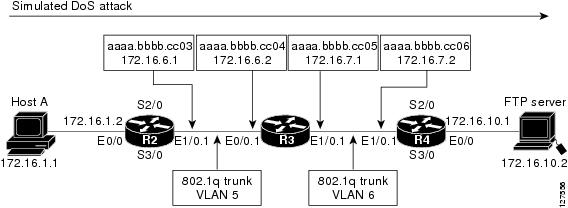
This example uses the network shown in the figure below. Host A is sending fake FTP packets to the FTP server.
This example also shows you how to use the Layer 2 data captured by the NetFlow Layer 2 and Security Monitoring Exports feature to learn where the traffic is originating and what path it is taking through the network.
 Tip | Keep track of the MAC addresses and IP addresses of the devices in your network. You can use them to analyze attacks and to resolve problems. |
Note | This example does not include the ip flow-capture icmpcommand, which captures the value of the ICMP type and code fields. |
R2
!
hostname R2
!
interface Ethernet0/0
 mac-address aaaa.bbbb.cc02
 ip address 172.16.1.2 255.255.255.0
!
interface Ethernet1/0
 mac-address aaaa.bbbb.cc03
 no ip address
!
interface Ethernet1/0.1
 encapsulation dot1Q 5
 ip address 172.16.6.1 255.255.255.0
!
!
router rip
 version 2
 network 172.16.0.0
 no auto-summary
!
R3
!
hostname R3
!
ip flow-capture fragment-offset
ip flow-capture packet-length
ip flow-capture ttl
ip flow-capture vlan-id
ip flow-capture ip-id
ip flow-capture mac-addresses
!
interface Ethernet0/0
 mac-address aaaa.bbbb.cc04
 no ip address
!
interface Ethernet0/0.1
 encapsulation dot1Q 5
 ip address 172.16.6.2 255.255.255.0
 ip accounting output-packets
 ip flow ingress
!
interface Ethernet1/0
 mac-address aaaa.bbbb.cc05
 no ip address
!
interface Ethernet1/0.1
 encapsulation dot1Q 6
 ip address 172.16.7.1 255.255.255.0
 ip accounting output-packets
 ip flow egress
!
router rip
 version 2
 network 172.16.0.0
 no auto-summary
!
R4
!
hostname R4
!
interface Ethernet0/0
 mac-address aaaa.bbbb.cc07
 ip address 172.16.10.1 255.255.255.0
!
interface Ethernet1/0
 mac-address aaaa.bbbb.cc06
 no ip address
!
interface Ethernet1/0.1
 encapsulation dot1Q 6
 ip address 172.16.7.2 255.255.255.0
!
router rip
 version 2
 network 172.16.0.0
 no auto-summary
!
The show ip cache verbose flow command displays the NetFlow flows that have been captured from the FTP traffic that Host A is sending.
The fields that have the values captured by the ip flow-capture command are shown in the first table below. These are the fields and the values that are used to analyze the traffic for this example. The other fields captured by the show ip cache verbose flow command are explained in the tables that follow the first table.
R3# show ip cache verbose flow

IP packet size distribution (3596 total packets):
   1-32   64   96  128  160  192  224  256  288  320  352  384  416  448  480
   .000 .003 .000 .000 .000 .000 .000 .000 .000 .000 .000 .000 .000 .000 .000
    512  544  576 1024 1536 2048 2560 3072 3584 4096 4608
   .000 .000 .000 .995 .000 .000 .000 .000 .000 .000 .000
The preceding output shows the percentage distribution of packets by size. In this display, 99.5 percent of the packets fall in the 1024-byte size range, and 0.3 percent fall in the 64-byte range.
The next section of the output can be divided into four parts. The section and the table corresponding to each are as follows:
IP Flow Switching Cache, 278544 bytes
  5 active, 4091 inactive, 25 added
  719 ager polls, 0 flow alloc failures
  Active flows timeout in 1 minutes
  Inactive flows timeout in 10 seconds
IP Sub Flow Cache, 25736 bytes
  10 active, 1014 inactive, 64 added, 25 added to flow
  0 alloc failures, 0 force free
  1 chunk, 1 chunk added
  last clearing of statistics never
Protocol         Total    Flows   Packets Bytes  Packets Active(Sec) Idle(Sec)
--------         Flows     /Sec     /Flow  /Pkt     /Sec     /Flow     /Flow
TCP-FTP              5      0.0       429   840      6.6      58.1       1.8
Total:               5      0.0       129   835      6.6      17.6       7.9
SrcIf          SrcIPaddress    DstIf          DstIPaddress    Pr TOS Flgs  Pkts
Port Msk AS                    Port Msk AS    NextHop              B/Pk  Active
Et0/0.1        10.132.221.111  Et1/0.1        172.16.10.2     06 80  00     198
0015 /0  0                     0015 /0  0     0.0.0.0               840    41.2
MAC: (VLAN id) aaaa.bbbb.cc03  (005)          aaaa.bbbb.cc06  (006)
Min plen:      840                            Max plen:       840
Min TTL:        59                            Max TTL:         59
IP id:           0
Et0/0.1        10.251.138.218  Et1/0.1        172.16.10.2     06 80  00     198
0015 /0  0                     0015 /0  0     0.0.0.0               840    41.2
MAC: (VLAN id) aaaa.bbbb.cc03  (005)          aaaa.bbbb.cc06  (006)
Min plen:      840                            Max plen:       840
Min TTL:        59                            Max TTL:         59
IP id:           0
Et0/0.1        10.10.12.1      Et1/0.1        172.16.10.2     06 80  00     203
0015 /0  0                     0015 /0  0     0.0.0.0               840    42.2
MAC: (VLAN id) aaaa.bbbb.cc03  (005)          aaaa.bbbb.cc06  (006)
Min plen:      840                            Max plen:       840
Min TTL:        59                            Max TTL:         59
IP id:           0
Et0/0.1        10.231.185.254  Et1/0.1        172.16.10.2     06 80  00     203
0015 /0  0                     0015 /0  0     0.0.0.0               840    42.2
MAC: (VLAN id) aaaa.bbbb.cc03  (005)          aaaa.bbbb.cc06  (006)
Min plen:      840                            Max plen:       840
Min TTL:        59                            Max TTL:         59
IP id:           0
Et0/0.1        10.71.200.138   Et1/0.1        172.16.10.2     06 80  00     203
0015 /0  0                     0015 /0  0     0.0.0.0               840    42.2
MAC: (VLAN id) aaaa.bbbb.cc03  (005)          aaaa.bbbb.cc06  (006)
Min plen:      840                            Max plen:       840
Min TTL:        59                            Max TTL:         59
IP id:           0
R3#
The table below describes the significant fields shown in the NetFlow cache section of the output.
| Table 6 | Field Descriptions in the NetFlow Cache Section of the Output |
|
Field |
Description |
|---|---|
|
bytes |
Number of bytes of memory used by the NetFlow cache. |
|
active |
Number of active flows in the NetFlow cache at the time this command was entered. |
|
inactive |
Number of flow buffers that are allocated in the NetFlow cache but that were not assigned to a specific flow at the time this command was entered. |
|
added |
Number of flows created since the start of the summary period. |
|
ager polls |
Number of times the NetFlow code caused entries to expire (used by Cisco Customer Support Engineers (CSE) for diagnostic purposes). |
|
flow alloc failures |
Number of times the NetFlow code tried to allocate a flow but could not. |
|
last clearing of statistics |
The period of time that has passed since the clear ip flow stats privileged EXEC command was last executed. The standard time output format of hours, minutes, and seconds (hh:mm:ss) is used for a period of time less than 24 hours. This time output changes to hours and days after the time exceeds 24 hours. |
The table below describes the significant fields shown in the activity by protocol section of the output.
| Table 7 | Field Descriptions in the Activity by Protocol Section of the Output |
|
Field |
Description |
||
|---|---|---|---|
|
Protocol |
IP protocol and the well-known port number. (Refer to http://www.iana.org , Protocol Assignment Number Services , for the latest RFC values.)
|
||
|
Total Flows |
Number of flows for this protocol since the last time statistics were cleared. |
||
|
Flows/Sec |
Average number of flows for this protocol per second; equal to the total flows divided by the number of seconds for this summary period. |
||
|
Packets/Flow |
Average number of packets for the flows for this protocol; equal to the total packets for this protocol divided by the number of flows for this protocol for this summary period. |
||
|
Bytes/Pkt |
Average number of bytes for the packets for this protocol; equal to the total bytes for this protocol divided by the total number of packets for this protocol for this summary period. |
||
|
Packets/Sec |
Average number of packets for this protocol per second; equal to the total packets for this protocol divided by the total number of seconds for this summary period. |
||
|
Active(Sec)/Flow |
Number of seconds from the first packet to the last packet of an expired flow divided by the number of total flows for this protocol for this summary period. |
||
|
Idle(Sec)/Flow |
Number of seconds observed from the last packet in each nonexpired flow for this protocol until the time at which the show ip cache verbose flow command was entered divided by the total number of flows for this protocol for this summary period. |
The table below describes the significant fields in the NetFlow record section of the output.
| Table 8 | Field Descriptions in the NetFlow Record Section of the Output |
|
Field |
Description |
||
|---|---|---|---|
|
SrcIf |
Interface on which the packet was received. |
||
|
Port Msk AS |
Source port number (displayed in hexadecimal format), IP address mask, and autonomous system number. This is always set to 0 in MPLS flows. |
||
|
SrcIPaddress |
This is the source IP address of the traffic in the five flows. The traffic is using five different IP source addresses |
||
|
DstIf |
Interface from which the packet was sent.
|
||
|
Port Msk AS |
Source port number (displayed in hexadecimal format), IP address mask, and autonomous system number. The value of this field is always set to 0 in Multiprotocol Label Switching (MPLS) flows. |
||
|
DstIPaddress |
This is the destination IP address of the traffic.
|
||
|
NextHop |
The Border Gateway Protocol (BGP) next-hop address. This is always set to 0 in MPLS flows. |
||
|
Pr |
IP protocol "well-known" port number, displayed in hexadecimal format. (Refer to http://www.iana.org , Protocol Assignment Number Services , for the latest RFC values.) |
||
|
ToS |
Type of service, displayed in hexadecimal format. |
||
|
B/Pk |
Average number of bytes observed for the packets seen for this flow. |
||
|
Flgs |
TCP flags, shown in hexadecimal format. This value is the result of bitwise OR of the TCP flags from all packets in the flow. |
||
|
Pkts |
Number of packets in this flow. |
||
|
Active |
Time the flow has been active. |
The table below describes the fields and values for the NetFlow Traffic Classification and Identification fields for the NetFlow record section of the output.
| Table 9 | NetFlow Layer 2 and Security Monitoring Exports Fields in the NetFlow Record Section of the Output |
|
Field |
Description |
||||
|---|---|---|---|---|---|
|
MAC |
These are the source and destination MAC addresses from the traffic. The source and destination MAC address are read from left to right in the output.
|
||||
|
VLAN id |
These are the source and destination VLAN IDs. The source and destination VLAN IDs are read from left to right in the output. |
||||
|
Min plen |
This is the minimum packet length for the packets captured in the five flows. The current value is 840. |
||||
|
Max plen |
This is the maximum packet length for the packets captured in the five flows. The current value is 840. |
||||
|
Min TTL |
This is the minimum time-to-live (TTL) for the packets captured in the five flows. The current value is 59. |
||||
|
Max TTL |
This is the maximum TTL for the packets captured in the five flows. The current value is 59. |
||||
|
IP id |
This is the IP identifier field for the traffic in the five flows. The current value is 0. |
The fact that the Layer 3 TTL, identifier, and packet length fields in the five flows have the same values is a good indication that this traffic is a DoS attack. If this data had been captured from real traffic, the values would typically be different. The fact that all five of these flows have a TTL value of 59 indicates that this traffic is originating from points that are the same distance away from R3. Real user traffic would normally be arriving from many different distances away; therefore the TTL values would be different.
If this traffic is identified as a DoS attack (based on the data captured in the Layer 3 fields), you can use the Layer 2 information in the flows to identify the path the traffic is taking through the network. In this example, the traffic is being sent to R3 on VLAN 5 by R2. You can demonstrate that R2 is transmitting the traffic over interface 1/0.1 because the source MAC address (aaaa.bbb.cc03) belongs to 1/0.1 on R2. You can identify that R3 is transmitting the traffic using VLAN 6 on interface 1/0.1 to interface 1/0.1 on R4 because the destination MAC address (aaaa.bbbb.cc06) belongs to interface 1/0.1 on R4.
You can use this information to develop a plan to mitigate this attack. One possible way to mitigate this attack is by configuring an extended IP access list that blocks FTP traffic from any host with a source address that is on the 10.0.0.0 network. Another possible solution is to configure a default route for the 10.0.0.0 network that points to the null interface on the router.
 Caution | Each of these solutions blocks traffic from legitimate hosts on the 10.0.0.0 network. Therefore these solutions should be used only temporarily while you identify the point of origin of the attack and decide how to stop it there. |
Analyzing a Simulated ICMP Ping Attack Example
The following example shows how to use the NetFlow Layer 2 and Security Monitoring Exports feature to find out that your network is being attacked by ICMP traffic. It uses the network shown in Analyzing a Simulated ICMP Ping Attack Example. Host A is sending very large ICMP ping packets to the FTP server.
R2
!
hostname R2
!
interface Ethernet0/0
 mac-address aaaa.bbbb.cc02
 ip address 172.16.1.2 255.255.255.0
!
interface Ethernet1/0
 mac-address aaaa.bbbb.cc03
 no ip address
!
interface Ethernet1/0.1
 encapsulation dot1Q 5
 ip address 172.16.6.1 255.255.255.0
!
!
router rip
 version 2
 network 172.16.0.0
 no auto-summary
!
R3
!
hostname R3
!
ip flow-capture fragment-offset
ip flow-capture packet-length
ip flow-capture ttl
ip flow-capture vlan-id
ip flow-capture icmp
ip flow-capture ip-id
ip flow-capture mac-addresses
!
interface Ethernet0/0
 mac-address aaaa.bbbb.cc04
 no ip address
!
interface Ethernet0/0.1
 encapsulation dot1Q 5
 ip address 172.16.6.2 255.255.255.0
 ip accounting output-packets
 ip flow ingress
!
interface Ethernet1/0
 mac-address aaaa.bbbb.cc05
 no ip address
!
interface Ethernet1/0.1
 encapsulation dot1Q 6
 ip address 172.16.7.1 255.255.255.0
 ip accounting output-packets
 ip flow egress
!
router rip
 version 2
 network 172.16.0.0
 no auto-summary
!
R4
!
hostname R4
!
interface Ethernet0/0
 mac-address aaaa.bbbb.cc07
 ip address 172.16.10.1 255.255.255.0
!
interface Ethernet1/0
 mac-address aaaa.bbbb.cc06
 no ip address
!
interface Ethernet1/0.1
 encapsulation dot1Q 6
 ip address 172.16.7.2 255.255.255.0
!
router rip
 version 2
 network 172.16.0.0
 no auto-summary
!
The show ip cache verbose flow command displays the NetFlow flows that have been captured from the ICMP traffic that Host A is sending.
The fields that have their values captured by the ip flow-capture command are explained in the first table below. These are the fields and the values that are used to analyze the traffic for this example. The other fields captured by the show ip cache verbose flow command are explained in the other tables below.
R3# show ip cache verbose flow
IP packet size distribution (5344 total packets):
   1-32   64   96  128  160  192  224  256  288  320  352  384  416  448  480
   .000 .000 .000 .000 .000 .000 .000 .000 .000 .000 .000 .000 .000 .000 .000
    512  544  576 1024 1536 2048 2560 3072 3584 4096 4608
   .000 .000 .000 .166 .832 .000 .000 .000 .000 .000 .000
The preceding output shows the percentage distribution of packets by size. In this display, 16.6 percent of the packets fall in the 1024-byte size range and 83.2 percent fall in the 1536-byte range.
The next section of the output can be divided into four sections. The section and the table corresponding to each are as follows:
IP Flow Switching Cache, 278544 bytes
  3 active, 4093 inactive, 7 added
  91 ager polls, 0 flow alloc failures
  Active flows timeout in 1 minutes
  Inactive flows timeout in 10 seconds
IP Sub Flow Cache, 25736 bytes
  7 active, 1017 inactive, 17 added, 7 added to flow
  0 alloc failures, 0 force free
  1 chunk, 0 chunks added
  last clearing of statistics 00:01:13
Protocol         Total    Flows   Packets Bytes  Packets Active(Sec) Idle(Sec)
--------         Flows     /Sec     /Flow  /Pkt     /Sec     /Flow     /Flow
ICMP                 2      0.0      1500  1378     42.8      11.4      10.9
Total:               2      0.0       600  1378     42.9      11.5      10.8
SrcIf          SrcIPaddress    DstIf          DstIPaddress    Pr TOS Flgs  Pkts
Port Msk AS                    Port Msk AS    NextHop              B/Pk  Active
Et0/0.1        10.106.1.1      Et1/0.1        172.16.10.2     01 00  10     391
0000 /0  0                     0800 /0  0     0.0.0.0              1500     8.6
MAC: (VLAN id) aaaa.bbbb.cc03  (005)          aaaa.bbbb.cc06  (006)
Min plen:      1500                            Max plen:       1500
Min TTL:         59                            Max TTL:          59
ICMP type:       8                            ICMP code:        0
IP id:       13499
Et0/0.1        10.106.1.1      Et1/0.1        172.16.10.2     01 00  00    1950
0000 /0  0                     0000 /0  0     0.0.0.0              1354     8.6
MAC: (VLAN id) aaaa.bbbb.cc03  (005)          aaaa.bbbb.cc06  (006)
Min plen:      772                            Max plen:       1500
Min TTL:         59                           Max TTL:          59
ICMP type:       0                            ICMP code:        0
IP id:       13499                            FO:            185
R3#
The table below describes the significant fields shown in the NetFlow cache lines of the output.
| Table 10 | Field Descriptions in the NetFlow Cache Section of the Output |
|
Field |
Description |
|---|---|
|
bytes |
Number of bytes of memory used by the NetFlow cache. |
|
active |
Number of active flows in the NetFlow cache at the time this command was entered. |
|
inactive |
Number of flow buffers that are allocated in the NetFlow cache but that were not assigned to a specific flow at the time this command was entered. |
|
added |
Number of flows created since the start of the summary period. |
|
ager polls |
Number of times the NetFlow code caused entries to expire (used by Cisco Customer Support Engineers (CSE) for diagnostic purposes). |
|
flow alloc failures |
Number of times the NetFlow code tried to allocate a flow but could not. |
|
last clearing of statistics |
The period of time that has passed since the clear ip flow stats privileged EXEC command was last executed. The standard time output format of hours, minutes, and seconds (hh:mm:ss) is used for a period of time less than 24 hours. This time output changes to hours and days after the time exceeds 24 hours. |
The table below describes the significant fields shown in the activity by protocol lines of the output.
| Table 11 | Field Descriptions in the Activity by Protocol Section of the Output |
|
Field |
Description |
||
|---|---|---|---|
|
Protocol |
IP protocol and the well-known port number. (Refer to http://www.iana.org , Protocol Assignment Number Services , for the latest RFC values.)
|
||
|
Total Flows |
Number of flows for this protocol since the last time statistics were cleared. |
||
|
Flows/Sec |
Average number of flows for this protocol per second; equal to the total flows divided by the number of seconds for this summary period. |
||
|
Packets/Flow |
Average number of packets for the flows for this protocol; equal to the total packets for this protocol divided by the number of flows for this protocol for this summary period. |
||
|
Bytes/Pkt |
Average number of bytes for the packets for this protocol; equal to the total bytes for this protocol divided by the total number of packets for this protocol for this summary period. |
||
|
Packets/Sec |
Average number of packets for this protocol per second; equal to the total packets for this protocol divided by the total number of seconds for this summary period. |
||
|
Active(Sec)/Flow |
Number of seconds from the first packet to the last packet of an expired flow divided by the total number of flows for this protocol for this summary period. |
||
|
Idle(Sec)/Flow |
Number of seconds observed from the last packet in each nonexpired flow for this protocol until the time at which the show ip cache verbose flow command was entered divided by the total number of flows for this protocol for this summary period. |
The table below describes the significant fields in the NetFlow record lines of the output.
| Table 12 | Field Descriptions in the NetFlow Record Section of the Output |
|
Field |
Description |
||
|---|---|---|---|
|
SrcIf |
Interface on which the packet was received. |
||
|
Port Msk AS |
Source port number (displayed in hexadecimal format), IP address mask, and autonomous system number. The value of this field is always set to 0 in MPLS flows. |
||
|
SrcIPaddress |
IP address of the device that transmitted the packet. The sending host is using 10.106.1.1 as the source IP address. |
||
|
DstIf |
Interface from which the packet was transmitted.
|
||
|
Port Msk AS |
Destination port number (displayed in hexadecimal format), IP address mask, and autonomous system. This is always set to 0 in MPLS flows. |
||
|
DstIPaddress |
IP address of the destination device. |
||
|
NextHop |
The BGP next-hop address. This is always set to 0 in MPLS flows. |
||
|
Pr |
IP protocol "well-known" port number, displayed in hexadecimal format. (Refer to http://www.iana.org , Protocol Assignment Number Services , for the latest RFC values.) |
||
|
ToS |
Type of service, displayed in hexadecimal format. |
||
|
B/Pk |
Average number of bytes observed for the packets seen for this flow. |
||
|
Flgs |
TCP flags, shown in hexadecimal format. This value is the result of bitwise OR of the TCP flags from all packets in the flow. |
||
|
Pkts |
Number of packets in this flow. |
||
|
Active |
Time the flow has been active. |
The table below describes the fields and values for the NetFlow Traffic Classification and Identification fields for the NetFlow record lines of the output.
| Table 13 | NetFlow Layer 2 and Security Monitoring Exports Fields in the NetFlow Record Section of the Output |
|
Field |
Description |
||||
|---|---|---|---|---|---|
|
MAC |
These are the source and destination MAC addresses from the traffic. The source and destination MAC address are read from left to right in the output.
|
||||
|
VLAN id |
These are the source and destination VLAN IDs. The source and destination VLAN IDs are read from left to right in the output. |
||||
|
Min plen |
This is the minimum packet length for the packets captured in the two flows. The current value for the first flow is 1500. The current value for the second flow is 772. |
||||
|
Max plen |
This is the maximum packet length for the packets captured in the two flows. The current value for the first flow is 1500. The current value for the second flow is 1500. |
||||
|
Min TTL |
This is the minimum time-to-live (TTL) for the packets captured in the two flows. The current value is 59. |
||||
|
Max TTL |
This is the maximum TTL for the packets captured in the two flows. The current value is 59. |
||||
|
IP id |
This is the IP identifier field for the traffic in the flows. The current value is 13499 for the two flows. |
||||
|
ICMP type |
This is the Internet Control Message Protocol (ICMP) type field from the ICMP datagram captured in the first flow. The value is: 8 |
||||
|
ICMP code |
This is the ICMP code field from the ICMP datagram captured in the second flow. The value is: 0 |
||||
|
FO |
This is the value of the fragment offset field from the first fragmented datagram in the second flow. The value is: 185 |
There are two ICMP flows shown in the output. You can tell that they are from the same ICMP datagram because they have the same IP ID field value of 13499. When two ICMP flows have the same IP ID value, the ICMP datagram being analyzed has been fragmented. The first flow has the ICMP type field set to 8, which indicates that this is an ICMP echo request (ping) datagram. The value of 185 in the fragment offset (FO) field in the second flow shows where this fragment will be placed in the memory buffer of the FTP server as the server reassembles the ICMP datagram. The value of 185 is applicable only to the first fragment of this datagram. The subsequent values will be greater because they take into account the previous fragments.
The value of 0 in the ICMP type field of the second flow does not mean that this flow is an ICMP echo reply as the table above shows. In this case the ICMP type field value is set to 0 because the ICMP headers for fragments of ICMP datagrams do not have the type and code fields. The default value of 0 is inserted instead.
Note | If this data were captured from a real ICMP attack, it would probably have more than one flow. |
Although, you cannot find out the original size of the ICMP datagram from the information shown by the show ip cache verbose flow, the fact that it was large enough to be fragmented in transit is a good indication that this is not a normal ICMP datagram.Notice the values in the minimum and maximum packet length fields for both flows. The values for both fields are set to 1500 for the first flow. The value for the minimum packet length is set to 772 and the value for the maximum packet length is set to 1500 for the second flow.
If this traffic is identified as a DoS attack based on the data captured in the Layer 3 fields, you can use the Layer 2 information in the flows to identify the path that the traffic is taking through the network. In this example, the traffic is being sent to R3 on VLAN 5 by R2. You can demonstrate that R2 is transmitting the traffic over interface 1/0.1 because the source MAC address (aaaa.bbb.cc03) belongs to 1/0.1 on R2. You can demonstrate that R3 is transmitting the traffic using VLAN 6 on interface 1/0.1 to interface 1/0.1 on R4, because the destination MAC address (aaaa.bbbb.cc06) belongs to interface 1/0.1 on R4.
You can use this information to mitigate this attack. One possible way to mitigate this attack is by configuring an extended IP access list that blocks ICMP traffic from any host with a source address that is on the 10.0.0.0 network. Another possible solution is to configure a default route for the 10.0.0.0 network that points to the null interface on the router.
Caution | Each of these solutions blocks traffic from legitimate hosts on the 10.0.0.0 network. Therefore these solutions should only be used temporarily while you identify the point of origin of the attack and decide how to stop it there. |
Configuring NBAR Support for NetFlow Exports Example
The following example shows how to configure NBAR support for NetFlow exports:
Router(config)# ip flow-export version 9
Router(config)# ip flow-capture nbar
Router(config)# ip flow-export template options nbar
Router# exit
The following example shows sample output of the show ip flow export nbarcommand:
Router # show ip flow export nba
r
Nbar netflow is enabled
10 nbar flows exported
0 nbar flows failed to export due to lack of internal buffers
The following example shows how to clear NBAR data from NetFlow accounting statistics:
Router # clear ip flow stats nba
r
Additional References
Related Documents
|
Related Topic |
Document Title |
|---|---|
|
Overview of Cisco IOS NetFlow |
Cisco IOS NetFlow Overview |
|
Overview of NBAR |
Classifying Network Traffic Using NBAR |
|
Configuring NBAR |
Configuring NBAR Using the MQC |
|
Configuring NBAR using protocol-discovery |
Enabling Protocol Discovery |
|
NetFlow commands |
Cisco IOS NetFlow Command Reference |
|
Information for installing, starting, and configuring the CNS NetFlow Collection Engine |
MIBs
Feature Information for NetFlow Layer 2 and Security Monitoring Exports
The following table provides release information about the feature or features described in this module. This table lists only the software release that introduced support for a given feature in a given software release train. Unless noted otherwise, subsequent releases of that software release train also support that feature.
Use Cisco Feature Navigator to find information about platform support and Cisco software image support. To access Cisco Feature Navigator, go to www.cisco.com/go/cfn. An account on Cisco.com is not required.
| Table 14 | Feature Information for NetFlow Layer 2 and Security Monitoring Exports |
|
Feature Name |
Releases |
Feature Configuration Information |
|---|---|---|
|
NetFlow Layer 2 and Security Monitoring Exports |
12.3(14)T 12.2(33)SRA |
The NetFlow Layer 2 and Security Monitoring Exports feature enables the capture of values from fields in Layer 2 and Layer 3 of IP traffic for accounting and security analysis. The following commands were modified by this feature: ip flow-capture, ip flow-export and show ip cache verbose flow. |
|
Support for capturing the value from the fragment offset field of IP headers added to NetFlow Layer 2 and Security Monitoring Exports1 |
12.4(2)T |
The fragment-offset keyword for the ip flow-capture command enables capturing the value of the IP fragment offset field from the first fragmented IP datagram in a flow. |
|
Application-aware NetFlow |
12.2(18)ZYA2 |
The application-aware NetFlow feature enables the capture of application information collected by PISA NBAR and exports using NetFlow Version 9. The following commands were modified by this feature: ip flow-capture, ip flow-export template options, show ip flow export, and clear ip flow stats. |
Glossary
export packet --A type of packet built by a device (for example, a router) with NetFlow services enabled. The packet is addressed to another device (for example, the NetFlow Collection Engine). The packet contains NetFlow statistics. The other device processes the packet (parses, aggregates, and stores information about IP flows).
flow --A set of packets with the same source IP address, destination IP address, protocol, source/destination ports, and type-of-service, and the same interface on which flow is monitored. Ingress flows are associated with the input interface, and egress flows are associated with the output interface.
NBAR --A classification engine in Cisco IOS Software that recognizes a wide variety of applications, including web-based and client/server applications.
NetFlow --Cisco IOS accounting feature that maintains per-flow information.
NetFlow Aggregation --A NetFlow feature that lets you summarize NetFlow export data on a Cisco IOS router before the data is exported to a NetFlow data collection system such as the NetFlow Collection Engine. This feature lowers bandwidth requirements for NetFlow export data and reduces platform requirements for NetFlow data collection devices.
NetFlow Collection Engine (formerly NetFlow FlowCollector)--Cisco application that is used with NetFlow on Cisco routers and Catalyst series switches. The NetFlow Collection Engine collects packets from the router that is running NetFlow and decodes, aggregates, and stores them. You can generate reports on various aggregations that can be set up on the NetFlow Collection Engine.
NetFlow v9 --NetFlow export format Version 9. A flexible and extensible means of carrying NetFlow records from a network node to a collector. NetFlow Version 9 has definable record types and is self-describing for easier NetFlow Collection Engine configuration.
Cisco and the Cisco Logo are trademarks of Cisco Systems, Inc. and/or its affiliates in the U.S. and other countries. A listing of Cisco's trademarks can be found at www.cisco.com/go/trademarks. Third party trademarks mentioned are the property of their respective owners. The use of the word partner does not imply a partnership relationship between Cisco and any other company. (1005R)
Any Internet Protocol (IP) addresses and phone numbers used in this document are not intended to be actual addresses and phone numbers. Any examples, command display output, network topology diagrams, and other figures included in the document are shown for illustrative purposes only. Any use of actual IP addresses or phone numbers in illustrative content is unintentional and coincidental.