



 Feedback
Contents
- MPLS TE Link and Node Protection with RSVP Hellos Support
- Finding Feature Information
- Prerequisites for MPLS TE Link and Node Protection with RSVP Hellos Support
- Restrictions for MPLS TE Link and Node Protection with RSVP Hellos Support
- Information About MPLS TE Link and Node Protection with RSVP Hellos Support
- Fast Reroute
- Link Protection
- Node Protection
- Bandwidth Protection
- Fast Tunnel Interface Down Detection
- RSVP Hello
- RSVP Hello Operation
- Hello Instance
- Hello Commands
- Features of MPLS TE Link and Node Protection with RSVP Hellos Support
- Backup Tunnel Support
- Backup Bandwidth Protection
- RSVP Hello
- Fast Reroute Operation
- Fast Reroute Activation
- Backup Tunnels Terminating at Different Destinations
- Backup Tunnels Terminating at the Same Destination
- Backup Tunnel Selection Procedure
- Bandwidth Protection
- Load Balancing on Limited-bandwidth Backup Tunnels
- Load Balancing on Unlimited-bandwidth Backup Tunnels
- Pool Type and Backup Tunnels
- Tunnel Selection Priorities
- Bandwidth Protection Considerations
- Using Backup Tunnels with Explicitly Signaled Bandwidth
- Using Backup Tunnels Signaled with Zero Bandwidth
- How to Configure MPLS TE Link and Node Protection with RSVP Hellos Support
- Enabling Fast Reroute on LSPs
- Creating a Backup Tunnel to the Next Hop or to the Next-Next Hop
- Assigning Backup Tunnels to a Protected Interface
- Associating Backup Bandwidth and Pool Type with a Backup Tunnel
- Configuring Backup Bandwidth Protection
- Configuring an Interface for Fast Link and Node Failure Detection
- Configuring an Interface for Fast Tunnel Interface Down
- Verifying That Fast Reroute Is Operational
- Troubleshooting Tips
- Config Examples for MPLS TE Link and Node Protection with RSVP Hellos Support
- Enabling Fast Reroute for All Tunnels Example
- Creating an NHOP Backup Tunnel Example
- Creating an NNHOP Backup Tunnel Example
- Assigning Backup Tunnels to a Protected Interface Example
- Associating Backup Bandwidth and Pool Type with Backup Tunnels Example
- Configuring Backup Bandwidth Protection Example
- Configuring an Interface for Fast Link and Node Failure Detection Example
- Configuring an Interface for Fast Tunnel Interface Down Example
- Configuring RSVP Hello and POS Signals Example
- Additional References
- Command Reference
- Feature Information for MPLS TE Link and Node Protection with RSVP Hellos Support
- Glossary
MPLS TE Link and Node Protection with RSVP Hellos Support
The MPLS TE: Link and Node Protection, with RSVP Hellos Support (with Fast Tunnel Interface Down Detection) feature provides the following Fast Reroute (FRR) capabilities:
- Backup tunnel that terminates at the next-next hop router to protect both the downstream link and node in order to protect link and node failures. There is no limit (except memory limitations) to the number of backup tunnels that can protect a given interface. A backup tunnel is scalable because it can protect multiple label switched paths (LSPs) and multiple interfaces.
- Backup bandwidth protection allows a priority to be assigned to backup tunnels for LSPs carrying certain kinds of data (such as voice).
- Fast Tunnel Interface Down detection, which forces a "generic" interface tunnel (not specifically a Fast Reroute tunnel) to become disabled immediately if the headend router detects a failed link on an LSP.
- Resource Reservation Protocol (RSVP) Hellos, which are used to accelerate the detection of node failures.
For information about shared risk link groups (SRLGs), which are sets of links that are likely to go down together, refer to MPLS Traffic Engineering: Shared Risk Link Groups.
- Finding Feature Information
- Prerequisites for MPLS TE Link and Node Protection with RSVP Hellos Support
- Restrictions for MPLS TE Link and Node Protection with RSVP Hellos Support
- Information About MPLS TE Link and Node Protection with RSVP Hellos Support
- How to Configure MPLS TE Link and Node Protection with RSVP Hellos Support
- Config Examples for MPLS TE Link and Node Protection with RSVP Hellos Support
- Additional References
- Command Reference
- Feature Information for MPLS TE Link and Node Protection with RSVP Hellos Support
- Glossary
Finding Feature Information
Your software release may not support all the features documented in this module. For the latest feature information and caveats, see the release notes for your platform and software release. To find information about the features documented in this module, and to see a list of the releases in which each feature is supported, see the Feature Information Table at the end of this document.
Use Cisco Feature Navigator to find information about platform support and Cisco software image support. To access Cisco Feature Navigator, go to www.cisco.com/go/cfn. An account on Cisco.com is not required.
Prerequisites for MPLS TE Link and Node Protection with RSVP Hellos Support
Your network must support the following Cisco IOS features in order to support features described in this document:
- IP Cisco Express Forwarding
- MPLS
Your network must support at least one of the following protocols:
- Intermediate System-to-Intermediate System (IS-IS)
- Open Shortest Path First (OSPF)
Restrictions for MPLS TE Link and Node Protection with RSVP Hellos Support
- Interfaces must use MPLS Global Label Allocation.
- Backup tunnel headend and tailend routers must implement FRR as described in this document.
- Backup tunnels are not protected. If an LSP is actively using a backup tunnel and the backup tunnel fails, the LSP is torn down.
- LSPs that are actively using backup tunnels are not considered for promotion. So, if an LSP is actively using a backup tunnel and a better backup tunnel becomes available, the active LSP is not switched to the better backup tunnel.
Information About MPLS TE Link and Node Protection with RSVP Hellos Support
- Fast Reroute
- Link Protection
- Node Protection
- Bandwidth Protection
- Fast Tunnel Interface Down Detection
- RSVP Hello
- Features of MPLS TE Link and Node Protection with RSVP Hellos Support
- Fast Reroute Operation
Fast Reroute
Fast Reroute (FRR) is a mechanism for protecting MPLS TE LSPs from link and node failures by locally repairing the LSPs at the point of failure, allowing data to continue to flow on them while their headend routers attempt to establish new end-to-end LSPs to replace them. FRR locally repairs the protected LSPs by rerouting them over backup tunnels that bypass failed links or nodes.
For information about how FRR protects TE LSPs from shared risk link group (SRLG) failure, refer to MPLS Traffic Engineering: Shared Risk Link Groups.
Link Protection
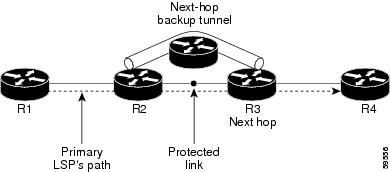
Backup tunnels that bypass only a single link of the LSP's path provide Link Protection. They protect LSPs if a link along their path fails by rerouting the LSP's traffic to the next hop (bypassing the failed link). These are referred to as next-hop (NHOP) backup tunnels because they terminate at the LSP's next hop beyond the point of failure. The figure below illustrates an NHOP backup tunnel.
Node Protection
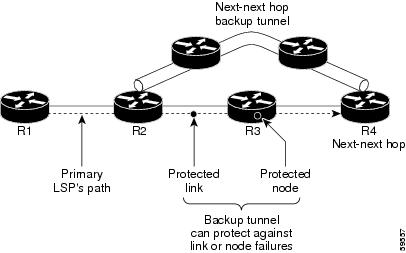
FRR provides Node Protection for LSPs. Backup tunnels that bypass next-hop nodes along LSP paths are called next-next-hop (NNHOP) backup tunnels because they terminate at the node following the next-hop node of the LSP paths, thereby bypassing the next-hop node. They protect LSPs if a node along their path fails by enabling the node upstream of the failure to reroute the LSPs and their traffic around the failed node to the next-next hop. FRR supports the use of RSVP Hellos to accelerate the detection of node failures. NNHOP backup tunnels also provide protection from link failures, because they bypass the failed link in addition to the node.
The figure below illustrates an NNHOP backup tunnel.
If an LSP is using a backup tunnel and something changes so that the LSP is no longer appropriate for the backup tunnel, the LSP is torn down. Such changes include the following:
Bandwidth Protection
NHOP and NNHOP backup tunnels can be used to provide bandwidth protection for rerouted LSPs. This is referred to as backup bandwidth. You can associate backup bandwidth with NHOP or NNHOP backup tunnels. This informs the router of the amount of backup bandwidth a particular backup tunnel can protect. When a router maps LSPs to backup tunnels, bandwidth protection ensures that an LSP uses a given backup tunnel only if there is sufficient backup bandwidth. The router selects which LSPs use which backup tunnels in order to provide maximum bandwidth protection. That is, the router determines the best way to map LSPs onto backup tunnels in order to maximize the number of LSPs that can be protected. For information about mapping tunnels and assigning backup bandwidth, see the "Backup Tunnel Selection Procedure" section.
LSPs that have the "bandwidth protection desired" bit set have a higher right to select backup tunnels that provide bandwidth protection; that is, those LSPs can preempt other LSPs that do not have that bit set. For more information, see the "Prioritizing Which LSPs Obtain Backup Tunnels with Bandwidth Protection" section.
Fast Tunnel Interface Down Detection
Fast Tunnel Interface Down detection forces a "generic" interface tunnel (not specifically a Fast Reroute tunnel) to become disabled immediately if the headend router detects a failed link on an LSP.
This feature is configured with the tunnel mpls traffic-eng interface down delay command. If this feature is not configured, there is a delay before the tunnel becomes unoperational and before the traffic uses an alternative path chosen by the headend/midpoint router to forward the traffic. This is acceptable for data traffic, but not for voice traffic because it relies on the TE tunnel to go down as soon as the LSP goes down.
RSVP Hello
RSVP Hellos are described in the following sections:
RSVP Hello Operation
RSVP Hello enables RSVP nodes to detect when a neighboring node is not reachable. This provides node-to-node failure detection. When such a failure is detected, it is handled in a similar manner as a link-layer communication failure.
RSVP Hello can be used by FRR when notification of link-layer failures is not available (for example, with Ethernet), or when the failure detection mechanisms provided by the link layer are not sufficient for the timely detection of node failures.
A node running Hello sends a Hello Request to a neighboring node every interval. If the receiving node is running Hello, it responds with Hello Ack. If four intervals pass and the sending node has not received an Ack or it receives a bad message, the sending node declares that the neighbor is down and notifies FRR.
There are two configurable parameters:
- Hello interval, by using the ip rsvp signalling hello refresh intervalcommand
- Number of acknowledgment messages that are missed before the sending node declares that the neighbor is down, by using the ip rsvp signalling hello refresh misses command
 Note | If a router's CPU utilization is high due to frequent RSVP Hello processing, there may be false failures due to Hello messages that are not transmitted. |
Hello Instance
A Hello instance implements RSVP Hello for a given router interface address and remote IP address. A Hello instance is expensive because of the large number of Hello requests that are sent and the strains they put on the router resources. Therefore, create a Hello instance only when it is necessary and delete it when it is no longer needed.
There are two types of Hello instances:
Active Hello Instances
If a neighbor is unreachable when an LSP is ready to be fast rerouted, an active Hello instance is needed. Create an active Hello instance for each neighbor with at least one LSP in this state.
Active Hello instances periodically send Hello Request messages, and expect Hello Ack messages in response. If the expected Ack message is not received, the active Hello instance declares that the neighbor (remote IP address) is unreachable (lost). LSPs traversing that neighbor may be fast rerouted.
If there is a Hello instance with no LSPs for an unreachable neighbor, do not delete the Hello instance. Convert the active Hello instance to a passive Hello instance because there may be an active instance on the neighboring router that is sending Hello requests to this instance.
Passive Hello Instances
Passive Hello instances respond to Hello Request messages (sending Ack messages), but do not initiate Hello Request messages and do not cause LSPs to be fast rerouted. A router with multiple interfaces can run multiple Hello instances to different neighbors or to the same neighbor.
A passive Hello instance is created when a Hello Request is received from a neighbor with a source IP address/destination IP address pair in the IP header for which a Hello instance does not exist.
Delete passive instances if no Hello messages are received for this instance within 10 minutes.
Features of MPLS TE Link and Node Protection with RSVP Hellos Support
MPLS TE Link and Node Protection, with RSVP Hellos Support (with Fast Tunnel Interface Down Detection) includes the following features:
Backup Tunnel Support
Backup tunnel support has the following capabilities:
Backup Tunnels Can Terminate at the Next-Next Hop to Support FRR
Backup tunnel that terminates at the next-next hop router to protect both the downstream link and node in order to protect link and node failures. For more detailed information, see the Node Protection.
Multiple Backup Tunnels Can Protect the Same Interface
There is no limit (except memory limitations) to the number of backup tunnels that can protect a given interface. In many topologies, support for Node Protection requires supporting multiple backup tunnels per protected interface. These backup tunnels can terminate at the same destination or at different destinations. That is, for a given protected interface, you can configure multiple NHOP or NNHOP backup tunnels. This allows redundancy and load balancing.
In addition to being required for Node Protection, this feature provides the following benefits:
- Redundancy--If one backup tunnel is down, other backup tunnels protect LSPs.
- Increased backup capacity--If the protected interface is a high-capacity link and no single backup path exists with an equal capacity, multiple backup tunnels can protect that one high-capacity link. The LSPs using this link will fail over to different backup tunnels, allowing all of the LSPs to have adequate bandwidth protection during failure (rerouting). If bandwidth protection is not desired, the router spreads LSPs across all available backup tunnels (that is, there is load balancing across backup tunnels). For a more detailed explanation, see the Backup Tunnel Selection Procedure.
Examples are shown in the Backup Tunnels Terminating at Different Destinations and the Backup Tunnels Terminating at the Same Destination.
Scalability
A backup tunnel is scalable because it can protect multiple LSPs and multiple interfaces. It provides many-to-one (N:1) protection, which has significant scalability advantages over one-to-one (1:1) protection, where a separate backup tunnel must be used for each LSP needing protection.
Example of 1:1 protection: When 5,000 backup tunnels protect 5,000 LSPs, each router along the backup path must maintain state for an additional 5,000 tunnels.
Example of N:1 protection: When one backup tunnel protects 5,000 LSPs, each router along the backup path maintains one additional tunnel.
Backup Bandwidth Protection
Backup bandwidth protection has the following capabilities:
Bandwidth Protection on Backup Tunnels
Rerouted LSPs not only have their packets delivered during a failure, but the quality of service can also be maintained.
Bandwidth Pool Specifications for Backup Tunnels
You can restrict the types of LSPs that can use a given backup tunnel. Backup tunnels can be restricted so that only LSPs using subpool bandwidth can use them or only LSPs that use global pool bandwidth can use them. This allows different backup tunnels to be used for voice and data. Example: The backup tunnel used for voice could provide bandwidth protection, and the backup tunnel used for data could (optionally) not provide bandwidth protection.
Semidynamic Backup Tunnel Paths
The path of a backup tunnel can be configured to be determined dynamically. This can be done by using the IP explicit address exclusion feature that was added in Release 12.0(14)ST. Using this feature, semidynamic NHOP backup tunnel paths can be specified simply by excluding the protected link; semidynamic NNHOP backup tunnel paths can be configured simply by excluding the protected node.
Prioritizing Which LSPs Obtain Backup Tunnels with Bandwidth Protection
In case there are not enough NHOP or NNHOP backup tunnels or they do not have enough backup bandwidth to protect all LSPs, you can give an LSP priority in obtaining backup tunnels with bandwidth protection. This is especially useful if you want to give LSPs carrying voice a higher priority than those carrying data.
To activate this feature, enter the tunnel mpls traffic-eng fast-reroute bw-protectcommand to set the "bandwidth protection desired" bit. See the configuration task Enabling Fast Reroute on LSPs. The LSPs do not necessarily receive bandwidth protection. They have a higher chance of receiving bandwidth protection if they need it.
LSPs that do not have the bandwidth protection bit set can be demoted. Demotion is when one or more LSPs are removed from their assigned backup tunnel to provide backup to an LSP that has its bandwidth protection bit set. Demotion occurs only when there is a scarcity of backup bandwidth.
When an LSP is demoted, it becomes unprotected (that is, it no longer has a backup tunnel). During the next periodic promotion cycle, an attempt is made to find the best possible backup tunnels for all LSPs that do not currently have protection, including the LSP that was demoted. The LSP may get protection at the same level or a lower level, or it may get no protection.
For information about how routers determine which LSPs to demote, see the "Backup Protection Preemption Algorithms" section.
RSVP Hello
RSVP Hello enables a router to detect when a neighboring node has gone down but its interface to that neighbor is still operational. This feature is useful when next-hop node failure is not detectable by link layer mechanisms, or when notification of link-layer failures is not available. This allows the router to switch LSPs onto its backup tunnels and avoid packet loss.
For a more detailed description of RSVP Hello, see the RSVP Hello.
Fast Reroute Operation
This section describes the following:
- Fast Reroute Activation
- Backup Tunnels Terminating at Different Destinations
- Backup Tunnels Terminating at the Same Destination
- Backup Tunnel Selection Procedure
- Bandwidth Protection
- Load Balancing on Limited-bandwidth Backup Tunnels
- Load Balancing on Unlimited-bandwidth Backup Tunnels
- Pool Type and Backup Tunnels
- Tunnel Selection Priorities
- Bandwidth Protection Considerations
Fast Reroute Activation
Three mechanisms cause routers to switch LSPs onto their backup tunnels:
- Interface down notification
- Loss of Signal
- RSVP Hello neighbor down notification
When a router's link or neighboring node fails, the router often detects this failure by an interface down notification. On a Packet over SONET (POS) interface, this notification is very fast. When a router notices that an interface has gone down, it switches LPSs going out that interface onto their respective backup tunnels (if any).
Unlike POS interfaces, Gigabit Ethernet does not have any alarms to detect link failures. If a link is down due to a cut cable or because the remote end shuts its laser, the optics module (GBIC or SFPs) on the Gigabit Ethernet card detects a loss of signal (LOS). The LOS is used as a mechanism to detect the failure and begin the switchover.
RSVP Hellos can also be used to trigger FRR. If RSVP Hellos are configured on an interface, messages are periodically sent to the neighboring router. If no response is received, Hellos declare that the neighbor is down. This causes any LSPs going out that interface to be switched to their respective backup tunnels.
Fast Reroute also works over ATM interfaces. The interfaces must use RSVP Hello to detect failures.
Backup Tunnels Terminating at Different Destinations
The figure below illustrates an interface that has multiple backup tunnels terminating at different destinations and demonstrates why, in many topologies, support for Node Protection requires supporting multiple backup tunnels per protected interface.

In this illustration, a single interface on R1 requires multiple backup tunnels. LSPs traverse the following routes:
To provide protection if node R2 fails, two NNHOP backup tunnels are required: one terminating at R3 and one terminating at R4.
Backup Tunnels Terminating at the Same Destination
The figure below shows how backup tunnels terminating at the same location can be used for redundancy and load balancing. Redundancy and load balancing work for both NHOP and NNHOP backup tunnels.

In this illustration, there are three routers: R1, R2, and R3. At R1, there are two NNHOP backup tunnels (T1 and T2) that go from R1 to R3 without traversing R2.
With redundancy, if R2 fails or the link from R1 to R2 fails, either backup tunnel can be used. If one backup tunnel is down, the other can be used. LSPs are assigned to backup tunnels when the LSPs are first established. This is done before a failure.
With load balancing, if neither backup tunnel has enough bandwidth to back up all LSPs, both tunnels can be used. Some LSPs will use one backup tunnel, other LSPs will use the other backup tunnel. The router decides the best way to fit the LSPs onto the backup tunnels.
Backup Tunnel Selection Procedure
When an LSP is signaled, each node along the LSP path that provides FRR protection for the LSP selects a backup tunnel for the LSP to use if either of the following events occurs:
- The link to the next hop fails.
- The next hop fails.
By having the node select the backup tunnel for an LSP before a failure occurs, the LSP can be rerouted onto the backup tunnel quickly if there is a failure.
For an LSP to be mapped to a backup tunnel, all of the following conditions must exist:
- The LSP is protected by FRR; that is, the LSP is configured with the t unnel mpls traffic-eng fast-reroute command.
- The backup tunnel is up.
- The backup tunnel is configured to have an IP address, typically a loopback address.
- The backup tunnel is configured to protect this LSP's outgoing interface; that is, the interface is configured with the mpls traffic-eng backup-path command.
- The backup tunnel does not traverse the LSP's protected interface.
- The backup tunnel terminates at the LSP's NHOP or NNHOP. If it is an NNHOP tunnel, it does not traverse the LSP's NHOP.
- The bandwidth protection requirements and constraints, if any, for the LSP and backup tunnel are met. For information about bandwidth protection considerations, see the Bandwidth Protection.
Bandwidth Protection
A backup tunnel can be configured to protect two types of backup bandwidth:
- Limited backup bandwidth--A backup tunnel provides bandwidth protection. The sum of the bandwidth of all LSPs using this backup tunnel cannot exceed the backup tunnel's backup bandwidth. When assigning LSPs to this type of backup tunnel, sufficient backup bandwidth must exist.
- Unlimited backup bandwidth--The backup tunnel does not provide any bandwidth protection (that is, best-effort protection exists). There is no limit to the amount of bandwidth used by the LSPs that are mapped to this backup tunnel. LSPs that allocate zero bandwidth can only use backup tunnels that have unlimited backup bandwidth.
Load Balancing on Limited-bandwidth Backup Tunnels
There may be more than one backup tunnel that has sufficient backup bandwidth to protect a given LSP. In this case, the router chooses the one that has the least amount of backup bandwidth available. This algorithm limits fragmentation, maintaining the largest amount of backup bandwidth available.
Specifying limited backup bandwidth does not "guarantee" bandwidth protection if there is a link or node failure. For example, the set of NHOP and NNHOP backup tunnels that gets triggered when an interface fails may all share some link on the network topology, and this link may not have sufficient bandwidth to support all LSPs using this set of backup tunnels.
In the figure below, both backup tunnels traverse the same links and hop. When the link between routers R1 and R4 fails, backup tunnels for primary tunnel 1 and primary tunnel 2 are triggered simultaneously. The two backup tunnels may share a link in the network.

In the figure below, the backup tunnel for primary tunnel 1 may traverse routers R1-R2-R3-R4, and the backup tunnel for primary tunnel 2 may traverse routers R4-R2-R3-R1. In this case, the link R2-R3 may get overloaded if R1-R4 fails.

Load Balancing on Unlimited-bandwidth Backup Tunnels
More than one backup tunnel, each having unlimited backup bandwidth, can protect a given interface. In this case, when choosing a backup tunnel for a given LSP, the router chooses the backup tunnel that has the least amount of backup bandwidth in use. This algorithm evenly distributes the LSPs across backup tunnels based on LSP's bandwidth. If an LSP is requesting zero bandwidth, the router chooses the backup tunnel that is currently protecting the fewest LSPs.
Pool Type and Backup Tunnels
By default, a backup tunnel provides protection for LSPs that allocate from any pool (that is, global or subpool). However, a backup tunnel can be configured to protect only LSPs that use global pool bandwidth, or only those that use subpool bandwidth.
Tunnel Selection Priorities
This section describes the following:
NHOP Versus NNHOP Backup Tunnels
More than one backup tunnel can protect a given LSP, where one backup tunnel terminates at the LSP's NNHOP, and the other terminates at the LSP's NHOP. In this case, the router chooses the backup tunnel that terminates at the NNHOP (that is, FRR prefers NNHOP over NHOP backup tunnels).
The table below lists the tunnel selection priorities. The first choice is an NNHOP backup tunnel that acquires its bandwidth from a subpool or global pool, and has limited bandwidth. If there is no such backup tunnel, the next choice (2) is a next-next hop backup tunnel that acquires a limited amount of bandwidth from any pool. The preferences go from 1 (best) to 8 (worst), where choice 3 is for an NNHOP backup tunnel with an unlimited amount of subpool or global pool bandwidth.
| Table 1 | Tunnel Selection Priorities |
|
Preference |
Backup Tunnel Destination |
Bandwidth Pool |
Bandwidth Amount |
|---|---|---|---|
|
1 (Best) |
NNHOP |
Subpool or global pool |
Limited |
|
2 |
NNHOP |
Any |
Limited |
|
3 |
NNHOP |
Subpool or global pool |
Unlimited |
|
4 |
NNHOP |
Any |
Unlimited |
|
5 |
NHOP |
Subpool or global pool |
Limited |
|
6 |
NHOP |
Any |
Limited |
|
7 |
NHOP |
Subpool or global pool |
Unlimited |
|
8 (Worst) |
NHOP |
Any |
Unlimited |
The figure below shows an example of the backup tunnel selection procedure based on the designated amount of global pool and subpool bandwidth currently available.

In this example, an LSP requires 20 units (kilobits per second) of subpool backup bandwidth. The best backup tunnel is selected as follows:
- Backup tunnels T1 through T4 are considered first because they terminate at the NNHOP.
- Tunnel T4 is eliminated because it only has 10 units of subpool backup bandwidth.
- Tunnel T1 is eliminated because it protects only LSPs using global pool bandwidth.
- Tunnel T3 is chosen over T2 because, although both have sufficient backup bandwidth, T3 has the least backup bandwidth available (leaving the most backup bandwidth available on T2).
- Tunnels T5 and T6 need not be considered because they terminate at an NHOP, and therefore are less desirable than T3, which terminates at an NNHOP.
Promotion
After a backup tunnel has been chosen for an LSP, conditions may change that will cause us to reevaluate this choice. This reevaluation, if successful, is called promotion. Such conditions may include:
- A new backup tunnel comes up.
- The currently chosen backup tunnel for this LSP goes down.
- A backup tunnel's available backup bandwidth increases. For example, an LSP protected by the tunnel has been reoptimized by the headend to use another path.
- A backup tunnel's available backup-bandwidth decreases.
For cases 1 and 2, the LSP's backup tunnel is evaluated immediately. Cases 3 and 4 are addressed by periodically reevaluating LSP-to-backup tunnel mappings. By default, background reevaluation is performed every 5 minutes. This interval is configurable via the mpls traffic-eng fast-reroute timers command.
The response to case 4 is as follows:
When the backup tunnel's bandwidth is reduced, promotion will not be run so long as the remaining bandwidth is greater than the sum of the bandwidths of all primary paths for which this tunnel is the backup. This policy prevents unnecessary disruption of protection of the primary paths.
When the backup tunnel's bandwidth does fall below the required bandwidth needed for it to substitute for all primary paths to which it has been assigned, promotion is run.
Backup Protection Preemption Algorithms
When you set the "bandwidth protection desired" bit for an LSP, the LSP has a higher right to select backup tunnels that provide bandwidth protection and it can preempt other LSPs that do not have that bit set.
If there is insufficient backup bandwidth on NNHOP backup tunnels but not on NHOP backup tunnels, the bandwidth-protected LSP does not preempt NNHOP LSPs; it uses NHOP protection.
If there are multiple LSPs using a given backup tunnel and one or more must be demoted to provide bandwidth, there are two user-configurable methods (algorithms) that the router can use to determine which LSPs are demoted.
For example, If you need 10 units of backup bandwidth on a backup tunnel, you can demote one of the following:
- A single LSP using 100 units of bandwidth--Makes available more bandwidth than needed, but results in lots of waste
- Ten LSPs, each using one unit of bandwidth--Results in no wasted bandwidth, but affects more LSPs
The default algorithm minimizes the number of LSPs that are demoted. To change the algorithm to minimize the amount of bandwidth that is wasted, enter the mpls traffic-eng fast-reroute backup-prot-preemption optimize-bw command.
Bandwidth Protection Considerations
There are numerous ways in which bandwidth protection can be ensured. The table below describes the advantages and disadvantages of three methods.
| Table 2 | Bandwidth Protection Methods |
|
Method |
Advantages |
Disadvantages |
|---|---|---|
|
Reserve bandwidth for backup tunnels explicitly. |
It is simple. |
It is a challenge to allow bandwidth sharing of backup tunnels protecting against independent failures. |
|
Use backup tunnels that are signaled with zero bandwidth. |
It provides a way to share bandwidth used for protection against independent failures, so it ensures more economical bandwidth usage. |
It may be complicated to determine the proper placement of zero bandwidth tunnels. |
|
Backup bandwidth protection |
Ensures bandwidth protection for voice traffic. |
An LSP that does not have backup bandwidth protection can be demoted at any time if there is not enough backup bandwidth and an LSP that has backup bandwidth protection needs bandwidth. |
Cisco implementation of FRR does not mandate a particular approach, and it provides the flexibility to use any of the above approaches. However, given a range of configuration choices, be sure that the choices are constant with a particular bandwidth protection strategy.
The following sections describe some important issues in choosing an appropriate configuration:
- Using Backup Tunnels with Explicitly Signaled Bandwidth
- Using Backup Tunnels Signaled with Zero Bandwidth
Using Backup Tunnels with Explicitly Signaled Bandwidth
There are two bandwidth parameters that must be set for a backup tunnel:
- actual signaled bandwidth
- backup-bandwidth
To signal bandwidth requirements of a backup tunnel, configure the bandwidth of the backup tunnel by using the tunnel mpls traffic-eng bandwidth command.
To configure the backup bandwidth of the backup tunnel, use the tunnel mpls traffic-eng backup-bw command.
The signaled bandwidth is used by the LSRs on the path of the backup tunnel to perform admission control and do appropriate bandwidth accounting.
The backup bandwidth is used by the PLR (the headend of the backup tunnel) to decide how much primary traffic can be rerouted to this backup tunnel if there is a failure.
Both parameters need to be set to ensure proper operation. The numerical value of the signaled bandwidth and the backup-bandwidth should be the same.
Protected Bandwidth Pools and the Bandwidth Pool from Which the Backup Tunnel Reserves Its Bandwidth
The tunnel mpls traffic-eng bandwidthcommand allows you to configure the following:
- Amount of bandwidth a backup tunnel reserves
- The DS-TE bandwidth pool from which the bandwidth needs to be reserved
Note | Only one pool can be selected (that is, the backup tunnel can explicitly reserve bandwidth from either the global pool or the subpool, but not both). |
The tunnel mpls traffic-eng backup-bw command allows you to specify the bandwidth pool to which the traffic must belong for the traffic to use this backup tunnel. Multiple pools are allowed.
There is no direct correspondence between the bandwidth pool that is protected and the bandwidth pool from which the bandwidth of the backup tunnel draws its bandwidth.
Example: In this example, assume the following:
- Bandwidth protection is desired only for subpool traffic, but the best-effort traffic using the global pool does not require bandwidth protection.
- Scheduling is configured so that subpool traffic uses the priority queue, and global pool traffic is served at a lower priority.
Bandwidth protection for 10 Kbps of subpool traffic on a given link can be achieved by any of the following combinations:
- tunnel mpls traffic-eng bandwidth sub-pool 10
tunnel mpls traffic-eng backup-bw sub-pool 10
- tunnel mpls traffic-eng bandwidth global-pool 10
tunnel mpls traffic-eng backup-bw sub-pool 10 global-pool unlimited
- tunnel mpls traffic-eng bandwidth global-pool 40
tunnel mpls traffic-eng backup-bw sub-pool 10 global-pool 30
Using Backup Tunnels Signaled with Zero Bandwidth
Frequently it is desirable to use backup tunnels with zero signaled bandwidth, even when bandwidth protection is required. It may seem that if no bandwidth is explicitly reserved, no bandwidth guarantees can be provided. However, that is not necessarily true.
In the following situation:
- Only link protection is desired.
- Bandwidth protection is desired only for subpool traffic.
For each protected link AB with a max reservable subpool value of S, there may be a path from node A to node B such that the difference between max reservable global and max reservable subpool is at least S. If it is possible to find such paths for each link in the network, you can establish all the backup tunnels along such paths without any bandwidth reservations. If there is a single link failure, only one backup tunnel will use any link on its path. Because that path has at least S of available bandwidth (in the global pool), assuming that marking and scheduling is configured to classify the subpool traffic into a priority queue, the subpool bandwidth is guaranteed.
The above approach allows sharing of the global pool bandwidth between backup tunnels protecting independent link failures. The backup tunnels are expected to be used for only a short period of time after a failure (until the headends of affected LSPs reroute those LSPs to other paths with available subpool bandwidth). The probability of multiple unrelated link failures is very small (in the absence of node or SRLG failures, which result in multiple link failures). Therefore, it is reasonable to assume that link failures are in practice independent with high probability. This "independent failure assumption" in combination with backup tunnels signaled without explicit bandwidth reservation enables efficient bandwidth sharing that yields substantial bandwidth savings.
Backup tunnels protecting the subpool traffic do now draw bandwidth from any pool. Primary traffic using the global pool can use the entire global pool, and primary traffic using the subpool can use the entire subpool. Yet, subpool traffic has a complete bandwidth guarantee if there is a single link failure.
A similar approach can be used for node and SRLG protection. However, the decision of where to put the backup tunnels is more complicated because both node and SRLG failures effectively result in the simultaneous failure of several links. Therefore, the backup tunnels protecting traffic traversing all affected links cannot be computed independently of each other. The backup tunnels protecting groups of links corresponding to different failures can still be computed independently of each other, which results in similar bandwidth savings.
Signaled Bandwidth Versus Backup Bandwidth
Backup bandwidth is used locally (by the router that is the headend of the backup tunnel) to determine which, and how many, primary LSPs can be rerouted on a particular backup tunnel. The router ensures that the combined bandwidth requirement of these LSPs does not exceed the backup bandwidth.
Therefore, even when the backup tunnel is signaled with zero bandwidth, the backup bandwidth must be configured with the value corresponding to the actual bandwidth requirement of the traffic protected by this backup tunnel. Unlike the case when bandwidth requirements of the backup tunnels are explicitly signaled, the value of the signaled bandwidth (which is zero) is not the same value as the backup bandwidth.
How to Configure MPLS TE Link and Node Protection with RSVP Hellos Support
This section assumes that you want to add FRR protection to a network in which MPLS TE LSPs are configured.
Make sure that the following tasks have been performed before you perfom the configuration tasks, but you do not have to already have configured MPLS TE tunnels:
- Enabled MPLS TE on all relevant routers and interfaces
- Configured MPLS TE tunnels
The following sections describe how to use FRR to protect LSPs in your network from link or node failures. Each task is identified as either required or optional.
Note | You can perform the configuration tasks in any order. |
Note | An NNHOP backup tunnel must not go via the NHOP. |
- Enabling Fast Reroute on LSPs
- Creating a Backup Tunnel to the Next Hop or to the Next-Next Hop
- Assigning Backup Tunnels to a Protected Interface
- Associating Backup Bandwidth and Pool Type with a Backup Tunnel
- Configuring Backup Bandwidth Protection
- Configuring an Interface for Fast Link and Node Failure Detection
- Configuring an Interface for Fast Tunnel Interface Down
- Verifying That Fast Reroute Is Operational
Enabling Fast Reroute on LSPs
LSPs can use backup tunnels only if they have been configured as fast reroutable. To do this, enter the following commands at the headend of each LSP.
DETAILED STEPS
Creating a Backup Tunnel to the Next Hop or to the Next-Next Hop
To create a backup tunnel to the next hop or to the next-next hop, enter the following commands on the node that will be the headend of the backup tunnel (that is, the node whose downstream link or node may fail). The node on which you enter these commands must be a supported platform. See the "Feature Information for MPLS TE Link and Node Protection with RSVP Hellos Support," for more information.
Creating a backup tunnel is basically no different from creating any other tunnel. None of the commands below is new.
DETAILED STEPS
Assigning Backup Tunnels to a Protected Interface
To assign one or more backup tunnels to a protected interface, enter the following commands on the node that will be the headend of the backup tunnel (that is, the node whose downstream link or node may fail). The node on which you enter these commands must be a supported platform. See the "Feature Information for MPLS TE Link and Node Protection with RSVP Hellos Support," section for more information.
Note | You must configure the interface to have an IP address and to enable the MPLS TE tunnel feature. |
DETAILED STEPS
| Command or Action | Purpose | |||
|---|---|---|---|---|
Step 1 |
enable
Example: Router> enable |
Enables privileged EXEC mode. | ||
Step 2 |
configure
terminal
Example: Router# configure terminal |
Enters global configuration mode. | ||
Step 3 |
interface
type
slot
/port
Example: Router(config)# interface POS5/0 |
Moves configuration to the physical interface level, directing subsequent configuration commands to the specific physical interface identified by the type. | ||
Step 4 |
mpls
traffic-eng
backup-path
tunnel
tunnel-id
Example: Router(config-if)# mpls traffic-eng backup-path tunnel2 |
Allows LSPs going out this interface to use this backup tunnel if there is a link or node failure.
|
Associating Backup Bandwidth and Pool Type with a Backup Tunnel
To associate backup bandwidth with a backup tunnel and designate the type of LSP that can use a backup tunnel, enter the following commands.
DETAILED STEPS
| Command or Action | Purpose | |
|---|---|---|
Step 1 |
enable
Example: Router> enable |
Enables privileged EXEC mode.
|
Step 2 |
configure
terminal
Example: Router# configure terminal |
Enters global configuration mode. |
Step 3 |
interface
tunnel
number
Example: Router(config)# interface tunnel 2 |
Enters interface configuration mode for the specified tunnel. |
Step 4 |
tunnel
mpls
traffic-eng
backup-bw
{bandwidth | [sub-pool {bandwidth | unlimited}][global-pool {bandwidth | unlimited}]} [any {bandwidth | unlimited}] Example: Router(config-if)# tunnel mpls traffic-eng backup-bw sub-pool 1000 |
Associates bandwidth with a backup tunnel and designates whether LSPs that allocate bandwidth from the specified pool can use the tunnel. |
Configuring Backup Bandwidth Protection
DETAILED STEPS
| Command or Action | Purpose | |
|---|---|---|
Step 1 |
enable
Example: Router> enable |
Enables privileged EXEC mode.
|
Step 2 |
configure
terminal
Example: Router# configure terminal |
Enters global configuration mode. |
Step 3 |
interface
tunnel
number
Example: Router(config)# interface tunnel 2 |
Enters interface configuration mode for the specified tunnel. |
Step 4 |
tunnel
mpls
traffic-eng
fast-reroute
[bw-protect] Example: Router(config-if)# tunnel mpls traffic-eng fast-reroute bw-protect |
Enables an MPLS TE tunnel to use an established backup tunnel in the event of a link or node failure.
|
Step 5 |
mpls
traffic-eng
fast-reroute
backup-prot-preemption
[optimize-bw] Example: Router(config)# mpls traffic-eng fast-reroute backup-prot-preemption optimize-bw |
Changes the backup protection preemption algorithm from minimize the number of LSPs that are demoted to minimize the amount of bandwidth that is wasted. |
Configuring an Interface for Fast Link and Node Failure Detection
DETAILED STEPS
| Command or Action | Purpose | |
|---|---|---|
Step 1 |
enable
Example: Router> enable |
Enables privileged EXEC mode.
|
Step 2 |
configure
terminal
Example: Router# configure terminal |
Enters global configuration mode. |
Step 3 |
interface
type
slot
/
port
Example: Router(config)# interface pos0/0 |
Configures an interface type and enters interface configuration mode. |
Step 4 |
pos
ais-shut
Example: Router(config-if)# pos ais-shut |
Sends the line alarm indication signal (LAIS) when the Packet-over-SONET (POS) interface is placed in any administrative shutdown state. |
Step 5 |
pos
report
{b1-tca | b2-tca | b3-tca | lais | lrdi | pais | plop | prdi | rdool | sd-ber | sf-ber | slof | slos} Example: Router(config-if)# pos report lrdi |
Permits selected SONET alarms to be logged to the console for a POS interface. |
Configuring an Interface for Fast Tunnel Interface Down
DETAILED STEPS
| Command or Action | Purpose | |
|---|---|---|
Step 1 |
enable
Example: Router> enable |
Enables privileged EXEC mode.
|
Step 2 |
configure
terminal
Example: Router# configure terminal |
Enters global configuration mode. |
Step 3 |
interface
type
slot
/
port
Example: Router(config)# interface tunnel 1000 |
Configures an interface type and enters interface configuration mode. |
Step 4 |
tunnel
mpls
traffic-eng
interface
down
delay
time
Example: Router(config-if)# tunnel mpls traffic-eng interface down delay 0 |
Forces a tunnel to go down as soon as the headend router detects that the LSP is down. |
Verifying That Fast Reroute Is Operational
DETAILED STEPS
| Step 1 |
show
mpls
traffic-eng
tunnels
brief
Use this command to verify that backup tunnels are up: Example:
Router# show mpls traffic-eng tunnels brief

Signalling Summary:
    LSP Tunnels Process:           running
    RSVP Process:                  running
    Forwarding:                    enabled
    Periodic reoptimization:       every 3600 seconds, next in 1706 seconds
TUNNEL NAME                      DESTINATION      UP IF     DOWN IF   STATE/PROT
Router_t1                        10.112.0.12      -         PO4/0/1   up/up
Router_t2                        10.112.0.12      -         unknown   up/down
Router_t3                        10.112.0.12      -         unknown   admin-down
Router_t1000                     10.110.0.10      -         unknown   up/down
Router_t2000                     10.110.0.10      -         PO4/0/1   up/up
Displayed 5 (of 5) heads, 0 (of 0) midpoints, 0 (of 0) tails
| ||
| Step 2 |
show
ip
rsvp
sender
detail
Use this command to verify that LSPs are protected by the appropriate backup tunnels. Following is sample output from the show ip rsvp sender detail command when the command is entered at the PLR before a failure: Example:
Router# show ip rsvp sender detail

PATH:
 Tun Dest:   10.10.0.6  Tun ID: 100  Ext Tun ID: 10.10.0.1
 Tun Sender: 10.10.0.1  LSP ID: 31
 Path refreshes:
  arriving: from PHOP 10.10.7.1 on Et0/0 every 30000 msecs
 Session Attr:
  Setup Prio: 7, Holding Prio: 7
  Flags: (0x7) Local Prot desired, Label Recording, SE Style
  session Name: R1_t100
 ERO: (incoming)
  10.10.7.2 (Strict IPv4 Prefix, 8 bytes, /32)
  10.10.0.6 (Strict IPv4 Prefix, 8 bytes, /32)
 RRO:
   10.10.7.1/32, Flags:0x0 (No Local Protection)
   10.10.4.1/32, Flags:0x9 (Local Prot Avail/to NNHOP) !Available to NNHOP
   10.10.1.1/32, Flags:0x0 (No Local Protection)
 Traffic params - Rate: 10K bits/sec, Max. burst: 1K bytes
   Min Policed Unit: 0 bytes, Max Pkt Size 4294967295 bytes
 Fast-Reroute Backup info:
   Inbound  FRR: Not active
   Outbound FRR: No backup tunnel selected
 Path ID handle: 50000416.
 Incoming policy: Accepted. Policy source(s): MPLS/TE
 Status: Proxy-terminated
| ||
| Step 3 |
show
mpls
traffic-eng
fast-reroute
database
Enter the clear ip rsvp hello instance counters command to verify the following: The following command output displays the LSPs that are protected: Example:
Router# show mpls traffic-eng fast-reroute database
Tunnel head end item frr information:
Protected tunnel              In-label Out intf/label   FRR intf/label   Status
Tunnel500                     Tun hd   AT4/0.100:Untagg Tu501:20         ready
Prefix item frr information:
Prefix             Tunnel     In-label Out intf/label   FRR intf/label   Status
10.0.0.8/32        Tu500      18       AT4/0.100:Pop ta Tu501:20         ready
10.0.8.8/32        Tu500      19       AT4/0.100:Untagg Tu501:20         ready
10.8.9.0/24        Tu500      22       AT4/0.100:Untagg Tu501:20         ready
LSP midpoint item frr information:
LSP identifier                In-label Out intf/label   FRR intf/label   Status
If LDP is not enabled, separate prefix items are not shown because all prefixes then use a single rewrite. To confirm that a particular IP prefix is FRR protected, even though it is not shown in this display, enter it within the show mpls forwarding-table ip-address detail command. The final line of the display will tell whether that prefix is protected: Example:
Router# show mpls forwarding-table 10.0.0.11 32 detail

Local    Outgoing    Prefix         Bytes tag    Outgoing     Next Hop
tag      tag or VC   or Tunnel Id   switched     interface
Tun hd   Untagged    10.0.0.11/32   48           pos5/0       point2point
          MAC/Encaps=4/8, MTU=1520, Tag Stack{22}
          48D18847 00016000
          No output feature configured
          Fast Reroute Protection via (Tu0, outgoing label 12304)
The following command output displays the LSPs that are protected when the FRR primary tunnel is over an ATM interface and the backup tunnel is over a POS interface. As shown in the figure below, interface ATM4/0.100 is protected by backup tunnel 501. This figure displays the protected LSPs:
Example:
Router# show mpls traffic-eng fast-reroute database
Tunnel head end item frr information:
Protected tunnel In-label Out intf/label FRR intf/label Status
Tunnel500 Tun hd AT4/0.100:Untagg Tu501:20 ready
Prefix item frr information:
Prefix Tunnel In-label Out intf/label FRR intf/label Status
10.0.0.8/32 Tu500 18 AT4/0.100:Pop ta Tu501:20 ready
10.0.8.8/32 Tu500 19 AT4/0.100:Untagg Tu501:20 ready
10.8.9.0/24 Tu500 22 AT4/0.100:Untagg Tu501:20 ready
LSP midpoint item frr information:
LSP identifier In-label Out intf/label FRR intf/label Status
The following command output displays the LSPs that are protected when the FRR backup tunnel is over an ATM interface: Example:
Router# show mpls traffic-eng fast-reroute database

Tunnel head end item frr information:
Protected tunnel In-label Out intf/label FRR intf/label Status
Tunnel500 Tun hd PO2/0:Untagged Tu501:20 ready
Prefix item frr information:
Prefix Tunnel In-label Out intf/label FRR intf/label Status
10.0.0.8/32 Tu500 18 PO2/0:Pop tag Tu501:20 ready
10.0.8.8/32 Tu500 19 PO2/0:Untagged Tu501:20 ready
10.8.9.0/24 Tu500 22 PO2/0:Untagged Tu501:20 ready
LSP midpoint item frr information:
LSP identifier In-label Out intf/label FRR intf/label Status
| ||
| Step 4 |
show
mpls
traffic-eng
tunnels
backup
The following conditions must exist for backup tunnels to be operational:
On the router where the backup tunnels originate, enter the show mpls traffic-eng tunnels backupcommand. Following is sample command output: Example:
Router# show mpls traffic-eng tunnels backup
Router_t578
  LSP Head, Tunnel578, Admin: up, Oper: up
  Src 10.55.55.55, Dest 10.88.88.88, Instance 1
  Fast Reroute Backup Provided:
    Protected i/fs: PO1/0, PO1/1, PO3/3
    Protected lsps: 1
    Backup BW: any pool unlimited; inuse: 100 kbps
Router_t5710
  LSP Head, Tunnel5710, Admin: admin-down, Oper: down
  Src 10.55.55.55, Dest 10.7.7.7, Instance 0
  Fast Reroute Backup Provided:
    Protected i/fs: PO1/1
    Protected lsps: 0
    Backup BW: any pool unlimited; inuse: 0 kbps
Router_t5711
  LSP Head, Tunnel5711, Admin: up, Oper: up
  Src 10.55.55.55, Dest 10.7.7.7, Instance 1
  Fast Reroute Backup Provided:
    Protected i/fs: PO1/0
    Protected lsps: 2
    Backup BW: any pool unlimited; inuse: 6010 kbps
The command output will allow you to verify the following:
If none of the above actions works, enable debug by entering the debug ip rsvp fast-reroute command and the debug mpls traffic-eng fast-reroute command on the router that is the headend of the backup tunnel. Then do the following: | ||
| Step 5 |
show
mpls
traffic-eng
fast-reroute
database
Enter the clear ip rsvp hello instance counters command to verify the following: The following command output displays the LSPs that are protected: Example:
Router# show mpls traffic-eng fast-reroute database
Tunnel head end item frr information:
Protected Tunnel   In-label   intf/label       FRR intf/label      Status
Tunne1l0           Tun        pos5/0:Untagged  Tu0:12304           ready
Prefix item frr information:
Prefix        Tunnel  In-label    Out intf/label   FRR intf/label Status
10.0.0.11/32  Tu110   Tun hd      pos5/0:Untagged  Tu0:12304      ready
LSP midpoint frr information:
LSP identifier       In-label Out intf/label   FRR intf/label   Status
10.0.0.12 1 [459]    16       pos0/1:17        Tu2000:19        ready
Example:
Router# show mpls forwarding-table 10.0.0.11 32 detail

Local    Outgoing    Prefix         Bytes tag    Outgoing     Next Hop
tag      tag or VC   or Tunnel Id   switched     interface
Tun hd   Untagged    10.0.0.11/32   48           pos5/0       point2point
          MAC/Encaps=4/8, MTU=1520, Tag Stack{22}
          48D18847 00016000
          No output feature configured
          Fast Reroute Protection via (Tu0, outgoing label 12304)
| ||
| Step 6 |
show
ip
rsvp
reservation
Following is sample output from the show ip rsvp reservation command entered at the headend of a primary LSP. Entering the command at the head-end of the primary LSP shows, among other things, the status of FRR (that is, local protection) at each hop this LSP traverses. The per-hop information is collected in the Record Route Object (RRO) that travels with the Resv message from the tail to the head. Example:
Router# show ip rsvp reservation detail
Reservation:
  Tun Dest:   10.1.1.1  Tun ID: 1  Ext Tun ID: 10.1.1.1
  Tun Sender: 10.1.1.1  LSP ID: 104
  Next Hop: 10.1.1.2 on POS1/0
  Label: 18 (outgoing)
  Reservation Style is Shared-Explicit, QoS Service is Controlled-Load
  Average Bitrate is 0 bits/sec, Maximum Burst is 1K bytes
  Min Policed Unit: 0 bytes, Max Pkt Size: 0 bytes
  RRO:
    10.1.1.1/32, Flags:0x1 (Local Prot Avail/to NHOP)
      Label subobject: Flags 0x1, C-Type 1, Label 18
    10.1.1.1/32, Flags:0x0 (Local Prot Avail/In Use/Has BW/to NHOP)
      Label subobject: Flags 0x1, C-Type 1, Label 16
    10.1.1.2/32, Flags:0x0 (No Local Protection)
      Label subobject: Flags 0x1, C-Type 1, Label 0
  Resv ID handle: CD000404.
  Policy: Accepted. Policy source(s): MPLS/TE
Notice the following about the primary LSP:
The RRO display shows the following information for each hop:
|

Troubleshooting Tips
This section describes the following:
LSPs Do Not Become Active; They Remain Ready
At a PLR, LSPs transition from Ready to Active if one of the following events occurs:
- Primary interface goes down--If the primary interface (LSP's outbound interface) goes down and the LSP is ready to use a backup tunnel, the LSP will transition to the active state causing its data to flow over the backup tunnel. On some platforms and interface types (for example, GSR POS interfaces), fast interface-down logic has been added to detect this event very quickly. On other platforms where this logic does not exist, detection time is slower. On such platforms, it may be desirable to enable RSVP Hello (see the next bulleted item, "Hellos detect next hop is down").
- Hellos detect next hop is down--If Hellos are enabled on the primary interface (LSP's outbound interface), and the LSP's next hop is no longer reachable, the next hop is declared down. This event will cause the LSP to begin actively using its backup tunnel. Notice that a next hop will be declared down even if the primary interface does not go down. For example, if the next hop stops responding due to a reboot or software/hardware problem, Hellos will trigger the LSPs using this next hop to switch to their backup tunnels. Hellos can also help trigger FRR on interfaces such as Gigabit Ethernet where the interface remains up but is unusable (due to lack of link-layer liveness detection mechanisms).
Primary Tunnel Does Not Select Backup Tunnel That Is Up
If a backup tunnel is up, but it is not selected as a backup tunnel by the primary tunnel (LSP), enter the following commands for the backup tunnel:
- shutdown
- no shutdown
Note | If you change the status of a backup tunnel, the backup tunnel selection algorithm is rerun for the backup tunnel. LSPs that have currently selected (that is, are ready to use) that backup tunnel will be disassociated from it, and then reassociated with that backup tunnel or another backup tunnel. This is generally harmless and usually results in mapping the same LSPs to that backup tunnel. However, if any LSPs are actively using that backup tunnel, shutting down the backup tunnel will tear down those LSPs. |
Enhanced RSVP Commands
The following RSVP commands have been enhanced to display information that can be helpful when examining FRR state or when troubleshooting FRR:
- show ip rsvp request --Displays upstream reservation state (that is, information related to the Resv messages that this node will send upstream).
- show ip rsvp reservation --Displays information about Resv messages received.
- show ip rsvp sender --Displays information about Path messages being received.
These commands show control plane state; they do not show data state. That is, they show information about RSVP messages (Path and Resv) used to signal LSPs. For information about the data packets being forwarded along LSPs, use the show mpls forwarding command.
RSVP Hello
The RSVP Hello feature enables RSVP nodes to detect when a neighboring node is not reachable. Use this feature when notification of link-layer failures is not available and unnumbered links are not used, or when the failure detection mechanisms provided by the link layer are not sufficient for timely node failure detection. Hello must be configured both globally on the router and on the specific interface to be operational.
Hello Instances Have Not Been Created
If Hello instances have not been created, do the following:
- Determine if RSVP Hello has been enabled globally on the router. Enter the ip rsvp signalling hello(configuration) command.
- Determine if RSVP Hello has been enabled on an interface that the LSPs traverse. Enter the ip rsvp signalling hello(interface) command.
- Verify that at least one LSP has a backup tunnel by viewing the output of the show ip rsvp sendercommand. A value of "Ready" indicates that a backup tunnel has been selected.
No entry at index (error may self-correct, RRO may not yet have propagated from downstream node of interest)" Error Message Is Printed at the Point of Local Repair
FRR relies on a Record Route Object (RRO) in Resv messages arriving from downstream. Routers receiving Path messages with the SESSION_ATTRIBUTE bit indicating that the LSP is fast-reroutable should include an RRO in the corresponding Resv messages.
If an LSP is configured for FRR, but the Resv arriving from a downstream router contains an incomplete RRO, the "No entry at index (error may self-correct, RRO may not yet have propagated from downstream node of interest)" message is printed. An incomplete RRO is one in which the NHOP or the NNHOP did not include an entry in the RRO.
This error typically means that backup tunnels to the NHOP or the NNHOP cannot be selected for this LSP because there is insufficient information about the NHOP or NNHOP due to the lack of an RRO entry.
Occasionally there are valid circumstances in which this situation occurs temporarily and the problem is self-corrected. If subsequent Resv messages arrive with a complete RRO, ignore the error message.
To determine whether the error has been corrected, view the RRO in Resv messages by entering the clear ip rsvp hello instance counters command. Use an output filter keyword to view only the LSP of interest.
Couldn't get rsbs (error may self-correct when Resv arrives)" Error Message Is Printed at the Point of Local Repair
The PLR cannot select a backup tunnel for an LSP until a Resv message has arrived from downstream.
When this error occurs, it typically means that something is truly wrong. For example, no reservation exists for this LSP. You can troubleshoot this problem by using the debug ip rsvp reservation command to enable debug.
Occasionally there are valid circumstances in which this error message occurs and there is no need for concern. One such circumstance is when an LSP experiences a change before any Resv message has arrived from downstream. Changes can cause a PLR to try to select a backup tunnel for an LSP, and the selection will fail (causing this error message) if no Resv message has arrived for this LSP.
Config Examples for MPLS TE Link and Node Protection with RSVP Hellos Support

- Enabling Fast Reroute for All Tunnels Example
- Creating an NHOP Backup Tunnel Example
- Creating an NNHOP Backup Tunnel Example
- Assigning Backup Tunnels to a Protected Interface Example
- Associating Backup Bandwidth and Pool Type with Backup Tunnels Example
- Configuring Backup Bandwidth Protection Example
- Configuring an Interface for Fast Link and Node Failure Detection Example
- Configuring an Interface for Fast Tunnel Interface Down Example
- Configuring RSVP Hello and POS Signals Example
Enabling Fast Reroute for All Tunnels Example
On router R1, enter interface configuration mode for each tunnel to be protected (Tunnel 1000 and Tunnel 2000). Enable these tunnels to use a backup tunnel in case of a link or node failure along their paths.
Tunnel 1000 will use 10 units of bandwidth from the subpool.
Tunnel 2000 will use 5 units of bandwidth from the global pool. The "bandwidth protection desired" bit and the "node protection desired bit" have been set by specifying bw-prot and node-prot, respectively, in the tunnel mpls traffic-eng fast-reroute command.
Router(config)# interface Tunnel1000
Router(config-if)# tunnel mpls traffic-eng fast-reroute
Router(config-if)# tunnel mpls traffic-eng bandwidth sub-pool 10
Router(config)# interface Tunnel2000
Router(config-if)# tunnel mpls traffic-eng fast-reroute bw-prot node-prot
Router(config-if)# tunnel mpls traffic-eng bandwidth 5
Creating an NHOP Backup Tunnel Example
On router R2, create an NHOP backup tunnel to R3. This backup tunnel should avoid using the link 10.1.1.2.
Router(config)# ip explicit-path name avoid-protected-link
Router(cfg-ip-expl-path)# exclude-address 10.1.1.2

Explicit Path name avoid-protected-link:
____1: exclude-address 10.1.1.2
Router(cfg-ip_expl-path)# end

Router(config)# interface Tunnel1

Router(config-if)# ip unnumbered loopback0

Router(config-if)# tunnel destination 10.3.3.3
Router(config-if)# tunnel mode mpls traffic-eng0

Router(config-if)# tunnel mpls traffic-eng path-option explicit avoid-protected-link
Creating an NNHOP Backup Tunnel Example
On router R2, create an NNHOP backup tunnel to R4. This backup tunnel should avoid R3.
Router(config)# ip explicit-path name avoid-protected-node

Router(cfg-ip-expl-path)# exclude-address 10.3.3.3

Explicit Path name avoid-protected-node:
____1: exclude-address 10.3.3.3
Router(cfg-ip_expl-path)# end

Router(config)# interface Tunnel2

Router(config-if)# ip unnumbered loopback0

Router(config-if)# tunnel destination 10.4.4.4

Router(config-if)# tunnel mode mpls traffic-eng0

Router(config-if)# tunnel mpls traffic-eng path-option explicit avoid-protected-node
Associating Backup Bandwidth and Pool Type with Backup Tunnels Example
Backup tunnel 1 is to be used only by LSPs that take their bandwidth from the global pool. It does not provide bandwidth protection. Backup tunnel 2 is to be used only by LSPs that take their bandwidth from the subpool. Backup tunnel 2 provides bandwidth protection for up to 1000 units.
Router(config)# interface Tunnel1

Router(config-if)# tunnel mpls traffic-eng backup-bw global-pool Unlimited

Router(config)# interface Tunnel2

Router(config-if)# tunnel mpls traffic-eng backup-bw sub-pool 1000
Configuring Backup Bandwidth Protection Example
In the following example, backup bandwidth protection is configured.
Note | This global configuration is required only to change the backup protection preemption algorithm from minimize the number of LSPs that are demoted to minimize the amount of bandwidth that is wasted. |
Router(config-if)# tunnel mpls traffic-eng fast-reroute bw-protect
Router(config)# mpls traffic-eng fast-reroute backup-prot-preemption optimize-bw
Configuring RSVP Hello and POS Signals Example
Hello must be configured both globally on the router and on the specific interface on which you need FRR protection. To configure Hello, use the following configuration commands:
- ip rsvp signalling hello (configuration)--Enables Hello globally on the router.
- ip rsvp signalling hello (interface)--Enables Hello on an interface where you need FRR protection.
The following configuration commands are optional:
- ip rsvp signalling hello dscp --Sets the DSCP value that is in the IP header of the Hello message.
- ip rsvp signalling hello refresh misses --Specifies how many acknowledgments a node can miss in a row before the node considers that communication with its neighbor is down.
- ip rsvp signalling hello refresh interval --Configures the Hello request interval.
- ip rsvp signalling hello statistics --Enables Hello statistics on the router.
For configuration examples, see the Hello command descriptions in the "Command Reference" section of MPLS Traffic Engineering (TE): Link and Node Protection, with RSVP Hellos Support.
To configure POS signaling for detecting FRR failures, enter pos report all or enter the following commands to request individual reports:
pos ais-shut
pos report rdool
pos report lais
pos report lrdi
pos report pais
pos report prdi
pos report sd-ber
Additional References
The following sections provide references related to the MPLS TE: Link and Node Protection, with RSVP Hellos Support (with Fast Tunnel Interface Down Detection) feature.
Related Documents
|
Related Topic |
Document Title |
|---|---|
|
Link protection |
MPLS TE: Link and Node Protection, with RSVP Hellos Support (with Fast Tunnel Interface Down Detection) |
|
Shared risk link groups |
|
|
MPLS traffic engineering commands |
Cisco IOS Multiprotocol Label Switching Command Reference |
|
RSVP |
Cisco IOS Quality of Service Solutions Command Reference |
MIBs
Technical Assistance
|
Description |
Link |
|---|---|
|
The Cisco Support website provides extensive online resources, including documentation and tools for troubleshooting and resolving technical issues with Cisco products and technologies. To receive security and technical information about your products, you can subscribe to various services, such as the Product Alert Tool (accessed from Field Notices), the Cisco Technical Services Newsletter, and Really Simple Syndication (RSS) Feeds. Access to most tools on the Cisco Support website requires a Cisco.com user ID and password. |
Command Reference
The following commands are introduced or modified in the feature or features documented in this module. For information about these commands, see the Cisco IOS Multiprotocol Label Switching Command Reference at http://www.cisco.com/en/US/docs/ios/mpls/command/reference/mp_book.html. For information about all Cisco IOS commands, use the Command Lookup Tool at http://tools.cisco.com/Support/CLILookup .
Feature Information for MPLS TE Link and Node Protection with RSVP Hellos Support
The following table provides release information about the feature or features described in this module. This table lists only the software release that introduced support for a given feature in a given software release train. Unless noted otherwise, subsequent releases of that software release train also support that feature.
Use Cisco Feature Navigator to find information about platform support and Cisco software image support. To access Cisco Feature Navigator, go to www.cisco.com/go/cfn. An account on Cisco.com is not required.
| Table 3 | Feature Information for MPLS TE: Link and Node Protection, with RSVP Hellos Support (with Fast Tunnel Interface Down Detection) |
|
Feature Name |
Releases |
Feature Information |
|---|---|---|
|
MPLS TE: Link and Node Protection, with RSVP Hellos Support (with Fast Tunnel Interface Down Detection) |
12.0(10)ST 12.0(16)ST 12.0(22)S 12.0(23)S 12.0(24)S 12.0(29)S 12.0(30)S 12.2(33)SRB 12.4(20)T |
The MPLS TE: Link and Node Protection, with RSVP Hellos Support (with Fast Tunnel Interface Down Detection) feature provides the following Fast Reroute (FRR) capabilities:
|
|
In 12.0(10)ST, Fast Reroute Link Protection feature was introduced. |
||
|
In 12.0(16)ST, Link Protection for Cisco series 7200 and 7500 platforms was added. In 12.0(22)S, Fast Reroute enhancements were added. In 12.0(23)S, the show mpls traffic-eng fast-reroute database command was revised. In 12.0(24)S, support for the Cisco 10720 Internet router and the Cisco 12000 series router engine 3 was added. In 12.0(29)S, backup bandwidth protection was added. In 12.0(30)S, support for the following was added:
This feature was integrated into Cisco IOS Release 12.2(33)SRB. This feature was integrated into Cisco IOS Release 12.4(20)T. |
Glossary
backup bandwidth --The usage of NHOP and NNHOP backup tunnels to provide bandwidth protection for rerouted LSPs.
backup tunnel --An MPLS TE tunnel used to protect other (primary) tunnels' traffic when a link or node failure occurs.
bandwidth --The available traffic capacity of a link.
Cisco Express Forwarding --A means for accelerating the forwarding of packets within a router, by storing route lookup.
enterprise network --A large and diverse network connecting most major points in a company or other organization.
Fast Reroute --Procedures that enable temporary routing around a failed link or node while a new LSP is being established at the head end.
Gigabit Ethernet --Standard for a high-speed Ethernet, approved by the IEEE (Institute of Electrical and Electronics Engineers) 802.3z standards committee in 1996.
global pool --The total bandwidth allocated to an MPLS Traffic Engineering link or node.
headend --The router that originates and maintains a given LSP. This is the first router in the LSP's path.
hop --Passage of a data packet between two network nodes (for example, between two routers).
instance --A Hello instance implements the RSVP Hello extensions for a given router interface address and remote IP address. Active Hello instances periodically send Hello Request messages, expecting Hello ACK messages in response. If the expected Ack message is not received, the active Hello instance declares that the neighbor (remote IP address) is unreachable (that is, it is lost). This can cause LSPs crossing this neighbor to be fast rerouted.
interface --A network connection.
Intermediate System-to-Intermediate System --IS-IS. Link-state hierarchical routing protocol that calls for intermediate system (IS) routers to exchange routing information based on a single metric to determine network topology.
link --A point-to-point connection between adjacent nodes. There can be more than one link between adjacent nodes. A network communications channel consisting of a circuit or transmission path and all related equipment between a sender and a receiver. Sometimes referred to as a line or a transmission link.
limited backup bandwidth --Backup tunnels that provide bandwidth protection.
load balancing --A configuration technique that shifts traffic to an alternative link if a certain threshold is exceeded on the primary link. Load balancing is similar to redundancy in that if an event causes traffic to shift directions, alternative equipment must be present in the configuration. In load balancing, the alternative equipment is not necessarily redundant equipment that only operates in the event of a failure.
LSP --label switched path. A configured connection between two routers, in which label switching is used to carry the packets. The purpose of an LSP is to carry data packets.
merge point --The backup tunnel's tail.
MPLS --Multiprotocol Label Switching. Packet-forwarding technology, used in the network core, that applies data link layer labels to tell switching nodes how to forward data, resulting in faster and more scalable forwarding than network layer routing normally can do.
MPLS global label allocation --There is one label space for all interfaces in the router. For example, label 100 coming in one interface is treated the same as label 100 coming in a different interface.
NHOP --next hop. The next downstream node along an LSP's path.
NHOP backup tunnel --next-hop backup tunnel. Backup tunnel terminating at the LSP's next hop beyond the point of failure, and originating at the hop immediately upstream of the point of failure. It bypasses a failed link, and is used to protect primary LSPs that were using this link before the failure.
NNHOP --next-next hop. The node after the next downstream node along an LSP's path.
NNHOP backup tunnel --next-next-hop backup tunnel. Backup tunnel terminating at the LSP's next-next hop beyond the point of failure, and originating at the hop immediately upstream of the point of failure. It bypasses a failed link or node, and is used to protect primary LSPs that were using this link or node before the failure.
node --Endpoint of a network connection or a junction common to two or more lines in a network. Nodes can be interconnected by links, and serve as control points in the network. Computers on a network, or any endpoint or a junction common to two or more lines in a network. Nodes can be processors, controllers, or workstations.
OSPF --Open Shortest Path First. A link-state hierarchical Interior Gateway Protocol routing algorithm, derived from the IS-IS protocol. OSPF features include least-cost routing, multipath routing, and load balancing.
primary LSP --The last LSP originally signaled over the protected interface before the failure. The LSP before the failure.
primary tunnel --Tunnel whose LSP may be fast rerouted if there is a failure. Backup tunnels cannot be primary tunnels.
promotion --Conditions, such as a new backup tunnel comes up, cause a reevaluation of a backup tunnel that was chosen for an LSP. If the reevaluation is successful, it is called a promotion.
protected interface --An interface that has one or more backup tunnels associated with it.
redundancy --The duplication of devices, services, or connections so that, in the event of a failure, the redundant devices, services, or connections can perform the work of those that failed.
RSVP --Resource Reservation Protocol. An IETF protocol used for signaling requests (setting up reservations) for Internet services by a customer before that customer is permitted to transmit data over that portion of the network.
scalability --An indicator showing how quickly some measure of resource usage increases as a network gets larger.
state --Information that a router must maintain about each LSP. The information is used for rerouting tunnels.
subpool --The more restrictive bandwidth in an MPLS Traffic Engineering link or node. The subpool is a portion of the link or node's overall global pool bandwidth.
tailend --The router upon which an LSP is terminated. This is the last router in the LSP's path.
topology --The physical arrangement of network nodes and media within an enterprise networking structure.
tunnel --Secure communications path between two peers, such as two routers.
unlimited backup bandwidth --Backup tunnels that provide no bandwidth (best-effort) protection (that is, they provide best-effort protection).
Cisco and the Cisco logo are trademarks or registered trademarks of Cisco and/or its affiliates in the U.S. and other countries. To view a list of Cisco trademarks, go to this URL: www.cisco.com/go/trademarks. Third-party trademarks mentioned are the property of their respective owners. The use of the word partner does not imply a partnership relationship between Cisco and any other company. (1110R)
Any Internet Protocol (IP) addresses and phone numbers used in this document are not intended to be actual addresses and phone numbers. Any examples, command display output, network topology diagrams, and other figures included in the document are shown for illustrative purposes only. Any use of actual IP addresses or phone numbers in illustrative content is unintentional and coincidental.