



 Feedback
Contents
- Configuring CEF Network Accounting
- Finding Feature Information
- Prerequisites for CEF Network Accounting
- Information About CEF Network Accounting
- Cisco Platform Support for Central CEF and dCEF
- Traffic Matrix Statistics
- TMS and CEF Nonrecursive Accounting
- How Backbone Routers Collect TMS
- TMS Viewing Options
- TMS Displayed with the NDA Display Module
- Nonrecursive Accounting Information Displayed
- Statistics in the timestats File
- Statistics in the tmsasinfo File
- How to Configure CEF Network Accounting
- Configuring CEF Network Accounting
- Enabling a Backbone Router to Collect TMS
- Using the CLI to Enable a Backbone Router to Collect TMS
- Enabling the NDA to Collect TMS on a Backbone Router
- Interpreting the tmstats File
- Viewing Information in the tmsasinfo File
- Verifying CEF Network Accounting Information
- Configuration Examples for CEF Network Accounting
- Example Configuring CEF Network Accounting
- Example Enabling a Backbone Router to Collect TMS Data
- Example IP CEF Nonrecursive Accounting
- Example Interpreting the tmstats_ascii File
- Additional References
- Feature Information for CEF Network Accounting
- Glossary
Configuring CEF Network Accounting
This module contains information about and instructions for configuring network accounting for Cisco Express Forwarding. Accounting produces the statistics that enable you to better understand Cisco Express Forwarding patterns in your network. For example, you might want to find out the number of packets and bytes switched to a destination or the number of packets switched through a destination.
Cisco Express Forwarding is an advanced Layer 3 IP switching technology. It optimizes network performance and scalability for all kinds of networks: those that carry small amounts of traffic and those that carry large amounts of traffic in complex patterns, such as the Internet and networks characterized by intensive web-based applications or interactive sessions.
Finding Feature Information
Your software release may not support all the features documented in this module. For the latest feature information and caveats, see the release notes for your platform and software release. To find information about the features documented in this module, and to see a list of the releases in which each feature is supported, see the Feature Information Table at the end of this document.
Use Cisco Feature Navigator to find information about platform support and Cisco software image support. To access Cisco Feature Navigator, go to www.cisco.com/go/cfn. An account on Cisco.com is not required.
Prerequisites for CEF Network Accounting
Cisco Express Forwarding must be up and running on the networking device before you can configure network accounting for Cisco Express Forwarding. See the Cisco Platform Support for Central CEF and dCEF section for information on how to determine if Cisco Express Forwarding is enabled on your networking device.
Information About CEF Network Accounting
For links to information about other Cisco Express Forwarding and distributed Cisco Express Forwarding features that you can configure, go to the Additional References.
- Cisco Platform Support for Central CEF and dCEF
- Traffic Matrix Statistics
- TMS and CEF Nonrecursive Accounting
- How Backbone Routers Collect TMS
- TMS Viewing Options
- Statistics in the timestats File
- Statistics in the tmsasinfo File
Cisco Platform Support for Central CEF and dCEF
Cisco Express Forwarding is enabled by default on most Cisco platforms running Cisco IOS software Release 12.0 or later. When Cisco Express Forwarding is enabled on a router, the Route Processor (RP) performs the express forwarding.
To find out if Cisco Express Forwarding is enabled on your platform, enter the show ip cefcommand. If Cisco Express Forwarding is enabled, you receive output that looks like this:
Router# show ip cef
Prefix              Next Hop            Interface
[...]
10.2.61.8/24        192.168.100.1       FastEthernet1/0/0
                    192.168.101.1       FastEthernet6/1
[...]
If Cisco Express Forwarding is not enabled on your platform, the output for the show ip cefcommand looks like this:
Router# show ip cef
%CEF not running
Distributed Cisco Express Forwarding is enabled by default on the Catalyst 6500 series switch, the Cisco 7500 series router, and the Cisco 12000 Series Internet Router. When distributed Cisco Express Forwarding is enabled on your platform, the line cards perform the express forwarding.
If Cisco Express Forwarding is not enabled on your platform, use the ip cefcommand to enable (central) Cisco Express Forwarding or the ip cef distributed command to enable distributed Cisco Express Forwarding.
Central Cisco Express Forwarding or distributed Cisco Express Forwarding has the following restrictions:
- The Cisco 12000 Series Internet routers operate only in distributed Cisco Express Forwarding mode. On these routers, you must not disable distributed Cisco Express Forwarding on an interface.
- If you enable Cisco Express Forwarding and then create an access list that uses the logkeyword, the packets that match the access list are not Cisco Express Forwarding switched. They are process switched. Logging disables Cisco Express Forwarding.
- Distributed Cisco Express Forwarding switching cannot be configured on the same VIP card on which distributed fast switching is configured.
- Distributed Cisco Express Forwarding is not supported on Cisco 7200 series routers.
See the Additional References for links to more information on the features and functionality of Cisco Express Forwarding.
Traffic Matrix Statistics
The traffic matrix statistics (TMS) feature allows an administrator to gather the following data:
-
The number of packets and number of bytes that travel across the backbone from internal and external sources. The counts of packets and bytes are called TMS and are useful for determining how much traffic a backbone handles. You can analyze TMS using the following methods:
- Collecting and viewing TMS through the application of the Network Data Analyzer (NDA)
- Reading the TMS that reside on the backbone router
- The neighbor autonomous systems of a Border Gateway Protocol (BGP) destination. You can view these systems by reading the tmasinfo_ascii file on the backbone router.
The following sections explain how to collect and view the TMS using the command-line interface (CLI) and the NDA. For detailed instructions on using the NDA, see the Network Data Analyzer Installation and User Guide .
TMS and CEF Nonrecursive Accounting
TMS enables an administrator to capture and analyze data on traffic entering a backbone that is running BGP. The TMS feature also allows an administrator to determine the neighbor autonomous systems of a BGP destination. TMS are counted during packet forwarding by Cisco Express Forwarding nonrecursive accounting.
By enabling a backbone router to gather TMS, you can determine the amount of traffic that enters the backbone from sites outside of the backbone. You can also determine the amount of traffic that is generated within the backbone. This information helps you optimize and manage traffic across the backbone.
The following paragraphs explain how Cisco Express Forwarding nonrecursive accounting aggregates packet statistics for Interior Gateway Protocol (IGP) routes and their dependent BGP routes.
A BGP network deployed by a service provider might have the following components:
- IGP routes that describe the next hop to which traffic should be sent
- BGP routes that specify an intermediate address to which traffic should be sent
The intermediate address specified for the BGP route might be several hops away from the provider edge (PE) router. The next hop for the BGP route is the next hop for the intermediate address of the BGP route. The BGP route is called recursive, because it points through an intermediate address to an IGP route that provides the next hop for forwarding. However, a route lookup results in a next hop that is not directly reachable, as is the case with the BGP route's intermediate address. A recursive lookup to an IGP route is used to decide how to reach the indirect next hop.
Cisco Express Forwarding represents IGP routes as nonrecursive entries and BGP routes as recursive entries that resolve through nonrecursive entries.
Cisco Express Forwarding nonrecursive accounting counts the packets for all of the Cisco Express Forwarding recursive entries (from BGP routes) that resolve through a Cisco Express Forwarding nonrecursive entry and the packets for the nonrecursive entry (from IGP routes). The number of packets is totalled in one location.
The packets forwarded based on a nonrecursive Cisco Express Forwarding entry can be split into two bins based on whether the input interface of the backbone router is configured as internal or external. Thus, all packets that arrive on external interfaces (external to the region of interest) and are forwarded based on a given IGP route (either directly or through a recursive BGP route) are counted together.
The following example shows how Cisco Express Forwarding nonrecursive accounting counts packets when BGP routes resolve to one IGP route and when they do not.
A multiaccess network access point (NAP) has BGP routes referring to hosts on the NAP network.
- If the network is advertised as a single IGP route, all of the BGP routes to the various hosts at that NAP resolve to a single IGP route. Cisco Express Forwarding nonrecursive accounting counts the number of packets sent to all BGP destinations.
- If a network administrator instead advertises individual host routes from the NAP network to the IGP, Cisco Express Forwarding nonrecursive accounting counts packets to those hosts separately.
How Backbone Routers Collect TMS
You can determine the amount of traffic that enters the backbone from sites outside of the backbone if you enable a backbone router to gather TMS. You can also determine the amount of traffic that is generated within the backbone. This information helps you optimize and manage traffic across the backbone. The two figures below help illustrate the traffic statistics you can gather using TMS.
The figure below shows a sample network with backbone routers and links. The traffic that travels through the backbone is the area of interest for TMS collection. TMS are collected during packet forwarding. The backbone is represented by the darkly shaded routers and bold links. The lighter shaded and unshaded routers are outside the backbone.
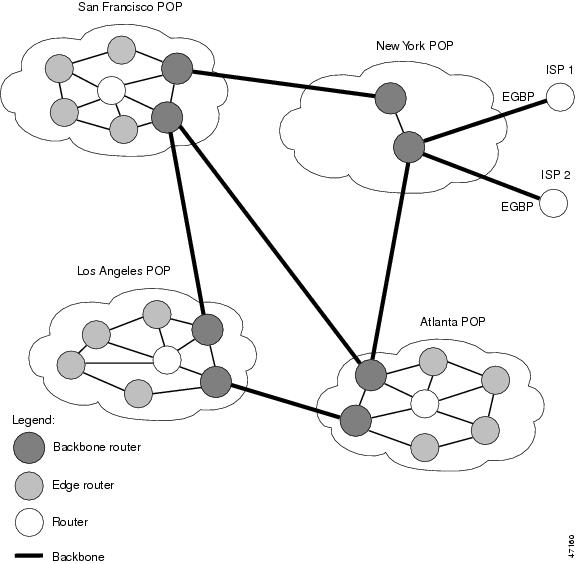
The figure below shows an exploded view of the backbone router that links the Los Angeles point of presence (POP) in the figure above to the Atlanta POP. The bold line represents the backbone link going to the Atlanta POP.
The figure below shows the following types of traffic that travel through the backbone router:
- The dotted line marked A represents traffic entering the backbone from a router that is not part of the backbone. This is called external traffic.
- The dotted lines marked B and D represent traffic that is exiting the backbone. This is called internal traffic.
- The dotted line marked C represents traffic that is not using the backbone and is not of interest to TMS.

You can determine the amount of traffic the backbone handles by enabling a backbone router to track the number of packets and bytes that travel through the backbone router. You can separate the traffic into the categories "internal" and "external." You separate the traffic by designating incoming interfaces on the backbone router as internal or external.
Once you enable a backbone router to collect TMS, the router starts counters, which dynamically update when network traffic passes through the backbone router. You can retrieve a snapshot of the TMS, either through a command to the backbone router or through the NDA.
External traffic (path A in the figure above) is the most important for determining the amount of traffic that travels through a backbone router. Internal traffic (paths B and D in the figure above) is useful for ensuring that you are capturing all of the TMS data. When you receive a snapshot of the TMS, the packets and bytes are displayed in internal and external categories.
TMS Viewing Options
Once TMS are collected, you have three options for viewing the data:
TMS Displayed with the NDA Display Module
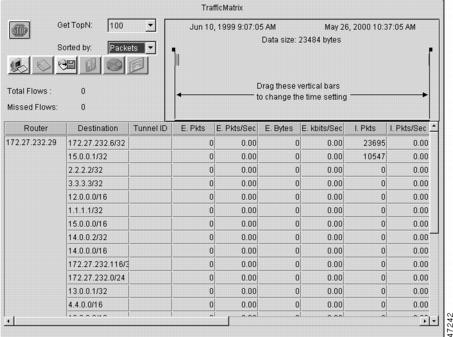
The NDA collects TMS from the backbone router and displays the data through the NDA Display module. The TMS can look similar to the data shown in the two figures below. The display format depends on the aggregation scheme you select. See the Network Data Analyzer Installation and User Guide for more information.
(The view of data that the NDA Display module provides is wide. Slide the scroll bar to the right and left to see all of the data. The two figures below taken together show all of the columns of data.)

Nonrecursive Accounting Information Displayed
You can use the show ip cef command to display nonrecursive accounting information, including the counts of internal and external packets and bytes that have traveled through the IP prefix address/mask (in the format a.b.c.d/len) for an IGP route. Here is an example that shows 0 packets and 0 bytes of external traffic and 1144 packets and 742 bytes of internal traffic for the router with the IP address 10.102.102.102:
router# show ip cef 10.102.102.102
10.102.102.10/32, version 34, epoch 0, per-destination sharing
0 packets, 0 bytes
 tag information set
  local tag: 19
 via 10.1.1.100, Ethernet0/0, 0 dependencies
  next hop 10.1.1.100, Ethernet0/0
  valid adjacency
  tag rewrite with Et0/0, 10.1.1.100, tags imposed {17}
 0 packets, 0 bytes switched through the prefix
 tmstats: external 0 packets, 0 bytes
      internal 1144 packets, 742 bytes
 30 second output rate 0 Kbits/sec
Statistics in the timestats File
Before you perform the task to interpret the statistics in the tmstats_ascii file (an optional procedure described in the Interpreting the tmstats File section), you need to understand the following:
Virtual Files on the Backbone Router
You can read TMS that reside on the backbone router and are stored in the following virtual files:
- tmstats_ascii--TMS in ASCII (human readable) format
- tmstats_binary--TMS in binary (space-efficient) format
The binary file tmstats_binary contains the same information as the ASCII file, except in a space-efficient format. You can copy this file from the router and read it with any utility that accepts files in binary format.
tmstats File Header Description
The tmstats_ascii file header provides the address of the backbone router and information about how much time the router used to collect and export the TMS data. The header occupies one line and uses the following format:
VERSION 1|ADDR
<address>
|AGGREGATION
TrafficMatrix.ascii|SYSUPTIME
<seconds>|
routerUTC
<routerUTC>
|NTP
<synchronized|unsynchronized>|DURATION
<aggregateTime>
|
The table below describes the fields in the file header of the tmstats_ascii file.
| Table 1 | Fields in tmstats_ascii File Header |
|
Maximum Field Length |
Field |
Description |
|---|---|---|
|
10 |
VERSION |
File format version |
|
21 |
ADDR |
The IP address of the router |
|
32 |
AGGREGATION |
The type of data being aggregated |
|
21 |
SYSUPTIME |
The time of export (in seconds) since the router booted |
|
21 |
routerUTC |
The time of export (in seconds) since 1900-01-01 (Coordinated Universal Time (UTC)), as determined by the router |
|
19 |
NTP |
An indication of whether or not the UTC of the router has been synchronized by the Network Time Protocol (NTP) with an authoritative time source, such as a radio clock or an atomic clock attached to a time server |
|
20 |
DURATION |
The time needed to capture the data (in seconds) (trailing |) |
Destination Prefix Record Description
The destination prefix record displays the internal and external packets and bytes for the IGP route and uses the following format:
p|
<destPrefix/Mask>
|
<creationSysUpTime>
|
<internalPackets>
|
<internalBytes>
|
<externalPackets>
|
<externalBytes>
The per-prefix records display information only about label switched traffic data. Label forwarding across a backbone router or switch, is based on either dynamic label switching or traffic engineered paths.
The table below describes the fields in the destination prefix record.
| Table 2 | Destination Prefix Record Fields |
|
Maximum Field Length |
Field |
Description |
|---|---|---|
|
2 |
<recordType> |
p means that the record represents dynamic label switching (for example, LDP) data or headend traffic engineering (TE) tunnel traffic data. t means that the record contains TE tunnel midpoint data. |
|
19 |
destPrefix/Mask |
The IP prefix address/mask (in the format a.b.c.d/len) for this IGP route. |
|
11 |
creationSysUpTime |
How long the system had been running when the record was first created. |
|
21 |
internalPackets |
Internal packet count. |
|
21 |
internalBytes |
Internal byte count. |
|
21 |
externalPackets |
External packet count. |
|
20 |
externalBytes |
External byte count (no trailing |). |
Tunnel Midpoint Record Description
The tunnel midpoint record displays the internal and external packets and bytes for the tunnel head and uses the following format:
t|
<headAddr><tun_id>
|
<creationSysUpTime>
|

<internalPackets>
|
<internalBytes>
|
<externalPackets>
|
<externalBytes>
The table below describes the fields in the tunnel midpoint record.
| Table 3 | Tunnel Midpoint Record Fields |
|
Maximum Field Length |
Field |
Description |
|---|---|---|
|
2 |
<recordType> |
t means that the record contains TE tunnel midpoint data. |
|
27 |
headAddr<space>tun_id |
The IP address of the tunnel head and tunnel interface number. |
|
11 |
creationSysUpTime |
How long the system had been running when the record was first created. |
|
21 |
internalPackets |
Internal packet count. |
|
21 |
internalBytes |
Internal byte count. |
|
21 |
externalPackets |
External packet count. |
|
20 |
externalBytes |
External byte count (no trailing |). |
Statistics in the tmsasinfo File
Before viewing the statistics in thetmsasinfo file (an optional procedure described in the Viewing Information in the tmsasinfo File), you need to understand the following:
Header Format for tmsasinfo File
The file header provides the address of the router and indicates how much time the router used to collect and export the data. The file header uses the following format:
VERSION 1|ADDR
<address>
|AGGREGATION
ASList.ascii|SYSUPTIME
<seconds>|routerUTC

<routerUTC>
|DURATION
<aggregateTime>
|
The table below describes the fields in the file header.
| Table 4 | Fields in the tmsasinfo File Header |
|
Maximum Field Length |
Field |
Description |
|---|---|---|
|
5 |
VERSION |
File format version |
|
15 |
ADDR |
The IP address of the router |
|
20 |
AGGREGATION |
The type of data being aggregated |
|
10 |
SYSUPTIME |
The time of export (in seconds) since router booted |
|
10 |
routerUTC |
The time of export (in seconds) since 1900-01-01, as determined by the router |
|
10 |
DURATION |
The time needed to capture the data (in seconds) |
Neighbor AS Record in the tmsasinfo File
The neighbor AS record displays the neighbor AS and the underlying prefix/mask for each BGP route. The record uses the following format:
<nonrecursivePrefix/Mask>
|
<AS>
|
<destinationPrefix/Mask>
The table below describes the fields in the neighbor AS record.
How to Configure CEF Network Accounting
- Configuring CEF Network Accounting
- Enabling a Backbone Router to Collect TMS
- Interpreting the tmstats File
- Viewing Information in the tmsasinfo File
- Verifying CEF Network Accounting Information
Configuring CEF Network Accounting
Perform the following task to enable network accounting for Cisco Express Forwarding.
When you enable network accounting for Cisco Express Forwarding from the global configuration mode, accounting information is collected on the RP.
When you enable network accounting for distributed Cisco Express Forwarding from the global configuration mode, accounting information grouped by IP prefix (recursive or nonrecursive) is not sent to the RP, but is collected on the line card.
After accounting information is collected for Cisco Express Forwarding or distributed Cisco Express Forwarding, you can display the statistics using the show ip cef command. To verify the statistics on a line card, use the show cef interface statisticscommand.
DETAILED STEPS
Enabling a Backbone Router to Collect TMS
This section contains information about and instructions for enabling a backbone router to collect TMS for Cisco Express Forwarding. Enabling a backbone router to collect TMS requires enabling nonrecursive accounting and setting the interfaces on the router to collect internal or external TMS. The internal and external settings are used only for TMS collection. The interfaces are set to internal by default.
 Note | Make sure you configure the collection of internal and external TMS on the incoming interface of the backbone router. |
You can perform these tasks either through the CLI or through the NDA. The following sections explain each procedure:
- Using the CLI to Enable a Backbone Router to Collect TMS
- Enabling the NDA to Collect TMS on a Backbone Router
Using the CLI to Enable a Backbone Router to Collect TMS
- interface type slot/port
- interface type slot/port-adapter/port
DETAILED STEPS
Enabling the NDA to Collect TMS on a Backbone Router
Perform the following task to enable the NDA to collect TMS on a backbone router.
You can use the NDA to enable TMS collection and to set the incoming interfaces on the backbone router to collect internal or external traffic data.
DETAILED STEPS
| Step 1 |
Open the Traffic Matrix Statistics Control window in the NDA.
For specific instructions, see the Network Data Analyzer Installation and User Guide . |
| Step 2 |
Click the
New button in the Traffic Matrix Statistics Control window.
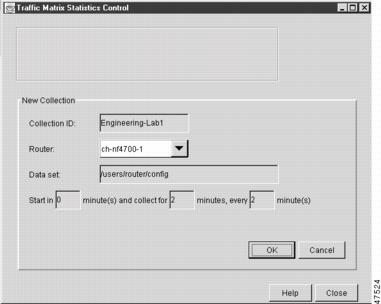
If a valid directory of router configuration files exists on a designated Utility Server host in the network, the Traffic Matrix Statistics Control window shown in the figure below appears. |
| Step 3 |
Specify the new TMS collection parameters, using the Traffic Matrix Statistics Control window.
The window incorporates a New Collection panel that enables you to define a new TMS collection process. To use the NDA for TMS collection, you must specify the following information:
The window for entering this information on the NDA is similar to the one shown in the figure below. |
| Step 4 |
Click
OK in the New Collection panel.
The Traffic Matrix Statistics Control window confirms the information you entered, and the new collection name appears at the top left corner of the window. |
| Step 5 |
Select the
TMS tab in the Router Configuration window in the NDA.
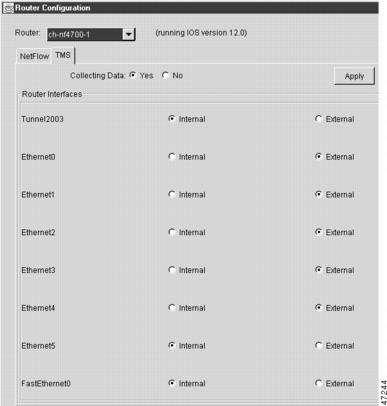
The TMS Router Configuration panel shown in the figure below appears. This panel enables you to configure network devices to export TMS data. (For instructions on locating the Router Configuration window, see the Network Data Analyzer Installation and User Guide .) |
| Step 6 |
Set internal and external interfaces on the router.
The Router Configuration window allows you to set the interfaces on the backbone router to collect internal and external packet and byte data. By default, all interfaces are set to collect internal data. Single-selection buttons allow you to associate the interface with either internal data or external data. You can select only one radio button for an interface at one time. Set the interface to collect internal or external data by clicking the appropriate radio button. The window for selecting this information on the NDA is similar to the one shown in the figure below. |
| Step 7 |
Click
Applyin the Router Configuration window.
Any changes that you have made to the configuration parameters in the TMS Router Configuration panel are applied to the currently selected device. The Apply button affects only changes made in the panel where the button is located. When the NDA asks if you want to enable Cisco Express Forwarding, click Yes. |
Interpreting the tmstats File
This section contains instructions for interpreting the statistics in the tmstats_ascii file. For conceptual information about the tmstats_ascii file, see the Statistics in the timestats File.
DETAILED STEPS
| Step 1 |
more
system:/vfiles/tmstats_ascii
Enter this command on the backbone router to view the statistics in the ASCII file. For example: Example:
Router# more system:/vfiles/tmstats_ascii
VERSION 1|ADDR 172.27.32.24|AGGREGATION TrafficMatrix.ascii|SYSUPTIME 41428|routerUTC 3104467160|NTP unsynchronized|DURATION 1|
p|10.1.0.0/16|242|1|50|2|100
p|172.27.32.0/22|242|0|0|0|0
This is an example of a tmstats_ascii file. The example contains a header information and two records. The header information and each record begin on a separate line. A bar (|) separates consecutive fields within a header or record. The first field in a record specifies the type of record. |
| Step 2 |
Interpret the header and record information in the tmstats_ascii file.
Each tmstats_ascii file displayed consists of header information and records. The file in the example in Step 1 contains header information and two destination prefix records. See thefollowing sections for a description of header and record information: |
Viewing Information in the tmsasinfo File
Perform the following task to view information in the tmsasinfo file about BGP neighbor autonomous systems (ASs) for IGP destinations.
The TMS feature also displays the BGP neighbor ASs associated with each IGP destination. You can display all the neighbor ASs for any IGP destination. The tmsasinfo file is in ASCII format. It is the only format provided for this data.
For conceptual information about the tmsasinfo file, see the Statistics in the tmsasinfo File.
DETAILED STEPS
| Step 1 |
more
system:/vfiles/tmsasinfo
Enter this command on the backbone router to view the statistics in the tmsasinfo ASCII file. For example: Example:
Router# more system:/vfiles/tmsasinfo

VERSION 1|ADDR 10.10.10.10|AGGREGATION ASList.ascii|SYSUPTIME 619855|routerUTC 3334075555|DURATION 0
10.1.1.2/32|65535|192.168.1.0/24
This is an example of a tmsasinfo file. The example contains a header information and one record. The header information and each record begin on a separate line. A bar (|) separates consecutive fields within a header or record.
|
| Step 2 |
View the header and record information in the tmasinfo file.
See the following sections for a description of header and record information: |
Verifying CEF Network Accounting Information
Perform the following task to verify that Cisco Express Forwarding networking accounting information is as you expected.
DETAILED STEPS
| Step 1 |
show
ip
cef
summary
Use this command to display the collected Cisco Express Forwarding network accounting information. For example: Example:
Router# show ip cef summary
IP CEF with switching (Table Version 19), flags=0x0
  19 routes, 0 reresolve, 0 unresolved (0 old, 0 new), peak 1
  19 leaves, 17 nodes, 19960 bytes, 58 inserts, 39 invalidations
  0 load sharing elements, 0 bytes, 0 references
  universal per-destination load sharing algorithm, id E3296D5B
  3(1) CEF resets, 0 revisions of existing leaves
  Resolution Timer: Exponential (currently 1s, peak 1s)
  0 in-place/0 aborted modifications
  refcounts:  4628 leaf, 4608 node
Adjacency Table has 7 adjacencies
This command shows sample accounting information on a router with Central Cisco Express Forwarding enabled. In this example, the Cisco Express Forwarding table contains a total or 19 entries, 0 entries need to be reresolved, 0 entries do not have resolved recursions, and the highest number of unresolved entries is 1. The Cisco Express Forwarding Trie contains 19 leaves and 17 nodes, which take up 19960 bytes of memory. The number of routes inserted into the table is 58 and 39 routes have been invalidated. This command shows no load sharing elements. The per-destination load sharing algorithm is configured and the identifier is E3296D5D. The following command is sample output for a router with distributed Cisco Express Forwarding enabled: Example:
Router# show ip cef summary
IP Distributed CEF with switching (Table Version 36), flags=0x0
  16 routes, 0 reresolve, 0 unresolved (0 old, 0 new), peak 1
  19 leaves, 17 nodes, 19960 bytes, 39 inserts, 20 invalidations
  0 load sharing elements, 0 bytes, 0 references
  universal per-destination load sharing algorithm, id E3296D5B
  2(0) CEF resets, 0 revisions of existing leaves
  Resolution Timer: Exponential (currently 1s, peak 1s)
  0 in-place/0 aborted modifications
  refcounts:  4628 leaf, 4608 node
|
| Step 2 |
show
ip
cef
interface
-
type
number
detail
Use this command to show detailed Cisco Express Forwarding network accounting information for a specified interface type and number. The following is sample output from the show ip cef detailcommand for interface Ethernet 0. It shows all the prefixes resolving through adjacency pointing to next hop interface Ethernet 0/0 and next hop interface IP address 172.29.233.33. For example, for Ethernet interface 0, IP address 172.29.233.33: Example:
Router# show ip cef ethernet 0/0 detail
IP Distributed CEF with switching (Table Version 136808)
 45800 routes, 8 unresolved routes (0 old, 8 new)
 45800 leaves, 2868 nodes, 8444360 bytes,
 136808 inserts, 91008 invalidations
 1 load sharing elements, 208 bytes, 1 references
 1 CEF resets, 1 revisions of existing leaves
 refcounts: 527343 leaf, 465638 node
 172.29.233.33/32, version 7417, cached adjacency 172.29.233.33
 0 packets, 0 bytes,
   Adjacency-prefix
   via 172.29.233.33, Ethernet0/0, 0 dependencies
 next hop 172.29.233.33, Ethernet0/0
   valid cached adjacency
 0 packets, 0 bytes switched through the prefix
 tmstats: external 0 packets, 0 bytes
      internal 0 packets, 0 bytes
|
Configuration Examples for CEF Network Accounting
- Example Configuring CEF Network Accounting
- Example Enabling a Backbone Router to Collect TMS Data
- Example IP CEF Nonrecursive Accounting
- Example Interpreting the tmstats_ascii File
Example Enabling a Backbone Router to Collect TMS Data
The following example shows how to enable a backbone router to collect TMS data:
configure terminal
!
ip cef
ip cef accounting non-recursive
!
interface e1/0
 ip cef accounting non-recursive external
 end
For a sample backbone configuration, see the Example IP CEF Nonrecursive Accounting section.
Example IP CEF Nonrecursive Accounting
The following example shows an IP Cisco Express Forwarding accounting configuration. The example shows how to enable routers to count the number of internal and external packets and bytes that travel through the backbone routers. The figure below shows the sample backbone configuration.

Router A Configuration
Router(config)# ip cef
Router(config)# ip cef accounting non-recursive
Router(config)# interface e1/0
Router(config-if)# ip cef accounting non-recursive external
Router B Configuration: e1/1
Router(config)# ip cef
Router(config)# ip cef accounting non-recursive
Router(config)# interface e1/1
Router(config-if)# ip cef accounting non-recursive external
Router B Configuration: e1/0
Router(config)# interface e1/0
Router(config-if)# ip cef accounting non-recursive internal
Router C Configuration: e1/1:
Router(config)# ip cef
Router(config)# ip cef accounting non-recursive
Router(config)# interface e1/1
Router(config-if)# ip cef accounting non-recursive internal
Example Interpreting the tmstats_ascii File
The following example shows the contents of tmstats_ascii file:
Router# more system:/vfiles/tmstats_ascii
VERSION 1|ADDR 172.27.32.24|AGGREGATION TrafficMatrix.ascii|SYSUPTIME 41428|routerUTC 3104467160|NTP unsynchronized|DURATION 1|
p|10.1.0.0/16|242|1|50|2|100
p|172.27.32.0/22|242|0|0|0|0
This example contains header information and two destination prefix records. The records represent dynamic label switching or traffic engineering (TE) tunnel data indicated by the initial "p."
Additional References
Related Documents
|
Related Topic |
Document Title |
|---|---|
|
Cisco IOS commands |
|
|
IP switching commands: complete command syntax, command modes, command history, defaults, usage guidelines, and examples. |
Cisco IOS IP Switching Command Reference |
|
Overview of the Cisco Express Forwarding feature |
Cisco Express Forwarding Overview |
|
Tasks for verifying basic Cisco Express Forwarding and distributed Cisco Express Forwarding operation |
Configuring Basic Cisco Express Forwarding for Improved Performance, Scalability, and Resiliency in Dynamic Networks |
|
Tasks for enabling or disabling Cisco Express Forwarding or distributed Cisco Express Forwarding |
Enabling or Disabling Cisco Express Forwarding or Distributed Cisco Express Forwarding to Customize Switching and Forwarding for Dynamic Networks |
|
Tasks for configuring load-balancing schemes for Cisco Express Forwarding |
Configuring a Load-Balancing Scheme for Cisco Express Forwarding Traffic |
|
Tasks for configuring Cisco Express Forwarding consistency checkers |
Configuring Cisco Express Forwarding Consistency Checkers for Route Processors and Line Cards |
|
Tasks for configuring epochs for Cisco Express Forwarding tables |
Configuring Epochs to Clear and Rebuild Cisco Express Forwarding and Adjacency Tables |
|
Tasks for customizing the display of recorded Cisco Express Forwarding events |
Customizing the Display of Recorded Cisco Express Forwarding Events |
|
How to determine which Cisco IOS switching or forwarding path your packets are taking |
|
|
How to use the Cisco Network Data Analyzer to view TMS |
|
|
Commands for configuring and monitoring Cisco Express Forwarding |
Cisco IOS IP Switching Command Reference |
MIBs
Technical Assistance
|
Description |
Link |
|---|---|
|
The Cisco Support and Documentation website provides online resources to download documentation, software, and tools. Use these resources to install and configure the software and to troubleshoot and resolve technical issues with Cisco products and technologies. Access to most tools on the Cisco Support and Documentation website requires a Cisco.com user ID and password. |
Feature Information for CEF Network Accounting
The following table provides release information about the feature or features described in this module. This table lists only the software release that introduced support for a given feature in a given software release train. Unless noted otherwise, subsequent releases of that software release train also support that feature.
Use Cisco Feature Navigator to find information about platform support and Cisco software image support. To access Cisco Feature Navigator, go to www.cisco.com/go/cfn. An account on Cisco.com is not required.
Glossary
AS --autonomous system. A collection of networks under a common administration sharing a common routing strategy. Autonomous systems are subdivided by areas. An autonomous system must be assigned a unique 16-bit number by the Internet Assigned Numbers Authority (IANA).
adjacency --A relationship formed between selected neighboring routers and end nodes for the purpose of exchanging routing information. Adjacency is based upon the use of a common media segment by the routers and nodes involved.
BGP --Border Gateway Protocol. An interdomain routing protocol that replaces Exterior Gateway Protocol (EGP). BGP exchanges reachability information with other BGP systems. It is defined by RFC 1163.
Cisco Express Forwarding --A Layer 3 switching technology. Cisco Express Forwarding can also refer to central Cisco Express Forwarding mode, one of two modes of Cisco Express Forwarding operation. Cisco Express Forwarding enables a Route Processor to perform express forwarding. Distributed Cisco Express Forwarding is the other mode of Cisco Express Forwarding operation.
distributed Cisco Express Forwarding --A type of Cisco Express Forwarding switching in which line cards (such as Versatile Interface Processor (VIP) line cards) maintain identical copies of the Forwarding Information Base (FIB) and adjacency tables. The line cards perform the express forwarding between port adapters; this relieves the Route Switch Processor of involvement in the switching operation.
FIB --forwarding information base. A component of Cisco Express Forwarding. The router uses the FIB lookup table to make destination-based switching decisions during Cisco Express Forwarding operation. The router maintains a mirror image of the forwarding information in an IP routing table.
IGP -- Interior Gateway Protocol. An internet protocol used to exchange routing information within an autonomous system. Examples of common Internet IGPs include Interior Gateway Routing Protocol (IGRP), Open Shortest Path First (OSPF), and Routing Information Protocol (RIP).
label --A short fixed-length data construct that tells switching nodes how to forward data (packets or cells).
line card --A general term for an interface processor that can be used in various Cisco products. For example, a Versatile Interface Processor (VIP) is a line card for the Cisco 7500 series router.
prefix --The network address portion of an IP address. A prefix is specified by a network and mask and is generally represented in the format network/mask. The mask indicates which bits are the network bits. For example, 1.0.0.0/16 means that the first 16 bits of the IP address are masked, making them the network bits. The remaining bits are the host bits. In this example, the network number is 10.0.
RP --Route Processor. The processor module in the Cisco 7000 series routers that contains the CPU, system software, and most of the memory components that are used in the router. It is sometimes called a supervisory processor.
TE --traffic engineering. Techniques and processes that cause routed traffic to travel through the network on a path other than the one that would have been chosen if standard routing methods were used.
traffic engineering tunnel --A label-switched tunnel that is used for traffic engineering. Such a tunnel is set up through means other than normal Layer 3 routing; it is used to direct traffic over a path different from the one that Layer 3 routing could cause the tunnel to take.
TMS --Traffic Matrix Statistics. An IOS feature that enables an administrator to capture and analyze traffic data entering a backbone that is running the Border Gateway Protocol (BGP). This feature also allows an administrator to determine the neighbor autonomous systems of a BGP destination
VPN --Virtual Private Network. The result of a router configuration that enables IP traffic to use tunneling to travel securely over a public TCP/IP network.
VRF --A Virtual Private Network (VPN) routing/forwarding instance. A VRF consists of an IP routing table, a derived forwarding table, a set of interfaces that use the forwarding table, and a set of rules and routing protocols that determine what goes into the forwarding table. In general, a VRF includes the routing information that defines a customer VPN site that is attached to a PE router.
Cisco and the Cisco logo are trademarks or registered trademarks of Cisco and/or its affiliates in the U.S. and other countries. To view a list of Cisco trademarks, go to this URL: www.cisco.com/go/trademarks. Third-party trademarks mentioned are the property of their respective owners. The use of the word partner does not imply a partnership relationship between Cisco and any other company. (1110R)
Any Internet Protocol (IP) addresses and phone numbers used in this document are not intended to be actual addresses and phone numbers. Any examples, command display output, network topology diagrams, and other figures included in the document are shown for illustrative purposes only. Any use of actual IP addresses or phone numbers in illustrative content is unintentional and coincidental.