



 Feedback
Contents
- Verifying IPv4 Multicast Forwarding Using the MFIB
- Finding Feature Information
- Prerequisites for Verifying IPv4 Multicast Forwarding Using the MFIB
- Restrictions for Verifying IPv4 Multicast Forwarding Using the MFIB
- Information About Verifying IPv4 Multicast Forwarding Using the MFIB
- Guidelines for Verifying IPv4 Multicast Forwarding Using the MFIB
- Common Commands for Verifying IPv4 Multicast Forwarding Using the MFIB
- Common Mroute Flags
- Common MRIB Flags
- Common MFIB Flags
- C Flag
- C Flag Sample Output
- Well-Known Groups
- Standard Multicast Group Entry
- K Flag
- K Flag Sample Output
- IA Flag
- IA Flag Sample Output
- A Flag
- A Flag Sample Output
- F Flag
- F Flag Sample Output
- NS Flag
- IC Flag
- IC Flag Sample Output
- PIM Tunnel Interfaces
- How to Verify IPv4 Multicast Forwarding Using the MFIB
- Verifying IPv4 Multicast Forwarding Using the MFIB for PIM-SM PIM-SSM and Bidir-PIM
- Verifying PIM Tunnel Interfaces for PIM-SM
- Configuration Examples for Verifying IPv4 Multicast Forwarding Using the MFIB
- Examples Verifying IPv4 Multicast Forwarding Using the MFIB for PIM-SM
- PIM-SM Example Active Sources and Interested Receivers - SPT Switchover
- PIM-SM Example Active Sources and Interested Receivers - SPT Threshold Set to Infinity
- PIM-SM Example Source Traffic Only with No Receivers
- PIM-SM Example Interested Receivers with No Active Sources
- Examples Verifying IPv4 Multicast Forwarding Using the MFIB for PIM-SSM
- PIM-SSM Example Interested Receivers With or Without Active Sources
- PIM-SSM Example Source Traffic Only with No Active Receivers
- PIM-SSM Example Unwanted Sources in the SSM Network
- Examples Verifying IPv4 Multicast Forwarding Using the MFIB for Bidir-PIM Networks
- Bidir-PIM Example Active Sources with Interested Receivers
- Bidir-PIM Example Active Sources with No Interested Receivers
- Bidir-PIM Example No Active Sources with Interested Receivers
- Bidir-PIM Example No Active Sources with No Interested Receivers
- Additional References
- Feature Information for Verifying IPv4 Multicast Forwarding Using the MFIB
Verifying IPv4 Multicast Forwarding Using the MFIB
This module describes how to verify IPv4 multicast forwarding using the Multicast Forwarding Information Base (MFIB) in multicast networks operating in Protocol Independent Multicast (PIM) sparse mode (PIM-SM), Source Specific Multicast (PIM-SSM) mode, or bidirectional PIM (bidir-PIM) mode.
- Finding Feature Information
- Prerequisites for Verifying IPv4 Multicast Forwarding Using the MFIB
- Restrictions for Verifying IPv4 Multicast Forwarding Using the MFIB
- Information About Verifying IPv4 Multicast Forwarding Using the MFIB
- How to Verify IPv4 Multicast Forwarding Using the MFIB
- Configuration Examples for Verifying IPv4 Multicast Forwarding Using the MFIB
- Additional References
- Feature Information for Verifying IPv4 Multicast Forwarding Using the MFIB
Finding Feature Information
Your software release may not support all the features documented in this module. For the latest feature information and caveats, see the release notes for your platform and software release. To find information about the features documented in this module, and to see a list of the releases in which each feature is supported, see the Feature Information Table at the end of this document.
Use Cisco Feature Navigator to find information about platform support and Cisco software image support. To access Cisco Feature Navigator, go to www.cisco.com/go/cfn. An account on Cisco.com is not required.
Prerequisites for Verifying IPv4 Multicast Forwarding Using the MFIB
- Before performing the tasks in this module, you should be familiar with concepts described in the â Multicast Forwarding Information Base Overview â and â IP Multicast Technology Overview â modules.
- The tasks in this module assume that IP multicast has been enabled and that PIM-SM, PIM-SSM, or bidir-PIM have been configured using the relevant tasks described in the â Configuring Basic IP Multicast â module.
Information About Verifying IPv4 Multicast Forwarding Using the MFIB
- Guidelines for Verifying IPv4 Multicast Forwarding Using the MFIB
- Common Commands for Verifying IPv4 Multicast Forwarding Using the MFIB
- Common Mroute Flags
- Common MRIB Flags
- Common MFIB Flags
Guidelines for Verifying IPv4 Multicast Forwarding Using the MFIB
When you verify IPv4 multicast forwarding using the MFIB in PIM network environments, a useful approach is to begin the verification process on the last-hop designated router (DR), and then continue the verification process on the routers along the SPT for PIM-SM or PIM-SSM (or on the shared tree for bidir-PIM) until the first-hop DR has been reached. The goal of the verification is to ensure that IP multicast traffic is being forwarded properly through an IP multicast network.
Common Commands for Verifying IPv4 Multicast Forwarding Using the MFIB
The table describes the common commands used to verify multicast forwarding using the MFIB.
Common Mroute Flags
When you verify multicast forwarding, it is helpful to start by looking at the control plane using the show ip mroute command. The table describes some of the common flags that you will observe in the output of the show ip mroute command when verifying multicast forwarding.
|
Flag |
Description |
||
|---|---|---|---|
|
Mode Flags (All Routers) |
|||
|
S |
SparseâEntry is operating in sparse mode. |
||
|
s |
SSMâGroupEntry is operating in SSM mode. |
||
|
B |
B BidirâGroupEntry is operating in bidirectional mode. |
||
|
Last-Hop DR Flags |
|||
|
C |
ConnectedâIndicates that an IGMPv2 report for the multicast group was received. |
||
|
I |
Received Source Specific Host ReportâIndicates that an IGMPv3 report for the multicast group was received. |
||
|
L |
LocalâIndicates that the router itself is a member of the multicast group. Examples are groups that are joined locally by the ip igmp join-group command, the ip sap listen commands, and the well-known Auto-RP groups, 224.0.1.39 and 224.0.1.40.
|
||
|
J |
Joined SPTâIndicates that the SPT threshold is set to 0 kbps and the next (S, G) packet received down the shared tree will trigger an (S, G) join in the direction of the source.
|
||
|
First-Hop DR Flags |
|||
|
F |
Register FlagâIndicates that the router is a candidate to register for the multicast group. |
||
|
(S, G) Forwarding Flag (Routers Along SPT) |
|||
|
T |
SPT-bit SetâIndicates that packets have been received on the SPT. |
||
|
Pruned Flag |
|||
|
P |
PrunedâEntry is in a prune state. Multicast traffic for the multicast group will be dropped by the router. |
||
Common MRIB Flags
When you verify multicast forwarding, it is helpful to confirm the communication between the control plane and the MFIB by examining the MRIB using the show ip mrib routecommand. The table describes some of the common flags that you will encounter in the output of the show ip mrib routecommand when verifying multicast forwarding.
|
Flag |
Description |
|---|---|
|
Entry Flags |
|
|
C |
Connected--When set, this flag should also appear in the MFIB. For more information, see the C Flag description in the Common MFIB Flags section. |
|
IA |
Inherited Accept--When set, this flag should also appear in the MFIB. For more information, see the IA Flag description in the Common MFIB Flags section. |
|
Interface Flags |
|
|
A |
Accept--When set, this flag should also appear in the MFIB. For more information, see the A Flag description in the Common MFIB Flags section. |
|
F |
Forward--When set, this flag should also appear in the MFIB. For more information, see the F Flag description in the Common MFIB Flags section. |
|
NS |
Negate Signal--When set, this flag should also appear in the MFIB. For more information about this flag, see the NS Flag description in Common MFIB Flags section. |
Common MFIB Flags
When you verify multicast forwarding, it is important to examine the MFIB using the show ip mfib command to ensure that multicast traffic is being forwarded as expected. This section describes some of the common flags that you will observe in the output of the show ip mfib command when verifying multicast forwarding.
- C Flag
- C Flag Sample Output
- K Flag
- K Flag Sample Output
- IA Flag
- IA Flag Sample Output
- A Flag
- A Flag Sample Output
- F Flag
- F Flag Sample Output
- NS Flag
- IC Flag
- IC Flag Sample Output
- PIM Tunnel Interfaces
C Flag
The table describes the C flag.
|
Entry Flag |
Description |
||
|---|---|---|---|
|
C |
Connected--Indicates that the MFIB will inform the multicast control plane when it receives traffic from a directly connected source. This flag is used for multicast groups running in PIM-SM or PIM-DM. For PIM-SM, it triggers PIM registration. For PIM-DM, it triggers dense mode flooding.
|
C Flag Sample Output
The following is sample output from the show ip mfib command. In this example, the output has been filtered to display only entries that have the C flag set.
RP# show ip mfib | inc Flags: C
 (*,224.0.0.0/4) Flags: C
 (*,239.1.1.1) Flags: C
 (*,224.0.1.39) Flags: C
 (*,224.0.1.40) Flags: C
Well-Known Groups
(*, 224.0.0.0/4) Flags: C
This entry indicates that a directly connected check is being performed for the multicast range 224.0.0.0/4. The assumption is that this range is in the group-to-RP mapping cache. If it is not in the group-to-RP mapping cache, this entry will not appear. (*, G/m) parent entries, such as this entry, are used when a match for a (*, G) or (S, G) entry is not found. When traffic from a directly connected source matches a parent entry, the appropriate (*, G) and (S, G) entries in the MFIB, MRIB, and mroute tables will be created.
(*, 224.0.1.39) Flags: C
This entry indicates that a directly connected check is being performed for the Auto-RP Announce multicast group. When traffic from a directly connected source matches this entry and no corresponding (S, G) entry is found, the appropriate (S, G) entry will be created in the MFIB, MRIB, and mroute tables.
 Note | (*, 224.0.1.39) appears in routers that are configured as an RP for Auto-RP using the ip pim send-rp-announce command. The C flag will always be set for this entry, whether the multicast group is running in PIM-DM or PIM-SM. |
(*, 224.0.1.40) Flags: C
This entry indicates that a directly connected check is being performed for the Auto-RP Discovery multicast group. When traffic from a directly connected source matches this entry and no corresponding (S, G) entry is found, the appropriate (S, G) entry will be created in the MFIB, MRIB, and mroute table.
Note | (*, 224.0.1.40) appears on routers that are configured as a Mapping Agent using the ip pim send-rp-discovery command. The C flag will always be set for this entry, whether the multicast group is running in PIM-DM or PIM-SM. |
Standard Multicast Group Entry
(*, 239.1.1.1) Flags: C
This entry indicates that a directly connected check is being performed for the multicast group 239.1.1.1.
Note | 239.1.1.1 was arbitrarily chosen for this example to represent a standard multicast group entry in the show ip mfib output; in practice, the multicast group entries that will display in the output will depend upon your multicast network environment and application. |
For this example, the (*, 224.0.0.0/4) entry will not be used because (*, 239.1.1.1) is more specific. When traffic from a directly connected source matches the (*, 239.1.1.1) entry and no (S, G) entry match is found, the MFIB will create the appropriate (S, G) entry then inform the multicast control plane to do the same in the mroute table. If the source is sending for the first time, the multicast control plane will then perform PIM registration or dense mode flooding based on the mode running for the multicast group.
K Flag Sample Output
The K flag is set to indicate that the control plane (PIM/IGMP/TRANS) owns this entry. When the K flag is set the entry stays in the MFIB until the control plane removes it.
If all flags on an entry (or interface) are removed, MFIB deletes the entry. Therefore, the K flag is used to ensure that MFIB keeps the entry in the absence of any other entry flags (or interfaces with flags on the entry).
The following is sample output from the show ip mfibcommand. In this example, the output has been filtered to display only entries that have the K flag set.
Note | The K flag is displayed only when the verbose keyword is also specified. |
RP# show ip mfib verbose | inc Flags: K
ET - Data Rate Exceeds Threshold, K - Keepalive Forwarding Counts: Pkt Count/Pkts per second/Avg Pkt Size/Kbits per second
 (*,224.0.0.0/4) Flags: K
 (*,224.0.1.40) Flags: C K
 (*,232.0.0.0/8) Flags: K
 (*,239.0.0.0/8) Flags: K
 (*,239.1.1.1) Flags: IA K
IA Flag
The table describes the IA flag.
|
Entry Flag |
Description |
||
|---|---|---|---|
|
IA |
Inherit A Flag--(*, G) entries with the IA flag set indicate that the accept check be performed using its (*, G/mask) parent entry. In other words, the accept check is used to inherit interfaces with the A flag set in the (*, G/m) parent entry.
|
IA Flag Sample Output
In the following output from the show ip mfib and show ip pim rp-mappingcommands, the multicast group 239.195.1.1 is running bidir-PIM and there are two entries: (*, 239.195.1.1) and (*, 239.195.0.0/16). The (*, 239.195.1.1) entry indicates that there is an interested receiver in the network. The parent entry, (*, 239.195.0.0/16), indicates that there is a bidir-PIM group-to-RP mapping. The (*, 239.195.1.1) entry will be used for forwarding multicast traffic for the multicast group 239.195.1.1. The (*, 239.195.1.1) entry will also have the IA flag set, indicating it will inherit the following interfaces from its parent entry for performing accept checks: Serial interface 4/0, Serial interface 2/0, GigabitEthernet interface 0/0/0, and Null interface 0.
Note | The portions of output relevant to the IA flag are highlighted in bold. |
Router# show ip mfib 239.195.1.1
 (*,239.195.1.1) Flags: IA
   SW Forwarding: 0/0/0/0, Other: 0/0/0
   Serial4/0 Flags: F
     Pkts: 0/0
   GigabitEthernet0/0/0 Flags: F
     Pkts: 0/0
Router# show ip mfib 239.195.0.0/16
 (*,239.195.0.0/16) Flags:
   SW Forwarding: 0/0/0/0, Other: 0/0/0
   Serial4/0
 Flags: A
 F
     Pkts: 0/0
   Serial2/0
Flags: A
   GigabitEthernet0/0/0
 Flags: A
   Null0
 Flags: A
Router# show ip pim rp mapping
     PIM Group-to-RP Mappings
Group(s) 239.195.0.0/16
  RP 192.168.254.6 (?), v2v1, bidir
    Info source: 192.168.6.6 (?), elected via Auto-RP
         Uptime: 00:49:10, expires: 00:02:19
A Flag
The table describes the A flag.
|
I/O Flag |
Description |
||
|---|---|---|---|
|
A |
Accept--Indicates that multicast data can be accepted on this interface. For example, for PIM-SM and PIM-SSM, the A flag would appear on the Reverse Path Forwarding (RPF) interface set in the mroute table.
|
A Flag Sample Output
Interfaces with the A flag set in the MFIB correspond to the incoming interfaces for their respective mroute entries, as shown in the following output for the multicast group 239.1.1.1:
Note | The portions of sample output relevant to the A flag are highlighted in bold. |
Router# show ip mfib 239.1.1.1
 (*,239.1.1.1) Flags: C
   SW Forwarding: 366/0/28/0, Other: 0/0/0
   Serial4/0 Flags: A
NS
   GigabitEthernet0/0/0 Flags: F NS
     Pkts: 366/0
 (192.168.1.2,239.1.1.1) Flags:
   SW Forwarding: 107/10/28/2, Other: 1/1/0
   Serial2/0 Flags: A
   GigabitEthernet0/0/0 Flags: F NS
     Pkts: 106/1
Router# show ip mroute 239.1.1.1
(*, 239.1.1.1), 00:00:40/stopped, RP 192.168.6.6, flags: SJC
  Incoming interface: Serial4/0
, RPF nbr 192.168.67.6
  Outgoing interface list:
    GigabitEthernet0/0/0, Forward/Sparse, 00:00:40/00:02:59
(192.168.1.2, 239.1.1.1), 00:00:03/00:02:56, flags: JT
  Incoming interface: Serial2/0
, RPF nbr 192.168.37.3
  Outgoing interface list:
    GigabitEthernet0/0/0, Forward/Sparse, 00:00:03/00:02:59
F Flag
The table describes the F flag.
|
I/O Flag |
Description |
||
|---|---|---|---|
|
F |
Forward--Indicates that multicast data can be forwarded out this interface. For example, the interfaces that are in the outgoing interface list in the mroute table will have this flag set.
|
F Flag Sample Output
Interfaces with the F flag set in the MFIB correspond to interfaces in the outgoing interface list for their respective mroute entries, as shown in the following output for the multicast group 239.1.1.1:
Note | The portions of sample output relevant to the F flag are highlighted in bold. |
Router# show ip mfib 239.1.1.1
 (*,239.1.1.1) Flags: C
   SW Forwarding: 366/0/28/0, Other: 0/0/0
   Serial4/0 Flags: A NS
   GigabitEthernet0/0 Flags: F
 NS
     Pkts: 366/0
 (192.168.1.2,239.1.1.1) Flags:
   SW Forwarding: 107/10/28/2, Other: 1/1/0
   Serial2/0 Flags: A
   GigabitEthernet0/0/0 Flags: F
 NS
     Pkts: 106/1
Router# show ip mroute 239.1.1.1
(*, 239.1.1.1), 00:00:40/stopped, RP 192.168.6.6, flags: SJC
  Incoming interface: Serial4/0, RPF nbr 192.168.67.6
  Outgoing interface list:
  GigabitEthernet0/0
, Forward/Sparse, 00:00:40/00:02:59
(192.168.1.2, 239.1.1.1), 00:00:03/00:02:56, flags: JT
  Incoming interface: Serial2/0, RPF nbr 192.168.37.3
  Outgoing interface list:
    GigabitEthernet0/0/0
, Forward/Sparse, 00:00:03/00:02:59
NS Flag
The table describes the NS flag.
|
I/O Flag |
Description |
||||
|---|---|---|---|---|---|
|
NS |
Negate Signal--Indicates the MFIB will notify the multicast control plane when traffic is received on the specified interface, if the S flag is not set. The NS flag is used for:
|
IC Flag
The table describes the IC flag.
|
I/O Flag |
Description |
|---|---|
|
IC |
Internal Copy--Indicates that a copy of the packet will be processed by the control plane. The IC flag applies to:
|
IC Flag Sample Output
Note | The configuration lines and portions of sample output relevant to the IC flag are highlighted in bold. |
Static IGMP Join
The following example configures a static IGMP join for multicast group 239.1.1.1 under GigabitEthernet interface 0/0/0:
interface GigabitEthernet0/0/0
 ip address 192.168.7.7 255.255.255.0
 ip pim sparse-mode
 ip igmp join-group 239.1.1.1
The following sample output from the show ip mfib command verifies that the IC flag is set for GigabitEthernet interface 0/0/0:
Router# show ip mfib 239.1.1.1
 (*,239.1.1.1) Flags: C
   SW Forwarding: 366/0/28/0, Other: 0/0/0
   Serial4/0 Flags: A NS
   GigabitEthernet0/0/0
 Flags: F IC
 NS
     Pkts: 366/0
 (192.168.1.2,239.1.1.1) Flags:
   SW Forwarding: 3978/10/28/2, Other: 1/1/0
   Serial2/0 Flags: A
   GigabitEthernet0/0/0
Flags: F IC
 NS
     Pkts: 3977/1
Note | The ip igmp static-group command will not set the IC flag. |
Auto-RP Groups 224.0.1.39 and 224.0.1.40
The following output from the show ip igmp groupand show ip mfib command confirms that this router is both an RP and Mapping Agent and has the IC flag set to process switch Auto-RP multicast packets.
Note | All routers, including the RP, will join the multicast group 224.0.1.40. In addition to the multicast group 224.0.1.40, Mapping Agents will also join 224.0.1.39. |
Router# show ip igmp group
IGMP Connected Group Membership
Group Address    Interface                Uptime    Expires   Last Reporter   Group Accounted
224.0.1.39       Serial2/0
               02:57:51  stopped   192.168.26.6
224.0.1.39       Serial1/0
                02:57:51  stopped   192.168.67.6
224.0.1.39       GigabitEthernet0/0/0
    02:57:51  00:02:11  192.168.16.6
224.0.1.39       Loopback0
                02:57:51  00:02:07  192.168.6.6
224.0.1.40       Loopback0
                02:57:51  00:02:11  192.168.6.6
239.1.1.1        GigabitEthernet0/0/0     02:58:51  00:02:13  192.168.16.6
224.1.1.1        GigabitEthernet0/0/0     02:58:51  00:02:13  192.168.16.6
Router# show ip mfib 224.0.1.39
 (*,224.0.1.39) Flags: C
   SW Forwarding: 0/0/0/0, Other: 0/0/0
   Loopback0 Flags: F IC NS
     Pkts: 0/0
   Serial2/0 Flags: F IC NS
     Pkts: 0/0
   Serial1/0 Flags: F IC NS
     Pkts: 0/0
   GigabitEthernet0/0/0 Flags: F IC NS
     Pkts: 0/0
 (192.168.6.6,224.0.1.39) Flags:
   SW Forwarding: 0/0/0/0, Other: 0/0/0
   Loopback0 Flags: A IC
   Serial2/0 Flags: F IC NS
     Pkts: 0/0
   Serial1/0 Flags: F IC NS
     Pkts: 0/0
   GigabitEthernet0/0/0 Flags: F IC NS
     Pkts: 0/0
Router# show ip mfib 224.0.1.40
 (*,224.0.1.40) Flags: C
   SW Forwarding: 0/0/0/0, Other: 0/0/0
   Loopback0 Flags: F IC NS
     Pkts: 0/0
   Serial2/0 Flags: F NS
     Pkts: 0/0
   Serial1/0 Flags: F NS
     Pkts: 0/0
 (192.168.6.6,224.0.1.40) Flags:
   SW Forwarding: 0/0/0/0, Other: 0/0/0
   Loopback0 Flags: A IC
   Serial2/0 Flags: F NS
     Pkts: 0/0
   Serial1/0 Flags: F NS
     Pkts: 0/0
Linkscope Multicast Groups 224.0.0.0/24
The following output from the show ip mfib linkscope command confirms that the IC flag is set to process multicast control packets:
Router# show ip mfib linkscope
.
.
.
(*,224.0.0.1) Flags:
   SW Forwarding: 0/0/0/0, Other: 0/0/0
   Loopback0 Flags: IC
   Serial4/0 Flags: IC
   Serial3/0 Flags: IC
   Serial2/0 Flags: IC
   GigabitEthernet1/0/0 Flags: IC
   GigabitEthernet0/0/0 Flags: IC
 (*,224.0.0.2) Flags:
   SW Forwarding: 0/0/0/0, Other: 0/0/0
   Loopback0 Flags: IC
   Serial4/0 Flags: IC
   Serial3/0 Flags: IC
   Serial2/0 Flags: IC
   GigabitEthernet1/0/0 Flags: IC
   GigabitEthernet0/0/0 Flags: IC
 (*,224.0.0.13) Flags:
   SW Forwarding: 0/0/0/0, Other: 0/0/0
   Loopback0 Flags: IC
   Serial4/0 Flags: IC
   Serial3/0 Flags: IC
   Serial2/0 Flags: IC
   GigabitEthernet1/0/0 Flags: IC
   GigabitEthernet0/0/0 Flags: IC
 (*,224.0.0.22) Flags:
   SW Forwarding: 0/0/0/0, Other: 0/0/0
   Loopback0 Flags: IC
   Serial4/0 Flags: IC
   Serial3/0 Flags: IC
   Serial2/0 Flags: IC
   GigabitEthernet1/0/0 Flags: IC
   GigabitEthernet0/0/0 Flags: IC
PIM Tunnel Interfaces
PIM tunnel interfaces are used by MFIB for the PIM-SM registration process. Two types of PIM tunnel interfaces are used by the MFIB:
- A PIM encapsulation tunnel (PIM Encap Tunnel)
- A PIM decapsulation tunnel (PIM Decap Tunnel)
The PIM Encap Tunnel is dynamically created whenever a group-to-RP mapping is learned (via Auto-RP, BSR, or static RP configuration). The PIM Encap Tunnel is used to encapsulate multicast packets sent by first-hop DRs that have directly connected sources.
Similar to the PIM Encap Tunnel, the PIM Decap Tunnel interface is dynamically created--with the exception that it is created on the RP only whenever a group-to-RP mapping is learned. The PIM Decap Tunnel interface is used by the RP to decapsulate PIM registers.
Note | PIM tunnels will not appear in the running configuration. |
The following syslog message will appear when a PIM tunnel interface is created:
* %LINEPROTO-5-UPDOWN: Line protocol on Interface Tunnel<interface_number>, changed state to up
How to Verify IPv4 Multicast Forwarding Using the MFIB
- Verifying IPv4 Multicast Forwarding Using the MFIB for PIM-SM PIM-SSM and Bidir-PIM
- Verifying PIM Tunnel Interfaces for PIM-SM
Verifying IPv4 Multicast Forwarding Using the MFIB for PIM-SM PIM-SSM and Bidir-PIM
Perform this optional task to verify multicast forwarding using the MFIB in PIM-SM, PIM-SSM, and bidir-PIM networks.
When you verify IPv4 multicast forwarding using the MFIB in PIM network environments, a useful approach is to begin the verification process on the last-hop DR, and then continue the verification process on the routers along the SPT for PIM-SM or PIM-SSM (or on the shared tree for bidir-PIM) until the first-hop DR has been reached. The goal of the verification is to ensure that IP multicast traffic is being forwarded properly through an IP multicast network.
The tasks in this module assume that IP multicast has been enabled and that PIM-SM, PIM-SSM, or bidir-PIM have been configured.
Note | You must be running a Cisco software image that supports the IPv4 MFIB infrastructure. > |
DETAILED STEPS
| Step 1 |
enable
Enables privileged EXEC mode. Enter your password if prompted.
Router> enable
| ||
| Step 2 |
show
ip
mroute
Displays the contents of the mroute table.
Router# show ip mroute
| ||
| Step 3 |
show
ip
mrib
route
Displays the MRIB table.
Router# show ip mrib route
| ||
| Step 4 |
show
ip
mfib
Displays the forwarding entries and interfaces in the MFIB.
Router# show ip mfib
| ||
| Step 5 |
show ip pim rp mapping
Displays all group-to-RP mappings of which the router is aware (either configured or learned from Auto-RP or BSR). Use this command to confirm which router is acting as the RP.
Sample Output from an RP The following is sample output from the show ip pim rp mapping command. The output confirms that the router in this example is the RP. Example: RP# show ip pim rp mapping PIM Group-to-RP Mappings This system is an RP (Auto-RP) This system is an RP-mapping agent (Loopback0) Group(s) 224.0.0.0/4 RP 192.168.6.6 (?), v2v1 Info source: 192.168.6.6 (?), elected via Auto-RP Uptime: 01:04:03, expires: 00:02:53 Sample Output from a Non-RP The following is sample output from the show ip pim rp mapping command. The output confirms that this router is not the RP. Example: Non-RP# show ip pim rp mapping PIM Group-to-RP Mappings Group(s) 224.0.0.0/4 RP 192.168.6.6 (?), v2v1 Info source: 192.168.6.6 (?), elected via Auto-RP Uptime: 00:40:55, expires: 00:02:45 | ||
| Step 6 |
show ip igmp groups
Displays the multicast groups with receivers that are directly connected to the router and that were learned through IGMP. Use this command to confirm that the IGMP cache is being properly populated on the last-hop DR for the groups that receivers on the LAN have joined.
Router# show ip igmp groups
|
Verifying PIM Tunnel Interfaces for PIM-SM
Perform this optional task verify to verify the PIM tunnel interfaces that are used by the MFIB for the PIM-SM registration process. This task can be performed if you suspect that there may be problems related to PIM-SM registration.
DETAILED STEPS
| Step 1 |
enable
Enables privileged EXEC mode. Enter your password if prompted.
Router> enable
| ||
| Step 2 |
show
ip
pim
rp
mapping
Displays all group-to-RP mappings of which the router is aware (either configured or learned from Auto-RP or BSR). Use this command to confirm which router is acting as the RP. Sample Output from an RP The following is sample output from the show ip pim rp mapping command. The output confirms that the router in this example is the RP. Example: RP# show ip pim rp mapping PIM Group-to-RP Mappings This system is an RP (Auto-RP) This system is an RP-mapping agent (Loopback0) Group(s) 224.0.0.0/4 RP 192.168.6.6 (?), v2v1 Info source: 192.168.6.6 (?), elected via Auto-RP Uptime: 01:04:03, expires: 00:02:53 Sample Output from a Non-RP The following is sample output from the show ip pim rp mapping command. The output confirms that this router is not the RP. Example: Non-RP# show ip pim rp mapping PIM Group-to-RP Mappings Group(s) 224.0.0.0/4 RP 192.168.6.6 (?), v2v1 Info source: 192.168.6.6 (?), elected via Auto-RP Uptime: 00:40:55, expires: 00:02:45 | ||
| Step 3 |
show
ip
pim
tunnel
Displays the PIM tunnel interfaces used by the MFIB for the PIM-SM registration process. Sample Output from an RP (show ip pim tunnel) The following is output from the show ip pim tunnel command. The output is used to verify the PIM Encap and Decap Tunnel on the RP. Example: RP# show ip pim tunnel Tunnel0 Type : PIM Encap RP : 192.168.6.6* Source: 192.168.6.6 Tunnel1 Type : PIM Decap RP : 192.168.6.6* Source: -
Sample Output from a Non-RP (show ip pim tunnel) The following is output from the show ip pim tunnel command. The output is used to confirm that a PIM Encap Tunnel has been created on a non-RP router. Example: Non-RP# show ip pim tunnel Tunnel0 Type : PIM Encap RP : 192.168.6.6 Source: 192.168.67.7 | ||
| Step 4 |
show
ip
mfib
Displays the forwarding entries and interfaces in the MFIB. or show ip mrib route Displays the MRIB table. Use either the show ip mfib command or the show ip mrib route command to verify that the entries registering for PIM-SM have the F flag set for the PIM Encap Tunnel. |
Configuration Examples for Verifying IPv4 Multicast Forwarding Using the MFIB
- Examples Verifying IPv4 Multicast Forwarding Using the MFIB for PIM-SM
- Examples Verifying IPv4 Multicast Forwarding Using the MFIB for PIM-SSM
- Examples Verifying IPv4 Multicast Forwarding Using the MFIB for Bidir-PIM Networks
Examples Verifying IPv4 Multicast Forwarding Using the MFIB for PIM-SM
This section contains the following examples for verifying multicast forwarding using the MFIB for PIM-SM networks:
Note | The examples in this section were created in a test environment to provide a conceptual view of the multicast environment. The IP addresses, interfaces, and other values are shown as examples only. They do not show real-world deployment values. |
- PIM-SM Example Active Sources and Interested Receivers - SPT Switchover
- PIM-SM Example Active Sources and Interested Receivers - SPT Threshold Set to Infinity
- PIM-SM Example Source Traffic Only with No Receivers
- PIM-SM Example Interested Receivers with No Active Sources
PIM-SM Example Active Sources and Interested Receivers - SPT Switchover
The following example shows how to verify multicast forwarding using the MFIB for PIM-SM in a network environment where there are active sources with interested receivers. This verification example is based on the topology shown in the figure.
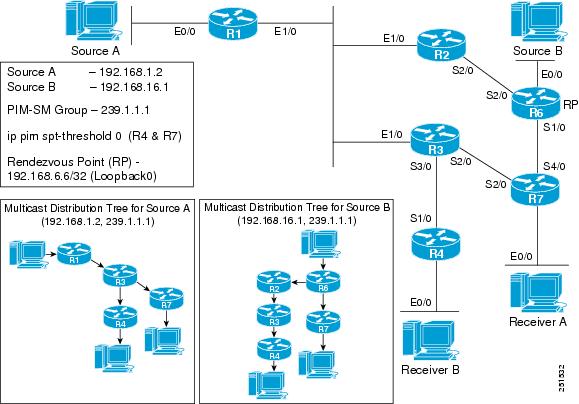
In this verification example, the following conditions apply:
- All routers have the SPT switchover set to the default (ip pim spt-threshold 0).
- Because the SPT threshold is set to 0, all last-hop DRs with interested receivers will perform an SPT switchover when multicast traffic is received on the shared tree.
- During the PIM-SM registration process between the first-hop DR and the RP, a PIM tunnel is used. First-hop DRs will have a PIM Encap Tunnel and the RP will have both a PIM Encap and Decap Tunnel. After the PIM-SM registration process completes, PIM tunnels will not be used for multicast forwarding. For more information, see the Verifying PIM Tunnel Interfaces for PIM-SM section.
R1 (First-Hop DR)
R1# show ip pim rp mapping

PIM Group-to-RP Mappings
Group(s) 224.0.0.0/4
  RP 192.168.6.6 (?), v2v1
    Info source: 192.168.6.6 (?), elected via Auto-RP
         Uptime: 03:09:53, expires: 00:02:14
R1# show ip mroute 239.1.1.1
(*, 239.1.1.1), 00:53:08/stopped, RP 192.168.6.6, flags: SPF
  Incoming interface: Ethernet1/0, RPF nbr 192.168.123.2
  Outgoing interface list: Null
(192.168.1.2, 239.1.1.1), 00:53:08/00:03:12, flags: FT
  Incoming interface: Ethernet0/0, RPF nbr 0.0.0.0
  Outgoing interface list:
    Ethernet1/0, Forward/Sparse, 00:38:25/00:03:07
R1# show ip mrib route 239.1.1.1
(*,239.1.1.1) RPF nbr: 192.168.123.2 Flags: C
  Ethernet1/0 Flags: A
(192.168.1.2,239.1.1.1) RPF nbr: 0.0.0.0 Flags:
  Ethernet0/0 Flags: A
  Ethernet1/0 Flags: F NS
R1# show ip mfib 239.1.1.1
 (*,239.1.1.1) Flags: C
   SW Forwarding: 0/0/0/0, Other: 23058/0/23058
   Ethernet1/0 Flags: A
 (192.168.1.2,239.1.1.1) Flags:
   SW Forwarding: 23059/10/28/2, Other: 8826/0/8826
   Ethernet0/0 Flags: A
   Ethernet1/0 Flags: F NS
     Pkts: 23058/0
R2 (Router Along the SPT)
R2# show ip pim rp mapping

PIM Group-to-RP Mappings
Group(s) 224.0.0.0/4
  RP 192.168.6.6 (?), v2v1
    Info source: 192.168.6.6 (?), elected via Auto-RP
         Uptime: 03:09:53, expires: 00:02:14
R2# show ip mroute 239.1.1.1
(*, 239.1.1.1), 00:39:05/00:02:53, RP 192.168.6.6, flags: S
  Incoming interface: Serial2/0, RPF nbr 192.168.26.6
  Outgoing interface list:
    Ethernet1/0, Forward/Sparse, 00:39:05/00:02:53
(192.168.16.1, 239.1.1.1), 00:03:31/00:02:54, flags: T
  Incoming interface: Serial2/0, RPF nbr 192.168.26.6
  Outgoing interface list:
    Ethernet1/0, Forward/Sparse, 00:03:31/00:02:56
(192.168.1.2, 239.1.1.1), 00:39:05/00:02:42, flags: PT
  Incoming interface: Ethernet1/0, RPF nbr 192.168.123.1
  Outgoing interface list: Null
R2# show ip mrib route 239.1.1.1
(*,239.1.1.1) RPF nbr: 192.168.26.6 Flags: C
  Ethernet1/0 Flags: F NS
  Serial2/0 Flags: A
(192.168.1.2,239.1.1.1) RPF nbr: 192.168.123.1 Flags:
  Ethernet1/0 Flags: A
(192.168.16.1,239.1.1.1) RPF nbr: 192.168.26.6 Flags:
  Serial2/0 Flags: A
  Ethernet1/0 Flags: F NS
R2# show ip mfib 239.1.1.1
 (*,239.1.1.1) Flags: C
   SW Forwarding: 21343/0/28/0, Other: 0/0/0
   Serial2/0 Flags: A
   Ethernet1/0 Flags: F NS
     Pkts: 21343/0
 (192.168.1.2,239.1.1.1) Flags:
   SW Forwarding: 21643/0/28/0, Other: 1812/1/1811
   Ethernet1/0 Flags: A
 (192.168.16.1,239.1.1.1) Flags:
   SW Forwarding: 2112/10/28/2, Other: 0/0/0
   Serial2/0 Flags: A
   Ethernet1/0 Flags: F NS
     Pkts: 2112/0
R3 (Router Along the SPT)
R3# show ip pim rp mapping

PIM Group-to-RP Mappings
Group(s) 224.0.0.0/4
  RP 192.168.6.6 (?), v2v1
    Info source: 192.168.6.6 (?), elected via Auto-RP
         Uptime: 03:09:53, expires: 00:02:14
R3# show ip mroute 239.1.1.1
(*, 239.1.1.1), 00:40:32/00:03:19, RP 192.168.6.6, flags: S
  Incoming interface: Ethernet1/0, RPF nbr 192.168.123.2
  Outgoing interface list:
    Serial3/0, Forward/Sparse, 00:40:32/00:03:19
(192.168.16.1, 239.1.1.1), 00:04:58/00:02:29, flags: T
  Incoming interface: Ethernet1/0, RPF nbr 192.168.123.2
  Outgoing interface list:
    Serial3/0, Forward/Sparse, 00:04:58/00:03:26
(192.168.1.2, 239.1.1.1), 00:04:58/00:02:26, flags: T
  Incoming interface: Ethernet1/0, RPF nbr 192.168.123.1
  Outgoing interface list:
    Serial2/0, Forward/Sparse, 00:04:28/00:02:57
    Serial3/0, Forward/Sparse, 00:04:58/00:03:27
R3# show ip mrib route 239.1.1.1
(*,239.1.1.1) RPF nbr: 192.168.123.2 Flags: C
  Serial3/0 Flags: F NS
  Ethernet1/0 Flags: A
(192.168.1.2,239.1.1.1) RPF nbr: 192.168.123.1 Flags:
  Ethernet1/0 Flags: A
  Serial2/0 Flags: F NS
  Serial3/0 Flags: F NS
(192.168.16.1,239.1.1.1) RPF nbr: 192.168.123.2 Flags:
  Ethernet1/0 Flags: A
  Serial3/0 Flags: F NS
R3# show ip mfib 239.1.1.1
 (*,239.1.1.1) Flags: C
   SW Forwarding: 42686/0/28/0, Other: 0/0/0
   Ethernet1/0 Flags: A
   Serial3/0 Flags: F NS
     Pkts: 42686/0
 (192.168.1.2,239.1.1.1) Flags:
   SW Forwarding: 2984/10/28/2, Other: 0/0/0
   Ethernet1/0 Flags: A
   Serial3/0 Flags: F NS
     Pkts: 2984/0
   Serial2/0 Flags: F NS
     Pkts: 2684/0
 (192.168.16.1,239.1.1.1) Flags:
   SW Forwarding: 2984/10/28/2, Other: 0/0/0
   Ethernet1/0 Flags: A
   Serial3/0 Flags: F NS
     Pkts: 2984/0
R4 (Last-Hop DR for Receiver B)
R4# show ip pim rp mapping

PIM Group-to-RP Mappings
Group(s) 224.0.0.0/4
  RP 192.168.6.6 (?), v2v1
    Info source: 192.168.6.6 (?), elected via Auto-RP
         Uptime: 03:09:53, expires: 00:02:14
R4# show ip igmp groups 239.1.1.1
IGMP Connected Group Membership
Group Address    Interface       Uptime    Expires    Last Reporter   Group Accounted
239.1.1.1        Ethernet0/0     00:06:39  00:02:56   192.168.4.1
R4# show ip mroute 239.1.1.1
(*, 239.1.1.1), 00:42:12/stopped, RP 192.168.6.6, flags: SJC
  Incoming interface: Serial1/0, RPF nbr 192.168.34.3
  Outgoing interface list:
    Ethernet0/0, Forward/Sparse, 00:42:12/00:02:02
(192.168.16.1, 239.1.1.1), 00:06:37/00:02:16, flags: JT
  Incoming interface: Serial1/0, RPF nbr 192.168.34.3
  Outgoing interface list:
    Ethernet0/0, Forward/Sparse, 00:06:37/00:02:02
(192.168.1.2, 239.1.1.1), 00:06:37/00:02:19, flags: JT
  Incoming interface: Serial1/0, RPF nbr 192.168.34.3
  Outgoing interface list:
    Ethernet0/0, Forward/Sparse, 00:06:37/00:02:02
R4# show ip mrib route 239.1.1.1
(*,239.1.1.1) RPF nbr: 192.168.34.3 Flags: C
  Serial1/0 Flags: A NS
  Ethernet0/0 Flags: F NS
(192.168.1.2,239.1.1.1) RPF nbr: 192.168.34.3 Flags:
  Serial1/0 Flags: A
  Ethernet0/0 Flags: F NS
(192.168.16.1,239.1.1.1) RPF nbr: 192.168.34.3 Flags:
  Serial1/0 Flags: A
  Ethernet0/0 Flags: F NS
R4# show ip mfib 239.1.1.1
 (*,239.1.1.1) Flags: C
   SW Forwarding: 42684/0/28/0, Other: 0/0/0
   Serial1/0 Flags: A NS
   Ethernet0/0 Flags: F NS
     Pkts: 42684/0
 (192.168.1.2,239.1.1.1) Flags:
   SW Forwarding: 3980/10/28/2, Other: 0/0/0
   Serial1/0 Flags: A
   Ethernet0/0 Flags: F NS
     Pkts: 3979/1
 (192.168.16.1,239.1.1.1) Flags:
   SW Forwarding: 3980/10/28/2, Other: 0/0/0
   Serial1/0 Flags: A
   Ethernet0/0 Flags: F NS
     Pkts: 3979/1
R6 (RP and First-Hop DR for Source B)
R6# show ip pim rp mapping

PIM Group-to-RP Mappings
This system is an RP (Auto-RP)
This system is an RP-mapping agent (Loopback0)
Group(s) 224.0.0.0/4
  RP 192.168.6.6 (?), v2v1
    Info source: 192.168.6.6 (?), elected via Auto-RP
         Uptime: 03:10:53, expires: 00:02:06
R6# show ip mroute 239.1.1.1
(*, 239.1.1.1), 00:58:12/00:03:25, RP 192.168.6.6, flags: SF
  Incoming interface: Null, RPF nbr 0.0.0.0
  Outgoing interface list:
    Serial1/0, Forward/Sparse, 00:43:25/00:03:22
    Serial2/0, Forward/Sparse, 00:43:29/00:03:25
(192.168.1.2, 239.1.1.1), 00:58:12/00:02:47, flags: PT
  Incoming interface: Serial2/0, RPF nbr 192.168.26.2
  Outgoing interface list: Null
(192.168.16.1, 239.1.1.1), 00:58:12/00:03:17, flags: FT
  Incoming interface: Ethernet0/0, RPF nbr 0.0.0.0
  Outgoing interface list:
    Serial1/0, Forward/Sparse, 00:43:25/00:03:22
    Serial2/0, Forward/Sparse, 00:43:29/00:03:27
R6# show ip mrib route 239.1.1.1
(*,239.1.1.1) RPF nbr: 0.0.0.0 Flags: C
  Serial1/0 Flags: F NS
  Serial2/0 Flags: F NS
  Tunnel1 Flags: A
(192.168.1.2,239.1.1.1) RPF nbr: 192.168.26.2 Flags:
  Serial2/0 Flags: A NS
(192.168.16.1,239.1.1.1) RPF nbr: 0.0.0.0 Flags:
  Ethernet0/0 Flags: A
  Serial1/0 Flags: F NS
  Serial2/0 Flags: F NS
R6# show ip mfib 239.1.1.1
 (*,239.1.1.1) Flags: C
   SW Forwarding: 0/0/0/0, Other: 0/0/0
   Tunnel1 Flags: A
   Serial2/0 Flags: F NS
     Pkts: 0/0
   Serial1/0 Flags: F NS
     Pkts: 0/0
 (192.168.1.2,239.1.1.1) Flags:
   SW Forwarding: 21604/0/28/0, Other: 39/1/38
   Serial2/0 Flags: A NS
 (192.168.16.1,239.1.1.1) Flags:
   SW Forwarding: 26099/10/28/2, Other: 8827/0/8827
   Ethernet0/0 Flags: A
   Serial2/0 Flags: F NS
     Pkts: 26098/0
   Serial1/0 Flags: F NS
     Pkts: 26058/0
R7 (Last-Hop DR for Receiver A)
R7# show ip pim rp mapping

PIM Group-to-RP Mappings
Group(s) 224.0.0.0/4
  RP 192.168.6.6 (?), v2v1
    Info source: 192.168.6.6 (?), elected via Auto-RP
         Uptime: 03:09:53, expires: 00:02:14
R7# show ip igmp groups 239.1.1.1
IGMP Connected Group Membership
Group Address    Interface       Uptime    Expires    Last Reporter   Group Accounted
239.1.1.1        Ethernet0/0     00:08:47  00:02:56   192.168.7.1
R7# show ip mroute 239.1.1.1
(*, 239.1.1.1), 00:44:45/stopped, RP 192.168.6.6, flags: SJC
  Incoming interface: Serial4/0, RPF nbr 192.168.67.6
  Outgoing interface list:
    Ethernet0/0, Forward/Sparse, 00:44:45/00:02:47
(192.168.1.2, 239.1.1.1), 00:08:45/00:02:13, flags: JT
  Incoming interface: Serial2/0, RPF nbr 192.168.37.3
  Outgoing interface list:
    Ethernet0/0, Forward/Sparse, 00:08:45/00:02:47
(192.168.16.1, 239.1.1.1), 00:08:45/00:02:10, flags: JT
  Incoming interface: Serial4/0, RPF nbr 192.168.67.6
  Outgoing interface list:
    Ethernet0/0, Forward/Sparse, 00:08:45/00:02:47
R7# show ip mrib route 239.1.1.1
(*,239.1.1.1) RPF nbr: 192.168.67.6 Flags: C
  Serial4/0 Flags: A NS
  Ethernet0/0 Flags: F NS
(192.168.1.2,239.1.1.1) RPF nbr: 192.168.37.3 Flags:
  Serial2/0 Flags: A
  Ethernet0/0 Flags: F NS
(192.168.16.1,239.1.1.1) RPF nbr: 192.168.67.6 Flags:
  Serial4/0 Flags: A
  Ethernet0/0 Flags: F NS
R7# show ip mfib 239.1.1.1
 (*,239.1.1.1) Flags: C
   SW Forwarding: 43204/0/28/0, Other: 0/0/0
   Serial4/0 Flags: A NS
   Ethernet0/0 Flags: F NS
     Pkts: 43204/0
 (192.168.1.2,239.1.1.1) Flags:
   SW Forwarding: 5255/10/28/2, Other: 1/1/0
   Serial2/0 Flags: A
   Ethernet0/0 Flags: F NS
     Pkts: 5254/1
 (192.168.16.1,239.1.1.1) Flags:
   SW Forwarding: 5255/10/28/2, Other: 0/0/0
   Serial4/0 Flags: A
   Ethernet0/0 Flags: F NS
     Pkts: 5254/1
PIM-SM Example Active Sources and Interested Receivers - SPT Threshold Set to Infinity
The following example shows how to verify multicast forwarding using the MFIB for PIM-SM in a network environment where there are active sources with interested receivers. This verification example is based on the topology shown in the figure.
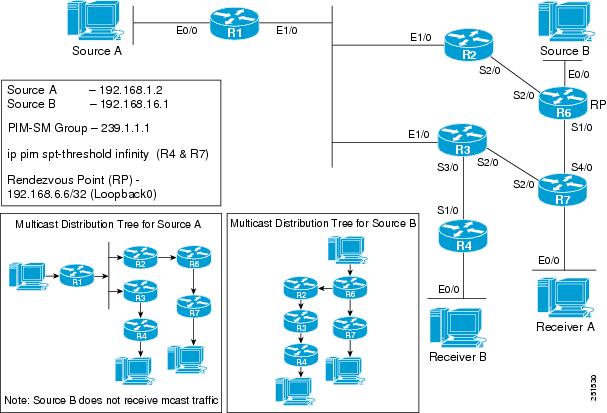
For this verification example, the following conditions apply:
- Last-hop DRs R4 and R7 have the SPT threshold set to infinity (configured with the ip pim spt-threshold infinity command).
Note | When the SPT threshold is set to infinity, multicast traffic is configured to stay on the shared tree. Last-hop DRs will not perform an SPT switchover. |
- During the PIM-SM registration process between the first-hop DR and the RP, a PIM tunnel is used. First-hop DRs will have a PIM Encap Tunnel and the RP will have both a PIM Encap and Decap Tunnel. After the PIM-SM registration process completes, PIM tunnels will not be used for multicast forwarding. For more information, see the Verifying PIM Tunnel Interfaces for PIM-SM section.
R1 (First-Hop DR for Source A)
R1# show ip pim rp mapping

PIM Group-to-RP Mappings
Group(s) 224.0.0.0/4
  RP 192.168.6.6 (?), v2v1
    Info source: 192.168.6.6 (?), elected via Auto-RP
         Uptime: 03:09:53, expires: 00:02:14
R1# show ip mroute 239.1.1.1
(*, 239.1.1.1), 00:37:29/stopped, RP 192.168.6.6, flags: SPF
  Incoming interface: Ethernet1/0, RPF nbr 192.168.123.2
  Outgoing interface list: Null
(192.168.1.2, 239.1.1.1), 00:37:29/00:02:53, flags: FT
  Incoming interface: Ethernet0/0, RPF nbr 0.0.0.0
  Outgoing interface list:
    Ethernet1/0, Forward/Sparse, 00:22:46/00:03:19
R1# show ip mrib route 239.1.1.1
(*,239.1.1.1) RPF nbr: 192.168.123.2 Flags: C
  Ethernet1/0 Flags: A
(192.168.1.2,239.1.1.1) RPF nbr: 0.0.0.0 Flags:
  Ethernet0/0 Flags: A
  Ethernet1/0 Flags: F NS
R1# show ip mfib 239.1.1.1
 (*,239.1.1.1) Flags: C
   SW Forwarding: 0/0/0/0, Other: 13688/0/13688
   Ethernet1/0 Flags: A
 (192.168.1.2,239.1.1.1) Flags:
   SW Forwarding: 13689/10/28/2, Other: 8826/0/8826
   Ethernet0/0 Flags: A
   Ethernet1/0 Flags: F NS
     Pkts: 13688/0
R2 (Router Along SPT for Source A and Shared Tree for Source B)
R2# show ip pim rp mapping

PIM Group-to-RP Mappings
Group(s) 224.0.0.0/4
  RP 192.168.6.6 (?), v2v1
    Info source: 192.168.6.6 (?), elected via Auto-RP
         Uptime: 03:09:53, expires: 00:02:14
R2# show ip mroute 239.1.1.1
(*, 239.1.1.1), 00:23:28/00:02:44, RP 192.168.6.6, flags: S
  Incoming interface: Serial2/0, RPF nbr 192.168.26.6
  Outgoing interface list:
    Ethernet1/0, Forward/Sparse, 00:23:28/00:02:44
(192.168.1.2, 239.1.1.1), 00:23:28/00:02:54, flags: T
  Incoming interface: Ethernet1/0, RPF nbr 192.168.123.1
  Outgoing interface list:
    Serial2/0, Forward/Sparse, 00:23:28/00:02:40
R2# show ip mrib route 239.1.1.1
(*,239.1.1.1) RPF nbr: 192.168.26.6 Flags: C
  Ethernet1/0 Flags: F NS
  Serial2/0 Flags: A
(192.168.1.2,239.1.1.1) RPF nbr: 192.168.123.1 Flags:
  Ethernet1/0 Flags: A
  Serial2/0 Flags: F NS
R2# show ip mfib 239.1.1.1
 (*,239.1.1.1) Flags: C
   SW Forwarding: 14084/10/28/2, Other: 0/0/0
   Serial2/0 Flags: A
   Ethernet1/0 Flags: F NS
     Pkts: 14084/0
 (192.168.1.2,239.1.1.1) Flags:
   SW Forwarding: 14083/10/28/2, Other: 1/1/0
   Ethernet1/0 Flags: A
   Serial2/0 Flags: F NS
     Pkts: 14083/0
R3 (Router Along the Shared Tree)
R3# show ip pim rp mapping

PIM Group-to-RP Mappings
Group(s) 224.0.0.0/4
  RP 192.168.6.6 (?), v2v1
    Info source: 192.168.6.6 (?), elected via Auto-RP
         Uptime: 03:09:53, expires: 00:02:14
R3# show ip mroute 239.1.1.1
(*, 239.1.1.1), 00:23:57/00:03:10, RP 192.168.6.6, flags: S
  Incoming interface: Ethernet1/0, RPF nbr 192.168.123.2
  Outgoing interface list:
    Serial3/0, Forward/Sparse, 00:23:57/00:03:10
R3# show ip mrib route 239.1.1.1
(*,239.1.1.1) RPF nbr: 192.168.123.2 Flags: C
  Serial3/0 Flags: F NS
  Ethernet1/0 Flags: A
R3# show ip mfib 239.1.1.1
 (*,239.1.1.1) Flags: C
   SW Forwarding: 28742/20/28/4, Other: 0/0/0
   Ethernet1/0 Flags: A
   Serial3/0 Flags: F NS
     Pkts: 28742/0
R4 (Last-Hop DR for Receiver B)
R4# show ip pim rp mapping

PIM Group-to-RP Mappings
Group(s) 224.0.0.0/4
  RP 192.168.6.6 (?), v2v1
    Info source: 192.168.6.6 (?), elected via Auto-RP
         Uptime: 03:09:53, expires: 00:02:14
R4# show ip igmp groups 239.1.1.1
IGMP Connected Group Membership
Group Address    Interface       Uptime    Expires    Last Reporter   Group Accounted
239.1.1.1        Ethernet0/0     00:24:37  00:02:56   192.168.4.1
R4# show ip mroute 239.1.1.1
(*, 239.1.1.1), 00:24:35/00:02:35, RP 192.168.6.6, flags: SC
  Incoming interface: Serial1/0, RPF nbr 192.168.34.3
  Outgoing interface list:
    Ethernet0/0, Forward/Sparse, 00:24:35/00:02:35
R4# show ip mrib route 239.1.1.1
(*,239.1.1.1) RPF nbr: 192.168.34.3 Flags: C
  Ethernet0/0 Flags: F NS
  Serial1/0 Flags: A
R4# show ip mfib 239.1.1.1
 (*,239.1.1.1) Flags: C
   SW Forwarding: 29517/20/28/4, Other: 0/0/0
   Serial1/0 Flags: A
   Ethernet0/0 Flags: F NS
     Pkts: 29517/0
R6 (RP and First-Hop DR for Source B)
R6# show ip pim rp mapping
PIM Group-to-RP Mappings
This system is an RP (Auto-RP)
This system is an RP-mapping agent (Loopback0)
Group(s) 224.0.0.0/4
  RP 192.168.6.6 (?), v2v1
    Info source: 192.168.6.6 (?), elected via Auto-RP
         Uptime: 03:10:53, expires: 00:02:06
R6# show ip mroute 239.1.1.1
(*, 239.1.1.1), 00:39:44/00:03:09, RP 192.168.6.6, flags: SF
  Incoming interface: Null, RPF nbr 0.0.0.0
  Outgoing interface list:
    Serial1/0, Forward/Sparse, 00:24:57/00:03:09
    Serial2/0, Forward/Sparse, 00:25:01/00:03:09
(192.168.1.2, 239.1.1.1), 00:39:44/00:03:18, flags: T
  Incoming interface: Serial2/0, RPF nbr 192.168.26.2
  Outgoing interface list:
    Serial1/0, Forward/Sparse, 00:24:57/00:03:09
(192.168.16.1, 239.1.1.1), 00:39:44/00:02:35, flags: FT
  Incoming interface: Ethernet0/0, RPF nbr 0.0.0.0
  Outgoing interface list:
    Serial1/0, Forward/Sparse, 00:24:57/00:03:09
    Serial2/0, Forward/Sparse, 00:25:01/00:03:09
R6# show ip mrib route 239.1.1.1
(*,239.1.1.1) RPF nbr: 0.0.0.0 Flags: C
  Serial1/0 Flags: F NS
  Serial2/0 Flags: F NS
  Tunnel1 Flags: A
(192.168.1.2,239.1.1.1) RPF nbr: 192.168.26.2 Flags:
  Serial2/0 Flags: A
  Serial1/0 Flags: F NS
(192.168.16.1,239.1.1.1) RPF nbr: 0.0.0.0 Flags:
  Ethernet0/0 Flags: A
  Serial1/0 Flags: F NS
  Serial2/0 Flags: F NS
R6# show ip mfib 239.1.1.1
 (*,239.1.1.1) Flags: C
   SW Forwarding: 0/0/0/0, Other: 0/0/0
   Tunnel1 Flags: A
   Serial2/0 Flags: F NS
     Pkts: 0/0
   Serial1/0 Flags: F NS
     Pkts: 0/0
 (192.168.1.2,239.1.1.1) Flags:
   SW Forwarding: 14978/10/28/2, Other: 39/1/38
   Serial2/0 Flags: A
   Serial1/0 Flags: F NS
     Pkts: 14978/0
 (192.168.16.1,239.1.1.1) Flags:
   SW Forwarding: 15019/10/28/2, Other: 8827/0/8827
   Ethernet0/0 Flags: A
   Serial2/0 Flags: F NS
     Pkts: 15018/0
   Serial1/0 Flags: F NS
     Pkts: 14978/0
R6# show ip pim tunnel

Tunnel0
  Type  : PIM Encap
  RP    : 192.168.6.6*
  Source: 192.168.6.6
Tunnel1*
  Type  : PIM Decap
  RP    : 192.168.6.6*
  Source: -
R7 (Last-Hop DR for Receiver A)
R7# show ip pim rp mapping

PIM Group-to-RP Mappings
Group(s) 224.0.0.0/4
  RP 192.168.6.6 (?), v2v1
    Info source: 192.168.6.6 (?), elected via Auto-RP
         Uptime: 03:09:53, expires: 00:02:14
R7# show ip igmp groups 239.1.1.1
IGMP Connected Group Membership
Group Address    Interface       Uptime    Expires    Last Reporter   Group Accounted
239.1.1.1        Ethernet0/0     00:25:39  00:02:56   192.168.7.1
R7# show ip mroute 239.1.1.1
(*, 239.1.1.1), 00:25:37/00:02:58, RP 192.168.6.6, flags: SC
  Incoming interface: Serial4/0, RPF nbr 192.168.67.6
  Outgoing interface list:
    Ethernet0/0, Forward/Sparse, 00:25:37/00:02:58
R7# show ip mrib route 239.1.1.1
(*,239.1.1.1) RPF nbr: 192.168.67.6 Flags: C
  Ethernet0/0 Flags: F NS
  Serial4/0 Flags: A
R7# show ip mfib 239.1.1.1
 (*,239.1.1.1) Flags: C
   SW Forwarding: 30756/20/28/4, Other: 0/0/0
   Serial4/0 Flags: A
   Ethernet0/0 Flags: F NS
     Pkts: 30756/0
PIM-SM Example Source Traffic Only with No Receivers
The following example shows how to verify multicast forwarding using the MFIB for PIM-SM in a network environment where sources are sending traffic without interested receivers. This verification example is based on the topology shown in the figure.
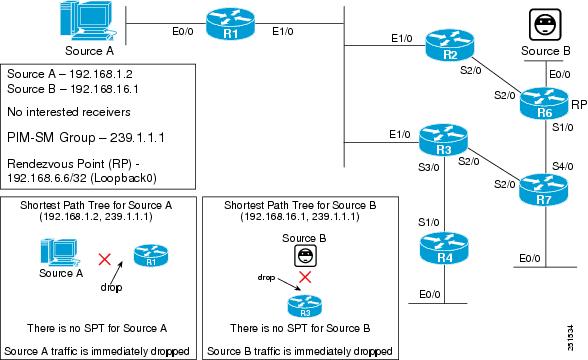
In this verification example, the following conditions apply:
- Source A and Source B are sending traffic for multicast group 239.1.1.1 to first-hop DRs R1 and R6, respectively.
- When R1 and R6 receive the source traffic, they will then check their group-to-RP mapping cache for multicast group 239.1.1.1 to determine the RP. In this case, R6 is the RP.
- After determining the RP, R1 and R6 will then create state and send PIM registers for (Source A, 239.1.1.1) and (Source B, 239.1.1.1) toward the RP.
- Because there are no interested receivers, the RP will send a register stop to R1 and R6 (itself).
- R1 and R6 are the only routers that will have (S, G) state for 239.1.1.1.
- Routers that are not the RP or directly connected to an active source will not create state for (*, 239.1.1.1).
R1 (First-Hop DR for Source A)
R1# show ip pim rp mapping

PIM Group-to-RP Mappings
Group(s) 224.0.0.0/4
  RP 192.168.6.6 (?), v2v1
    Info source: 192.168.6.6 (?), elected via Auto-RP
         Uptime: 03:09:53, expires: 00:02:14
R1# show ip mroute 239.1.1.1
Outgoing interface flags: H - Hardware switched, A - Assert winner
 Timers: Uptime/Expires
 Interface state: Interface, Next-Hop or VCD, State/Mode
(*, 239.1.1.1), 00:02:06/stopped, RP 192.168.6.6, flags: SPF
  Incoming interface: Ethernet1/0, RPF nbr 192.168.123.2
  Outgoing interface list: Null
(192.168.1.2, 239.1.1.1), 00:02:06/00:02:53, flags: PFT
  Incoming interface: Ethernet0/0, RPF nbr 0.0.0.0
  Outgoing interface list: Null
R1# show ip mrib route 239.1.1.1
(*,239.1.1.1) RPF nbr: 192.168.123.2 Flags: C
  Ethernet1/0 Flags: A
(192.168.1.2,239.1.1.1) RPF nbr: 0.0.0.0 Flags:
  Ethernet0/0 Flags: A
R1# show ip mfib 239.1.1.1
 (*,239.1.1.1) Flags: C
   SW Forwarding: 0/0/0/0, Other: 0/0/0
   Ethernet1/0 Flags: A
 (192.168.1.2,239.1.1.1) Flags:
   SW Forwarding: 1/0/28/0, Other: 1267/0/1267
   Ethernet0/0 Flags: A
R6 (RP and First-Hop DR for Source B)
R6# show ip pim rp mapping
PIM Group-to-RP Mappings
This system is an RP (Auto-RP)
This system is an RP-mapping agent (Loopback0)
Group(s) 224.0.0.0/4
  RP 192.168.6.6 (?), v2v1
    Info source: 192.168.6.6 (?), elected via Auto-RP
         Uptime: 03:10:53, expires: 00:02:06
R6# show ip mroute 239.1.1.1
(*, 239.1.1.1), 00:02:48/stopped, RP 192.168.6.6, flags: SPF
  Incoming interface: Null, RPF nbr 0.0.0.0
  Outgoing interface list: Null
(192.168.1.2, 239.1.1.1), 00:02:42/00:02:17, flags: P
  Incoming interface: Serial2/0, RPF nbr 192.168.26.2
  Outgoing interface list: Null
(192.168.16.1, 239.1.1.1), 00:02:48/00:02:11, flags: PFT
  Incoming interface: Ethernet0/0, RPF nbr 0.0.0.0
  Outgoing interface list: Null
R6# show ip mrib route 239.1.1.1
(*,239.1.1.1) RPF nbr: 0.0.0.0 Flags: C
  Tunnel1 Flags: A
(192.168.1.2,239.1.1.1) RPF nbr: 192.168.26.2 Flags:
  Serial2/0 Flags: NS
  Tunnel1 Flags: A
(192.168.16.1,239.1.1.1) RPF nbr: 0.0.0.0 Flags:
  Ethernet0/0 Flags: A
R6# show ip mfib 239.1.1.1
 (*,239.1.1.1) Flags: C
   SW Forwarding: 0/0/0/0, Other: 0/0/0
   Tunnel1 Flags: A
 (192.168.1.2,239.1.1.1) Flags:
   SW Forwarding: 0/0/0/0, Other: 0/0/0
   Tunnel1 Flags: A
   Serial2/0 Flags: NS
 (192.168.16.1,239.1.1.1) Flags:
   SW Forwarding: 1/0/28/0, Other: 1688/0/1688
   Ethernet0/0 Flags: A
R6# show ip pim tunnel
Tunnel0
  Type  : PIM Encap
  RP    : 192.168.6.6*
  Source: 192.168.6.6
Tunnel1*
  Type  : PIM Decap
  RP    : 192.168.6.6*
  Source: -
In this scenario, R2, R3, R4, and R7 have no interested receivers; therefore, they are not on the multicast forwarding path and will not have multicast state. The output for the show ip mroute, show ip mrib route, and show ip mfib route commands would appear only on R2, R3, R4, and R7, as in this example (taken from R2):
R2 (Router Not Along the Multicast Forwarding Path)
R2# show ip mroute 239.1.1.1
Group 239.1.1.1 not found
R2# show ip mrib route 239.1.1.1
No matching routes in MRIB route-DB
R2# show ip mfib 239.1.1.1
Group 239.1.1.1 not found
Note | The output for the show ip mroute, show ip mrib route, and show ip mfib commands would be the same for R2, R3, R4, and R7 for this scenario. |
PIM-SM Example Interested Receivers with No Active Sources
The following example shows how to verify multicast forwarding using the MFIB for PIM-SM in a network environment where there are interested receivers with no active sources. This verification example is based on the topology shown in the figure.
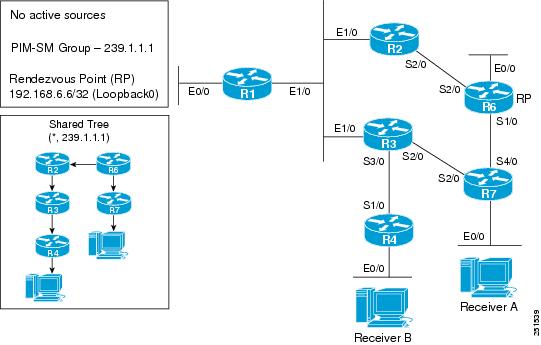
For this verification example, the following conditions apply:
- Last-hop DRs R4 and R7 also have the SPT threshold set to infinity (configured with the ip pim spt-threshold infinity command).
Note | When the SPT threshold is set to infinity, multicast traffic is configured to stay on the shared tree. Last-hop DRs will not perform an SPT switchover. |
- Receiver A and Receiver B are sending IGMP joins to R7 and R4, respectively, for multicast group 239.1.1.1.
- When R4 and R7 receive the IGMP joins, they will then check their group-to-RP mapping cache for multicast group 239.1.1.1 to determine the RP.
- After determining the RP, R4 and R7 will then create state and send PIM joins for (*, 239.1.1.1) toward the RP.
Note | The unicast routing table is used to build the shared tree entry for (*, 239.1.1.1). Shared tree entries are always rooted at the RP. In this scenario, the shared tree from R4 to R6 is through R3 and R2 because R3âs best unicast route (determined by the underlying IGP) is R2. The shared tree for R7 is directly upstream to R6. |
R4 (Last-Hop DR)
R4# show ip pim rp mapping

PIM Group-to-RP Mappings
Group(s) 224.0.0.0/4
  RP 192.168.6.6 (?), v2v1
    Info source: 192.168.6.6 (?), elected via Auto-RP
         Uptime: 03:09:53, expires: 00:02:14
R4# show ip igmp groups 239.1.1.1
IGMP Connected Group Membership
Group Address    Interface       Uptime    Expires    Last Reporter   Group Accounted
239.1.1.1        Ethernet0/0     00:03:07  00:02:56   192.168.4.1
R4# show ip mroute 239.1.1.1
(*, 239.1.1.1), 00:03:05/00:02:47, RP 192.168.6.6, flags: SJC
  Incoming interface: Serial1/0, RPF nbr 192.168.34.3
  Outgoing interface list:
    Ethernet0/0, Forward/Sparse, 00:03:05/00:02:47
R4# show ip mrib route 239.1.1.1
(*,239.1.1.1) RPF nbr: 192.168.34.3 Flags: C
  Ethernet0/0 Flags: F NS
  Serial1/0 Flags: A NS
R4# show ip mfib 239.1.1.1
(*,239.1.1.1) Flags: C
   SW Forwarding: 0/0/0/0, Other: 0/0/0
   Serial1/0 Flags: A NS
   Ethernet0/0 Flags: F NS
     Pkts: 0/0
R3 (Router Along the Shared Tree)
R4# show ip pim rp mapping

PIM Group-to-RP Mappings
Group(s) 224.0.0.0/4
  RP 192.168.6.6 (?), v2v1
    Info source: 192.168.6.6 (?), elected via Auto-RP
         Uptime: 03:09:53, expires: 00:02:14
R3# show ip mroute 239.1.1.1
(*, 239.1.1.1), 00:03:40/00:02:47, RP 192.168.6.6, flags: S
  Incoming interface: Ethernet1/0, RPF nbr 192.168.123.2
  Outgoing interface list:
    Serial3/0, Forward/Sparse, 00:03:40/00:02:47
R3# show ip mrib route 239.1.1.1
 (*,239.1.1.1) RPF nbr: 192.168.123.2 Flags: C
  Serial3/0 Flags: F NS
  Ethernet1/0 Flags: A
R3# show ip mfib 239.1.1.1
(*,239.1.1.1) Flags: C
   SW Forwarding: 0/0/0/0, Other: 0/0/0
   Ethernet1/0 Flags: A
   Serial3/0 Flags: F NS
     Pkts: 0/0
R2 (Router Along the Shared Tree)
R2# show ip pim rp mapping

PIM Group-to-RP Mappings
Group(s) 224.0.0.0/4
  RP 192.168.6.6 (?), v2v1
    Info source: 192.168.6.6 (?), elected via Auto-RP
         Uptime: 03:09:53, expires: 00:02:14
R2# show ip mroute 239.1.1.1
 (*, 239.1.1.1), 00:04:05/00:03:20, RP 192.168.6.6, flags: S
  Incoming interface: Serial2/0, RPF nbr 192.168.26.6
  Outgoing interface list:
    Ethernet1/0, Forward/Sparse, 00:04:05/00:03:20
R2# show ip mrib route 239.1.1.1
 (*,239.1.1.1) RPF nbr: 192.168.26.6 Flags: C
  Ethernet1/0 Flags: F NS
  Serial2/0 Flags: A
R2# show ip mfib 239.1.1.1
(*,239.1.1.1) Flags: C
   SW Forwarding: 0/0/0/0, Other: 0/0/0
   Serial2/0 Flags: A
   Ethernet1/0 Flags: F NS
     Pkts: 0/0
R7 (Last-Hop DR)
R7# show ip pim rp mapping

PIM Group-to-RP Mappings
Group(s) 224.0.0.0/4
  RP 192.168.6.6 (?), v2v1
    Info source: 192.168.6.6 (?), elected via Auto-RP
         Uptime: 03:09:53, expires: 00:02:14
R7# show ip igmp groups 239.1.1.1
IGMP Connected Group Membership
Group Address    Interface       Uptime    Expires    Last Reporter   Group Accounted
239.1.1.1        Ethernet0/0     00:04:33  00:02:56   192.168.7.1
R7# show ip mroute 239.1.1.1
 (*, 239.1.1.1), 00:04:31/00:02:36, RP 192.168.6.6, flags: SJC
  Incoming interface: Serial4/0, RPF nbr 192.168.67.6
  Outgoing interface list:
    Ethernet0/0, Forward/Sparse, 00:04:31/00:02:36
R7# show ip mrib route 239.1.1.1
 (*,239.1.1.1) RPF nbr: 192.168.67.6 Flags: C
  Ethernet0/0 Flags: F NS
  Serial4/0 Flags: A NS
R7# show ip mfib 239.1.1.1
(*,239.1.1.1) Flags: C
   SW Forwarding: 0/0/0/0, Other: 0/0/0
   Serial4/0 Flags: A NS
   Ethernet0/0 Flags: F NS
     Pkts: 0/0
R6 (RP)
R6# show ip pim rp mapping
PIM Group-to-RP Mappings
This system is an RP (Auto-RP)
This system is an RP-mapping agent (Loopback0)
Group(s) 224.0.0.0/4
  RP 192.168.6.6 (?), v2v1
    Info source: 192.168.6.6 (?), elected via Auto-RP
         Uptime: 03:10:53, expires: 00:02:06
R6# show ip mroute 239.1.1.1
(*, 239.1.1.1), 00:05:01/00:03:27, RP 192.168.6.6, flags: S
  Incoming interface: Null, RPF nbr 0.0.0.0
  Outgoing interface list:
    Serial1/0, Forward/Sparse, 00:04:57/00:03:27
    Serial2/0, Forward/Sparse, 00:05:01/00:03:23
R6# show ip mrib route 239.1.1.1
 (*,239.1.1.1) RPF nbr: 0.0.0.0 Flags: C
  Serial1/0 Flags: F NS
  Serial2/0 Flags: F NS
  Tunnel1 Flags: A
R6# show ip mfib 239.1.1.1
(*,239.1.1.1) Flags: C
   SW Forwarding: 0/0/0/0, Other: 0/0/0
   Tunnel1 Flags: A
   Serial2/0 Flags: F NS
     Pkts: 0/0
   Serial1/0 Flags: F NS
     Pkts: 0/0
R6# show ip pim tunnel
Tunnel0
  Type  : PIM Encap
  RP    : 192.168.6.6*
  Source: 192.168.6.6
Tunnel1*
  Type  : PIM Decap
  RP    : 192.168.6.6*
  Source: -
R1 (Router Not Along the Multicast Forwarding Path)
R1# show ip mroute 239.1.1.1
Group 239.1.1.1 not found
R1# show ip mrib route 239.1.1.1
No matching routes in MRIB route-DB
R1# show ip mfib 239.1.1.1
Group 239.1.1.1 not found
Note | R1 does not have any state for 239.1.1.1 because it does not have an interested receiver, is not along the shared tree path, and does not have a directly connected source. |
Examples Verifying IPv4 Multicast Forwarding Using the MFIB for PIM-SSM
- PIM-SSM Example Interested Receivers With or Without Active Sources
- PIM-SSM Example Source Traffic Only with No Active Receivers
- PIM-SSM Example Unwanted Sources in the SSM Network
PIM-SSM Example Interested Receivers With or Without Active Sources
The following example shows how to verify multicast forwarding using the MFIB for PIM-SSM in a network environment where there are interested receivers with or without active sources. This verification example is based on the topology shown in the figure.
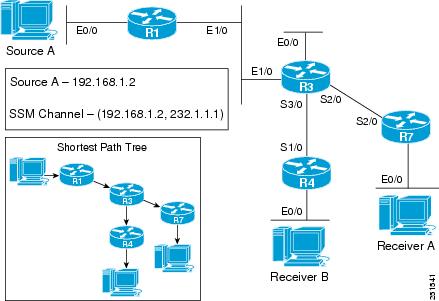
For this verification example, the following conditions apply:
- All routers in the network have been configured to run PIM-SSM and have the ip pim ssm default command configured globally.
- Source A is sending multicast packets to SSM group 232.1.1.1.
- Receiver A and Receiver B are interested in receiving multicast from Source A, (192.168.1.2, 232.1.1.1).
- Receiver A and Receiver B are using IGMPv3.
R1 (First-Hop DR for Source A)
R1# show ip mroute 232.1.1.1
(192.168.1.2, 232.1.1.1), 00:07:18/00:03:02, flags: sT
  Incoming interface: Ethernet0/0, RPF nbr 0.0.0.0
  Outgoing interface list:
    Ethernet1/0, Forward/Sparse, 00:07:18/00:03:02
R1# show ip mrib route 232.1.1.1
(192.168.1.2,232.1.1.1) RPF nbr: 0.0.0.0 Flags:
  Ethernet1/0 Flags: F NS
  Ethernet0/0 Flags: A
R1# show ip mfib 232.1.1.1
 (192.168.1.2,232.1.1.1) Flags:
   SW Forwarding: 3039/10/28/2, Other: 0/0/0
   Ethernet0/0 Flags: A
   Ethernet1/0 Flags: F NS
     Pkts: 3039/0
R3 (Router Along the SPT)
R3# show ip mroute 232.1.1.1
(192.168.1.2, 232.1.1.1), 00:08:00/00:03:13, flags: sT
  Incoming interface: Ethernet1/0, RPF nbr 192.168.123.1
  Outgoing interface list:
    Serial3/0, Forward/Sparse, 00:08:00/00:03:13
    Serial2/0, Forward/Sparse, 00:08:00/00:02:59
R3# show ip mrib route 232.1.1.1
(192.168.1.2,232.1.1.1) RPF nbr: 192.168.123.1 Flags:
  Serial3/0 Flags: F NS
  Serial2/0 Flags: F NS
  Ethernet1/0 Flags: A
R3# show ip mfib 232.1.1.1
 (192.168.1.2,232.1.1.1) Flags:
   SW Forwarding: 3514/10/28/2, Other: 0/0/0
   Ethernet1/0 Flags: A
   Serial3/0 Flags: F NS
     Pkts: 3514/0
   Serial2/0 Flags: F NS
     Pkts: 3514/0
R4 (Last-Hop DR for Receiver B)
R4# show ip igmp groups 232.1.1.1
IGMP Connected Group Membership
Group Address    Interface           Uptime    Expires   Last Reporter   Group Accounted
232.1.1.1        Ethernet0/0         00:12:46  stopped   192.168.4.1
R4# show ip mroute 232.1.1.1
(192.168.1.2, 232.1.1.1), 00:08:42/stopped, flags: sTI
  Incoming interface: Serial1/0, RPF nbr 192.168.34.3
  Outgoing interface list:
    Ethernet0/0, Forward/Sparse, 00:08:42/00:00:17
R4# show ip mrib route 232.1.1.1
(192.168.1.2,232.1.1.1) RPF nbr: 192.168.34.3 Flags:
  Serial1/0 Flags: A
  Ethernet0/0 Flags: F NS
R4# show ip mfib 232.1.1.1
 (192.168.1.2,232.1.1.1) Flags:
   SW Forwarding: 3786/10/28/2, Other: 0/0/0
   Serial1/0 Flags: A
   Ethernet0/0 Flags: F NS
     Pkts: 3786/0
R7 (Last-Hop DR for Receiver A)
R7# show ip igmp groups 232.1.1.1
IGMP Connected Group Membership
Group Address    Interface           Uptime    Expires   Last Reporter   Group Accounted
232.1.1.1        Ethernet0/0         00:12:24  stopped   192.168.7.1
R7# show ip mroute 232.1.1.1
(192.168.1.2, 232.1.1.1), 00:09:37/stopped, flags: sTI
  Incoming interface: Serial2/0, RPF nbr 192.168.37.3
  Outgoing interface list:
    Ethernet0/0, Forward/Sparse, 00:09:37/00:02:22
R7# show ip mrib route 232.1.1.1
(192.168.1.2,232.1.1.1) RPF nbr: 192.168.37.3 Flags:
  Serial2/0 Flags: A
  Ethernet0/0 Flags: F NS
R7# show ip mfib 232.1.1.1
 (192.168.1.2,232.1.1.1) Flags:
   SW Forwarding: 4182/10/28/2, Other: 0/0/0
   Serial2/0 Flags: A
   Ethernet0/0 Flags: F NS
     Pkts: 4182/0
PIM-SSM Example Source Traffic Only with No Active Receivers
The following example shows how to verify multicast forwarding using the MFIB for PIM-SSM in a network environment where there is an active source with no interested receivers. This verification example is based on the topology shown in the figure.
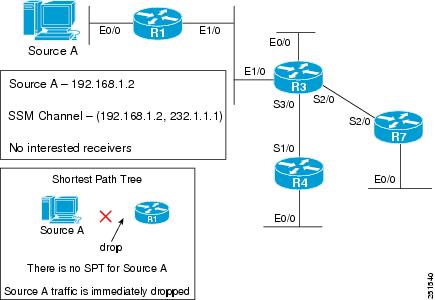
For this verification example, the following conditions apply:
- All routers in the network have been configured to run PIM-SSM and have the ip pim ssm default command configured globally.
- Source A is sending multicast packets to SSM group 232.1.1.1.
- Source B is not actively sending.
- There are no interested receivers in the network.
Routers that support the MFIB will not create state for SSM multicast groups until a join has been requested by an interested receiver, which means that any routers with active sources sending to an SSM group will not have multicast state. Because there are no interested receivers in this network, none of the routers will create state for (192.168.1.2, 232.1.1.1).
The following is output from the show ip mroute, show ip mrib route, and show ip mfib commands taken from R1:
R1
R1# show ip mroute 239.1.1.1
Group 239.1.1.1 not found
R1# show ip mrib route 239.1.1.1
No matching routes in MRIB route-DB
R1# show ip mfib 239.1.1.1
Group 239.1.1.1 not found
Note | Because there are no interested receivers in this network, the output from the show ip mroute, show ip mrib route, and show ip mfib commands would be the same on R3, R4, and R7 in this example scenario. |
PIM-SSM Example Unwanted Sources in the SSM Network
The following example shows how to verify multicast forwarding using the MFIB for PIM-SSM in a network environment where there is an unwanted source. This verification example is based on the topology shown in the figure.
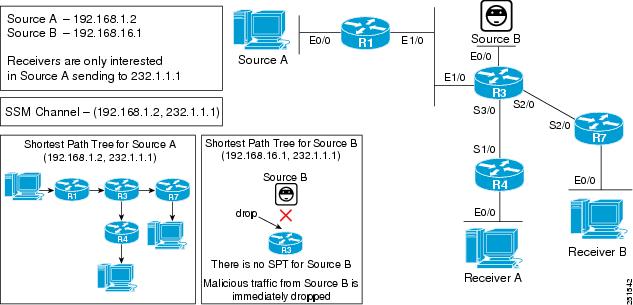
For this verification example, the following conditions apply:
- All routers in the network have been configured to run PIM-SSM and have the ip pim ssm default command configured globally.
- Receiver A and Receiver B are only interested in receiving multicast from Source A, (192.168.1.2, 232.1.1.1).
- Unwanted source, Source B, is sending traffic to 232.1.1.1.
Note | Even though Source B is directly connected to R3, R3 will not create state for 232.1.1.1. Multicast traffic from Source B sending to SSM group 232.1.1.1, thus, will be immediately dropped by the router. |
R3 (First-Hop DR for Unwanted Source B)
R3# show ip mroute 232.1.1.1 192.168.3.1
R3# show ip mrib route 232.1.1.1 192.168.3.1
No matching routes in MRIB route-DB
R3# show ip mfib 232.1.1.1 192.168.3.1
(192.168.3.1,232.1.1.1) entry not found
Note | Likewise, R1, R4, and R7 will also have no multicast state for (192.168.3.1, 232.1.1.1) and any directly connected sources sending to 232.1.1.1 will be dropped. |
Examples Verifying IPv4 Multicast Forwarding Using the MFIB for Bidir-PIM Networks
This section contains the following examples for verifying multicast forwarding using the MFIB for bidir-PIM networks:
Note | The examples in this section were created in a test environment to provide a conceptual view of the multicast environment. The IP addresses, interfaces, and other values are shown as examples only. They do not show real-world deployment values. |
- Bidir-PIM Example Active Sources with Interested Receivers
- Bidir-PIM Example Active Sources with No Interested Receivers
- Bidir-PIM Example No Active Sources with Interested Receivers
- Bidir-PIM Example No Active Sources with No Interested Receivers
Bidir-PIM Example Active Sources with Interested Receivers
The following example shows how to verify multicast forwarding using the MFIB for bidir-PIM in a network environment where there are active sources and interested receivers. This verification example is based on the topology shown in the figures.
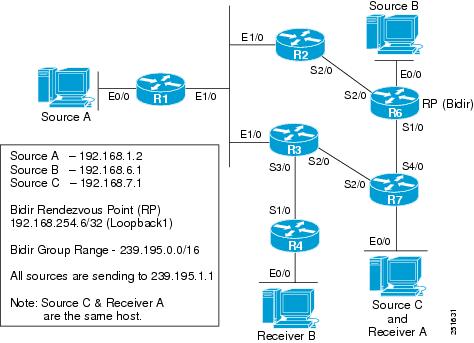
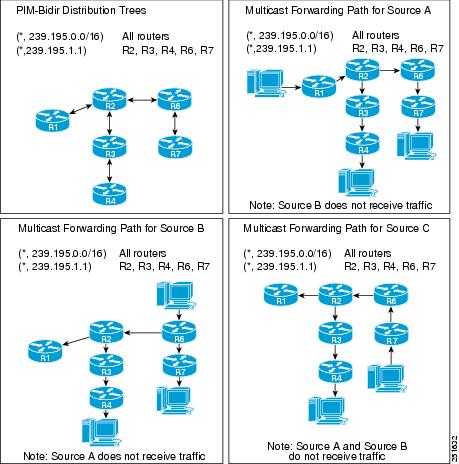
For this verification example, the following conditions apply:
- Entries for (*, 239.195.0.0/16) are created by the control plane based on the PIM group-to-RP mappings on all routers.
- Entries for (*, 239.195.1.1) will only be created when IGMP joins are initiated by interested receivers joining this group. As a result, all routers along the shared tree between the RP and the last-hop DRs that have interested receivers will have state for (*, 239.195.1.1).
Note | R1 will not have state for (*, 239.195.1.1) because it is not between the RP and the last-hop DRs. |
- If both (*,239.195.0.0/26) and (*,239.195.1.1) entries are present in a router, the more specific entry, (*,239.195.1.1) will be used for forwarding.
- All source traffic for this scenario will go to the RP and then out the appropriate interfaces where there are interested receivers.
- Source traffic received by the RP is never sent back out the same interface it was received on.
- In general, multicast packet forwarding can be verified by observing the âSW Forwardingâ counter in the show ip mfib output for the most specific entry available in the MFIB. If multicast is being forwarded, this counter will increment.
R1 (First-Hop DR for Source A)
R1# show ip pim rp mapping
PIM Group-to-RP Mappings
Group(s) 239.195.0.0/16
  RP 192.168.254.6 (?), v2v1, bidir
    Info source: 192.168.6.6 (?), elected via Auto-RP
         Uptime: 1d02h, expires: 00:02:09
R1# show ip pim interface df
* implies this system is the DF
Interface                RP               DF Winner        Metric     Uptime
Ethernet0/0              192.168.254.6    *192.168.1.1      75         1d02h
Ethernet1/0              192.168.254.6     192.168.123.2    65         1d02h
R1# show ip mroute 239.195.1.1
Group 239.195.1.1 not found
R1# show ip mrib route 239.195.1.1
No matching routes in MRIB route-DB
R1# show ip mfib 239.195.1.1
Group 239.195.1.1 not found
R1# show ip mroute 239.195.0.0/16
(*,239.195.0.0/16), 1d02h/-, RP 192.168.254.6, flags: B
  Bidir-Upstream: Ethernet1/0, RPF nbr: 192.168.123.2
  Incoming interface list:
    Ethernet0/0, Accepting/Sparse
    Ethernet1/0, Accepting/Sparse
R1# show ip mrib route 239.195.0.0/16
(*,239.195.0.0/16) RPF nbr: 192.168.123.2 Flags:
  Ethernet0/0 Flags: A
  Null0 Flags: A
  Ethernet1/0 Flags: A F
R1# show ip mfib 239.195.0.0/16
 (*,239.195.0.0/16) Flags:
   SW Forwarding: 4677/10/28/2, Other: 9355/0/9355
   Ethernet1/0 Flags: A F
     Pkts: 4677/0
   Ethernet0/0 Flags: A
   Null0 Flags: A
R2 (Router Along the Multicast Forwarding Path)
R2# show ip pim rp mapping
PIM Group-to-RP Mappings
Group(s) 239.195.0.0/16
  RP 192.168.254.6 (?), v2v1, bidir
    Info source: 192.168.6.6 (?), elected via Auto-RP
         Uptime: 1d02h, expires: 00:02:45
R2# show ip pim interface df
* implies this system is the DF
Interface                RP               DF Winner        Metric     Uptime
Ethernet1/0              192.168.254.6    *192.168.123.2    65         1d02h
Serial2/0                192.168.254.6     192.168.26.6     0          1d02h
R2# show ip mroute 239.195.1.1
(*, 239.195.1.1), 02:13:50/00:02:36, RP 192.168.254.6, flags: B
  Bidir-Upstream: Serial2/0, RPF nbr 192.168.26.6
  Outgoing interface list:
    Ethernet1/0, Forward/Sparse, 02:13:50/00:02:36
    Serial2/0, Bidir-Upstream/Sparse, 02:13:50/00:00:00
R2# show ip mrib route 239.195.1.1
(*,239.195.1.1) RPF nbr: 192.168.26.6 Flags: IA
  Ethernet1/0 Flags: F
  Serial2/0 Flags: F
R2# show ip mfib 239.195.1.1
 (*,239.195.1.1) Flags: IA
   SW Forwarding: 14693/30/28/6, Other: 0/0/0
   Serial2/0 Flags: F
     Pkts: 4897/0
   Ethernet1/0 Flags: F
     Pkts: 9796/0
R2# show ip mroute 239.195.0.0/16
(*,239.195.0.0/16), 1d02h/-, RP 192.168.254.6, flags: B
  Bidir-Upstream: Serial2/0, RPF nbr: 192.168.26.6
  Incoming interface list:
    Ethernet1/0, Accepting/Sparse
    Serial2/0, Accepting/Sparse
R2# show ip mrib route 239.195.0.0/16
(*,239.195.0.0/16) RPF nbr: 192.168.26.6 Flags:
  Ethernet1/0 Flags: A
  Null0 Flags: A
  Serial2/0 Flags: A F
R2# show ip mfib 239.195.0.0/16
 (*,239.195.0.0/16) Flags:
   SW Forwarding: 0/0/0/0, Other: 0/0/0
   Serial2/0 Flags: A F
     Pkts: 0/0
   Ethernet1/0 Flags: A
   Null0 Flags: A
R3 (Router Along the Multicast Forwarding Path)
R3# show ip pim rp mapping
PIM Group-to-RP Mappings
Group(s) 239.195.0.0/16
  RP 192.168.254.6 (?), v2v1, bidir
    Info source: 192.168.6.6 (?), elected via Auto-RP
         Uptime: 1d02h, expires: 00:02:25
R3# show ip pim interface df
* implies this system is the DF
Interface                RP               DF Winner        Metric     Uptime
Ethernet0/0              192.168.254.6    *192.168.3.3      75         1d02h
Ethernet1/0              192.168.254.6     192.168.123.2    65         1d02h
Serial2/0                192.168.254.6     192.168.37.7     65         1d02h
Serial3/0                192.168.254.6    *192.168.34.3     75         1d02h
R3# show ip mroute 239.195.1.1
(*, 239.195.1.1), 02:14:09/00:03:08, RP 192.168.254.6, flags: B
  Bidir-Upstream: Ethernet1/0, RPF nbr 192.168.123.2
  Outgoing interface list:
    Serial3/0, Forward/Sparse, 02:14:09/00:03:08
    Ethernet1/0, Bidir-Upstream/Sparse, 02:14:09/00:00:00
R3# show ip mrib route 239.195.1.1
(*,239.195.1.1) RPF nbr: 192.168.123.2 Flags: IA
  Serial3/0 Flags: F
  Ethernet1/0 Flags: F
R3# show ip mfib 239.195.1.1
 (*,239.195.1.1) Flags: IA
   SW Forwarding: 15263/30/28/6, Other: 0/0/0
   Serial3/0 Flags: F
     Pkts: 15263/0
   Ethernet1/0 Flags: F
     Pkts: 0/0
R3# show ip mroute 239.195.0.0/16
(*,239.195.0.0/16), 1d02h/-, RP 192.168.254.6, flags: B
  Bidir-Upstream: Ethernet1/0, RPF nbr: 192.168.123.2
  Incoming interface list:
    Serial3/0, Accepting/Sparse
    Ethernet0/0, Accepting/Sparse
    Ethernet1/0, Accepting/Sparse
R3# show ip mrib route 239.195.0.0/16
(*,239.195.0.0/16) RPF nbr: 192.168.123.2 Flags:
  Serial3/0 Flags: A
  Ethernet0/0 Flags: A
  Null0 Flags: A
  Ethernet1/0 Flags: A F
R3# show ip mfib 239.195.0.0/16
 (*,239.195.0.0/16) Flags:
   SW Forwarding: 0/0/0/0, Other: 0/0/0
   Serial3/0 Flags: A
   Ethernet1/0 Flags: A F
     Pkts: 0/0
   Ethernet0/0 Flags: A
   Null0 Flags: A
R4 (Last-Hop DR for Receiver B)
R4# show ip pim rp mapping
PIM Group-to-RP Mappings
Group(s) 239.195.0.0/16
  RP 192.168.254.6 (?), v2v1, bidir
    Info source: 192.168.6.6 (?), elected via Auto-RP
         Uptime: 1d02h, expires: 00:02:10
R4# show ip pim interface df
* implies this system is the DF
Interface                RP               DF Winner        Metric     Uptime
Ethernet0/0              192.168.254.6    *192.168.4.4      139        1d02h
Serial1/0                192.168.254.6     192.168.34.3     75         1d02h
R4# show ip igmp groups 239.195.1.1

IGMP Connected Group Membership
Group Address    Interface                Uptime    Expires   Last Reporter   Group Accounted
239.195.1.1      Ethernet0/0              02:14:25  00:02:25  192.168.4.1
R4# show ip mroute 239.195.1.1
(*, 239.195.1.1), 02:14:25/00:02:25, RP 192.168.254.6, flags: BC
  Bidir-Upstream: Serial1/0, RPF nbr 192.168.34.3
  Outgoing interface list:
    Ethernet0/0, Forward/Sparse, 02:14:25/00:02:25
    Serial1/0, Bidir-Upstream/Sparse, 02:14:25/00:00:00
R4# show ip mrib route 239.195.1.1
(*,239.195.1.1) RPF nbr: 192.168.34.3 Flags: IA
  Ethernet0/0 Flags: F
  Serial1/0 Flags: F
R4# show ip mfib 239.195.1.1
 (*,239.195.1.1) Flags: IA
   SW Forwarding: 15729/30/28/6, Other: 0/0/0
   Serial1/0 Flags: F
     Pkts: 0/0
   Ethernet0/0 Flags: F
     Pkts: 15729/0
R4# show ip mroute 239.195.0.0/16
(*,239.195.0.0/16), 1d02h/-, RP 192.168.254.6, flags: B
  Bidir-Upstream: Serial1/0, RPF nbr: 192.168.34.3
  Incoming interface list:
    Ethernet0/0, Accepting/Sparse
    Serial1/0, Accepting/Sparse
R4# show ip mrib route 239.195.0.0/16
(*,239.195.0.0/16) RPF nbr: 192.168.34.3 Flags:
  Ethernet0/0 Flags: A
  Null0 Flags: A
  Serial1/0 Flags: A F
R4# show ip mfib 239.195.0.0/16
 (*,239.195.0.0/16) Flags:
   SW Forwarding: 0/0/0/0, Other: 0/0/0
   Serial1/0 Flags: A F
     Pkts: 0/0
   Ethernet0/0 Flags: A
   Null0 Flags: A
R6 (RP and First-Hop DR for Source B)
R6# show ip pim rp mapping
PIM Group-to-RP Mappings
This system is an RP (Auto-RP)
This system is an RP-mapping agent (Loopback0)
Group(s) 239.195.0.0/16
  RP 192.168.254.6 (?), v2v1, bidir
    Info source: 192.168.254.6 (?), elected via Auto-RP
         Uptime: 1d02h, expires: 00:02:55
R6# show ip pim interface df
* implies this system is the DF
Interface                RP               DF Winner        Metric     Uptime
Loopback0                192.168.254.6    *192.168.6.6      0          1d02h
Loopback1                192.168.254.6    *192.168.254.6    0          1d02h
Ethernet0/0              192.168.254.6    *192.168.16.6     0          1d02h
Serial1/0                192.168.254.6    *192.168.67.6     0          1d02h
Serial2/0                192.168.254.6    *192.168.26.6     0          1d02h
R6# show ip mroute 239.195.1.1
(*, 239.195.1.1), 02:14:43/00:02:49, RP 192.168.254.6, flags: B
  Bidir-Upstream: Null, RPF nbr 0.0.0.0
  Outgoing interface list:
    Serial1/0, Forward/Sparse, 02:14:35/00:02:49
    Serial2/0, Forward/Sparse, 02:14:43/00:02:41
R6# show ip mrib route 239.195.1.1
(*,239.195.1.1) RPF nbr: 0.0.0.0 Flags: IA
  Serial1/0 Flags: F
  Serial2/0 Flags: F
R6# show ip mfib 239.195.1.1
 (*,239.195.1.1) Flags: IA
   SW Forwarding: 16269/30/28/6, Other: 0/0/0
   Serial2/0 Flags: F
     Pkts: 10846/0
   Serial1/0 Flags: F
     Pkts: 10846/0
R6# show ip mroute 239.195.0.0/16
(*,239.195.0.0/16), 1d02h/-, RP 192.168.254.6, flags: B
  Bidir-Upstream: Loopback1, RPF nbr: 192.168.254.6
  Incoming interface list:
    Serial2/0, Accepting/Sparse
    Serial1/0, Accepting/Sparse
    Ethernet0/0, Accepting/Sparse
    Loopback0, Accepting/Sparse
    Loopback1, Accepting/Sparse
R6# show ip mrib route 239.195.0.0/16
(*,239.195.0.0/16) RPF nbr: 192.168.254.6 Flags:
  Serial2/0 Flags: A
  Serial1/0 Flags: A
  Ethernet0/0 Flags: A
  Loopback0 Flags: A
  Null0 Flags: A
  Loopback1 Flags: A F
R6# show ip mfib 239.195.0.0/16
 (*,239.195.0.0/16) Flags:
   SW Forwarding: 0/0/0/0, Other: 0/0/0
   Loopback1 Flags: A F
     Pkts: 0/0
   Loopback0 Flags: A
   Serial2/0 Flags: A
   Serial1/0 Flags: A
   Ethernet0/0 Flags: A
   Null0 Flags: A
R7 (First-Hop DR for Source C and Last-Hop DR for Receiver A)
R7# show ip pim rp mapping
PIM Group-to-RP Mappings
Group(s) 239.195.0.0/16
  RP 192.168.254.6 (?), v2v1, bidir
    Info source: 192.168.6.6 (?), elected via Auto-RP
         Uptime: 1d02h, expires: 00:02:35
R7# show ip pim interface df
* implies this system is the DF
Interface                RP               DF Winner        Metric     Uptime
Ethernet0/0              192.168.254.6    *192.168.7.7      65         1d02h
Serial2/0                192.168.254.6    *192.168.37.7     65         1d02h
Serial4/0                192.168.254.6     192.168.67.6     0          1d02h
R7# show ip igmp groups 239.195.1.1
IGMP Connected Group Membership
Group Address    Interface                Uptime    Expires   Last Reporter   Group Accounted
239.195.1.1      Ethernet0/0              02:14:51  00:02:44  192.168.7.1
R7# show ip mroute 239.195.1.1
(*, 239.195.1.1), 02:14:51/00:02:43, RP 192.168.254.6, flags: BC
  Bidir-Upstream: Serial4/0, RPF nbr 192.168.67.6
  Outgoing interface list:
    Ethernet0/0, Forward/Sparse, 02:14:51/00:02:43
    Serial4/0, Bidir-Upstream/Sparse, 02:14:51/00:00:00
R7# show ip mrib route 239.195.1.1
(*,239.195.1.1) RPF nbr: 192.168.67.6 Flags: IA
  Ethernet0/0 Flags: F
  Serial4/0 Flags: F
R7# show ip mfib 239.195.1.1
 (*,239.195.1.1) Flags: IA
   SW Forwarding: 16747/30/28/6, Other: 0/0/0
   Serial4/0 Flags: F
     Pkts: 5582/0
   Ethernet0/0 Flags: F
     Pkts: 11165/0
R7# show ip mroute 239.195.0.0/16
(*,239.195.0.0/16), 1d02h/-, RP 192.168.254.6, flags: B
  Bidir-Upstream: Serial4/0, RPF nbr: 192.168.67.6
  Incoming interface list:
    Serial2/0, Accepting/Sparse
    Ethernet0/0, Accepting/Sparse
    Serial4/0, Accepting/Sparse
R7# show ip mrib route 239.195.0.0/16
(*,239.195.0.0/16) RPF nbr: 192.168.67.6 Flags:
  Serial2/0 Flags: A
  Ethernet0/0 Flags: A
  Null0 Flags: A
  Serial4/0 Flags: A F
R7# show ip mfib 239.195.0.0/16
 (*,239.195.0.0/16) Flags:
   SW Forwarding: 0/0/0/0, Other: 0/0/0
   Serial4/0 Flags: A F
     Pkts: 0/0
   Serial2/0 Flags: A
   Ethernet0/0 Flags: A
   Null0 Flags: A
Bidir-PIM Example Active Sources with No Interested Receivers
The following example shows how to verify multicast forwarding using the MFIB for bidir-PIM in a network environment where there are active sources with no interested receivers. This verification example is based on the topology shown in the figures.
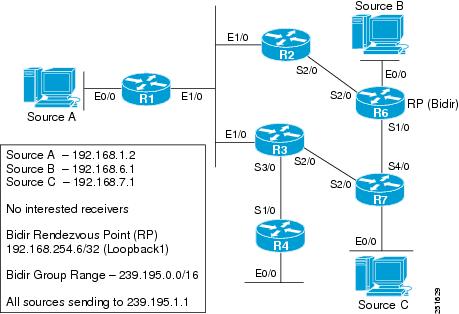
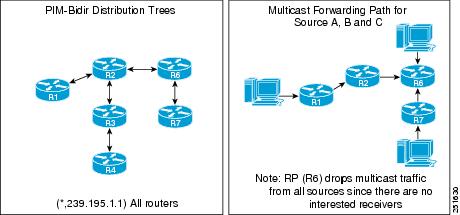
For this verification example, the following conditions apply:
- Entries for (*, 239.195.0.0/16) are created by the control plane based on the PIM group-to-RP mappings on all routers.
- Because there are no interested receivers, (*, 239.195.0.0/16) will be the only state in the network on all routers.
- All source traffic for this example will go to the RP and then be dropped because there are no interested receivers in the network. In addition, source traffic received by the RP is never sent back out the same interface it was received on.
- In general, multicast packet forwarding can be verified by observing the âSW Forwardingâ counter in the show ip mfib output for the most specific entry available in the MFIB. If multicast is being forwarded, this counter will increment.
- In this scenario, all traffic stops at the RP because there are no interested receivers. In addition, traffic received by the RP will be forwarded only to the bidir-PIM RP interface to be dropped.
R1 (First-Hop DR for Source A)
R1# show ip pim rp mapping
PIM Group-to-RP Mappings
Group(s) 239.195.0.0/16
  RP 192.168.254.6 (?), v2v1, bidir
    Info source: 192.168.6.6 (?), elected via Auto-RP
         Uptime: 1d03h, expires: 00:02:43
R1# show ip pim interface df
* implies this system is the DF
Interface                RP               DF Winner        Metric     Uptime
Ethernet0/0              192.168.254.6    *192.168.1.1      75         1d03h
Ethernet1/0              192.168.254.6     192.168.123.2    65         1d03h
R1# show ip mroute 239.195.1.1
Group 239.195.1.1 not found
R1# show ip mrib route 239.195.1.1
No matching routes in MRIB route-DB
R1# show ip mfib 239.195.1.1
Group 239.195.1.1 not found
R1# show ip mroute 239.195.0.0/16
(*,239.195.0.0/16), 1d03h/-, RP 192.168.254.6, flags: B
  Bidir-Upstream: Ethernet1/0, RPF nbr: 192.168.123.2
  Incoming interface list:
    Ethernet0/0, Accepting/Sparse
    Ethernet1/0, Accepting/Sparse
R1# show ip mrib route 239.195.0.0/16
(*,239.195.0.0/16) RPF nbr: 192.168.123.2 Flags:
  Ethernet0/0 Flags: A
  Null0 Flags: A
  Ethernet1/0 Flags: A F
R1# show ip mfib 239.195.0.0/16
 (*,239.195.0.0/16) Flags:
   SW Forwarding: 34754/10/28/2, Other: 58228/0/58228
   Ethernet1/0 Flags: A F
     Pkts: 34754/0
   Ethernet0/0 Flags: A
   Null0 Flags: A
R2
R2# show ip pim rp mapping
PIM Group-to-RP Mappings
Group(s) 239.195.0.0/16
  RP 192.168.254.6 (?), v2v1, bidir
    Info source: 192.168.6.6 (?), elected via Auto-RP
         Uptime: 1d03h, expires: 00:02:28
R2# show ip pim interface df
* implies this system is the DF
Interface                RP               DF Winner        Metric     Uptime
Ethernet1/0              192.168.254.6    *192.168.123.2    65         1d03h
Serial2/0                192.168.254.6     192.168.26.6     0          1d03h
R2# show ip mroute 239.195.1.1
Group 239.195.1.1 not found
R2# show ip mrib route 239.195.1.1
No matching routes in MRIB route-DB
R2# show ip mfib 239.195.1.1
Group 239.195.1.1 not found
R2# show ip mroute 239.195.0.0/16
(*,239.195.0.0/16), 1d03h/-, RP 192.168.254.6, flags: B
  Bidir-Upstream: Serial2/0, RPF nbr: 192.168.26.6
  Incoming interface list:
    Ethernet1/0, Accepting/Sparse
    Serial2/0, Accepting/Sparse
R2# show ip mrib route 239.195.0.0/16
(*,239.195.0.0/16) RPF nbr: 192.168.26.6 Flags:
  Ethernet1/0 Flags: A
  Null0 Flags: A
  Serial2/0 Flags: A F
R2# show ip mfib 239.195.0.0/16
 (*,239.195.0.0/16) Flags:
   SW Forwarding: 4211/10/28/2, Other: 0/0/0
   Serial2/0 Flags: A F
     Pkts: 4211/0
   Ethernet1/0 Flags: A
   Null0 Flags: A
R3
R3# show ip pim rp mapping
PIM Group-to-RP Mappings
Group(s) 239.195.0.0/16
  RP 192.168.254.6 (?), v2v1, bidir
    Info source: 192.168.6.6 (?), elected via Auto-RP
         Uptime: 1d03h, expires: 00:02:09
R3# show ip pim interface df
* implies this system is the DF
Interface                RP               DF Winner        Metric     Uptime
Ethernet0/0              192.168.254.6    *192.168.3.3      75         1d03h
Ethernet1/0              192.168.254.6     192.168.123.2    65         1d03h
Serial2/0                192.168.254.6     192.168.37.7     65         1d03h
Serial3/0                192.168.254.6    *192.168.34.3     75         1d03h
R3# show ip igmp groups 239.195.1.1

IGMP Connected Group Membership
Group Address    Interface                Uptime    Expires   Last Reporter   Group Accounted
R3# show ip mroute 239.195.1.1
Group 239.195.1.1 not found
R3# show ip mrib route 239.195.1.1
No matching routes in MRIB route-DB
R3# show ip mfib 239.195.1.1
Group 239.195.1.1 not found
R3# show ip mroute 239.195.0.0/16
(*,239.195.0.0/16), 1d03h/-, RP 192.168.254.6, flags: B
  Bidir-Upstream: Ethernet1/0, RPF nbr: 192.168.123.2
  Incoming interface list:
    Serial3/0, Accepting/Sparse
    Ethernet0/0, Accepting/Sparse
    Ethernet1/0, Accepting/Sparse
R3# show ip mrib route 239.195.0.0/16
(*,239.195.0.0/16) RPF nbr: 192.168.123.2 Flags:
  Serial3/0 Flags: A
  Ethernet0/0 Flags: A
  Null0 Flags: A
  Ethernet1/0 Flags: A F
R3# show ip mfib 239.195.0.0/16
 (*,239.195.0.0/16) Flags:
   SW Forwarding: 0/0/0/0, Other: 3935/0/3935
   Serial3/0 Flags: A
   Ethernet1/0 Flags: A F
     Pkts: 0/0
   Ethernet0/0 Flags: A
   Null0 Flags: A
R4
R4# show ip pim rp mapping
PIM Group-to-RP Mappings
Group(s) 239.195.0.0/16
  RP 192.168.254.6 (?), v2v1, bidir
    Info source: 192.168.6.6 (?), elected via Auto-RP
         Uptime: 1d03h, expires: 00:02:54
R4# show ip pim interface df
* implies this system is the DF
Interface                RP               DF Winner        Metric     Uptime
Ethernet0/0              192.168.254.6    *192.168.4.4      139        1d03h
Serial1/0                192.168.254.6     192.168.34.3     75         1d03h
R4# show ip igmp groups 239.195.1.1

IGMP Connected Group Membership
Group Address    Interface                Uptime    Expires   Last Reporter   Group Accounted
R4# show ip mroute 239.195.1.1
Group 239.195.1.1 not found
R4# show ip mrib route 239.195.1.1
No matching routes in MRIB route-DB
R4# show ip mfib 239.195.1.1
Group 239.195.1.1 not found
R4# show ip mroute 239.195.0.0/16
(*,239.195.0.0/16), 1d03h/-, RP 192.168.254.6, flags: B
  Bidir-Upstream: Serial1/0, RPF nbr: 192.168.34.3
  Incoming interface list:
    Ethernet0/0, Accepting/Sparse
    Serial1/0, Accepting/Sparse
R4# show ip mrib route 239.195.0.0/16
(*,239.195.0.0/16) RPF nbr: 192.168.34.3 Flags:
  Ethernet0/0 Flags: A
  Null0 Flags: A
  Serial1/0 Flags: A F
R4# show ip mfib 239.195.0.0/16
 (*,239.195.0.0/16) Flags:
   SW Forwarding: 0/0/0/0, Other: 0/0/0
   Serial1/0 Flags: A F
     Pkts: 0/0
   Ethernet0/0 Flags: A
   Null0 Flags: A
R6 (RP and First-Hop DR for Source B)
R6# show ip pim rp mapping
PIM Group-to-RP Mappings
This system is an RP (Auto-RP)
This system is an RP-mapping agent (Loopback0)
Group(s) 239.195.0.0/16
  RP 192.168.254.6 (?), v2v1, bidir
    Info source: 192.168.254.6 (?), elected via Auto-RP
         Uptime: 1d03h, expires: 00:01:59
R6# show ip pim interface df
* implies this system is the DF
Interface                RP               DF Winner        Metric     Uptime
Loopback0                192.168.254.6    *192.168.6.6      0          1d03h
Loopback1                192.168.254.6    *192.168.254.6    0          1d03h
Ethernet0/0              192.168.254.6    *192.168.16.6     0          1d03h
Serial1/0                192.168.254.6    *192.168.67.6     0          1d03h
Serial2/0                192.168.254.6    *192.168.26.6     0          1d03h
R6# show ip mroute 239.195.1.1
Group 239.195.1.1 not found
R6# show ip mrib route 239.195.1.1
No matching routes in MRIB route-DB
R6# show ip mfib 239.195.1.1
Group 239.195.1.1 not found
R6# show ip mroute 239.195.0.0/16
(*,239.195.0.0/16), 1d03h/-, RP 192.168.254.6, flags: B
  Bidir-Upstream: Loopback1, RPF nbr: 192.168.254.6
  Incoming interface list:
    Serial2/0, Accepting/Sparse
    Serial1/0, Accepting/Sparse
    Ethernet0/0, Accepting/Sparse
    Loopback0, Accepting/Sparse
    Loopback1, Accepting/Sparse
R6# show ip mrib route 239.195.0.0/16
(*,239.195.0.0/16) RPF nbr: 192.168.254.6 Flags:
  Serial2/0 Flags: A
  Serial1/0 Flags: A
  Ethernet0/0 Flags: A
  Loopback0 Flags: A
  Null0 Flags: A
  Loopback1 Flags: A F
R6# show ip mfib 239.195.0.0/16
 (*,239.195.0.0/16) Flags:
   SW Forwarding: 13951/30/28/6, Other: 0/0/0
   Loopback1 Flags: A F
     Pkts: 13951/0
   Loopback0 Flags: A
   Serial2/0 Flags: A
   Serial1/0 Flags: A
   Ethernet0/0 Flags: A
   Null0 Flags: A
R7 (First-Hop DR for Source C)
R7# show ip pim rp mapping
PIM Group-to-RP Mappings
Group(s) 239.195.0.0/16
  RP 192.168.254.6 (?), v2v1, bidir
    Info source: 192.168.6.6 (?), elected via Auto-RP
         Uptime: 1d03h, expires: 00:02:22
R7# show ip pim interface df
* implies this system is the DF
Interface                RP               DF Winner        Metric     Uptime
Ethernet0/0              192.168.254.6    *192.168.7.7      65         1d03h
Serial2/0                192.168.254.6    *192.168.37.7     65         1d03h
Serial4/0                192.168.254.6     192.168.67.6     0          1d03h
R7# show ip igmp groups 239.195.1.1
IGMP Connected Group Membership
Group Address    Interface                Uptime    Expires   Last Reporter   Group Accounted
R7# show ip mroute 239.195.1.1
Group 239.195.1.1 not found
R7# show ip mrib route 239.195.1.1
No matching routes in MRIB route-DB
R7# show ip mfib 239.195.1.1
Group 239.195.1.1 not found
R7# show ip mroute 239.195.0.0/16
(*,239.195.0.0/16), 1d03h/-, RP 192.168.254.6, flags: B
  Bidir-Upstream: Serial4/0, RPF nbr: 192.168.67.6
  Incoming interface list:
    Serial2/0, Accepting/Sparse
    Ethernet0/0, Accepting/Sparse
    Serial4/0, Accepting/Sparse
R7# show ip mrib route 239.195.0.0/16
(*,239.195.0.0/16) RPF nbr: 192.168.67.6 Flags:
  Serial2/0 Flags: A
  Ethernet0/0 Flags: A
  Null0 Flags: A
  Serial4/0 Flags: A F
R7# show ip mfib 239.195.0.0/16
 (*,239.195.0.0/16) Flags:
   SW Forwarding: 4917/10/28/2, Other: 0/0/0
   Serial4/0 Flags: A F
     Pkts: 4917/0
   Serial2/0 Flags: A
   Ethernet0/0 Flags: A
   Null0 Flags: A
Bidir-PIM Example No Active Sources with Interested Receivers
The following example shows how to verify multicast forwarding using the MFIB for bidir-PIM in a network environment where there are no active sources with interested receivers. This verification example is based on the topology shown in the figure.

For this verification example, the following conditions apply:
- Entries for (*, 239.195.0.0/16) are created by the control plane based on the PIM group-to-RP mappings on all routers.
- Entries for (*, 239.195.1.1) will be created only when IGMP joins are initiated by interested receivers joining this group. As a result, all routers along the shared tree between the RP and the last-hop DRs that have interested receivers will have state for (*, 239.195.1.1).
Note | R1 will not have state for (*, 239.195.1.1) because it is not between the RP and the last-hop DRs. |
- In general, multicast packet forwarding can be verified by observing the âSW Forwardingâ counter in show ip mfib command output for the most specific entry available in the MFIB. If multicast is being forwarded, this counter will increment; however, because there are no active sources in this scenario, this counter will not increment.
R1
R1# show ip pim rp mapping
PIM Group-to-RP Mappings
Group(s) 239.195.0.0/16
  RP 192.168.254.6 (?), v2v1, bidir
    Info source: 192.168.6.6 (?), elected via Auto-RP
         Uptime: 1d01h, expires: 00:02:07
R1# show ip pim interface df
* implies this system is the DF
Interface                RP               DF Winner        Metric     Uptime
Ethernet0/0              192.168.254.6    *192.168.1.1      75         1d01h
Ethernet1/0              192.168.254.6     192.168.123.2    65         1d01h
R1# show ip mroute 239.195.1.1
Group 239.195.1.1 not found
R1# show ip mrib route 239.195.1.1
No matching routes in MRIB route-DB
R1# show ip mfib 239.195.1.1
Group 239.195.1.1 not found
R1# show ip mroute 239.195.0.0/16
(*,239.195.0.0/16), 1d01h/-, RP 192.168.254.6, flags: B
  Bidir-Upstream: Ethernet1/0, RPF nbr: 192.168.123.2
  Incoming interface list:
    Ethernet0/0, Accepting/Sparse
    Ethernet1/0, Accepting/Sparse
R1# show ip mrib route 239.195.0.0/16
(*,239.195.0.0/16) RPF nbr: 192.168.123.2 Flags:
  Ethernet0/0 Flags: A
  Null0 Flags: A
  Ethernet1/0 Flags: A F
R1# show ip mfib 239.195.0.0/16
 (*,239.195.0.0/16) Flags:
   SW Forwarding: 0/0/0/0, Other: 0/0/0
   Ethernet1/0 Flags: A F
     Pkts: 0/0
   Ethernet0/0 Flags: A
   Null0 Flags: A
R2
R2# show ip pim rp mapping
PIM Group-to-RP Mappings
Group(s) 239.195.0.0/16
  RP 192.168.254.6 (?), v2v1, bidir
    Info source: 192.168.6.6 (?), elected via Auto-RP
         Uptime: 1d01h, expires: 00:02:32
R2# show ip pim interface df
* implies this system is the DF
Interface                RP               DF Winner        Metric     Uptime
Ethernet1/0              192.168.254.6    *192.168.123.2    65         1d01h
Serial2/0                192.168.254.6     192.168.26.6     0          1d01h
R2# show ip mroute 239.195.1.1
(*, 239.195.1.1), 01:30:22/00:02:50, RP 192.168.254.6, flags: B
  Bidir-Upstream: Serial2/0, RPF nbr 192.168.26.6
  Outgoing interface list:
    Ethernet1/0, Forward/Sparse, 01:30:22/00:02:50
    Serial2/0, Bidir-Upstream/Sparse, 01:30:22/00:00:00
R2# show ip mrib route 239.195.1.1
(*,239.195.1.1) RPF nbr: 192.168.26.6 Flags: IA
  Ethernet1/0 Flags: F
  Serial2/0 Flags: F
R2# show ip mfib 239.195.1.1
 (*,239.195.1.1) Flags: IA
   SW Forwarding: 0/0/0/0, Other: 0/0/0
   Serial2/0 Flags: F
     Pkts: 0/0
   Ethernet1/0 Flags: F
     Pkts: 0/0
R2# show ip mroute 239.195.0.0/16
(*,239.195.0.0/16), 1d01h/-, RP 192.168.254.6, flags: B
  Bidir-Upstream: Serial2/0, RPF nbr: 192.168.26.6
  Incoming interface list:
    Ethernet1/0, Accepting/Sparse
    Serial2/0, Accepting/Sparse
R2# show ip mrib route 239.195.0.0/16
(*,239.195.0.0/16) RPF nbr: 192.168.26.6 Flags:
  Ethernet1/0 Flags: A
  Null0 Flags: A
  Serial2/0 Flags: A F
R2# show ip mfib 239.195.0.0/16
 (*,239.195.0.0/16) Flags:
   SW Forwarding: 0/0/0/0, Other: 0/0/0
   Serial2/0 Flags: A F
     Pkts: 0/0
   Ethernet1/0 Flags: A
   Null0 Flags: A
R3
R3# show ip pim rp mapping
PIM Group-to-RP Mappings
Group(s) 239.195.0.0/16
  RP 192.168.254.6 (?), v2v1, bidir
    Info source: 192.168.6.6 (?), elected via Auto-RP
         Uptime: 1d01h, expires: 00:02:17
R3# show ip pim interface df
* implies this system is the DF
Interface                RP               DF Winner        Metric     Uptime
Ethernet0/0              192.168.254.6    *192.168.3.3      75         1d01h
Ethernet1/0              192.168.254.6     192.168.123.2    65         1d01h
Serial2/0                192.168.254.6     192.168.37.7     65         1d01h
Serial3/0                192.168.254.6    *192.168.34.3     75         1d01h
R3# show ip mroute 239.195.1.1
(*, 239.195.1.1), 01:30:36/00:03:21, RP 192.168.254.6, flags: B
  Bidir-Upstream: Ethernet1/0, RPF nbr 192.168.123.2
  Outgoing interface list:
    Serial3/0, Forward/Sparse, 01:30:36/00:03:21
    Ethernet1/0, Bidir-Upstream/Sparse, 01:30:36/00:00:00
R3# show ip mrib route 239.195.1.1
(*,239.195.1.1) RPF nbr: 192.168.123.2 Flags: IA
  Serial3/0 Flags: F
  Ethernet1/0 Flags: F
R3# show ip mfib 239.195.1.1
 (*,239.195.1.1) Flags: IA
   SW Forwarding: 0/0/0/0, Other: 0/0/0
   Serial3/0 Flags: F
     Pkts: 0/0
   Ethernet1/0 Flags: F
     Pkts: 0/0
R3# show ip mroute 239.195.0.0/16
(*,239.195.0.0/16), 1d01h/-, RP 192.168.254.6, flags: B
  Bidir-Upstream: Ethernet1/0, RPF nbr: 192.168.123.2
  Incoming interface list:
    Serial3/0, Accepting/Sparse
    Ethernet0/0, Accepting/Sparse
    Ethernet1/0, Accepting/Sparse
R3# show ip mrib route 239.195.0.0/16
(*,239.195.0.0/16) RPF nbr: 192.168.123.2 Flags:
  Serial3/0 Flags: A
  Ethernet0/0 Flags: A
  Null0 Flags: A
  Ethernet1/0 Flags: A F
R3# show ip mfib 239.195.0.0/16
 (*,239.195.0.0/16) Flags:
   SW Forwarding: 0/0/0/0, Other: 0/0/0
   Serial3/0 Flags: A
   Ethernet1/0 Flags: A F
     Pkts: 0/0
   Ethernet0/0 Flags: A
   Null0 Flags: A
R4 (Last-Hop DR for Receiver B)
R4# show ip pim rp mapping
PIM Group-to-RP Mappings
Group(s) 239.195.0.0/16
  RP 192.168.254.6 (?), v2v1, bidir
    Info source: 192.168.6.6 (?), elected via Auto-RP
         Uptime: 1d01h, expires: 00:02:02
R4# show ip pim interface df
* implies this system is the DF
Interface                RP               DF Winner        Metric     Uptime
Ethernet0/0              192.168.254.6    *192.168.4.4      139        1d01h
Serial1/0                192.168.254.6     192.168.34.3     75         1d01h
R4# show ip igmp groups 239.195.1.1
IGMP Connected Group Membership
Group Address    Interface                Uptime    Expires   Last Reporter   Group Accounted
239.195.1.1      Ethernet0/0              01:30:51  00:02:56  192.168.4.1
R4# show ip mroute 239.195.1.1
(*, 239.195.1.1), 01:30:51/00:02:56, RP 192.168.254.6, flags: BC
  Bidir-Upstream: Serial1/0, RPF nbr 192.168.34.3
  Outgoing interface list:
    Ethernet0/0, Forward/Sparse, 01:30:51/00:02:56
    Serial1/0, Bidir-Upstream/Sparse, 01:30:51/00:00:00
R4# show ip mrib route 239.195.1.1
(*,239.195.1.1) RPF nbr: 192.168.34.3 Flags: IA
  Ethernet0/0 Flags: F
  Serial1/0 Flags: F
R4# show ip mfib 239.195.1.1
 (*,239.195.1.1) Flags: IA
   SW Forwarding: 0/0/0/0, Other: 0/0/0
   Serial1/0 Flags: F
     Pkts: 0/0
   Ethernet0/0 Flags: F
     Pkts: 0/0
R4# show ip mroute 239.195.0.0/16
(*,239.195.0.0/16), 1d01h/-, RP 192.168.254.6, flags: B
  Bidir-Upstream: Serial1/0, RPF nbr: 192.168.34.3
  Incoming interface list:
    Ethernet0/0, Accepting/Sparse
    Serial1/0, Accepting/Sparse
R4# show ip mrib route 239.195.0.0/16
(*,239.195.0.0/16) RPF nbr: 192.168.34.3 Flags:
  Ethernet0/0 Flags: A
  Null0 Flags: A
  Serial1/0 Flags: A F
R4# show ip mfib 239.195.0.0/16
 (*,239.195.0.0/16) Flags:
   SW Forwarding: 0/0/0/0, Other: 0/0/0
   Serial1/0 Flags: A F
     Pkts: 0/0
   Ethernet0/0 Flags: A
   Null0 Flags: A
R6 (RP)
R6# show ip pim rp mapping
PIM Group-to-RP Mappings
This system is an RP (Auto-RP)
This system is an RP-mapping agent (Loopback0)
Group(s) 239.195.0.0/16
  RP 192.168.254.6 (?), v2v1, bidir
    Info source: 192.168.254.6 (?), elected via Auto-RP
         Uptime: 1d01h, expires: 00:02:30
R6# show ip pim interface df
* implies this system is the DF
Interface                RP               DF Winner        Metric     Uptime
Loopback0                192.168.254.6    *192.168.6.6      0          1d01h
Loopback1                192.168.254.6    *192.168.254.6    0          1d01h
Ethernet0/0              192.168.254.6    *192.168.16.6     0          1d01h
Serial1/0                192.168.254.6    *192.168.67.6     0          1d01h
Serial2/0                192.168.254.6    *192.168.26.6     0          1d01h
R6# show ip mroute 239.195.1.1
(*, 239.195.1.1), 01:31:08/00:03:00, RP 192.168.254.6, flags: B
  Bidir-Upstream: Null, RPF nbr 0.0.0.0
  Outgoing interface list:
    Serial1/0, Forward/Sparse, 01:31:00/00:03:00
    Serial2/0, Forward/Sparse, 01:31:08/00:02:57
R6# show ip mrib route 239.195.1.1
(*,239.195.1.1) RPF nbr: 0.0.0.0 Flags: IA
  Serial1/0 Flags: F
  Serial2/0 Flags: F
R6# show ip mfib 239.195.1.1
 (*,239.195.1.1) Flags: IA
   SW Forwarding: 0/0/0/0, Other: 0/0/0
   Serial2/0 Flags: F
     Pkts: 0/0
   Serial1/0 Flags: F
     Pkts: 0/0
R6# show ip mroute 239.195.0.0/16
(*,239.195.0.0/16), 1d01h/-, RP 192.168.254.6, flags: B
  Bidir-Upstream: Loopback1, RPF nbr: 192.168.254.6
  Incoming interface list:
    Serial2/0, Accepting/Sparse
    Serial1/0, Accepting/Sparse
    Ethernet0/0, Accepting/Sparse
    Loopback0, Accepting/Sparse
    Loopback1, Accepting/Sparse
R6# show ip mrib route 239.195.0.0/16
(*,239.195.0.0/16) RPF nbr: 192.168.254.6 Flags:
  Serial2/0 Flags: A
  Serial1/0 Flags: A
  Ethernet0/0 Flags: A
  Loopback0 Flags: A
  Null0 Flags: A
  Loopback1 Flags: A F
R6# show ip mfib 239.195.0.0/16
 (*,239.195.0.0/16) Flags:
   SW Forwarding: 0/0/0/0, Other: 0/0/0
   Loopback1 Flags: A F
     Pkts: 0/0
   Loopback0 Flags: A
   Serial2/0 Flags: A
   Serial1/0 Flags: A
   Ethernet0/0 Flags: A
   Null0 Flags: A
R7 (Last-Hop DR for Receiver A)
R7# show ip pim rp mapping
PIM Group-to-RP Mappings
Group(s) 239.195.0.0/16
  RP 192.168.254.6 (?), v2v1, bidir
    Info source: 192.168.6.6 (?), elected via Auto-RP
         Uptime: 1d01h, expires: 00:02:33
R7# show ip pim interface df
* implies this system is the DF
Interface                RP               DF Winner        Metric     Uptime
Ethernet0/0              192.168.254.6    *192.168.7.7      65         1d01h
Serial2/0                192.168.254.6    *192.168.37.7     65         1d01h
Serial4/0                192.168.254.6     192.168.67.6     0          1d01h
R7# show ip igmp groups 239.195.1.1
IGMP Connected Group Membership
Group Address    Interface                Uptime    Expires   Last Reporter   Group Accounted
239.195.1.1      Ethernet0/0              01:31:14  00:02:22  192.168.7.1
R7# show ip mroute 239.195.1.1
(*, 239.195.1.1), 01:31:14/00:02:22, RP 192.168.254.6, flags: BC
  Bidir-Upstream: Serial4/0, RPF nbr 192.168.67.6
  Outgoing interface list:
    Ethernet0/0, Forward/Sparse, 01:31:14/00:02:22
    Serial4/0, Bidir-Upstream/Sparse, 01:31:14/00:00:00
R7# show ip mrib route 239.195.1.1
(*,239.195.1.1) RPF nbr: 192.168.67.6 Flags: IA
  Ethernet0/0 Flags: F
  Serial4/0 Flags: F
R7# show ip mfib 239.195.1.1
 (*,239.195.1.1) Flags: IA
   SW Forwarding: 0/0/0/0, Other: 0/0/0
   Serial4/0 Flags: F
     Pkts: 0/0
   Ethernet0/0 Flags: F
     Pkts: 0/0
R7# show ip mroute 239.195.0.0/16
(*,239.195.0.0/16), 1d01h/-, RP 192.168.254.6, flags: B
  Bidir-Upstream: Serial4/0, RPF nbr: 192.168.67.6
  Incoming interface list:
    Serial2/0, Accepting/Sparse
    Ethernet0/0, Accepting/Sparse
    Serial4/0, Accepting/Sparse
R7# show ip mrib route 239.195.0.0/16
(*,239.195.0.0/16) RPF nbr: 192.168.67.6 Flags:
  Serial2/0 Flags: A
  Ethernet0/0 Flags: A
  Null0 Flags: A
  Serial4/0 Flags: A F
R7# show ip mfib 239.195.0.0/16
 (*,239.195.0.0/16) Flags:
   SW Forwarding: 0/0/0/0, Other: 0/0/0
   Serial4/0 Flags: A F
     Pkts: 0/0
   Serial2/0 Flags: A
   Ethernet0/0 Flags: A
   Null0 Flags: A
Bidir-PIM Example No Active Sources with No Interested Receivers
The following example shows how to verify multicast forwarding using the MFIB for bidir-PIM in a network environment where there are no active sources and no interested receivers. This verification example is based on the topology shown in the figure.
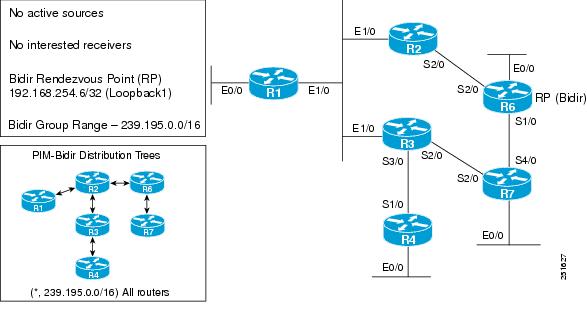
For this verification example, the following conditions apply:
- Entries for (*, 239.195.0.0/16) are created by the control plane based on the PIM group-to-RP mappings on all routers.
- Entries for any group within the range 239.195.0.0/16 will be created only when IGMP joins are initiated by interested receivers joining that particular group. For example, if a multicast receiver joins the group 239.195.1.1, an entry for (*, 239.195.1.1) will be created on all routers along the shared tree.
- Because there are no interested receivers, (*, 239.195.0.0/16) will be the only state in the network on all routers.
- In general, multicast packet forwarding can be verified by observing the âSW Forwardingâ counter in show ip mfib command output for the most specific entry available in the MFIB. If multicast is being forwarded, this counter will increment; however, because there are no active sources in this scenario, this counter will not increment.
R1
R1# show ip pim rp mapping
PIM Group-to-RP Mappings
Group(s) 239.195.0.0/16
  RP 192.168.254.6 (?), v2v1, bidir
    Info source: 192.168.6.6 (?), elected via Auto-RP
         Uptime: 22:06:01, expires: 00:02:30
R1# show ip mroute 239.195.0.0/16
(*,239.195.0.0/16), 22:06:01/-, RP 192.168.254.6, flags: B
  Bidir-Upstream: Ethernet1/0, RPF nbr: 192.168.123.2
  Incoming interface list:
    Ethernet0/0, Accepting/Sparse
    Ethernet1/0, Accepting/Sparse
R1# show ip mrib route 239.195.0.0/16
(*,239.195.0.0/16) RPF nbr: 192.168.123.2 Flags:
  Ethernet0/0 Flags: A
  Null0 Flags: A
  Ethernet1/0 Flags: A F
R1# show ip mfib 239.195.0.0/16
 (*,239.195.0.0/16) Flags:
   SW Forwarding: 0/0/0/0, Other: 0/0/0
   Ethernet1/0 Flags: A F
     Pkts: 0/0
   Ethernet0/0 Flags: A
   Null0 Flags: A
R1# show ip pim interface df
* implies this system is the DF
Interface                RP               DF Winner        Metric     Uptime
Ethernet0/0              192.168.254.6    *192.168.1.1      75         22:06:01
Ethernet1/0              192.168.254.6     192.168.123.2    65         22:06:01
R2
R2# show ip pim rp mapping
PIM Group-to-RP Mappings
Group(s) 239.195.0.0/16
  RP 192.168.254.6 (?), v2v1, bidir
    Info source: 192.168.6.6 (?), elected via Auto-RP
         Uptime: 22:09:00, expires: 00:02:30
R2# show ip mroute 239.195.0.0/16
(*,239.195.0.0/16), 22:09:00/-, RP 192.168.254.6, flags: B
  Bidir-Upstream: Serial2/0, RPF nbr: 192.168.26.6
  Incoming interface list:
    Ethernet1/0, Accepting/Sparse
    Serial2/0, Accepting/Sparse
R2# show ip mrib route 239.195.0.0/16
(*,239.195.0.0/16) RPF nbr: 192.168.26.6 Flags:
  Ethernet1/0 Flags: A
  Null0 Flags: A
  Serial2/0 Flags: A F
R2# show ip mfib 239.195.0.0/16
 (*,239.195.0.0/16) Flags:
   SW Forwarding: 0/0/0/0, Other: 0/0/0
   Serial2/0 Flags: A F
     Pkts: 0/0
   Ethernet1/0 Flags: A
   Null0 Flags: A
R2# show ip pim interface df
* implies this system is the DF
Interface                RP               DF Winner        Metric     Uptime
Ethernet1/0              192.168.254.6    *192.168.123.2    65         22:09:00
Serial2/0                192.168.254.6     192.168.26.6     0          22:09:00
R3
R3# show ip pim rp mapping
PIM Group-to-RP Mappings
Group(s) 239.195.0.0/16
  RP 192.168.254.6 (?), v2v1, bidir
    Info source: 192.168.6.6 (?), elected via Auto-RP
         Uptime: 22:09:20, expires: 00:02:12
R3# show ip mroute 239.195.0.0/16
(*,239.195.0.0/16), 22:09:20/-, RP 192.168.254.6, flags: B
  Bidir-Upstream: Ethernet1/0, RPF nbr: 192.168.123.2
  Incoming interface list:
    Serial3/0, Accepting/Sparse
    Ethernet1/0, Accepting/Sparse
R3# show ip mrib route 239.195.0.0/16
(*,239.195.0.0/16) RPF nbr: 192.168.123.2 Flags:
  Serial3/0 Flags: A
  Null0 Flags: A
  Ethernet1/0 Flags: A F
R3# show ip mfib 239.195.0.0/16
 (*,239.195.0.0/16) Flags:
   SW Forwarding: 0/0/0/0, Other: 0/0/0
   Serial3/0 Flags: A
   Ethernet1/0 Flags: A F
     Pkts: 0/0
   Null0 Flags: A
R3# show ip pim interface df
* implies this system is the DF
Interface                RP               DF Winner        Metric     Uptime
Ethernet1/0              192.168.254.6     192.168.123.2    65         22:09:20
Serial2/0                192.168.254.6     192.168.37.7     65         22:09:20
Serial3/0                192.168.254.6    *192.168.34.3     75         22:09:20
R4
R4# show ip pim rp mapping
PIM Group-to-RP Mappings
Group(s) 239.195.0.0/16
  RP 192.168.254.6 (?), v2v1, bidir
    Info source: 192.168.6.6 (?), elected via Auto-RP
         Uptime: 22:09:47, expires: 00:02:42
R4# show ip mroute 239.195.0.0/16
(*,239.195.0.0/16), 22:09:47/-, RP 192.168.254.6, flags: B
  Bidir-Upstream: Serial1/0, RPF nbr: 192.168.34.3
  Incoming interface list:
    Ethernet0/0, Accepting/Sparse
    Serial1/0, Accepting/Sparse
R4# show ip mrib route 239.195.0.0/16
(*,239.195.0.0/16) RPF nbr: 192.168.34.3 Flags:
  Ethernet0/0 Flags: A
  Null0 Flags: A
  Serial1/0 Flags: A F
R4# show ip mfib 239.195.0.0/16
 (*,239.195.0.0/16) Flags:
   SW Forwarding: 0/0/0/0, Other: 0/0/0
   Serial1/0 Flags: A F
     Pkts: 0/0
   Ethernet0/0 Flags: A
   Null0 Flags: A
R4# show ip pim interface df
* implies this system is the DF
Interface                RP               DF Winner        Metric     Uptime
Ethernet0/0              192.168.254.6    *192.168.4.4      139        22:09:47
Serial1/0                192.168.254.6     192.168.34.3     75         22:09:47
R6 (RP)
R6# show ip pim rp mapping
PIM Group-to-RP Mappings
This system is an RP (Auto-RP)
This system is an RP-mapping agent (Loopback0)
Group(s) 239.195.0.0/16
  RP 192.168.254.6 (?), v2v1, bidir
    Info source: 192.168.254.6 (?), elected via Auto-RP
         Uptime: 22:11:08, expires: 00:02:48
R6# show ip mroute 239.195.0.0/16
(*,239.195.0.0/16), 22:11:08/-, RP 192.168.254.6, flags: B
  Bidir-Upstream: Loopback1, RPF nbr: 192.168.254.6
  Incoming interface list:
    Serial2/0, Accepting/Sparse
    Serial1/0, Accepting/Sparse
    Ethernet0/0, Accepting/Sparse
    Loopback1, Accepting/Sparse
R6# show ip mrib route 239.195.0.0/16
(*,239.195.0.0/16) RPF nbr: 192.168.254.6 Flags:
  Serial2/0 Flags: A
  Serial1/0 Flags: A
  Ethernet0/0 Flags: A
  Null0 Flags: A
  Loopback1 Flags: A F
R6# show ip mfib 239.195.0.0/16
 (*,239.195.0.0/16) Flags:
   SW Forwarding: 0/0/0/0, Other: 0/0/0
   Loopback1 Flags: A F
     Pkts: 0/0
   Serial2/0 Flags: A
   Serial1/0 Flags: A
   Ethernet0/0 Flags: A
   Null0 Flags: A
R6# show ip pim interface df
* implies this system is the DF
Interface                RP               DF Winner        Metric     Uptime
Loopback1                192.168.254.6    *192.168.254.6    0          22:11:08
Ethernet0/0              192.168.254.6    *192.168.16.6     0          22:11:08
Serial1/0                192.168.254.6    *192.168.67.6     0          22:11:08
Serial2/0                192.168.254.6    *192.168.26.6     0          22:11:08
R7
R7# show ip pim rp mapping
PIM Group-to-RP Mappings
Group(s) 239.195.0.0/16
  RP 192.168.254.6 (?), v2v1, bidir
    Info source: 192.168.6.6 (?), elected via Auto-RP
         Uptime: 22:10:23, expires: 00:02:04
R7# show ip mroute 239.195.0.0/16
(*,239.195.0.0/16), 22:10:23/-, RP 192.168.254.6, flags: B
  Bidir-Upstream: Serial4/0, RPF nbr: 192.168.67.6
  Incoming interface list:
    Serial2/0, Accepting/Sparse
    Ethernet0/0, Accepting/Sparse
    Serial4/0, Accepting/Sparse
R7# show ip mrib route 239.195.0.0/16
(*,239.195.0.0/16) RPF nbr: 192.168.67.6 Flags:
  Serial2/0 Flags: A
  Ethernet0/0 Flags: A
  Null0 Flags: A
  Serial4/0 Flags: A F
R7# show ip mfib 239.195.0.0/16
 (*,239.195.0.0/16) Flags:
   SW Forwarding: 0/0/0/0, Other: 0/0/0
   Serial4/0 Flags: A F
     Pkts: 0/0
   Serial2/0 Flags: A
   Ethernet0/0 Flags: A
   Null0 Flags: A
R7# show ip pim interface df
* implies this system is the DF
Interface                RP               DF Winner        Metric     Uptime
Ethernet0/0              192.168.254.6    *192.168.7.7      65         22:10:23
Serial2/0                192.168.254.6    *192.168.37.7     65         22:10:23
Serial4/0                192.168.254.6     192.168.67.6     0          22:10:23
Additional References
Related Documents
|
Related Topic |
Document Title |
|---|---|
|
MFIB overview concepts and MFIB/MRIB entry and interface flag descriptions |
â Multicast Forwarding Information Base Overview â |
|
Overview of the IP multicast technology area |
â IP Multicast Technology Overview â |
|
Concepts, tasks, and examples for configuring an IP multicast network using PIM |
â Configuring Basic IP Multicast â |
|
IP multicast commands: complete command syntax, command mode, command history, defaults, usage guidelines, and examples |
Cisco IOS IP Multicast Command Reference |
MIBs
Technical Assistance
|
Description |
Link |
|---|---|
|
The Cisco Support website provides extensive online resources, including documentation and tools for troubleshooting and resolving technical issues with Cisco products and technologies. To receive security and technical information about your products, you can subscribe to various services, such as the Product Alert Tool (accessed from Field Notices), the Cisco Technical Services Newsletter, and Really Simple Syndication (RSS) Feeds. Access to most tools on the Cisco Support website requires a Cisco.com user ID and password. |
Feature Information for Verifying IPv4 Multicast Forwarding Using the MFIB
The following table provides release information about the feature or features described in this module. This table lists only the software release that introduced support for a given feature in a given software release train. Unless noted otherwise, subsequent releases of that software release train also support that feature.
Use Cisco Feature Navigator to find information about platform support and Cisco software image support. To access Cisco Feature Navigator, go to www.cisco.com/go/cfn. An account on Cisco.com is not required.
|
Feature Name |
Releases |
Feature Information |
|---|---|---|
|
IPv4 Multicast Support of the MFIB |
15.0(1)M 12.2(33)SRE |
The MFIB architecture provides modularity and separation between the multicast control plane (PIM and IGMP) and the multicast forwarding plane (MFIB). This architecture is used in Cisco IOS IPv6 and Cisco IOS XR multicast implementations. With the introduction of the IPv4 MFIB infrastructure, the Cisco IOS IPv4 multicast implementation has been enhanced, making the MFIB forwarding model the only forwarding engine used. The following commands were introduced or modified: clear ip mfib counters, debug ip mcache, debug ip mfib adjacency, debug ip mfib db, debug ip mfib fs, debug ip mfib init, debug ip mfib interface, debug ip mfib mrib, debug ip mfib pak, debug ip mfib platform, debug ip mfib ppr, debug ip mfib ps, debug ip mfib signal, debug ip mfib table, debug ip mpacket, debug ip mrib, ip mfib, ip mfib cef, ip mfib forwarding, ip mroute-cache, ip multicast cache-headers, ip multicast rate-limit, ip multicast ttl-threshold, ip pim register-rate-limit, show ip mcache, show ip mfib, show ip mfib active, show ip mfib count, show ip mfib interface, show ip mfib route, show ip mfib status, show ip mfib summary, show ip pim interface, show ip pim tunnel. |
Cisco and the Cisco Logo are trademarks of Cisco Systems, Inc. and/or its affiliates in the U.S. and other countries. A listing of Cisco's trademarks can be found at www.cisco.com/go/trademarks. Third party trademarks mentioned are the property of their respective owners. The use of the word partner does not imply a partnership relationship between Cisco and any other company. (1005R)
Any Internet Protocol (IP) addresses and phone numbers used in this document are not intended to be actual addresses and phone numbers. Any examples, command display output, network topology diagrams, and other figures included in the document are shown for illustrative purposes only. Any use of actual IP addresses or phone numbers in illustrative content is unintentional and coincidental.