清除安全Web裝置上的快取

簡介
本文說明清除Secure Web Appliance(SWA)中的代理快取、DNS快取和身份驗證快取的步驟。
必要條件
需求
思科建議您瞭解以下主題:
- 已安裝物理或虛擬SWA
- 許可證已啟用或已安裝
- 安全殼層(SSH)使用者端
- 安裝嚮導已完成
- 對SWA的管理訪問
採用元件
本文件所述內容不限於特定軟體和硬體版本。
本文中的資訊是根據特定實驗室環境內的裝置所建立。文中使用到的所有裝置皆從已清除(預設)的組態來啟動。如果您的網路運作中,請確保您瞭解任何指令可能造成的影響。
清除DNS快取
為了提高效率和效能,思科SWA儲存您最近連線的域的DNS條目。DNS快取允許SWA避免對相同域執行過多的DNS查詢。DNS快取條目根據記錄的生存時間(TTL)或SWA中的DNS配置過期。
但是,有時需要清除DNS快取中的條目。損壞或過期的DNS快取條目有時會導致向遠端主機交付時出現問題。
從GUI中清除DNS快取
要從圖形使用者介面(GUI)中清除DNS快取,請:
步驟1.導覽至Network。
步驟2.選擇DNS。
步驟3.單擊清除DNS快取。
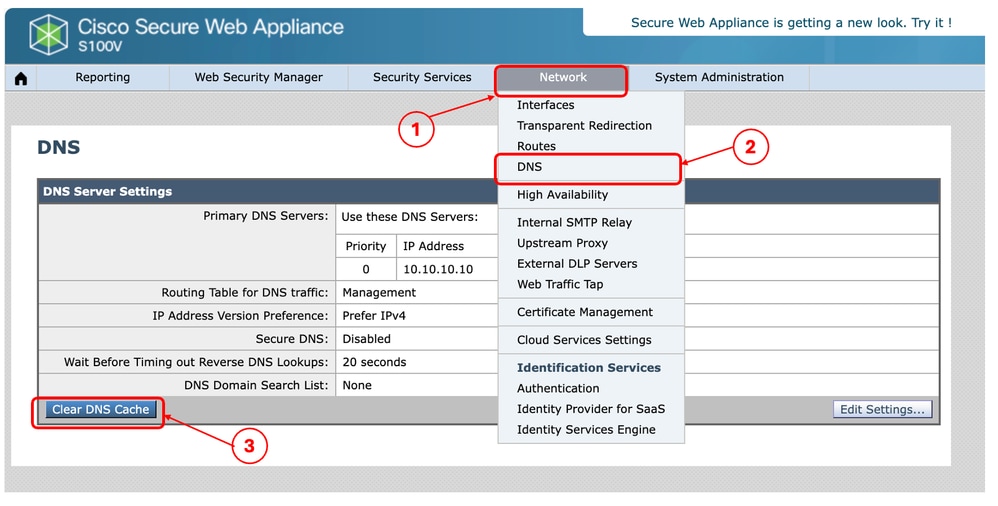 影象 — 顯示「清除DNS快取」按鈕的安全網路裝置GUI
從CLI清除DNS快取
從命令列介面(CLI)清除DNS快取:
步驟1.登入到CLI
步驟2.運行dnsflush
步驟3.選擇Y
SWA_CLI> dnsflush
Are you sure you want to clear out the DNS cache? [N]> Y
清除代理快取
從GUI清除代理快取
要從GUI中清除代理快取,請執行以下操作:
步驟1.導航至安全服務。
步驟2.選擇Web Proxy。
步驟3.按一下Clear Cache。
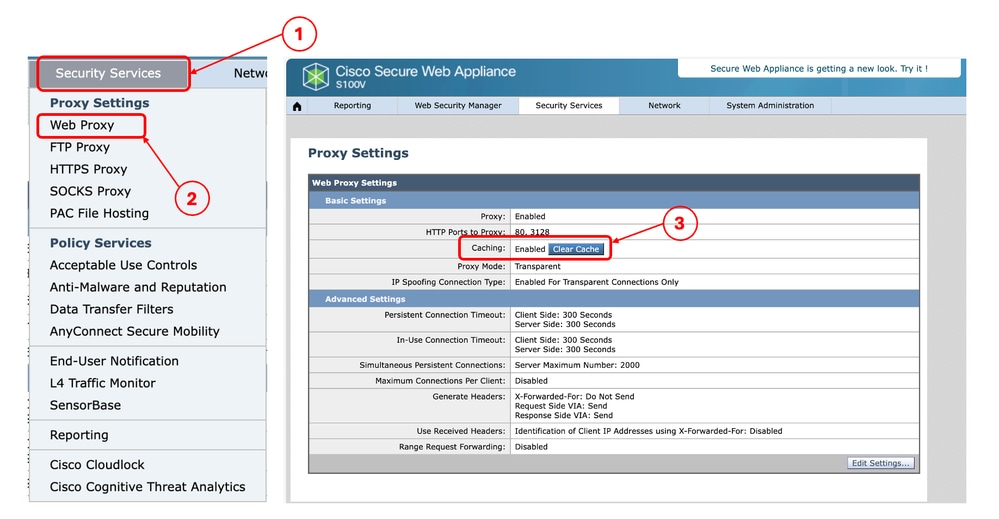 影象 — 清除代理快取
從CLI清除代理快取
從CLI清除代理快取:
步驟1.登入到CLI。
步驟2.執行診斷程式。
步驟3.選擇PROXY。
步驟4.選擇CACHE。
SWA_CLI> diagnostic

Choose the operation you want to perform:
- NET - Network Diagnostic Utility.
- PROXY - Proxy Debugging Utility.
- REPORTING - Reporting Utilities.
- SERVICES - Service Utilities.
[]> PROXY

Choose the operation you want to perform:
- SNAP - Take a snapshot of the proxy
- OFFLINE - Take the proxy offline (via WCCP)
- RESUME - Resume proxy traffic (via WCCP)
- CACHE - Clear proxy cache
- MALLOCSTATS - Detailed malloc stats in the next entry of the track stat log
- PROXYSCANNERMAP - Show mapping between proxy and corresponding scanners
[]> CACHE

Flushing Proxy cache, prox PID: 55182
清除驗證快取
您可以從身份驗證快取中刪除一個條目或所有條目(使用者)。

附註:您還可以列出身份驗證快取中當前儲存的所有使用者。
可以從CLI清除身份驗證快取。
步驟1.登入到CLI
步驟2.運行authcache。
步驟3.選擇FLUSHALL 或FLUSHUSER,具體取決於您需要清除所有快取條目還是僅清除單個使用者。
SWA_CLI> authcache

Choose the operation you want to perform:
- FLUSHALL - Flush all entries from auth cache
- FLUSHUSER - Flush specific user entry from auth cache
- LIST - List all entries from auth cache
- SEARCH - Search all entries from auth cache
- SEARCHDETAIL - Provide detailed information of the user from auth cache
提示:要找到要從快取中刪除的使用者名稱的正確格式,請選擇SEARCHDETAIL,然後首先找到正確的使用者名稱格式。
相關內容
修訂記錄
| 修訂 | 發佈日期 | 意見 |
|---|---|---|
2.0 |
16-Oct-2026
|
重新認證 |
1.0 |
08-May-2024
|
初始版本 |
 意見
意見