對安全Web裝置中的智慧許可證進行故障排除
目錄
簡介
本文檔介紹在安全網路裝置(SWA)中配置智慧許可證並對其進行故障排除的步驟。
必要條件
需求
思科建議您瞭解以下主題:
- 智慧許可證的工作原理
- 安全網路裝置(SWA)管理
思科建議您:
- 已安裝物理或虛擬安全網路裝置(SWA)
- 對SWA的管理訪問
- 訪問思科智慧許可證門戶
採用元件
本文件所述內容不限於特定軟體和硬體版本。
本文中的資訊是根據特定實驗室環境內的裝置所建立。文中使用到的所有裝置皆從已清除(預設)的組態來啟動。如果您的網路運作中,請確保您瞭解任何指令可能造成的影響。
思科智慧許可證
智慧許可提供以下功能:
- 從中心位置管理所有產品許可證。
- 使用一種方法應用和管理許可證,規範物理和虛擬郵件安全裝置(ESA)/安全管理裝置(SMA)/SWA之間的流程。
- 輕鬆將許可證應用到ESA/SMA/SWA。
- 接收與許可證過期相關的警報。
- 硬體型號ESA/SMA/SWA開箱即用,對所有服務有90天的評估期。
要使用智慧許可註冊SWA,裝置的所有者必須具有智慧帳戶:
- 每個域頒發一個智慧帳戶。
- 智慧帳戶的管理員可以建立允許資源隔離的子級虛擬帳戶。
- 虛擬帳戶可用於根據您的需求限制對不同思科產品許可證的訪問。
- 存取思科智慧軟體管理員(CSSM)以管理授權和下載權杖。
思科提供的資源連結,包括與智慧許可相關的影片、指南和說明:
Smart Software Manager衛星
Cisco Smart Software Manager衛星是Cisco Smart Licensing的一個元件。CSSM Satellite與CSSM協同工作,可管理產品許可證、提供近即時可視性並報告正在使用的思科許可證。
出於安全原因,如果您不想管理位於Cisco.com的智慧軟體管理器的客戶群,可以選擇在內部安裝智慧軟體管理器衛星。
有關Smart Software Manager衛星的詳細資訊,請參閱Cisco Smart Software Manager - Cisco。
與智慧許可證相關的定義
許可證型別:
- 傳統許可證(CL)是指用於硬體和虛擬許可證的傳統方法。
- 智慧許可證(SL)
許可證授權狀態:裝置內給定許可證的狀態。
- ESA/SWA/SMA不會在「智能許可證」頁面中顯示實際到期日期。
- 位置:GUI >系統管理>許可證
- 位置:CLI > License_smart > SUMMARY
特定特徵的狀態會隨以下值之一出現:
- 評估:
- 已在新的(硬體)ESA/SMA上啟用SL服務,無需註冊令牌。
- 已在安裝了當前CL的裝置上啟用SL服務。
- 評估已過期:90天評估智慧許可證已過期,並且裝置已過渡至額外的30天寬限期。
- In-Compliance:裝置已使用令牌註冊,當前該功能使用有效的許可證。
- 不合規(寬限期):可在以下兩種情形中觀察:
- 30天臨時功能許可證的一次按一下請求正在使用中。
- 裝置上的許可證已過期,且30天的寬限期已啟動。
- Out-of-Compliance(Expired):許可證已完全過期,相關的服務不再運行。

附註:Perpetual鍵表示該功能沒有到期期限。Dormant金鑰表示功能具有必須接受的終端使用者許可協定(EULA),或者必須配置並啟用該功能。完成之後,功能將移至「活動」,到期計時器開始。
在安全Web裝置中配置智慧許可證
您可以通過圖形使用者介面(GUI)和命令列介面(CLI)將SWA連線到智慧許可證。
開始之前

注意:在ESA/SMA/SWA上啟用智慧許可證功能是永久性的,不允許選擇將裝置恢復為傳統許可證模式。
- 購買的所有硬體型號SWA都包括90天評估許可證,用於所有功能。
- 使用當前傳統許可證(CL)遷移至智慧許可證的所有硬體型號均可獲得90天的評估許可證。
- 所有虛擬SWA型號都需要基本虛擬許可證(VLN),它是一種XML檔案,通過CLI loadlicense命令載入到裝置,以連結到升級/更新伺服器。
- 所有虛擬SWA型號建立後,都不包括90天許可證,並且要求通過傳統許可證VLAN(有時稱為XML)檔案進行註冊。
- 使用當前傳統許可證(CL)遷移的所有虛擬SWA模型都包括90天評估許可證。
- 目前,SWA在所有版本版本中都有智慧許可證作為可選功能。
- 啟用智慧許可證後,該盒上就不會使用經典許可證。
- 啟用智慧許可證後,無法保留傳統許可證。
- 在SWA版本15.0和更新版本版本版本中,可以選擇直接啟用智慧許可證,而不啟用傳統許可證。必須購買許可證,並將其配置為使用帶有智慧許可證的SWA。
- 自15.0版本起,無需任何標准許可證啟用,即可享受全新安裝和註冊智慧許可證的30天寬限期。
- 在15.1版的最新版本中,必須提供智慧許可證才能使SWA正常運行。此外,最新版本刪除了所有傳統許可證相關的功能。
- 如果基本版本中未啟用智慧許可證,則通過升級到智慧許可證授權版本,下載時SWA會受到限制。
CLI和GUI顯示中的更改
在CLI for Classic License中使用了4個命令。因此,在智慧許可證授權版本(15.1及更高版本)中,這些命令將被刪除。
檢視刪除的CLI命令清單:
- loadlicense
- showlicense
- 功能鍵
- featurekeyconfig
在Classic License的GUI中,System Administration頁籤中提到兩個頁面。在智慧許可證授權構建中,這些頁面將被刪除。
刪除的GUI頁面清單:
- 功能金鑰設定
- 功能金鑰
重設和重新載入
SWA中的重置配置執行出廠重置,此時整個配置被清除並且SWA恢復至其出廠狀態。在智慧許可證授權下,構建具有相同的行為,但會保留該行為。
Reload是一個CLI隱藏命令,用於清除配置資料並刪除功能金鑰。如果SWA已註冊到傳統許可證,且已執行重新載入,請再次載入許可證。
如果SWA配置了智慧許可證,則重新載入後,將取消註冊並禁用智慧許可證以及當前SWA行為中的出廠重置。
在SWA授權構建版本中,智慧許可證永遠不會恢復到disable狀態,因此reload命令會清除所有配置。智慧許可證將處於registered狀態,因此,將再次請求所有許可證。
通訊要求
通過TCP埠443與smartreceiver.cisco.com進行網路或代理通訊。要測試從SWA的連線,請執行以下步驟:
1.登入到CLI。
2.鍵入telnet,然後按Enter鍵。
3.選擇您希望SWA連線到智慧許可證伺服器的介面。
4.輸入smartreceiver.cisco.com。
5.在「埠」部分中,輸入443,然後按Enter。
附註:如果您已配置Smart Software Manager Satellite,請在步驟4中新增與該伺服器關聯的統一資源定位器(URL)或網際網路協定(IP)地址。
以下是成功連線的範例:
> telnet

Please select which interface you want to telnet from.
1. Auto
2. Management (10.48.48.184/24: management.swa1.cisco.com)
3. P1 (192.168.13.184/24: p1.swa1.cisco.com)
4. P2 (192.168.133.184/24: p2.swa1.cisco.com)
[1]> 4

Enter the remote hostname or IP address.
[]> smartreceiver.cisco.com

Enter the remote port.
[23]> 443

Trying 10.112.59.81...
Connected to smartreceiver.cisco.com.
Escape character is '^]'.
以下是連線失敗的範例:
SWA_CLI> telnet

Please select which interface you want to telnet from.
1. Auto
2. Management (10.48.48.184/24: management.swa1.cisco.com)
3. P1 (192.168.13.184/24: p1.swa1.cisco.com)
4. P2 (192.168.133.184/24: p2.swa1.cisco.com)
[1]> 2

Enter the remote hostname or IP address.
[]> smartreceiver.cisco.com

Enter the remote port.
[23]> 443

Trying 10.112.59.81...
telnet: connect to address 10.112.59.81: Operation timed out
Trying 2a04:e4c7:fffe::f...
bind: Invalid argument附註:要退出telnet,如果Ctrl + C不起作用,請按住Control,然後按],然後鍵q,然後按Enter。
從GUI配置智慧許可證
1.登入到GUI並導航至系統管理。
2.選擇智慧軟體許可。
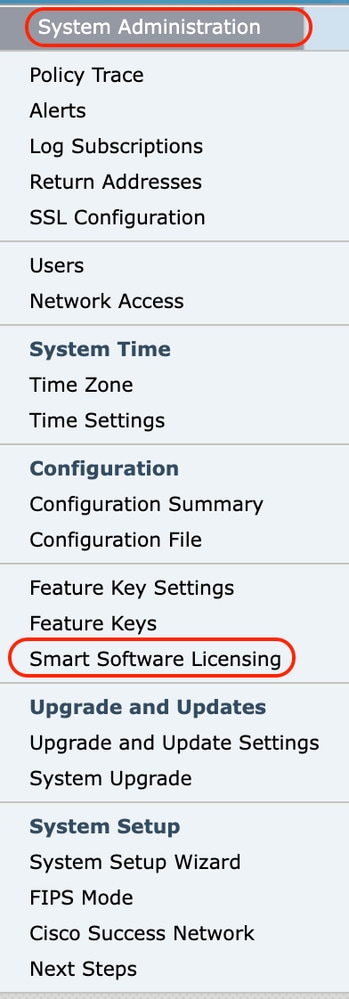 影象 — 選擇智慧軟體許可
3.選擇啟用智慧軟體許可。
 影象 — 選擇啟用智慧軟體許可
4.仔細閱讀說明,然後按一下OK。
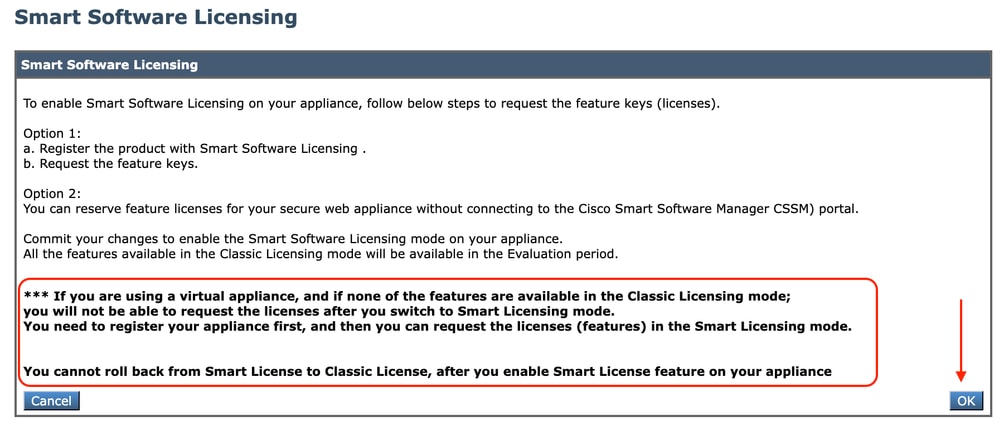 影象 — 仔細閱讀說明
注意:在裝置上啟用智慧許可證功能後,無法從「智慧許可證」回滾到「經典許可證」。
5. Commit更改。
6.等待一段時間,然後刷新「智慧許可」頁面。
7.選擇Smart License Registration,然後按一下Confirm。
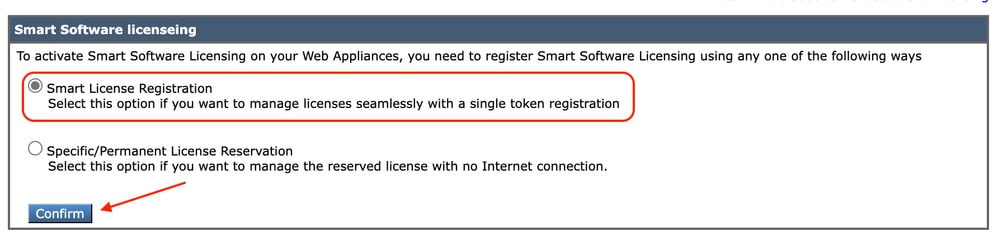 影象 — 選擇智慧許可證註冊
8.(可選):如果您的網路中有Smart Software Manager Satellite,請在傳輸設定中新增伺服器的URL或IP地址。
9.如果您有單獨的路由表,並且沒有從「管理」介面訪問智慧接收器的許可權;從測試介面部分選擇Data。
預設情況下,管理路由表處於選中狀態。
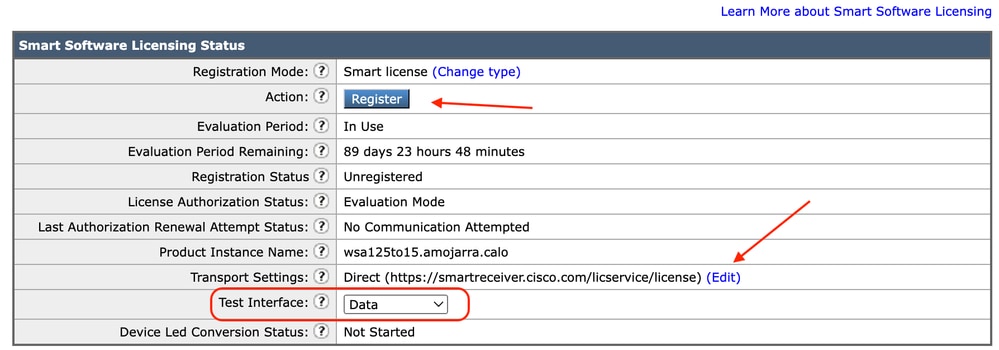 影象 — 選擇路由表
10.選擇Register以定位至「註冊」頁。
11.登入您的智慧軟體管理器門戶(思科軟體中心)或您的智慧軟體管理器衛星。
12.定位至Inventory標籤,如果您還沒有令牌,則生成一個新令牌。或者按一下藍色箭頭檢視您的令牌。
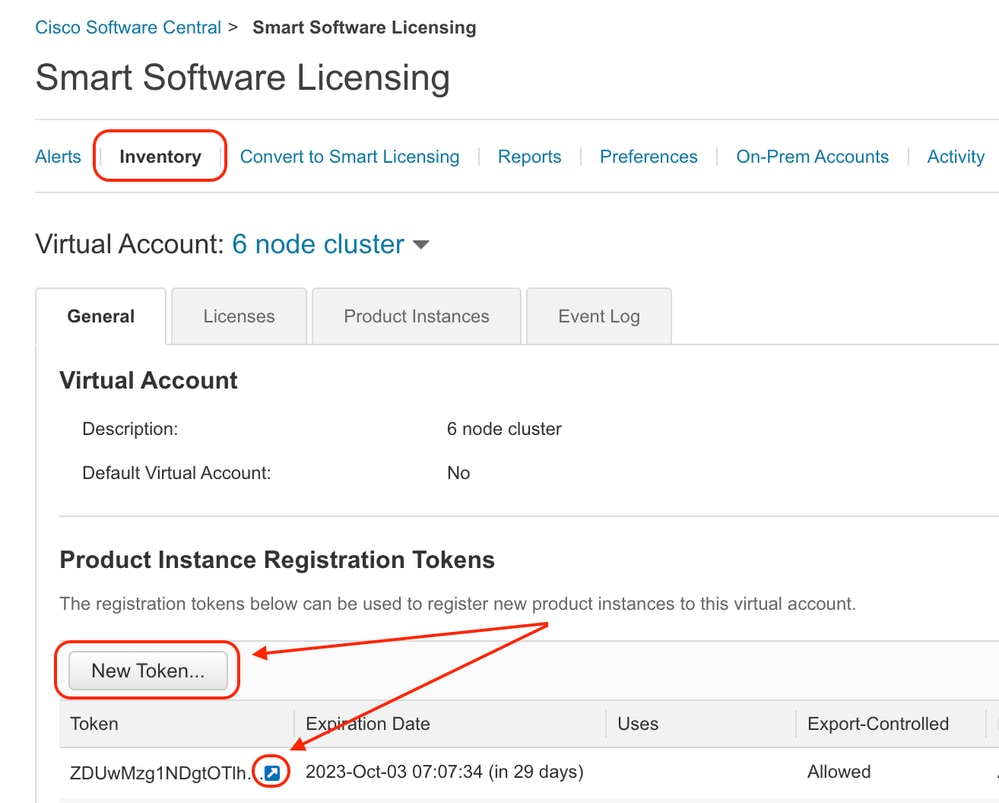 影象 — 導航到清單
13.(可選):要建立註冊令牌,請選擇New Token並填寫所需欄位。
14.將智慧許可證門戶中的令牌貼上到您的SWA,然後選擇Register。
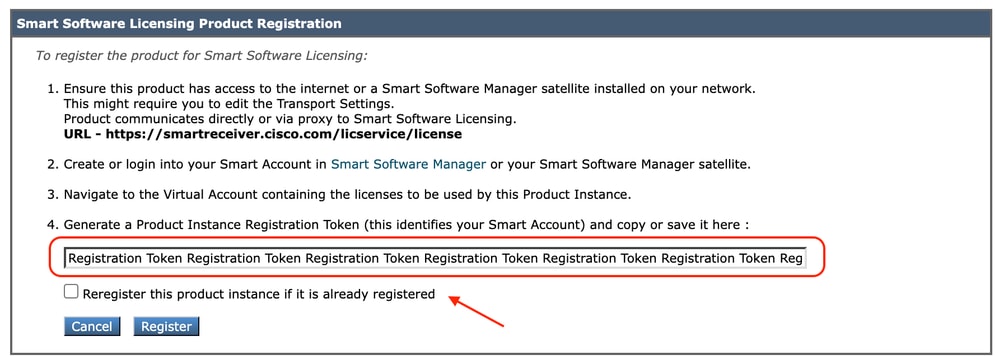 影象 — 貼上註冊令牌
15.(可選):如果裝置已經註冊,則選中此覈取方塊後,您可以重新註冊裝置。
16.幾分鐘後,您可以檢查註冊狀態。
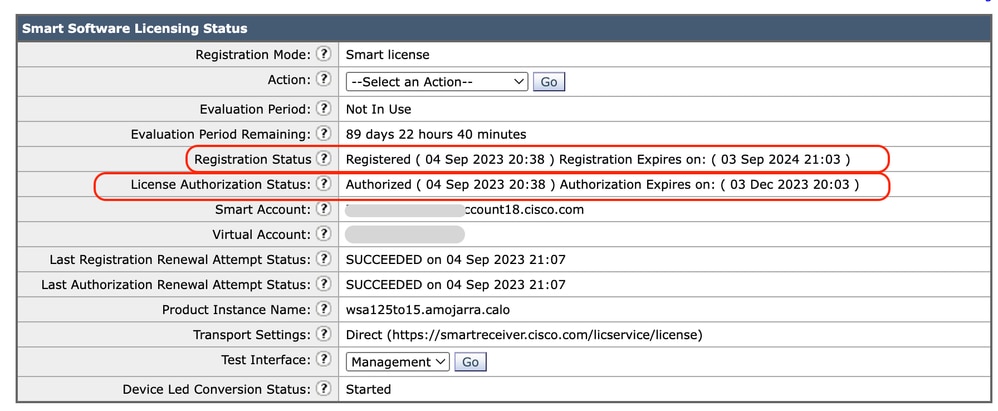 映像 — 已註冊裝置
驗證整合
您可以從GUI、CLI或智慧許可證門戶驗證整合。
從GUI驗證智慧許可證狀態
1.登入到GUI並導航到系統管理。
2.選擇智慧軟體許可。
3.檢查以下專案:
- 註冊狀態
- 許可證授權狀態
- 上次註冊續訂嘗試狀態
- 上次授權續訂嘗試狀態
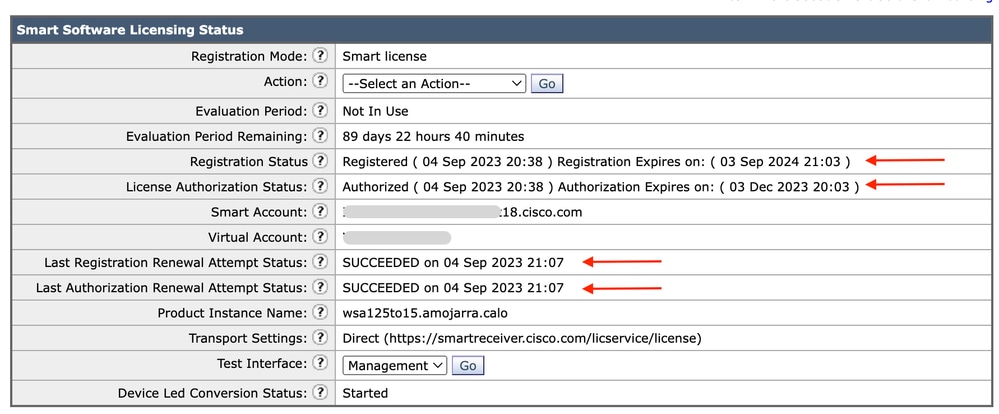 影象 — 在GUI中驗證智慧許可證
4.從系統管理選單中選擇許可證。
5.檢查所需的許可證是否符合要求。
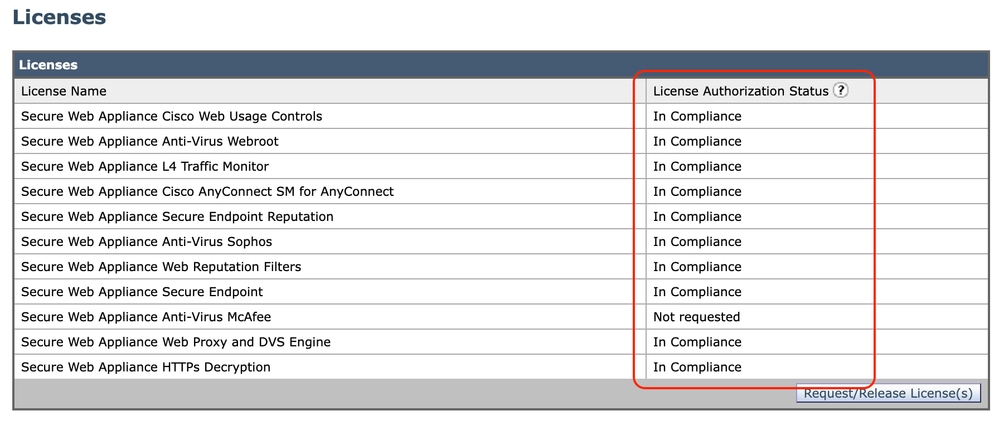 映像 — 許可證狀態
從CLI驗證智慧許可證狀態
使用以下步驟從CLI驗證智慧許可證狀態:
1.登入到CLI。
2.輸入license_smart。
3.選擇STATUS。
4.驗證以下專案:
- 註冊狀態
- 許可證授權狀態
- 上次註冊續訂嘗試狀態
- 上次授權續訂嘗試狀態
Smart Licensing is : Enabled

License Reservation is: Disabled
Evaluation Period: Not In Use
Evaluation Period Remaining: 89 days 22 hours 40 minutes
Registration Status: Registered ( 04 Sep 2023 20:38 ) Registration Expires on:  ( 03 Sep 2024 21:03 )
Smart Account: XXXXXXXXXXXX18.cisco.com
Virtual Account: XXXXXXXXX
Last Registration Renewal Attempt Status: SUCCEEDED on 04 Sep 2023 21:07
License Authorization Status: Authorized ( 04 Sep 2023 20:38 ) Authorization Expires on:  ( 03 Dec 2023 20:03 )
Last Authorization Renewal Attempt Status: SUCCEEDED on 04 Sep 2023 21:07
Product Instance Name: wsa125to15.amojarra.calo
Transport Settings: Direct (https://smartreceiver.cisco.com/licservice/license)
Device Led Conversion Status: Started
5.在license_smart嚮導中,輸入SUMMARY。
[]> SUMMARY

Feature Name                                                        License Authorization Status
----------------------------------------------------------------------------------------------------
Secure Web Appliance Cisco Web Usage Controls                          In Compliance
Secure Web Appliance Anti-Virus Webroot                                In Compliance
Secure Web Appliance L4 Traffic Monitor                                In Compliance
Secure Web Appliance Cisco AnyConnect SM for AnyConnect                In Compliance
Secure Web Appliance Secure Endpoint Reputation                        In Compliance
Secure Web Appliance Anti-Virus Sophos                                 In Compliance
Secure Web Appliance Web Reputation Filters                            In Compliance
Secure Web Appliance Secure Endpoint                                   In Compliance
Secure Web Appliance Anti-Virus McAfee                                 Not requested
Secure Web Appliance Web Proxy and DVS Engine                          In Compliance
Secure Web Appliance HTTPs Decryption                                  In Compliance
6.檢查所需的許可證是否符合要求。
在智慧許可證門戶中驗證裝置狀態
1.登入智慧軟體許可門戶:思科軟體中心。
2.選擇Inventory標籤。
3.選擇產品例項。
4.確認您的裝置已列出,然後按一下裝置名稱。
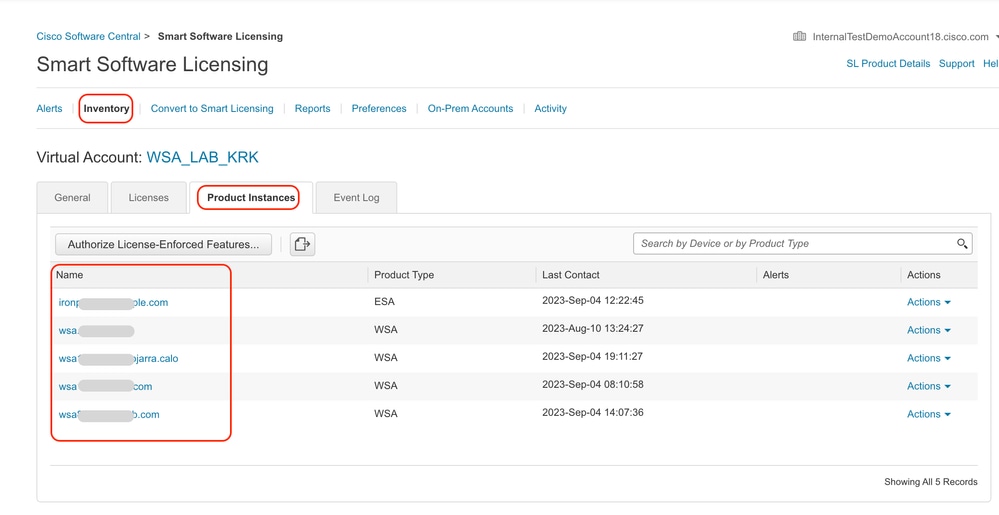 影象 — 在智慧許可證門戶中驗證裝置狀態
5.觀察General頁籤中的Feature Keys和裝置狀態。
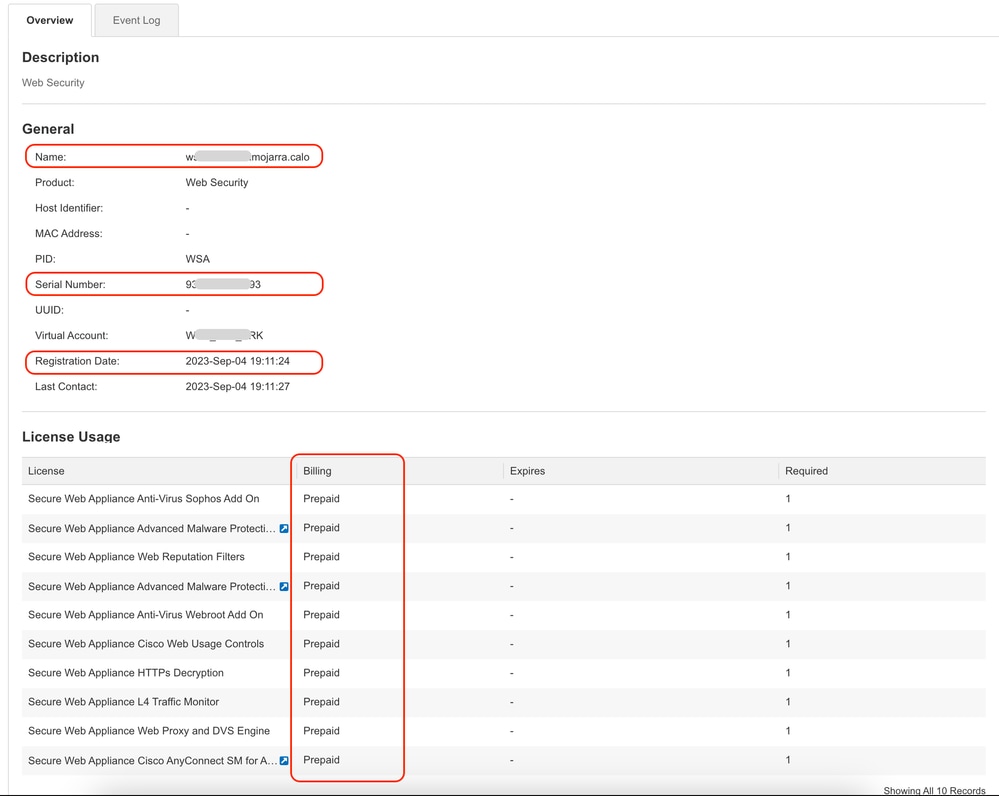 影象 — 驗證智慧許可證門戶中的功能金鑰
從CLI查詢VLAN
要從CLI檢視您的VLAN,請運行smartaccountinfo命令。您可以檢視一些額外資訊,如虛擬帳戶域或ID和產品例項。
> smartaccountinfo

Smart Account details
---------------------

Product Instance ID       : 609XXXXXXXX-fXXXXXXXXX55
Smart Account Domain      : XXXXXXXXXXXXXXXXXXX18.cisco.com
Smart Account ID          : 111111
Smart Account Name        : XXXXXXXXXXXXXXXXXXX18.cisco.com
VLN                       : VLNWSA1111111
Virtual Account Domain    : WSA_XXXXX
Virtual Account ID        : 111111
日誌記錄
所有與智慧許可證相關的日誌都收集在Smartlicense日誌中。預設情況下啟用此日誌。
使用以下步驟配置智慧許可證日誌:
1.登入到GUI。
2.從System Administration(系統管理)選單中,選擇Log Subscriptions。
3.選擇Smartlicense Logs。
4.按一下日誌名稱以編輯配置。

提示:如果要將日誌推送到日誌收集器伺服器,建議您建立新的日誌訂閱並轉發這些日誌,以便在SWA本地擁有日誌副本
智慧許可證故障排除
以下是常見錯誤以及解決該問題的步驟。
成功連線
以下是成功響應的smart_license日誌示例:
Mon Sep 4 20:39:32 2023 Info: The product is registered successfully with Smart Software Manager.註冊失敗
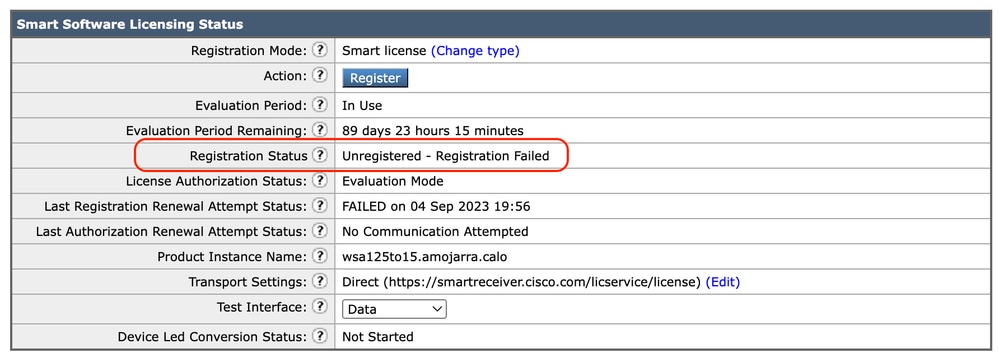 影象 — 註冊失敗
如果返回Registration Failed,請使用以下步驟從CLI檢查smart_license日誌:
1.登入到CLI。
2.輸入grep。
3.查詢與smartlicense 日誌關聯的號碼並輸入該號碼。
4.按一下Enter鍵,直到您看到日誌。
通訊傳送錯誤
如果出現「Communication send error(通訊傳送錯誤)」,請檢查SWA和埠TCP 443上的智慧許可證伺服器之間的連線。
Mon Sep 4 19:57:09 2023 Warning: The registration of the product with Smart Software Manager failed. The response from Smart Software Manager is: Communication send error. 提示:如果配置了Smart Software Manager Satellite,請驗證與已配置埠號的連線。
要檢查連通性,請按照本文通訊要求一節中提供的步驟操作。
此外,在顯示警報中,您還會看到相同的錯誤消息:
04 Sep 2023 20:19:29 +0200 The registration of the product with Smart Software Manager failed. The response from Smart Software Manager is: Communication send error.令牌無效
如果令牌已過期或達到其最大定義的使用值,則返回警告日誌令牌無效。
您可以通過displayalerts命令或smartlicense日誌驗證錯誤。
以下是CLI中displayalerts的錯誤範例:
04 Sep 2023 20:26:55 +0200 The registration of the product with Smart Software Manager failed. The response from Smart Software Manager is: Token is not valid以下是來自CLI的smartlicense日誌行的示例:
Mon Sep 4 20:26:55 2023 Warning: The registration of the product with Smart Software Manager failed. The response from Smart Software Manager is: Token is not valid要驗證令牌有效性是否登入到您的智慧許可證門戶,請導航到清單,檢查到期狀態和使用次數。
 影象 — Expier令牌
無法續訂授權
通訊傳送錯誤
如果您由於通訊傳送錯誤而收到更新授權失敗,則可能是由於連線問題。確保選擇了正確的路由表,並測試SWA與smartreceiver.cisco.com TCP埠443或Smart Software Manager Satellite伺服器之間的連線。
要檢查連通性,請按照本文通訊要求一節中提供的步驟操作。
您可以使用displayalerts命令或smartlicense日誌驗證錯誤
以下是CLI中displayalerts的範例錯誤:
04 Sep 2023 22:23:43 +0200 Failed to renew authorization of the product with Smart Software Manager due to Communication send error..以下是smartlicense日誌中來自CLI的示例日誌行:
Mon Sep 4 22:22:58 2023 Warning: Failed to renew authorization of the product with Smart Software Manager due to Communication send error..證書已吊銷
如果續訂授權的原因是證書已吊銷,請驗證是否已將裝置從智慧許可證門戶中刪除。檢查本文的在智慧許可證門戶中驗證裝置狀態部分。
通過運行displayalerts命令或從smartlicense日誌驗證錯誤。
以下是CLI中displayalerts的錯誤範例:
04 Sep 2023 22:39:10 +0200 Failed to renew authorization of the product with Smart Software Manager due to Could not return the certificate for the given sn (111111111) since it is REVOKED..以下是smartlicense日誌中來自CLI的示例日誌行:
Mon Sep 4 22:39:10 2023 Warning: Failed to renew authorization of the product with Smart Software Manager due to Could not return the certificate for the given sn (1111111) since it is REVOKED..要解決此問題,請再次註冊裝置。
裝置無VLAN
對於物理裝置,沒有VLAN;虛擬許可證號碼主要用於虛擬裝置。如果您使用的是虛擬SWA,且CLI的smartaccountinfo輸出中沒有VLAN,請嘗試在CLI中使用loadlicense命令再次載入XML許可證檔案。
注意:loadlicense命令會在安裝新的許可證檔案和金鑰之前從系統中刪除所有現有的功能金鑰(包括評估金鑰)和許可證檔案。
智慧許可證代理服務不可用
如果您收到此錯誤訊息,是由思科錯誤ID所導致:適用於SWA或思科錯誤ID的CSCwe36665:CSCvo22855,用於ESA。聯絡TAC實施解決方法。
"Smart license agent service is unavailable. Please visit this page after some time. If you continue to see the same message, please contact Cisco Sales representative."驗證簽名失敗
如果智慧許可證授權失敗並出現以下錯誤:
Tue Apr 22 09:46:27 2023 Warning: Failed to renew authorization of the product with Smart Software Manager due to Failed to verify signature..[第一次測試]此錯誤可能是由於思科錯誤ID:CSCvx04164。
此錯誤的條件是智慧許可門戶上的虛擬帳戶名稱包含非英文字元,此問題的解決方法為:
重新命名虛擬帳戶並刪除非英文字元:
1.訪問software.cisco.com。
2.導航到管理>管理智慧帳戶>虛擬帳戶。
3.按一下有問題的虛擬帳戶。
4.定義新名稱並刪除非英文字元。
附註:使用者必須具有管理許可權才能重新命名虛擬帳戶。
[第二次測試]如果虛擬帳戶名稱正確,請確保裝置列在智慧許可證門戶清單中。
使用本文Verify Device Status in Smart License Portal部分中提供的步驟。
[第三次測試]如果裝置列在智慧許可證門戶清單中,請從CLI重新啟動SWA智慧許可證服務:
1.登入到CLI。
2.運行診斷命令。
3.選擇服務。
4.選擇SMART_LICENSE。
5.選擇「重新啟動」。
SWA_CLI> diagnostic

Choose the operation you want to perform:
- NET - Network Diagnostic Utility.
- PROXY - Proxy Debugging Utility.
- REPORTING - Reporting Utilities.
- SERVICES - Service Utilities.
[]> SERVICES

Choose one of the following services:
- AMP - Secure Endpoint
- AVC - AVC
- ADC - ADC
- DCA - DCA
- WBRS - WBRS
- EXTFEED - ExtFeed
- L4TM - L4TM
- ANTIVIRUS - Anti-Virus xiServices
- AUTHENTICATION - Authentication Services
- MANAGEMENT - Appliance Management Services
- REPORTING - Reporting Associated services
- MISCSERVICES - Miscellaneous Service
- OCSP - OSCP
- UPDATER - UPDATER
- SICAP - SICAP
- SNMP - SNMP
- SNTP - SNTP
- VMSERVICE - VM Services
- WEBUI - Web GUI
- SMART_LICENSE - Smart Licensing Agent
- WCCP - WCCP
[]> SMART_LICENSE


Choose the operation you want to perform:
- RESTART - Restart the service
- STATUS - View status of the service
[]> RESTART

smart_agent is restarting.[第四次測試]在智慧許可證管理器門戶中生成新令牌並重新註冊裝置。
Smart_agent停滯於禁用狀態
將設備(在升級之前啟用了智慧許可證)升級到版本14.1或14.0後,在ESA或SMA上可以看到這些錯誤。
附註:x195或x395裝置上出現此錯誤。
以下是裝置產生的訊息範例:
08 Apr 2023 10:19:36 -0500 Initialization of smart agent service failed. Reason : Port 65501 is not available for smart agent service to run. Please try changing port for smart agent service through `license_smart setagentport` cli command or free the port from other service.在smart_license日誌中,您可以看到:
Mon Apr 8 09:02:36 2021 Warning: Smart License: Failed to change the hostname to esa.local for the product.此錯誤是由思科錯誤ID導致的:用於ESA的CSCvz74874和用於SMA的思科錯誤ID:CSCvx68947。您必須聯絡思科支援人員以解決此問題。
智慧代理服務初始化失敗
此錯誤主要與虛擬裝置相關,這些虛擬裝置所配置的資源多於預期。以下是日誌的範例:
Thu Jun 23 16:16:07 2022 Critical: Initialization of smart agent service failed. Reason : Port 65501 is not available for smart agent service to run. Please try changing port for smart agent service through `license_smart setagentport` cli command or free the port from other service.
any attempts to swap ports using the defined command will fail.要解決此問題,請檢查CLI中version命令的輸出,確保CPU數量和分配的記憶體設定為expected。如果裝置的核心數多於支援的核心,請更正分配。
來自授權雲的響應無效
如果已從智慧許可證管理器門戶中刪除裝置,則較舊版本將返回以下錯誤:
Thu Nov 15 13:50:20 2022 Warning: Failed to renew authorization of the product with Smart Software Manager due to Invalid response from licensing cloud..要解決此問題,請重新註冊裝置,同時檢視思科錯誤ID:CSCvr09743。
未傳送有效的SSL證書
如果您從裝置收到此錯誤,並且無法檢索更新,請參閱現場通知:FN - 72502,瞭解更多資訊。
21 Aug 2023 14:03:04 +0200    Unable to connect to the Cisco Aggregator Server.
Details: No valid SSL certificate was sent傳統VLAN證書檔案包括由Talos Keymaster建立的證書,用於訪問更新和升級。舊版金鑰管理證書頒發機構(CA)於2023年1月13日到期。
2021年12月15日前簽發的證書的有效期超過12個月的VLN證書檔案必須在2023年1月13日前續簽和應用。
要解決此問題,請聯絡思科許可證支援並請求一個新的VLAN檔案。
功能已移至「不合規」狀態
如果您看到一些日誌,表明您的某個功能已移至「不合規」狀態,請驗證:
1.您擁有有效的許可證。
2.裝置與智慧許可證伺服器具有連線(請參閱本文的通訊要求部分)。
3.檢查智慧許可證日誌,進一步瞭解此問題。
4.聯絡思科支援尋求幫助。
以下是日誌示例:
Mon Sep 4 20:41:09 2023 Warning: Secure Web Appliance HTTPs Decryption license has been moved to Out of Compliance successfully.
Mon Sep 4 20:41:10 2023 Warning: The Secure Web Appliance HTTPs Decryption is in Out of Compliance (OOC) state. You have 29 days remaining in your grace period.
智慧代理處於授權過期狀態
如果您收到「Smart Agent is in Authorization Expired state(智慧代理處於授權過期狀態)」的嚴重錯誤,請檢視下一行以查詢導致此狀態的原因。
以下是錯誤範例:
Fri Aug 18 15:51:11 2023 Critical: Web Security Appliance Cisco Web Usage Controls feature will stop working as Smart Agent is in Authorization Expired state. This can happen if there is no communication between the appliance and the Cisco Smart Software Manager (CSSM) for more than 90 days.檢查連線並確保裝置已在智慧許可證門戶中註冊。
相關內容
- 思科網路安全裝置最佳實踐指南 — 思科
- BRKSEC-3303
- 思科安全網路裝置AsyncOS 14.5使用手冊 — GD(常規部署) — 連線、安裝和配置[思科安全網路裝置] — 思科
- 思科智慧軟體管理員 — 思科
修訂記錄
| 修訂 | 發佈日期 | 意見 |
|---|---|---|
2.0 |
26-Oct-2026
|
已更新拼寫、語法、間距、插入的水平線以分隔各個部分,以實現可讀性、替代文字、URL和固定CCW警報。 |
1.0 |
08-Sep-2023
|
初始版本 |

 意見
