在ISE中配置使用OCSP的EAP-TLS身份驗證

目錄
簡介
本文檔介紹設定使用OCSP進行即時客戶端證書吊銷檢查的EAP-TLS身份驗證所需的步驟。
必要條件
需求
思科建議您瞭解以下主題:
- 思科身份服務引擎(ISE)的配置
- Cisco Catalyst的配置
- 線上證書狀態協定
採用元件
本文中的資訊係根據以下軟體和硬體版本:
- 身分識別服務引擎虛擬3.2補丁6
- C1000-48FP-4G-L 15.2(7)E9
- Windows Server 2016
- Windows 10
本文中的資訊是根據特定實驗室環境內的裝置所建立。文中使用到的所有裝置皆從已清除(預設)的組態來啟動。如果您的網路運作中,請確保您瞭解任何指令可能造成的影響。
網路圖表
此圖顯示用於本文檔示例的拓撲。
 網路圖表
網路圖表
背景資訊
在EAP-TLS中,客戶端將其數位證書作為身份驗證過程的一部分呈現給伺服器。本文檔描述了ISE如何通過檢查針對AD伺服器的證書公用名(CN)並確認證書是否已使用線上證書狀態協定(提供即時協定狀態)撤銷來驗證客戶端證書。
在Windows Server 2016上配置的域名是ad.rem-xxx.com,本文檔中將其用作示例。
本文檔中引用的線上證書狀態協定(OCSP)和Active Directory(AD)伺服器用於證書驗證。
- Active Directory FQDN:winserver.ad.rem-xxx.com
- CRL分發URL:http://winserver.ad.rem-xxx.com/ocsp-ca.crl
- 授權URL:http://winserver.ad.rem-xxx.com/ocsp
這是憑證鏈結,具有檔案中使用的每個憑證的通用名稱。
- CA:ocsp-ca-common-name
- 客戶端證書:clientcertCN
- 伺服器證書:ise32-01.ad.rem-xxx.com
- OCSP簽名證書:ocspSignCommonName
組態
C1000中的配置
這是C1000 CLI中的最小配置。
aaa new-model

radius server ISE32
address ipv4 1.x.x.181
key cisco123

aaa group server radius AAASERVER
server name ISE32

aaa authentication dot1x default group AAASERVER
aaa authorization network default group AAASERVER
aaa accounting dot1x default start-stop group AAASERVER
dot1x system-auth-control

interface Vlan12
ip address 192.168.10.254 255.255.255.0

interface Vlan14
ip address 1.x.x.101 255.0.0.0

interface GigabitEthernet1/0/1
Switch port access vlan 14
Switch port mode access

interface GigabitEthernet1/0/3
switchport access vlan 12
switchport mode access
authentication host-mode multi-auth
authentication port-control auto
dot1x pae authenticator
spanning-tree portfast edge
Windows PC中的配置
步驟1.配置使用者身份驗證
導覽至Authentication,勾選Enable IEEE 802.1X authentication,然後選擇Microsoft:智慧卡或其他證書。
按一下「設定」按鈕,選中「使用此電腦上的證書」,然後選擇Windows PC的受信任CA。
 啟用證書身份驗證
導覽至Authentication,勾選Additional Settings。從下拉選單中選擇User or computer authenticationfrom。
 指定身份驗證模式
步驟2.確認客戶端證書
導覽至Certificates - Current User > Personal > Certificates,然後檢查用於驗證的使用者端憑證。
 確認客戶端證書
按兩下客戶端證書,導航到Details,檢查Subject、CRL Distribution Points和Authority Information Access的詳細資訊。
- 主題:CN = clientcertCN
- CRL分發點:http://winserver.ad.rem-xxx.com/ocsp-ca.crl
- 授權資訊訪問:http://winserver.ad.rem-xxx.com/ocsp
 客戶端證書詳細資訊
Windows Server中的配置
步驟1.新增使用者
導航到Active Directory Users and Computers,然後按一下Users。將clientcertCN新增為使用者登入名。
 使用者登入名
步驟2.確認OCSP服務
導航到Windows,按一下Online Responder Management。確認OCSP伺服器的狀態。
 OCSP伺服器的狀態
按一下winserver.ad.rem-xxx.com,檢查OCSP簽名證書的狀態。
 OCSP簽名證書的狀態
ISE中的配置
步驟1.新增裝置
導覽至Administration > Network Devices,然後按一下Addbutton以新增C1000裝置。
 新增裝置
新增裝置
步驟2.新增Active Directory
導航至Administration > External Identity Sources > Active Directory,單擊Connectiontab,將Active Directory新增到ISE。
- 加入點名稱:AD_Join_Point
- Active Directory域:ad.rem-xxx.com
 新增Active Directory
導航到Groups頁籤,選擇Select Groups From Directoryfrom下拉選單。
 從目錄中選擇組
按一下Retrieve Groupfrom下拉選單。Checkad.rem-xxx.com/Users/Cert Publishers,然後按一下OK。
 檢查證書發佈者
步驟3.新增證書身份驗證配置檔案
導航到Administration > External Identity Sources > Certificate Authentication Profile,點選Add按鈕以新增新的證書身份驗證配置檔案。
- 名稱:cert_authen_profile_test
- 身份庫:AD_Join_Point
- 使用證書屬性的身份:主題 — 公用名稱。
- 將客戶端證書與身份庫中的證書匹配:只能解決身份歧義。
 新增證書身份驗證配置檔案
步驟4.新增身份源序列
導覽至Administration > Identity Source Sequences,新增Identity Source Sequence。
- 名稱:身份_AD
- 選擇Certificate Authentication Profile: cert_authen_profile_test
- 身份驗證搜尋清單:AD_Join_Point
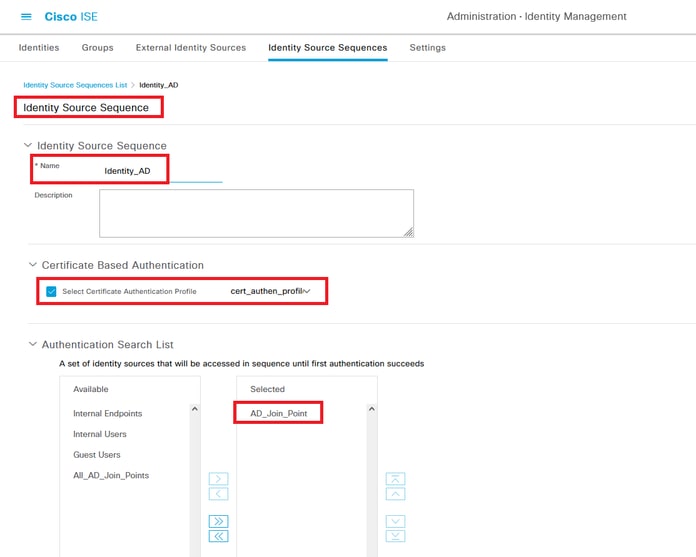 新增身份源序列
步驟5.確認ISE中的證書
導航到Administration > Certificates > System Certificates,確認伺服器證書是由受信任的CA簽名的。
 伺服器證書
伺服器證書
導航到Administration > Certificates > OCSP Client Profile,按一下Add按鈕以新增新的OCSP客戶端配置檔案。
- 名稱:ocsp_test_profile
- 配置OCSP響應程式URL:http://winserver.ad.rem-xxx.com/ocsp
 OCSP客戶端配置檔案
導航到Administration > Certificates > Trusted Certificates,確認受信任的CA已匯入到ISE。
 受信任的CA
檢查CA,然後按一下Edit按鈕,輸入OCSP配置的詳細資訊以進行Certificate Status Validation。
- 根據OCSP服務進行驗證:ocsp_test_profile
- 如果OCSP返回UNKNOWN狀態,則拒絕請求:檢查
- 如果OCSP響應程式無法訪問,則拒絕請求:檢查
 證書狀態驗證
步驟6.新增允許的協定
導航到Policy > Results > Authentication > Allowed Protocols,編輯Default Network Access服務清單,然後選中Allow EAP-TLS。
 允許EAP-TLS
步驟7.新增策略集
導航到Policy > Policy Sets,按一下+ 新增策略集。
- 策略集名稱:EAP-TLS-Test
- 狀況:網路存取通訊協定等於RADIUS
- 允許的協定/伺服器序列:預設網路訪問
 新增策略集
新增策略集
步驟8.新增身份驗證策略
導航到Policy Sets,按一下EAP-TLS-Testto add an authentication policy。
- 規則名稱:EAP-TLS-Authentication
- 狀況:網路訪問EapAuthentication等於EAP-TLS和Wired_802.1 X
- 使用:Identity_AD
 新增身份驗證策略
步驟9.新增授權策略
導航到Policy Sets,按一下EAP-TLS-Test新增授權策略。
- 規則名稱:EAP-TLS-Authorization
- 條件:證書主題 — 公用名等於clientcertCN
- 結果:允許訪問
 新增授權策略
驗證
步驟1.確認身份驗證會話
運行show authentication sessions interface GigabitEthernet1/0/3 details命令以確認C1000中的身份驗證會話。
Switch#show authentication sessions interface GigabitEthernet1/0/3 details
Interface: GigabitEthernet1/0/3
MAC Address: b496.9114.398c
IPv6 Address: Unknown
IPv4 Address: 192.168.10.10
User-Name: clientcertCN
Status: Authorized
Domain: DATA
Oper host mode: multi-auth
Oper control dir: both
Session timeout: N/A
Restart timeout: N/A
Periodic Acct timeout: N/A
Session Uptime: 111s
Common Session ID: 01C20065000000933E4E87D9
Acct Session ID: 0x00000078
Handle: 0xB6000043
Current Policy: POLICY_Gi1/0/3

Local Policies:
Service Template: DEFAULT_LINKSEC_POLICY_SHOULD_SECURE (priority 150)

Server Policies:


Method status list:
Method State

dot1x Authc Success
步驟2.確認Radius即時日誌
在ISE GUI中導航到操作(Operations)> RADIUS >即時日誌(Live Login),確認即時日誌以進行身份驗證。
 Radius即時日誌
確認身份驗證的詳細即時日誌。
 身份驗證詳細資訊
疑難排解
1.調試日誌
此調試日誌(prrt-server.log)可幫助您確認ISE中身份驗證的詳細行為。
- 運行時AAA
// OCSP request and response
Crypto,2024-06-05 09:43:33,064,DEBUG,0x7f9822961700,NIL-CONTEXT,Crypto::Result=0, CryptoLib.CSSL.OCSP Callback - starting OCSP request to primary,SSL.cpp:1444
Crypto,2024-06-05 09:43:33,064,DEBUG,0x7f9822961700,NIL-CONTEXT,Crypto::Result=0, Crypto.OcspClient::performRequest - Start processing OCSP request, URL=http://winserver.ad.rem-xxx.com/ocsp, use nonce=1,OcspClient.cpp:144

Crypto,2024-06-05 09:43:33,104,DEBUG,0x7f9822961700,NIL-CONTEXT,Crypto::Result=0, Crypto.OcspClient::performRequest - Received OCSP server response,OcspClient.cpp:411
Crypto,2024-06-05 09:43:33,104,DEBUG,0x7f9822961700,NIL-CONTEXT,Crypto::Result=0, Crypto.OcspClient::performRequest - Nonce verification passed,OcspClient.cpp:426

Crypto,2024-06-05 09:43:33,104,DEBUG,0x7f9822961700,NIL-CONTEXT,Crypto::Result=0, Crypto.OcspClient::performRequest - OCSP responser name 8CD12ECAB78607FA07194126EDA82BA7789CE00C,OcspClient.cpp:462
Crypto,2024-06-05 09:43:33,104,DEBUG,0x7f9822961700,NIL-CONTEXT,Crypto::Result=0, Crypto.OcspClient::performRequest - Verify response signature and KU/EKU attributes of response signer certificate,OcspClient.cpp:472

Crypto,2024-06-05 09:43:33,104,DEBUG,0x7f9822961700,NIL-CONTEXT,Crypto::Result=0, Crypto.OcspClient::performRequest - Response signature verification passed,OcspClient.cpp:482
Crypto,2024-06-05 09:43:33,104,DEBUG,0x7f9822961700,NIL-CONTEXT,Crypto::Result=0, Crypto.OcspClient::performRequest - Response contains 1 single responses for certificates,OcspClient.cpp:490

Crypto,2024-06-05 09:43:33,104,DEBUG,0x7f9822961700,NIL-CONTEXT,Crypto::Result=0, Crypto.OcspClient::performRequest - User certificate status: Good,OcspClient.cpp:598
Crypto,2024-06-05 09:43:33,104,DEBUG,0x7f9822961700,NIL-CONTEXT,Crypto::Result=0, CryptoLib.CSSL.OCSP Callback - perform OCSP request succeeded, status: Good,SSL.cpp:1684

// Radius session
Radius,2024-06-05 09:43:33,120,DEBUG,0x7f982d7b9700,cntx=0000017387,sesn=ise32-01/506864164/73,CPMSessionID=01C20065000000933E4E87D9,CallingStationID=B4-96-91-14-39-8C,RADIUS PACKET:: Code=1(AccessRequest) Identifier=238 Length=324
[1] User-Name - value: [clientcertCN]
[4] NAS-IP-Address - value: [1.x.x.101]
[5] NAS-Port - value: [50103]
[24] State - value: [37CPMSessionID=01C20065000000933E4E87D9;31SessionID=ise32-01/506864164/73;]
[87] NAS-Port-Id - value: [GigabitEthernet1/0/3]

Radius,2024-06-05 09:43:33,270,DEBUG,0x7f982d9ba700,cntx=0000017387,sesn=ise32-01/506864164/73,CPMSessionID=01C20065000000933E4E87D9,user=clientcertCN,CallingStationID=B4-96-91-14-39-8C,RADIUS PACKET:: Code=2(AccessAccept) Identifier=238 Length=294
[1] User-Name - value: [clientcertCN]

Radius,2024-06-05 09:43:33,342,DEBUG,0x7f982d1b6700,cntx=0000017401,sesn=ise32-01/506864164/74,CPMSessionID=01C20065000000933E4E87D9,CallingStationID=B4-96-91-14-39-8C,RADIUS PACKET:: Code=4(AccountingRequest) Identifier=10 Length=286
[1] User-Name - value: [clientcertCN]
[4] NAS-IP-Address - value: [1.x.x.101]
[5] NAS-Port - value: [50103]
[40] Acct-Status-Type - value: [Interim-Update]
[87] NAS-Port-Id - value: [GigabitEthernet1/0/3]
[26] cisco-av-pair - value: [audit-session-id=01C20065000000933E4E87D9]
[26] cisco-av-pair - value: [method=dot1x] ,RADIUSHandler.cpp:2455

Radius,2024-06-05 09:43:33,350,DEBUG,0x7f982e1be700,cntx=0000017401,sesn=ise32-01/506864164/74,CPMSessionID=01C20065000000933E4E87D9,user=clientcertCN,CallingStationID=B4-96-91-14-39-8C,RADIUS PACKET:: Code=5(AccountingResponse) Identifier=10 Length=20,RADIUSHandler.cpp:2455
2. TCP傾印
在ISE中的TCP轉儲中,您期望找到有關OCSP響應和Radius會話的資訊。
OCSP請求和響應:
 OCSP請求和響應的資料包捕獲
 捕獲OCSP響應的詳細資訊
Radius作業階段:
 Radius作業階段的封包擷取
相關資訊
修訂記錄
| 修訂 | 發佈日期 | 意見 |
|---|---|---|
2.0 |
17-Apr-2026
|
重新認證 |
1.0 |
19-Jul-2024
|
初始版本 |
 意見
意見