在ISE中配置NTP身份驗證

簡介
本文檔介紹如何在思科身份服務引擎(ISE)上配置NTP身份驗證並排除NTP身份驗證問題。
必要條件
需求
建議您瞭解以下主題:
- Cisco ISE CLI配置
- 網路時間協定(NTP)基礎知識
採用元件
本文中的資訊係根據以下軟體和硬體版本:
- ISE 2.7獨立節點
- CISCO2911/K9版本15.2(1)T2
本文中的資訊是根據特定實驗室環境內的裝置所建立。文中使用到的所有裝置皆從已清除(預設)的組態來啟動。如果您的網路運作中,請確保您瞭解任何指令可能造成的影響。
設定
網路圖表
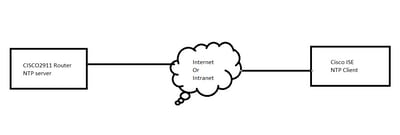
組態
開始之前
您必須分配超級管理員或系統管理員角色才能訪問ISE。
確保NTP埠在ISE和NTP伺服器之間的傳輸路徑中未被阻止。
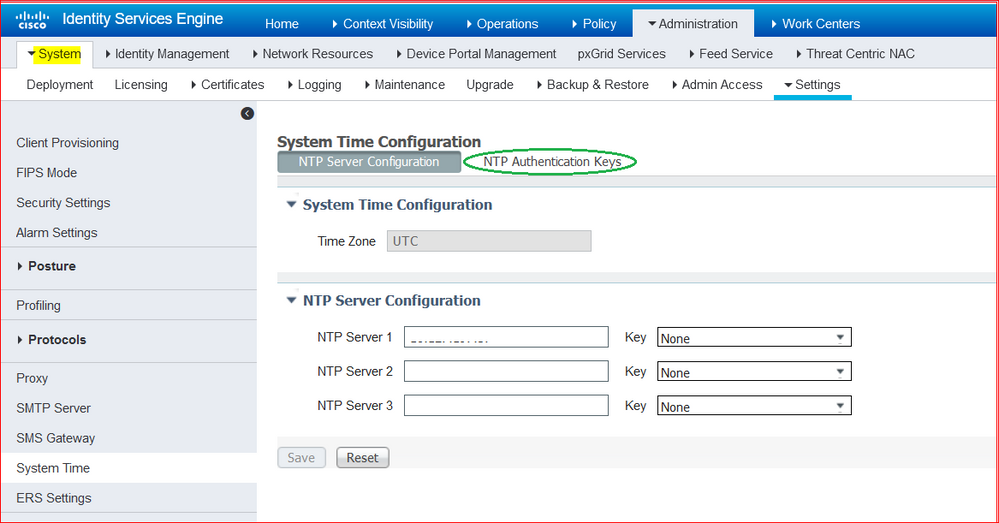
假設您在ISE上配置了NTP伺服器。如果要更改NTP伺服器,請導航到管理>系統>設定>系統時間。對於短片,您可以看到ISE NTP配置

如果您在部署中同時擁有主要和輔助思科ISE節點,您必須登入到每個節點的使用者介面並配置系統時間和網路時間協定(NTP)伺服器設定。
您可以在ISE中通過GUI或CLI配置NTP身份驗證。
GUI步驟
步驟1。導覽至Administration > System > Settings > System Time,然後按一下NTP Authentication Keys,如下圖所示。
步驟2.在此處可新增一個或多個身份驗證金鑰。按一下「Add」,便會彈出視窗。此處,Key ID欄位支援1到65535之間的數值,Key Value欄位支援最多15個字母數字字元。Key Value是用於將ISE作為NTP伺服器的客戶端進行身份驗證的實際NTP金鑰。此外,金鑰ID必須與NTP伺服器上配置的金鑰ID匹配。從HMAC下拉選單中選擇所需的雜湊消息身份驗證代碼(HMAC)值。
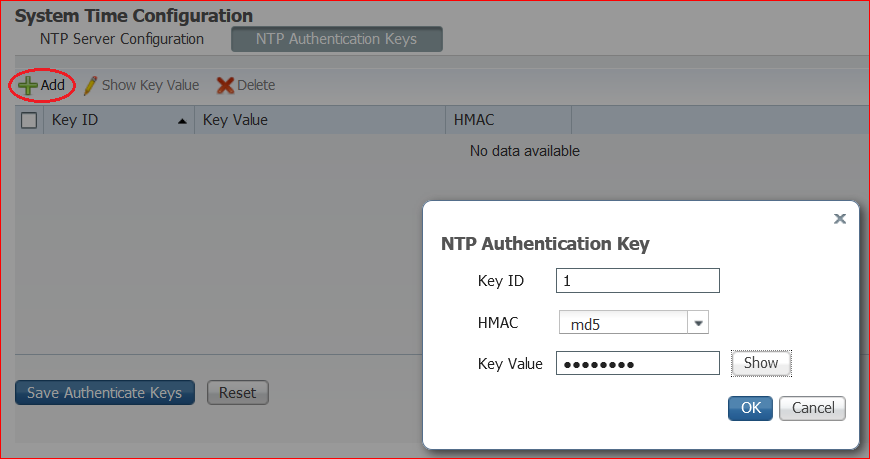
步驟3.按一下OK,然後Save Authentication Keys。返回NTP伺服器配置頁籤。
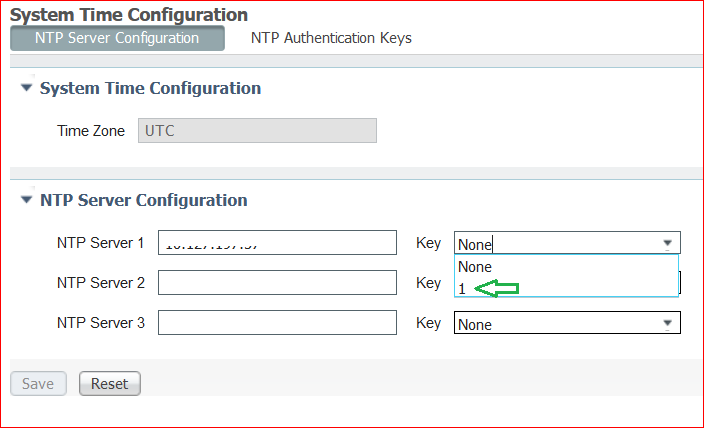
步驟4.現在在金鑰下拉選單中,您看到您在步驟3中配置的金鑰ID。如果配置了多個金鑰ID,請按一下相應的金鑰ID。然後按一下Save。
CLI步驟
步驟1.配置NTP身份驗證金鑰。
admin(config)# ntp authentication-key ?
<1-65535> Key number >>> This is the Key ID
admin(config)# ntp authentication-key 1 ? >>> Here you can choose the HMAC value
md5 MD5 authentication
sha1 SHA1 authentication
sha256 SHA256 authentication
sha512 SHA512 authentication
admin(config)# ntp authentication-key 1 md5 ? >>> You can choose either to paste the hash of the actual key or type the key in plain text.
hash Specifies an ENCRYPTED (hashed) key follows
plain Specifies an UNENCRYPTED plain text key follows

admin(config)# ntp authentication-key 1 md5 plain Ntp123 >>> Ensure there are no spaces given at the end of the key.
步驟2.定義NTP伺服器並關聯步驟1中配置的金鑰ID。
admin(config)# ntp server IP/HOSTNAME ?
key Peer key number
<cr> Carriage return.

admin(config)# ntp serve IP/HOSTNAME key ?
<1-65535>

admin(config)# ntp serve IP/HOSTNAME key 1 ?
<cr> Carriage return.

admin(config)# ntp serve IP/HOSTNAME key 1
路由器上的配置
路由器充當NTP伺服器。配置這些命令,使路由器成為具有NTP身份驗證的NTP伺服器。
ntp authentication-key 1 md5 Ntp123 >>> The same key that you configured on ISE
ntp authenticate
ntp master STRATUM
驗證
在ISE上:
使用show ntp命令。如果NTP身份驗證成功,您必須看到要與NTP伺服器同步的ISE。
admin# sh ntp
Configured NTP Servers:
NTP_SERVER_IP

Reference ID : 0A6A23B1 (NTP_SERVER_IP)
Stratum : 3
Ref time (UTC) : Fri Mar 26 09:14:31 2021
System time : 0.000008235 seconds fast of NTP time
Last offset : +0.000003193 seconds
RMS offset : 0.000020295 seconds
Frequency : 10.472 ppm slow
Residual freq : +0.000 ppm
Skew : 0.018 ppm
Root delay : 0.000571255 seconds
Root dispersion : 0.000375993 seconds
Update interval : 519.3 seconds
Leap status : Normal >>> If there is any issue in NTP synchronization, it shows "Not synchronised".

210 Number of sources = 1
MS Name/IP address Stratum Poll Reach LastRx Last sample
===============================================================================
^* NTP_SERVER_IP 2 9 377 100 +3853ns[+7046ns] +/- 684us

M indicates the mode of the source.
^ server, = peer, # local reference clock.

S indicates the state of the sources.
* Current time source, + Candidate, x False ticker, ? Connectivity lost, ~ Too much variability

Warning: Output results can conflict at the time of changing synchronization.

admin#
疑難排解
本節提供的資訊可供您疑難排解設定問題。
- 如果NTP身份驗證不起作用,首先要確保ISE和NTP伺服器之間的可達性。
- 確保ISE和NTP伺服器上的金鑰ID配置匹配。
- 確保在NTP伺服器上將金鑰ID配置為受信任金鑰。
- 舊版ISE(如2.4和2.6)支援ntp trusted-key命令。因此,請確保已在這些ISE版本上將NTP金鑰配置為trusted-key。
- ISE 2.7引入了NTP同步行為的更改。雖然以前的版本使用ntpd,但2.7及更高版本使用的是編年史。Chrony的要求與ntpd不同。其中最明顯的一個問題是,當ntpd與根色散高達10秒的伺服器同步時,僅在根色散低於3秒時進行同步。這會導致能夠同步升級前的NTP伺服器在2.7上不同步,而沒有任何明顯原因。
由於此更改,如果您使用Windows NTP伺服器報告非常大的根色散(3秒或更長時間),NTP同步問題將頻繁出現,這會導致時間忽略NTP伺服器太不準確。
參考缺陷
思科錯誤ID CSCvw78019
思科錯誤ID CSCvw03693
相關資訊
修訂記錄
| 修訂 | 發佈日期 | 意見 |
|---|---|---|
4.0 |
04-Aug-2026
|
重新認證 — 更新的格式 |
3.0 |
28-May-2024
|
更新的標題、替代文字和格式。 |
2.0 |
16-May-2023
|
重新認證 |
1.0 |
28-Jun-2021
|
初始版本 |
 意見
意見