排除Firepower裝置上的雲配置故障

簡介
本文檔介紹Firepower系統觸發運行狀況警報的常見場景:威脅資料更新思科雲配置失敗。
必要條件
需求
思科建議您瞭解以下主題:
- 雲整合
- Firepower感測器模組
- Firepower威脅防禦
- Firepower管理中心
- DNS解析和代理連線
- 思科威脅回應(CTR)整合
採用元件
本文中的資訊係根據以下軟體和硬體版本:
- 思科智慧帳戶入口網站
- 思科安全服務交換(SSE)
- Firepower管理中心(FMC)版本6.4.0或更高版本
- Firepower威脅防禦(FTD)或Firepower感測器模組(SFR)版本6.4.0或更高版本
本文中的資訊是根據特定實驗室環境內的裝置所建立。文中使用到的所有裝置皆從已清除(預設)的組態來啟動。如果您的網路運作中,請確保您瞭解任何指令可能造成的影響。
背景資訊
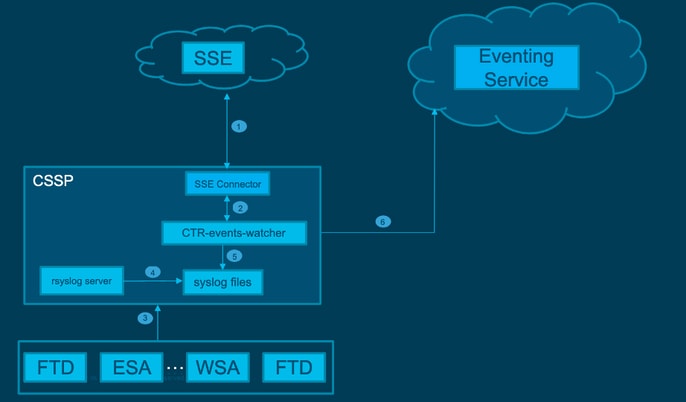
由於FTD無法與api-sse.cisco通訊,因此觀察到Cloud Configuration錯誤。
此警報是快速威脅遏制(RTC)功能的一部分。在新的Firepower版本中預設啟用此功能,其中FTD必須與Internet上的api-sse.cisco.com通訊。如果此通訊不可用,FTD健康監視器模組將顯示以下錯誤消息:威脅資料更新 — 思科雲配置 — 故障。
網路圖表
問題
思科錯誤ID CSCvr46845解釋了Firepower系統何時觸發Cisco雲配置 — 故障的運行狀況警報。此問題通常與FTD和api-sse.cisco之間的連線相關。
有兩種主要可能情況:
案例1.在未啟用雲整合的情況下,由於不允許連線到雲入口網站,因此預計會出現此警報。
案例2.在啟用雲整合的情況下,必須執行更詳細的分析,以消除涉及連線失敗的情況。
下一個映像中的運行狀況故障警報示例:
 運行狀況故障警報示例
疑難排解
案例1的解決方案。由於FTD無法與https://通訊,因此觀察到雲端組態錯誤
方案2的解決方案。必須啟用雲整合時:
用於故障排除的有用命令:
curl -v -k https://api-sse.cisco.com <-- To verify connection with the external site
nslookup api-sse.cisco.com <-- To dicard any DNS error
/ngfw/etc/sf/connector.properties <-- To verify is configure properly the FQDN settings
netstat -na | grep 8989 <-- To verify the outbound connection to the cloud on port 8989/tcp is ESTABLISHED
netstat -na | grep 443 <-- To verify the outbound connection to the cloud on port 443/tcp is ESTABLISHED
選項1:缺少DNS配置
步驟1.確認FTD上已設定DNS。如果沒有DNS配置,請按照以下步驟操作:
> show network
步驟2.通過運行以下命令新增DNS:
> configure network dns servers dns_ip_addresses
配置DNS後,運行狀況警報會得到解析,裝置將顯示為正常狀態。在反映更改並配置適當的DNS伺服器之前會短暫經過一段時間。
選項2. DNS無法解析https://api-sse.cisco.com
執行curl命令。如果裝置無法到達雲站點,則顯示與本示例類似的輸出。
FTD01:/home/ldap/abbac# curl -v -k https://api-sse.cisco.com
* Rebuilt URL to: https://api-sse.cisco.com/
* getaddrinfo(3) failed for api-sse.cisco.com:443
* Couldn't resolve host 'api-sse.cisco.com'
* Closing connection 0
curl: (6) Couldn't resolve host 'api-sse.cisco.com'

附註:執行curl命令後可能會發生DNS問題。如果是,則從選項1中的相同故障排除方法開始。驗證DNS配置是否已正確設定。
正確的curl輸出必須是:
root@fp:/home/admin# curl -v -k https://api-sse.cisco.com
* Rebuilt URL to: https://api-sse.cisco.com/
* Trying 10.6.187.110...
* Connected to api-sse.cisco.com (10.6.187.110) port 443 (#0)
* ALPN, offering http/1.1
* Cipher selection: ALL:!EXPORT:!EXPORT40:!EXPORT56:!aNULL:!LOW:!RC4:@STRENGTH
* successfully set certificate verify locations:
* CAfile: none
CApath: /etc/ssl/certs
* TLSv1.2 (OUT), TLS header, Certificate Status (22):
* TLSv1.2 (OUT), TLS handshake, Client hello (1):
* TLSv1.2 (IN), TLS handshake, Server hello (2):
* TLSv1.2 (IN), TLS handshake, Certificate (11):
* TLSv1.2 (IN), TLS handshake, Server key exchange (12):
* TLSv1.2 (IN), TLS handshake, Server finished (14):
* TLSv1.2 (OUT), TLS handshake, Client key exchange (16):
* TLSv1.2 (OUT), TLS change cipher, Client hello (1):
* TLSv1.2 (OUT), TLS handshake, Finished (20):
* TLSv1.2 (IN), TLS change cipher, Client hello (1):
* TLSv1.2 (IN), TLS handshake, Finished (20):
* SSL connection using TLSv1.2 / ECDHE-RSA-AES128-GCM-SHA256
* ALPN, server accepted to use http/1.1
* Server certificate:
* subject: C=US; ST=California; L=San Jose; O=Cisco Systems, Inc.; CN=api-sse.cisco.com
* start date: 2019-12-03 20:57:56 GMT
* expire date: 2021-12-03 21:07:00 GMT
* issuer: C=US; O=HydrantID (Avalanche Cloud Corporation); CN=HydrantID SSL ICA G2
* SSL certificate verify result: self signed certificate in certificate chain (19), continuing anyway.
> GET / HTTP/1.1
> Host: api-sse.cisco.com
> User-Agent: curl/7.44.0
> Accept: */*
>
< HTTP/1.1 403 Forbidden
< Date: Wed, 30 Dec 2020 21:41:15 GMT
< Content-Type: text/plain; charset=utf-8
< Content-Length: 9
< Connection: keep-alive
< Keep-Alive: timeout=5
< ETag: "5fb40950-9"
< Cache-Control: no-store
< Pragma: no-cache
< Content-Security-Policy: default-src https: ;
< X-Content-Type-Options: nosniff
< X-XSS-Protection: 1; mode=block
< X-Frame-Options: SAMEORIGIN
< Strict-Transport-Security: max-age=31536000; includeSubDomains
<
* Connection #0 to host api-sse.cisco.com left intact
Forbidden
捲曲到伺服器主機名:
# curl -v -k https://cloud-sa.amp.cisco.com
*   Trying 10.21.117.50...
* TCP_NODELAY set
* Connected to cloud-sa.amp.cisco.com (10.21.117.50) port 443 (#0)
* ALPN, offering http/1.1
* Cipher selection: ALL:!EXPORT:!EXPORT40:!EXPORT56:!aNULL:!LOW:!RC4:@STRENGTH
* successfully set certificate verify locations:
*   CAfile: /etc/ssl/certs/ca-certificates.crt
  CApath: none
* TLSv1.2 (OUT), TLS header, Certificate Status (22):
* TLSv1.2 (OUT), TLS handshake, Client hello (1):
使用nslookup、telnet和ping命令等基本連線工具驗證思科雲站點的正確DNS解析。
將nslookup應用於伺服器主機名。
# nslookup cloud-sa.amp.sourcefire.com
# nslookup cloud-sa.amp.cisco.com
# nslookup api.amp.sourcefire.com
# nslookup panacea.threatgrid.com
root@fp:/home/admin# nslookup api-sse.cisco.com
Server: 10.25.0.1
Address: 10.25.0.1#53

Non-authoritative answer:
api-sse.cisco.com canonical name = api-sse.cisco.com.akadns.net.
Name: api-sse.cisco.com.akadns.net
Address: 10.6.187.110
Name: api-sse.cisco.com.akadns.net
Address: 10.234.20.16
與AMP Cloud的連線問題可能是由於DNS解析。驗證DNS設定或從FMC運行nslookup。
nslookup api.amp.sourcefire.com
Telnet
root@fp:/home/admin# telnet api-sse.cisco.com 8989
root@fp:/home/admin# telnet api-sse.cisco.com 443
root@fp:/home/admin# telnet cloud-sa.amp.cisco.com 443
Ping
root@fp:/home/admin# ping api-sse.cisco.com
更多疑難排解選項
驗證/ngfw/etc/sf/connector.properties下的聯結器屬性。您必須使用正確的聯結器埠(8989)和connector_fqdn使用正確的URL看到此輸出。
root@Firepower-module1:sf# cat /ngfw/etc/sf/connector.properties
registration_interval=180
connector_port=8989
region_discovery_endpoint=https://api-sse.cisco.com/providers/sse/api/v1/regions
connector_fqdn=api-sse.cisco.com
有關詳細資訊,請參閱Firepower配置指南。
已知的問題
思科錯誤ID CSCvs05084 FTD思科雲配置失敗,因為代理。
思科錯誤ID CSCvp56922使用update-context sse-connector API更新裝置主機名和版本。
思科錯誤ID CSCvu02123 DOC錯誤:在CTR配置指南中將從Firepower裝置可訪問的URL更新為SSE。
思科錯誤ID CSCvr46845加強版:運行狀況消息Cisco Cloud Configuration - Failure needs improvement。
[影片] Firepower — 將FMC註冊到SSE
修訂記錄
| 修訂 | 發佈日期 | 意見 |
|---|---|---|
4.0 |
09-Jul-2026
|
更新的拼寫、間距、某些語法、插入行以分隔章節的可讀性、可選文本的間距和CCW警報。 |
3.0 |
01-Mar-2023
|
已刪除PII。已更新標題、簡介、樣式要求、機器翻譯、德語和格式。 |
2.0 |
05-Jan-2022
|
已新增影片 |
1.0 |
05-Jan-2022
|
初始版本 |
 意見
意見