從 FMC 和 FTD 下載檔案

簡介
本檔案介紹如何將記錄檔從Cisco Firepower管理中心(FMC)和Firepower威脅防禦(FTD)下載到本機電腦。
必要條件
需求
思科建議您瞭解以下主題:
- Cisco Firepower裝置
- 虛擬裝置型號
採用元件
本文件所述內容不限於特定軟體和硬體版本。
本文中的資訊是根據特定實驗室環境內的裝置所建立。文中使用到的所有裝置皆從已清除(預設)的組態來啟動。如果您的網路運作中,請確保您瞭解任何指令可能造成的影響。
複製檔案
將檔案從FTD複製到FMC
FMC上有一個安全複製協定(SCP)伺服器,因此檔案可以從FTD移到FMC。
root@FMC:~$ scp admin@<FTD ip>:<path to file> <path to local directory where to store>
一個常見的示例是將核心檔案從FTD移動到FMC。
在FTD上:
root@ciscoasa:/ngfw/var/common# ls -l
total 1557960
-rw-r--r-- 1 root root 23231 Sep 6 03:43 core_1482327396_Firepower-module1_snort_6
-rw------- 1 root root 560128000 Apr 26 01:47 core_1556242979_ciscoasa_snort_6.8777
-rw------- 1 root root 383381504 Aug 25 23:05 core_1566774281_ciscoasa_snort_11.31618
-rw------- 1 root root 69562368 Aug 25 23:05 core_1566774281_ciscoasa_snort_11.31620
-rw------- 1 root root 465424384 Aug 28 02:21 core_1566958444_ciscoasa_snort_6.18352
-rw------- 1 root root 116887552 Aug 28 02:18 core_1566958688_ciscoasa_snort_6.18340
-rw------- 1 root root 52338688 Aug 28 02:18 core_1566958689_ciscoasa_snort_6.18341
-rw------- 1 root root 465514496 Sep 2 02:20 core_1567390346_ciscoasa_snort_6.27631
-rw------- 1 root root 151572480 Sep 2 02:17 core_1567390618_ciscoasa_snort_6.27435
現在,將檔案傳輸到FMC:
root@FMC:/Volume/home/admin# scp admin@10.10.10.10:/ngfw/var/common/core_1567390618_ciscoasa_snort_6.27435 /var/common/
將檔案從FMC複製到本地電腦
使用SCP複製
FMC上有一個安全複製協定(SCP)伺服器,它使用可以從FMC移動到其他裝置的檔案。
root@FMC:~$ scp <path to local directory where to store> admin@<FMC ip>:<path to file>
一種常見的做法是將核心檔案從FMC移動到本地案頭:
root@localMachine:/Volume/home/admin# scp admin@10.10.10.20:/var/common/core_1567390618_ciscoasa_snort_6.27435 /var/tmp/
WInSCP是一種常用的工具,通常在Windows上使用。此工具提供基於GUI的介面。
In FMC 6.4 and above, SCP to the FMC is not possible directly. For that please create a new user with the bash prompt and add password
[Please make sure that this user does not exist on the device]

root@FMC:/Volume/home/admin# useradd -s /bin/bash temp_admin
root@FMC:/Volume/home/admin# passwd temp_admin

After this SCP to the FMC will work. Once done, please remeber to delete the user:

root@FMC:/Volume/home/admin# userdel temp_admin
從GUI下載
可從GUI下載存在/var/common的檔案。
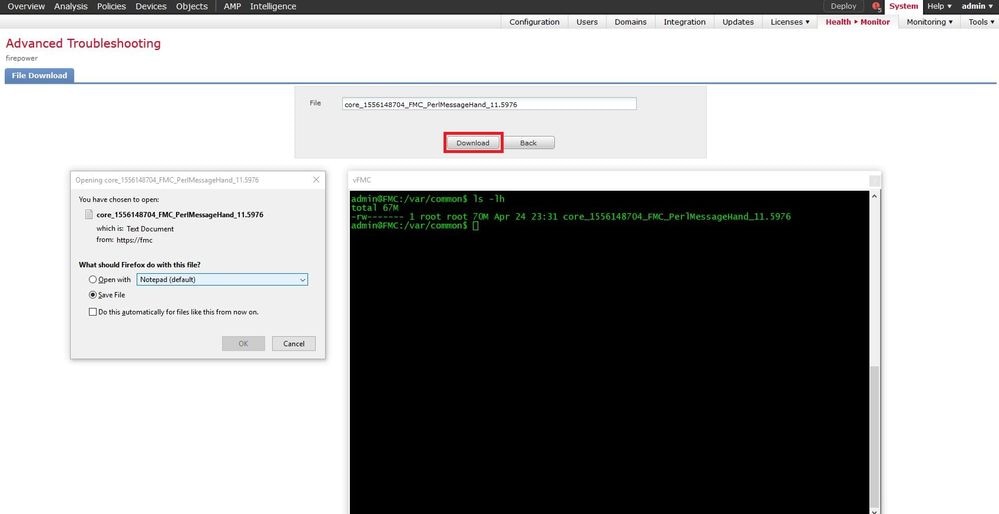
If there are any file(s) and/or tcpdump generated on the FMC, please move to /var/common, so that it can be downloaded from the GUI.
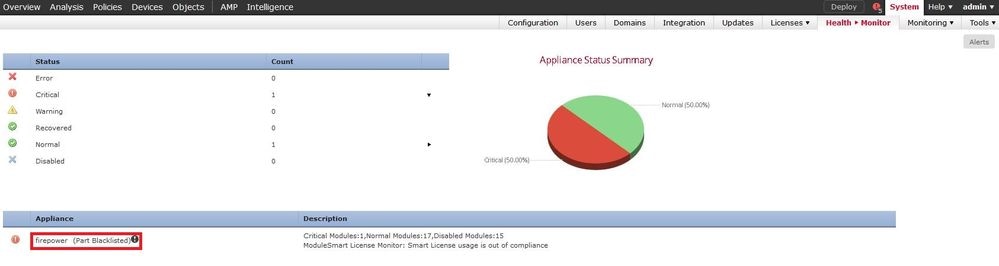
步驟1。導覽至System > Health > Monitor,然後按一下sensor,檔案需要從其中下載,如下圖所示:
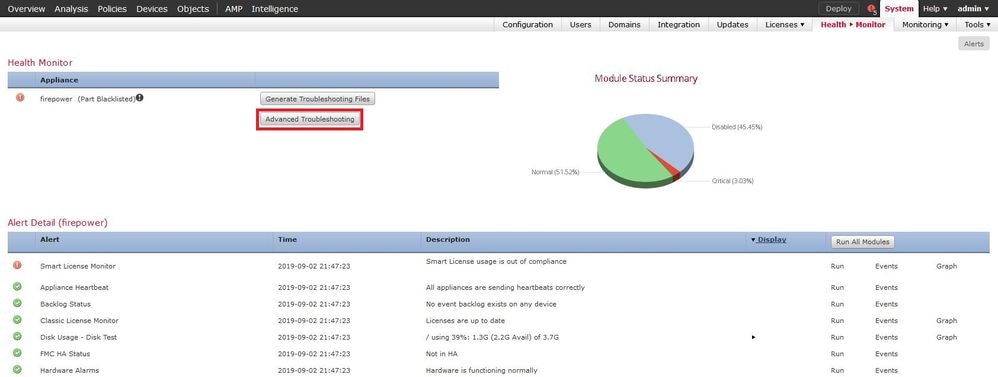
步驟2.導覽至System > Health > Monitor,然後按一下Advanced Troubleshooting,如下圖所示:
步驟3.輸入filename並按一下download,如下圖所示:
修訂記錄
| 修訂 | 發佈日期 | 意見 |
|---|---|---|
4.0 |
23-Dec-2024
|
已更新文章說明和格式。 |
2.0 |
04-Apr-2023
|
已更新格式。已更正CCW。重新認證。 |
1.0 |
30-Jul-2021
|
初始版本 |
 意見
意見