為FMC管理訪問配置雙因素身份驗證

簡介
本文檔介紹在Firepower管理中心上為管理訪問配置外部雙因素身份驗證所需的步驟。
必要條件
需求
思科建議您瞭解以下主題:
- Firepower管理中心(FMC)對象配置
- 身分識別服務引擎(ISE)管理
採用元件
- 運行版本6.3.0的Cisco Firepower管理中心(FMC)
- 運行版本2.6.0.156的思科身份服務引擎(ISE)
- 支援Windows(Cisco Duo)版本,可連線FMC、ISE和Internet以充當Duo身份驗證代理伺服器
- Windows機器訪問FMC、ISE和Duo管理門戶
- Duo Web帳戶
本文中的資訊是根據特定實驗室環境內的裝置所建立。文中使用到的所有裝置皆從已清除(預設)的組態來啟動。如果您的網路運作中,請確保您瞭解任何指令可能造成的影響。
背景資訊
FMC管理員根據ISE伺服器進行身份驗證,Duo身份驗證代理伺服器向管理員的流動裝置傳送推送通知形式的附加身份驗證。
身份驗證流程
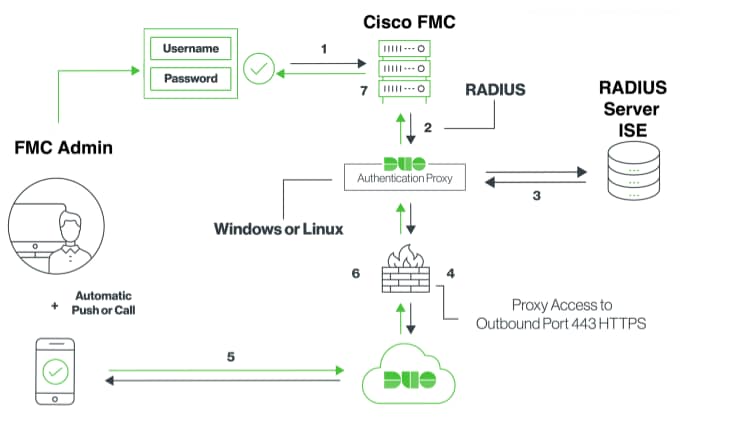
驗證流程說明
- 主身份驗證已啟動到Cisco FMC。
- Cisco FMC向Duo Authentication Proxy傳送驗證要求。
- 主身份驗證必須使用Active Directory或RADIUS。
- Duo Authentication Proxy連線建立到Duo Security over TCP埠443。
- 通過Duo Security的服務進行輔助身份驗證。
- Duo authentication proxy接收身份驗證響應。
- 已授予Cisco FMC GUI訪問許可權。
設定
要完成配置,請考慮以下部分:
FMC的配置步驟
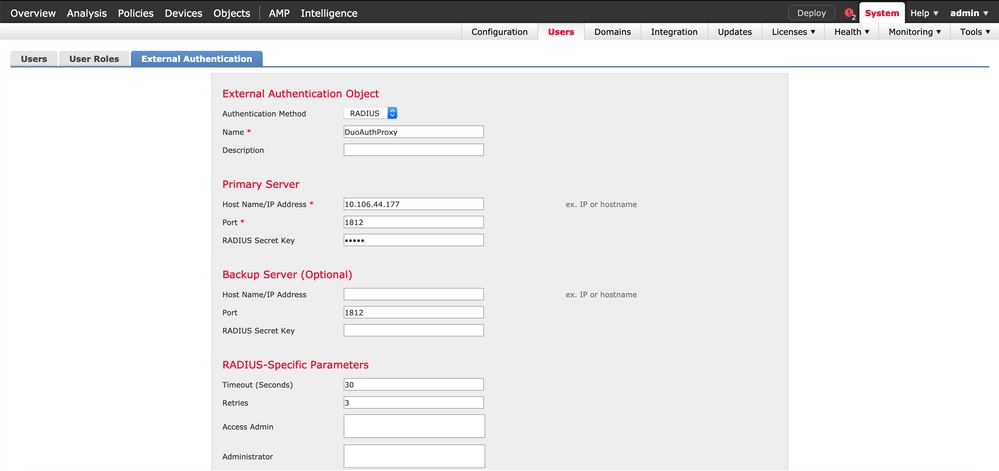
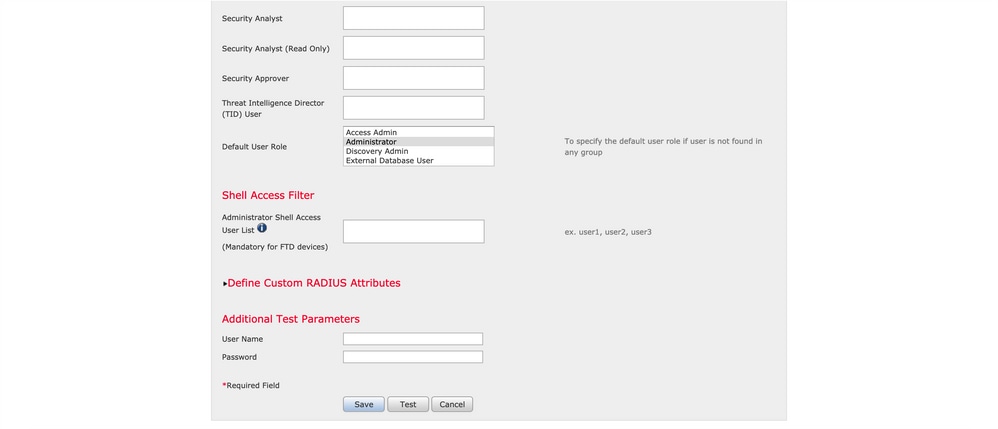
步驟1。導覽至System > Users > External Authentication。建立外部身份驗證對象並將身份驗證方法設定為RADIUS。確保在「預設使用者角色」下選擇管理員:
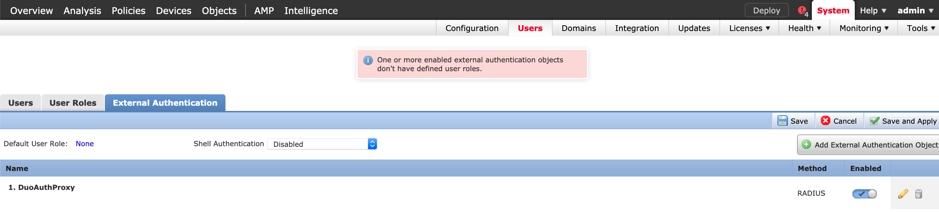
按一下「Save」和「Apply」(忽略警告):
步驟2.導覽至System > Users > Users。建立使用者,並將驗證方法檢查為External:
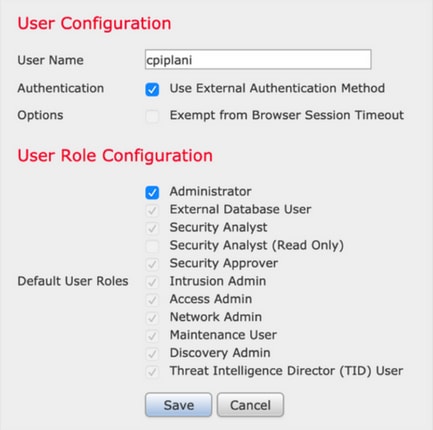
步驟3. 下載並安裝Duo Authentication Proxy伺服器。
登入到Windows機器並安裝Duo Authentication Proxy Server
思科建議使用至少具有1個CPU、200 MB磁碟空間和4 GB RAM的系統。
步驟4.配置authproxy.cfg檔案。
在文本編輯器(如記事本或寫字板)++開啟此檔案。
編輯authproxy.cfg檔案並新增以下配置:
[radius_client]
host=10.197.223.23                 Sample IP Address of the ISE server
secret=cisco                       Password configured on the ISE server in order to register the network device
FMC的IP地址必須與RADIUS金鑰一起配置。
[radius_server_auto]
ikey=xxxxxxxxxxxxxxx
skey=xxxxxxxxxxxxxxxxxxxxxxxxxxx
api_host=api-xxxxxxxx.duosecurity.com
radius_ip_1=10.197.223.76           IP of FMC
radius_secret_1=cisco               Radius secret key used on the FMC
failmode=safe
client=radius_client
port=1812
api_timeout=
確保配置ikey、skey和api_host引數。要獲取這些值,請登入您的Duo帳戶(Duo Admin Login),然後導航至Applications > Protect應用程式。接下來,選擇RADIUS驗證應用程式:
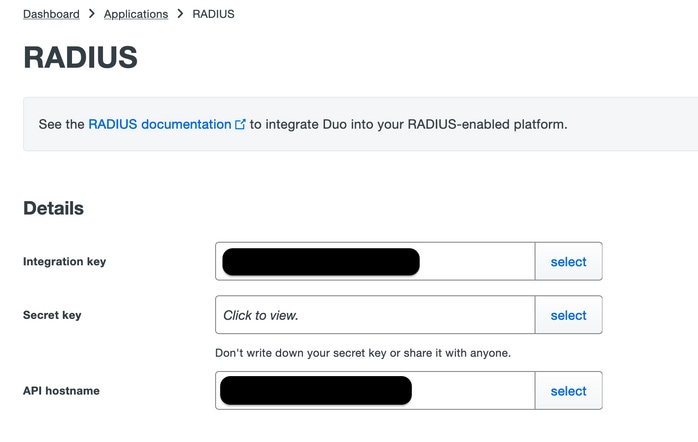
- 整合金鑰= ikey
- secret key = skey
- API主機名= api_host
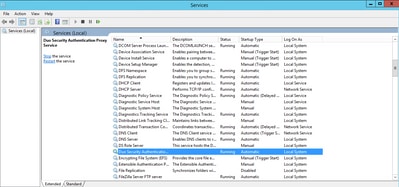
步驟5. 重新啟動Duo Security身份驗證代理服務。儲存檔案並在Windows電腦上重新啟動Duo服務。
開啟Windows服務控制檯(services.msc)。 在服務清單中找到Duo Security Authentication Proxy Service,然後按一下Restart:
ISE的配置步驟
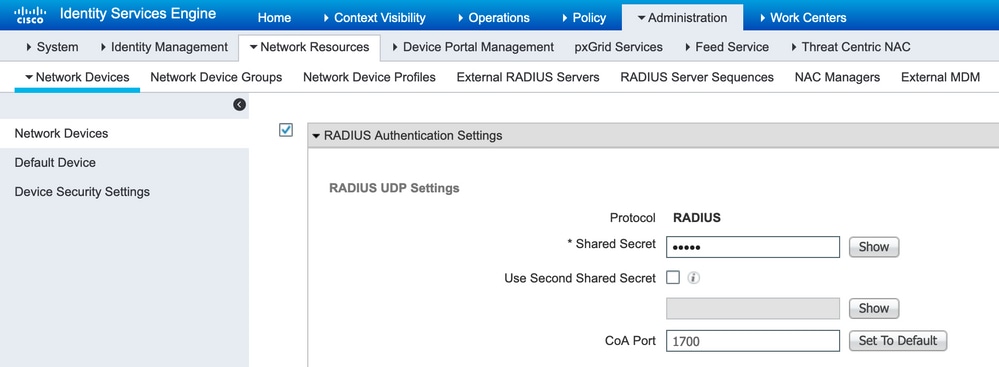
步驟1.導覽至Administration > Network Devices。按一下Add以配置網路裝置:
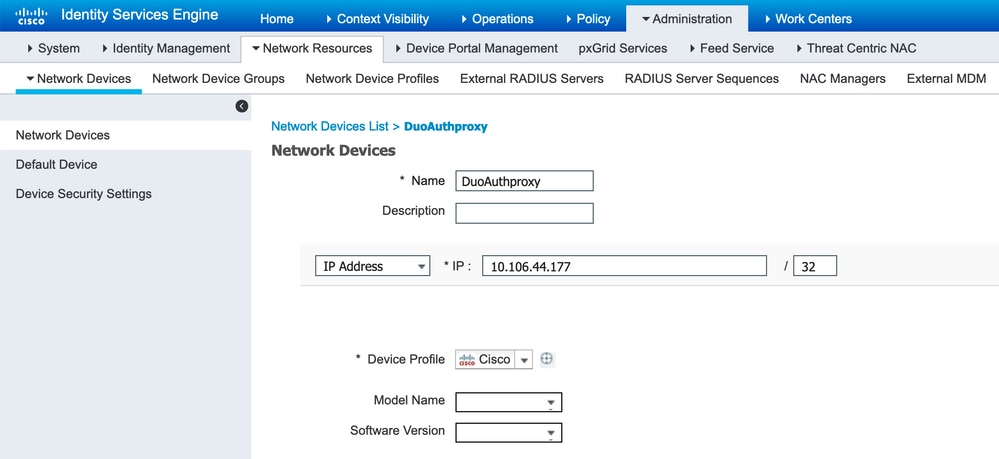
配置Shared Secret,如authproxy.cfg的* Shared Secret中所述:
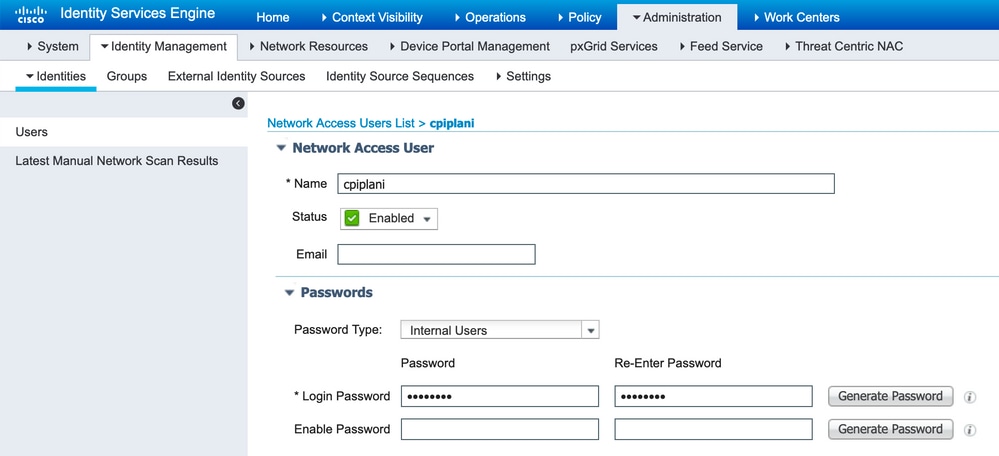
步驟2.導覽至Administration > Identities。單擊Add以配置身份使用者:
Duo Administration Portal的配置步驟
步驟1.在裝置上建立使用者名稱並啟用Duo Mobile。
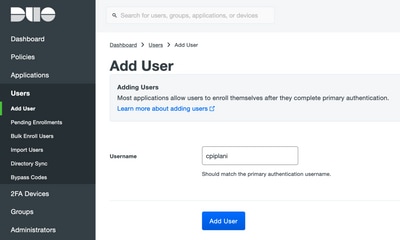
在Duo Cloud管理網頁上新增使用者。導航到使用者>添加使用者:
步驟2.代碼的自動生成。
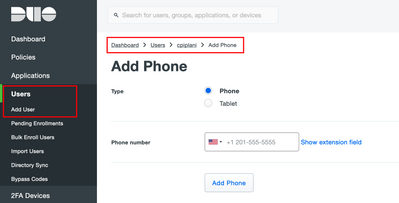
新增使用者電話號碼:

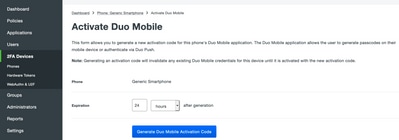
選擇Activate Duo Mobile:

選擇Generate Duo Mobile Activation Code,如下圖所示:
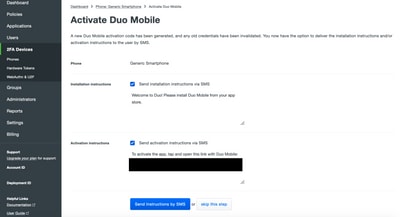
選擇Send Instructions by SMS,如下圖所示:
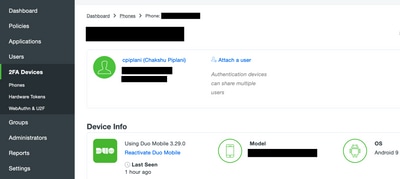
單擊SMS中的連結,Duo應用連結指向「裝置資訊」部分中的使用者帳戶:
驗證
使用本節內容,確認您的組態是否正常運作。
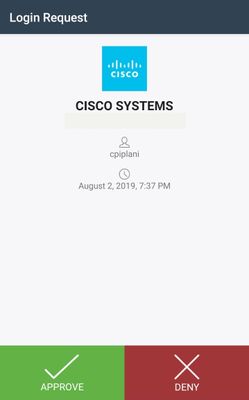
步驟1.使用在ISE使用者身份頁面上新增的使用者憑據登入FMC。您必須在終端機收到Duo推送通知,以進行二元身份驗證(2FA)。 確保您批准該計畫,並且FMC將登入:
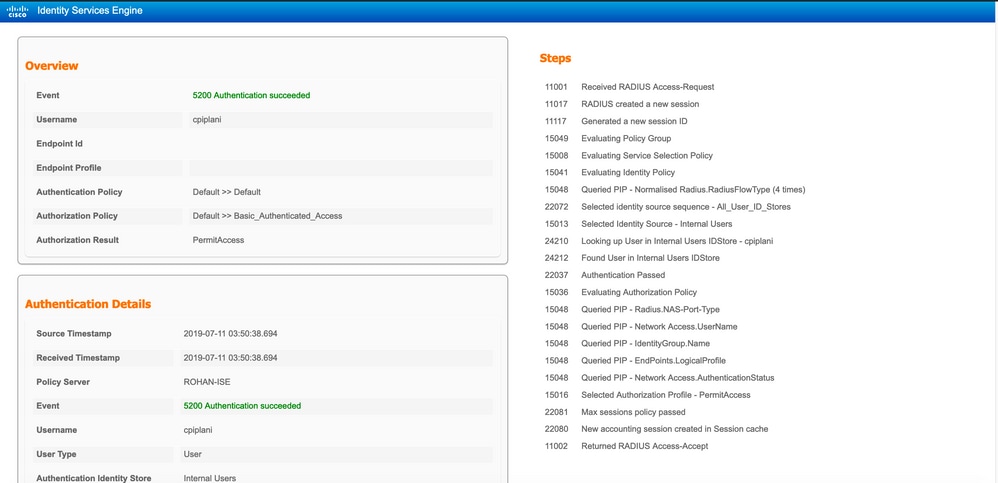
步驟2.在ISE伺服器上,導航到操作>RADIUS > Live Logs。查詢在FMC上用於身份驗證的使用者名稱,並選擇詳細資訊列下的詳細身份驗證報告。您必須驗證驗證驗證是否成功:
疑難排解
本節提供額外的資訊對組態進行疑難排解。
- 檢查Duo Authentication Proxy伺服器上的調試。日誌位於:
- C:\Program檔案(x86)\Duo Security Authentication Proxy\log
- 在記事本或寫字板等文本編輯器中開啟authproxy++log檔案。
- C:\Program檔案(x86)\Duo Security Authentication Proxy\log
當輸入不正確的憑證並且ISE伺服器拒絕身份驗證時,記錄片段。
2019-08-04T18:54:17+0530 [DuoForwardServer (UDP)] Sending request from 10.197.223.76 to radius_server_auto        10.197.223.76 is the IP of the FMC
2019-08-04T18:54:17+0530 [DuoForwardServer (UDP)] Received new request id 4 from ('10.197.223.76', 34524)
2019-08-04T18:54:17+0530 [DuoForwardServer (UDP)] (('10.197.223.76', 34524), 4): login attempt for username u'cpiplani'
2019-08-04T18:54:17+0530 [DuoForwardServer (UDP)] Sending request for user u'cpiplani' to ('10.197.223.23', 1812) with id 199
2019-08-04T18:54:17+0530 [RadiusClient (UDP)] Got response for id 199 from ('10.197.223.23', 1812); code 3         10.197.223.23 is the IP of the ISE Server.
2019-08-04T18:54:17+0530 [RadiusClient (UDP)] (('10.197.223.76', 34524), 4): Primary credentials rejected - No reply message in packet
2019-08-04T18:54:17+0530 [RadiusClient (UDP)] (('10.197.223.76', 34524), 4): Returning response code 3: AccessReject
2019-08-04T18:54:17+0530 [RadiusClient (UDP)] (('10.197.223.76', 34524), 4): Sending response
在ISE伺服器上,導航到操作> RADIUS >即時日誌以驗證身份驗證詳細資訊。
使用ISE和Duo成功身份驗證的日誌片段:
2019-08-04T18:56:16+0530 [DuoForwardServer (UDP)] Sending request from 10.197.223.76 to radius_server_auto
2019-08-04T18:56:16+0530 [DuoForwardServer (UDP)] Received new request id 5 from ('10.197.223.76', 34095)
2019-08-04T18:56:16+0530 [DuoForwardServer (UDP)] (('10.197.223.76', 34095), 5): login attempt for username u'cpiplani'
2019-08-04T18:56:16+0530 [DuoForwardServer (UDP)] Sending request for user u'cpiplani' to ('10.197.223.23', 1812) with id 137
2019-08-04T18:56:16+0530 [RadiusClient (UDP)] Got response for id 137 from ('10.197.223.23', 1812); code 2                         <<<< At this point we have got successful authentication from ISE Server.
2019-08-04T18:56:16+0530 [RadiusClient (UDP)] http POST to https://api-f754c261.duosecurity.com:443/rest/v1/preauth
2019-08-04T18:56:16+0530 [duoauthproxy.lib.http._DuoHTTPClientFactory#info] Starting factory <_DuoHTTPClientFactory: https://api-f754c261.duosecurity.com:443/rest/v1/preauth>
2019-08-04T18:56:17+0530 [HTTPPageGetter (TLSMemoryBIOProtocol),client] (('10.197.223.76', 34095), 5): Got preauth result for: u'auth'
2019-08-04T18:56:17+0530 [HTTPPageGetter (TLSMemoryBIOProtocol),client] Invalid ip. Ip was None
2019-08-04T18:56:17+0530 [HTTPPageGetter (TLSMemoryBIOProtocol),client] http POST to https://api-f754c261.duosecurity.com:443/rest/v1/auth
2019-08-04T18:56:17+0530 [duoauthproxy.lib.http._DuoHTTPClientFactory#info] Starting factory <_DuoHTTPClientFactory: https://api-f754c261.duosecurity.com:443/rest/v1/auth>
2019-08-04T18:56:17+0530 [duoauthproxy.lib.http._DuoHTTPClientFactory#info] Stopping factory <_DuoHTTPClientFactory: https://api-f754c261.duosecurity.com:443/rest/v1/preauth>
2019-08-04T18:56:30+0530 [HTTPPageGetter (TLSMemoryBIOProtocol),client] (('10.197.223.76', 34095), 5): Duo authentication returned 'allow': 'Success. Logging you in...'
2019-08-04T18:56:30+0530 [HTTPPageGetter (TLSMemoryBIOProtocol),client] (('10.197.223.76', 34095), 5): Returning response code 2: AccessAccept             <<<< At this point, user has hit the approve button and the authentication is successful.
2019-08-04T18:56:30+0530 [HTTPPageGetter (TLSMemoryBIOProtocol),client] (('10.197.223.76', 34095), 5): Sending response
2019-08-04T18:56:30+0530 [duoauthproxy.lib.http._DuoHTTPClientFactory#info] Stopping factory <_DuoHTTPClientFactory: https://api-f754c261.duosecurity.com:443/rest/v1/auth>
相關資訊
修訂記錄
| 修訂 | 發佈日期 | 意見 |
|---|---|---|
3.0 |
02-Jun-2026
|
更新的拼寫、語法、間距等 |
2.0 |
15-Jun-2023
|
已刪除PII。已新增Alt文本。已更新標題、簡介、SEO、機器翻譯、樣式要求和格式。 |
1.0 |
20-Aug-2019
|
初始版本 |
 意見
意見